

Before you open a role, check four things in market data: how many people have the skills, what employers offer for similar work, how long similar searches take, and what rules apply. Use official statistics for context, live adverts for detail, and your own records for what actually happens in your company. Treat every number as a range, not a promise.
Key takeaways
- Use three layers: official statistics, live job adverts and your own hiring records.
- Official data shows broad trends and pay bands. It rarely shows the exact local market for your role.
- Read pay as a range. Check the date, the region and the job definition behind every figure.
- Share findings with the hiring manager as options, not as verdicts.
- Write down the source, date and limits of each number you use.
Why check the market first
A role opened with wrong assumptions wastes weeks. A pay range below the market brings few applicants. A skill list that only a handful of people in your region can meet brings a thin pipeline. A start date that ignores notice periods brings declined offers. Fifteen minutes of research before the intake meeting lets you give the manager a realistic picture and prepare options if you need to push back.
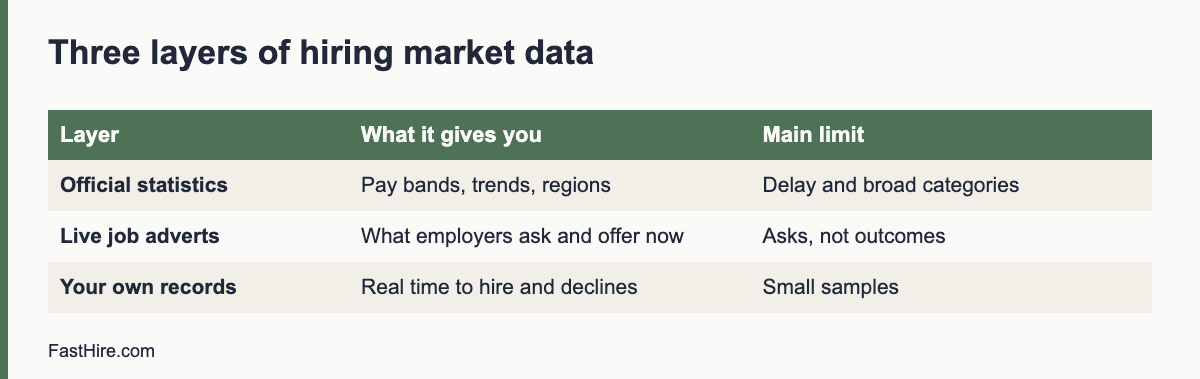
The three layers of data
| Layer | What it gives you | Limits |
|---|---|---|
| Official statistics | Occupation definitions, typical pay bands, employment trends, regional differences, labour market conditions | Published with a delay; broad job categories; may not match your exact role or skills |
| Live job adverts | What employers ask for and offer now; titles used; location and remote rules | Adverts are asks, not outcomes; pay may be missing; duplicates inflate counts |
| Your own records | How long searches took, where candidates dropped out, offer acceptance, reasons for declines | Small samples; reflect your brand and process as well as the market |
No single layer is enough. When the three agree, you can be more confident. When they disagree, ask why. A role that official data shows as widely available but where your last two searches had few applicants may point to your advert, your pay or your location rules rather than the market.
Where to look: official sources
| Region | Source | What you can find |
|---|---|---|
| United States | Bureau of Labor Statistics Occupational Outlook Handbook | Job duties, education, pay and outlook by occupation |
| United States | BLS Occupational Employment and Wage Statistics | Wage estimates by occupation and area |
| United States | CareerOneStop | Occupation profiles, wage and licence information, sponsored by the US Department of Labor |
| United Kingdom | Office for National Statistics: employment and labour market | Employment, vacancies and earnings data |
| United Kingdom | GOV.UK National Minimum Wage rates | Legal pay floors, not market rates |
| European Union | Eurostat labour market statistics | Employment and unemployment data by country |
| European Union | EURES | Labour market information, mobility rules and vacancies across the EU |
These pages change, and the names of their datasets change too. Open the current page and read the notes on definitions and dates. Where a page offers pay by occupation, check the job definition. A “software developer” in a statistical table may cover a wider group than the role you are hiring.
A step-by-step method: 45 minutes
- Define the role in words. Write the job in one sentence and list three must-have skills. Use plain titles, not internal ones.
- Find the official occupation. Use the occupation lists in the sources above. Note the code or name.
- Read pay and outlook. Note the pay range, the date and the area. Do not copy a single figure. Write “the page shows a range from X to Y for [area] in [year]” in your notes.
- Collect 10 live adverts. Search with three different job titles. Record title, location, remote rules, required skills and pay if shown. Remove duplicates.
- Compare requirements. Which skills appear in most adverts? Which appear in only one? This shows what the market treats as standard.
- Compare pay. If many adverts do not show pay, note that. Where pay laws require disclosure, the numbers will be easier to find; rules differ by place.
- Check your own records. For the last two similar searches, note applicants, time to hire and reasons for declined offers.
- Write a one-page summary. Three findings, two risks and two options.
Reading the numbers carefully
| Check | Why it matters |
|---|---|
| Date of the data | Pay and demand change. A figure from two years ago may be out of date. |
| Region | National averages hide local differences. Big cities and rural areas differ. |
| Definition | Job titles vary. Read what the category includes. |
| Average or median | A median is closer to a typical case. An average can be pulled by a few high figures. |
| Sample size | Small samples are unreliable. Look for a note. |
| Source | Is it a government statistic, a company marketing report or an anonymous post? Weigh them differently. |
| Full compensation | Pay, bonus, benefits and flexibility all matter to candidates. |
Be careful with salary reports from commercial sites. Some are useful, but many use self-reported data. Treat them as a clue and compare with official figures. Do not quote a figure to a manager without saying where it came from and when.
What to ask about pay and the law
Pay questions have legal sides. In several places, laws now ask employers to share pay ranges or to avoid asking for pay history. These rules differ across US states, the UK and EU countries, and they are changing. We cover them in our guide to pay transparency. Until then, check the official page for each place you hire, and do not set pay for a role by looking at a candidate’s past salary. Our guides on hiring in another country and the cost to hire an employee explain related costs.
Turning findings into a conversation
Share the summary in the first five minutes of the meeting. Use plain statements: “Official data shows a range of X to Y for this occupation in [area]. Of ten live adverts, seven offer more than our range. Our last two searches received [number] applicants.” Then ask, “What would you like to do?” Give two or three options. For example: raise the range, accept less experience and plan training, or extend the timeline. The manager decides.
Mistakes to avoid
- Treating one salary figure as the market. Always give a range and the source.
- Copying competitors’ adverts. Use them to learn what the market asks for, not to copy their words or their requirements.
- Ignoring supply. A role that needs rare skills in a small town needs a different plan, such as remote work or training.
- Forgetting notice periods. Local norms differ. Ask candidates in the first conversation.
- Skipping your own data. Your history is the most relevant evidence you have.
FastHire is being built for the screening stage that follows the market check. It shows each job requirement next to the exact CV passage that supports it, so you can see how a requirement affects the pool of real applicants. FastHire is coming soon. It does not rank, score or reject candidates. People make every decision.
A worked example (fictional)
This example is invented to show the method. The numbers are not real market data. A recruiter prepares for an intake meeting on an accounts payable specialist role in a mid-sized city.
| Step | Finding (invented) | What the recruiter does with it |
|---|---|---|
| Official occupation | The closest official category covers bookkeeping and accounting clerks, with a wide pay range for the region | Notes the range and the date, and writes down that the category is broad |
| Ten live adverts | Eight ask for experience with a specific accounting system; three ask for a professional qualification; two show pay | Marks the system experience as common and the qualification as less common |
| Pay in adverts | Two adverts show ranges that overlap the company range at the lower end | Notes that the sample is tiny and that most adverts hide pay |
| Own records | The last search received 38 applicants and took longer than planned because two offers were declined for pay reasons | Prepares an option to raise the range or to hire for potential |
| Notice periods | Two shortlisted candidates in the last search had long notice periods | Adds a start date range to the brief |
The recruiter then writes a one-page summary: three findings (system experience is standard, the qualification is not, pay was a reason for declines), two risks (the pay range is at the low end, start dates will be later than the manager hopes) and two options (adjust the range, or hire for core skills and train on the system). The manager sees facts and choices, and decides.
A one-page market summary template
| Section | Fill in |
|---|---|
| Role and location | |
| Official source, date and range | |
| Number of live adverts reviewed and date | |
| Skills in most adverts | |
| Skills in few adverts | |
| Pay shown in adverts (range, number of adverts that show pay) | |
| Remote or hybrid norms | |
| Our last two similar searches: applicants, time to hire, reasons for declines | |
| Three findings | |
| Two risks | |
| Two options |
Keep the summary short and put the sources in a footnote or an appendix. If you repeat the exercise for the same role family each quarter, you will build a record that shows how the market changes and how your own results compare.
Fairness and the law when you use market data
- Use market data to set the role, not to filter people. Pay and skills data describes the market. It says nothing about any one candidate.
- Do not set pay from a candidate’s earlier salary. Several places restrict asking about pay history. Check local rules.
- Keep pay fair inside the company. Compare with people in similar roles so that the new offer does not create gaps that cannot be explained by job-related reasons.
- Be careful with scraped data. If you collect candidate data from public sources, GDPR and other laws still apply. See GDPR for job applicants.
Keeping the research current
Market data ages quickly, so build a light routine. Once a quarter, update your summary for the three roles you hire for most often. Re-check ten adverts for each, note any change in pay or requirements, and add the results of your own searches from the last quarter. Store the summaries in one folder with the date in the file name. When a manager asks “what is the market doing?” you can answer in a minute with a document that shows its sources.
Also keep a short list of questions that the data cannot answer, such as why strong candidates declined or how your brand is seen. Collect that information through direct conversations with candidates, using a short, neutral question at the end of the process. Numbers describe the market. Conversations explain your place in it.
One last habit: write down what the data cannot tell you. Official statistics do not show how candidates feel about your brand, how fast your competitors move or how a new law may change pay in the next year. List these unknowns in your summary and say how you will learn about them, for example through candidate comments, calls with other recruiters or a short test of a revised advert. Being clear about limits makes the rest of the summary more credible with hiring managers.
Frequently asked questions
Which source is best for pay data?
Official statistics are the most reliable for context, but they are broad. Use them with live adverts for your area and your own offers and declines.
How often should I check the market?
Before each new role, and every few months for roles you hire for often.
What if there is no data for my role?
Use the closest occupation, compare with adverts for related roles and talk to hiring managers and recruiters in other teams. Say that the data is limited.
Can I use LinkedIn or job boards for data?
They can show live adverts and titles. Be aware that their data is not a full or neutral sample of the labour market.
Should I share market data with candidates?
You can share the pay range for the role. Do not share other candidates’ data or private offers.
Related guides
- Hiring guides for recruiters and HR teams
- How to run an intake meeting with a hiring manager
- How to push back on unrealistic hiring manager requests
- The real cost to hire an employee
- All hiring guides for employers
- Pay transparency in hiring: EU, UK and US
This is general information, not legal advice.