

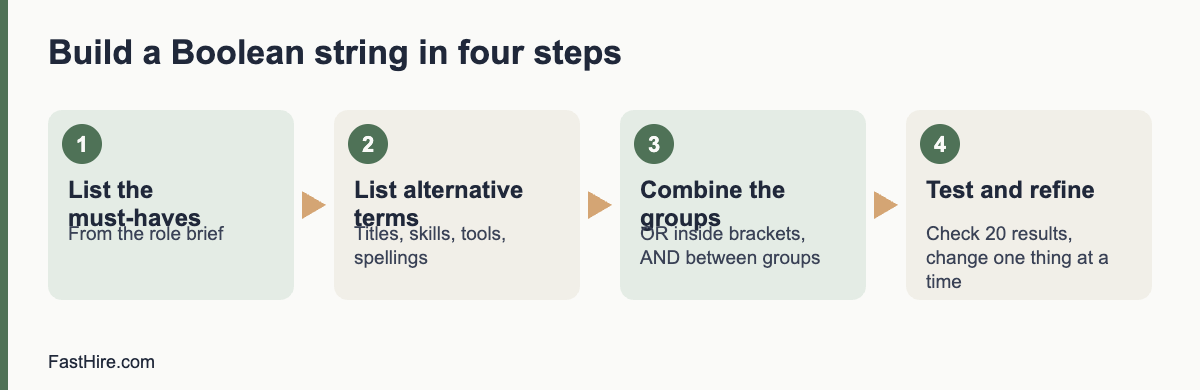
Boolean search uses the words AND, OR and NOT, quotation marks and brackets to tell a search tool exactly what to find. For recruiting, it means you can search for several job titles and skills at once, leave out noise and test results quickly. Start with a plain list of must-haves, write the alternative terms for each, join the alternatives with OR inside brackets and join the groups with AND.
Key takeaways
- Build one group of terms for each must-have. Join alternatives with OR and groups with AND.
- Use quotation marks for exact phrases and NOT to remove common false matches.
- Test the string on a small result set. Adjust before you contact anyone.
- Search by skills and work, never by traits that point to protected characteristics.
- Check each platform’s help page, because operators and limits differ between tools.
The five building blocks
| Operator | What it does | Example |
|---|---|---|
| AND | Both terms must appear | “warehouse” AND “planning” |
| OR | Either term may appear | “stock controller” OR “inventory planner” |
| NOT | Removes results with a term | NOT “intern” |
| ” ” (quotation marks) | Searches for an exact phrase | “supply chain” |
| ( ) (brackets) | Groups terms so the logic is clear | (“stock controller” OR “inventory planner”) AND “WMS” |
Most tools also support a wildcard, such as an asterisk, for word endings, and some support proximity or field-specific search. These features differ widely and change over time, so confirm them in the tool’s help page before you rely on them. Brackets and quotation marks work in most places.
A four-step method to build a string
Step 1: List the must-haves
Take the three to five must-haves from the role brief. Boolean search works best on things that appear as words in a profile: job titles, skills, tools, certifications, sectors. It does not work for qualities such as “good attitude”.
Step 2: List alternative terms for each
People describe the same work in different ways. For each must-have, list titles, skills, tools and spelling variations. Ask the hiring manager and two current team members for their words. This is the step that makes the biggest difference.
| Must-have | Alternative terms |
|---|---|
| Warehouse planning | “warehouse planner”, “inventory planner”, “stock controller”, “stock planner”, “replenishment” |
| Uses a warehouse management system | “WMS”, “warehouse management system”, “barcode scanning”, names of tools you know |
| Leads a small team | “team leader”, “shift lead”, “supervisor”, “trainer” |
Step 3: Build and combine the groups
Put each list inside brackets joined by OR. Then join the groups with AND.
(“warehouse planner” OR “inventory planner” OR “stock controller” OR “stock planner” OR replenishment) AND (WMS OR “warehouse management system” OR “barcode scanning”) AND (“team leader” OR “shift lead” OR supervisor OR trainer)
Step 4: Test and refine
Run the string and look at the first 20 results. If most are wrong, you have too much OR in a broad group, or a term with two meanings. If you have very few results, remove one AND group or add alternative terms. Change one thing at a time and write down what you changed. After each change, read a few more results.
Sample strings for five roles
These examples are starting points. Replace the terms with the words your hiring manager and your market use.
| Role | Sample string |
|---|---|
| Customer support agent | (“customer support” OR “customer service” OR “helpdesk” OR “service desk”) AND (“email” OR “chat” OR “tickets”) NOT (“sales” OR “intern”) |
| Bookkeeper | (bookkeeper OR “accounts assistant” OR “accounts payable” OR “accounts receivable”) AND (“month end” OR reconciliation OR “VAT” OR “sales tax”) |
| Electrician | (electrician OR “electrical technician”) AND (installation OR maintenance) AND (licence OR license OR certified OR qualified) |
| Software developer | (developer OR engineer) AND (“Python” OR “TypeScript” OR “Java”) AND (“API” OR “backend” OR “web”) NOT (manager OR recruiter) |
| Operations coordinator | (“operations coordinator” OR “operations assistant” OR “logistics coordinator”) AND (scheduling OR suppliers OR planning) |
Notice the spelling variants “licence” and “license”, and “VAT” and “sales tax”. If you recruit across the US, the UK and the EU, add local terms to the same string or keep one string per country.
Searching on websites and public pages
Some recruiters search the open web, for example public professional pages, portfolios and community profiles, using a search engine. Most search engines support quotation marks and a site operator that limits results to one website. Only use publicly available pages, follow the site’s terms and respect any “do not contact” notes. If a page is not open to the public, do not try to get around the restriction.
Using Boolean search fairly
A search string is a screen. It decides who you see and who you do not. Build it around skills and work, not around traits. Do not include words that point to age, sex, race, religion, nationality, disability or family status unless the role truly requires something job-related and lawful, and then get advice. Avoid search terms such as graduation years, “recent graduate” or “digital native” unless the role really is an early-career role. The US Equal Employment Opportunity Commission explains protected traits and practices to avoid on its page about prohibited employment policies and practices. In Great Britain, the Acas page on recruitment explains how discrimination law applies to choosing candidates.
Remember that strings can exclude people by accident. If you list only one job title, you may miss capable people with other titles. If you require a specific tool name, you may miss people with similar skills in a different tool. Add alternatives and review a sample of “near misses” to see what you missed.
Data protection and platform rules
Profiles are personal data. In the UK and the EU, data protection law applies. If you save or copy details, you should tell people where you found them, why you are contacting them and how long you will keep their data. The Information Commissioner’s Office explains the duties of employers and recruiters in its guidance on recruitment and selection. Many platforms also restrict automated copying and mass messaging. Read the terms before you use any tool that collects data in bulk.
A simple workflow for a search session
- Open the role brief and the sourcing tracker. Write the target number of profiles for the session, for example 30.
- Build the string in a text file, so you can save and reuse it.
- Run it and check the first 20 results. Adjust until at least half meet the must-haves at a glance.
- Review profiles against the must-haves. Write one line of evidence for each yes in the tracker.
- Contact the best matches with a short message. See How to source candidates for the whole process.
- Save the final string with a note of what worked, and review it with the hiring manager.
Common mistakes
- Too many terms in one group. A group with 30 OR terms will pull in noise. Keep groups under about ten terms and test.
- Missing brackets. Without brackets, the search tool may read AND and OR in an order you did not intend. Always use brackets.
- Searching only titles. Titles vary. Add skills and tools.
- Not saving strings. Keep a library of tested strings and notes by role.
- Skipping the hiring manager. The people who do the work often know the words that matter.
- Ignoring false matches. Use NOT sparingly, because it can remove good profiles too.
FastHire is being built for the stage after search, when you have applications or profiles and need to check them against the requirements. It shows each job requirement next to the exact CV passage that supports it, so people can check the evidence. FastHire is coming soon. It does not rank, score or reject candidates. People make every decision.
Troubleshooting: too many or too few results
| What you see | Likely cause | What to try |
|---|---|---|
| Thousands of results, most irrelevant | Groups are too broad, or common words such as “manager” match everything | Add an AND group for a specific tool or task. Use exact phrases. Remove generic terms. |
| Very few results | Too many AND groups, a rare spelling or a term that few people use | Remove one AND group. Add alternative terms and spelling variants. Check for typos. |
| Many people with the right words but the wrong work | Words appear in a different context, such as “planning” in event planning | Add a context term such as “warehouse” or “logistics”. Use NOT with care. |
| Results all look alike | Terms favour one sector or one kind of employer | Add terms from other sectors that use the same skill. Search by tasks as well as titles. |
| Good people missing from results | Profiles use different words, or are short | Test the string against three people you know are a good match. Add the words they use. |
Practice exercise with answers
Try this on a role you know. The role is “Payroll specialist”. Must-haves: two years of payroll processing, knowledge of tax and social contributions in the country, and use of a payroll system. Write your own string first, then compare.
Sample answer:
(“payroll specialist” OR “payroll administrator” OR “payroll officer” OR “payroll clerk” OR “payroll assistant”) AND (PAYE OR “payroll tax” OR “withholding” OR “social contributions” OR “social security”) AND (“payroll system” OR “payroll software” OR ADP OR Sage OR Workday OR “month end”)
Check the logic: the first group covers titles, the second covers tax terms for the UK, the US and the EU, and the third covers systems. Names of tools are examples, so replace them with the tools your hiring manager uses. If you recruit only in one country, drop the terms for the others. Then read 20 results and adjust.
Keep a string library
A shared document of tested strings saves hours. Use one row per search and keep these fields.
| Field | What to record |
|---|---|
| Role and date | Role name, date of the search and who ran it |
| Platform | Where you ran it, because operators differ |
| String | The exact text, copied and pasted |
| Result quality | How many of the first 20 results met the must-haves |
| Changes and notes | What you changed and what worked, for example “added spelling variant, results doubled” |
| Review date | When to check the string again, since job titles and tools change |
Review the library every few months. Remove strings that no longer work, merge duplicates and share the best ones with new team members. A library also helps fairness: it shows what you searched, so you can check whether the terms were job-related and whether you used enough alternatives.
When Boolean search is not the right tool
Boolean search finds words. It cannot judge quality, motivation or potential. It also struggles when the key evidence is not written in a profile, for example in portfolios, code repositories or references. For roles like these, pair search with other methods: referrals, communities, short work samples and conversations. Also remember that a longer, cleverer string does not replace a clear role brief. If the hiring manager cannot say what good looks like, no string will find it. Fix the brief first, then search.
Frequently asked questions
What is Boolean search in recruiting?
It is a way of searching with the words AND, OR and NOT, exact phrases and brackets, so that you can combine many terms in one precise search.
Do all tools support the same operators?
No. Support for wildcards, proximity and field search varies by tool. Always check the help page of the tool you use.
How long should a Boolean string be?
As short as works. Start with one group per must-have and add alternatives only where they bring good results. Very long strings are hard to maintain and to explain.
Is Boolean search biased?
It can be, if you choose terms that point to protected traits or only one narrow set of titles. Use skill-based terms, add alternatives and review the results you do not see.
Can I save and share strings with my team?
Yes. Keep them in a shared document with the role, the date, the platform and notes on how well they worked.
Related guides
- Hiring guides for recruiters and HR teams
- How to source candidates: ten channels and when to use each
- How to define a role before you hire: a one-page role brief
- How to run a kickoff meeting with your recruiter
- All hiring guides for employers
- How to write outreach messages candidates reply to
This is general information, not legal advice.