
Eight numbers cover most of what a recruiting team needs to know: how many applicants come in, where they come from, how fast they move, where they leave, how many accept, how they rate the process, how long hiring managers take to respond, and whether results differ unfairly between groups. Track these from your own records, review them monthly, and ignore the rest until these are reliable.
Key takeaways
- Start with eight numbers, all counted from your own records.
- Define each number in writing so that every recruiter counts the same way.
- Always read a number together with its sample size. Five hires is not a trend.
- Use numbers to find process problems, not to rank people.
- Add fairness checks, but follow your country’s rules on collecting monitoring data.
Why fewer numbers work better
Most applicant tracking systems can produce dozens of reports. A team that tries to read all of them usually reads none. Reports also fail when nobody agrees on what a word means. If one recruiter counts “time to hire” from the day the job was posted and another counts it from the day the candidate applied, the average is meaningless.
So the first job is not building a dashboard. The first job is a one-page definitions sheet. Write each metric, the start event, the end event, who records it and where. Keep it next to the numbers. Our guide to time to hire and time to fill shows why those two terms must be kept apart.
The eight numbers
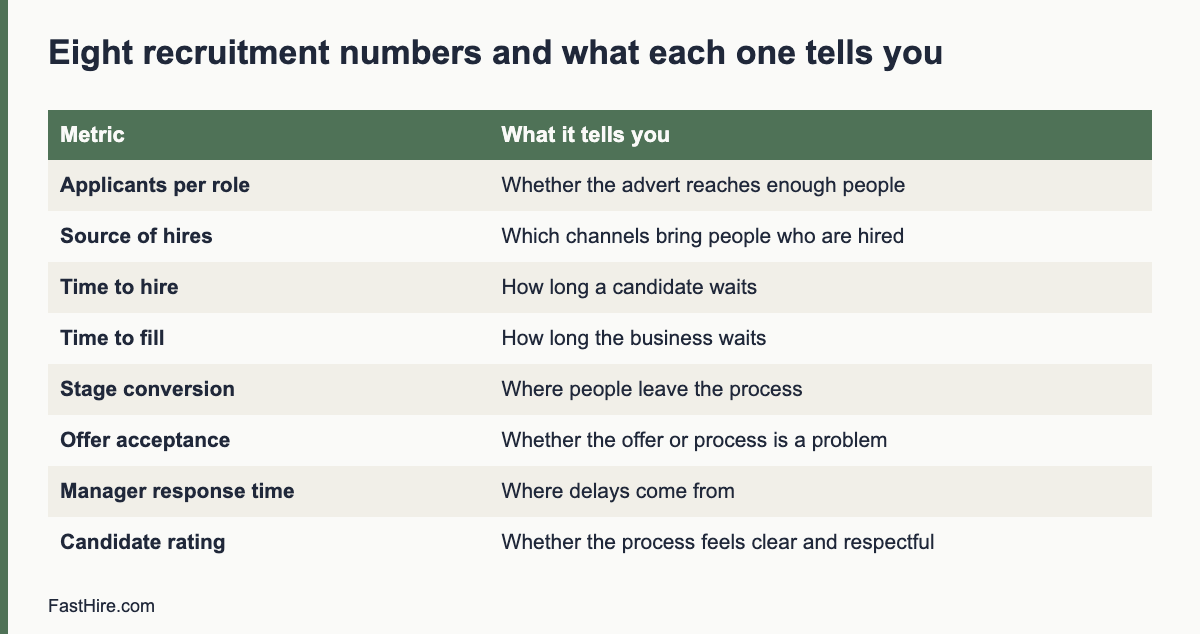
| # | Metric | How to calculate it | What it tells you |
|---|---|---|---|
| 1 | Applicants per role | Count of applications received for one role, by week | Whether the advert reaches enough people, or too many |
| 2 | Source of applicants and hires | Count by source, for both applicants and hires | Which channels bring people who are hired, not only people who apply |
| 3 | Time to hire | Days from the date a candidate applied (or was first contacted) to the date they accepted an offer | How long a candidate waits for a decision |
| 4 | Time to fill | Days from the date the role was approved to the date the offer was accepted | How long the business waits for the seat to be filled |
| 5 | Stage conversion | Candidates who moved to the next stage divided by candidates who entered the stage | Where people leave the process, and whether a stage is too strict or too loose |
| 6 | Offer acceptance rate | Offers accepted divided by offers made | Whether the offer, the pay or the process is a problem late in the process |
| 7 | Hiring manager response time | Days between sending a shortlist or request and receiving feedback | Whether delays come from the recruiting team or from managers |
| 8 | Candidate experience rating | Average answer to one question asked after the process, plus comments | Whether the process feels clear and respectful |
Fairness checks are a ninth item, but they are not a single number. See the section on fairness below.
1. Applicants per role
Count applications weekly, not only at the end. A role that gets four applicants in two weeks has an advert or channel problem. A role that gets 600 in two days has a screening-capacity problem. Both need different actions. For the second case, see our guide to screening at volume.
Be careful with one trap: a large pile is not a sign of success. If most applicants do not meet the basic requirements, a clearer advert will help more than more promotion.
2. Source of applicants and hires
Record the source at the moment of application, using a required field. Free-text fields produce messy data such as “LinkedIn”, “linkedin” and “LI”. Use a fixed list: career page, job board, referral, agency, direct outreach, event, other.
Then compare two columns for each source: the share of applicants and the share of hires. A channel that sends 50 percent of applicants and 5 percent of hires is costing review time. A channel that sends 5 percent of applicants and 30 percent of hires deserves more attention. With small numbers, treat these as clues, not proof.
3 and 4. Time to hire and time to fill
Time to hire measures the candidate’s experience. Time to fill measures the business’s experience. Report both, and add the median as well as the average. A single role that stayed open for 200 days can pull the average up, while the median shows the typical case.
Split the time into stages so you can act: application to first contact, first contact to first interview, last interview to decision, decision to offer, offer to acceptance. Often most of the delay sits in one gap. In many teams that gap is the wait for hiring manager feedback, which is why metric 7 matters. For ways to shorten the process, read how to reduce time to hire.
5. Stage conversion
For each stage, divide the number who moved on by the number who entered. Look at the whole funnel for one role, then compare roles of the same type. Two questions help. Is a stage rejecting almost everyone? Then the requirement or the question may be too strict, or the advert may be attracting the wrong people. Is a stage passing almost everyone? Then it may not be doing any work, and you may be spending interview time on people you could have assessed earlier.
A fictional example: a team screens 120 applicants for a customer support role. 40 pass the screening review, 20 take a call, 10 attend an interview, 3 receive an offer and 2 accept. The step from screening review to call is 50 percent, from call to interview 50 percent, from interview to offer 30 percent and from offer to acceptance 67 percent. These numbers are invented to show the arithmetic. They are not a benchmark.
6. Offer acceptance rate
Divide accepted offers by offers made. When the rate is low, ask the people who declined why. Use a short, neutral message: “Thank you for considering us. Would you tell us the main reason you chose not to join? Your answer will only be used to improve our process.” Common reasons are pay, a better offer, slow communication, unclear role content or a change in the candidate’s plans. Write the reasons down and count them. After 10 or 15 answers you will often see a pattern.
7. Hiring manager response time
This is the metric many teams avoid, and it is often the most useful. Record the date you send each request to a manager and the date they reply. Share the figures with managers in a neutral way, with the message that the aim is to help candidates, not to blame anyone. Pair this with a simple agreement, such as “feedback within two working days”, and use our guide to giving fast interview feedback.
8. Candidate experience rating
Ask one question and one open comment box after the process ends, to candidates who were hired and to those who were not. The question can be: “How clear was our communication, from 1 (not clear) to 5 (very clear)?” Do not ask candidates to rate their interviewer by name. Keep answers anonymous when you report them. A low score with comments such as “I never heard back” points directly to the standard in how to avoid ghosting candidates. The wider candidate experience checklist lists what to check.
How to set the numbers up in a week
- Day 1: write definitions. One page, eight metrics, start and end events.
- Day 2: check the data fields. Make sure your system records application date, source, stage dates, offer date, acceptance date and decline reason. Make source a required fixed list.
- Day 3: export last year’s data for a few roles. Calculate the eight numbers by hand for three or four roles. This shows where the data is missing.
- Day 4: fix the gaps. Add missing fields, correct dates and agree who enters what.
- Day 5: build one view. A spreadsheet with one tab per month is enough to begin. A simple table with the eight numbers, the previous month and a short comment column works well.
Fairness checks, with care
Hiring numbers can also show whether a stage affects some groups differently from others. This is sensitive, so follow a few rules. Collect monitoring data only where the law and your policy allow it. Tell applicants why you ask, keep it optional and separate from decision records, and do not show it to people who screen applications.
In the United States, the Equal Employment Opportunity Commission and the federal Uniform Guidelines describe a rule of thumb called the four-fifths rule. It compares selection rates between groups. The rule is a signal for further review, not a legal test on its own. See 29 CFR 1607.4 in the Code of Federal Regulations and read the explanation in our four-fifths rule guide. Current federal enforcement priorities have changed, so check the latest guidance and your state and local rules.
In the UK and the EU, the data you collect about protected characteristics is special category data under data protection law. You need a lawful basis and an additional condition, and you should limit access. The UK Information Commissioner’s Office has guidance on recruitment and selection. Rules differ across EU member states, so ask your data protection officer or a local adviser.
Whatever the country, group sizes matter. If a group has eight applicants, one decision changes the percentage by more than 12 points. Do not draw conclusions from very small groups. Use the check to ask questions about the process, such as “Is this requirement necessary?”, and not to blame individuals.
A monthly review agenda
| Time | Item | Output |
|---|---|---|
| 5 min | Read the eight numbers against last month | Three changes that stand out |
| 10 min | Open roles with the longest wait | One action per role, with an owner |
| 10 min | Stage conversion for the biggest role | Decision on any requirement or question to change |
| 5 min | Source mix | Decision to keep, cut or test a channel |
| 5 min | Candidate comments | Two comments to act on |
Keep the review to 35 minutes. Write the actions in the same document as the numbers, and start the next meeting by checking whether they were done.
Mistakes to avoid
- Changing definitions mid-year. If you must change one, mark the date on the chart and do not compare across the change.
- Reading small samples as trends. With fewer than about ten hires in a period, describe the cases instead of calculating averages.
- Using numbers to rank recruiters or candidates. Metrics should show process problems. A recruiter with a long time to hire may be working on the hardest roles.
- Counting only fast hires as good hires. Speed matters, but so does fit. Follow up with the hiring manager at 90 days to check how the new hire is doing.
- Ignoring data protection. Keep only the data you need, for only as long as you need it, and delete on schedule.
FastHire is being built to help with the evidence part of the process. It shows each job requirement next to the exact CV passage that supports it, so reviewers spend less time searching and more time deciding. FastHire is coming soon. It does not rank, score or reject candidates. People make every decision.
Frequently asked questions
Which metric should I start with?
Start with the stage dates. Once you record when each candidate enters and leaves each stage, you can calculate time to hire, stage conversion and manager response time from the same data.
What is a good time to hire?
There is no single good number. It depends on the role, the country and the labour market. Compare your own roles with each other and with your own past results, and ask candidates how the wait felt.
Can a spreadsheet replace an applicant tracking system for reporting?
For a small team, yes. A shared spreadsheet with one row per candidate and a column for each stage date is enough to calculate all eight numbers. Move to a system when volume makes manual entry slow.
Is it legal to collect gender or ethnicity data on applicants?
It depends on the country and the purpose. Rules differ in the US, the UK and each EU member state. Check the official guidance linked above and ask a specialist before you start.
How often should I review the numbers?
Monthly for the full review, and weekly for open roles that are late.
Related guides
- Hiring guides for recruiters and HR teams
- Time to hire vs time to fill: what each one measures
- How to reduce time to hire without lowering the bar
- Candidate experience checklist
- All hiring guides for employers
- How to build a hiring dashboard in a spreadsheet
This is general information, not legal advice.