
Time-to-fill and time-to-hire both measure speed, but they start the clock at different points. In common usage, time-to-fill runs from when a job requisition is approved or the job is opened until the offer is accepted. Time-to-hire runs from when a specific candidate enters your process, usually the application or first contact, until that same candidate accepts. Definitions vary between companies, so write yours down.
Key takeaways
- Time-to-fill measures how long a role is open. Time-to-hire measures how long a candidate takes to move through your process.
- Definitions are not universal. State the start and end events in writing and use them every time.
- Use the median as well as the average, because a few very long searches distort an average.
- Track the gap between stages, not only the total. The gaps show where to act.
- Do not compare your numbers with published benchmarks unless the definitions match exactly.
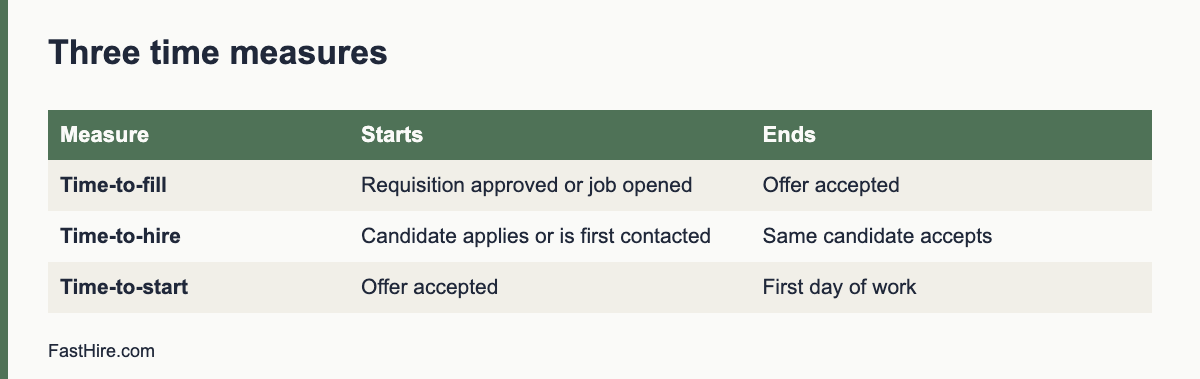
The two measures side by side
| Measure | Common start event | Common end event | What it tells you | Who it helps |
|---|---|---|---|---|
| Time-to-fill | Requisition approved or job opened | Offer accepted (some use the start date) | How long the business waits for the role to be filled | Finance and operations leaders planning cover |
| Time-to-hire | Candidate applies or is first contacted | Same candidate accepts the offer | How fast your process moves a candidate | Recruiters improving the candidate journey |
| Time-to-start | Offer accepted | First day of work | How long notice and onboarding prep take | Hiring managers planning the work |
These are common conventions, not official standards. Some teams count time-to-fill to the start date. Others count time-to-hire from the first interview. Pick one definition per measure and write it at the top of every report. When you read a number from another source, check how it was defined.
Why the difference matters
Time-to-fill includes the days before you speak to anyone: waiting for approval, writing the ad, choosing channels. If time-to-fill is long but time-to-hire is short, your problem is probably at the start, such as slow approvals or weak sourcing. If time-to-hire is long, the delay is in your process: screening, scheduling and decisions. Different problems need different fixes. See how to reduce time-to-hire without lowering quality for the fixes.
| Pattern you see | Likely cause | Where to look |
|---|---|---|
| Long time-to-fill, short time-to-hire | Slow approval, late ad, thin sourcing | Kickoff, approvals, channels. See sourcing |
| Short time-to-fill, long time-to-hire | Good pipeline, slow process | Screening, scheduling, decisions |
| Both long | Both problems, or a very scarce skill | Start with the largest stage gap |
| Both short, but poor quality of hire | Rushed decisions | Check criteria, scorecards and reference steps |
How to measure, step by step
Step 1: Write definitions
Create a one-page glossary: the name of each measure, the start event, the end event, the source of each date and who owns the data. Example: “Time-to-hire: days from the candidate’s application date in the tracking system to the date the candidate’s acceptance is recorded.”
Step 2: Capture the dates
For every role and candidate who reaches the offer, record these dates: requisition approved, job posted, application received, first screen, first interview, final interview, offer sent, offer accepted, start date. Use one sheet or your tracking system. Make the dates mandatory.
Step 3: Calculate
In a spreadsheet, use simple subtraction. If the offer accepted date is in column H and the application date is in column C, time-to-hire in days is H minus C. If the requisition date is in column B, time-to-fill is H minus B.
| Column | Content | Example formula |
|---|---|---|
| A | Candidate or role ID | |
| B | Requisition approved date | |
| C | Application date | |
| H | Offer accepted date | |
| I | Time-to-fill (days) | =H2-B2 |
| J | Time-to-hire (days) | =H2-C2 |
| K | Time-to-start (days) | =Start date minus H2 |
Step 4: Summarise with the median and the spread
The average adds all values and divides by the count. One search that took 200 days will pull the average up. The median is the middle value when you sort the numbers, and it ignores extreme cases. Report both, plus the range. In a spreadsheet use AVERAGE and MEDIAN. A short report might read: “Time-to-fill: median 38 days, average 46 days, range 21 to 98 days across 12 roles.”
Step 5: Break it down by stage
Calculate the days between each pair of stages. The stage gaps show the bottleneck. Use a table like the one in the article on reducing time-to-hire.
A worked example (fictional)
This example is invented. A recruiter tracks one role. The requisition is approved on 1 March. The job is posted on 8 March. The chosen candidate applies on 12 March, has a screen on 20 March, an interview on 27 March, a final interview on 3 April, receives an offer on 8 April and accepts on 11 April. The candidate starts on 13 May.
| Measure | Calculation | Result |
|---|---|---|
| Time-to-fill | 1 March to 11 April | 41 days |
| Time-to-hire | 12 March to 11 April | 30 days |
| Time-to-start | 11 April to 13 May | 32 days |
| Posting delay | 1 March to 8 March | 7 days |
| Application to screen | 12 March to 20 March | 8 days |
| Final interview to offer | 3 April to 8 April | 5 days |
The recruiter sees that 7 days passed between approval and posting. That is 17 percent of the time-to-fill (7 divided by 41). The posting delay is the first problem to solve. The 8 days between application and screen is the second one. These facts guide the next change.
Common mistakes
| Mistake | Effect | Fix |
|---|---|---|
| Mixing definitions between teams | Numbers cannot be compared | Publish the glossary |
| Counting only successful hires | Hides roles that failed or were cancelled | Track cancelled and open roles separately |
| Using only the average | Outliers mislead | Report the median too |
| Recording dates from memory | Errors | Use system timestamps or a shared sheet |
| Comparing with a benchmark that uses another definition | Wrong conclusion | Check the source definition first |
| Optimising for speed alone | Lower quality | Track quality measures too. See metrics |
Which numbers to share with the business
Finance and operations leaders care about time-to-fill because it shows how long a seat stays empty. Hiring managers care about time-to-hire and time-to-start because they plan their work around them. Candidates care about the time between steps. Choose the right measure for the audience. A one-page report with one number per measure, the median, and one chart of stage gaps is enough. Add one sentence on what you will change.
Be careful with named benchmarks. Published figures about average hiring times come from different sources and use different definitions. If you quote one, link to the source, state the definition, and check that the sample matches your market and role. Otherwise, compare your numbers with your own past searches.
Data protection notes
The dates and outcomes you record relate to identifiable people, so data protection rules apply. In the UK and EU, the GDPR requires a lawful basis, limits on how long you keep data and transparency. See the ICO employment guidance. For reporting, use aggregated numbers without names. Keep individual records only as long as you need them. This is general information, not legal advice.
Median versus average: a small example (fictional)
Suppose five searches took 30, 32, 35, 38 and 120 days to fill. The average is (30 + 32 + 35 + 38 + 120) divided by 5, which is 51 days. The median is the middle value after sorting, which is 35 days. The one long search of 120 days pulls the average far above what happens in a typical search. If you only report 51 days, hiring managers may think the process is slow in general. If you report both numbers and explain the 120-day case, they see the real picture: a typical search takes about five weeks, and one search had a special problem.
Look into the outlier. Was the skill scarce? Did the approval stall? Did the hiring manager go on leave? Write a one-line reason beside each long search. Over time these notes show which causes repeat and which are one-offs.
A simple report layout
| Section | Content | Chart or table |
|---|---|---|
| Headline numbers | Median and average time-to-fill and time-to-hire, number of hires, period covered | Four numbers at the top |
| Stage gaps | Median days between stages | Bar chart |
| By role family | Compare similar roles only | Small table |
| Open roles | Days open so far for roles not yet filled | List |
| Notes | One line per outlier | Text |
| Next action | One change to test | One sentence |
Keep the report to one page. Share it monthly or after each search. If your team uses a tracking system, check that the reports use your written definitions. Many systems have default definitions that differ from yours.
Linking speed to quality
A fast number can hide a poor hire. Pair the time measures with at least one quality measure, such as the hiring manager’s rating at 90 days or the share of hires who complete probation. If time falls and quality falls too, the process is rushing. If time falls and quality holds, the changes are working. Define how you will rate quality before you change the process, so that you do not choose the measure afterwards to fit the result.
How to talk about the numbers with hiring managers
- Start with the role they care about: “Your last role took 41 days to fill.”
- Show the stage gaps, not blame: “Seven days passed before the ad went live, and eight days between application and screen.”
- Ask what they see: “What made these steps slow from your side?”
- Agree one change and a date to review.
- Share the result after the next search.
This conversation works best when it is about the shared goal of getting the right person in the seat, not about who was slow.
Setting up the sheet in 20 minutes
- Create a new sheet with one row per hire and the columns from the table above.
- Format the date columns as dates, not text, so that subtraction works.
- Add the formulas for time-to-fill, time-to-hire and time-to-start in the first row, then copy them down.
- Add a second sheet for the summary, with MEDIAN and AVERAGE formulas for each column.
- Add a column for “reason for delay” and fill it in for any role that took longer than the median by more than 10 days.
- Protect the formula cells so that nobody types over them.
If a date is missing, the formula will show an error or a wrong number. Use a filter to find blank cells before you report. Fix missing dates at the source, so that the next search is complete from the start. A reliable sheet with five rows is more useful than a large sheet with gaps. Update it on the day each event happens, not at the end of the month, so that the dates are accurate.
Review the definitions once a year. If the business changes how it approves roles or how candidates enter the process, update the start events and note the date of the change in the glossary. A short change log lets anyone read an old report and understand which definition it used. This habit also prevents arguments in meetings, because everyone can see the rule behind the number.
Official sources for this topic: Acas: recruitment, Your Europe: human resources. These pages are maintained by the authorities and may change, so check them for the current text.
Frequently asked questions
What is the difference between time-to-hire and time-to-fill?
Time-to-fill starts when the role opens, or the requisition is approved. Time-to-hire starts when a candidate enters the process. Both usually end when the offer is accepted, but definitions vary.
Which measure is better?
Neither is better. They answer different questions. Use time-to-fill for business planning and time-to-hire for process improvement.
Should I include the notice period?
Track it as time-to-start. It is not under your control, but it affects planning.
How many hires do I need to get a useful number?
Even five searches show patterns. With fewer, look at the stage gaps rather than the totals.
How do I handle roles that were cancelled?
Record them separately with the date and reason. Do not mix them with filled roles.
Related guides
- Hiring guides for recruiters and HR teams
- How to reduce time-to-hire without lowering quality
- How to source candidates: ten channels and when to use each
- How long should hiring take? A realistic timeline for small teams
- All hiring guides for employers
- Recruitment metrics: eight numbers worth tracking
This is general information, not legal advice.