
To check a job ad for bias, read it in four passes: the title and tone, the requirements, the conditions and pay, and the way people apply. Replace words that signal age, sex, race, disability or background with plain descriptions of the work. Cut requirements that are not needed. Show pay and hours. Make applying easy and open to adjustments.
Key takeaways
- Describe the work and the skills, not the type of person you imagine.
- Cut or soften requirements that are not needed in the first months. Long lists put off capable applicants.
- State pay, hours, place and flexibility clearly, as the law and good practice require.
- Avoid words that signal age, sex, race, religion, disability or class, even when meant as praise.
- Make the application short, accessible and open to adjustments, and test it on a phone.
Why the ad matters
The ad is often the first thing a candidate sees. It tells them whether they belong, whether the job fits and whether the process will be fair. A biased ad does not only risk a claim. It also narrows your pool, because capable people who read the ad as “not for me” simply do not apply. You will never see them in your data. Checking the ad is a cheap way to widen reach and lower legal risk.
The law applies to ads. In the US, the EEOC lists discriminatory practices, including in job advertisements. In the UK, the Equality Act covers advertising and recruitment; see GOV.UK employing people. In the EU, equal treatment rules apply under national law. See our guides on age discrimination, sex, gender and pregnancy, race and religion.
Pass 1: the title and tone
- Is the title a standard one that people search for, such as “Customer Service Assistant”?
- Does it avoid gendered endings (salesman, chairman) and slang (ninja, rockstar, guru)?
- Is the tone friendly and plain, not aggressive or elitist?
- Does it avoid phrases such as “work hard, play hard”, “digital native”, “young team” or “mature candidate”?
- Does it use “you” or “the post holder” rather than “he” for the person?
| Phrase | Why it can put people off | Plain alternative |
|---|---|---|
| Rockstar, ninja, guru | Signals a narrow style and culture | Specialist, skilled, experienced |
| Digital native | Signals age | Comfortable using digital tools |
| Aggressive, dominant | Can signal a gendered style | Confident, proactive |
| High-energy, always on | Can signal age or ability bias | Busy, with changing priorities. Describe actual peaks. |
| Native speaker | Can signal national origin | Can write clear emails and speak fluently with customers |
| Clean-shaven, well-groomed (unless justified) | Can exclude religious or cultural practices | Follows the dress rules listed, with adjustments where needed |
Pass 2: the requirements
Requirements are the biggest source of unintended bias. A long list can deter people who meet most of the needs, and some groups are less likely to apply unless they meet all. Cut the list to what is truly needed, in the first six months. Separate must-haves from nice-to-haves. See must-haves vs nice-to-haves and checkable job requirements.
- Does each requirement relate to a task in the job?
- Is a degree or a number of years needed, or can skills be shown another way?
- Are language requirements stated as tasks, not as “native speaker”?
- Are physical requirements stated as tasks, with a note that adjustments are available?
- Do you ask for qualifications that are a legal requirement, and say so?
- Do you avoid pedigree signals such as “top university” or “leading firm”?
Pass 3: pay, hours, place and conditions
People decide quickly. If your ad hides pay, hours or place, many will skip it. Some places require pay information; see salary in job ads. Say the hours, the shift pattern, the place and any travel. State what flexibility exists, and be honest about what does not. List benefits that are real. Mention the start date if it is fixed.
| Item | Check |
|---|---|
| Pay or range | Shown, accurate, matches what you will offer |
| Hours and shifts | Clear, with flexibility stated honestly |
| Place and travel | Clear; remote or hybrid rules stated |
| Contract type and length | Clear |
| Benefits | Real, not vague |
| Start date and closing date | Stated |
Pass 4: how to apply
- Can people apply on a phone in a few minutes?
- Does the form avoid unnecessary questions such as age, photo or marital status?
- Does it work with a screen reader and a keyboard? See accessible job applications.
- Is there a plain way to ask for adjustments, with a named contact?
- Is an alternative route offered, such as email or phone?
- Do you tell people what happens next and when?
- Do you explain how their data is used? See applicant privacy notice template.
Images, layout and the careers page
Images and layout speak too. Use real photos of your team, showing the range of people who work for you. Avoid stock images that show only one type of person. Use readable fonts, good contrast and clear headings. Add text alternatives to images. Test with a screen reader if you can, and with a phone. Check that the ad is not a locked PDF that people cannot read with assistive tools.
The equal opportunity statement
A short statement helps: “We welcome applications from everyone. We assess all candidates on the skills and evidence needed for the role. If you need an adjustment in the process, tell us and we will arrange it.” Write it in your own voice, and make sure the process matches the promise. A statement that is not backed by action can harm trust.
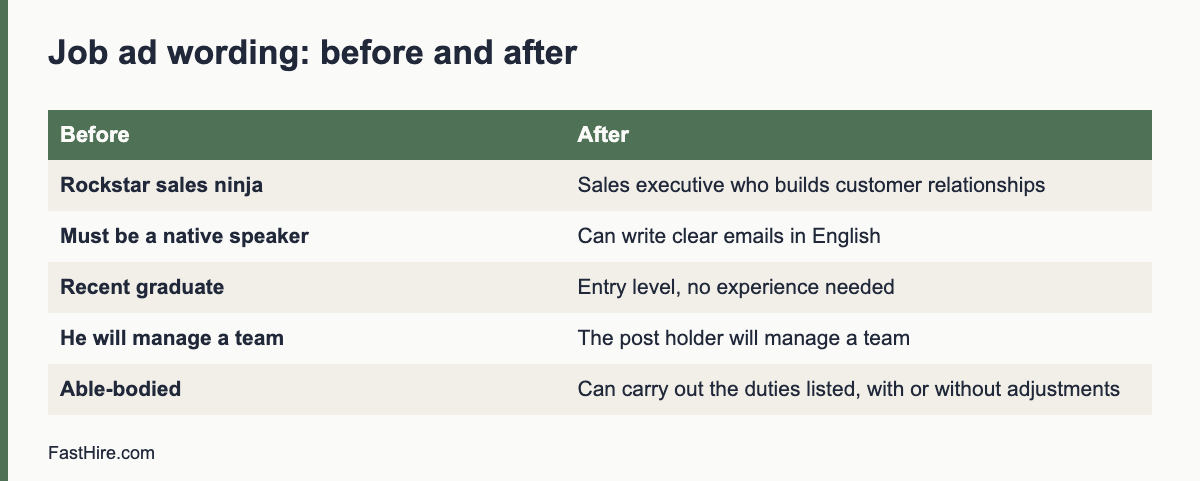
Before and after example
Before (fictional): “We are looking for a young, energetic digital native to join our dynamic sales team as a sales ninja. He must be a native English speaker with at least five years of experience at a leading firm. Hectic environment. Competitive salary.”
After (fictional): “We are looking for a sales executive to build relationships with business customers. You will plan calls, follow up leads and report weekly. You can write clear emails and speak with customers confidently in English. You have sales or customer experience, shown by examples of your work. The salary range is [range], full time, hybrid with two days in the office. We welcome applications from everyone. If you need adjustments in the process, tell us.”
Tools that check wording
Some tools flag biased words. They can help, but they have limits. They may miss context, miss non-obvious signals or flag harmless words. Use them as a second pair of eyes after your own check. Do not rely on a score. Keep a person responsible for the final wording. If a tool is built into your system, check how it stores and uses your text and candidate data.
A team routine
- The recruiter drafts the ad from the role brief.
- A second person, ideally from a different team, checks it with the four passes.
- The hiring manager confirms that the requirements match the real work.
- HR checks the legal points: pay information, statements and local rules.
- The ad is tested on a phone and with an accessibility check.
- The final version is saved with the date, for the record.
- After the round, review whether the applicant mix changed, and what to improve.
Common mistakes
- Copying an old ad without review.
- Adding more requirements every time the role changes.
- Using “culture” language that signals a narrow type.
- Hiding pay, then wondering why good candidates drop out.
- Making the form so long that only the very motivated finish.
- Leaving out any route to ask for adjustments.
Checklist
- Title is standard and free of slang and gendered terms.
- Tone is plain and welcoming.
- Requirements are few, real and checkable.
- Pay, hours, place and conditions are clear.
- The application works on a phone and with assistive tools.
- An adjustment route and a contact are shown.
- A second person has checked the ad.
- The saved version is dated.
Worked example (fictional)
A retailer posts a store supervisor role and gets mostly male applicants over a few years. The recruiter runs the four-pass check. She finds the title “Store Boss”, the phrase “we need someone tough and dominant”, a requirement for a degree that the job does not use, pay not shown, and a PDF form that does not work with screen readers. She rewrites the ad: “Store Supervisor”, a description of the daily tasks, three must-haves, a pay range, a plain online form that works on a phone, and a line on adjustments. Within two rounds, the applicant pool is broader, with more women and older applicants, and the manager reports that the shortlist quality is as strong as before.
Why people self-select out, and how to invite them back
Many capable people read an ad and decide quietly that it is not for them. They may think that they must meet every point, that the tone is aimed at someone else, or that the employer will not welcome their needs. You cannot see these people in your data, because they never apply. You can reduce the effect with small, honest changes. State that you welcome applications from people who meet most of the requirements. Say which requirements are essential and which can be learned. Give a name and an email for questions. Show real people and real work. These steps tell readers that you want a wide range of applicants and that the process is open.
Be careful not to promise what you cannot deliver. If you say that adjustments are available, make sure the process can provide them. If you say that flexibility is possible, describe what it means in practice. A match between words and actions is what builds trust. Candidates who join an employer that kept its promises become the best source of referrals and good reviews.
Checking ads for different roles
Entry level and apprenticeship roles
Avoid asking for experience that the role is meant to give. Describe the training. State whether a qualification is needed or whether people can show potential in other ways, such as a short task. Avoid age limits unless the law sets one for a clear reason, such as rules for young workers, and state the reason.
Shift and hourly roles
State the shift patterns and flexibility clearly. Avoid asking for “open availability” if you do not need it. Offer a way for people with caring duties or study to apply with partial availability. Make the form short and mobile friendly.
Senior and specialist roles
Avoid pedigree language and ask for evidence of results. Describe the scope and authority of the role. State pay or range. Avoid terms such as “seasoned” or “battle-tested”, which can signal age or a narrow style. Offer a conversation before applying, for all, not only for those with a link to your network.
Remote and international roles
Say where the person can be based, the time zones that matter and the languages needed. Explain how pay is set across locations. Check pay and data rules for each place. See how to manage hiring across the US, UK and EU.
Review the final ad one more time by reading it aloud, as if you were a capable person who is new to your field. Would you feel invited to apply? Would you know what the work is, what it pays and what happens next? If the answer to any of these is no, change the ad before it goes live.
Frequently asked questions
What counts as biased wording in a job ad?
Words that signal or prefer an age, sex, race, religion, disability, class or background, and requirements not linked to the job. Examples include “young”, “digital native”, “native speaker” and gendered job titles.
Is it a problem to say “energetic”?
It can signal youth to some readers. Describe the actual demands of the job instead, such as “on your feet most of the day”.
Do I need an equal opportunities statement?
It is good practice and helps candidates, but the process must match it. Some places have rules or guidance on statements.
Should I show pay in every ad?
Some places require it, and it helps candidates in any case. Check the rules where you hire.
Related guides
This is general information, not legal advice.