Category: Recruiters and HR teams

Sourcing, screening at volume and shorter time-to-hire, with a good experience for every candidate.

  • Boolean search for recruiters: examples you can copy

    Boolean search for recruiters: examples you can copy

    Boolean search uses the words AND, OR and NOT, quotation marks and brackets to tell a search tool exactly what to find. For recruiting, it means you can search for several job titles and skills at once, leave out noise and test results quickly. Start with a plain list of must-haves, write the alternative terms for each, join the alternatives with OR inside brackets and join the groups with AND.

    Key takeaways

    • Build one group of terms for each must-have. Join alternatives with OR and groups with AND.
    • Use quotation marks for exact phrases and NOT to remove common false matches.
    • Test the string on a small result set. Adjust before you contact anyone.
    • Search by skills and work, never by traits that point to protected characteristics.
    • Check each platform’s help page, because operators and limits differ between tools.
    x

    The five building blocks

    OperatorWhat it doesExample
    ANDBoth terms must appear“warehouse” AND “planning”
    OREither term may appear“stock controller” OR “inventory planner”
    NOTRemoves results with a termNOT “intern”
    ” ” (quotation marks)Searches for an exact phrase“supply chain”
    ( ) (brackets)Groups terms so the logic is clear(“stock controller” OR “inventory planner”) AND “WMS”

    Most tools also support a wildcard, such as an asterisk, for word endings, and some support proximity or field-specific search. These features differ widely and change over time, so confirm them in the tool’s help page before you rely on them. Brackets and quotation marks work in most places.

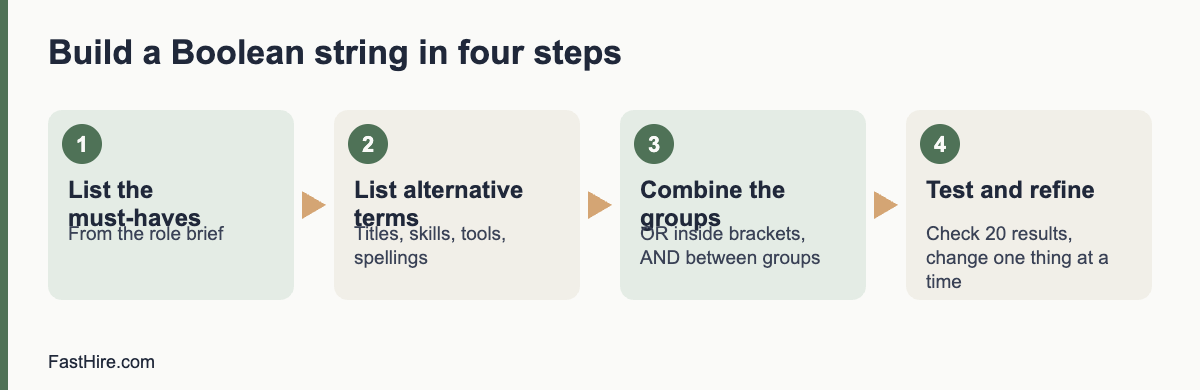
    A four-step method to build a string

    Step 1: List the must-haves

    Take the three to five must-haves from the role brief. Boolean search works best on things that appear as words in a profile: job titles, skills, tools, certifications, sectors. It does not work for qualities such as “good attitude”.

    Step 2: List alternative terms for each

    People describe the same work in different ways. For each must-have, list titles, skills, tools and spelling variations. Ask the hiring manager and two current team members for their words. This is the step that makes the biggest difference.

    Must-haveAlternative terms
    Warehouse planning“warehouse planner”, “inventory planner”, “stock controller”, “stock planner”, “replenishment”
    Uses a warehouse management system“WMS”, “warehouse management system”, “barcode scanning”, names of tools you know
    Leads a small team“team leader”, “shift lead”, “supervisor”, “trainer”

    Step 3: Build and combine the groups

    Put each list inside brackets joined by OR. Then join the groups with AND.

    (“warehouse planner” OR “inventory planner” OR “stock controller” OR “stock planner” OR replenishment) AND (WMS OR “warehouse management system” OR “barcode scanning”) AND (“team leader” OR “shift lead” OR supervisor OR trainer)

    Step 4: Test and refine

    Run the string and look at the first 20 results. If most are wrong, you have too much OR in a broad group, or a term with two meanings. If you have very few results, remove one AND group or add alternative terms. Change one thing at a time and write down what you changed. After each change, read a few more results.

    Sample strings for five roles

    These examples are starting points. Replace the terms with the words your hiring manager and your market use.

    RoleSample string
    Customer support agent(“customer support” OR “customer service” OR “helpdesk” OR “service desk”) AND (“email” OR “chat” OR “tickets”) NOT (“sales” OR “intern”)
    Bookkeeper(bookkeeper OR “accounts assistant” OR “accounts payable” OR “accounts receivable”) AND (“month end” OR reconciliation OR “VAT” OR “sales tax”)
    Electrician(electrician OR “electrical technician”) AND (installation OR maintenance) AND (licence OR license OR certified OR qualified)
    Software developer(developer OR engineer) AND (“Python” OR “TypeScript” OR “Java”) AND (“API” OR “backend” OR “web”) NOT (manager OR recruiter)
    Operations coordinator(“operations coordinator” OR “operations assistant” OR “logistics coordinator”) AND (scheduling OR suppliers OR planning)

    Notice the spelling variants “licence” and “license”, and “VAT” and “sales tax”. If you recruit across the US, the UK and the EU, add local terms to the same string or keep one string per country.

    Searching on websites and public pages

    Some recruiters search the open web, for example public professional pages, portfolios and community profiles, using a search engine. Most search engines support quotation marks and a site operator that limits results to one website. Only use publicly available pages, follow the site’s terms and respect any “do not contact” notes. If a page is not open to the public, do not try to get around the restriction.

    Using Boolean search fairly

    A search string is a screen. It decides who you see and who you do not. Build it around skills and work, not around traits. Do not include words that point to age, sex, race, religion, nationality, disability or family status unless the role truly requires something job-related and lawful, and then get advice. Avoid search terms such as graduation years, “recent graduate” or “digital native” unless the role really is an early-career role. The US Equal Employment Opportunity Commission explains protected traits and practices to avoid on its page about prohibited employment policies and practices. In Great Britain, the Acas page on recruitment explains how discrimination law applies to choosing candidates.

    Remember that strings can exclude people by accident. If you list only one job title, you may miss capable people with other titles. If you require a specific tool name, you may miss people with similar skills in a different tool. Add alternatives and review a sample of “near misses” to see what you missed.

    Data protection and platform rules

    Profiles are personal data. In the UK and the EU, data protection law applies. If you save or copy details, you should tell people where you found them, why you are contacting them and how long you will keep their data. The Information Commissioner’s Office explains the duties of employers and recruiters in its guidance on recruitment and selection. Many platforms also restrict automated copying and mass messaging. Read the terms before you use any tool that collects data in bulk.

    A simple workflow for a search session

    1. Open the role brief and the sourcing tracker. Write the target number of profiles for the session, for example 30.
    2. Build the string in a text file, so you can save and reuse it.
    3. Run it and check the first 20 results. Adjust until at least half meet the must-haves at a glance.
    4. Review profiles against the must-haves. Write one line of evidence for each yes in the tracker.
    5. Contact the best matches with a short message. See How to source candidates for the whole process.
    6. Save the final string with a note of what worked, and review it with the hiring manager.

    Common mistakes

    • Too many terms in one group. A group with 30 OR terms will pull in noise. Keep groups under about ten terms and test.
    • Missing brackets. Without brackets, the search tool may read AND and OR in an order you did not intend. Always use brackets.
    • Searching only titles. Titles vary. Add skills and tools.
    • Not saving strings. Keep a library of tested strings and notes by role.
    • Skipping the hiring manager. The people who do the work often know the words that matter.
    • Ignoring false matches. Use NOT sparingly, because it can remove good profiles too.

    FastHire is being built for the stage after search, when you have applications or profiles and need to check them against the requirements. It shows each job requirement next to the exact CV passage that supports it, so people can check the evidence. FastHire is coming soon. It does not rank, score or reject candidates. People make every decision.

    Troubleshooting: too many or too few results

    What you seeLikely causeWhat to try
    Thousands of results, most irrelevantGroups are too broad, or common words such as “manager” match everythingAdd an AND group for a specific tool or task. Use exact phrases. Remove generic terms.
    Very few resultsToo many AND groups, a rare spelling or a term that few people useRemove one AND group. Add alternative terms and spelling variants. Check for typos.
    Many people with the right words but the wrong workWords appear in a different context, such as “planning” in event planningAdd a context term such as “warehouse” or “logistics”. Use NOT with care.
    Results all look alikeTerms favour one sector or one kind of employerAdd terms from other sectors that use the same skill. Search by tasks as well as titles.
    Good people missing from resultsProfiles use different words, or are shortTest the string against three people you know are a good match. Add the words they use.

    Practice exercise with answers

    Try this on a role you know. The role is “Payroll specialist”. Must-haves: two years of payroll processing, knowledge of tax and social contributions in the country, and use of a payroll system. Write your own string first, then compare.

    Sample answer:
    (“payroll specialist” OR “payroll administrator” OR “payroll officer” OR “payroll clerk” OR “payroll assistant”) AND (PAYE OR “payroll tax” OR “withholding” OR “social contributions” OR “social security”) AND (“payroll system” OR “payroll software” OR ADP OR Sage OR Workday OR “month end”)

    Check the logic: the first group covers titles, the second covers tax terms for the UK, the US and the EU, and the third covers systems. Names of tools are examples, so replace them with the tools your hiring manager uses. If you recruit only in one country, drop the terms for the others. Then read 20 results and adjust.

    Keep a string library

    A shared document of tested strings saves hours. Use one row per search and keep these fields.

    FieldWhat to record
    Role and dateRole name, date of the search and who ran it
    PlatformWhere you ran it, because operators differ
    StringThe exact text, copied and pasted
    Result qualityHow many of the first 20 results met the must-haves
    Changes and notesWhat you changed and what worked, for example “added spelling variant, results doubled”
    Review dateWhen to check the string again, since job titles and tools change

    Review the library every few months. Remove strings that no longer work, merge duplicates and share the best ones with new team members. A library also helps fairness: it shows what you searched, so you can check whether the terms were job-related and whether you used enough alternatives.

    When Boolean search is not the right tool

    Boolean search finds words. It cannot judge quality, motivation or potential. It also struggles when the key evidence is not written in a profile, for example in portfolios, code repositories or references. For roles like these, pair search with other methods: referrals, communities, short work samples and conversations. Also remember that a longer, cleverer string does not replace a clear role brief. If the hiring manager cannot say what good looks like, no string will find it. Fix the brief first, then search.

    Frequently asked questions

    What is Boolean search in recruiting?

    It is a way of searching with the words AND, OR and NOT, exact phrases and brackets, so that you can combine many terms in one precise search.

    Do all tools support the same operators?

    No. Support for wildcards, proximity and field search varies by tool. Always check the help page of the tool you use.

    How long should a Boolean string be?

    As short as works. Start with one group per must-have and add alternatives only where they bring good results. Very long strings are hard to maintain and to explain.

    Is Boolean search biased?

    It can be, if you choose terms that point to protected traits or only one narrow set of titles. Use skill-based terms, add alternatives and review the results you do not see.

    Can I save and share strings with my team?

    Yes. Keep them in a shared document with the role, the date, the platform and notes on how well they worked.

    Related guides

    This is general information, not legal advice.
  • How to source candidates: ten channels and when to use each

    How to source candidates: ten channels and when to use each

    Sourcing means finding people who could do the job and inviting them to apply, before or alongside advertising. The most reliable method is to define the profile from the role brief, choose three or four channels that fit that profile, contact people with a short honest message, track where every candidate comes from and drop channels that do not produce. This guide covers ten channels and when each one works.

    Key takeaways

    • Start with a clear profile based on the must-haves in the role brief, not on job titles alone.
    • Use three or four channels at a time. Ten channels in parallel create noise and double work.
    • Contact people with a short, honest message and a clear next step.
    • Treat personal data with care: tell people where you found them and why you are contacting them.
    • Record the source of every candidate and review the numbers every two weeks.
    x

    What sourcing is, and when you need it

    Advertising waits for candidates to find you. Sourcing goes to find them. You need it when a role is hard to fill, when the people you want are not looking, when a market is tight, or when your usual channels bring too few or too similar candidates. Sourcing also helps when you want a wider mix of candidates and your ad alone does not reach them.

    Sourcing is not a separate magic skill. It is a repeatable process: define, search, contact, track and review. You can do it with a spreadsheet and a few free channels. Before you start, make sure the role is defined. Our guides to the role brief and the recruiter kickoff meeting show how.

    Step 1: Define the profile

    Write the profile in terms of what a person can do and has done, not job titles alone. Titles differ widely between companies, and some capable people have never held the title you list. For each of the three to five must-haves, add two or three ways it might appear in a profile.

    Must-haveWays it might appear in a profile
    Two years of warehouse planning“Stock controller”, “inventory planner”, “stock room lead”, volunteer stock management
    Uses a warehouse systemNames of systems, “WMS”, “barcode scanning”, or training in a similar tool
    Leads a small team“Shift lead”, “supervisor”, “trainer”, or running a group of volunteers

    This list becomes your search terms and your checklist for judging profiles later. It also reminds you that skills can come from different paths, which helps fairness.

    Step 2: Choose the channels

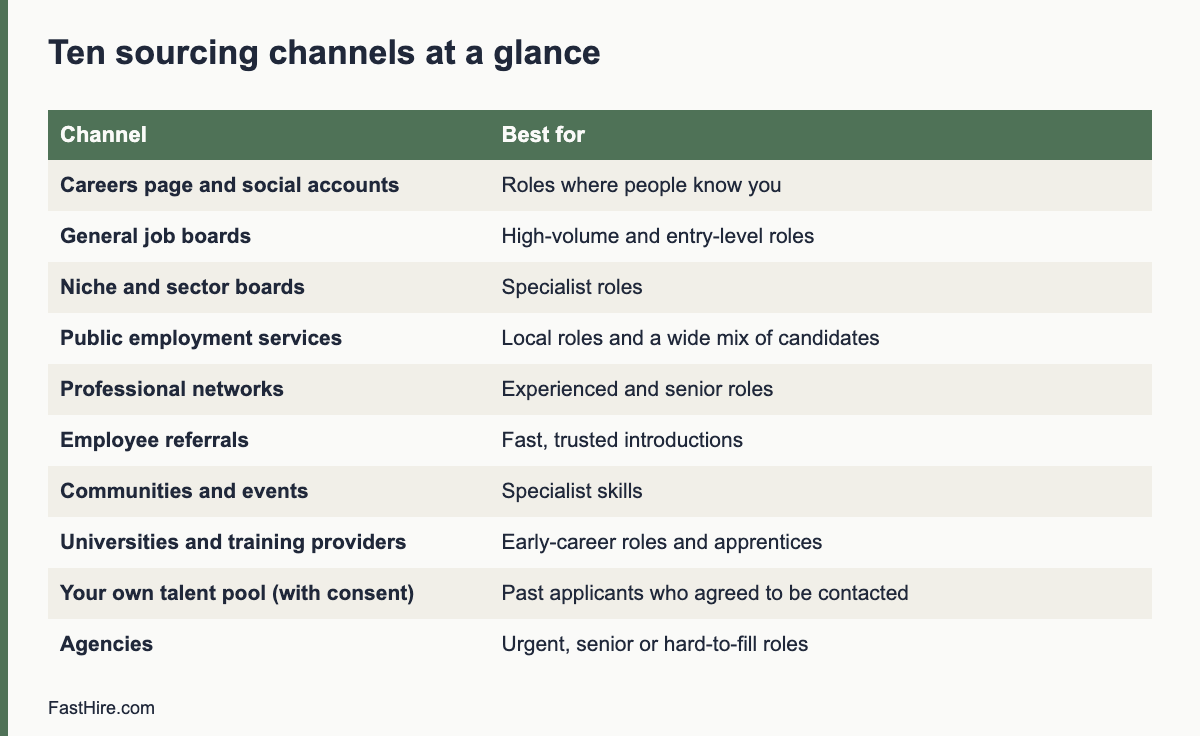
    Here are ten channels. Pick the ones that match where your candidates are, the time you have and the budget.

    ChannelBest forMain limit
    1. Your own careers page and social accountsRoles where people already know youSmall reach if your brand is unknown
    2. General job boardsHigh-volume roles, entry-level rolesMany unsuitable applications
    3. Niche or sector boardsSpecialist rolesCost and smaller audience
    4. Public employment servicesLocal roles, wide mix of candidates. In the UK, the Find a job service; in the EU, EURESCoverage varies by country
    5. Professional networksExperienced and senior rolesNeeds personal outreach; response rates vary
    6. Employee referralsFast, trusted introductionsCan repeat the profile of your current team
    7. Communities and eventsSpecialist skills; meetups, forums, alumni groupsSlow to build, needs a real presence
    8. Universities and training providersEarly-career roles and apprenticesSeasonal timing
    9. Your own talent poolPast applicants who said yes to being contactedMust respect consent and retention rules
    10. AgenciesUrgent, senior or hard-to-fill rolesFees; you give up some control of the process

    You do not need all ten. For a customer service role, two job boards, your careers page and referrals may be enough. For a rare engineer, you may add a niche board, two communities and direct outreach.

    Step 3: Search and shortlist profiles

    When you search networks or databases, use the variations from your profile table, and record the search terms you used. This helps you repeat what works and explain later how you found people. For advanced search syntax, see our guide to Boolean search for recruiters.

    Compare each profile against the must-haves only. Write one line of evidence for each yes, as in a normal screen. Do not rank people by how polished their profile looks. People write profiles for different reasons, and many strong candidates keep them short.

    Step 4: Contact people with respect

    A good message is short. It says who you are, why you are writing to this person, what the role is and what you want them to do next. It tells them where you found their details and makes it easy to say no. For more, see our guide to writing outreach messages that candidates reply to.

    Subject: Warehouse planning role at [company]

    Hello [name],

    I found your profile on [source]. You have worked on stock planning at [company], which is close to what we need for a Warehouse Planner role in [city]. Pay range: [range]. Hybrid, four days on site.

    If you would like to hear more, reply with a good time for a 15-minute call. If not, no problem. I will not contact you again unless you ask.

    [Your name, company and a way to verify who you are]

    Keep personal data lawful

    When you find people yourself, you hold personal data about them. In the UK and the EU, data protection law applies, and you should tell people where you obtained their details, why you hold them and how long you will keep them. Use only the data you need, and delete it when you no longer need it. The UK Information Commissioner’s Office explains the duties of employers and recruiters in its guidance on recruitment and selection. In the US, there is no single national law on this, but state privacy laws and platform rules may apply, so check them for the places where you recruit.

    Platform terms matter too. Many networks restrict automated collection or mass messaging. Read the rules before you use any tool that copies data.

    Fair sourcing

    Sourcing can widen your pool or narrow it. If you search only in the same networks or ask only your own team for referrals, you may keep meeting the same kind of people. Add channels that reach different groups. Describe the role in neutral language. Contact people based on skills, not on names, photos or other traits that point to protected characteristics. The US Equal Employment Opportunity Commission lists protected traits and practices to avoid on its page about prohibited employment policies and practices. In Great Britain, the Acas page on recruitment explains how discrimination law applies to hiring.

    A two-week sourcing sprint

    DayWhat to do
    Day 1Confirm the profile and the search terms with the hiring manager. Agree the channels.
    Days 2 and 3Search and shortlist 30 to 50 profiles against the must-haves. Record the evidence.
    Day 4Send the first 20 messages. Use one template and personalise one line.
    Day 7Send one follow-up to people who did not reply. Do not send more than one.
    Days 8 to 10Hold short calls with interested people. Share two to four strong profiles with the hiring manager.
    Day 14Review: how many contacted, how many replied, how many passed the must-haves and which channel produced them. Change the plan.

    What to measure

    Track four numbers per channel: contacts or applications, replies or qualified applicants, interviews and offers. Divide each stage by the one before it. This shows where a channel is weak: low replies mean the message or targeting is off, low qualification means the profile or the ad is unclear. Review every two weeks and drop channels that give nothing.

    Common sourcing mistakes

    • Searching for job titles only and missing capable people with other titles.
    • Sending the same long message to hundreds of people. Short and personal gets more replies and builds a better name for your employer.
    • Contacting people repeatedly after they say no.
    • Keeping candidate data in private spreadsheets without a deletion date.
    • Letting the hiring manager skip the brief and say “send more profiles”. Calibrate first.

    FastHire is being built for the step after sourcing, when you have a pile of profiles or applications. It shows each job requirement next to the exact CV passage that supports it, so that people can check the evidence quickly. FastHire is coming soon. It does not rank, score or reject candidates. People make every decision.

    A sourcing tracker you can copy

    One simple sheet is enough. Add one row per person you contact or who applies.

    ColumnWhat to record
    Name and contactAs the person gave it or as it appears in the public profile
    Source and date foundChannel, link and the date you found the profile
    Basis for contactWhy you contacted this person, for example “stock planning at a retailer, matches must-have 1”
    Must-havesYes, no or unclear for each, with one line of evidence
    Message sent and replyDate of first message, follow-up, reply and the outcome
    Consent and retentionWhat you told the person, and the date you will delete the record
    StageContacted, replied, call, shortlisted, interview, offer, closed

    Sourcing in three common situations

    SituationWhat worksWhat to watch
    Senior or specialist role, few candidatesDirect outreach, referrals and communities. A personal note that shows you read the profile. Offer a short, low-pressure call.Do not overstate the role or the pay. Be clear about the process and the timeline.
    High-volume role, many candidates neededJob boards, public employment services and a short application. Screen in batches against must-haves.A long application loses people. Keep the first step to a few minutes.
    Early-career roleUniversities, training providers and community groups. Describe what you will teach.Do not require experience that only some people can get, such as unpaid internships.

    A worked example: warehouse planner

    This example is fictional. A regional distributor needs a warehouse planner. The hiring manager and the recruiter use the profile table above. They choose four channels: the company careers page, one logistics job board, the local public employment service and employee referrals. They ask the team for referrals with a short message that explains the must-haves and says that referred people go through the same process as everyone else.

    In week one, the recruiter finds 40 profiles and contacts 20 of them. Eight reply and six agree to a call. Applications arrive from the careers page and the public employment service. The recruiter reviews all of them against the same four must-haves, writes one line of evidence for each yes and sends the hiring manager five strong candidates. The numbers in this example are invented to show the flow. They are not benchmarks.

    At the two-week review, the recruiter sees that the job board produced many applications but few that met the must-haves, while referrals and the public service produced fewer but better matches. The recruiter keeps the two stronger channels, adds one community, and pauses the board. The process improved because every candidate had a recorded source and the same screen.

    Frequently asked questions

    What is the difference between sourcing and recruiting?

    Recruiting is the whole process from role definition to offer. Sourcing is the part that finds and contacts potential candidates, often people who are not actively applying.

    How many sourcing channels should I use?

    Use three or four at a time and review them every two weeks. Drop those that give nothing and test a new one.

    Is it legal to contact people I find online?

    It can be, but data protection rules apply, especially in the UK and the EU. Tell people where you found their details, why you are contacting them and how they can object. Check platform rules too.

    How do I find candidates who are not looking?

    Use professional networks, communities and referrals, and write a short message that explains why you contacted them and what is in it for them. Respect a no.

    How do I avoid sourcing only people like my current team?

    Add channels that reach different groups, use skill-based search terms and apply the same must-haves to every profile.

    Related guides

    This is general information, not legal advice.
  • How to write a screening call script

    How to write a screening call script

    A screening call script is a short, fixed set of questions and prompts that a recruiter uses with every candidate in a first call. It has six parts: opening, role summary, must-have checks, motivation and availability, candidate questions and closing. A script makes calls shorter, fairer and easier to compare, and it leaves room for natural conversation.

    Key takeaways

    • Use the same script and the same must-have questions for every candidate for the same role.
    • Keep the call to 15 to 25 minutes, with time for the candidate’s questions.
    • Check must-haves with a request for an example. Do not accept a plain “yes” without detail.
    • Record notes on a sheet during the call and score within 15 minutes after.
    • Avoid questions about protected traits. Offer adjustments at the booking stage.
    x

    What a screening call is for

    A first call has three jobs. It confirms that the candidate meets the basic must-haves. It checks practical facts such as location, availability and pay expectations. And it gives the candidate a clear picture of the role and process so that they can decide whether to continue. It is not a full interview, and it should not try to test every skill.

    A script helps because recruiters handle many calls. Without one, each call drifts, questions vary and notes are hard to compare. With one, you can move through 8 to 10 calls in a day and still treat each person with attention. Pair the script with a screening sheet. See our guides to structured screening and screening at volume.

    Before the call: preparation checklist

    TaskDetail
    Read the role briefKnow the must-haves, nice-to-haves, pay range, hours, location and process
    Read the CVMark two items to ask about and any unclear points
    Prepare the sheetOne row per must-have, with fields for evidence and score
    Book the callOffer a choice of times, state the length and ask about adjustments
    Prepare answersPay range, process, timeline, benefits, remote or office policy
    Check the rulesKnow what you cannot ask. See questions you cannot ask

    The six-part script

    PartTimePurpose
    1. Opening1 to 2 minPut the candidate at ease and set the agenda
    2. Role summary2 minShare the facts
    3. Must-have checks8 to 10 minCollect evidence
    4. Motivation and practicalities3 to 5 minInterest, availability, pay, notice
    5. Candidate questions3 to 5 minAnswer honestly
    6. Closing1 to 2 minExplain next steps and the date

    Part 1: Opening

    Hello [Name], this is [your name] from [company]. Thank you for making time. This call will take about [20] minutes. I will tell you a little about the role, ask some questions, and leave time for yours. I will take notes so that I do not miss anything. Is this still a good time?

    Part 2: Role summary

    The role is [title], on a team of [number]. The person will [two or three main tasks]. The hours are [hours], based [place or remote]. The pay range is [range]. The process has [number] steps and we plan to decide by [date]. Does that match what you expected?

    Part 3: Must-have checks

    Ask each must-have as a request for an example. Use the same wording for all candidates. Write the answer and score it right after the call. Use “tell me about” prompts and follow-ups.

    Must-have (example)Main questionFollow-upWhat a good answer includes
    Customer support experienceTell me about the support work you have done most recently. What did you handle each day?How many customers or cases? What tools?Specific tasks, volume, tools, outcome
    Written communicationTell me about a message you wrote that solved a customer problem.What happened after?A real example, clear action, result
    Works to deadlinesDescribe a busy period and how you managed your time.What would you do differently?Method, priorities, honest reflection
    Uses the main toolsWhich systems have you used, and for what?How long did it take you to learn them?Named tools, tasks, learning speed

    If an answer is general, ask for an example: “Can you give me a recent example?” If there is none, mark “unclear” or “no evidence”. Do not guess. The aim is to find evidence, not to catch people out.

    Part 4: Motivation and practicalities

    • “What interested you in this role?”
    • “What are you looking for in your next role?”
    • “Are you able to work the hours and the place described?”
    • “What is your notice period or earliest start date?”
    • “What pay range are you looking for?” (Check local laws first. Some US states and cities restrict questions about pay history. Ask about expectations, not current pay, unless the law allows it.)
    • “Are you in other processes, and what is your timeline?” (This helps you plan. It is not a test.)

    Part 5: Candidate questions

    What questions do you have for me about the role, the team or the process?

    Answer honestly. If you do not know, say you will find out and by when. Note what the candidate asks, because it shows what matters to them.

    Part 6: Closing

    Thank you, that was helpful. Here is what happens next: I will review my notes and contact you by [date] with a decision on the next step. If you need any adjustment for the next steps, please tell me. Do you have any final questions?

    Notes sheet

    FieldWhat to write
    Candidate, role, date, time
    Must-have 1 evidenceFacts and phrases, not opinions
    Must-have 2 evidence
    Must-have 3 evidence
    Availability, notice, location
    Pay expectation (if asked)
    Questions asked by the candidate
    Score per must-have (1 to 4)
    Decision: move forward / hold / decline
    Reason in one line, job-related

    Do not note anything about age, health, family, religion, accent or looks. If the candidate shares such information, do not record it and do not use it. Keep the notes secure. In the UK and EU, a candidate may ask to see data held about them. See the ICO guidance on employment.

    Tone and listening

    • Smile when you speak. It changes your voice.
    • Do not read the script in a flat voice. Know it well enough to ask naturally.
    • Let silence work. Wait three seconds after a question before you prompt.
    • Summarise key points back to the candidate to check understanding.
    • Do not judge accent, speech style or background noise. They say nothing about the must-haves.
    • Be honest about pay, process and timeline. Do not oversell.

    A worked example (fictional)

    This example is invented. A recruiter screens a candidate for a customer support role. After the opening and role summary, she asks: “Tell me about the support work you have done most recently.” The candidate says he handled about 40 tickets a day at an online shop, used a help desk tool and a chat tool, and wrote refund replies. She scores “customer support experience” 3, with the note “40 tickets a day, two tools, refund replies”. For “written communication” she asks for an example. He describes a reply to an angry customer that led to a replacement and a positive review. She scores 3 with the same detail. For “works to deadlines” the candidate gives a general answer. She asks a follow-up: “Can you tell me about a particular week?” He cannot give an example, so she scores 1 and notes “no example given when asked”. She moves him forward with a note to test deadline handling in the interview. Her notes total 12 lines and were scored within 10 minutes.

    Adjustments and accessibility

    In the booking message, write: “If you need any adjustment for this call, such as more time, a different format or captions, please tell us and we will arrange it.” Offer phone or video, and a written alternative if needed. If the candidate asks for questions in advance, send them. This is fair, and it does not harm the quality of your screening. For legal context, see Acas on recruitment in the UK and the EEOC on prohibited practices in the US. This is general information, not legal advice.
    Common mistakes

    MistakeEffectFix
    Different questions for each candidateCannot compareUse a script
    Asking only yes/no questionsNo evidenceAsk for examples
    Talking more than the candidateLittle to scoreLimit your part to five minutes
    Judging voice or accentPossible biasScore only on the must-haves
    Skipping notesMemory errorsWrite during the call
    No next step statedCandidate waits and doubtsState the date

    Handling difficult moments

    SituationWhat to sayWhat to avoid
    The candidate asks about pay and you cannot share it“The range is [range]. I am not able to discuss exact figures at this stage, but I will confirm them before any offer.”Dodging the question or inventing a number
    The candidate does not meet a must-have“Based on what you have told me, the role needs [skill], and I did not hear enough about that. I do not want to waste your time, so I will not move forward with your application at this stage.”Vague promises of a later call
    The candidate is nervous“Take your time. We can come back to that question.”Interrupting or finishing sentences
    The candidate gives a very long answer“Thank you, that is helpful. Let me move to the next question so we cover everything.”Cutting them off sharply
    The candidate asks personal questions about the team“I can tell you about the work and the process. The hiring manager can say more in the interview.”Sharing personal details of colleagues
    The candidate shares health or family details“Thank you. Let us return to the role.”Following up on the topic or writing it in the notes
    The candidate asks if the role is still openAnswer honestly based on the planSaying it is open when you have filled it

    Scoring and deciding after the call

    1. Within 15 minutes, fill in the scores and the one-line reason.
    2. Mark the candidate: move forward, hold or decline.
    3. Check your notes for any protected-trait information. Remove it.
    4. Send the next-step message within two working days. See fast interview feedback for templates.
    5. Add the candidate to your tracking sheet with the date and outcome.

    Review the first ten calls together with the hiring manager. Check whether the questions separated strong from weak evidence and whether the time was right. Change the script if needed and apply the change to all later calls. Keep a version number and the date so that you can show which script you used for which candidates.

    Adapting the script for different channels

    ChannelChange
    Video callSend the link in advance and check the connection. Do not judge the background
    Phone onlyOffer a call-back if the line is poor
    Text or chat screeningUse the same questions in writing, with a time limit of two working days to reply
    Voice recording by an automated toolTell the candidate how the data is used and give a human alternative on request

    If a tool records or analyses candidate speech, check the data protection and AI rules in your country first. People must make the hiring decision. This is general information, not legal advice.

    Frequently asked questions

    How long should a screening call be?

    15 to 25 minutes is enough for most roles. Longer calls often repeat the interview.

    Should I record the call?

    Only if the law allows and the candidate agrees, and you have a reason and a retention rule. Notes are usually enough.

    Can I ask for the candidate’s current salary?

    Rules vary. Some places restrict it. Ask about expectations for the role, and check local law.

    What if the candidate does not meet a must-have?

    Say so clearly and kindly, and explain the next step. Do not prolong the call.

    How do I keep calls fair across many candidates?

    Use the same script, the same must-have questions, the same scale and the same notes sheet.

    Related guides

    This is general information, not legal advice.

  • Recruitment metrics: eight numbers worth tracking

    Recruitment metrics: eight numbers worth tracking

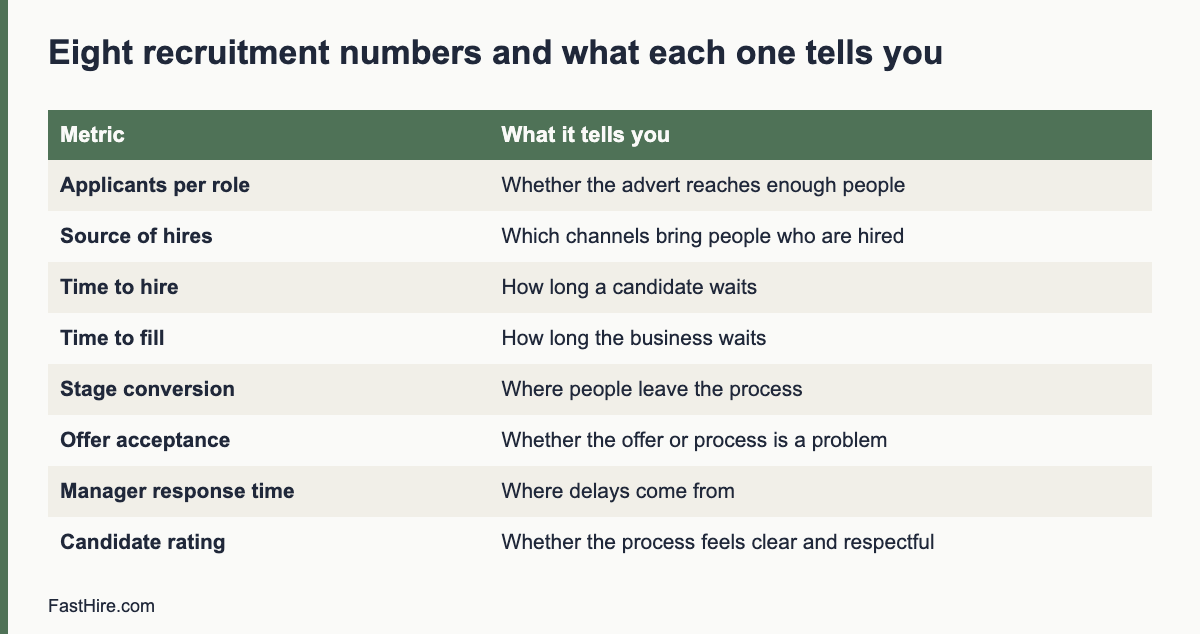
    Eight numbers cover most of what a recruiting team needs to know: how many applicants come in, where they come from, how fast they move, where they leave, how many accept, how they rate the process, how long hiring managers take to respond, and whether results differ unfairly between groups. Track these from your own records, review them monthly, and ignore the rest until these are reliable.

    Key takeaways

    • Start with eight numbers, all counted from your own records.
    • Define each number in writing so that every recruiter counts the same way.
    • Always read a number together with its sample size. Five hires is not a trend.
    • Use numbers to find process problems, not to rank people.
    • Add fairness checks, but follow your country’s rules on collecting monitoring data.
    x

    Why fewer numbers work better

    Most applicant tracking systems can produce dozens of reports. A team that tries to read all of them usually reads none. Reports also fail when nobody agrees on what a word means. If one recruiter counts “time to hire” from the day the job was posted and another counts it from the day the candidate applied, the average is meaningless.

    So the first job is not building a dashboard. The first job is a one-page definitions sheet. Write each metric, the start event, the end event, who records it and where. Keep it next to the numbers. Our guide to time to hire and time to fill shows why those two terms must be kept apart.

    The eight numbers

    #MetricHow to calculate itWhat it tells you
    1Applicants per roleCount of applications received for one role, by weekWhether the advert reaches enough people, or too many
    2Source of applicants and hiresCount by source, for both applicants and hiresWhich channels bring people who are hired, not only people who apply
    3Time to hireDays from the date a candidate applied (or was first contacted) to the date they accepted an offerHow long a candidate waits for a decision
    4Time to fillDays from the date the role was approved to the date the offer was acceptedHow long the business waits for the seat to be filled
    5Stage conversionCandidates who moved to the next stage divided by candidates who entered the stageWhere people leave the process, and whether a stage is too strict or too loose
    6Offer acceptance rateOffers accepted divided by offers madeWhether the offer, the pay or the process is a problem late in the process
    7Hiring manager response timeDays between sending a shortlist or request and receiving feedbackWhether delays come from the recruiting team or from managers
    8Candidate experience ratingAverage answer to one question asked after the process, plus commentsWhether the process feels clear and respectful

    Fairness checks are a ninth item, but they are not a single number. See the section on fairness below.

    1. Applicants per role

    Count applications weekly, not only at the end. A role that gets four applicants in two weeks has an advert or channel problem. A role that gets 600 in two days has a screening-capacity problem. Both need different actions. For the second case, see our guide to screening at volume.

    Be careful with one trap: a large pile is not a sign of success. If most applicants do not meet the basic requirements, a clearer advert will help more than more promotion.

    2. Source of applicants and hires

    Record the source at the moment of application, using a required field. Free-text fields produce messy data such as “LinkedIn”, “linkedin” and “LI”. Use a fixed list: career page, job board, referral, agency, direct outreach, event, other.

    Then compare two columns for each source: the share of applicants and the share of hires. A channel that sends 50 percent of applicants and 5 percent of hires is costing review time. A channel that sends 5 percent of applicants and 30 percent of hires deserves more attention. With small numbers, treat these as clues, not proof.

    3 and 4. Time to hire and time to fill

    Time to hire measures the candidate’s experience. Time to fill measures the business’s experience. Report both, and add the median as well as the average. A single role that stayed open for 200 days can pull the average up, while the median shows the typical case.

    Split the time into stages so you can act: application to first contact, first contact to first interview, last interview to decision, decision to offer, offer to acceptance. Often most of the delay sits in one gap. In many teams that gap is the wait for hiring manager feedback, which is why metric 7 matters. For ways to shorten the process, read how to reduce time to hire.

    5. Stage conversion

    For each stage, divide the number who moved on by the number who entered. Look at the whole funnel for one role, then compare roles of the same type. Two questions help. Is a stage rejecting almost everyone? Then the requirement or the question may be too strict, or the advert may be attracting the wrong people. Is a stage passing almost everyone? Then it may not be doing any work, and you may be spending interview time on people you could have assessed earlier.

    A fictional example: a team screens 120 applicants for a customer support role. 40 pass the screening review, 20 take a call, 10 attend an interview, 3 receive an offer and 2 accept. The step from screening review to call is 50 percent, from call to interview 50 percent, from interview to offer 30 percent and from offer to acceptance 67 percent. These numbers are invented to show the arithmetic. They are not a benchmark.

    6. Offer acceptance rate

    Divide accepted offers by offers made. When the rate is low, ask the people who declined why. Use a short, neutral message: “Thank you for considering us. Would you tell us the main reason you chose not to join? Your answer will only be used to improve our process.” Common reasons are pay, a better offer, slow communication, unclear role content or a change in the candidate’s plans. Write the reasons down and count them. After 10 or 15 answers you will often see a pattern.

    7. Hiring manager response time

    This is the metric many teams avoid, and it is often the most useful. Record the date you send each request to a manager and the date they reply. Share the figures with managers in a neutral way, with the message that the aim is to help candidates, not to blame anyone. Pair this with a simple agreement, such as “feedback within two working days”, and use our guide to giving fast interview feedback.

    8. Candidate experience rating

    Ask one question and one open comment box after the process ends, to candidates who were hired and to those who were not. The question can be: “How clear was our communication, from 1 (not clear) to 5 (very clear)?” Do not ask candidates to rate their interviewer by name. Keep answers anonymous when you report them. A low score with comments such as “I never heard back” points directly to the standard in how to avoid ghosting candidates. The wider candidate experience checklist lists what to check.

    How to set the numbers up in a week

    1. Day 1: write definitions. One page, eight metrics, start and end events.
    2. Day 2: check the data fields. Make sure your system records application date, source, stage dates, offer date, acceptance date and decline reason. Make source a required fixed list.
    3. Day 3: export last year’s data for a few roles. Calculate the eight numbers by hand for three or four roles. This shows where the data is missing.
    4. Day 4: fix the gaps. Add missing fields, correct dates and agree who enters what.
    5. Day 5: build one view. A spreadsheet with one tab per month is enough to begin. A simple table with the eight numbers, the previous month and a short comment column works well.

    Fairness checks, with care

    Hiring numbers can also show whether a stage affects some groups differently from others. This is sensitive, so follow a few rules. Collect monitoring data only where the law and your policy allow it. Tell applicants why you ask, keep it optional and separate from decision records, and do not show it to people who screen applications.

    In the United States, the Equal Employment Opportunity Commission and the federal Uniform Guidelines describe a rule of thumb called the four-fifths rule. It compares selection rates between groups. The rule is a signal for further review, not a legal test on its own. See 29 CFR 1607.4 in the Code of Federal Regulations and read the explanation in our four-fifths rule guide. Current federal enforcement priorities have changed, so check the latest guidance and your state and local rules.

    In the UK and the EU, the data you collect about protected characteristics is special category data under data protection law. You need a lawful basis and an additional condition, and you should limit access. The UK Information Commissioner’s Office has guidance on recruitment and selection. Rules differ across EU member states, so ask your data protection officer or a local adviser.

    Whatever the country, group sizes matter. If a group has eight applicants, one decision changes the percentage by more than 12 points. Do not draw conclusions from very small groups. Use the check to ask questions about the process, such as “Is this requirement necessary?”, and not to blame individuals.

    A monthly review agenda

    TimeItemOutput
    5 minRead the eight numbers against last monthThree changes that stand out
    10 minOpen roles with the longest waitOne action per role, with an owner
    10 minStage conversion for the biggest roleDecision on any requirement or question to change
    5 minSource mixDecision to keep, cut or test a channel
    5 minCandidate commentsTwo comments to act on

    Keep the review to 35 minutes. Write the actions in the same document as the numbers, and start the next meeting by checking whether they were done.

    Mistakes to avoid

    • Changing definitions mid-year. If you must change one, mark the date on the chart and do not compare across the change.
    • Reading small samples as trends. With fewer than about ten hires in a period, describe the cases instead of calculating averages.
    • Using numbers to rank recruiters or candidates. Metrics should show process problems. A recruiter with a long time to hire may be working on the hardest roles.
    • Counting only fast hires as good hires. Speed matters, but so does fit. Follow up with the hiring manager at 90 days to check how the new hire is doing.
    • Ignoring data protection. Keep only the data you need, for only as long as you need it, and delete on schedule.

    FastHire is being built to help with the evidence part of the process. It shows each job requirement next to the exact CV passage that supports it, so reviewers spend less time searching and more time deciding. FastHire is coming soon. It does not rank, score or reject candidates. People make every decision.

    Frequently asked questions

    Which metric should I start with?

    Start with the stage dates. Once you record when each candidate enters and leaves each stage, you can calculate time to hire, stage conversion and manager response time from the same data.

    What is a good time to hire?

    There is no single good number. It depends on the role, the country and the labour market. Compare your own roles with each other and with your own past results, and ask candidates how the wait felt.

    Can a spreadsheet replace an applicant tracking system for reporting?

    For a small team, yes. A shared spreadsheet with one row per candidate and a column for each stage date is enough to calculate all eight numbers. Move to a system when volume makes manual entry slow.

    Is it legal to collect gender or ethnicity data on applicants?

    It depends on the country and the purpose. Rules differ in the US, the UK and each EU member state. Check the official guidance linked above and ask a specialist before you start.

    How often should I review the numbers?

    Monthly for the full review, and weekly for open roles that are late.

    Related guides

    This is general information, not legal advice.
  • How to choose recruiting software: 25 questions to ask every vendor

    How to choose recruiting software: 25 questions to ask every vendor

    Choose recruiting software by starting with your own process, not with the vendor demo. Write down the 10 tasks your team does every week, set a budget range and a data protection requirement, then ask every vendor the same 25 questions and score the answers on one sheet. This guide gives the questions, the scorecard and a short pilot plan.

    Key takeaways

    • Define your process and must-have needs before you see a demo.
    • Ask every vendor the same 25 questions and record the answers in writing.
    • Check data protection, security and automated-decision features early. They can rule a product out.
    • Ask for a pilot with your own roles, and set success measures before it starts.
    • Be careful with any tool that ranks, scores or rejects people. Ask how a person can see and challenge each result.
    x

    Step 1: Write down what you need

    Vendors sell features. You need outcomes. Before you speak to anyone, spend an hour with your team and write a short brief. It should include the following.

    1. The 10 weekly tasks. For example: post a job to several boards, receive applications, review CVs, message candidates, schedule interviews, collect interview feedback, make an offer, and report numbers.
    2. The three biggest pains. For example: applications arrive by email, interview feedback is lost, or candidates are not told the outcome.
    3. Volume. How many roles and how many applications per year, as ranges. Use your own records. If you do not have them, see our guide to a hiring dashboard in a spreadsheet.
    4. Countries. Where do you hire and where will candidate data be stored? Rules differ for the US, UK and EU.
    5. Budget range and contract length you can accept. Do not invent a figure to impress anyone. Use your own finance team’s number.
    6. Who will use it. Recruiters, hiring managers who rarely log in, and an administrator. Hiring managers should need no training.

    Step 2: Separate must-haves from nice-to-haves

    Use the same discipline you use for a job. A must-have is a need where “no” means you cannot use the product. A nice-to-have is a feature that helps but has a workaround. Keep the must-have list to about eight lines.

    AreaExample must-haveExample nice-to-have
    ApplicationsReceives applications from our career page and by emailMobile app for candidates
    CollaborationHiring managers can leave structured feedback without trainingIn-app chat
    CommunicationTemplates for acknowledgement and decline messagesText message sending
    DataExport all our data in a standard format at any timeCustom report builder
    ComplianceRetention rules and deletion per candidateBuilt-in consent pages in several languages
    ControlNo automated rejection without a person’s decisionDuplicate detection

    Step 3: Ask the 25 questions

    Send the questions in writing before the demo, and ask for written answers. Spoken answers are easy to forget and hard to compare. Keep a copy of the vendor’s reply for your records.

    Process and daily use (questions 1 to 6)

    1. Which of our 10 weekly tasks can your product do without workarounds? Show each one in the demo, using our example role.
    2. How does a hiring manager give feedback? How many clicks, and can they do it from email?
    3. Can we create our own stages, scorecards and message templates, or do you set them?
    4. How do candidates apply? Is there a mobile-friendly form, and how long does it take a candidate to finish?
    5. How do we reach applicants who are not a good match? Can we send a decline in bulk, and can we personalise it?
    6. What reports can we run without paying extra? Can we export raw data to a spreadsheet?

    Data protection and security (questions 7 to 14)

    1. Where is candidate data stored, in which country, and which companies process it as sub-processors?
    2. Do you act as a data processor for us? Will you sign a data processing agreement before we start?
    3. How do you support lawful transfers of data between regions, if we hire in the EU or UK and you store data elsewhere?
    4. How can we delete a single candidate’s data on request, and how fast does it disappear from backups?
    5. Can we set automatic retention periods per country or per role?
    6. What security certifications or independent audits do you hold, and can you share the reports under an agreement?
    7. Who at your company can see our candidate data, and how is access logged?
    8. What happens to our data if we end the contract? How long do you keep it, and in what format can we take it?

    Fairness, automation and AI (questions 15 to 20)

    1. Does the product rank, score, filter out or recommend candidates in any way? Describe each feature in plain language.
    2. Can every automated feature be switched off? Is any enabled by default?
    3. For every score, ranking or recommendation, can a person see the reasons, and can they override it?
    4. What data was used to build or tune the feature? Do you test for different results between groups, and can we see the test summary?
    5. How do you help customers meet the rules that apply to automated decisions and AI in hiring, such as local laws in some US cities, the UK and EU data protection rules, and the EU AI Act?
    6. Do candidates see any notice that automated tools are used on their application, and can we edit it?

    Cost, support and contract (questions 21 to 25)

    1. What is the total cost over three years for our volume, including set-up, training, extra users, extra roles and support? Please give it in writing.
    2. What is the contract length, the notice period and the price increase rule at renewal?
    3. What support is included, in which languages and time zones, and what is the response time for urgent problems?
    4. What does the first 90 days look like? Who helps us import data and set up templates?
    5. Can you give us two customers of our size and type to speak to, who were not selected by your sales team alone?

    Questions 15 to 20 need special attention. In the United States, some cities and states regulate automated tools in hiring. For example, the New York City Department of Consumer and Worker Protection explains the city’s rules on automated employment decision tools. In the EU, the AI Act sets rules for AI systems, and hiring uses are a regulated area. We do not state application dates here. Read the official text for current dates, and see our guide on the EU AI Act and hiring tools. In the UK, the Information Commissioner’s Office explains data protection duties in its recruitment and selection guidance.

    Step 4: Score the answers

    Create one table. List vendors across the top and your criteria down the side. Give each criterion a weight from 1 to 3 based on how important it is to you. Score each answer from 0 to 3 as follows: 0 means it cannot be done, 1 means it needs a workaround, 2 means it works, and 3 means it works well and is shown in the demo.

    CriterionWeightVendor A (0 to 3)Vendor B (0 to 3)Vendor C (0 to 3)
    Fits our 10 weekly tasks3
    Hiring manager ease of use3
    Data protection and deletion3
    Automation is optional and explainable3
    Reports and export2
    Total cost over three years2
    Support and onboarding2
    Contract terms and exit2
    Weighted total

    Use the table to reduce the choice to two vendors, not to make the final choice. A score cannot capture how a product feels in daily use. Use the pilot for that. And note the irony: you are scoring software, not people. When you screen candidates, the same discipline applies, but a person should make each decision.

    Step 5: Run a short pilot

    Ask for a trial or a paid pilot of two to four weeks with one or two real roles. Do not test only with demo data. Agree the success measures in writing before you start.

    MeasureHow to check
    Setup timeHours from start to the first role live
    Hiring manager feedbackShare of requests answered without a reminder
    Candidate completionShare who start the application and finish it, compared with your current form
    Data accuracySpot-check 20 records against the source
    Support qualityNumber of questions asked and time to a useful answer
    Data exportExport everything and open it. Check that no fields are missing

    At the end of the pilot, ask your hiring managers and two or three candidates for comments. Then decide. If the vendor will not allow a pilot, that is information about the contract you will get.

    Red flags

    • No written answers. If a vendor will not put data protection answers in writing, do not buy.
    • “Our AI picks the best candidates.” Ask how, with what data, and what a person can see and change. Be careful with any promise of removing bias with software.
    • No data export. You must be able to leave.
    • Pressure to sign this week. A good tool will still be there next month.
    • Pricing that depends on a call. This may be normal, but ask for a three-year total in writing.
    • Reference customers chosen only by the vendor. Ask for one more you choose from the vendor’s public customer list.

    FastHire is coming soon and is being built for the screening step. It shows each job requirement next to the exact CV passage that supports it. It does not rank, score or reject candidates. People make every decision. If you compare tools, ask FastHire and every other vendor the same 25 questions.

    Contract points to check before you sign

    PointWhat to ask for
    Data ownershipA clause that says candidate data belongs to you, and the vendor may use it only to provide the service
    Data processing agreementA signed agreement that lists sub-processors and gives you notice of changes
    ExitExport of all data in a standard format within a fixed number of days, then deletion confirmed in writing
    Price changesA cap on increases at renewal, or a fixed price for the term
    Service problemsA written commitment on availability and a remedy if it is not met
    Changes to featuresNotice before the vendor adds or changes any automated feature that affects candidates

    Ask your legal or data protection adviser to read the contract. If you hire in the EU or UK, also ask whether a data protection impact assessment is needed before you start. Our guide on impact assessments for hiring tools will cover this in more detail.

    A 60-day rollout plan

    1. Days 1 to 10: set up. Import open roles, build stages and message templates, and connect the career page. Name one owner.
    2. Days 11 to 20: train a small group. Train recruiters first, then two friendly hiring managers. Collect questions and fix templates.
    3. Days 21 to 40: run live roles. Use the tool for new roles only. Do not move every old role at once.
    4. Days 41 to 50: review. Compare your pilot measures with the targets. Fix problems with the vendor in writing.
    5. Days 51 to 60: expand. Move the remaining roles, switch off old inboxes and tell candidates where to apply.

    Plan one more step: set a review date six months after launch. Ask whether the tool still solves the three pains you wrote at the start. If not, say so while you still have contract options.

    Frequently asked questions

    How long should the selection process take?

    For a small team, three to six weeks is often enough: one week for the brief, one to two weeks for questions and demos, and two to four weeks for a pilot. Adjust to your own approval process.

    Do I need an applicant tracking system at all?

    Not always. A small team that hires a few people a year can use a spreadsheet and email. Consider software when volume, collaboration or compliance records become hard to manage.

    Who should be in the decision?

    At least one recruiter, one hiring manager who will use it, someone responsible for data protection or IT security, and whoever owns the budget.

    What if the vendor says its AI is compliant?

    Ask for the supporting documents and read them. Compliance is a shared responsibility, and you as the employer remain responsible for your decisions.

    Should I choose an all-in-one suite or a specialist tool?

    It depends on the pains you wrote down. A suite reduces the number of systems. A specialist tool may fit one task better. Score both with the same questions.

    Related guides

    This is general information, not legal advice.
  • How to push back on unrealistic hiring manager requests

    How to push back on unrealistic hiring manager requests

    To push back on an unrealistic hiring request, do not say no. Show the evidence, ask what outcome the manager needs, offer two or three options with trade-offs, and agree one change with a date. Use your own numbers, real adverts and candidate feedback, and keep the tone calm and practical.

    Key takeaways

    • Most unrealistic requests come from habit, pressure or a missing picture of the market, not from bad intent.
    • Bring evidence: your own pipeline numbers, current adverts, pay data from official sources and candidate comments.
    • Ask about the outcome behind the request before you discuss the request itself.
    • Offer options with trade-offs, such as a wider requirement, a higher pay range or a longer timeline.
    • Write down the agreement and review it on a set date.
    x

    What “unrealistic” usually means

    RequestWhat lies behind itTypical effect
    A very long list of must-havesFear of a bad hire; a list built from several people’s wishesA tiny pool; good people screened out for reasons that do not affect the work
    A pay range below the marketBudget limits; the pay of the previous employeeFew applicants; declined offers
    A start date in two weeksUrgent gap in the teamCandidates with notice periods cannot start; you lose strong people
    “Only people from top companies”A belief that prestige signals qualityNarrow pool and possible unfair filtering
    “Do not interview anyone before you have 50 CVs”A wish to compare many peopleDelay; strong candidates accept other offers
    “We need a unicorn who does three jobs”Budget for one role, work for threeA role no one can do, and burnout for the person hired
    “Reject anyone with a gap in their CV”A shortcut to reduce riskUnfair filtering of carers, people with health issues and others

    Notice that each request has a reason you can discuss. The aim is not to win an argument. It is to help the manager reach the outcome they want.

    Step 1: Get the facts ready

    A pushback with facts is a conversation. A pushback with opinion is a dispute. Collect four types of evidence before the meeting.

    1. Your own pipeline data. Applicants per role, stage conversion, time to hire and offer acceptance from similar searches. See eight recruitment numbers worth tracking. If the numbers are thin, say so.
    2. Live market examples. Five to ten current adverts for similar roles. Note the requirements, the pay shown and the location rules. Do not name competitors in anything you publish, but for an internal discussion the examples help.
    3. Official labour and pay data. In the US, the Bureau of Labor Statistics publishes the Occupational Outlook Handbook with pay and demand notes by occupation. In the UK, GOV.UK publishes National Minimum Wage rates as a pay floor, not a market rate. In the EU, EURES gives labour market information by country. Use these as context, not as proof of any single salary.
    4. Candidate voice. Comments from declined offers, withdrawn candidates and interview feedback. A line such as “the pay was below other offers” is more convincing than your opinion.

    Our guide to reading market data before you open a role, when it is published, will go deeper on this step.

    Step 2: Start with the outcome

    Open the conversation with a question about the goal. People defend a request when you attack it, but they will explain a goal.

    “I want to help you fill this role well. Can I check what you need this person to achieve in the first six months? Then I will show you what I see in the market, and we can decide together how to get there.”

    After the manager answers, repeat the goal in your own words, and ask if you have it right. Now the discussion is about how to reach the goal, and the original request becomes one option among several.

    Step 3: Show the evidence, calmly

    Share one or two facts at a time, in a simple form. A small table is better than a long deck. Here is a fictional example of how to present a requirements problem.

    RequirementCandidates meeting it (from 120 applicants)Notes
    Degree in the exact field14Many strong candidates trained on the job
    Five years in the exact title9Several have equal experience under other titles
    Both of the above and agency experience2Only two are available this month

    The numbers above are invented to show the format. In a real discussion, use your own records. The aim is to let the manager see that each added requirement removes most of the pool. Then ask: “Which of these three is essential on day one?”

    Step 4: Offer options, not objections

    Give two or three clear choices with trade-offs. The manager keeps control of the decision, and you show that you have a plan.

    OptionWhat changesTrade-off
    A. Keep the requirements, raise the pay rangeBetter chance of attracting the few matching peopleHigher cost; budget approval needed
    B. Keep the pay range, relax two requirements and trainLarger pool; some training neededSlower start to full performance
    C. Keep both, extend the timelineSame pool, more time to find peopleThe gap stays open longer; interim cover needed
    D. Split the roleTwo roles with clearer scopesTwo hires; more cost in total

    If the manager chooses A or C, ask for a sign-off from the person who controls the budget or the deadline, so the decision does not fall back on you later.

    Step 5: Write the agreement

    After the meeting, send a short note: “We agreed to change X to Y, review progress on [date], and use [metric] to decide whether to adjust again.” Keep it neutral. This protects both of you from misremembering. If the situation changes, you can point to what was agreed.

    Scripts for common situations

    SituationTry saying
    The list is too long“If we could only keep three of these, which three would you keep? Which others could the person learn in three months?”
    The pay is below the market“The five adverts I found for similar roles offer more. Candidates compare offers. What flexibility do we have, on pay or on other parts of the package?”
    The timeline is too short“Candidates who are working need time to give notice. If we start on [date], the earliest realistic start is after the notice period. Do you want to plan interim cover?”
    Only top companies“What does experience at those companies show that we need? Can we write the skill itself, so we can also see it in people from other places?”
    Reject people with a gap in their CV“A gap alone does not show whether someone can do the job. We risk unfair filtering. Can we check the same skills for everyone?”
    The manager wants to bypass the process“I want to keep it fair for all candidates and fast for you. What is the part you find slow? Can we change that part?”

    When the manager still says no

    Sometimes the answer stays the same. You have three honest choices. You can run the search as asked and track the results, sharing them at an agreed date. You can escalate calmly to your own manager or HR partner, with a short summary of the facts and the options offered. Or you can decline a request that is unlawful, such as a requirement based on a protected trait. In that last case you do not negotiate. Explain the rule, point to official guidance, and offer a lawful alternative. For example, the Equal Employment Opportunity Commission lists prohibited practices on its page on prohibited employment policies and practices, and Acas explains the position in Great Britain on its recruitment page.

    Keep a record of your advice and the decision. This is not to blame anyone. It helps the team learn when it reviews results.

    Build trust so that pushback gets easier

    • Deliver on small promises. Send the first shortlist on the date you promised.
    • Share wins. When a changed requirement leads to a good hire, say so, with the manager as the author of the decision.
    • Share the numbers regularly. A short monthly update makes your data part of the normal conversation.
    • Invite their view. Ask what you could do better. A manager who feels heard hears you more easily.
    • Use calibration. Compare sample CVs together, as in our guide on intake meetings.

    FastHire is being built to make this kind of discussion factual. It shows each job requirement next to the exact CV passage that supports it, so you can see how a requirement affects the pool. FastHire is coming soon. It does not rank, score or reject candidates. People make every decision.

    A one-page pushback brief

    Before a hard conversation, fill in this page. It takes 15 minutes and keeps you calm and specific.

    LineYour entry
    The request, in the manager’s wordsWrite it exactly
    The goal behind it (best guess, to confirm)What outcome do they need?
    Two facts that bear on itFrom your data, adverts or official sources
    The effect on the pool, fairness or timeNumbers if you have them, otherwise a clear description
    Two or three options with trade-offsUse the table above
    The change you will ask forOne change, with a date
    What you will do if the answer is noRun as asked, track, review, escalate

    Tone: three habits that help

    1. Use “we”. “How can we reach the goal?” is better than “You are wrong”.
    2. Slow down. Pause before you reply to a strong statement. Repeat back what you heard.
    3. Keep it short. Give one fact, one question and one option at a time. Long lists feel like a lecture.

    Remember that the manager is under pressure too. They may have a team that is stretched, a deadline from their own boss or a budget that was cut. If you start with that picture, your tone will be kinder, and the manager will be more likely to listen.

    Following up after a change

    Once the manager agrees to a change, follow up on the date you set. Bring the same type of evidence you used before: how many applicants, how many passed each stage, how long it took. If the change helped, say so and thank the manager. If it did not, ask what the data suggests and agree the next step. Keep a short log of each agreement and its result. After a few searches, you will have a record that shows which changes worked in your company. That record is the most persuasive argument you can bring to the next manager.

    Share what you learn with other recruiters. A shared document of past pushbacks, with the facts and the result, lets new team members start from experience instead of from zero. Remove names before you share it so that managers are not singled out.

    Frequently asked questions

    Is it my job to challenge a hiring manager?

    Yes, in a constructive way. A recruiter’s value includes honest advice on the market, the process and the law. The manager makes the hiring decision, and you help them see the options.

    What if I have no data because the role is new?

    Use market examples, official data and your experience from similar roles. State that the evidence is limited and propose a short review after a fixed number of weeks.

    How do I respond to “just do what I asked”?

    Confirm that you will run the search as agreed, state your concern in one sentence, and agree a date and a metric to review. Then do the work well.

    Should I put pushback in writing?

    Yes, in a short, neutral summary after a conversation. Avoid blaming language.

    Can I refuse a requirement that looks discriminatory?

    Yes, and you should. Explain the risk, share the official guidance and offer a lawful way to meet the goal. Tell your HR partner if the manager insists.

    Related guides

    This is general information, not legal advice.

  • Applicant tracking system compliance checklist: GDPR and US records

    Applicant tracking system compliance checklist: GDPR and US records

    An applicant tracking system (ATS) holds personal data about people who have not yet joined you, so it needs clear rules on what you collect, who sees it, how long you keep it and how you delete it. Use the checklist below to review your system against GDPR duties in the UK and EU and against record-keeping duties in the United States.

    Key takeaways

    • Collect only the data you need to assess the application, and tell candidates what you do with it.
    • Set a retention period for each type of record, and delete or anonymise when it ends.
    • Keep US hiring records for the minimum period set by official rules, and keep them consistent for every applicant.
    • Limit who can see what. Hiring managers rarely need everything.
    • Test deletion and data export before you need them. Candidates can ask.
    x

    Two different rule sets, one system

    If you hire in the UK or EU, data protection law (the UK GDPR and the EU GDPR) limits what you may keep and for how long. If you hire in the United States, federal equal employment rules require employers to keep certain hiring records for a minimum time, and some states add their own rules. These can look like opposite pressures: one says delete, the other says keep. They fit together when you set separate retention periods per country and per record type, and write them down.

    Read the official texts for your situation. For the EU, see the General Data Protection Regulation and the guidance of the European Data Protection Board. For the UK, see the Information Commissioner’s Office guidance on recruitment and selection. For the United States, see the Equal Employment Opportunity Commission page on recordkeeping requirements. Rules change and differ by country, state and employer type, so ask a specialist for your case.

    The checklist

    A. Before you collect: purpose and notice

    1. Write the purpose. For example: “to assess applications for the role and to run the recruitment process fairly”. Do not use applicant data for an unrelated purpose, such as marketing, without a lawful basis.
    2. Choose a lawful basis (UK and EU). Many employers rely on legitimate interests or on steps needed before a contract. If you rely on consent, make it specific and easy to withdraw.
    3. Publish a privacy notice for applicants. It should say who you are, what data you collect, why, who receives it, how long you keep it, and how to exercise rights. Show it on the application page, before the form is submitted.
    4. Mention automated tools. If any feature makes or supports decisions with software, say so in plain language and explain how a person reviews the result.
    5. Review the application form. Remove fields you do not use. Do not ask for date of birth, photograph or marital status unless the law or the job requires it and you can explain why.

    B. While the process runs: access and accuracy

    1. Set roles and permissions. Recruiters see all applicants for their roles. Hiring managers see only the candidates shared with them, and only the fields they need.
    2. Hide what is not needed for the first review. Where the system allows it, hide names, photos and personal details until the screening decision. See our guide on reducing bias in resume screening.
    3. Keep notes factual. Interview notes can be disclosed if a candidate asks for their data or if there is a dispute. Write only what you would be comfortable showing to the candidate. Use job-related evidence, not comments about appearance, age, accent or family plans.
    4. Log changes. The system should record who viewed, edited or exported a record, and when.
    5. Keep records of the same type for every applicant. If you keep scorecards for interviewed candidates, keep them for all interviewed candidates, not only for the ones who were hired or declined.

    C. After the decision: retention and deletion

    1. Set a retention period per record type. Examples of types: applications and CVs of declined applicants, interview notes and scorecards, offer documents, candidate talent pool data, and monitoring data.
    2. Take the shortest period you can justify. Under GDPR, personal data must not be kept longer than necessary. Write the reason next to each period.
    3. Check US minimums. Federal rules set a minimum time to keep hiring records for most private employers, and longer periods can apply to federal contractors and under state laws. Confirm the current rule on the official page and keep records at least that long in the US.
    4. Automate deletion. Use the retention rules of the system. If it has none, put a monthly task in your calendar to run a deletion report.
    5. Delete from every place. Include email attachments, shared drives, spreadsheets, exports and backups. If backups cannot be changed at once, document the schedule on which they expire.
    6. Handle talent pools separately. Keep people in a talent pool only if they agreed, and ask them again after a fixed period. A guide on building a talent pool with consent is planned for this blog.

    D. Candidate rights and requests

    1. Name who handles requests. Candidates in the UK and EU can ask for a copy of their data, correction or deletion, and can object in some cases. Decide who receives the request and how fast you reply. GDPR sets a general time limit of one month for most requests, with possible extension. Read the official text for the details.
    2. Test a data export. Pick a dummy candidate, export everything and check what you see. Does it include interview notes and emails?
    3. Test a deletion. Delete the dummy candidate and check that the record disappears from search, reports and exports.
    4. Keep a log of requests. Record the date, the request, the action and the date of reply.
    5. Plan for the automated-decision rules. In the EU and UK, people have specific rights if a decision is based solely on automated processing and has significant effects. A guide on GDPR Article 22 and hiring is planned for this blog.

    E. Vendor and security

    1. Have a data processing agreement with the ATS vendor, listing sub-processors and locations.
    2. Check international transfers. If data moves outside the UK or EU, make sure there is a valid transfer mechanism. Ask the vendor to show it.
    3. Use strong sign-in. Require multi-factor authentication for all users and remove accounts when people leave.
    4. Review exports. Limit who can download all candidate data. Exports to personal laptops and email are a common leak.
    5. Plan for a breach. Know who to call, and the time limits for reporting a breach to the regulator in your country.

    A retention schedule you can adapt

    The table below is a template. The periods are placeholders in brackets. Replace them with the figures that your own legal adviser confirms for each country. We do not give fixed periods here because they depend on your country, your state, your industry and whether you are a government contractor.

    Record typePurposeUK / EU periodUS periodOwner
    Application and CV (declined)Handle the application and defend a claim[set by you, as short as justified][at least the official minimum]Recruiter
    Interview notes and scorecardsShow a fair, job-related decision[set by you][at least the official minimum]Recruiter
    Offer and acceptance documentsStart employmentMove to employee fileMove to employee fileHR
    Talent pool data (with consent)Contact for future roles[set by you, then ask again][set by you, then ask again]Recruiter
    Monitoring data (equal opportunities)Check the fairness of the process[set by you][set by you]HR
    Request logShow that you answered rights requests[set by you]n/aData protection lead

    Common mistakes

    • Keeping everything forever “just in case”. This is a risk under GDPR and a cost in any country.
    • Deleting US records too early. Deleting inside the minimum period can create its own problems. Check the official rule first.
    • Leaving data in email. CVs forwarded to hiring managers often live outside the ATS. Ask managers to use the system link instead of attachments.
    • Using free-text notes about protected traits. Do not record that a candidate is pregnant, older, disabled or of a certain religion. If a candidate volunteers it, do not use it in the decision.
    • Treating the vendor as responsible for everything. You remain responsible for how you use the system.

    FastHire is being built so that hiring teams can check each job requirement against the exact CV passage that supports it, with people making every decision. It does not rank, score or reject candidates. FastHire is coming soon.

    A one-hour self-audit

    You can test your system in one hour with one person from recruiting and one from IT. Work through the steps below and write down each answer. Anything you cannot answer in two minutes is a gap to fix.

    MinuteTaskWhat a good result looks like
    0 to 10Open the live application form as a candidateThe privacy notice is visible before submission, and every field has a clear purpose
    10 to 20Open the user listEvery user is current, and each has the lowest access they need
    20 to 30Open three old declined recordsEach is within its retention period, or it is flagged for deletion
    30 to 40Export a dummy candidateAll data appears in one file, including notes and messages
    40 to 50Delete the dummy candidateThe record is gone from search, lists and reports
    50 to 60Read the vendor agreement summaryA processing agreement, a sub-processor list and an exit clause exist

    Repeat the audit once a year and whenever you change vendor, add a new country or switch on an automated feature. Keep the notes. They show that you reviewed your own process, which is useful if a regulator, a candidate or an auditor asks.

    Talking to hiring managers about records

    Hiring managers rarely read policies, so give them three rules in a short message. First, use the system link and not email attachments to share CVs. Second, write notes about the job requirements and the evidence, and nothing else. Third, send questions about a candidate’s data to the named contact in recruiting. Repeat the message when a new manager joins, and again when the process changes. A rule that people can remember in ten seconds is a rule they will follow.

    What to do if you find a problem

    If the audit shows old records, missing notices or too much access, fix the simplest items first. Remove unused user accounts the same day. Update the privacy notice within a week. Set retention rules within a month. For larger gaps, such as data held by a vendor with no processing agreement, write a short plan with an owner and a date, and ask your data protection adviser whether anyone must be told. Record what you found, what you changed and when. Do not delete evidence that you may need to keep under a legal duty; ask for advice before you remove records connected to an open complaint or claim.

    Frequently asked questions

    Do I need candidate consent to store their CV?

    Not always. In the UK and EU, you need a lawful basis, and consent is only one of them. Many employers use legitimate interests or steps before a contract for ordinary recruitment. Consent is usual for talent pools. Check with your data protection adviser.

    How long should I keep declined applications?

    There is no single answer. Choose the shortest period you can justify, and in the US keep them at least as long as the official minimum. Write the period down and apply it to everyone.

    Can candidates see my interview notes?

    In the UK and EU, a candidate can ask for a copy of their personal data, and notes about them can be included, with some exceptions. In the US, rules vary by state. Write notes as if they could be read.

    Do these rules apply to a small business?

    Yes. Data protection law applies to most organisations that process personal data. Some US record-keeping rules depend on employer size, so check the official guidance.

    Who should own the ATS compliance checklist?

    One named person, usually in HR or operations, with support from IT and a legal adviser. Review it at least once a year and whenever you change the system.

    Related guides

    This is general information, not legal advice.
  • Screening at volume: a process for 500 applications

    Screening at volume: a process for 500 applications

    To screen 500 applications without losing fairness, split the work into stages: a short set of must-have questions at application, a 30 to 45 second review of each CV against the same written must-haves, a second pass on the people who pass to record evidence, and quality checks on a sample of both the yes and the no decisions. Use several reviewers who have calibrated together, keep records and tell every applicant the outcome.

    Key takeaways

    • Write three to five must-haves before the ad goes live, and test them on 20 real CVs.
    • Use short application questions only for facts that really decide eligibility, such as right to work or required licences.
    • Review every application against the same must-haves. Mark yes, no or unclear. Do not rank.
    • Calibrate reviewers on 10 CVs, then sample 10 percent of the “no” decisions for a second look.
    • Keep records of criteria, decisions and dates, and send every applicant an outcome.
    x

    Why volume changes the problem

    With 20 applications, one person can read each CV closely. With 500, closer reading is impossible, and the risk grows that fatigue, unclear criteria or a quick glance at the wrong features decide who gets seen. People also become less consistent through the day: the 400th CV is read differently from the first. A volume process needs structure that does not depend on one reviewer’s energy.

    Structure has another benefit. In many places, employers are expected to show that they used job-related criteria and applied them equally. Written criteria and records make that possible. The guidance of the US Equal Employment Opportunity Commission on prohibited employment policies and practices and the Acas page on recruitment both point to fair, job-related selection.

    Stage 0: Prepare before the ad goes live

    1. Write the must-haves. Use the role brief. Keep to three to five must-haves that can be checked on a resume or CV.
    2. Test them on 20 CVs. Ask two people to read the same 20 CVs against the must-haves. Where they differ, fix the wording and add an example of what counts.
    3. Choose the application format. Fewer fields means more applications, and also more noise. Ask only for what you need to decide whether someone is eligible.
    4. Plan the reviewers and the time. Estimate: 500 applications at 45 seconds each is about six and a quarter hours of reading for the first pass. Split across three reviewers, that is about two hours each, in short sessions.
    5. Prepare the messages. Write the acknowledgement, decline and invitation emails now, so that nobody improvises under pressure.

    Stage 1: Application questions (only for real eligibility)

    Short questions at application can save time, but they are a screen, and they can exclude people unfairly. Use them only for facts that decide legal or practical eligibility, such as the right to work in the country, a licence required by law, or availability for shift work if the role needs it. Phrase them neutrally, and allow a way to explain or ask for an adjustment.

    Good useRisky use
    “Do you hold a valid forklift licence?” for a role that legally requires one“How many years have you been working?” which may indirectly screen out older or younger candidates
    “Are you able to work Saturday shifts?” if every shift pattern includes them“Do you have reliable transport?” which may exclude people for reasons unrelated to the job
    “Do you have the right to work in [country]?” with a note on how to show it“Are you a native speaker?” which points to national origin; state the language level needed instead

    Stage 2: The 45-second review

    Reviewers read each CV for the must-haves only. They mark yes, no or unclear for each. They do not rank or compare. Use a sheet with one row per application and one column per must-have. This stage removes clearly ineligible applications and sorts the rest.

    Outcome of stage 2RuleNext step
    All must-haves yesMoves to stage 3Record the CV line for each yes
    At least one unclear, no noSend one short question or check the application form againIf the answer shows the must-have, move to stage 3
    At least one clear noDecline with a standard messageRecord the must-have that was not met

    Treat unclear marks with care. CVs are short summaries. A candidate with strong skills may write badly about them. If many applications are marked unclear for the same must-have, the ad or the application form probably does not make the requirement clear. Fix it and tell reviewers.

    Stage 3: Evidence and the short list

    For applications that pass, spend two to three minutes finding the exact evidence for each yes. Copy the CV line into the sheet. This is a person-led step. Tools can help you find passages, but a person decides what counts as evidence. FastHire is being built to show each job requirement next to the exact CV passage that supports it, so a person can check the evidence quickly. FastHire is coming soon. It does not rank, score or reject candidates. People make every decision.

    When you have more qualified people than you can interview, do not rank by a hidden formula. Use a neutral, written rule: random selection among all who meet every must-have, or one extra published criterion. Record the rule and apply it to everyone.

    Calibrate your reviewers

    1. Before the screen starts, all reviewers read the same 10 CVs and mark them alone.
    2. Compare marks. For each difference, discuss the must-have, agree what counts and write an example.
    3. Repeat with 10 new CVs. Aim for the reviewers to agree on nearly all marks. If they still differ often, the must-have is too vague. Rewrite it.
    4. Midway, repeat with five CVs to check for drift.

    Quality checks that catch errors

    CheckHowWhy
    Sample of no decisionsA second reviewer re-reads 10 percent of the “no” decisions, chosen at randomFinds errors and shows whether the criteria are applied consistently
    Sample of yes decisionsRe-read five to ten yes decisions per reviewerFinds reviewers who are too lenient
    Near-miss reviewLook at applicants who failed only one must-haveShows whether that must-have is really essential
    Time checkCompare how long each reviewer spends per CVVery quick reviews may mean low accuracy
    Pattern checkLook at who passes and fails by source channel and by must-haveHelps spot channels or criteria that need review

    If you track outcomes by group, such as for equal opportunity monitoring, store that data separately from decision records and follow the rules of your country. We cover this in more detail in our upcoming guides to diversity reporting and fairness monitoring.

    Candidate communication at volume

    • Send an automatic acknowledgement with the closing date and the date by which people will hear the outcome.
    • Send a clear decline to everyone who is not moving forward. Silence damages your employer reputation and wastes candidates’ time. See our guide to recruiter outreach messages for tone.
    • Offer a way to request an adjustment at any stage.
    • Tell people how long you will keep their data. The UK Information Commissioner’s Office explains the duties of employers and recruiters in its guidance on recruitment and selection.

    A worked example with 500 applications

    This example is fictional. It shows the flow, not the results of any real company. A retailer opens 12 customer service roles and receives 500 applications in two weeks. Three reviewers calibrate on 10 CVs in 45 minutes and rewrite one must-have that was unclear. Each reviewer reads about 167 applications in stage 2 over two sessions. 310 applications have all yes marks, 60 are unclear and 130 have a clear no.

    The 60 unclear applications receive a short question about availability. Forty reply, and 25 of them show they meet the must-have. That gives 335 applications for stage 3. The team can interview 60 people. Since 335 people meet every must-have, they use a published rule: random selection among all who meet the must-haves, repeated if people decline. A second reviewer checks 50 “no” decisions and 20 “yes” decisions at random, finds three errors and corrects them. Every applicant receives an outcome within the promised date. The whole screen takes about 20 reviewer hours, spread over two weeks.

    Common mistakes at volume

    • Changing the criteria after you see the pile. If you must change them, change them for all applications and record why.
    • Screening on proxies. Gaps in employment, school names, postal codes and graduation years are poor proxies for skill and can create unfair patterns.
    • Relying on a tool to decide. If you use software, a person must decide and understand the basis. Ask the vendor how the tool works. See our Boolean search guide for a search method that you can explain and check.
    • Skipping the sample checks. Errors at volume are common, and a short check finds many of them.
    • Forgetting the bin. Delete application data when you no longer need it, according to the rules of your country.

    A screening sheet for volume

    ColumnContentNotes
    Application IDA number, not a name, for the first pass if your system allows itSupports anonymous review. Link IDs to names in a separate, protected sheet.
    Date receivedDateHelps you meet the time you promised candidates
    Must-have 1 to 5Yes, no or unclearOne column per must-have
    Evidence (stage 3)The CV line, copied or paraphrasedOnly for people who pass stage 2
    Reviewer and timeInitials and dateShows who decided and when
    Second checkYes or no, with a noteOnly for sampled records
    Outcome and message sentInvited, declined, held, with the dateCloses the loop with the candidate
    Delete byRetention dateSupports data protection rules

    A reviewer time budget

    Use arithmetic to plan before you start. This table shows how to calculate the time for 500 applications. The numbers are planning assumptions, not benchmarks. Replace them with your own.

    StageTime per applicationApplicationsTotal hours
    Stage 2: first review45 seconds5006.25
    Unclear questions and replies2 minutes602.0
    Stage 3: evidence notes3 minutes33516.75
    Second checks on a sample1 minute701.2
    Messages to everyoneTemplates; mostly automated5002.0 (checks and edits)

    The total is about 28 hours, which three people can share over two weeks. If the total looks too high, you can cut stage 3 for the group that you will not interview, but only after you apply the written selection rule. Do not skip evidence notes for people you invite.

    If your must-haves knock out too many people

    Sometimes the pass rate is very low, and you wonder if the criteria are too strict. Check the near misses: look at 20 applicants who failed one must-have. If many of them clearly could do the job, the must-have may be a preference. Move it to nice-to-have with the hiring manager’s agreement and write the reason down. Then re-apply the changed rule to every application, not only to the ones you saw. If a must-have is unavoidable, such as a legal licence, explain this in the ad so that fewer unsuitable people apply.

    Frequently asked questions

    How long should I spend on each CV in a first pass?

    About 30 to 45 seconds, against written must-haves only. The aim is to sort, not to judge the whole person.

    Is it fair to reject applications that miss one must-have?

    Yes, if the must-have is job-related, written down before screening and applied to everyone. Review near misses to check that the must-have is really essential.

    Can I use software to screen at volume?

    Yes, but the decision should stay with a person, and rules on automated decision making may apply. Ask the vendor how the tool works and keep your own records.

    How many reviewers do I need?

    Enough to finish in a few short sessions. Three reviewers who calibrate together are better than one tired reviewer.

    What do I do if I have too many qualified candidates?

    Use a neutral, written rule such as random selection among all who meet every must-have, or one extra published criterion. Do not use a hidden score.

    Related guides

    This is general information, not legal advice.
  • How to write a rejection email that respects candidates

    How to write a rejection email that respects candidates

    A good rejection email is prompt, short, kind and clear. Say that the application did not move forward, thank the person for their time, give a brief and honest reason where you can, and leave the door open if it is true. Send it to everyone, and never leave an applicant waiting in silence.

    Key takeaways

    • Send an outcome to every applicant. Silence is the message candidates remember most.
    • Match the message to the stage: after screening, after a call, after interviews, after a final round.
    • Be honest and neutral. Do not invent reasons, and do not give details that open arguments or risk legal claims.
    • Offer useful feedback to people who gave you more of their time, within your capacity.
    • Only invite people to a talent pool if they agree, and only say “keep in touch” if you mean it.
    x

    Why the message matters

    For the candidate, a rejection is personal, even when the process is fair. For your company, it is one of the few moments when you speak to a large group of people who may become customers, colleagues or referrers. A clear and respectful message shows how you treat people. Silence does the opposite, and it is one of the most common complaints from job seekers. See our guide on how to avoid ghosting candidates and the candidate experience checklist.

    Principles

    1. Be prompt. Send the message as soon as the decision is made. Do not hold rejections until the role is filled, unless you tell candidates that is your plan.
    2. Be personal where it counts. Use the name and the role title. A mail merge is fine if it reads naturally.
    3. Be brief. Four to eight sentences is enough for most stages.
    4. Be honest. Do not say “we will keep your CV on file” unless you will, and the person agreed. Do not say “you were very close” if it is not true.
    5. Be consistent. Use a standard structure for each stage, so that people in the same situation get the same quality of message.
    6. Be careful with reasons. A short, job-related reason is kind. A long list of faults is not. Avoid any reference to personal characteristics.
    7. Make a human available. Give a contact for questions, and answer them.

    Which message for which stage

    StageWhat the person has givenWhat they need to hear
    After the applicationA few minutesA clear outcome soon after you decide; thanks; a brief reason such as “we chose applicants whose experience was closer to the requirements”
    After a screening call30 minutesThanks for the conversation; the outcome; a brief reason
    After interviewsSeveral hoursA personal message from the hiring manager or recruiter; a specific reason; an offer to share feedback
    After a task or testTime and effortThanks for the work; the outcome; useful feedback on the task
    After a final roundThe mostA phone call, then an email; real feedback; sincere thanks

    Templates

    1. After the application

    Subject: Your application for [role]
    Hello [Name],
    Thank you for applying for [role] at [Company]. We read every application with care.
    We have decided not to take your application forward. For this role, we chose to continue with applicants whose experience was closer to the requirements in the advert.
    We appreciate your interest, and we encourage you to look at our other roles at [link] if they fit your skills.
    We wish you well in your search.
    Kind regards,
    [Name, role]

    2. After a screening call

    Subject: Your application for [role]
    Hello [Name],
    Thank you for taking the time to talk with me on [day]. I enjoyed learning about your work on [specific topic].
    After the call, we have decided not to move your application to the next stage. We are continuing with candidates whose recent experience matches [one named requirement] more closely.
    If you would like a short note on how we reached this decision, reply to this email and I will send one.
    Thank you again, and good luck with your search.
    [Name, role]

    3. After interviews

    Subject: Your interview for [role]
    Hello [Name],
    Thank you for the time and effort you put into the interviews for [role]. It was a pleasure to meet you, and we appreciated your examples about [specific topic].
    We have decided to offer the role to another candidate. The decision was close, and the main difference was [one job-related reason, such as experience leading projects of the size we need].
    I would be glad to share more feedback if you would like it. Reply to this message or call me on [number].
    We will keep your details only for the period in our privacy notice, and we would like to stay in touch only if you want that. Reply “yes” if you would like us to tell you about future roles.
    Thank you again,
    [Name, role]

    4. After a task or test

    Subject: Your task for [role]
    Hello [Name],
    Thank you for completing the task for [role]. We know it took time.
    We have decided not to continue with your application. In the task, we looked for [two criteria]. Your submission showed [one strength], and we saw less evidence of [one gap].
    If you have any questions about the feedback, please write to me.
    We wish you the best,
    [Name, role]

    5. The call before the final email

    For final-stage candidates, call first. Say the decision in the first sentence. Do not start with small talk, because the person will be waiting for the answer. Then give two specific points of feedback and thank them. Follow with a short written message so they have it in writing. This takes ten minutes and builds goodwill that lasts.

    What to leave out

    AvoidWhySay instead
    “We found someone better.”It hurts and it is rarely helpful“We chose to continue with another candidate whose experience was closer to the requirements.”
    “Your CV was weak.”Vague and unkindName the requirement that was not shown
    “We will keep your CV on file.”Often untrue, and a data protection risk“We will delete your data by [date]. If you would like us to keep it for future roles, reply yes.”
    “You were overqualified.”Can read as age-relatedDescribe the match with the role needs
    “We want someone who is a better fit.”Unclear, and may hide biasUse specific, job-related reasons
    Any reference to age, health, family plans, nationality or other personal traitsRisky and unfairNever mention these

    Legal and data points

    Rejection messages are not a place for legal commentary, but a few points matter. Keep the reason consistent with the real reason in your records. If a candidate later challenges a decision, your notes and your email should match. In the UK and EU, candidates can ask for the personal data you hold about them, including notes, so write with that in mind. See our guides on GDPR for job applicants and retention of rejected applicant data. The Equal Employment Opportunity Commission describes unlawful practices on its page on prohibited employment policies and practices, and Acas covers the position in Great Britain on its recruitment page.

    Do not offer feedback that you cannot give consistently. If you share detailed feedback with some candidates, offer the same service to others at the same stage. Give feedback from the evidence you recorded, not from memory.

    Set up a system that scales

    • Build templates in your applicant system for each stage, with the merge fields for name, role and company.
    • Set a service level. For example, “every applicant gets an outcome within an agreed number of days after the decision”. Choose your own number and track it in your dashboard.
    • Review the wording twice a year. Ask a few declined candidates, with their permission, how the message felt.
    • Train managers. Many managers avoid writing rejections. Give them templates and a short call script.
    • Keep a feedback bank. A short list of approved, honest reasons by requirement makes personal feedback quicker.

    FastHire is being built so that decisions rest on the exact CV passage behind each requirement. That makes it easier to give a short, honest reason when someone asks. FastHire is coming soon. It does not rank, score or reject candidates. People make every decision, and people write the message.

    A feedback bank you can reuse

    Personal feedback takes time. A short bank of approved reasons, linked to your requirements, makes it faster and more consistent. Write each line so that it describes the evidence and not the person.

    RequirementIf the evidence was strongIf the evidence was limited
    Handles customer emails“Your examples showed clear, calm writing to customers.”“We saw fewer examples of written work with customers than we needed for this role.”
    Produces regular reports“You described a weekly report with a clear audience and purpose.”“We did not see a regular reporting task described in your examples.”
    Works with other teams“You gave a good example of coordinating with two other teams.”“We would have liked more examples of working across teams.”
    Leads or coaches“You described coaching two colleagues and the result.”“The role needs more experience leading others than your examples showed.”

    Do not say “you lacked confidence”, “you seemed nervous” or anything about manner unless the job clearly requires that and you can describe the observed behaviour. Never refer to age, health, accent, family or any protected trait. If a reviewer wrote such a comment in their notes, raise it with HR before you use the notes.

    Timing: a simple rule set

    SituationSuggested timing (set your own)
    Screened out on the written applicationWithin an agreed number of working days after the decision
    Declined after a callWithin one to two working days
    Declined after interviewsWithin one working day of the decision, with a call for final-round candidates
    Role closed or put on holdTell everyone still in the process as soon as you know
    Offer accepted by another candidateTell the other finalists after the acceptance is confirmed, and quickly

    The timings in this table are suggestions. Pick numbers that your team can meet, publish them to candidates, and track whether you meet them. A commitment you keep is better than a fast promise you break.

    If you have hundreds of applicants

    High volume does not remove the duty to reply. It changes how you do it. Use a merge template, send it in batches, and make the wording honest: “We received many applications for this role, and we are not able to give individual feedback at this stage.” Link to a page with tips on how applications are assessed, so applicants can improve for the next time. For the volume process itself, see screening at volume.

    Frequently asked questions

    Should I tell a candidate why they were rejected?

    Give a brief, job-related reason when you can. For people who invested time in interviews or tasks, offer more detailed feedback. Keep it tied to the evidence you recorded.

    Is it risky to give feedback?

    Feedback based on job-related evidence and your written criteria is usually safer than vague or inconsistent answers. Avoid any comment on personal traits. Ask HR or a lawyer if you have concerns.

    What if a candidate replies with anger?

    Respond once, calmly, with thanks and a restatement of the decision. If the person becomes abusive, you do not need to continue. Pass concerns about unfair treatment to HR.

    Should I send rejections in bulk?

    Yes for early stages, using a merge template. For later stages, write personally.

    Can I say we will keep their details?

    Only if you will, and if you have a lawful basis. In the UK and EU, ask for consent first. See our guide on talent pools with consent.

    Related guides

    This is general information, not legal advice.
  • How to screen resumes against must-haves with evidence

    How to screen resumes against must-haves with evidence

    To screen resumes against must-haves with evidence, write each must-have as something you can see in a CV, then record for every applicant one of three marks (yes, no, unclear) and the exact CV passage behind each yes. A person decides from the evidence. This is slower than a quick scan for the first ten CVs and faster after that, and it is much easier to explain.

    Key takeaways

    • A must-have is a skill or fact the person needs on day one. Write it so a reviewer can find proof in the CV.
    • Use three marks: yes with a quote, no, or unclear. Never guess.
    • Ask every unclear applicant the same short question before you decide.
    • Review one criterion at a time across a batch to avoid the halo effect.
    • People decide. A tool or a sheet only organises the evidence.
    x

    Why evidence beats impression

    A quick scan of a CV leaves you with an impression. Impressions are shaped by the layout, the employer names, the school and your mood. They are hard to explain to a hiring manager and harder to defend to a candidate who asks why. An evidence sheet changes the question from “Do I like this CV?” to “Does this CV show this skill, and where?”

    This is the same idea as in our guides on structured screening and screening at volume. Here we focus on the practical steps for reading each CV against your must-haves, including a sample sheet and a fictional example with CV passages.

    Step 1: Turn must-haves into checkable statements

    Take the three to five must-haves from the role brief. For each one, write: the requirement, what counts as evidence, what does not count, and one example. Vague words need to become observable.

    Vague must-haveCheckable must-haveCounts as evidenceDoes not count alone
    Strong communicationWrites clear customer repliesRole that included customer emails or reports; a described exampleThe phrase “excellent communicator”
    Senior experienceHas led a project or a teamA CV line that names a team size, a project or a result, paid or unpaidA job title alone
    Good with dataBuilds and checks spreadsheets or reportsA task such as monthly reporting, with a tool namedListing a tool in a skills list with no use shown
    Team playerWorks with other departmentsA described project with people from two or more teamsThe phrase “team player”
    Local experienceCan work in the countryA right-to-work statement, collected at the right stage by the right methodThe location of the last employer

    Notice that no must-have refers to age, sex, race, religion, disability, nationality or family status. Test each line for proxies, as explained in our guide on reducing bias in resume screening. The Equal Employment Opportunity Commission lists prohibited practices on its page on prohibited employment policies and practices, and Acas explains the position in Great Britain on its recruitment page.

    Step 2: Build the sheet

    A spreadsheet is enough. One row per applicant, one column per must-have for the mark, one for the evidence quote, and one for notes. Add a column for the decision and the reviewer’s initials.

    Applicant IDMust-have 1 markMust-have 1 evidenceMust-have 2 markMust-have 2 evidenceMust-have 3 markMust-have 3 evidenceOverallNext step
    A-014Yes“Answered about 40 customer emails a day…” (CV, job 2)Yes“Prepared the weekly sales report in Excel” (CV, job 1)UnclearNo mention of working with other teamsAsk one questionSend question
    A-015NoNo customer-facing role shownYes“Built monthly budget tracker”NoNone shownDoes not meet must-havesDecline with message

    The sample rows are fictional. They show the format: a mark and a short quote. The quote is the key part. If you cannot find words in the CV that support a yes, write unclear or no. A column of “yes” without quotes is an opinion.

    Step 3: Read in a fixed way

    1. Hide what is not needed. Where your system allows, hide name, photo, address and date of birth for the first read.
    2. Read one criterion at a time. Take a batch of 20 CVs and mark only must-have 1. Then mark must-have 2. This reduces the halo effect, where one strong item makes everything look strong.
    3. Look for evidence in the whole CV. Skills can appear in volunteer work, projects, education and earlier jobs. Do not limit the search to the last job.
    4. Accept different routes. A skill learned through paid work, unpaid work, training or study can show the same ability.
    5. Quote exactly. Copy a short phrase and note where it is in the CV.
    6. Mark unclear honestly. Unclear means the CV neither shows nor rules out the skill.
    7. Take breaks. Fatigue changes marks. Work in blocks of about 20 to 30 minutes.

    Step 4: Handle unclear marks

    Unclear marks are common, because CVs are short. Send the same neutral question to each applicant with an unclear mark on the same criterion: “Your CV does not show whether you have worked with other teams. Could you give us a short example in two or three sentences?” Set a response time, such as three working days. Treat answers as new evidence and record them in the sheet. Do not decline someone because the CV is brief without giving them a chance to add context, if you have the time and the numbers allow.

    For high-volume roles, you may not be able to ask every unclear applicant. Set a rule in advance, for example “we ask only applicants who meet the other must-haves”, and apply it the same way to all.

    Step 5: Decide and record

    A person looks at the marks and makes the decision. Use a simple rule that you wrote before reading: “A yes for all must-haves moves to the next step. An unclear for one gets a question. A no for any must-have is declined.” Add a second reviewer on a sample, about one in ten, to check consistency. Keep the sheet for the period in your retention schedule. See how long to keep rejected applicant data.

    A fictional example, end to end

    This example is invented. A small company hires an operations assistant. The brief gives three must-haves: handles customer emails, produces regular reports, and works with other teams. Here are three short CV passages and how a reviewer marks them.

    CV passage (fictional)Must-haveMarkReason
    “Responded to customer and supplier emails daily; resolved complaints within the team’s agreed times.”Handles customer emailsYesThe passage describes the task and a standard
    “Excellent communicator with strong attention to detail.”Handles customer emailsUnclearClaim only; no task or example. Ask a question
    “Created weekly stock reports and shared them with sales and finance.”Produces regular reports; works with other teamsYes for bothNames the report, the frequency and two teams
    “Studied business administration; completed a three-month internship in an office.”Produces regular reportsUnclearStudy and an internship do not show reports. Ask a question

    The marks come from the words on the page. The reviewer never needs to guess about a person’s background, and another reviewer would reach almost the same marks from the same words. That consistency is the point of the method.

    Where software can help, and where it cannot

    Software can make this faster by locating the passages in a CV that relate to each requirement. But it cannot decide what counts as evidence, and it should not decide who moves on. If you use a tool, check that you can see the passage behind every mark, that you can disagree with it, and that no applicant is rejected without a person reading the evidence. Rules on automated decisions and AI in hiring apply in several places; see our guides on GDPR Article 22 and New York City Local Law 144.

    FastHire is being built for exactly this method. It shows each job requirement next to the exact CV passage that supports it, so a reviewer can check the evidence in seconds. FastHire is coming soon. It does not rank, score or reject candidates. People make every decision.

    Common mistakes

    • Adding new criteria after reading some CVs. Changes should be logged and applied to everyone, including those already declined.
    • Marking yes from a job title. Titles vary across companies.
    • Treating gaps as evidence of anything. A gap shows only a gap.
    • Using school or employer names as shortcuts. They are not the same as skills.
    • Not telling candidates the outcome. Every applicant deserves a reply.

    Question bank for unclear marks

    Use short, neutral questions that ask for an example. Send the same question to every applicant with the same unclear mark.

    Unclear onQuestion
    Customer-facing writingPlease describe, in two or three sentences, a time you wrote to a customer to solve a problem. What did you write and what happened?
    ReportsWhich regular report or tracker have you prepared? What tool did you use and how often?
    Working with other teamsPlease give one example of a task where you worked with people from another team. What was your part?
    Leading or coachingHave you trained, led or guided other people, paid or unpaid? Please tell us what you did and for how long.
    Tool or systemWhich tasks have you done in [tool]? Please describe the most complex one.

    Keep the answers short. Do not ask for more than three questions at this stage. Candidates are giving you their time. Tell them why you ask: “Your CV is brief on this point. We want to make sure we have understood your experience.”

    Calibration: a 30-minute exercise

    Before a large screening round, calibrate the reviewers. Pick 10 CVs. Each reviewer marks the same CVs alone using the sheet. Then compare. Where marks differ, read the passage aloud and decide together what counts. Update the sheet with the new rule. Repeat with five more CVs until reviewers agree on almost all marks. This half hour saves a lot of rework later, and it produces better wording for the evidence column.

    Keep a log of the rules you agreed: “A volunteer role counts if the CV names the tasks.” “A skills list alone does not count.” Share the log with every reviewer and update it when you meet a new case.

    What to do with the sheet afterwards

    After the round, use the sheet to learn. Count how many applicants met each must-have. If one must-have was met by almost nobody, check whether it is too strict or whether the advert reached the wrong people. If one was met by almost everybody, it may not separate candidates and could be moved to the interview. Share these counts with the hiring manager as part of your update. They give a factual base for any change to the requirements, as discussed in our guide on pushing back on unrealistic requests.

    Finally, tell applicants what happened. Use short, respectful messages. Our guide on rejection emails that respect candidates gives templates.

    Frequently asked questions

    How many must-haves should I use?

    Three to five. More than that makes the pool small and the process slow. Move the rest to nice-to-have or to the interview.

    What if a CV is badly formatted?

    Read it anyway. Format is not a skill unless the job requires it. If a parser cannot read it, open the original.

    Can I use keywords to speed things up?

    Keywords can help you find passages, but they can also miss people who use different words. Read the passages, and do not decline because a word is missing.

    How long does evidence screening take?

    The first batch takes longer while you learn the sheet. After that, many reviewers find it as quick as a scan, and the output is more useful. Time it with your own team.

    Should two people screen every CV?

    For high-stakes or high-volume roles, a second reviewer on a sample is a good balance. Calibrate on ten CVs at the start.

    Related guides

    This is general information, not legal advice.