Category: Recruiters and HR teams

Sourcing, screening at volume and shorter time-to-hire, with a good experience for every candidate.

  • Candidate experience: a practical checklist for recruiters

    Candidate experience: a practical checklist for recruiters

    Candidate experience is how people feel and what they learn at each step of your hiring process, from seeing the job ad to the first day of work or a polite decline. To improve it, make the process clear, respectful, fast and fair: tell people what happens next, reply on time, treat everyone the same, and ask for feedback. The checklist below covers seven stages with 35 checks.

    Key takeaways

    • Candidate experience is a set of small, concrete actions, not a slogan.
    • Clarity and speed matter most: say what happens next and keep your word on dates.
    • Treat declined candidates well. They may apply again, refer others and talk about you.
    • Fairness is part of experience: same questions, same time, adjustments on request.
    • Ask two short questions after the process and act on the answers.
    x

    What candidate experience is, and why it matters

    Every candidate leaves the process with a picture of your organisation. That picture is formed by the ad, the application form, the messages, the interviews and the outcome. People who feel respected may accept an offer more readily, apply again later and speak well of you. People who feel ignored tell others. For a small team or a growing company, reputation is a hiring asset that costs very little to protect.

    Experience is also a matter of fairness. A process that is clear, accessible and consistent is easier for everyone, including people with caring duties, disabilities, or little experience of formal hiring. See our guide on how to reduce bias in resume screening for the screening side.

    The seven-stage checklist

    Stage 1: The job ad and the first look

    CheckDone?
    The title is clear and uses common words
    The ad states the main tasks, must-haves, hours, location and pay range (where allowed or required)
    The ad says what the process looks like and how long it takes
    The language is plain, with no phrases that point to age, sex or other protected traits
    The ad is readable on a phone
    There is a contact for questions and for adjustments

    See our guide to writing a job ad that attracts the right applicants for wording tips.

    Stage 2: Applying

    CheckDone?
    The application takes under 10 minutes
    Candidates can apply with a CV or resume, without retyping it into many fields
    The form works with a screen reader and a keyboard
    Candidates can save and return, or apply by email if the form fails
    The privacy notice is linked and written in plain words
    The confirmation message arrives within minutes

    Stage 3: Screening and first contact

    CheckDone?
    Candidates receive an outcome or a status message within the time you promised
    Screening uses written criteria and the same sheet for everyone
    The first call is booked at a time that suits the candidate, with a choice of slots
    The recruiter explains the role honestly, including limits
    The call is no longer than needed

    Stage 4: Interviews

    CheckDone?
    The invitation states the format, length, people, location or link, and how to prepare
    Adjustments are offered in the invitation
    The candidate is greeted on time and the interview starts on time
    Interviewers use prepared questions and take notes openly
    The candidate has time for questions
    Travel costs or time are respected, for example by video options

    Stage 5: Decision and feedback

    CheckDone?
    Every candidate receives an outcome
    Finalists receive a call or detailed message with job-related reasons
    Messages go out within the promised time
    Messages contain no protected-trait comments or comparisons
    Candidates can ask a question after the outcome

    Stage 6: Offer and onboarding

    CheckDone?
    The offer is made by phone first, then in writing
    Terms match the ad, or differences are explained
    The candidate has a fair time to decide
    The first-day plan and contact are sent before the start
    Other finalists are told the outcome promptly

    See how to make a job offer and the first 30 days onboarding plan.

    Stage 7: After the process

    CheckDone?
    A short survey is sent to hired and declined candidates
    Results are reviewed every quarter
    One improvement is chosen and shared with the team
    Candidate data is kept only as long as needed and then deleted
    Candidates who agreed are added to a talent pool with consent

    A two-question survey

    Keep the survey short so that people reply. Send it within two days of the outcome. Use these two questions, plus an optional comment box.

    1. How clear was the process? (1 = very unclear, 5 = very clear)
    2. How respected did you feel? (1 = not at all, 5 = fully)

    Add: “What is one thing we could do better?” Store the answers without names if you can. Report the average and the comments to the hiring team each quarter. Do not use answers to judge individual candidates. If a candidate was declined, a reply is voluntary and should never affect any later application.

    Service standards you can publish

    StandardExample wording
    AcknowledgementYou will hear from us within one working day of applying
    ScreeningWe review applications within five working days of the closing date
    InterviewsYou will receive an invitation or an outcome within two working days of the screening date
    FeedbackYou will get an outcome within two working days of each interview
    OffersWe call the same day we decide

    Publish only what you can deliver. A missed promise hurts more than a longer promise. Track your performance against the standard and report it to your team. See how to reduce time-to-hire for ways to make the standard realistic.

    Common problems and fixes

    ProblemLikely causeFix
    Candidates ask “what is the status?”No updatesAdd automatic status messages at set points
    Candidates drop out after the first callUnclear role or payState key facts in the ad and the call script
    Complaints about long formsToo many fieldsCut to the minimum; accept a CV
    Candidates arrive unpreparedNo briefingSend an invitation with details and a tip sheet
    Silence after interviewsOverloaded teamUse templates and a service standard
    Poor reviews from declined candidatesImpersonal or late messagesUse kind, specific, on-time messages

    A worked example (fictional)

    This example is invented. A recruiter at a mid-sized company reviews her process using the checklist. She finds five gaps: the application form needs 18 fields, there is no status message after screening, interview invitations do not mention adjustments, declined candidates after interview receive no message, and no one asks for feedback. She fixes them in two weeks. She cuts the form to a CV upload and five questions, writes three status templates, adds an adjustment line to the invitation, sends a decline template to all interviewed candidates, and starts the two-question survey. After the next search, 14 of 40 candidates reply to the survey. The average clarity score is 4.3 and the respect score is 4.5. The main comment is “I wish I had known the salary range earlier”. She adds the range to the ad.

    Data and privacy

    Candidate experience also covers how you treat personal data. Tell candidates what you collect, why, how long you keep it and who sees it. In the UK and EU, the GDPR requires this. See the ICO employment guidance and the GDPR text. Ask for consent before you add candidates to a talent pool. Delete data on schedule. In the US, rules vary by state. This is general information, not legal advice.

    Messages that show respect

    Messages are the part of the experience that you control most. Write them in plain words, keep them short and say what happens next. These templates cover the moments that matter most.

    Status update during a delay

    Hello [Name],

    A short update on your application for [job title]. We are still reviewing applications and need until [date] to finish. You do not need to do anything. We will contact you by [date] with a decision on the next step. If your situation changes, please reply and tell us.

    Best wishes,
    [Name]

    Interview invitation with preparation notes

    Hello [Name],

    We would like to invite you to an interview for [job title] on [date and time options]. It will last about [45] minutes with [names and roles]. We will ask about your experience with [two or three topics] and leave time for your questions. You do not need to prepare a presentation. If you would like any adjustment, such as questions in advance, more time or a different format, please reply and we will arrange it.

    Best wishes,
    [Name]

    Decline that respects the candidate

    Hello [Name],

    Thank you for the time and care you put into your application and interview. We have decided not to move forward. This decision was based on how closely the experience matched the requirements for this role. We valued [one specific, honest point]. If you would like to be considered for future roles, tell us and we will keep your details for [period] with your consent.

    Best wishes,
    [Name]

    Who owns candidate experience?

    If everyone owns it, no one owns it. Name one person, usually the recruiter or the HR lead, who is responsible for the standard, the templates and the survey. Give hiring managers a short list of three duties: be on time, give feedback on time and follow the question list. Review the results together every quarter. Small teams can do this in a 30-minute meeting. Keep a shared document with the standard, the templates and the latest survey results, so that new team members can find them.

    Fairness inside the experience

    A good experience for one candidate and a poor one for another is not fair. Check that the same steps, the same time and the same support apply to all. Review whether certain steps create barriers: a form that does not work with assistive technology, interview times that exclude people with caring duties, or locations that are hard to reach. Offer alternatives. Ask all candidates the same question about adjustments. For legal duties, see Acas for the UK, the EEOC for the US and your national equality body in the EU. This is general information, not legal advice.
    What to do with the survey results

    Read every comment, then group them by stage. If three or more candidates mention the same issue, treat it as a pattern. Pick one fix per quarter. Tell the team what you changed and why. Tell candidates, too: a line on your careers page such as “You told us the process was unclear, so we now share the full steps in the job ad” shows that you listen.

    Do not chase high scores by asking leading questions. A low score on a clear question is more useful than a high score on a vague one. Compare declined and hired candidates separately, because the groups often feel differently. If declined candidates score much lower on respect, review your decline messages and your timing first.

    Finally, share the results with leadership once a year in a one-page summary: the scores, the main comments, the changes you made and the next change you plan. Leaders then see candidate experience as a measured part of hiring, and they are more likely to support the time it needs.

    Frequently asked questions

    What is the most important part of candidate experience?

    Clear communication and respect for time. Say what happens next and keep to the dates.

    Do I need to reply to every applicant?

    Yes, as a standard of good practice. An automatic acknowledgement and a clear outcome message take little time.

    How do I measure candidate experience?

    Use a short survey with two scored questions and a comment box. Report the results every quarter.

    Does candidate experience matter for entry-level roles?

    Yes. Entry-level candidates may be new to hiring and benefit most from clear instructions.

    Can small teams offer a good candidate experience?

    Yes. A clear ad, quick replies and kind decline messages cost little and make a large difference.

    Related guides

    This is general information, not legal advice.

  • How to write outreach messages candidates reply to

    How to write outreach messages candidates reply to

    Candidates reply to messages that are short, specific and honest. Name the person’s relevant experience in one line, state the role, location and pay range, say where you found their details, and ask for one small next step. Respect a no. Most poor outreach fails because it is generic, hides the pay, or makes the candidate do the work of finding out why they were contacted.

    Key takeaways

    • Open with one specific reason you are writing to this person, not a general compliment.
    • Include role, location, working pattern and pay range in the first message.
    • Say where you found their details and how they can end further contact.
    • Ask for one small next step, such as a 15-minute call or a reply with a good time.
    • Send one follow-up at most. Never mislead, pressure or create false urgency.
    x

    What candidates see when they read your message

    A person who is not looking for a job reads a recruiter message in a few seconds. They ask three questions. Is this for me? Is this real? What do I need to do? If your message answers all three in the first lines, you get a reply or at least a respectful no. If it does not, it joins the pile of messages that all say “I came across your impressive profile”.

    Ask The Recruiter, our sister site, shares advice for job seekers and shows how recruiter messages look from the other side. See Ask The Recruiter if you want to read like a candidate for a few minutes before you write.

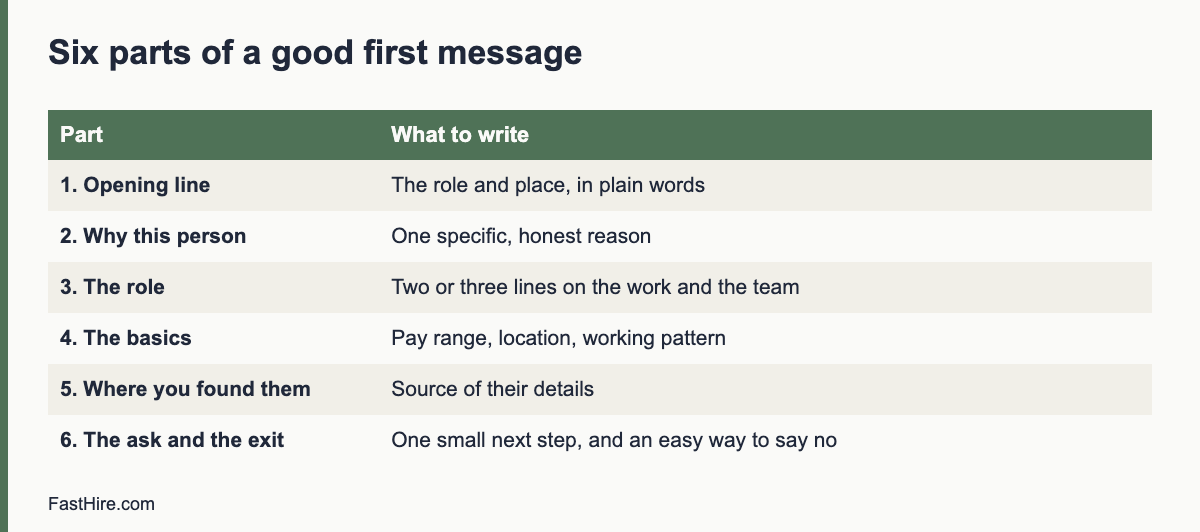
    The six parts of a good first message

    PartWhat to writeExample
    1. Subject or opening lineThe role and place, in plain words“Warehouse Planner role in Leeds, hybrid”
    2. Why this personOne specific reason, from their work or profile“You have run stock planning at a regional retailer, which is close to what we need.”
    3. The roleTwo or three lines on what they would do and the team“You would plan inbound stock for three depots with a team of four.”
    4. The basicsPay range, location, working pattern“Pay range: [range] per year. Four days on site, one from home.”
    5. Where you found themSource of their details and why you hold them“I found your profile on [source], where you list your work publicly.”
    6. The ask and the exitOne small next step, and a polite way to say no“If you would like to hear more, reply with a time for a 15-minute call. If not, no problem. I will not contact you again.”

    Eight templates you can adapt

    1. First message to someone who is not looking

    Subject: Warehouse Planner role in Leeds, hybrid

    Hello [name],

    You have run stock planning at [company], which is close to what we need for a Warehouse Planner role at [our company]. You would plan inbound stock for three depots and work with a team of four.

    Pay range: [range]. Four days on site, one from home.

    I found your profile on [source]. If you would like to hear more, reply with a time for a 15-minute call. If not, no problem. I will not contact you again.

    [Name, title, company, how to verify]

    2. One follow-up

    Subject: Re: Warehouse Planner role in Leeds

    Hello [name],

    A short follow-up in case my first message got lost. The role is still open, and the details are above. If the timing is wrong or you are not interested, tell me and I will close this thread.

    [Name]

    Send the follow-up three to five working days after the first message. Do not send more. A third message without a reply tells the person that you do not respect their time.

    3. Asking for a referral

    Subject: Do you know someone for a Warehouse Planner role?

    Hello [name],

    We are hiring a Warehouse Planner in Leeds. You know the field well, so I would value your view. Is there anyone you would suggest we speak to? You do not need to give me personal details. If you pass on this link, they can decide whether to get in touch: [link].

    Thank you for reading.

    [Name]

    4. Re-engaging a past applicant who agreed to be contacted

    Subject: A new role that may suit your earlier application

    Hello [name],

    You applied to us in [month and year] and agreed that we could contact you about future roles. We now have a [role] opening that matches [one specific must-have shown in the earlier application].

    Details: [location, pay range, link]. If you would like us to end contact you, reply “unsubscribe” and we will remove your details.

    [Name]

    5. A senior or specialist candidate

    Subject: Head of Operations at [company], confidential conversation

    Hello [name],

    I am writing about a Head of Operations role reporting to our COO. I noticed your work on [specific public project or talk], which relates to the main challenge of this role: [one sentence].

    I can share the full brief, pay range and reason for the vacancy in a 20-minute call. Would [two time options] suit you? If you prefer to receive the brief in writing first, I can send it.

    [Name]

    6. An early-career candidate

    Subject: Graduate Analyst role at [company]: no experience required

    Hello [name],

    I saw your [project or course work, specific]. We have a Graduate Analyst role where you would learn [skills]. You do not need previous paid experience. We train every new analyst for the first three months.

    Pay: [range]. Location: [place]. Apply here by [date]: [link]. If you would like to talk first, reply and I will find a time.

    [Name]

    7. Telling someone the role is not a match

    Subject: Thank you for your reply

    Hello [name],

    Thank you for taking the time to talk. After our conversation, the role needs [specific must-have you did not show], so I will not move forward with your profile for this one. I appreciate your openness. If you would like to stay in touch for future roles that fit, tell me and I will note it.

    [Name]

    8. Closing the loop on no reply

    Subject: Closing this thread

    Hello [name],

    I have not heard back, so I will assume the timing is not right and will not contact you again about this role. If that is wrong, reply at any time.

    [Name]

    Subject lines that work, and ones that do not

    WorksDoes not work
    “Warehouse Planner role in Leeds, hybrid”“Exciting opportunity!!!”
    “Question about your stock planning work”“You are a perfect match”
    “Support Lead at [company]: pay range inside”“Urgent: act now”
    “Quick question about a referral”“Confidential opportunity” with no details
    “Following up on my note from Tuesday”“Last chance”

    Avoid false urgency and exaggeration. Phrases such as “perfect match” or “last chance” are untrue in most cases and push people away. Never invent a deadline to pressure a person.

    Honest, respectful and lawful: the rules to follow

    • Be truthful. Name your company, the real role and the real pay range. Do not use a fake client name or a role title that hides the level.
    • Do not pressure. No tactics that mislead, rush or guilt a person into a reply.
    • Do not discriminate. Choose who to contact based on skills and experience, not on traits that point to protected characteristics. The US Equal Employment Opportunity Commission lists them on its page about prohibited employment policies and practices.
    • Treat data with care. In the UK and the EU, tell people where you found their details and how to object. The Information Commissioner’s Office explains this in its guidance on recruitment and selection.
    • Check messaging rules. Rules on unsolicited electronic messages differ by country and by channel. If you send in bulk, take local advice.

    Personalise without being strange

    Use public work, such as a published project, a talk or a role on a public profile. Do not mention private details, family or anything that makes the person feel watched. Keep personalisation to one line, because a long, flattering paragraph reads like a template. If you cannot write one honest sentence about why this person, do not contact them.

    Measure and improve

    Track messages sent, replies, positive replies and calls booked per template. Change one thing at a time, such as the subject line or the first sentence. Run a version for at least 20 sends before you compare. A low reply rate usually means weak targeting or a missing pay range, not a weak template. A high reply rate with many “no” answers means the message is clear but the role is not attractive. Go back to the brief and the sourcing plan. See How to source candidates and Boolean search for recruiters.

    FastHire is being built for the step after outreach, when replies become applications. It shows each job requirement next to the exact CV passage that supports it, and candidates check their fit before applying. FastHire is coming soon. It does not rank, score or reject candidates. People make every decision.

    Choosing the channel

    ChannelGood forTake care with
    EmailLonger detail, pay range, attachments such as a briefSpam filters. Use a real name, a company address and a short subject.
    Professional network messageFirst contact with people who use the network for workLength limits and platform rules on bulk messages. Do not copy details out of the platform.
    Phone or video callSenior roles, or people who asked for a callNever call without a prior message unless the person invited it. Offer a time choice.
    Text or chat appsHourly and shift work, where candidates prefer quick messagesObtain consent first, keep messages short and respect hours of the day.
    Referral intro by a mutual contactHard-to-reach specialistsThe introducer must agree to share the person’s details.

    How to handle the replies

    If the person saysYou replyNext step
    “Tell me more”Send the brief, pay range and two call times within one working dayHold a 15-minute call and ask about the must-haves
    “Not now, maybe later”Thank them, ask whether you may contact them again in six months, and record the answerAdd to talent pool only with their consent and a retention date
    “Not interested”Thank them and confirm you will not contact them again about this roleDelete or flag the record as agreed
    “How did you get my details?”Answer plainly: where you found them, why you contacted them and how to objectRecord the answer and follow any request to delete
    “What is the salary?”Give the range. If it is not approved yet, say so and give a dateEscalate to the hiring manager to fix the range

    Reply within one working day. Quick replies protect your reputation and your reply rates. If you are away, set an automatic reply that names a backup. If someone asks you to end contact, end it and note it.

    A short checklist before you send

    1. Is the first line specific to this person, and true?
    2. Are the role, place and pay range clear without opening a link?
    3. Have I said where I found their details?
    4. Is the ask small, and is the exit polite?
    5. Could I send the same message to a colleague’s relative without embarrassment?
    6. Have I removed any pressure, exaggeration or false urgency?

    Frequently asked questions

    How long should a recruiter message be?

    Keep it under about 120 words. That is enough for the reason you are writing, the role, the pay range, where you found the person and a clear next step.

    Should I include the salary range?

    Yes. It saves time for both sides and builds trust. In some places pay information is also required by law in job ads or on request.

    How many follow-ups should I send?

    One. A second follow-up tends to feel like pressure. Close the thread politely if you hear nothing.

    Is it okay to contact someone on a personal email or phone?

    Be careful. Use the channel the person uses for professional contact. Do not use private details that you obtained in unclear ways, and follow the data protection rules in your country.

    What if the person says no?

    Thank them, cease contacting them about that role and delete or mark their details as agreed. A courteous exit protects your reputation.

    Related guides

    This is general information, not legal advice.

  • How to run an intake meeting with a hiring manager

    How to run an intake meeting with a hiring manager

    An intake meeting is the working session where a recruiter and a hiring manager agree what the role needs, how to judge candidates and how the process will run. Plan 45 to 60 minutes, bring a written agenda and a question list, and leave with a signed-off brief, a scorecard, a timeline and a named owner for each step.

    Key takeaways

    • Prepare before the meeting: read the old job description, the team structure and recent hires for similar roles.
    • Use a fixed agenda: outcomes, must-haves, nice-to-haves, interview plan, timeline, pay range and risks.
    • Calibrate with three or four real example CVs. This shows what the manager means in practice.
    • End with written decisions and dates. Send the notes within one working day.
    • Treat the meeting as a joint design session, not an order form.
    x

    How an intake meeting differs from a kickoff

    Many teams use “intake” and “kickoff” for the same meeting. In this guide, an intake meeting is the detailed working session between the recruiter and the hiring manager. A kickoff may add more people, such as the interview panel. If you want the broader view, read our guide on the recruiter kickoff meeting. Here the focus is the question bank and the calibration step, which many teams skip.

    Before the meeting: 30 minutes of preparation

    1. Read the old description and the team structure. Note anything that seems out of date.
    2. Look at past hires for similar roles. What worked? How long did hiring take? Use your own records, such as a hiring dashboard.
    3. Check the market. Collect a few current adverts for similar roles, with their requirements and pay if shown. Bring them as examples, not as a standard.
    4. Send a short pre-read. Ask the manager to write three bullet points: what will this person achieve in a year, what tasks will they do, and what skills are essential.
    5. Book 60 minutes and a quiet room. Block time for a 10-minute follow-up call if you need it.

    A 50-minute agenda

    MinutesTopicOutput
    0 to 5Purpose and agenda; confirm the decision-maker and approval statusShared view of what the meeting must achieve
    5 to 15Outcomes and tasks: what success looks like in 6 and 12 monthsThree outcomes, five to eight main tasks
    15 to 25Must-haves and nice-to-haves, and what evidence shows eachDraft must-have list with evidence examples
    25 to 35Calibration with sample CVsAgreement on what a strong, a maybe and a not-yet CV looks like
    35 to 42Interview plan and scorecard: stages, panel, questions, tasksPlan with owners
    42 to 47Timeline, pay range, approval and risksDates and constraints
    47 to 50Summary and next stepsList of decisions and follow-ups

    The question bank

    Outcomes and context

    • What should this person have achieved after six months and after twelve months?
    • What is the most important problem they will solve?
    • Why is the role open now? Is it new, a replacement or a change?
    • Who will they work with every day? What do those people need?
    • What would make you say, a year from now, that this was a great hire?

    Requirements and evidence

    • Which three skills or experiences does the person need on day one? What could they learn in the first three months?
    • For each must-have, what would we see in a CV or hear in an interview that proves it?
    • Which requirements come from the work, and which come from habit or past hires?
    • Would a person with different experience but the same skill succeed? Which routes into this role are valid?
    • Is any requirement a qualification the law or a regulator requires?

    Process and logistics

    • Who will be on the interview panel? Can all of them attend in the next two weeks?
    • How fast can you give feedback after each stage? What turnaround do you commit to?
    • What is the pay range, what flexibility exists, and who approves an offer?
    • What is the target start date? What notice periods are likely?
    • What would make you pause or end the search?

    You can send the question bank before the meeting. Managers who see the questions in advance often arrive with better answers.

    The calibration step: use real CVs

    Words such as “strong communication” or “senior” mean different things to different people. Calibration turns them into examples. Take three or four anonymised CVs, for example from a past search with names removed or from public sample CVs, and ask the manager to mark each as strong, maybe or not yet. Then ask why. Write the reasons as evidence statements, such as “has led a team of at least five for a year” or “has handled customer complaints in writing”. Look for hidden criteria such as school names or employer prestige. If they appear, discuss whether they are job-related.

    This step also exposes disagreements between the manager and other interviewers, which are much easier to fix before the search than in the debrief. Our guide on interview debrief meetings shows how disagreements surface later if they are not resolved earlier.

    Keep the process fair

    • Check each requirement for a protected trait. “Digital native”, “recent graduate” and “young team” signal age. “Native speaker” can signal national origin. Use a precise skill level instead.
    • Do not accept cultural fit as a criterion. Ask for values-related behaviours that can be observed, and define them.
    • Agree the same questions for every candidate. See structured interviews.
    • Keep notes about work, not people. Record evidence for requirements.

    The official sources on discrimination give the baseline. In the US, see the Equal Employment Opportunity Commission page on prohibited employment policies and practices. In Great Britain, see the Acas page on recruitment. In the EU, see the Employment Equality Directive and your national law.

    After the meeting: the one-page brief

    Send a one-page summary within one working day. Ask the manager to reply “agreed” or to mark changes. Use this layout.

    SectionContent
    Role and reporting lineTitle, team, manager, location or remote rules
    OutcomesThree outcomes for the first year
    Main tasksFive to eight
    Must-havesThree to five, each with the evidence that shows it
    Nice-to-havesUp to five, not used for rejection
    ProcessStages, panel, tasks, scorecard, expected dates
    Pay and approvalsRange, who approves, any limits
    Risks and open pointsItems to fix, with owner and date

    Save the brief where the whole team can find it. It becomes the base for the advert, the screening sheet and the scorecard. If the manager later asks to change the requirements, update the brief and tell everyone who is affected.

    Common problems, and what to do

    ProblemResponse
    The manager has no timeOffer a 30-minute version with the three most important sections, and a short follow-up by email
    The manager lists 15 must-havesAsk which three the person needs on day one. Move the rest to nice-to-have or training
    The manager says “I will know it when I see it”Use calibration CVs to turn this into evidence statements
    The manager wants a copy of the last hireAsk what the last hire did well and what was missing. Describe those as outcomes
    The manager changes requirements mid-searchAgree a rule: changes are logged, and the team reviews already declined CVs against the new rule

    FastHire is being built for the step right after this meeting. It shows each job requirement next to the exact CV passage that supports it, so the must-haves you agreed become checks a reviewer can see. FastHire is coming soon. It does not rank, score or reject candidates. People make every decision.

    A worked example (fictional)

    This example is invented to show how the agenda works in practice. A recruiter meets a hiring manager who needs a customer support team lead.

    TopicWhat the manager first saidWhat the recruiter askedResult in the brief
    Outcomes“Someone who can fix our support problems.”“What would be fixed after six months? How would we know?”Cut the time customers wait for a first reply; train two new agents; write a weekly summary of top issues
    Must-haves“Five years as a team lead, a degree, CRM experience.”“Which of these would a strong person lack on day one, and could you train it?”Must-have: has led or coached other support staff, paid or unpaid; handles complaints in writing. CRM: nice-to-have, taught in the first month. Degree: removed
    Evidence“I will see it in the CV.”“What would you see? Show me on a sample CV.”Evidence: a CV line that names the team size or the coaching task and the outcome
    Process“We will chat to a few people.”“Who will interview? What will each ask? When will you give feedback?”Two stages, a panel of two, one scorecard, feedback within two working days

    The manager started with a status list and ended with a short list of observable skills. The change came from a few direct questions and one sample CV, not from a debate. The recruiter then sent the one-page brief within a day, and the manager replied “agreed” with one correction.

    Use the meeting to set service levels

    An intake meeting is also the best moment to agree what each side promises. Write two short lists in the brief: what the recruiter will do and what the manager will do.

    Recruiter commits toHiring manager commits to
    Share a first shortlist with evidence by an agreed dateReview the shortlist within an agreed number of working days
    Update the manager weekly, even if there is no newsAttend scheduled interviews or give notice of changes
    Tell every candidate the outcomeSubmit scorecards within one working day after each interview
    Raise problems early, such as a thin pipelineSay early if requirements change

    Agreeing these points at the start makes them easier to enforce later. When a delay occurs, you point to a shared note instead of starting an argument. For ways to track the numbers behind these promises, see eight recruitment numbers worth tracking.

    Remote and multi-country intake

    If the manager and the recruiter work in different places, run the intake by video and share a document during the call. Use one shared document so that both of you edit the same brief and nobody keeps a private version. If the role covers more than one country, add a section that states, for each country, the employment type, the pay range, the language needed, the work authorisation rules and the notice periods. Rules differ across the US, the UK and the EU, so involve HR or a local adviser early. Our guide to hiring in another country lists the main questions.

    Time zones add friction. Agree the hours when the manager can respond to candidates and the hours for interviews. Write them in the brief, and put them in the candidate preparation message too.

    Frequently asked questions

    How long should an intake meeting be?

    Aim for 45 to 60 minutes for a new role. A repeat role with an up-to-date brief can take 20 to 30 minutes.

    Who should attend?

    The recruiter and the hiring manager. Add a peer or the HR partner if the role is new or sensitive. Keep the group small, so decisions are made in the room.

    Should I use a form instead of a meeting?

    A form helps with the pre-read, but a conversation finds disagreements and unclear words. Use both.

    What if the manager is senior and pushes back on my suggestions?

    Bring evidence: past hires, market adverts and candidate feedback. Offer a short test period for the new approach and agree what you will check. Our guide on pushing back on unrealistic requests has scripts.

    Do I need a new intake for each opening of the same role?

    Review the existing brief. If the work has changed, run a short intake. If not, confirm the details and update the timeline.

    Related guides

    This is general information, not legal advice.

  • How to build a talent pool with consent

    How to build a talent pool with consent

    A talent pool is a list of people you may contact about future roles. To build one fairly, ask each person clearly, explain what you will do with their data and how long you will keep it, make saying no easy, contact them only about jobs, and review the list on a schedule. In the UK and EU, consent must be freely given, specific and easy to withdraw.

    Key takeaways

    • Ask for consent separately from the job application, with a clear yes or no choice that is not pre-ticked.
    • Say what you will send, how often, how long you will keep the data and how to leave.
    • Do not add people to the pool without asking. That includes declined applicants and people you found online.
    • Review the pool at set times, delete expired entries and honour withdrawals fast.
    • Only contact people about jobs that match what they told you they want.
    x

    What a talent pool is, and is not

    A talent pool is a group of people who have agreed to hear from you about future openings. It can include past applicants who were close, former employees, people who met you at events and people who joined your careers page mailing list. It is not a database of everyone whose CV you have ever received. Keeping CVs “just in case” without asking is a common mistake and a data protection risk.

    A pool can save time. When a role opens, you can start with people who already know you and have shown interest. But a pool is worth only as much as its freshness and its trust. An out-of-date list of people who never agreed to be there harms both.

    The legal picture, in outline

    RegionMain pointsOfficial source
    EUGDPR: consent must be freely given, specific, informed and unambiguous, shown by a clear affirmative act, and as easy to withdraw as to give. You must also have a lawful basis for any other use and give a privacy notice. Marketing-style messages are also subject to e-privacy rules in member statesGDPR; European Data Protection Board
    UKUK GDPR and the Data Protection Act 2018 apply. Rules on electronic messages (PECR) can apply to emails and texts. The regulator publishes guidance on consent and on recruitmentICO recruitment and selection
    USNo single federal rule on talent pools. Federal and state laws on email, telephone and text messaging, and some state privacy laws, may apply. Check each state where you hireCheck state attorney general pages and the Federal Trade Commission for email rules

    Some employers rely on legitimate interests to contact people they have found through public sources. In the UK and EU, this requires a balance test and a prompt notice to the person, usually within one month. Many privacy regulators expect special care with unsolicited approaches. Consent is the simpler path for a pool. Ask a data protection adviser which basis fits your case. Our guide on GDPR for job applicants explains the lawful bases.

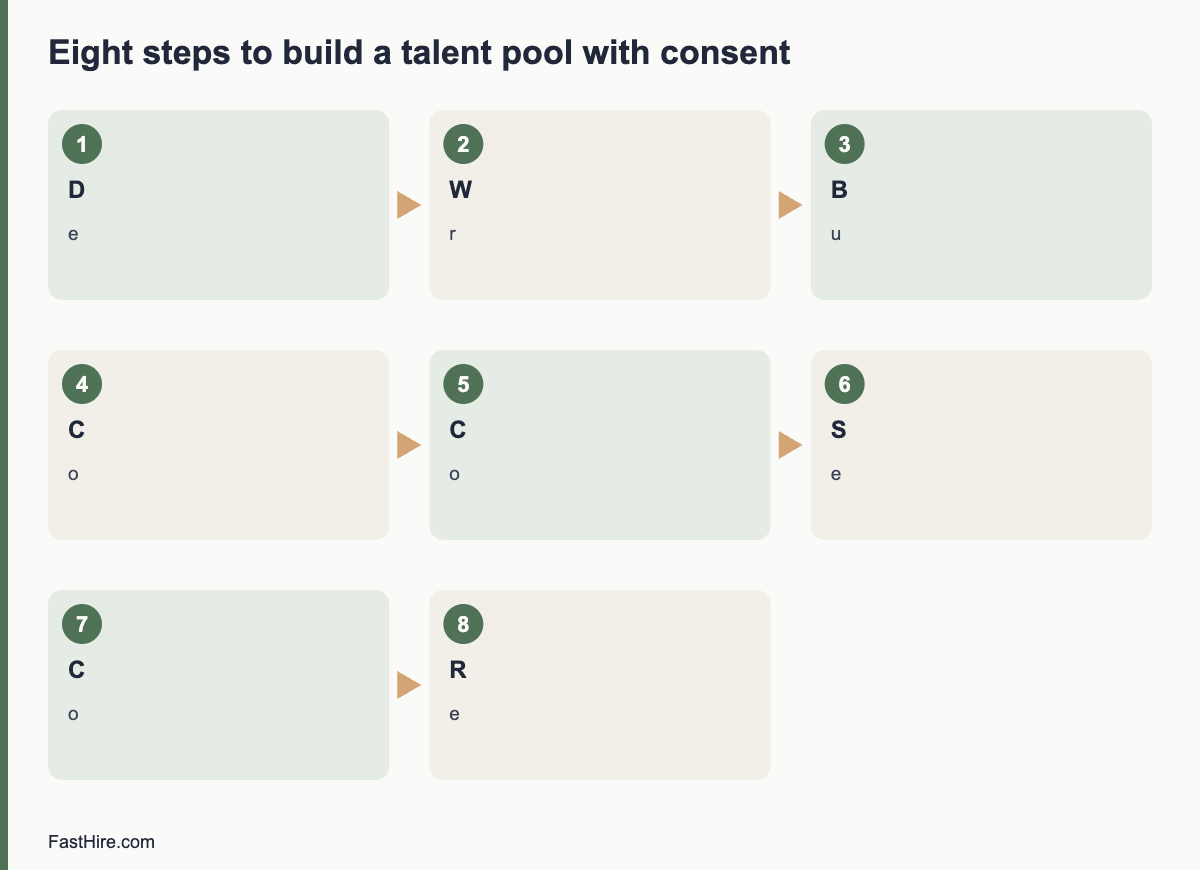
    Eight steps to build a pool with consent

    1. Decide the purpose. For example: “to tell you about roles in customer support and operations in Berlin and remote”. The narrower the purpose, the clearer the consent.
    2. Write the promise. What will you send, how often, and for how long will you keep the data? Examples: “no more than one message a month, only about roles that match”, “deleted after 12 months unless you renew”. The figures here are examples. Choose your own.
    3. Build an opt-in. A separate checkbox that is not pre-ticked, on the application form or a sign-up page. Keep the wording simple. Keep it independent from the application, so that saying no does not affect the application.
    4. Collect the minimum. Name, contact details, interests, location and work authorisation if needed. Skip anything not needed to match roles.
    5. Confirm. Send an email that confirms what the person agreed to, with a link to change or withdraw.
    6. Record consent. Store the date, the wording they saw, the source and what they agreed to. You may need to show this later.
    7. Segment. Tag people by role family and location so you can match them to the right roles.
    8. Review and refresh. Remove people after the period you promised, or ask them to renew. Delete anyone who withdraws within the legal time limit, and aim for the same day.

    Wording for the opt-in

    Stay in touch
    Would you like us to keep your details and tell you about future roles at [Company] that match your interests? You can say no and still apply for this job.
    [ ] Yes, keep my details for [period] and email me about roles in [areas]. We will email no more than [frequency] and you can leave at any time with one click.
    We use your details only for this purpose. Read our privacy notice at [link].

    Do not use a pre-ticked box, bundle this with the application consent or hide it in long terms. In the EU and UK these methods are not valid consent.

    Where people come from, and what to do

    SourceWhat you can doWhat to avoid
    Candidates who applied and were declinedAsk in the decline message if they would like to stay in touch. Link to the opt-inAdding them to the pool automatically
    People who sign up on your careers pageUse the sign-up as the opt-in, with a clear confirmationUsing the email for general marketing
    Event contactsAsk in person or by follow-up email whether they agree to hear about rolesTyping every business card into the system without asking
    Former employeesAsk in the exit process whether they want alumni updatesAssuming they agreed in their employment contract
    People found on public profilesSend a short individual message that explains who you are and how you found them, and ask if they want to hear from you. Respect any request not to contact themBulk-loading them into the pool or scraping profiles

    Be careful about scraping profile sites. Platforms have terms that restrict automated collection, and data protection law still applies to public information. Contact people one by one, with a clear and honest message.

    How to use the pool fairly

    • Match on skills and interests, not on traits that could be protected. Do not filter on age, sex, nationality or family status.
    • Record the evidence for each match. Use the same job-related criteria as for any other applicant. See screening resumes against must-haves with evidence.
    • Give pool members the same process. They do not skip the structured interview because you know them.
    • Tell them the outcome. A person who agreed to hear from you deserves a reply if they apply for a role through the pool.
    • Check who your pool leaves out. If the pool is mostly people from the same schools or networks, widen your sources.

    Measure and clean

    Track four numbers: the size of the pool, the share who open or reply, the number of hires from the pool and the number of withdrawals. These are your own numbers. Do not compare them to industry benchmarks unless you have an official source. A pool with many silent entries needs cleaning. Remove people who have not engaged after the period you promised. A shorter, current pool is more useful and lower risk than a long one that nobody trusts.

    Set a calendar date for a full clean every six months. Export the list, remove expired entries, delete from every place (system, email tools, spreadsheets) and keep a short log of what you removed. See how long to keep rejected applicant data for the retention method.

    What to send, and what not to send

    Good messagePoor message
    “A role opened in operations in Lisbon that matches your interests. Here is the advert. Reply if you want to apply, or tell us if you no longer want to hear from us.”“We have many exciting roles! Click here!” sent to everyone
    Short, specific, easy to leaveLong, vague, with a hidden unsubscribe link
    Sent only when a match existsSent weekly because the system allows it

    FastHire is being built for the step where you read applications. It shows each job requirement next to the exact CV passage that supports it, so a person can check the evidence quickly, whether the CV came from a talent pool or a new application. FastHire is coming soon. It does not rank, score or reject candidates. People make every decision.

    A consent record template

    Keep one record for every pool member. You need it to show what the person agreed to, and to find them when they ask to leave.

    FieldExample (fictional)
    Person IDTP-0042
    Date and time of consentDate and time
    SourceCareers page sign-up form
    Exact wording and version shownVersion 2 of the opt-in text, link to a saved copy
    What they agreed toEmails about operations roles in Lisbon, up to once a month
    Review or expiry dateDate set from the period you promised
    Withdrawal dateBlank until withdrawn
    Last contact and outcomeDate; applied / no reply / opted out

    Store the record where only the recruiting team can see it. Keep a copy of each version of the opt-in wording with the date it was in use. If the wording changes in a way that widens the purpose, ask existing members again.

    Monthly routine for the pool owner

    1. Process every withdrawal request received. Aim to complete it within one working day.
    2. Check for entries that reach their expiry date in the next 30 days, and send the renewal message.
    3. Remove expired entries from all systems.
    4. Review bounced emails and remove invalid addresses.
    5. Match new roles against the pool using the written criteria, and record the evidence for each match.
    6. Update the four numbers: pool size, response share, hires from the pool and withdrawals.

    The routine takes under an hour a month for a small pool. It keeps the list honest, and it gives you a short record to show a regulator or a candidate if they ask how the pool works.

    When a pool is not the right tool

    A talent pool takes effort to run well. If you hire a handful of people a year, the cost may be higher than the benefit. In that case, a simple option works: keep a short list of people who asked to be told about specific roles, and write to them when one opens. Or invite declined candidates to re-apply when a new role appears. These options need less data and less upkeep, and they are easier to explain.

    Frequently asked questions

    Is a talent pool the same as keeping CVs on file?

    No. Keeping CVs on file for the current process is one purpose. A pool for future roles is a different purpose and needs its own basis, often consent, and its own retention period.

    Can I add declined applicants to the pool?

    Only if they agree. Ask in the decline message and give a link to opt in. Do not add them automatically.

    How long can I keep pool entries?

    Choose a period you can justify, state it in the opt-in, and ask people to renew before it ends. Many employers choose a year or less; your adviser can confirm what fits.

    Do I need to remove people when they ask?

    Yes. In the UK and EU, withdrawal of consent must be easy and acted on promptly. In the US, state laws and email rules may also give opt-out rights.

    Can I contact people from a public professional profile?

    You can send a first, individual message that explains who you are, where you found their details and what you want. Respect a request to end contact. Check the rules in each country.

    Related guides

    This is general information, not legal advice.
  • How to build a hiring dashboard in a spreadsheet

    How to build a hiring dashboard in a spreadsheet

    You can build a useful hiring dashboard in a spreadsheet in about two hours. Use one tab for raw candidate data, one tab for definitions, and one tab for summary tables that update with formulas. Keep one row per candidate per role, record the date of each stage, and read the results monthly.

    Key takeaways

    • A spreadsheet is enough for a team that hires fewer than about 30 people a year. After that, manual entry becomes the problem.
    • Use three tabs: Data, Definitions and Dashboard. Never type into the Dashboard tab.
    • Record dates, not statuses. Dates let you calculate every time metric.
    • Use drop-down lists for source, stage and decline reason to keep the data clean.
    • Protect personal data: limit access, avoid sensitive fields and delete on schedule.
    x

    When a spreadsheet is the right tool

    A spreadsheet suits a small team, a new hiring process, or a pilot before you pay for software. It is easy to change, everyone knows how to read it, and it forces you to decide what you want to measure. It works less well when several recruiters edit the same file, when volume reaches hundreds of applicants per role, or when you need an audit trail. At that point, see our guide on choosing recruiting software if it is available, or use the questions in the section on moving on below.

    Treat this dashboard as a way to learn what you need. The metrics themselves are explained in eight recruitment numbers worth tracking. This guide shows how to build them.

    Step 1: Design the Data tab

    One row equals one candidate applying to one role. If the same person applies to two roles, make two rows. Use these columns.

    ColumnTypeNotes
    Candidate IDNumberUse a code such as C-0001. Do not use names in reports.
    Role IDTextA short code, such as CS-2026-01
    SourceDrop-downCareer page, job board, referral, agency, outreach, event, other
    Date appliedDateThe day the application arrived
    Date screenedDateThe day the screening decision was recorded
    Date first callDateLeave blank if no call
    Date interviewDateThe date of the first interview
    Date decisionDateThe day the final decision was made
    Date offerDateLeave blank if no offer
    Date acceptedDateLeave blank if declined or no offer
    OutcomeDrop-downDeclined at screening, declined after call, declined after interview, offer declined, hired, withdrew
    Decline reason codeDrop-downMissing a must-have, withdrew, accepted other offer, pay, other
    Hiring manager response daysNumberDays between request and reply for this candidate
    Outcome sent dateDateThe day the candidate was told

    Keep names, emails and CVs in your applicant system or a separate protected folder. The dashboard needs dates and codes, not personal details. This also lowers your data protection risk. The UK Information Commissioner’s Office gives guidance on recruitment and selection, and the US Equal Employment Opportunity Commission explains record-keeping duties on its page on recordkeeping requirements.

    Step 2: Add data validation

    Most spreadsheet errors are typing errors. Use data validation to restrict what can be entered.

    1. Drop-down lists for Source, Outcome and Decline reason. In Google Sheets, use Data, then Data validation, then Drop-down. In Excel, use Data, then Data Validation, then List.
    2. Date rules for every date column, so text such as “next Tuesday” is refused.
    3. A check column that flags rows where a later date is earlier than a previous date. Example formula: =IF(AND(H2<>””,H2<D2),”Check”,””).
    4. Frozen header row and a filter, so people can sort without breaking the table.
    5. A named range or table for the full data area, so formulas extend as you add rows.

    Step 3: Write the Definitions tab

    This tab has three columns: Metric, Start event and end event, and Rule for missing data. Write them in plain language. Examples are below.

    MetricDefinitionMissing data rule
    Time to hireDate accepted minus Date applied, in calendar daysExclude rows with no acceptance
    Time to first responseOutcome sent date or first call date (whichever is earlier) minus Date appliedExclude rows with neither
    Stage conversionCount in the next stage divided by count in the current stage, for one roleShow “n/a” if the current stage has fewer than 5 people
    Offer acceptance rateCount with Date accepted divided by count with Date offerShow “n/a” if fewer than 5 offers
    Manager responseAverage of Hiring manager response days, by managerExclude blanks

    Step 4: Build the Dashboard tab

    The Dashboard tab contains only formulas. Never type numbers into it. Below are formulas that work in both Google Sheets and Excel. Replace the ranges with your own. Row 2 onward holds data, and columns follow the table above.

    NumberExample formulaPlain meaning
    Applicants for a role=COUNTIFS(Data!B:B,A2)Count rows with this Role ID
    Hired for a role=COUNTIFS(Data!B:B,A2,Data!K:K,”Hired”)Count rows with the outcome “Hired”
    Offers made=COUNTIFS(Data!B:B,A2,Data!I:I,”<>”)Count rows with an offer date
    Offer acceptance=IFERROR(COUNTIFS(Data!B:B,A2,Data!J:J,”<>”)/COUNTIFS(Data!B:B,A2,Data!I:I,”<>”),”n/a”)Accepted divided by offers
    Median time to hireUse a helper column on Data: =IF(J2<>””,J2-D2,””) then =MEDIAN(helper range)Middle value, not distorted by one slow hire
    Applicants by source=COUNTIFS(Data!C:C,”Referral”)Count rows with that source
    Stage conversion, screening to call=IFERROR(COUNTIFS(Data!B:B,A2,Data!F:F,”<>”)/COUNTIFS(Data!B:B,A2,Data!E:E,”<>”),”n/a”)Candidates with a call date divided by candidates with a screening date

    Add one pivot table for each of these views: applicants and hires by source, outcomes by role, and average manager response days by manager. Pivot tables take two minutes to build and refresh with one click.

    Charts that help

    • A funnel table, not a fancy chart. List the stages in order with counts and percentages. It is easier to read than most funnel charts.
    • A simple bar chart of median days between stages. The tallest bar shows where candidates wait.
    • A line of applicants per week for each open role. This shows when an advert slows down.
    • A table of open roles with days open and next action. Add a column with the owner.

    Step 5: Set a routine

    A dashboard that nobody updates is worse than none, because it looks accurate. Agree on three habits.

    1. Update within one working day. Whoever changes a candidate’s stage also enters the date. It takes ten seconds at the moment and an hour a week later.
    2. Check the Check column every Friday. Fix errors before they reach the Dashboard.
    3. Review once a month. Use the agenda in the metrics guide. Write actions in a text box under the numbers.

    A fictional example

    This example is invented to show how to read the dashboard. A small team has three open roles in one quarter: a customer support agent, an office coordinator and a bookkeeper. After two months the Dashboard shows the following.

    RoleApplicantsReached interviewOffersAcceptedMedian days, application to decision
    Customer support agent9682219
    Office coordinator4161024
    Bookkeeper1431112

    What can the team learn? The office coordinator role has one offer that was declined. The decline reason column says “pay”. That is one case, not a pattern, but it is enough to check the pay range against the advert. The customer support role has a high number of applicants and 8 interviews, so the team could ask whether the screening criteria are clear enough. The bookkeeper role has few applicants, so the team could check the advert and the channels. The numbers do not give the answer. They tell you where to look.

    Privacy and fairness rules for the spreadsheet

    • Limit access. Share the file only with people who need it, and remove access when people leave the team.
    • Avoid sensitive fields. Do not add columns for age, ethnicity, health or similar details to the same sheet. If you need monitoring data for fairness checks, collect it where the law allows, keep it separate, and follow the guidance of your country.
    • Use codes. Candidate IDs let you discuss patterns without exposing names in meetings.
    • Delete on schedule. Decide how long you keep rows, and delete or anonymise them when the period ends. See your country’s rules. In the EU and UK, data protection law requires you to keep personal data only as long as needed. The European Data Protection Board publishes guidance on the GDPR.
    • Do not use the sheet to decide about people. It shows process patterns. A person must make each hiring decision, using evidence from the CV and interview.

    When to move beyond the spreadsheet

    Signs that you have outgrown it: more than two people need to edit at once and overwrite each other; you hire more than about 30 people a year; you need to send messages from the same place; you must show who changed what and when; or you spend more than an hour a week fixing data. At that point, write down your needs first. A list of the questions to ask vendors is in our recruiting software guide when it is published. Your Data tab columns become your list of required fields.

    FastHire is being built for the screening step in that process. It shows each job requirement next to the exact CV passage that supports it, so reviewers can check the evidence quickly. FastHire is coming soon. It does not rank, score or reject candidates. People make every decision.

    Common spreadsheet problems and fixes

    ProblemCauseFix
    Numbers change when someone sorts the dataFormulas use fixed row numbersUse whole-column references or a named table
    The same source appears under three namesFree-text entryReplace with a drop-down list and clean the old rows once
    Median time looks too lowRows without an acceptance date are counted as zeroUse helper columns that return blank text when the date is missing
    Two people overwrite each other’s changesOne shared file, no rulesAgree one owner per role, or use version history and review it weekly
    Nobody trusts the dashboardErrors were found once and never explainedKeep a short change log on the Definitions tab with date and reason for each fix

    A 30-minute handover note

    If the person who built the dashboard leaves, the file must still work. Write a one-page note and store it on the Definitions tab. The note should say who owns the file, where the master copy is, which columns people may edit, how to add a new role, how often the data is checked and who to ask for help. Add three screenshots: the Data tab, the Dashboard tab and the drop-down list settings. Test the note by asking a colleague to add a new role and a new candidate using only the note. Every place where they hesitate is a place to improve it.

    Finally, run a yearly clean-up. Archive the previous year into a separate protected file, remove personal data you no longer need, and start a new Data tab with the same columns. This keeps the sheet fast and respects your retention rules.

    Frequently asked questions

    Should I use Excel or Google Sheets?

    Either works. Google Sheets is easier for several people editing at once. Excel is better for large files and offline work. Choose the one your organisation already supports and secures.

    How many rows can a spreadsheet handle?

    Both tools can handle tens of thousands of rows, but they become slow and hard to check well before that. If you pass a few thousand rows, consider a database or an applicant system.

    Should I include candidate names in the sheet?

    Not in the dashboard. Use IDs and keep the link between IDs and names in a protected place. This limits the harm if the sheet is shared by mistake.

    How do I count time when a role is paused?

    Write a rule in the Definitions tab, for example “the clock pauses while the role is paused” and add pause start and end columns. Whatever you choose, apply it to all roles.

    Can I build this without formulas?

    Yes. Pivot tables can produce most of the counts. Formulas are needed only for medians and some conversion rates.

    Related guides

    This is general information, not legal advice.

  • How to read market data before you open a role

    How to read market data before you open a role

    Before you open a role, check four things in market data: how many people have the skills, what employers offer for similar work, how long similar searches take, and what rules apply. Use official statistics for context, live adverts for detail, and your own records for what actually happens in your company. Treat every number as a range, not a promise.

    Key takeaways

    • Use three layers: official statistics, live job adverts and your own hiring records.
    • Official data shows broad trends and pay bands. It rarely shows the exact local market for your role.
    • Read pay as a range. Check the date, the region and the job definition behind every figure.
    • Share findings with the hiring manager as options, not as verdicts.
    • Write down the source, date and limits of each number you use.
    x

    Why check the market first

    A role opened with wrong assumptions wastes weeks. A pay range below the market brings few applicants. A skill list that only a handful of people in your region can meet brings a thin pipeline. A start date that ignores notice periods brings declined offers. Fifteen minutes of research before the intake meeting lets you give the manager a realistic picture and prepare options if you need to push back.

    The three layers of data

    LayerWhat it gives youLimits
    Official statisticsOccupation definitions, typical pay bands, employment trends, regional differences, labour market conditionsPublished with a delay; broad job categories; may not match your exact role or skills
    Live job advertsWhat employers ask for and offer now; titles used; location and remote rulesAdverts are asks, not outcomes; pay may be missing; duplicates inflate counts
    Your own recordsHow long searches took, where candidates dropped out, offer acceptance, reasons for declinesSmall samples; reflect your brand and process as well as the market

    No single layer is enough. When the three agree, you can be more confident. When they disagree, ask why. A role that official data shows as widely available but where your last two searches had few applicants may point to your advert, your pay or your location rules rather than the market.

    Where to look: official sources

    RegionSourceWhat you can find
    United StatesBureau of Labor Statistics Occupational Outlook HandbookJob duties, education, pay and outlook by occupation
    United StatesBLS Occupational Employment and Wage StatisticsWage estimates by occupation and area
    United StatesCareerOneStopOccupation profiles, wage and licence information, sponsored by the US Department of Labor
    United KingdomOffice for National Statistics: employment and labour marketEmployment, vacancies and earnings data
    United KingdomGOV.UK National Minimum Wage ratesLegal pay floors, not market rates
    European UnionEurostat labour market statisticsEmployment and unemployment data by country
    European UnionEURESLabour market information, mobility rules and vacancies across the EU

    These pages change, and the names of their datasets change too. Open the current page and read the notes on definitions and dates. Where a page offers pay by occupation, check the job definition. A “software developer” in a statistical table may cover a wider group than the role you are hiring.

    A step-by-step method: 45 minutes

    1. Define the role in words. Write the job in one sentence and list three must-have skills. Use plain titles, not internal ones.
    2. Find the official occupation. Use the occupation lists in the sources above. Note the code or name.
    3. Read pay and outlook. Note the pay range, the date and the area. Do not copy a single figure. Write “the page shows a range from X to Y for [area] in [year]” in your notes.
    4. Collect 10 live adverts. Search with three different job titles. Record title, location, remote rules, required skills and pay if shown. Remove duplicates.
    5. Compare requirements. Which skills appear in most adverts? Which appear in only one? This shows what the market treats as standard.
    6. Compare pay. If many adverts do not show pay, note that. Where pay laws require disclosure, the numbers will be easier to find; rules differ by place.
    7. Check your own records. For the last two similar searches, note applicants, time to hire and reasons for declined offers.
    8. Write a one-page summary. Three findings, two risks and two options.

    Reading the numbers carefully

    CheckWhy it matters
    Date of the dataPay and demand change. A figure from two years ago may be out of date.
    RegionNational averages hide local differences. Big cities and rural areas differ.
    DefinitionJob titles vary. Read what the category includes.
    Average or medianA median is closer to a typical case. An average can be pulled by a few high figures.
    Sample sizeSmall samples are unreliable. Look for a note.
    SourceIs it a government statistic, a company marketing report or an anonymous post? Weigh them differently.
    Full compensationPay, bonus, benefits and flexibility all matter to candidates.

    Be careful with salary reports from commercial sites. Some are useful, but many use self-reported data. Treat them as a clue and compare with official figures. Do not quote a figure to a manager without saying where it came from and when.

    What to ask about pay and the law

    Pay questions have legal sides. In several places, laws now ask employers to share pay ranges or to avoid asking for pay history. These rules differ across US states, the UK and EU countries, and they are changing. We cover them in our guide to pay transparency. Until then, check the official page for each place you hire, and do not set pay for a role by looking at a candidate’s past salary. Our guides on hiring in another country and the cost to hire an employee explain related costs.

    Turning findings into a conversation

    Share the summary in the first five minutes of the meeting. Use plain statements: “Official data shows a range of X to Y for this occupation in [area]. Of ten live adverts, seven offer more than our range. Our last two searches received [number] applicants.” Then ask, “What would you like to do?” Give two or three options. For example: raise the range, accept less experience and plan training, or extend the timeline. The manager decides.

    Mistakes to avoid

    • Treating one salary figure as the market. Always give a range and the source.
    • Copying competitors’ adverts. Use them to learn what the market asks for, not to copy their words or their requirements.
    • Ignoring supply. A role that needs rare skills in a small town needs a different plan, such as remote work or training.
    • Forgetting notice periods. Local norms differ. Ask candidates in the first conversation.
    • Skipping your own data. Your history is the most relevant evidence you have.

    FastHire is being built for the screening stage that follows the market check. It shows each job requirement next to the exact CV passage that supports it, so you can see how a requirement affects the pool of real applicants. FastHire is coming soon. It does not rank, score or reject candidates. People make every decision.

    A worked example (fictional)

    This example is invented to show the method. The numbers are not real market data. A recruiter prepares for an intake meeting on an accounts payable specialist role in a mid-sized city.

    StepFinding (invented)What the recruiter does with it
    Official occupationThe closest official category covers bookkeeping and accounting clerks, with a wide pay range for the regionNotes the range and the date, and writes down that the category is broad
    Ten live advertsEight ask for experience with a specific accounting system; three ask for a professional qualification; two show payMarks the system experience as common and the qualification as less common
    Pay in advertsTwo adverts show ranges that overlap the company range at the lower endNotes that the sample is tiny and that most adverts hide pay
    Own recordsThe last search received 38 applicants and took longer than planned because two offers were declined for pay reasonsPrepares an option to raise the range or to hire for potential
    Notice periodsTwo shortlisted candidates in the last search had long notice periodsAdds a start date range to the brief

    The recruiter then writes a one-page summary: three findings (system experience is standard, the qualification is not, pay was a reason for declines), two risks (the pay range is at the low end, start dates will be later than the manager hopes) and two options (adjust the range, or hire for core skills and train on the system). The manager sees facts and choices, and decides.

    A one-page market summary template

    SectionFill in
    Role and location
    Official source, date and range
    Number of live adverts reviewed and date
    Skills in most adverts
    Skills in few adverts
    Pay shown in adverts (range, number of adverts that show pay)
    Remote or hybrid norms
    Our last two similar searches: applicants, time to hire, reasons for declines
    Three findings
    Two risks
    Two options

    Keep the summary short and put the sources in a footnote or an appendix. If you repeat the exercise for the same role family each quarter, you will build a record that shows how the market changes and how your own results compare.

    Fairness and the law when you use market data

    • Use market data to set the role, not to filter people. Pay and skills data describes the market. It says nothing about any one candidate.
    • Do not set pay from a candidate’s earlier salary. Several places restrict asking about pay history. Check local rules.
    • Keep pay fair inside the company. Compare with people in similar roles so that the new offer does not create gaps that cannot be explained by job-related reasons.
    • Be careful with scraped data. If you collect candidate data from public sources, GDPR and other laws still apply. See GDPR for job applicants.

    Keeping the research current

    Market data ages quickly, so build a light routine. Once a quarter, update your summary for the three roles you hire for most often. Re-check ten adverts for each, note any change in pay or requirements, and add the results of your own searches from the last quarter. Store the summaries in one folder with the date in the file name. When a manager asks “what is the market doing?” you can answer in a minute with a document that shows its sources.

    Also keep a short list of questions that the data cannot answer, such as why strong candidates declined or how your brand is seen. Collect that information through direct conversations with candidates, using a short, neutral question at the end of the process. Numbers describe the market. Conversations explain your place in it.

    One last habit: write down what the data cannot tell you. Official statistics do not show how candidates feel about your brand, how fast your competitors move or how a new law may change pay in the next year. List these unknowns in your summary and say how you will learn about them, for example through candidate comments, calls with other recruiters or a short test of a revised advert. Being clear about limits makes the rest of the summary more credible with hiring managers.

    Frequently asked questions

    Which source is best for pay data?

    Official statistics are the most reliable for context, but they are broad. Use them with live adverts for your area and your own offers and declines.

    How often should I check the market?

    Before each new role, and every few months for roles you hire for often.

    What if there is no data for my role?

    Use the closest occupation, compare with adverts for related roles and talk to hiring managers and recruiters in other teams. Say that the data is limited.

    Can I use LinkedIn or job boards for data?

    They can show live adverts and titles. Be aware that their data is not a full or neutral sample of the labour market.

    Should I share market data with candidates?

    You can share the pay range for the role. Do not share other candidates’ data or private offers.

    Related guides

    This is general information, not legal advice.

  • How to reduce time-to-hire without lowering quality

    How to reduce time-to-hire without lowering quality

    To reduce time-to-hire without lowering quality, find the stage where candidates wait longest, then remove the waiting rather than the checking. Set response-time agreements, schedule interviews in blocks, run steps in parallel, use written criteria so decisions are quick, and keep candidates informed. Never cut references, legal checks or structured scoring to save days.

    Key takeaways

    • Measure the days between stages first. The longest gap is usually waiting, not work.
    • Cut waiting with agreements on response times, fixed interview blocks, and a named decision maker with a date.
    • Run steps in parallel where possible, for example references while the offer is prepared.
    • Keep the quality controls: written criteria, evidence, scorecards and legal checks.
    • Review the numbers after each search and fix one bottleneck at a time.
    x

    Speed and quality are not opposites

    Most delays in hiring are not caused by careful work. They are caused by queues: a CV waits for a hiring manager, an interview waits for a free calendar, a decision waits for a second opinion. Careful work takes hours. Waiting takes days. If you remove the waiting, you speed up the process without touching the checks that protect quality.

    The real risks to quality come from shortcuts: skipping the criteria, relying on gut feeling, or rushing the offer. A clear process lets you move faster because everyone knows what to do and when. See our guides on structured screening and the recruiter kickoff meeting for the foundations.

    Step 1: Map your stages and measure the gaps

    List every stage from role approval to start date. For your last five hires, record the date each stage began and ended. Calculate the days between them.

    StageWhat to recordQuestions to ask
    Role approved to ad liveDatesIs the brief ready? Who approves the ad?
    Ad live to closing dateDatesIs the ad period fixed? Are sources working?
    Closing to shortlistDatesHow long does screening take? Who reviews?
    Shortlist to first interviewDatesHow long to schedule?
    Last interview to decisionDatesWho decides? Is there a meeting?
    Decision to offer sentDatesWho writes the offer? Is pay approved?
    Offer sent to acceptedDatesIs the offer clear? Is there negotiation?
    Accepted to startDatesWhat is the notice period?

    Add up the gaps. In many processes, two or three of them hold most of the delay. Focus on those. If you do not have data yet, start recording it now. For definitions of the measures, see our upcoming guide on time-to-hire and time-to-fill.

    Step 2: Remove the waiting

    Agree response times in writing

    Agree a service level with hiring managers: for example, review shortlisted CVs within two working days, give interview feedback within one working day, and decide within two working days of the last interview. Write it in the kickoff notes and track it. Our upcoming guide on recruitment SLAs gives a template.

    Schedule in blocks

    Ask hiring managers to reserve two or three interview blocks in advance, for example Tuesday and Thursday afternoons for three weeks. Invite candidates into those blocks. This replaces long email chains. Use a shared calendar link if you can, and give candidates a choice of at least three slots.

    Run steps in parallel

    Instead ofDo
    Wait for all interviews, then start referencesAsk finalists for referees at the final interview and start checks as soon as a preferred candidate is clear
    Wait for the decision, then draft the offerPrepare the offer letter and pay approval while interviews run
    Screen all CVs at the endScreen weekly so that early applicants move quickly
    Book interviews one at a timeOffer the whole block to the shortlist at once

    Name the decision maker and the date

    Decisions slow down when no one owns them. At the kickoff, name the person who decides, the date and the evidence needed. Use a 30-minute debrief with scores submitted in advance. See how to run a debrief meeting.

    Pre-approve the offer range

    Agree the pay range and the offer terms before you start interviews. Waiting for an approval after the decision is a common source of a week or more of delay, and candidates may take another offer.

    Step 3: Speed up screening safely

    • Use a screening sheet with yes, no and unclear for each must-have, and a CV passage for each yes. See screening at volume.
    • Screen in time-boxed sessions of 60 to 90 minutes. Take breaks.
    • Do a quick second review of a sample, not every application.
    • Send clear acknowledgements and outcome messages from templates.
    • Use tools that show evidence next to each requirement and leave the decision to people. Do not let tools auto-reject.

    Faster screening should not mean less careful screening. The sheet, the evidence and the sample check keep quality high. Review our guide on how to reduce bias in resume screening if you worry that speed will add bias.

    Step 4: Improve the candidate side of the clock

    Candidates drop out when they wait. Reduce their waiting too.

    ProblemFix
    No news after applyingSend an acknowledgement at once and a status update at set dates
    Slow schedulingOffer self-booking links with several slots
    Unclear processState the steps and the dates in the ad and the first message
    Slow offerCall the same day as the decision, send the letter within hours
    Long notice periodsAsk early. Stay in touch during notice with short, useful messages

    Keep the tone respectful. Do not pressure candidates with false deadlines. Speed is for the process, not a weapon against the candidate.

    What not to cut

    ControlWhy it stays
    Written must-havesFairness and quality; saves time later
    Same questions for all candidatesComparability; legal defence
    Scorecards and notesEvidence; decision quality
    Legal checks such as right to workRequired by law
    References for roles that need trustRisk control
    Feedback to candidatesReputation and fairness

    If someone proposes dropping one of these to meet a deadline, ask what risk they accept and who owns it. In most cases the saved time is small compared with the cost of a bad decision. For the cost side, see what a bad hire really costs.

    A worked example (fictional)

    This example is invented. A recruiter tracks five hires and finds these average gaps: 4 days from approval to ad live, 14 days of ad time, 5 days from closing to shortlist, 9 days from shortlist to first interview, 6 days from last interview to decision, 4 days from decision to offer. That is 42 days to an offer. She sees that waiting makes up most of 9 + 6 + 4 = 19 days. She introduces three changes: interview blocks booked in advance, a 30-minute debrief within two days after the last interview, and an offer range approved before the search. In the next search the gaps become 3, 14, 3, 3, 2 and 1 days: 26 days. The quality checks are unchanged. The hiring manager reports that the scorecards made the decision easier, not harder.

    Your numbers will differ. The method is the same: measure, find the longest wait, remove it, and measure again.

    Quality check after each change

    To make sure speed does not hurt quality, track at least these four numbers: the share of hires that complete probation, the hiring manager’s rating of the hire at 90 days, the offer acceptance rate and the candidate experience rating. If any worsens after a change, review that change. Do not rely on one search. Look at several.

    MeasureHow to trackWarning sign
    Probation completionShare of hires who pass the reviewFalls after a speed change
    Manager rating at 90 daysShort form with a fixed scaleLower than before
    Offer acceptanceOffers accepted divided by offers madeFalls: offers may be unclear or slow
    Candidate feedbackTwo-question survey after the processComplaints about rushing or silence

    A 4-week improvement plan

    Do not try to fix everything at once. Use four weeks, one focus per week.

    1. Week 1: Measure. Collect dates for your last five hires. Calculate the gaps. Choose the two longest.
    2. Week 2: Agree. Meet hiring managers. Present the two gaps and propose response times. Write them down and get a yes.
    3. Week 3: Block and prepare. Book interview blocks for your next search. Pre-approve the offer range. Prepare templates for acknowledgement, invitation, hold and decline messages.
    4. Week 4: Run and review. Use the changes on the next search. Track the new gaps. After the search, hold a 20-minute review with the hiring manager.

    Share the result with the team: “Our average gap between the last interview and the decision fell from six days to two.” A concrete result makes it easier to keep the new habits and to ask for the next change.

    Message templates that save time

    TemplateWhen to useKey content
    AcknowledgementWithin hours of the applicationThanks, closing date, next-step date
    Invitation with slotsAfter screeningThree or more time options, length, format, adjustment offer
    HoldIf a date slipsNew date and reason
    Decline with brief reasonAfter screening or interviewClear result, thanks, one job-related reason for late-stage candidates
    Offer call scriptAt decisionTerms, reply date, next steps

    Store the templates in your email or tracking system. Review them twice a year. A good template cuts a five-minute task to a one-minute task. Across a hundred candidates that saves more than a day of work.

    Using data without losing the human side

    Track numbers to find bottlenecks, but do not turn people into numbers. A candidate who takes a week to reply may be changing jobs or caring for a family member. A hiring manager who delays feedback may be dealing with a customer crisis. When a gap is large, ask what caused it before you assign blame. The goal is to make the process work for people, so that speed comes from clarity and respect.

    Where tools can help, and where they cannot

    Software can speed up scheduling, reminders, tracking and the display of evidence. It cannot decide who fits the role. Choose tools that reduce waiting, such as self-booking links and status dashboards, and avoid any feature that ranks, scores or rejects people without a human decision. FastHire is being built on that principle: it shows each job requirement next to the exact CV passage that supports it, so a reviewer can check evidence quickly, while people make every decision. FastHire is coming soon.

    Whatever you use, test it against your bottleneck list. If your delay is in decisions, a scheduling tool will not help. If your delay is in screening a large pile, a tool that shows the evidence for each requirement may help. Match the tool to the gap you measured, and review the numbers after three searches.

    Start small. Pick one search, record the dates and discuss the result with the hiring manager this week.

    Official sources for this topic: ICO: recruitment and selection, EEOC: small business guidance. These pages are maintained by the authorities and may change, so check them for the current text.

    Frequently asked questions

    What is a good time-to-hire?

    It depends on the role, market and country. Compare with your own past hires first. Sources that publish averages define the measure differently, so check the definition before you compare.

    Can I shorten the process without losing quality?

    Yes, by removing waiting between steps, not by cutting criteria, scoring or legal checks.

    What is the biggest cause of delay?

    Usually scheduling and waiting for decisions. Measure the gaps to find yours.

    Should I use software to speed up hiring?

    Tools can help with scheduling, tracking and showing evidence. People should make the decisions. Check the data protection and AI rules in your country.

    How do I get hiring managers to respond faster?

    Agree response times at the kickoff, share a weekly status report and show the cost of delays in lost candidates.

    Related guides

    This is general information, not legal advice.

  • Time-to-hire vs time-to-fill: definitions and how to measure

    Time-to-hire vs time-to-fill: definitions and how to measure

    Time-to-fill and time-to-hire both measure speed, but they start the clock at different points. In common usage, time-to-fill runs from when a job requisition is approved or the job is opened until the offer is accepted. Time-to-hire runs from when a specific candidate enters your process, usually the application or first contact, until that same candidate accepts. Definitions vary between companies, so write yours down.

    Key takeaways

    • Time-to-fill measures how long a role is open. Time-to-hire measures how long a candidate takes to move through your process.
    • Definitions are not universal. State the start and end events in writing and use them every time.
    • Use the median as well as the average, because a few very long searches distort an average.
    • Track the gap between stages, not only the total. The gaps show where to act.
    • Do not compare your numbers with published benchmarks unless the definitions match exactly.
    x

    The two measures side by side

    MeasureCommon start eventCommon end eventWhat it tells youWho it helps
    Time-to-fillRequisition approved or job openedOffer accepted (some use the start date)How long the business waits for the role to be filledFinance and operations leaders planning cover
    Time-to-hireCandidate applies or is first contactedSame candidate accepts the offerHow fast your process moves a candidateRecruiters improving the candidate journey
    Time-to-startOffer acceptedFirst day of workHow long notice and onboarding prep takeHiring managers planning the work

    These are common conventions, not official standards. Some teams count time-to-fill to the start date. Others count time-to-hire from the first interview. Pick one definition per measure and write it at the top of every report. When you read a number from another source, check how it was defined.

    Why the difference matters

    Time-to-fill includes the days before you speak to anyone: waiting for approval, writing the ad, choosing channels. If time-to-fill is long but time-to-hire is short, your problem is probably at the start, such as slow approvals or weak sourcing. If time-to-hire is long, the delay is in your process: screening, scheduling and decisions. Different problems need different fixes. See how to reduce time-to-hire without lowering quality for the fixes.

    Pattern you seeLikely causeWhere to look
    Long time-to-fill, short time-to-hireSlow approval, late ad, thin sourcingKickoff, approvals, channels. See sourcing
    Short time-to-fill, long time-to-hireGood pipeline, slow processScreening, scheduling, decisions
    Both longBoth problems, or a very scarce skillStart with the largest stage gap
    Both short, but poor quality of hireRushed decisionsCheck criteria, scorecards and reference steps

    How to measure, step by step

    Step 1: Write definitions

    Create a one-page glossary: the name of each measure, the start event, the end event, the source of each date and who owns the data. Example: “Time-to-hire: days from the candidate’s application date in the tracking system to the date the candidate’s acceptance is recorded.”

    Step 2: Capture the dates

    For every role and candidate who reaches the offer, record these dates: requisition approved, job posted, application received, first screen, first interview, final interview, offer sent, offer accepted, start date. Use one sheet or your tracking system. Make the dates mandatory.

    Step 3: Calculate

    In a spreadsheet, use simple subtraction. If the offer accepted date is in column H and the application date is in column C, time-to-hire in days is H minus C. If the requisition date is in column B, time-to-fill is H minus B.

    ColumnContentExample formula
    ACandidate or role ID
    BRequisition approved date
    CApplication date
    HOffer accepted date
    ITime-to-fill (days)=H2-B2
    JTime-to-hire (days)=H2-C2
    KTime-to-start (days)=Start date minus H2

    Step 4: Summarise with the median and the spread

    The average adds all values and divides by the count. One search that took 200 days will pull the average up. The median is the middle value when you sort the numbers, and it ignores extreme cases. Report both, plus the range. In a spreadsheet use AVERAGE and MEDIAN. A short report might read: “Time-to-fill: median 38 days, average 46 days, range 21 to 98 days across 12 roles.”

    Step 5: Break it down by stage

    Calculate the days between each pair of stages. The stage gaps show the bottleneck. Use a table like the one in the article on reducing time-to-hire.

    A worked example (fictional)

    This example is invented. A recruiter tracks one role. The requisition is approved on 1 March. The job is posted on 8 March. The chosen candidate applies on 12 March, has a screen on 20 March, an interview on 27 March, a final interview on 3 April, receives an offer on 8 April and accepts on 11 April. The candidate starts on 13 May.

    MeasureCalculationResult
    Time-to-fill1 March to 11 April41 days
    Time-to-hire12 March to 11 April30 days
    Time-to-start11 April to 13 May32 days
    Posting delay1 March to 8 March7 days
    Application to screen12 March to 20 March8 days
    Final interview to offer3 April to 8 April5 days

    The recruiter sees that 7 days passed between approval and posting. That is 17 percent of the time-to-fill (7 divided by 41). The posting delay is the first problem to solve. The 8 days between application and screen is the second one. These facts guide the next change.

    Common mistakes

    MistakeEffectFix
    Mixing definitions between teamsNumbers cannot be comparedPublish the glossary
    Counting only successful hiresHides roles that failed or were cancelledTrack cancelled and open roles separately
    Using only the averageOutliers misleadReport the median too
    Recording dates from memoryErrorsUse system timestamps or a shared sheet
    Comparing with a benchmark that uses another definitionWrong conclusionCheck the source definition first
    Optimising for speed aloneLower qualityTrack quality measures too. See metrics

    Which numbers to share with the business

    Finance and operations leaders care about time-to-fill because it shows how long a seat stays empty. Hiring managers care about time-to-hire and time-to-start because they plan their work around them. Candidates care about the time between steps. Choose the right measure for the audience. A one-page report with one number per measure, the median, and one chart of stage gaps is enough. Add one sentence on what you will change.

    Be careful with named benchmarks. Published figures about average hiring times come from different sources and use different definitions. If you quote one, link to the source, state the definition, and check that the sample matches your market and role. Otherwise, compare your numbers with your own past searches.

    Data protection notes

    The dates and outcomes you record relate to identifiable people, so data protection rules apply. In the UK and EU, the GDPR requires a lawful basis, limits on how long you keep data and transparency. See the ICO employment guidance. For reporting, use aggregated numbers without names. Keep individual records only as long as you need them. This is general information, not legal advice.
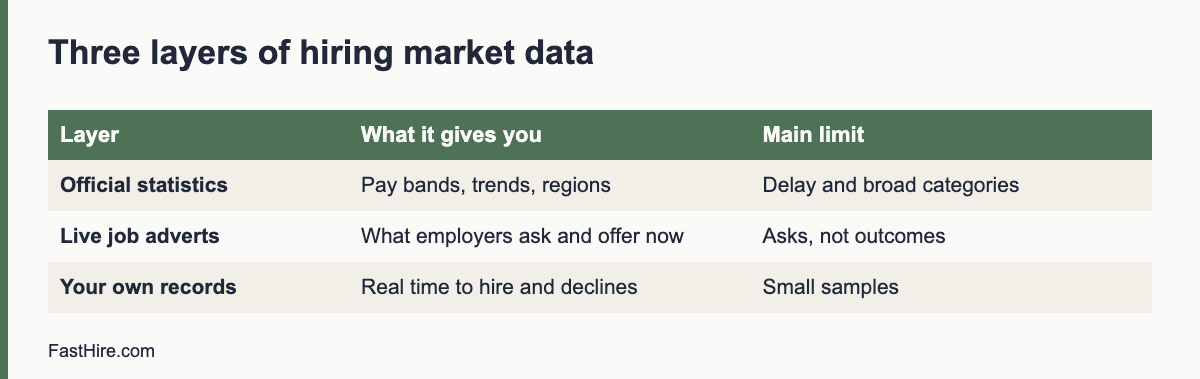
    Median versus average: a small example (fictional)

    Suppose five searches took 30, 32, 35, 38 and 120 days to fill. The average is (30 + 32 + 35 + 38 + 120) divided by 5, which is 51 days. The median is the middle value after sorting, which is 35 days. The one long search of 120 days pulls the average far above what happens in a typical search. If you only report 51 days, hiring managers may think the process is slow in general. If you report both numbers and explain the 120-day case, they see the real picture: a typical search takes about five weeks, and one search had a special problem.

    Look into the outlier. Was the skill scarce? Did the approval stall? Did the hiring manager go on leave? Write a one-line reason beside each long search. Over time these notes show which causes repeat and which are one-offs.

    A simple report layout

    SectionContentChart or table
    Headline numbersMedian and average time-to-fill and time-to-hire, number of hires, period coveredFour numbers at the top
    Stage gapsMedian days between stagesBar chart
    By role familyCompare similar roles onlySmall table
    Open rolesDays open so far for roles not yet filledList
    NotesOne line per outlierText
    Next actionOne change to testOne sentence

    Keep the report to one page. Share it monthly or after each search. If your team uses a tracking system, check that the reports use your written definitions. Many systems have default definitions that differ from yours.

    Linking speed to quality

    A fast number can hide a poor hire. Pair the time measures with at least one quality measure, such as the hiring manager’s rating at 90 days or the share of hires who complete probation. If time falls and quality falls too, the process is rushing. If time falls and quality holds, the changes are working. Define how you will rate quality before you change the process, so that you do not choose the measure afterwards to fit the result.

    How to talk about the numbers with hiring managers

    1. Start with the role they care about: “Your last role took 41 days to fill.”
    2. Show the stage gaps, not blame: “Seven days passed before the ad went live, and eight days between application and screen.”
    3. Ask what they see: “What made these steps slow from your side?”
    4. Agree one change and a date to review.
    5. Share the result after the next search.

    This conversation works best when it is about the shared goal of getting the right person in the seat, not about who was slow.

    Setting up the sheet in 20 minutes

    1. Create a new sheet with one row per hire and the columns from the table above.
    2. Format the date columns as dates, not text, so that subtraction works.
    3. Add the formulas for time-to-fill, time-to-hire and time-to-start in the first row, then copy them down.
    4. Add a second sheet for the summary, with MEDIAN and AVERAGE formulas for each column.
    5. Add a column for “reason for delay” and fill it in for any role that took longer than the median by more than 10 days.
    6. Protect the formula cells so that nobody types over them.

    If a date is missing, the formula will show an error or a wrong number. Use a filter to find blank cells before you report. Fix missing dates at the source, so that the next search is complete from the start. A reliable sheet with five rows is more useful than a large sheet with gaps. Update it on the day each event happens, not at the end of the month, so that the dates are accurate.

    Review the definitions once a year. If the business changes how it approves roles or how candidates enter the process, update the start events and note the date of the change in the glossary. A short change log lets anyone read an old report and understand which definition it used. This habit also prevents arguments in meetings, because everyone can see the rule behind the number.

    Official sources for this topic: Acas: recruitment, Your Europe: human resources. These pages are maintained by the authorities and may change, so check them for the current text.

    Frequently asked questions

    What is the difference between time-to-hire and time-to-fill?

    Time-to-fill starts when the role opens, or the requisition is approved. Time-to-hire starts when a candidate enters the process. Both usually end when the offer is accepted, but definitions vary.

    Which measure is better?

    Neither is better. They answer different questions. Use time-to-fill for business planning and time-to-hire for process improvement.

    Should I include the notice period?

    Track it as time-to-start. It is not under your control, but it affects planning.

    How many hires do I need to get a useful number?

    Even five searches show patterns. With fewer, look at the stage gaps rather than the totals.

    How do I handle roles that were cancelled?

    Record them separately with the date and reason. Do not mix them with filled roles.

    Related guides

    This is general information, not legal advice.
  • How to write a candidate update email cadence

    How to write a candidate update email cadence

    Update candidates at every point where their status changes, and at least once a week when nothing changes during an active process. A good cadence has seven messages: acknowledgement, screening outcome, interview invitation, post-interview status, decision, offer or decline, and a final close-out. State the next date in every message, and send it on that date or earlier.

    Key takeaways

    • Send a message whenever the status changes, and every five to seven days when it does not.
    • Put the next update date in each message, and keep it.
    • Use templates for speed and personal details for warmth.
    • Send a clear outcome to every candidate, including those who are declined early.
    • Track messages in your tracking system so that no one falls through the gap.
    x

    Why cadence matters

    Candidates cannot see your process. They only see messages and silence. When there is silence, they guess: the role is filled, they were rejected or the company is disorganised. Regular short updates remove the guessing, even if the news is “no change yet”. They also reduce the number of status emails you receive, which saves your time.

    A cadence is a plan for when you write, not a promise to share every detail. You decide the points in advance, and you tie them to dates. This is part of the candidate experience described in our candidate experience checklist.

    The seven-message cadence

    No.MessageWhen to sendWhat to include
    1AcknowledgementWithin minutes or hours of the applicationThanks, closing date, next update date, how to ask for adjustments
    2Screening outcomeWithin 2 working days of the screening dateInvite to the next step, hold or decline
    3Interview invitationSame day as the decision to inviteDates, format, people, length, preparation, adjustments
    4Post-interview statusSame or next day after the interviewThanks, the date by which you will reply
    5DecisionOn or before the promised dateNext step, offer, or decline with reasons for finalists
    6Offer or close-outSame day as the decisionCall first for offers, then letter. For declines, a kind message
    7Final close-outWhen the role is filledTell all remaining candidates that the role is filled; ask for consent to keep their details

    This cadence fits most processes. Add a message if your process has extra steps such as a work sample or a panel. See how to give fast interview feedback for message wording after interviews.

    The “no news” update

    When nothing has changed, a short message still helps. Send it every five to seven days to candidates who are in the middle of a process. Do not send it to candidates who have received a clear outcome. A “no news” update has three parts: what is happening, what the candidate does not need to do, and the next date.

    Hello [Name],

    A short update on your application for [job title]. We are still [finishing the interviews / waiting for a decision]. There is nothing you need to do. We expect to contact you by [date]. If your situation changes, for example if you receive another offer, please let us know so that we can plan.

    Best wishes,
    [Name]

    Do not add false urgency, and do not hint at an offer that you have not decided to make. Honest, calm updates build trust.

    Template library

    1. Acknowledgement

    Hello [Name],

    Thank you for applying for [job title]. We have your application. Applications close on [date]. We will contact everyone by [date] with a clear next step. If you need any adjustment to our process, please reply to this message.

    Best wishes,
    [Name]

    2. Invitation to a screening call

    Hello [Name],

    Thank you for your application. We would like to arrange a 20-minute call to talk about the role. These times are available: [list]. Please reply with the time that suits you. The call will be by [phone/video]. If you would like any adjustment, tell us and we will arrange it.

    Best wishes,
    [Name]

    3. Decline after screening

    Hello [Name],

    Thank you for your interest in [job title]. We reviewed your application against the requirements for the role. We will not move forward at this stage. We appreciate your time and wish you well in your search.

    Best wishes,
    [Name]

    4. Post-interview thanks and date

    Hello [Name],

    Thank you for meeting us today. We enjoyed hearing about [specific point]. We are speaking to other candidates this week, and we will contact you by [date] with a decision.

    Best wishes,
    [Name]

    5. Role filled

    Hello [Name],

    Thank you for your interest in [job title]. The role has now been filled. We valued your time and your application. If you would like us to keep your details for future roles, please reply “yes” and we will keep them for [period] and then delete them.

    Best wishes,
    [Name]

    How to schedule and track

    1. Add a “next update due” date for every active candidate in your tracking sheet or system.
    2. Sort by date each morning. Send what is due.
    3. Use mail merge or system templates for acknowledgement and decline messages, and personalise the first line.
    4. Record the date and type of each message.
    5. Review the sheet each Friday for candidates who have not heard from you in five days.

    If you use an applicant tracking system, check whether it can set reminders and send templates. Keep control of the content. A human should approve declines for finalists. If you use automation, tell candidates that a status message is automatic and give a way to reach a person.

    Common mistakes

    MistakeEffectFix
    Updating only when there is good newsCandidates assume the worstSend “no news” updates
    Promising a date and missing itLoss of trustPromise only what you can keep; if you miss it, say so with a new date
    Using the same wording for everyone, including finalistsFeels coldPersonalise finalists
    Not telling candidates when the role is filledCandidates wait for weeksSend a close-out message
    Including protected-trait commentsLegal riskKeep to job-related facts
    Sending messages at odd hoursPressureSchedule for working hours

    A worked example (fictional)

    This example is invented. A recruiter runs a search for a project manager. On Monday she posts the job and sets the closing date for the 21st. Every applicant receives message 1 within an hour. On the 22nd she screens and sends outcomes on the 23rd: 12 invitations and 38 declines. On the 24th and 25th she runs 12 calls. On the 26th she sends interview invitations to five people and declines to seven, each with a short reason for those who had a call. Interviews run on the 29th and 30th. After each interview she sends message 4 with the date of 3 November. On 2 November, with a day to spare, she sends a “no news” update to two people still waiting on a second round. On 3 November she calls the chosen candidate and sends the offer. She sends decline messages to the other four finalists the same day, with two specific reasons each. On 5 November the candidate accepts, and she sends message 5 to the remaining candidates. Total time spent on messages: about three hours across the search, because she used templates.

    Data protection notes

    Messages to candidates contain personal data. Keep them in your tracking system or a secure folder, delete them when no longer needed, and do not send sensitive information by unsecured channels. In the UK and EU, tell candidates how you use their data in your privacy notice. See the ICO employment guidance. If you keep candidate details for future roles, get consent and say how long you will keep them. This is general information, not legal advice.

    Adjusting the cadence to your volume

    The same plan does not fit every volume. Adapt it to the number of candidates and the time you have.

    VolumeApproachNotes
    Under 20 applicantsPersonal messages for every stageEasy to keep warm; use templates for speed
    20 to 100 applicantsTemplates with a personal first line for finalistsUse mail merge in your email or tracking system
    100 to 500 applicantsAutomatic acknowledgement and outcome messages; personal messages for interviewed candidates onlyReview the automatic text carefully. Include a way to reach a person
    More than 500 applicantsAutomated status page or messages for early stages; personal contact for shortlisted candidatesPlan the screening process first. See screening at volume

    For high volume, set expectations in the ad: “Due to the number of applications, we will contact only those selected for an interview” is an honest sentence, but a better one is “We will send every applicant an outcome by [date]”. If you can send an outcome to all, do so. A short, courteous automatic message is better than nothing.

    What to do when your timeline changes

    Timelines slip. A manager gets ill, a decision waits for approval, an interview must be moved. When this happens, tell the candidates at once. Use three elements: what changed, the new date and a thanks for patience. Do not hide a delay until the date has passed. If the new date is unknown, say when you will next write, for example “We will write again on Friday with an update”. People accept delays when they are told in time.

    Candidates who write to you

    Some candidates will write to ask for news, even with a good cadence. Reply within one working day with the facts you have. If there is nothing new, say so and repeat the next date. Do not ignore the message, and do not give hints about internal discussions. Keep a log of questions you receive. If the same question appears many times, add the answer to your ad or to your acknowledgement message.

    Review the cadence after each search

    • How many status enquiries did you receive? Fewer is better.
    • Did you miss any promised dates? Why?
    • Which messages did candidates mention positively in the survey?
    • Which step still leaves people without news?
    • What one change will you make for the next search?

    Keep these notes with the role brief. After three searches you will have a cadence that fits your team, and it will be faster to run each time.

    Ownership and backup

    Name one person who owns the cadence and one person who covers when the owner is away. A cadence that depends on a single person fails during holidays and sick leave. Put the plan, the templates and the tracking sheet in a shared place, and give the backup person access. Agree what the backup does: check the “next update due” column each day and send what is due. This small step protects the promises you made to candidates and prevents silent gaps.

    If you work with an agency or an outside recruiter, include the cadence in the briefing. Ask them to follow your dates and your tone, and to report the status of each candidate weekly. You remain responsible for the experience, even when someone else sends the messages.

    Official sources for this topic: ICO: recruitment and selection, Acas: recruitment. These pages are maintained by the authorities and may change, so check them for the current text.

    Frequently asked questions

    How often should recruiters update candidates?

    At each change of status, and every five to seven days during an active process even if there is no news.

    What if I have no news?

    Send a short message saying so, with the next update date. Silence is worse than “no news”.

    Do I need to tell every applicant when the role is filled?

    It is good practice. A short message ends the wait and keeps goodwill.

    Can I automate updates?

    Acknowledgements and status messages can be automatic. Tell candidates that they are automatic. People should write and send decisions about finalists.

    What should a decline message include?

    A clear result, thanks, and for later-stage candidates one or two job-related reasons. Avoid protected traits and comparisons.

    Related guides

    This is general information, not legal advice.
  • How to avoid ghosting candidates: a simple service standard

    How to avoid ghosting candidates: a simple service standard

    To avoid ghosting candidates, publish a simple service standard and build it into your process: acknowledge every application, give every candidate an outcome, state a date for the next update, keep a “last contact” date for each active candidate and review it every week. Ghosting is mostly a workflow problem, not a character problem, so fix the workflow.

    Key takeaways

    • Ghosting happens when a process has no owner for the silent moments: after the application, after an interview, and after the decision.
    • A service standard has five promises: acknowledge, update, decide, tell, close. Put dates on each.
    • Track “days since last contact” for every active candidate and review it weekly.
    • Use templates so a kind decline takes one minute.
    • Silence harms candidates and your reputation. Even a short, honest message helps.
    x

    What ghosting is, and why it happens

    Ghosting means cutting off contact without an explanation. In hiring, employers ghost candidates when they go silent after an application or an interview. The cause is rarely bad intent. It is usually one of these: too many applicants, no template for declines, a hiring manager who has not decided, a recruiter who is overloaded, a role that is on hold, or a fear of awkward conversations.

    CauseWhat it looks likeFix
    VolumeHundreds of applications and no time to replyAutomated acknowledgement and outcome messages; screening sessions on fixed days
    Waiting for a decisionHiring manager delays; recruiter has no news to share“No news” update with a date; response-time agreement
    Role on hold or cancelledThe process pauses; nobody tells candidatesClose-out message as soon as the status changes
    Awkward conversationsDeclines feel uncomfortableTemplates and a short script
    No ownerNobody is responsible for follow-upName an owner for each role and a backup
    Tool gapsApplicants sit in a system without promptsReminders and a weekly list

    Silence costs more than it seems. Candidates tell friends and write reviews. Some will be future customers, partners or colleagues. Fairness also matters: a person who receives no outcome cannot move on or learn. A clear service standard is a modest investment with a high return. See our candidate experience checklist for the full journey.

    The five-promise service standard

    PromiseStandard (example)Who owns it
    1. AcknowledgeEvery applicant receives an acknowledgement within one working day, with the closing date and the date of the next updateRecruiter or system
    2. UpdateEvery active candidate hears from us at least every seven days, even if there is no newsRecruiter
    3. DecideWe give an outcome within two working days of each interview or taskHiring manager and recruiter
    4. TellEvery candidate receives a clear outcome, including those declined at screeningRecruiter
    5. CloseWhen a role is filled, paused or cancelled, we tell all remaining candidates within two working daysRecruiter

    Publish the standard on your careers page and in the ad. Choose times you can keep. Track performance. If you cannot meet a promise, change the promise or the process. A published standard also helps hiring managers understand what they must do. See candidate update email cadence for message timing.

    Build the standard into the workflow

    Give every application a status

    Use a short list of statuses: received, screened, call, interview, task, finalist, offer, hired, declined, withdrawn, on hold. Each status has a rule for the next message.

    StatusMessage dueMaximum days in this status
    ReceivedAcknowledgement (same day)Until screening day, as stated in ad
    Screened: declinedDecline within 2 working days of the screening date2
    Screened: invitedInvitation within 2 working days2
    After interviewThank you and date within 1 day; outcome by the date givenAs stated
    FinalistUpdate every 3 to 5 daysUntil decision
    On holdNotice when put on hold; update every 7 daysReview monthly
    Hired or role closedClose-out to all remaining candidates2

    Keep a “last contact” date

    For every active candidate, record the date and type of the last message. Add a column for “next update due”. Sort by this column each morning. Anything in the past is a risk of ghosting. A simple spreadsheet is enough for a small team. In a tracking system, use filters or tasks.

    Hold a ten-minute weekly review

    Every Friday, list active candidates with no contact for five days or more, roles with no activity for seven days and decisions that are overdue. Send the messages that are due. Ask hiring managers for decisions by the next working day. This review prevents most ghosting.

    Put the deadline in the ad

    Write “We will reply to every applicant by [date]” in the ad. Then do it. A public promise gives you a reason to prioritise it.

    Templates for the hard moments

    Decline at screening

    Hello [Name],

    Thank you for applying for [job title]. We reviewed your application against the requirements for the role. We will not move forward with it at this stage. We appreciate your interest and wish you every success.

    Best wishes,
    [Name]

    Role on hold

    Hello [Name],

    We are pausing the search for [job title] while we review our plans. We do not yet know when it will restart. We will write again by [date] to tell you what has changed. If you would like us to withdraw your application, please reply and we will do so.

    Best wishes,
    [Name]

    Role cancelled

    Hello [Name],

    We have decided to close the [job title] search. We are sorry for the late news and appreciate your time. If you agree, we will keep your details for [period] and contact you if a similar role opens. Please reply “no” if you prefer that we delete them.

    Best wishes,
    [Name]

    After an interview with no decision yet

    Hello [Name],

    Thank you for your interview on [date]. We have not yet made a decision. We expect to contact you by [new date]. If your situation changes in the meantime, please tell us.

    Best wishes,
    [Name]

    What to do when the volume is very high

    If you receive hundreds of applications, you cannot write to each person by hand. Use automation with care. Send an automatic acknowledgement, then an automatic outcome message after screening. Write the text yourself and avoid cold language. Offer a way to reach a person. Do not let a system reject candidates without a person making the decision. See screening at volume. For legal context on automated decisions in the UK and EU, see our article on the EU AI Act and hiring tools and check the rules for your country. This is general information, not legal advice.
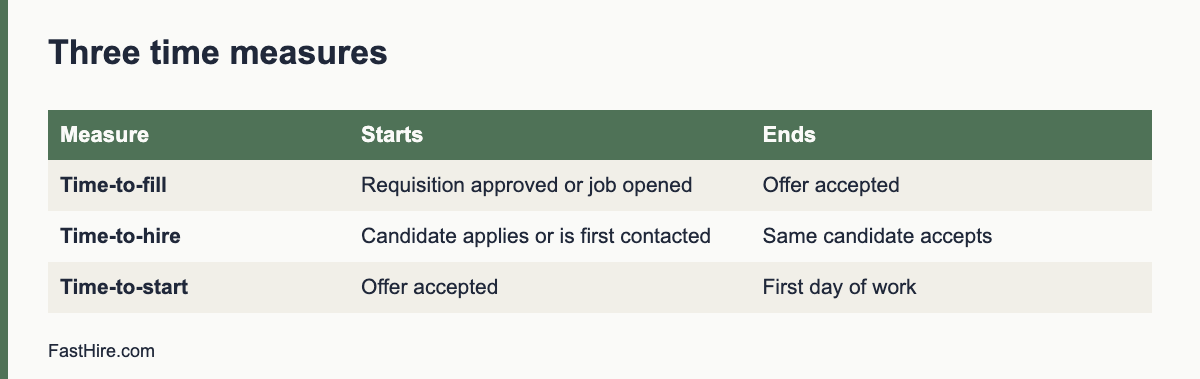
    Working with hiring managers

    Most ghosting at the interview stage comes from slow decisions. Agree response times in the kickoff meeting, share the service standard, and show the data. Say: “Our standard is two working days after an interview. This week we are at six days for two candidates. Can we decide by Thursday?” Offer help: a short debrief, a decision template or a call. See the recruiter kickoff meeting and how to run a debrief meeting. Make it easy for managers to say yes, no or “not yet, until [date]”.

    Measure and report

    MeasureHow to calculateTarget (set your own)
    Acknowledgement timeHours between application and acknowledgementWithin one working day
    Outcome rateCandidates who received an outcome divided by all candidates100 percent
    Update gapDays since last contact for active candidates7 days or fewer
    Decision timeWorking days from interview to outcomeWithin the promise
    ComplaintsNumber of “I never heard back” messagesFalling over time

    Report these to the hiring team each month. Celebrate improvements. If a number is poor, ask what blocked it. Do not use the numbers to blame individuals.

    A worked example (fictional)

    This example is invented. A recruiter of a mid-sized company discovers that 40 candidates have had no contact for more than two weeks after an interview. She sets up a status list, a “next update due” column and a weekly review. She writes five templates. In the first Friday review she sends 40 messages in about one hour: 25 declines, 10 holds with dates and 5 invitations. She publishes a service standard on the careers page. Over the next two months, the number of “I never heard back” emails falls from several each week to about one a month. She adds a line to the kickoff agenda about decision times and shares the monthly report with hiring managers.

    A weekly review that keeps the standard alive

    A service standard only works if someone checks it. Set a fixed 20-minute slot each week. The recruiter who owns the standard opens the applicant list for every open role and answers four questions. Does any applicant have no outcome and no message in the last seven days? Is any interviewed candidate waiting longer than the promised date for news? Are there hiring managers who owe feedback? Which messages are due this week?

    Write the answers in a shared note, not in your head. Name each late item, the person who owns it and the day it will be fixed. If the same hiring manager appears on the list two weeks in a row, raise it with that manager directly and use the feedback guide linked below as a starting point.

    Weekly checkOwnerFix if late
    Applicants with no acknowledgementRecruiterSend the acknowledgement today
    Applicants past the promised screening dateRecruiterSend a short update with a new date
    Interviewed candidates with no outcomeHiring manager and recruiterAgree the decision or a new date within one working day
    Declined applicants with no messageRecruiterSend the decline message today
    Offers waiting for a replyRecruiterCall the candidate and ask if they need anything

    A short script for the hiring manager conversation

    The hardest part of the standard is a manager who is busy and does not reply. Do not send a long complaint. Use a short, factual message, and offer a fix.

    Hi Sam, three candidates interviewed last week are waiting for news. We told them they would hear by Friday.
    Can you send your scorecards by noon tomorrow? If you need more time, I will tell the candidates the new date today.
    If it helps, we can hold a 15-minute debrief tomorrow and decide together.

    This message states the facts, names the promise to the candidate, gives a deadline and offers help. It does not blame. If the manager still does not reply, tell the candidates the truth: “We need a little more time and we will write again by Wednesday.” That is better than silence.

    What to do when you have no news

    Many ghosting cases start when a recruiter feels they have nothing to say. But “no news yet” is news. A candidate can plan around a clear date. They cannot plan around silence. Use this pattern: say what has happened, say what has not happened, give the next date, and give a contact.

    Hello Priya, thank you for your patience. We have finished the interviews for the role, but the final decision is not made yet.
    We will write to you by Thursday 17:00 with an outcome or an update.
    If you accept another offer before then, please tell us so we can wrap up your application.

    The last line respects the candidate. They may have other offers, and you are not asking them to wait with no information.

    How to measure the standard without invented targets

    You do not need industry statistics to measure this. Count your own numbers each month: the share of applicants who received an acknowledgement on the day, the share who received a final outcome, the number of days from interview to outcome, and the number of candidates who withdrew after waiting. Compare this month with last month. Set a target based on your own starting point, for example “reduce the number of interviewed candidates waiting more than the promised date by half”. Treat this as a planning target, not an external benchmark.

    You can also ask every candidate one question at the end of the process: “How clear was our communication, from 1 to 5?” Keep the answers anonymous and read the free-text comments. They show where silence happens more clearly than any dashboard.

    Common objections, and short answers

    ObjectionShort answer
    We get too many applicants to write to everyone.Use a template and your system’s bulk send. A two-line decline sent late is better than none. See the update email guide below.
    Declining people will cause arguments.Short, neutral messages with no reasons beyond “we chose candidates whose experience was closer to the requirements” rarely start debates. Do not give detailed scores or personal comments.
    The hiring manager has not decided.Send the “no news yet” message with a date. Silence is the worse option.
    A decline might create legal risk.Keep the message factual and consistent for every applicant, and keep records. For legal questions in your country, ask a specialist.

    A calm, consistent standard protects your employer brand in a simple way: candidates who are treated with respect, even when they are declined, are more likely to speak well of you and to apply again later. That is a reasonable expectation, not a measured result, so judge it by your own repeat-applicant numbers over time.

    Official sources for this topic: Acas: recruitment, ICO: recruitment and selection. These pages are maintained by the authorities and may change, so check them for the current text.

    Frequently asked questions

    What is candidate ghosting?

    It is when an employer goes silent to a candidate, usually after an application or interview, without giving an outcome.

    Why do employers ghost candidates?

    Usually because of volume, slow decisions, unclear ownership or discomfort with giving bad news. It is a process problem that can be fixed.

    Do I have to reply to every applicant?

    It is good practice. A short automated acknowledgement and a clear outcome message take little time and protect your reputation.

    What should I say if I have no news?

    Say so, give the next date and thank the person. A short “no news” message is better than silence.

    Can automation help?

    Yes, for acknowledgements and status messages, if the text is clear and kind and a person makes decisions.

    Related guides

    This is general information, not legal advice.