Category: Fair and compliant hiring

Evidence-based screening, bias reduction, accessibility, applicant data rules and the use of AI in hiring.

  • The ADA and hiring: reasonable accommodation for applicants

    The ADA and hiring: reasonable accommodation for applicants

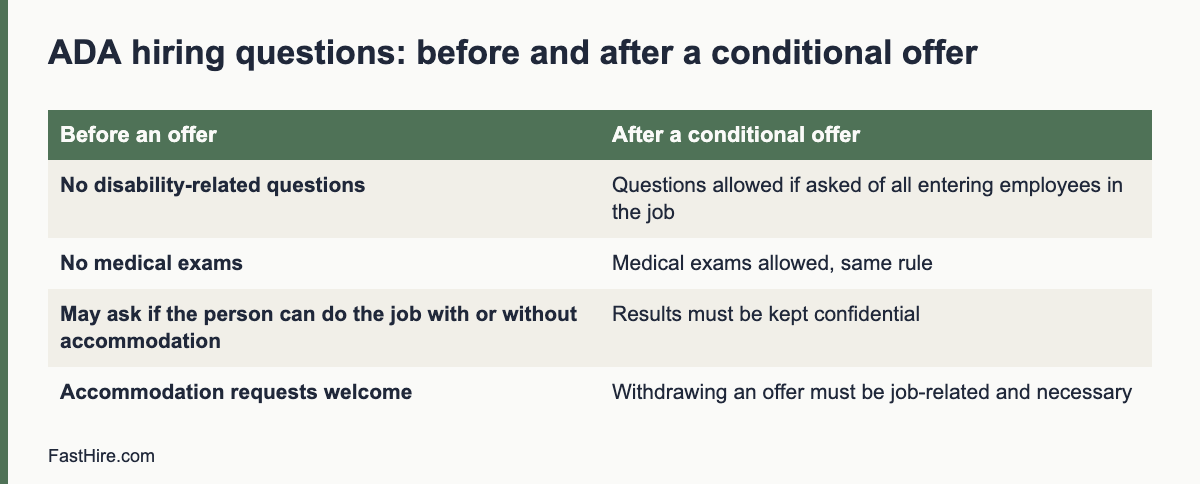
    The Americans with Disabilities Act (ADA) bans discrimination against qualified applicants with disabilities and requires covered employers to provide reasonable accommodation in the application process. Before a conditional job offer, you generally cannot ask disability-related questions or require medical exams. After an offer, you can, if you do it for everyone entering the same job and keep the results confidential.

    Key takeaways

    • The ADA covers qualified applicants. Judge people on whether they can perform the essential functions of the job, with or without accommodation.
    • Before an offer, do not ask disability-related questions or require medical exams. You can ask whether the person can perform the job functions.
    • After a conditional offer, you may ask and test, if you do it for all entering employees in that job category and keep the information separate and confidential.
    • Provide reasonable accommodation in the application process unless it causes undue hardship.
    • Coverage and state laws vary. Check the EEOC guidance and ask a specialist about hard cases.
    x

    Who and what the ADA covers

    Title I of the ADA prohibits discrimination in employment, including hiring, against a qualified individual on the basis of disability. The text is hosted by the EEOC on its page for Titles I and V of the ADA. Coverage depends on the size of the employer, and the EEOC’s small business pages explain how the rules apply; see EEOC guidance for small business. Many state and local laws reach smaller employers or add protections, so do not assume that you are outside the rules.

    “Qualified” means that the person can perform the essential functions of the job with or without reasonable accommodation. “Disability” is defined broadly in the ADA as amended, and includes physical or mental impairments that substantially limit one or more major life activities, a record of such an impairment, or being regarded as having one. Employers should not try to decide who “counts”. Focus on the job and on what the person needs to do it.

    Before the job offer: what you cannot ask

    The EEOC’s guidance on preemployment disability-related questions and medical examinations explains the rules. In outline, before a conditional offer you generally may not ask disability-related questions or require medical examinations. That is true even if you plan to look at the results only after the offer.

    Allowed before an offerNot allowed before an offer
    “Can you perform the essential functions of this job, with or without accommodation?”“Do you have a disability?” “What medications do you take?”
    Asking about attendance requirements, such as “Can you work the hours listed?”“How many sick days did you take last year?”
    Asking about non-medical qualifications and skills“Have you ever had a workers’ compensation claim?”
    Asking about current illegal drug useAsking about past treatment for addiction or mental health conditions
    Asking a candidate who has an obvious disability, or who has told you about one, whether they need an accommodation and what it would beMedical exams, including tests that measure physiological responses such as blood pressure
    Physical agility tests that are not medical, for all applicants in the jobTests that measure heart rate or other medical responses

    These examples follow the EEOC guidance. Read the guidance for details and edge cases, such as how to describe job functions and how drug and alcohol tests are treated. A drug test for illegal drugs is not a medical exam, but an alcohol test is treated as one.

    After a conditional offer

    Once you make a conditional offer, you may ask disability-related questions and require medical examinations, and make the offer depend on the results. Three conditions apply. You must do it for all entering employees in the same job category, whether or not they have a disability. You must keep medical information confidential, in files separate from the personnel file. And if you withdraw the offer because of a medical result, you must show that the reason is job-related and consistent with business necessity, and that no reasonable accommodation would let the person do the job.

    Reasonable accommodation in the application process

    Reasonable accommodation includes changes to the application process, the way a test or interview is given, and the way a job is done. The EEOC’s enforcement guidance on reasonable accommodation and undue hardship covers job applicants and the application process.

    StageExamples of accommodation
    Application formAccept applications by phone or email; provide an accessible form; give extra time; allow help from another person
    Online testsExtra time; a different format; a screen-reader-friendly version; an oral or written alternative
    InterviewsSign language interpreter; step-free location; written questions; a quiet room; breaks; a video or phone option
    Work sample or trialAdapted equipment; a different way to show the skill; a longer time limit
    Offer and onboardingAccessible documents; flexible start arrangements; workplace changes

    The employer and the applicant should talk about the need and the options. A request does not need special words. If a person says that a change would help because of a condition, treat it as a request. You may ask what would help. You may ask for limited documentation only where the disability and the need are not obvious, and take care not to ask for more than you need. Where an accommodation causes undue hardship, you can decline it, but you should look for an alternative that works. Our guide on reasonable adjustments in interviews gives step-by-step handling and scripts, and many of the practices apply in the US.

    Essential functions and job descriptions

    The ADA looks to the essential functions of the job. Write them down before you advertise. A good description lists the real tasks, the time spent on each, and whether the task could be done in another way. It avoids “must be able to lift 25 kilos” unless lifting is truly a core function. If a task is not essential, it should not be a barrier. Use the same list to build your screening criteria and interview questions. Our guide to writing a job description for a new role and the role brief method help here.

    Tests, tools and standards

    • Ask whether a test measures a skill the job needs. A timed typing test is relevant to a data entry role, but not necessarily to a role that uses speech software.
    • Check that online tools are accessible. They should work with keyboards and screen readers.
    • Offer an alternative. Give a clear way to ask for another format.
    • Validate selection criteria. The EEOC explains how tests and selection procedures are assessed in its guidance on employment tests and selection procedures.
    • Review automated tools. See our guide on US law on AI and hiring.

    Confidentiality and records

    Information about an applicant’s disability or accommodation request is confidential. Share it only with people who need to know it to carry out the accommodation, and describe the change, not the condition. Keep it out of scorecards and out of general applicant files. Medical information should sit in a separate confidential file. Do not use the information to decide who moves forward. Follow your retention schedule; see our guide on retention of rejected applicant data.

    Common mistakes

    MistakeFix
    Asking “Do you have any health problems?” in an interviewAsk whether the person can do the essential functions, with or without accommodation
    Rejecting a person because an accommodation “might be costly”Look at the actual accommodation, and at the undue hardship standard in the EEOC guidance. Many accommodations cost little or nothing
    Telling the hiring team about a candidate’s conditionTell them only what they need to carry out the change
    Using a medical form with the applicationRemove it. Medical exams come after a conditional offer, for all entering employees in the job
    Assuming that a person cannot do a task because of a conditionAsk the person how they would do it, and offer a trial where relevant
    No contact for requestsName a person and put the contact in every invitation

    FastHire is being built for fair, evidence-based screening. It shows each job requirement next to the exact CV passage that supports it, so decisions rest on skills and not on guesses. FastHire is coming soon. It does not rank, score or reject candidates. People make every decision.

    A fictional case: a request during an application

    This case is invented to show the reasoning. It is not legal advice. A candidate for an inventory clerk role writes to the contact in the invitation: “I have a visual impairment and use screen magnification. Could I receive the skills test as a file I can enlarge, with extra time?”

    StepWhat the employer does
    1. Reply fastThanks the candidate, confirms the request and asks if the format and time suggested would work
    2. Check the testAsks: does the test measure a skill the job needs? Is speed essential? The job involves counting stock, not speed reading, so extra time is reasonable
    3. Provide the changeSends an accessible file, sets a longer time limit, and confirms in writing
    4. Keep it separateTells the assessor only that the format and time limit differ, not why
    5. Score on the job criteriaMarks the test against the same criteria as all other candidates
    6. Keep recordsStores the request and the change in a confidential file for the retention period

    The employer did not ask about the cause, did not ask for medical proof and did not change the standard. It changed how the candidate showed the skill. If the employer had been unsure whether extra time was reasonable, it could have talked with the candidate about alternatives and taken advice.

    Training for people who handle requests

    The person who first receives an accommodation request is often a recruiter, a coordinator or a hiring manager who has never been trained. A one-hour session helps. Cover these points: what an accommodation is, how to reply in a warm and practical way, who to involve, how to keep information confidential, what not to ask, and what to do if the request seems difficult. Give them a script and a contact in HR or legal for hard cases. Repeat the session once a year and when new people join the hiring team.

    Reply template:
    Hello [Name], thank you for letting us know. We can [change]. Does that work for you? If you would like something different, please tell us. We will confirm the arrangement in writing and will tell only the people who need to know what is different, not the reason.

    Keep the tone matter-of-fact and positive. Candidates who are treated well when they ask for help often become strong employees and good advocates for your company.

    Ask for a review each year

    Once a year, review how requests were handled. Count the number of requests, the time to reply, the types of change and the results. Remove personal details before you share the review. Ask whether any request was declined and why. Ask a few candidates who used accommodations, if they agree, what worked and what did not. Use the findings to update your templates, your venues and your online tools.

    Frequently asked questions

    Can I ask a candidate if they have a disability?

    Generally not before a conditional job offer. You may ask whether they can perform the essential functions of the job with or without accommodation, and you may invite requests for accommodation.

    Can I ask a candidate with a visible disability how they would do the job?

    If the disability is obvious, or the person has told you about it, you may ask whether they need an accommodation and what it would be. Keep the questions about the job.

    Is a drug test a medical exam?

    A test for illegal drugs is not a medical exam under the ADA. A test for alcohol is. Check the EEOC guidance and your state law.

    Can I ask for a doctor’s note for an accommodation request?

    Only in limited cases, where the need is not obvious, and only what is needed. Ask a specialist first, and do not request medical records at the application stage by default.

    Does the ADA apply to remote or online hiring?

    Yes. The application process is covered whatever the format.

    Related guides

    This is general information, not legal advice.
  • UK reasonable adjustments in recruitment

    UK reasonable adjustments in recruitment

    Under the Equality Act 2010, employers in Great Britain must make reasonable adjustments so that disabled applicants are not at a substantial disadvantage in recruitment. You also may not ask applicants about their health before offering work, except for limited purposes. In practice: invite requests, agree changes, keep details confidential, and judge everyone on the same job criteria.

    Key takeaways

    • The duty applies to recruitment as well as to employment. It is triggered when a disabled applicant would be at a substantial disadvantage.
    • Before offering work, do not ask about health or disability, except for permitted purposes such as checking if a person can take part in an assessment.
    • Adjustments can change a process, a physical feature or provide an auxiliary aid.
    • The Access to Work scheme can help with support such as interpreters at interviews. Tell candidates about it where relevant.
    • Northern Ireland has separate legislation. This guide covers Great Britain.
    x

    The legal duty, in plain language

    The duty to make adjustments is in section 20 of the Equality Act 2010. It has three requirements. First, where a provision, criterion or practice puts a disabled person at a substantial disadvantage compared with non-disabled people, you must take reasonable steps to avoid the disadvantage. Second, where a physical feature has that effect, you must take reasonable steps to avoid it. Third, where a disabled person would be at a disadvantage without an auxiliary aid, you must take reasonable steps to provide the aid. The full Act is on legislation.gov.uk.

    The duty applies to job applicants. A recruitment practice is a “provision, criterion or practice”. Examples: a requirement to complete an online test in 30 minutes, a rule that all interviews take place in person upstairs, or a form that can only be completed on one website. If a practice puts a disabled person at a substantial disadvantage, you consider what reasonable steps can remove it. “Substantial” means more than minor or trivial.

    “Reasonable” depends on the facts: how effective the step would be, whether it is practicable, its cost, your resources and the support available. Many changes in recruitment are low cost. GOV.UK gives employers a short guide on reasonable adjustments for disabled workers, and Acas explains recruitment duties on its recruitment page.

    Who is a disabled person?

    Under the Act, a person has a disability if they have a physical or mental impairment that has a substantial and long-term adverse effect on their ability to carry out normal day-to-day activities. Long-term generally means that the effect has lasted or is likely to last at least 12 months. Conditions such as cancer, HIV and multiple sclerosis are covered from diagnosis. Read the definition on GOV.UK to see how it applies. Do not decide whether a person “counts” before you help. Focus on what they need in the process.

    No health questions before an offer

    Section 60 of the Equality Act says that an employer must not ask a job applicant about their health before offering work, or before placing them in a pool to be selected from later. The Act lists exceptions. They include asking whether the person will be able to take part in an assessment, such as an interview or a test, and whether reasonable adjustments are needed for it. They also include checking that the person can carry out a function that is intrinsic to the work, with adjustments, and monitoring diversity. Read the section for the full list, and ask a specialist if you are unsure.

    Allowed in the recruitment processNot allowed before an offer
    “Is there any adjustment we should make so you can take part in the interview or test?”“Do you have any health conditions?”
    “This job involves driving. Do you hold a valid licence?”“How many days were you off sick in your last job?”
    “Can you perform the main tasks in the job description, with adjustments if needed?”A health questionnaire sent with the application form
    An equal opportunities form that is voluntary, anonymous in the decision, and kept separateAsking referees about the person’s sickness record
    Asking about health after a conditional offer, as the Act allowsRejecting a person because of an imagined future absence

    An employer can ask for health information after making an offer, but the usual rules on discrimination still apply. If you withdraw an offer for a reason linked to disability, take advice first.

    What adjustments look like in recruitment

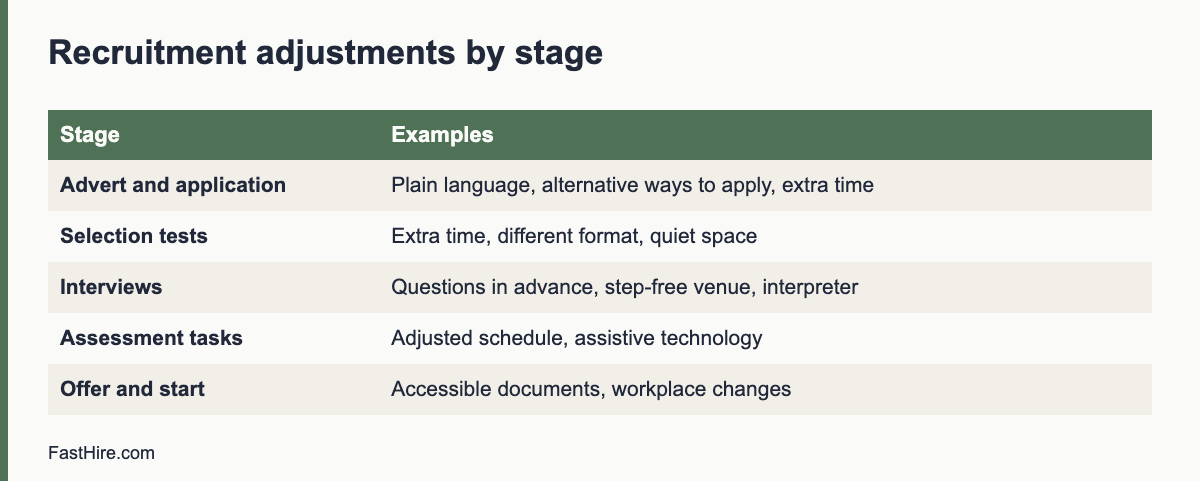
    StagePossible adjustments
    Advert and applicationPlain language; accessible format; alternative ways to apply, such as phone or email; extra time for the form
    Selection testsExtra time; a different format; reader or scribe; screen-reader-compatible test; a quiet space
    InterviewsInterview questions sent in advance; step-free venue; breaks; a video or phone interview; British Sign Language interpreter; a support person
    Assessment centres and tasksAdjusted schedule; a different task that tests the same skill; assistive technology
    Offer and startAccessible documents; changes to the workplace or equipment; a phased start

    Make it easy to ask. Add a line to every invitation. For example: “If you need any adjustment to take part, such as extra time, a different format or step-free access, please tell us at [email]. You do not need to explain why. We will reply within one working day.” Our guide for hiring managers on reasonable adjustments in interviews has wording and a six-step process.

    Access to Work

    Access to Work is a UK government scheme that can help disabled people with the extra costs of support at work, and it can cover support at job interviews. GOV.UK describes it on its page, Access to Work: get support if you have a disability or health condition. It mentions that deaf or hard-of-hearing applicants who need a BSL interpreter or lipspeaker, and people who need communication support, can get help for interviews. Rules and eligibility change, so read the page. Tell candidates that this scheme exists, but do not make them apply for it before you provide reasonable adjustments you can provide yourself.

    Keeping the process fair

    • Judge the same job criteria for everyone. An adjustment changes how a person shows a skill. It does not lower the standard.
    • Keep details confidential. Tell interviewers what is different, not why.
    • Record what you agreed. Keep a short note, and keep it away from the scorecard.
    • Do not treat a request as a risk. Declining a candidate because they asked for an adjustment is likely to be unlawful.
    • Use structured interviews. Same questions, same scoring. See structured interviews.
    • Mind data protection. Health and disability information is special category data under UK GDPR. See GDPR for job applicants.

    Common mistakes

    MistakeFix
    Waiting for the candidate to discloseOffer adjustments in every invitation
    Asking for a medical certificateAsk what would help. Do not ask for proof at this stage
    Saying “we cannot do that” without looking for alternativesDiscuss other options and explain what you can do
    Using an online test with no accessible versionOffer an alternative format, or choose an accessible tool
    Sharing the condition with all interviewersShare only the change, not the reason
    Assuming the cost is too highCheck the real cost; consider support such as Access to Work

    FastHire is being built for fair, evidence-based screening. It shows each job requirement next to the exact CV passage that supports it, so decisions rest on skills. FastHire is coming soon. It does not rank, score or reject candidates. People make every decision.

    A fictional case: an online test

    This case is invented. A UK retailer uses a 20-minute online numeracy test for a stock controller role. A candidate with dyscalculia emails the contact in the invitation and asks whether the time can be extended.

    QuestionReasoning
    Is there a provision, criterion or practice?Yes. The practice is a timed online test for all candidates.
    Is there a substantial disadvantage?Likely. Timed numeracy tasks can disadvantage the candidate more than non-disabled candidates.
    What would a reasonable step be?Extra time, a calculator if the job allows it, or a different format. The employer checks what the job needs: stock controllers use calculators and systems every day.
    Is the step practicable and low cost?Yes. Most test platforms allow time changes.
    What does the employer do?Agrees extra time and allows a calculator, confirms in writing, tells the assessor only about the changed conditions, and marks against the same criteria.

    The key move is to ask what the test is for. If the job uses a calculator, a test that bans it measures something the job does not need. Adjusting the test makes it fairer for everyone, and it gives the employer a better picture of the skill it cares about.

    Plan for common requests

    Most requests fall into a few groups. Plan these in advance so that you can reply fast.

    Request typePlan
    More time in a testKnow which tools allow it and how long you can extend. Decide a standard extension and a route for longer ones
    Questions in advanceDecide which questions you can send, and send the same kind to anyone who asks
    Different formatKeep documents in plain text or accessible PDF; allow phone or video
    Step-free accessKnow the accessible rooms in each office and the route from the entrance
    Interpreter or communication supportKeep contact details for booking services; tell candidates about Access to Work where it may apply
    A support person or assistance animalSet a simple rule to welcome them, and tell reception

    Write the plan in a short procedure and give it to everyone who schedules interviews. Review it each year with feedback from candidates who asked for adjustments, if they are willing to share it.

    Public sector and large employers

    Public bodies in Great Britain also have the public sector equality duty, which is separate from the duty to make adjustments. Large employers may also use voluntary schemes to show their commitment to disabled candidates. These schemes can help, but they do not replace the legal duties. Treat each request on its own facts.

    What to do if a request is hard

    Some requests take effort: a sign language interpreter booked at short notice, an interview in a building with no lift, or a test platform that cannot change its timing. Do not refuse by reflex. Try these steps in order: tell the candidate you are working on it, look for a different date or venue, look for another route such as a video interview, ask the candidate what would work for them, and check whether outside support is available. Record what you tried. If you conclude that a request is not reasonable, take advice before you reply, and offer the closest alternative you can.

    Tell the candidate early. Waiting until the day before makes every option harder and leaves the candidate anxious. A frank message that says what you can do and when you will have an answer is always better than silence.

    Frequently asked questions

    Do small employers have to make reasonable adjustments?

    The duty applies to employers of any size in Great Britain. What is reasonable depends on the employer’s resources.

    Can I ask about health at the interview?

    Not before offering work, except for the permitted purposes in section 60 of the Equality Act, such as asking about adjustments for the assessment.

    What if a candidate does not tell me about their disability?

    The duty to make adjustments generally applies where the employer knows, or could reasonably be expected to know, that a person is disabled and likely to be disadvantaged. Invite requests so that people can tell you.

    Who pays for adjustments?

    The employer pays for reasonable adjustments, and cannot pass the cost to the applicant. Schemes such as Access to Work may help with some support.

    Does this apply in Northern Ireland?

    Northern Ireland has its own disability discrimination law. Check the official guidance there.

    Related guides

    This is general information, not legal advice.
  • Pay transparency in hiring: EU, UK and US

    Pay transparency in hiring: EU, UK and US

    Pay transparency in hiring means telling applicants what a job pays before they invest time, and not using their pay history to set an offer. Rules differ: the EU has a directive that member states must put into national law, several US states and cities require pay ranges in job postings, and the UK requires gender pay gap reporting by larger employers. Check the official source for each place where you hire.

    Key takeaways

    • Share a pay range for every role, even where the law does not require it. It saves time for everyone.
    • Do not ask applicants about their pay history to set an offer. Several places ban the question, and EU rules restrict it.
    • Set pay from the role, the market and your pay structure, and write down the reasons.
    • Rules vary by country, state and city, and they are changing. Use official sources, and take advice for cross-border hiring.
    • We do not state application dates here. Check each official source for current dates.
    x

    Why pay transparency matters in hiring

    When pay is hidden, candidates guess. Some drop out because they fear the pay is too low. Some accept an offer and feel misled later. People who negotiate well may get more than people who do not, for reasons unrelated to the job. Asking about earlier pay can carry past pay gaps into the new job. Sharing a clear range reduces these problems, shortens the process and supports equal pay for equal work. It is also a way to show candidates respect for their time.

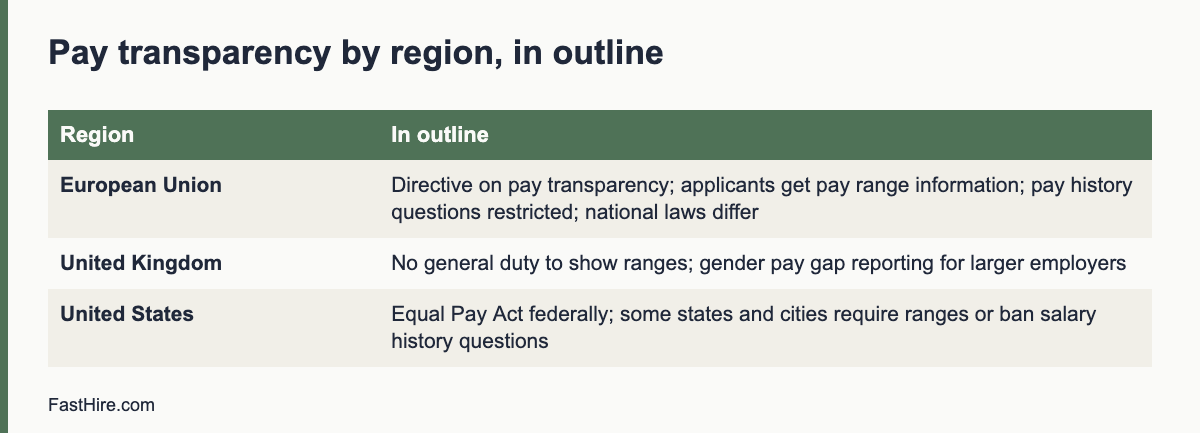
    The picture by region

    RegionWhat exists (in outline)Where to read
    European UnionDirective (EU) 2023/970 on pay transparency and enforcement of equal pay. Among other things, it gives job applicants a right to receive information about the initial pay or its range, based on objective and gender-neutral criteria, before the interview or earlier, and it prohibits employers from asking applicants about their pay history. It also requires larger employers to report on pay gaps. Member states put it into national law, so national rules and timing differDirective (EU) 2023/970 on EUR-Lex; the EU’s Your Europe pages for employer information
    United KingdomNo general duty to publish pay ranges in job adverts. Employers with at least 250 staff must report their gender pay gap. The Equality Act 2010 covers equal pay between women and men for equal workGOV.UK gender pay gap reporting guidance; Equality Act 2010
    United StatesThe federal Equal Pay Act bars sex-based wage discrimination for substantially equal work. Several states and cities also require pay ranges in job postings or bar salary history questions, with different rules on who is coveredEEOC: Equal Pay Act; check state and city labour department sites

    The table is a short orientation. Directives and statutes have conditions, definitions and exceptions. Read the official text for your case. For the EU, remember that a directive binds each member state to reach a result, and each country writes its own law. Check the status in every country where you hire, and ask a local adviser.

    What this means for your hiring process

    1. Put a pay range in every advert

    Even where it is not required, a range helps. Write the range you are really prepared to pay for the role, not a wide band to cover every case. If the range is wide, explain what drives the position in it, such as skills or experience. Include other pay elements if they are a regular part of the package, such as bonus rules, and keep benefits listed clearly. Do not invent a range to meet a rule. A false range damages trust and may break the law.

    2. Do not ask about pay history

    Remove “current salary” from application forms, screening questions and interview guides. Train interviewers to avoid the question. If a candidate volunteers it, do not use it to set an offer. Instead ask about pay expectations in the context of the range: “The range for this role is X to Y. Is that in line with what you are looking for?” This keeps the focus on the job. In the EU, the directive restricts asking about pay history. Several US states and cities have similar rules.

    3. Set pay from the role, not the person

    Use a pay structure: levels, ranges, and criteria for placing someone in a range. Typical criteria are skills the role needs, relevant experience, scope of responsibility and market data. Write the criteria down and use them for every offer. Our guide on reading market data before you open a role explains how to gather the data, and the real cost to hire an employee explains related costs.

    4. Check internal fairness before you make an offer

    Compare the offer with people in similar roles. If the new hire will earn more or less than colleagues doing the same work, ask why. The reason should be job-related and written down. If not, adjust the offer or review existing pay. Differences linked to sex, race or other protected traits are a legal risk, and the EU directive adds duties around equal pay for work of equal value. The EEOC’s Equal Pay Act page and the UK Equality Act text set out the basic rules.

    5. Prepare to answer questions

    Employees and candidates will ask how pay is set. Prepare simple answers. A one-page explanation of your pay structure and the criteria for placement in a range is enough. Train managers to give the same answer, and agree who handles special cases.

    A checklist for each role

    CheckDone?
    Range set from the role, market data and internal comparison
    Reasons for the range and position in it written down
    Range shown in the advert or the first message to candidates
    No pay history question on forms or in interview guides
    Interviewers trained to avoid pay history
    Offer compared with colleagues in similar roles
    Local rules checked for the country, state or city of the job
    Reason for any difference from the range recorded

    Hiring across countries

    If you hire in several places, you will face different rules. A simple approach is to follow the strictest rule for all roles: show a range, avoid pay history questions and document how you set pay. This reduces confusion for your recruiters and treats candidates the same everywhere. It does not replace local legal advice. Where pay data is personal data, such as the pay of a named employee, GDPR and similar laws apply. See our guide on hiring in another country.

    Fairness beyond the posting

    • Offer the same negotiation room to everyone. Do not reward only those who ask. Set a standard approach to negotiation and describe it.
    • Review pay data by group where the law allows. Look at starting pay by role and level. Investigate gaps that you cannot explain by job-related reasons.
    • Document exceptions. If you pay above the range for a reason such as a rare skill, record the reason and the approval.
    • Be careful with promises. Do not tell a candidate “we will match your current pay” if that conflicts with your structure or local rules.
    • Respect privacy. Do not share one person’s pay with another.

    FastHire is being built to support evidence-based decisions at the screening stage. It shows each job requirement next to the exact CV passage that supports it. It does not rank, score or reject candidates. People make every decision. FastHire is coming soon.

    Wording you can use

    SituationWording
    In an advertPay range: [amount] to [amount] per [year / hour], depending on skills and experience. Bonus: [rule, if any]. Benefits: [list].
    In the first message to a candidateThe pay range for this role is [amount] to [amount]. Is this in line with what you are looking for?
    If a candidate asks you to match their payWe set pay from the role and our pay structure, not from earlier pay. For this role, the range is [amount] to [amount].
    If a candidate declines to say what they expectThat is fine. We will make an offer within the range based on the role and the skills you bring.
    In an interview guideDo not ask about current or past pay. If it is shared, do not record it and do not use it.

    A fictional example of setting an offer

    This case is invented. A company hires a project coordinator. Its pay structure for the level has a range, and it has written criteria for placing someone in the range: relevant experience in coordinating projects of similar size, skill in the tools used, and the scope of the job. The recruiter writes a short note for the offer.

    CriterionEvidence from the interview scorecard (fictional)Placement
    Project coordination experienceLed three projects of similar size in the last four yearsUpper half
    ToolsUses the main tool and a related one; needs a short training on the reporting toolMiddle
    ScopeThe job fits the level; no extra dutiesMiddle
    Internal comparisonTwo current coordinators in the same range, similar experienceOffer within their band

    The note records why the offer sits where it does. If anyone later asks, the answer is written and tied to job-related criteria. The candidate’s earlier salary appears nowhere in the note.

    Common mistakes

    • A range too wide to be useful. “From low to very high” tells candidates nothing. Narrow it.
    • A range that is not honest. Do not advertise a top figure that you will not pay in practice.
    • Matching old pay. This copies past gaps into the new job.
    • Hidden differences for similar roles. If two people do the same work, the reasons for different pay must be job-related.
    • Telling the team nothing. When you introduce pay ranges, tell current employees first. Explain how they work, and answer questions.
    • Treating pay talk as secret. In some places the law protects the right of employees to discuss pay. Check the rules.

    Preparing your team

    Hold a short training for recruiters and hiring managers. Cover the rules that apply to your locations, the pay structure and how to use it, how to answer a candidate who asks about pay, the questions never to ask, and where to record the reasons for an offer. Provide a one-page guide. Review it each year and when laws change. A short session now prevents awkward conversations and legal risk later.

    Finally, keep records. For each hire, store the range, the placement criteria, the offer and the reasons for any exception, for the period your retention schedule allows. These records support equal pay checks and help you respond to questions from employees, candidates and regulators. Keep them in a restricted place, since pay data about named people is personal data. When laws change, update the template and the training, and note the date of the change in your procedure.

    Frequently asked questions

    Do I have to show a pay range in every job advert?

    Not everywhere. Some US states and cities require it for covered employers, and the EU directive gives applicants a right to information on pay or its range, with details set by national law. The UK has no general duty. Even so, a range is good practice.

    Can I ask about a candidate’s current salary?

    In the EU, the directive prohibits asking about pay history. Several US states and cities ban it too. Even where it is legal, it can carry past pay gaps into the new job. Avoid it.

    What if a candidate asks for more than the range?

    You can negotiate within the rules of your pay structure, with a written reason for any exception. Keep the same approach for all candidates.

    Does this apply to remote roles?

    Often it depends on where the worker lives or where the employer operates. Rules for remote roles are complex. Take advice.

    Where can I find the current rules?

    Use the official sources linked above, and the labour department site of each state or national authority where you hire.

    Related guides

    This is general information, not legal advice.

  • UK Equality Act: direct and indirect discrimination in recruitment

    UK Equality Act: direct and indirect discrimination in recruitment

    In Great Britain, the Equality Act 2010 makes it unlawful to discriminate in recruitment because of nine protected characteristics: age, disability, gender reassignment, marriage and civil partnership, pregnancy and maternity, race, religion or belief, sex and sexual orientation. Direct discrimination is less favourable treatment because of a characteristic. Indirect discrimination is a neutral rule that puts a group at a particular disadvantage and cannot be justified.

    Key takeaways

    • The Equality Act 2010 covers England, Scotland and Wales. Northern Ireland has separate equality laws.
    • Nine protected characteristics apply. Discrimination can be direct or indirect, and harassment and victimisation are also covered.
    • Employers must consider reasonable adjustments for disabled applicants.
    • Asking about health or disability before a job offer is restricted, with limited exceptions.
    • Positive action is allowed in limited ways. It is not the same as picking someone because of a characteristic.
    x

    Who and what the law covers

    The Equality Act 2010 applies to employers in England, Scotland and Wales. It covers every stage of recruitment: the job ad, the application, shortlisting, interviews, tests, the offer and the terms offered. The Act protects applicants, not only employees. Northern Ireland has its own equality laws, so employers there should check local guidance. The official text is on legislation.gov.uk. Acas gives a plain guide to fair recruitment on its page about recruitment, and GOV.UK explains checks employers can make on job applicants.

    The nine protected characteristics

    CharacteristicExamples in recruitment
    AgeAn ad asking for “recent graduates” only, or “up to 10 years of experience” with no reason
    DisabilityRefusing to consider adjustments for an interview; asking about health too early
    Gender reassignmentRejecting an applicant because they are transgender or are proposing to undergo or have undergone gender reassignment
    Marriage and civil partnershipPreferring single applicants. This protection applies to being married or in a civil partnership
    Pregnancy and maternityNot shortlisting someone because they are pregnant
    RaceTreating applicants differently by colour, nationality, ethnic or national origins
    Religion or beliefRejecting someone because of their faith or lack of belief
    SexDifferent questions or pay for men and women for the same role
    Sexual orientationRejecting an applicant because they are gay, lesbian, bisexual or heterosexual

    Protection also covers discrimination by association (for example, a person who cares for a disabled relative) and discrimination by perception (when you wrongly think a person has a characteristic).

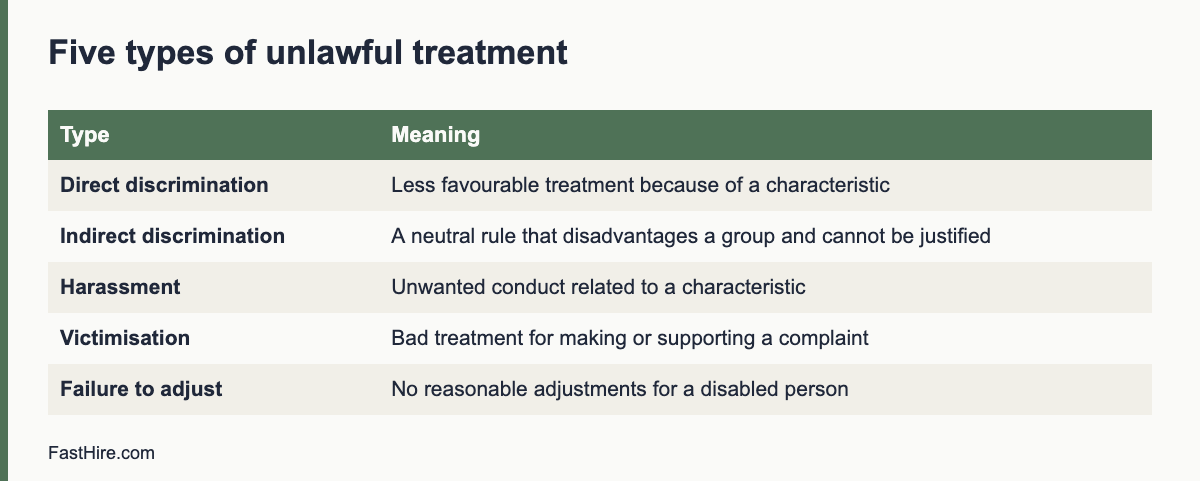
    Types of unlawful treatment

    TypeMeaningRecruitment example (fictional)
    Direct discriminationTreating someone less favourably because of a protected characteristicA manager rejects a strong applicant because “she may have children soon”
    Indirect discriminationA provision, criterion or practice that applies to everyone but puts people with a characteristic at a particular disadvantage, and cannot be shown to be a proportionate means of achieving a legitimate aimA rule that all staff must be able to work every Friday evening, with no business need, which disadvantages applicants who observe a religious practice on Fridays
    HarassmentUnwanted conduct related to a characteristic that violates dignity or creates an intimidating, hostile or offensive environmentJokes about an applicant’s accent in an interview
    VictimisationTreating someone badly because they made or supported a complaint under the ActRefusing to interview a person who earlier complained about discrimination
    Failure to make reasonable adjustmentsNot taking reasonable steps to remove disadvantage for a disabled personRefusing to send questions in advance to an applicant who needs them

    Indirect discrimination can be defended if the employer shows that the practice is a proportionate means of achieving a legitimate aim. That requires a real aim, such as health and safety, and evidence that the rule is needed and that less harmful options were considered. A habit or a convenience is usually not enough. For similar ideas in the US, see disparate treatment vs disparate impact.

    Reasonable adjustments in recruitment

    Employers must take reasonable steps to remove disadvantages for disabled applicants. In recruitment this can mean changing the process, the place or the format, or giving extra help. Examples:

    • Sending interview questions in advance
    • Allowing extra time for a test
    • Offering a different format for an application, such as a phone call instead of a form
    • Holding an interview in an accessible room
    • Providing a sign language interpreter or captions
    • Allowing a support person to attend

    Tell applicants how to ask for adjustments in the job ad and the invitation. Respond quickly, and record what you agreed. What is reasonable depends on cost, size, practicability and the effect of the change. Take advice if you are unsure. See our upcoming guide on UK reasonable adjustments in recruitment for more detail.

    Health and disability questions before an offer

    The Act limits questions about health or disability before you make a job offer or include a person in a pool of preferred candidates. The main exceptions are to find out whether the person can take part in a recruitment assessment with adjustments, to monitor diversity, to support positive action, or where a health requirement is intrinsic to the job. GOV.UK explains these limits in its page about checks employers can make on job applicants. After a conditional offer, you may ask health questions that relate to the job, in line with the law and data protection rules. Do not ask all applicants to complete a general health questionnaire at the application stage.

    Job ads, shortlisting and interviews

    StageRiskGood practice
    Job adWording or channels that exclude groupsPlain language, job-related requirements, open channels, an adjustments line
    Application formQuestions on protected characteristicsCollect only what you need; keep monitoring data separate
    ShortlistingAssumptions from names, ages or gapsWritten criteria, evidence sheet, two reviewers on a sample. See structured screening
    InterviewUnplanned questions on family, health or originQuestion list, scorecard. See questions you cannot ask
    TestsTests that disadvantage a groupValidate tests; offer adjustments
    OfferDifferent pay for similar rolesPay ranges, consistent offers, reasons recorded

    Positive action

    The Act allows certain positive action steps. Employers may take proportionate steps to encourage people with a characteristic to apply if they are under-represented or face disadvantage, such as outreach and training. In a recruitment tie-break, where two candidates are equally qualified, an employer may choose the candidate from an under-represented group, subject to conditions. This is different from positive discrimination, which is generally unlawful, such as setting quotas or choosing a candidate who is less qualified because of a characteristic. Take advice before you use a tie-break. The Equality and Human Rights Commission provides guidance on its website at equalityhumanrights.com.

    Data protection and records

    Keep records of your criteria, scores and reasons. They show that you acted fairly. Data protection law applies to these records. Information about protected characteristics may be special category data, which has extra conditions. See the ICO employment guidance. Tell applicants what you collect and why, and delete data when you no longer need it.

    A worked example (fictional)

    This example is invented. A small retailer in England hires a store assistant. The manager wants “energetic, young” people. The owner rewrites the ad to describe tasks (“lift boxes up to 10 kilograms with aids provided; work Saturdays”) and adds “Tell us if you need any adjustment to apply”. She asks all applicants the same questions. One applicant mentions a medical condition in the interview. The manager does not follow up on the condition and focuses on whether the applicant can do the tasks, with or without adjustments, and asks what would help. The applicant says a stool at the till would help. The owner notes the answer and scores the applicant on the criteria. The applicant is offered the job and the stool is provided. The process left a record that supports the decision.

    Checklist for UK employers

    • Job ad is task-based, avoids age or sex signals and invites adjustment requests.
    • Criteria are written and linked to the job.
    • Shortlisting uses an evidence sheet and a second reviewer on a sample.
    • Interview questions are fixed and exclude protected topics.
    • Health questions are held until after an offer, unless an exception applies.
    • Adjustments are offered and recorded.
    • Monitoring data, if collected, is kept separate and used lawfully.
    • Reasons for decisions are recorded and stored securely.

    Questions to ask before you finalise a requirement

    Use these five questions each time you add a requirement to an ad or a shortlist rule. They help you spot indirect discrimination early.

    1. Does this requirement apply to every applicant in the same way?
    2. Is it needed for the job? Which task depends on it?
    3. Could it put people with a protected characteristic at a particular disadvantage? For example, rigid working hours, a long continuous service requirement, a physical test, a particular qualification or a language level.
    4. What is the legitimate aim, such as safety or customer service, and is this rule a proportionate way to reach it?
    5. Is there a less restrictive way, such as a trial period, training, equipment or a different test?

    Write the answers next to the requirement in your role brief. If you cannot answer, remove the requirement or change it. See how to write checkable job requirements.

    What to do if an applicant complains

    Treat the complaint seriously and calmly. Acknowledge it in writing, say who will look into it, and give a date for a reply. Collect the documents: the ad, the criteria, the scorecards, the messages and the notes. Ask someone who was not involved in the decision to review. Do not discourage the applicant from complaining and do not treat them worse for complaining, because that can be victimisation. If the matter may lead to a tribunal claim, take legal advice. Acas offers guidance and early conciliation services for employment disputes, and you can find them on the Acas website.

    Where to read next

    This guide covers recruitment in Great Britain. For the EU rules, read our article on EU equal treatment in hiring. For the way UK data protection law affects applicants, see our guides on GDPR for applicants. For a practical step-by-step on fair screening, read how to reduce bias in resume screening. For the cost of an unfair process, remember that legal risk is only one part: unfair hiring also loses you good people and damages your reputation.

    Pay, offers and the terms you offer

    The Act covers the terms on which you offer a job, not only whether you offer it. Offering a lower salary to a woman than to a man for the same role, or less favourable terms to a person of a particular race, can be unlawful. Keep pay ranges for each role and make offers within the range, based on job-related factors such as experience relevant to the tasks. Record the reason when you offer above or below the middle of the range. Reviewing offers across roles each year helps you find unexplained gaps. Equal pay law is a separate topic with its own rules, so take advice if you find a gap.

    Be careful with salary history questions and with negotiation. Candidates who negotiate more may be rewarded in ways that disadvantage those who negotiate less, and this can reproduce earlier inequality. A clear range and a consistent process help.

    Frequently asked questions

    Does the Equality Act apply to job applicants?

    Yes. It covers recruitment, including ads, shortlisting, interviews, tests and offers.

    What are the nine protected characteristics?

    Age, disability, gender reassignment, marriage and civil partnership, pregnancy and maternity, race, religion or belief, sex and sexual orientation.

    Can I ask about health before offering a job?

    Generally not, with limited exceptions such as adjustments for the recruitment process. See GOV.UK guidance.

    Does the Act apply in Northern Ireland?

    Northern Ireland has separate equality laws. Check local guidance.

    What is the difference between direct and indirect discrimination?

    Direct is less favourable treatment because of a characteristic. Indirect is a neutral rule that puts a group at a particular disadvantage and cannot be justified.

    Related guides

    This is general information, not legal advice.
  • Data protection impact assessments for hiring tools

    Data protection impact assessments for hiring tools

    A data protection impact assessment (DPIA) is a written risk check you do before you start processing that is likely to be high risk for people. Under the UK and EU GDPR, hiring tools that evaluate people at scale, use new technology or make automated decisions often call for one. This guide explains when you need one, what it contains and gives a template you can fill in.

    Key takeaways

    • A DPIA is a document that asks: what do we do with data, is it necessary and fair, what could go wrong, and what do we do about it?
    • Do it before you start using a tool, not after. Update it when the tool or the use changes.
    • Hiring tools that score, rank or filter applicants, analyse video or voice, or combine data from many sources are strong candidates for a DPIA.
    • Involve recruiting, IT or security, a data protection lead and, where possible, the views of applicants.
    • A DPIA can end with the answer “do not use this tool” or “use it with these limits”.
    x

    What the law says

    Article 35 of the GDPR requires a DPIA where processing is likely to result in a high risk to the rights and freedoms of people. The article gives examples that include systematic and extensive evaluation of personal aspects based on automated processing, including profiling, on which decisions are based that produce legal or similarly significant effects. National regulators publish lists of processing that always needs one. The UK Information Commissioner’s Office explains the duty in its guidance on data protection impact assessments. The European Data Protection Board publishes European guidance and endorses criteria for deciding when a DPIA is likely.

    Employment decisions have a significant effect on people. Applicants are also in an unequal position, because they depend on your decision. Both points weigh toward doing a DPIA for tools that go beyond basic storage. The EU AI Act separately treats some hiring AI systems as high risk, and has its own duties. We do not state dates. Read the official text and our overview of the EU AI Act and hiring tools.

    In the United States there is no general DPIA duty. Some state privacy laws require risk assessments for certain processing, and some local laws require bias audits for automated employment decision tools. Check the rules where you hire. Many US employers do a similar assessment as good practice.

    Do you need one? A quick screen

    QuestionIf yes
    Does the tool score, rank, filter or recommend applicants?A DPIA is very likely needed
    Does it analyse video, voice, facial expression or other biometric data?A DPIA is very likely needed, and extra legal limits may apply
    Does it combine data from several sources, such as social media or public profiles?A DPIA is likely needed
    Do you process data about many applicants, or about vulnerable groups?Consider a DPIA
    Does the tool make decisions without a person reviewing them?A DPIA is needed, and the automated decision rules also apply
    Is it a basic storage or scheduling tool with no evaluation?A DPIA may not be needed. Record why

    Write down the result of this screen even when the answer is “no DPIA”. The record shows you thought about it.

    What a DPIA contains

    The GDPR requires at least four things: a description of the processing and its purposes, an assessment of necessity and proportionality, an assessment of risks to people, and the measures you will take to address the risks. In practice you can organise the work in eight sections.

    1. Describe the processing. What tool, what data, from whom, for what decision, where stored, who sees it, how long kept.
    2. State the purpose and the lawful basis. Why you need it, and the lawful basis for each purpose.
    3. Test necessity. Could you reach the same goal with less data or a simpler method? For example, can a reviewer check the job requirements against the CV directly?
    4. Test proportionality and fairness. Is the effect on applicants proportionate to the benefit? Could the tool treat groups differently?
    5. Consult. Ask recruiters, hiring managers, IT or security, the data protection officer if you have one, and where possible applicants or their representatives.
    6. List the risks. For each, score likelihood and severity as low, medium or high.
    7. Plan measures. Reduce each risk with a specific action, an owner and a date.
    8. Sign off and review. Record the decision, who made it, and when you will review it.

    A template

    SectionWhat to writeExample (fictional)
    1. ProcessingTool name, data types, volumes, storage, recipientsA screening tool reads CVs and highlights text that matches job requirements. About 3,000 CVs per year. Data stored in the EU.
    2. Purpose and basisWhy, and the lawful basisTo assess applications fairly. Legitimate interests; assessment recorded.
    3. NecessityAlternatives consideredManual review is slower. A highlight tool does not need names or photos, so we hide them.
    4. FairnessRisks of unequal effects, how you testWe compare the tool output with manual review on a sample each quarter.
    5. ConsultationWho you asked, what they saidRecruiters asked for an override. IT asked for single sign-on.
    6. RisksLikelihood and severityWrong highlights could mislead a reviewer: medium likelihood, medium severity.
    7. MeasuresAction, owner, dateReviewers see the full CV next to every highlight. Owner: head of recruiting. Done by launch.
    8. Sign-offDecision, date, review dateApproved with conditions. Review in six months.

    The example is invented to show the format. It is not a legal assessment. Your DPIA must reflect your actual tool and facts.

    Risks specific to hiring tools

    RiskWhy it mattersPossible measure
    Unfair or biased resultsA tool trained on past decisions may repeat past patternsTest results across groups where lawful; keep a person deciding; remove proxies
    Opaque decisionsApplicants and reviewers cannot see why a result appearedChoose tools that show the evidence, such as the CV passage behind each mark
    Over-collectionTools may pull in extra data from public sourcesTurn off enrichment; collect only what the role needs
    Inaccurate dataParsing errors can misread a CVLet reviewers see the original; let candidates correct their data
    Excessive retentionData kept in a vendor system after the processSet retention rules; test deletion
    Transfers abroadData may move to other countriesCheck vendor locations and transfer tools
    SecurityA breach exposes CVs and contact detailsAccess by role, strong sign-in, encryption and breach plan
    Candidate rightsRequests to access or delete may be hard to answerTest the request process before launch

    What to ask the vendor

    • What data does the tool use, and from which sources?
    • How does it produce its output? Can we see the reasons for each result?
    • Has it been tested for different results between groups? Can we see a summary?
    • Where is the data stored and who are your sub-processors?
    • Can we switch off any automated feature?
    • Will you help us with the DPIA by sharing documents and answering questions?

    Our guide to choosing recruiting software lists 25 questions that feed directly into a DPIA.

    After the DPIA

    1. Do not skip the follow-up. Measures on paper do not protect anyone until they are in place.
    2. Review on a schedule. Every six to twelve months, and whenever the tool, the data or the use changes.
    3. Consult the regulator if risks remain high. The GDPR provides for prior consultation where you cannot reduce a high risk. Read the official guidance.
    4. Update your privacy notice. The notice should match the DPIA.
    5. Keep the document. It is evidence of your accountability.

    FastHire is being built to keep people in charge. It shows each job requirement next to the exact CV passage that supports it, so a reviewer can check the evidence. It does not rank, score or reject candidates. People make every decision. FastHire is coming soon. If you assess FastHire or any other tool, use the template above.

    How to score risks without false precision

    Use a simple three-level scale for likelihood and for severity. Likelihood asks how probable it is that the harm happens. Severity asks how bad the harm is for the person. A harm that is unlikely but very serious, such as a wrongly rejected applicant who never learns why, still needs a measure. Do not pretend that the scores are exact. They help you decide where to act first.

    Risk (fictional example)LikelihoodSeverityOverallMeasure
    Reviewer trusts a wrong highlightMediumMediumMediumShow the full CV next to every highlight; train reviewers to check
    Applicant data stored longer than statedLowMediumLow to mediumAutomatic deletion; quarterly check
    Data moved to a country without a transfer toolLowHighMediumConfirm vendor storage; sign transfer terms
    Applicant cannot get a copy of their dataMediumLowLow to mediumWritten request procedure; test it
    Tool treats groups unequallyUnknownHighHigh until testedTest on a sample; keep a person deciding; turn off a feature if a problem appears

    The last row shows an honest approach. When you do not know a likelihood, say so, and treat the risk as high until you have evidence. Do not enter “low” because the vendor says so.

    A five-day plan for a first DPIA

    1. Day 1: gather facts. Collect the vendor documents, the data map and the application form. List the people to consult.
    2. Day 2: fill in sections 1 to 3. Describe the processing, the purpose and the necessity test.
    3. Day 3: run a short workshop. Ask recruiters, a hiring manager and IT to name risks. Write them without judging them.
    4. Day 4: score and plan. Score each risk, assign measures, owners and dates.
    5. Day 5: review and sign. Ask your data protection lead to comment. Record the decision and the review date.

    The first DPIA takes the longest. After that you can reuse the structure, and later reviews are shorter. Keep a folder with the final document, the vendor papers and the consultation notes.

    Common DPIA mistakes

    • Writing it after launch. A DPIA is meant to shape the decision. If the tool is already in use, treat the DPIA as urgent and do it now.
    • Copying the vendor’s template without edits. The assessment is about your use, your data and your applicants.
    • Listing risks to the company only. The focus is risk to people, such as unfair treatment, loss of privacy or loss of opportunity.
    • Leaving out consultation. Include the people who use the tool and, where possible, the people affected by it.
    • No review date. Tools change, so the assessment must change with them.

    Finally, write a one-paragraph summary at the top of the DPIA for busy readers. It should say what the tool does, the main risks, the measures and the decision. Executives, managers and regulators will read the summary first. If it is unclear, the rest of the document will not be read carefully.

    Frequently asked questions

    Is a DPIA the same as a legitimate interests assessment?

    No. A legitimate interests assessment checks whether that lawful basis fits. A DPIA is a broader risk assessment. You may do both for the same tool.

    Who signs off on a DPIA?

    Usually a senior person responsible for the process, with advice from the data protection officer or lead. The adviser records advice, and the decision-maker records the decision.

    Do small companies need DPIAs?

    The rule depends on risk, not on company size. A small company using a tool that scores applicants may still need one.

    Can the vendor do the DPIA for me?

    The vendor can give information, but you are responsible for the assessment of your own use.

    Does a DPIA replace a bias audit?

    No. A DPIA looks at risks to people from the use of data. A bias audit tests outcomes for different groups. Some tools need both.

    Related guides

    This is general information, not legal advice.
  • How to reduce bias in resume screening: 15 practical steps

    How to reduce bias in resume screening: 15 practical steps

    You can reduce bias in resume screening, but you cannot remove it with one trick. The most reliable approach combines written job-related criteria, evidence recorded for each decision, more than one reviewer, limits on information that is not needed for the first pass, and checks on your own results. This guide gives 15 practical steps, with the limits of each.

    Key takeaways

    • Bias in screening comes from habits of the mind and from the process. Fix both.
    • Write job-related criteria first, record evidence and use the same sheet for everyone.
    • Hide details that are not needed for the first pass, but know the limits: public pilots show mixed results.
    • Use two reviewers on a sample, and check your outcomes for patterns.
    • Never use protected characteristics, or close proxies for them, to decide.
    x

    Where bias enters screening

    TypeWhat it looks like in screeningControl
    Similarity biasPreferring applicants who share your school, hobby or backgroundEvidence sheet and written criteria
    Halo effectOne strong item, such as a famous employer, lifts every judgmentMark one criterion at a time
    StereotypingAssumptions linked to a name, age, gender or nationalityHide details in the first pass; test criteria for proxies
    AnchoringThe first CV you read sets the standard for the restCalibrate on sample CVs; review in random order
    FatigueLater CVs get less attentionTime boxes and short sessions
    ConfirmationYou look for facts that support a first impressionRecord evidence for each criterion before you decide

    These are normal human tendencies, not signs of bad intent. A good process assumes they exist and builds in checks. Discrimination law looks at what you did and the effects, not only at what you meant. The US Equal Employment Opportunity Commission lists protected traits and practices to avoid on its page about prohibited employment policies and practices, and the Acas page on recruitment explains the Equality Act position for Great Britain.

    Fifteen practical steps

    Steps 1 to 5 happen before you screen, steps 6 to 10 while you screen, and steps 11 to 15 after you screen.

    1. Write the criteria first. Take three to five job-related must-haves from the role brief. Do not add new ones after you see the pile.
    2. Test each criterion for proxies. Ask: could this exclude people because of age, sex, race, religion, disability, family status or nationality, without being needed for the work? Rewrite it as a task if so.
    3. Allow several ways to show a skill. “Customer support work, paid or unpaid” is wider and fairer than “two years in a call centre”.
    4. Define the evidence. For each criterion, write what counts and what does not, with one example.
    5. Calibrate reviewers. Have everyone mark the same 10 CVs alone, compare, and fix the wording where they differ.
    6. Hide what you do not need in the first pass. Names, photographs, addresses and dates of birth are not criteria. Where your system allows, hide them for the first review. See the limits below.
    7. Use a sheet, not a feeling. Mark yes, no or unclear for each criterion and write the CV passage for each yes.
    8. Review one criterion at a time. Mark criterion 1 for a batch of CVs, then criterion 2. This reduces the halo effect.
    9. Use random order and time boxes. Mix the batch so that no group is always read at the end of the day. Take breaks.
    10. Ask about unclear marks. Send the same neutral question to every applicant with an unclear mark before you decline.
    11. Add a second reviewer on a sample. Have a colleague re-read 10 percent of the declined applications and a few of the accepted ones.
    12. Look at near misses. Review applicants who failed only one criterion. If many could do the job, the criterion may be too strict.
    13. Check patterns, lawfully. Where the law allows you to collect monitoring data, compare pass rates by stage and source. If a pattern appears that you cannot explain by job-related reasons, take advice.
    14. Give every applicant an outcome. Silence is not neutral. People from groups who face barriers are more likely to give up when they hear nothing.
    15. Keep records, and delete on schedule. Records show that you used job-related criteria. Data protection law also requires you to keep applicant data only as long as needed.

    A simple screening sheet you can copy

    One sheet per applicant keeps every decision on the same footing. Use one row per criterion. The evidence column is the most important one: if you cannot paste a passage from the CV, the mark is “unclear”, not “yes”.

    CriterionWhat countsMark (yes / no / unclear)CV passage or note
    1. Handles customer queries in writingAny paid or unpaid role with written replies to customers, members or users
    2. Uses a ticket or case systemAny named system, or a clear description of logging and tracking cases
    3. Works to deadlinesA stated target, rota or service level they met
    4. Can work the shifts listedStated availability, or no conflict visible in the CV

    Notice what the sheet leaves out: school name, employer prestige, age, and anything about family. If a criterion does not appear on the sheet, it should not influence the decision. If a reviewer wants to add a reason during the review, pause and agree whether the new reason is job-related. If it is, add it for everyone and re-check the earlier applicants.

    A worked example (fictional)

    This example is invented to show the method. It is not real data. A small company is hiring a customer support agent and gets 120 applications. The hiring manager writes four criteria and defines the evidence. Two reviewers each mark the same 10 CVs alone. They disagree on three of them, all on criterion 3, “works to deadlines”. The wording was too vague, so they rewrite it as “a stated target, rota or service level they met”, and mark the 10 again. Now they agree on nine.

    The reviewers then split the remaining CVs and mark criterion 1 for the whole batch, then criterion 2, and so on. Fourteen applicants fail exactly one criterion. A reviewer looks at those 14 and finds that nine of them fail criterion 2, “uses a ticket or case system”, only because they used a different system with a different name. The team changes the “what counts” column to accept any system, and moves the nine forward. The process found a flaw in the criterion, not in the applicants.

    What to avoid

    Common mistakeWhy it causes harmBetter practice
    Rejecting for a gap in work historyGaps can relate to health, caring duties or study, and say little about skillAsk about skills and recent evidence, not about the gap
    Preferring “culture fit”It often means “like us”Define the behaviours the job needs and look for evidence
    Using a prestige school or employer as a shortcutIt favours people with access, not people with skillMark the skill evidence itself
    Changing criteria after seeing the pileIt lets first impressions steer the rulesFreeze criteria; record any change for all
    Scanning quickly and trusting the gutFast reading amplifies stereotypesUse the sheet and a time box

    The limits of hiding information

    Many employers hide names and other details in the first pass. This can help, but evidence from public programmes is mixed, so treat it as one tool, not a cure.

    The Public Service Commission of Canada ran a name-blind pilot with 27 recruitment processes between April and October 2017. Its final report found that anonymisation reduced the overall rate at which applicants were screened in, from 48.3 percent to 43.3 percent. For visible-minority applicants, the rates did not change significantly (47.3 percent and 46.0 percent). The report notes limits, such as that reviewers knew they were part of a pilot and that removing details also removed information related to skills. See the Public Service Commission of Canada report. A trial in the Australian Public Service, with more than 2,100 public servants shortlisting for a hypothetical role, also advises caution before assuming that blind review improves diversity outcomes. See the Australian government report summary.

    The lesson is practical. Hiding information can remove one route for bias, but it can also remove context, and it does not fix unclear criteria. Combine it with the other steps, and measure what happens in your own process. We discuss this in more detail in our guide to blind CV screening.

    Do not use protected traits, or close proxies

    In screening, do not use a protected characteristic, directly or by a proxy, as a reason to include or exclude. Examples of risky proxies include graduation year (age), postcode (race or class), name (ethnicity or gender), gaps in work history (sex, disability or caring duties) and club memberships (religion or sexual orientation). If you think a requirement is truly needed and has an uneven effect on a group, record why it is necessary for the job and look for a less exclusive alternative. Get advice in such cases.

    What differs in the US, UK and EU

    RegionWhat to knowWhere to read
    United StatesFederal law prohibits job discrimination on protected grounds, and state and city laws can add more. Rules on automated tools and on monitoring differ by state or city, so check where you hire.EEOC: prohibited practices
    United KingdomThe Equality Act 2010 protects nine characteristics. Data protection rules apply to applicant data, including data you collect for monitoring.Acas: recruitment
    European UnionEqual treatment is set by EU directives and national laws, and GDPR governs applicant data. National rules differ, so check each country where you hire.Check the official national equality body and data protection authority

    Using software without losing control

    Some tools hide details, extract CV passages or score applicants. If you use one, remember three rules. A person must make and understand the decision. You must be able to explain what the tool did with each application. And you must check the tool’s effect, because a tool can copy bias from the data it learned from. In the UK and the EU, rules on automated decisions and on the use of AI in hiring may apply. The UK Information Commissioner’s Office explains data protection duties in its guidance on recruitment and selection.

    FastHire is being built for this kind of person-led screening. It shows each job requirement next to the exact CV passage that supports it, so a reviewer can check the evidence in seconds. FastHire is coming soon. It does not rank, score or reject candidates. People make every decision.

    A one-page checklist

    CheckDone?
    Criteria written before screening and tested for proxies
    Evidence defined, with one example per criterion
    Reviewers calibrated on 10 CVs
    First-pass details hidden where possible
    Sheet used: yes, no, unclear and a CV passage
    One criterion reviewed at a time
    Unclear applicants asked one neutral question
    Second reviewer checked a sample
    Near misses reviewed
    Every applicant told the outcome
    Records kept and deletion date set

    Frequently asked questions

    Can unconscious bias training fix biased screening?

    Training can raise awareness, but it rarely changes results alone. Changing the process, with written criteria, evidence and checks, has more direct effects.

    Should I always hide names on CVs?

    It can help in the first pass, but results from public pilots are mixed and it does not fix unclear criteria. Use it with other steps and check your own results.

    Is it legal to collect diversity data from applicants?

    Often yes, if you follow your country’s rules, keep the data separate from decision records and explain its purpose. Rules differ by country, so check the official guidance.

    How many reviewers do I need?

    At least two on a sample of decisions. For high-volume roles, calibrate all reviewers first.

    What if my results show a pattern I cannot explain?

    Do not ignore it. Review the criteria and the process, and get advice from an HR or employment law specialist.

    Related guides

    This is general information, not legal advice.
  • What the EU AI Act means for hiring tools in 2026 (plain English, not legal advice)

    What the EU AI Act means for hiring tools in 2026 (plain English, not legal advice)

    This post is a plain-English overview, not legal advice. The rules are detailed, their timing has been the subject of proposals to change it, and how they apply to you depends on your situation. Check the official text and take advice before relying on any of this.

    If you hire in the Netherlands, or you hire people in the EU from the UK, you have probably heard that the EU AI Act affects recruitment software. That is true. This post sets out what the law says about hiring, in plain language, with links to the sources.

    Key takeaways

    • The EU AI Act sorts AI systems by risk. AI used for recruitment and selection is listed among the high-risk uses.
    • A few practices are banned outright. Most hiring tools are not banned, but high-risk tools carry duties.
    • Providers (who build tools) and deployers (employers who use them) have different duties.
    • Application dates have been the subject of proposals to change them. Read the official text for current dates. We do not state dates here.
    • A person should make each hiring decision, with the evidence in front of them.
    x

    What the AI Act is

    The AI Act is Regulation (EU) 2024/1689. It entered into force in August 2024. As a regulation, it applies directly in every EU member state, including the Netherlands, without needing a separate Dutch law to copy it.

    It does not regulate “AI” in general. It sorts AI systems by what they are used for and sets rules according to the risk of that use. Most uses carry few or no new obligations. A short list of practices is banned outright. And a set of uses listed in the Act are treated as high-risk, with significant obligations attached.

    Why hiring is in the high-risk group

    Annex III of the Act lists the high-risk areas. Point 4 covers employment. It includes AI systems intended to be used:

    • for the recruitment or selection of people, in particular to place targeted job adverts, to analyse and filter job applications, and to evaluate candidates; and
    • to make decisions affecting terms of work relationships, promotion or termination, to allocate tasks based on behaviour or personal traits, or to monitor and evaluate performance and behaviour.

    In plain terms: if an AI system reads applications and sorts, filters or assesses candidates, it is very likely to be high-risk. Hiring decisions have a large effect on people’s lives, and automated systems can repeat unfair patterns at scale.

    There are narrow exceptions in Article 6(3) for systems that only perform a narrow procedural task or a preparatory task and do not materially influence the outcome. Whether a given tool falls under them is a question for careful analysis, not something to assume because a vendor says so.

    Something that is already banned

    Article 5 lists prohibited practices, and these have applied since 2 February 2025. One of them is directly relevant to hiring: using AI systems to infer the emotions of a person in the workplace, except for medical or safety reasons. A video interview tool that claims to read a candidate’s enthusiasm or honesty from their face or voice is the kind of thing this was aimed at. If you use or are offered anything like that, pause and get advice.

    Providers and deployers

    The Act puts different duties on different parties.

    • The provider is whoever develops the AI system and places it on the market under its name. For most employers, that is the software vendor.
    • The deployer is whoever uses the system under its authority in a professional setting. If you use an AI hiring tool to process applications, you are a deployer.

    Providers carry most of the technical obligations. Deployers have a shorter but real list.

    What deployers of high-risk hiring tools have to do

    Article 26 sets out the main deployer obligations. In plain English, an employer using a high-risk AI hiring system should expect to:

    1. Use it as instructed. Follow the provider’s instructions for use, and do not use it for purposes it was not designed for.
    2. Put people in charge. Assign human oversight to people who have the competence, training and authority to do it, and the support they need. Article 14 explains what that oversight is meant to achieve, including being able to disregard or override the system’s output.
    3. Check your input data. Where you control the data going in (for example, the job requirements you configure), make sure it is relevant and sufficiently representative for the purpose.
    4. Monitor and report. Keep an eye on how it is working, and tell the provider, and in some cases the authorities, if you see a serious risk or incident.
    5. Keep the logs. Keep the automatically generated logs under your control for at least six months, unless other law says otherwise.
    6. Tell your workforce. Before putting a high-risk system into use at the workplace, inform workers’ representatives and affected workers. In the Netherlands that is likely to involve your works council (ondernemingsraad), which may have its own rights under Dutch law.
    7. Tell candidates. Inform people who are subject to decisions made or assisted by the system that it is being used.

    On top of that, Article 86 gives people affected by certain decisions based on a high-risk system the right to a clear and meaningful explanation of the role the system played. And Article 4, which has applied since February 2025, expects both providers and deployers to take measures to ensure a sufficient level of AI literacy among the staff who deal with AI systems.

    When this applies

    The general timetable in Article 113 makes most high-risk obligations, including those for Annex III systems such as hiring tools, apply from 2 August 2026. However, in November 2025 the European Commission proposed changes, known as the Digital Omnibus, that would delay the high-risk obligations, linking them to the availability of supporting standards and guidance. At the time of writing you should check the current position on the European Commission’s AI Act pages and with your advisers rather than assume either date.

    Whatever the final date, most of what the Act asks of deployers is good practice anyway.

    What about the UK?

    The UK is not in the EU, so the AI Act does not apply there as UK law. But it can still reach UK employers. The Act applies to providers and deployers outside the EU where the output of the AI system is used in the EU. A UK company using an AI tool to assess candidates for a role in Amsterdam should assume it may be in scope.

    For purely UK hiring, the relevant rules are mainly UK GDPR, including its rules on solely automated decision-making, and the Equality Act 2010. The ICO has published recommendations for AI tools in recruitment following audits of providers, and these are a useful reference for any employer.

    Questions to ask your vendors

    If you use, or are considering, software that uses AI anywhere in your hiring process, these questions are a reasonable start:

    • Do you consider this system high-risk under Annex III of the AI Act? If not, why not?
    • What exactly does the system do with applications: does it sort, filter, assess or exclude anyone?
    • What are your instructions for use, and what human oversight do you expect from us?
    • What logs does the system keep, and how do we access them?
    • How have you tested it for unfair outcomes across groups of candidates?
    • How can a candidate find out how the system was involved in a decision about them?
    • Does any feature infer emotions, personality or honesty from video, audio or text?

    Unclear answers are themselves useful information.

    The short version

    The AI Act does not ban AI in hiring. It treats it as a high-stakes use, and asks the people building and using these tools to show they are being careful: clear instructions, real human oversight, records, openness with candidates, and no emotion reading at work. If your hiring process already keeps people in charge and can explain itself, you are most of the way there.

    Again: not legal advice. Read the official text and talk to an adviser about your own situation.

    A deployer checklist

    If you use an AI tool in hiring, the Act calls you a deployer. Article 26 of the AI Act sets out duties for deployers of high-risk systems. In outline, they include using the system according to the provider’s instructions, assigning human oversight to people with the competence and authority to do it, checking that the input data is relevant for the intended purpose where you control it, monitoring the system and reporting problems, keeping the logs the system generates for an appropriate period, and informing workers’ representatives and the affected workers before using a high-risk system at work. Read the article for the exact wording and conditions, and ask a lawyer how it applies to you.

    StepWhat to doEvidence to keep
    1. InventoryList every tool that sorts, filters, scores, ranks or evaluates applicantsThe tool list, with owner and purpose
    2. ClassifyFor each tool, decide with your vendor whether it falls under a high-risk use. Annex III lists recruitment and selection uses, such as analysing and filtering applications and evaluating candidatesA short note on the reasoning
    3. Ask the vendorRequest the instructions for use, the logging features and the vendor’s own documents on conformityVendor replies in writing
    4. Assign oversightName the people who review the tool’s output, give them time and authority, and train themNames, training dates
    5. Inform peopleTell candidates which tools are used. Tell employees and their representatives where the Act or national law requires itNotices and dates
    6. Keep logsKeep the logs the system produces, for at least the period set by the Act or longer if national law requiresLog settings and retention schedule
    7. ReviewCheck outcomes by sample, report problems to the vendor and to the authorities where requiredReview notes

    This table is a planning aid. It is not a full list of duties, and some of them depend on your role and your country. For data protection duties that run alongside, see our guides on GDPR for job applicants, GDPR Article 22 and impact assessments for hiring tools.

    What to do this month

    1. Write the tool list. One page, one line per tool.
    2. Switch off what you do not need. Features that rank or score people are the first to review. If a feature is not essential, turn it off.
    3. Email each vendor with five questions. What does the tool do? Is it intended for recruitment or selection? What documents do you provide? How do we use human oversight? How do we get logs?
    4. Name an owner. One person in HR or legal should track the vendor answers and official updates.
    5. Add a line to your candidate notice. If you use AI-assisted tools, say so in plain language and say that people decide.

    FastHire is being built to keep people in charge. It shows each job requirement next to the exact CV passage that supports it. It does not rank, score or reject candidates. People make every decision. FastHire is coming soon. If you assess FastHire or any other tool, use the checklist above.

    Frequently asked questions

    Does the EU AI Act ban CV screening software?

    No. The Act does not ban CV screening in general. It lists AI used for recruitment and selection among high-risk uses, which carry duties. A few specific practices are banned, and the official text lists them.

    Is a tool that only highlights text in a CV high risk?

    It depends on what the tool is intended to do and how it is used. Annex III lists uses such as analysing and filtering applications and evaluating candidates. Ask the vendor and a lawyer to classify the tool in your setting.

    I am a UK employer. Does this apply to me?

    It can, if you place a tool on the EU market, or if the output of a tool is used in the EU, or if you hire people in the EU. The UK has its own rules, including UK GDPR. Check both.

    What are the dates for these rules?

    Dates and any changes to them are set by the official text and by later amendments. Check the Official Journal and the European Commission pages for the current position. We do not state dates in this guide.

    Who is responsible, the vendor or the employer?

    Both have duties. Providers must meet requirements for the system they place on the market. Deployers, such as employers, must use it properly and provide human oversight. Contracts do not remove your own duties.

    Related guides

    This is general information, not legal advice.
  • Disparate treatment vs disparate impact in hiring

    Disparate treatment vs disparate impact in hiring

    In US law, disparate treatment means treating a person worse because of a protected characteristic, such as race, sex or religion. Disparate impact means using a neutral rule or test that excludes members of a protected group at a much higher rate and is not job-related and necessary. Treatment is about intent and motive. Impact is about the effect of a neutral practice.

    Key takeaways

    • Disparate treatment: different treatment because of a protected trait. Proof often looks at motive or evidence of different rules for different people.
    • Disparate impact: a neutral practice with an uneven effect that the employer cannot justify as job-related and consistent with business necessity.
    • Both apply to hiring: ads, screening, tests, interviews and offers.
    • The UK and EU use the terms direct and indirect discrimination for similar ideas.
    • US enforcement priorities on disparate impact have shifted. Check current official guidance. This is general information, not legal advice.
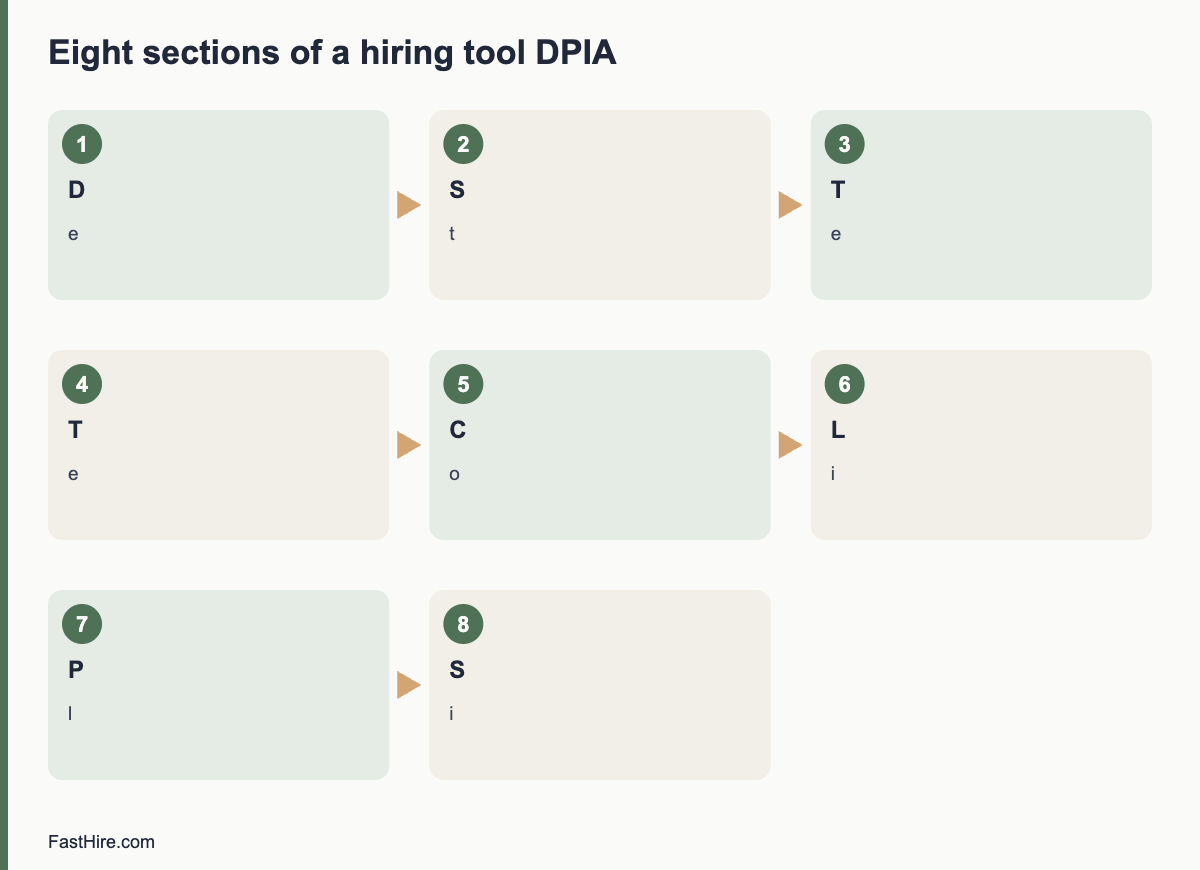
    x

    The two theories in plain words

    Think of two questions. First: did you treat this person differently because of who they are? That is disparate treatment. Second: does one of your rules, which looks the same for everyone, produce a very uneven result that you cannot justify by the needs of the job? That is disparate impact.

    Disparate treatmentDisparate impact
    Core questionWas a person treated worse because of a protected trait?Does a neutral rule cause a much worse result for a protected group?
    FocusMotive and different rules for different peopleEffect of one practice on a group
    Example in hiringA manager refuses to interview women for a night shift role because “women should not work at night”A strict lifting test that nobody needs for the job and that most women fail
    What the employer must showA legitimate, non-discriminatory reason, not a pretextThat the practice is job-related and consistent with business necessity
    Evidence often usedStatements, patterns, comparisons with similar candidatesStatistics, such as selection-rate comparisons, and validation of the practice
    Intent needed?Yes, in the sense of acting because of the traitNo

    The US Equal Employment Opportunity Commission explains protected traits and practices to avoid on its page about prohibited employment policies and practices. The EEOC page on employment tests and selection procedures describes disparate impact in testing. The text of Title VII of the Civil Rights Act of 1964 is on the EEOC website.

    Disparate treatment in hiring: examples

    • An ad that says “young team, digital natives” and a manager who rejects older applicants because of age.
    • A recruiter who sends different interview questions to women than to men for the same role.
    • A hiring manager who does not shortlist an applicant after learning that the applicant is pregnant.
    • A rule that is applied to some groups and not others, such as asking only certain candidates for extra references.
    • A decision to avoid a candidate because customers might prefer someone else of a different race or sex. Customer preference is generally not an acceptable reason.

    Notice that these examples may be proven by documents, messages, interview notes and patterns. This is why recording job-related reasons for each decision matters. See our guide to documenting hiring decisions and the steps in how to reduce bias in resume screening.

    Disparate impact in hiring: examples

    • A strict height or weight rule that is not needed for the job and screens out more women than men.
    • A requirement for a four-year degree where the work does not need one, which may exclude some groups at a higher rate.
    • A keyword filter that rejects applications with certain gaps or formats, with an uneven effect on a group.
    • An aptitude test not validated for the job, with a large difference in pass rates by group.
    • A rule that excludes anyone with any criminal record regardless of the offence, the time elapsed and the job. Rules vary by place.

    In each example the rule looks neutral. The concern is the result and the lack of job-related justification. For how to measure results, see the four-fifths rule explained.

    The legal background in the US

    The disparate impact theory comes from the US Supreme Court case Griggs v. Duke Power Co., decided in 1971, which held that employment practices that are neutral on their face but operate to exclude a protected group can violate Title VII if they are not related to job performance. Congress later wrote the disparate impact standard into Title VII in the Civil Rights Act of 1991 (section 703(k)). Under that section, a plaintiff can show that an employer uses a particular practice that causes a disparate impact on a protected basis, and the employer must then show that the practice is job-related for the position and consistent with business necessity. The plaintiff may still prevail by showing a less discriminatory alternative that the employer refused to adopt.

    Enforcement priorities have changed. In April 2025 an executive order directed federal agencies to deprioritise enforcement of disparate-impact liability. The statute itself remains, private lawsuits may still use it, and state and local laws may apply their own rules. Because this area is moving, check the latest EEOC guidance and your state law, and take advice for any decision with legal risk.

    The same ideas in the UK and EU

    RegionTreatment-like conceptImpact-like conceptWhere to read
    United KingdomDirect discrimination: treating someone less favourably because of a protected characteristicIndirect discrimination: a provision, criterion or practice that puts people sharing a characteristic at a particular disadvantage, which the employer cannot show to be a proportionate means of achieving a legitimate aimAcas: recruitment
    European UnionDirect discrimination in the equal treatment directivesIndirect discrimination in the same directives, with a justification testDirective 2000/78/EC; Directive 2000/43/EC; national law
    United StatesDisparate treatmentDisparate impactEEOC

    The ideas are similar but not identical. Do not assume that a defence that works in one country works in another. For example, the UK test asks whether the practice is a proportionate means of achieving a legitimate aim, while the US test asks about job-relatedness and business necessity. Use local guidance for each country where you hire.

    What this means for your hiring process

    RiskControl
    Treating people differently because of a traitSame questions, same criteria, same time, written scoring, second reviewer on a sample
    Neutral rules with uneven resultsWrite criteria from the tasks of the job, avoid unneeded filters, monitor selection rates where lawful
    Decisions that cannot be explainedRecord evidence and reasons for each decision
    Biased or untested toolsAsk vendors how tools were tested; test on your data; keep people in charge
    Unclear requirementsUse checkable requirements. See how to write checkable job requirements

    A worked example (fictional)

    This example is invented. A warehouse employer adds a rule: all applicants must lift 40 kilograms unaided. A review shows that the actual job uses mechanical aids for loads above 15 kilograms. The lifting rule, applied to everyone, screens out far more women than men. There is no evidence of anyone intending to exclude women, so this is not disparate treatment. It may be disparate impact because the rule is neutral on its face, has an uneven effect and may not be job-related. The employer reviews the job tasks, sets a lifting requirement based on the tasks, and offers a trial of the aids. It tests the new requirement for selection rates. Separately, a manager tells one female applicant “this is not a job for a woman”. That is disparate treatment, and the employer would need to address it as a conduct issue, with HR and legal advice.

    Practical checklist

    • Every requirement is linked to a task in the job description.
    • Requirements are the same for everyone.
    • Tests are validated for the job, or you have evidence they relate to the work.
    • Selection rates are checked where lawful.
    • Managers are trained on what not to say or ask. See what you can and cannot ask.
    • Reasons for decisions are written down.
    • Complaints have a clear route and are taken seriously.

    How to test a practice for job-relatedness

    If a rule is flagged for uneven results, you need to show how it relates to the job. A practical method has five steps. This is a general approach, and a specialist can help with formal validation.

    1. Describe the job tasks. Use a current job analysis or a detailed description written with people who do the work.
    2. Link the rule to a task. For each requirement, write the task that needs it and how often the task occurs.
    3. Check how the requirement is measured. A test of a skill should reflect the skill in the real job, not a broader or different one.
    4. Look for evidence. Past performance data, expert review or published validation studies can show that the rule predicts performance.
    5. Look for alternatives. Could another method measure the same skill with less effect on a group? Try it on past data if possible.

    Record each step. If you cannot link a requirement to a task, remove it or change it. A requirement that is a habit or a status marker is the most likely to fail.

    Training managers on the difference

    Short training works best when it uses real cases. Give managers three one-paragraph scenarios and ask them to label each as treatment, impact or neither, and to say what they would change. Discuss the answers for 20 minutes. Repeat once a year. Include these points: do not decide on protected traits, apply the same rules to everyone, ask whether a rule is needed for the job, and escalate concerns early. For managers who interview, share the guide on questions you cannot ask.

    When to ask for advice

    • You see a large gap in selection rates and cannot explain it by job-related reasons.
    • A candidate or employee complains about unfair treatment.
    • You plan to use a new test or tool for many applicants.
    • You operate in several countries with different rules.
    • A manager made a comment that suggests a decision was based on a protected trait.

    In these cases, bring in HR and a qualified employment lawyer early. Keep records, avoid deleting documents and do not contact the complainant in a way that could be seen as pressure. Take the issue seriously and respond promptly. This is general information, not legal advice.
    Remedies and risks, in brief

    If a court or agency finds discrimination, remedies can include changes to the practice, back pay, compensation and legal costs. The exact remedies depend on the law and the country. Besides legal risk, there is reputation risk and the loss of talent. A fair, evidence-based process lowers both. It is also cheaper to fix a rule early than to defend it later. Review your criteria, tests and tools once a year, and each time you change a requirement. Keep the review short and written.

    Frequently asked questions

    What is the difference between disparate treatment and disparate impact?

    Treatment is about treating a person worse because of a protected trait. Impact is about a neutral practice that has a much worse effect on a protected group and is not justified by the job.

    Do I need intent for disparate impact?

    No. The focus is the effect of the practice and whether it is job-related and necessary.

    Are these terms used in the UK?

    The UK uses direct and indirect discrimination, which are similar but follow different tests.

    Can a neutral test be lawful if it has an uneven effect?

    In the US, it may be if the employer shows it is job-related and consistent with business necessity and no less discriminatory alternative exists. Take advice.

    Has US enforcement of disparate impact changed?

    Federal priorities shifted in 2025. The statute remains and private and state actions may apply. Check current official guidance.

    Related guides

    This is general information, not legal advice.

  • EU equal treatment rules in hiring: what employers should know

    EU equal treatment rules in hiring: what employers should know

    EU equal treatment rules for hiring come from several directives that each member state turns into national law. They ban discrimination in access to employment, including recruitment, on grounds of racial or ethnic origin, religion or belief, disability, age, sexual orientation and sex. Because national laws differ in detail, employers must check the law of each country where they hire.

    Key takeaways

    • EU directives set minimum rules. Each country adds its own law, so details differ.
    • Protected grounds in employment: racial or ethnic origin, religion or belief, disability, age, sexual orientation, and sex.
    • Direct and indirect discrimination, harassment and instructions to discriminate are covered.
    • Employers must provide reasonable accommodation for disabled people, unless it creates a disproportionate burden.
    • When a person shows facts that suggest discrimination, the burden of proof can shift to the employer.
    x

    How EU law works for employers

    The European Union does not have one employment law that applies directly to every employer. Instead, it issues directives. A directive sets a goal, and each member state writes national laws to meet it. Member states can set higher protection. That is why an employer in Ireland, Germany, Spain and Poland may face different details on the same topic. Always read the national law and guidance for the country where the job is based, and where the employer is established.

    This guide gives an overview. It is general information, not legal advice. For official summaries, see the Your Europe page on hiring and managing staff.
    The main directives

    DirectiveWhat it coversOfficial text
    Directive 2000/43/EC (Racial Equality Directive)Equal treatment irrespective of racial or ethnic origin, including access to employment, in the public and private sectorsEUR-Lex
    Directive 2000/78/EC (Employment Equality Directive)Equal treatment in employment and occupation on grounds of religion or belief, disability, age and sexual orientationEUR-Lex
    Directive 2006/54/EC (Recast Directive)Equal opportunities and equal treatment of men and women in matters of employment and occupationEUR-Lex
    Directive (EU) 2023/970 (Pay Transparency Directive)Pay transparency and enforcement mechanisms, with duties that include information for job applicants about pay. Member states must apply it through national lawEUR-Lex

    The EU Charter of Fundamental Rights also includes a ban on discrimination. Member states and EU institutions must respect it when applying EU law. For the application date of national pay transparency rules, check the official national implementation and the EUR-Lex record, because dates and details may vary by country. We do not give a date here.

    What counts as discrimination

    ConceptMeaningRecruitment example (fictional)
    Direct discriminationA person is treated less favourably than another in a comparable situation because of a protected groundAn ad that says “no applicants over 40”
    Indirect discriminationAn apparently neutral provision, criterion or practice puts people with a protected ground at a particular disadvantage, unless it is objectively justified by a legitimate aim and the means are appropriate and necessaryA rule that all staff must work on a day of religious observance, with no need
    HarassmentUnwanted conduct related to a protected ground that violates dignity and creates an intimidating, hostile, degrading, humiliating or offensive environmentInsulting comments in an interview
    Instruction to discriminateTelling someone to discriminateA manager telling a recruiter to remove applicants of a certain origin
    VictimisationAdverse treatment for complaining or supporting a complaintRefusing to hire a person who earlier made a complaint

    These definitions are paraphrased from the directives. Read the directive and your national law for exact wording. The tests for justification differ between grounds and countries.

    Reasonable accommodation for disabled people

    Under Directive 2000/78/EC, employers must take appropriate measures, where needed in a particular case, to enable a person with a disability to have access to employment, to take part in it, to advance, or to undergo training, unless the measures would impose a disproportionate burden. In recruitment, this can mean accessible application formats, adjusted tests, extra time, accessible premises, assistive technology or a modified interview format. State how applicants can ask for adjustments in the job ad and the invitation. Respond quickly and record what you agree. National law may define “disability” and “disproportionate burden” in detail. See our UK guide on reasonable adjustments for a comparison.

    Exceptions: genuine occupational requirements

    The directives allow limited exceptions. A difference of treatment based on a characteristic related to a protected ground may be lawful where, because of the nature of the occupational activities or the context, the characteristic is a genuine and determining occupational requirement, the objective is legitimate, and the requirement is proportionate. Churches and organisations with an ethic based on religion or belief have some defined flexibility under Directive 2000/78/EC, within limits set by national law. Age differences can be justified in some cases, such as set minimum age for safety-critical work, if objectively and reasonably justified by a legitimate aim. These exceptions are narrow. Do not rely on them without advice.

    Burden of proof and enforcement

    The directives require that when a person shows facts from which discrimination may be presumed, the respondent must prove that there was no breach of the principle of equal treatment. This is called the shifting of the burden of proof. It does not mean a complaint wins automatically. It means that you must be able to show job-related reasons. Written criteria, scorecards and records make this possible.

    Member states must provide ways to enforce the rules, including judicial or administrative procedures, and penalties that are effective, proportionate and dissuasive. Many countries have an equality body that gives advice and support to people who think they were discriminated against. The remedies and procedures differ between countries.

    What to do in recruitment, step by step

    1. Identify the countries. List where the job is based and where you are established.
    2. Find national guidance. Look for the equality body, the labour ministry and the data protection authority for each country.
    3. Write job-related criteria. Link each requirement to a task. See must-haves vs nice-to-haves.
    4. Use neutral ads. Avoid wording that signals age, sex, origin or religion without a genuine need.
    5. Use structured screening and interviews. Same criteria, same questions. See structured screening.
    6. Offer accommodations. Invite applicants to ask for them.
    7. Keep records. Store scorecards and reasons securely and delete them on schedule.
    8. Check data rules. Monitoring data about protected grounds is special category data under GDPR, with extra rules. See the GDPR text and your national authority, or the European Data Protection Board.

    Differences across countries: what to check

    TopicWhy it variesWhat to check
    List of protected groundsMany countries add grounds such as language, family status, social origin or political opinionThe national equality act and guidance
    Age rulesMinimum ages, retirement rules and justifications differNational labour law
    Questions about criminal recordsRules differ widelyNational law and data protection authority
    Health questionsStrict in many countriesNational law on pre-employment medical questions
    Photos and personal details on CVsCustoms differ; some countries discourage or restrict themNational guidance
    Monitoring and diversity dataSpecial category data; some countries restrict collecting itData protection authority
    Collective agreementsMay add duties in some sectorsSector agreements

    When you recruit across several countries, build a short country sheet for each: protected grounds, key rules, who to contact and the process notes. Update it once a year. See our guide to managing hiring across the US, UK and EU for an approach to multi-country work.

    A worked example (fictional)

    This example is invented. A company based in one EU country opens a role in another member state. The HR lead assumes that the same ad and interview questions apply. She checks national guidance for the second country. She finds that the local equality body discourages questions about marital status and that photos on CVs are not required. She removes a line about “native speaker” from the ad and replaces it with “fluent written and spoken French at a level for client calls”, which she can test in a call. She adds an adjustments line in the local language. She tells the interviewers which topics are not allowed. The process is the same in structure as in the home country and different in details. She keeps a one-page note of what she checked, with sources and the date.

    Job ads under EU equal treatment rules

    The job ad is the first place where discrimination can occur. Many countries ban ads that exclude people on a protected ground unless there is a genuine occupational requirement. Use this short check before you publish.

    CheckExample of a riskBetter wording
    Age“Young and dynamic team”; “recent graduate” with no need“Team that values learning”; “entry-level; training provided”
    Sex“Salesman wanted”; “waitress”“Sales representative”; “server”
    Origin“Native speaker”“Fluent written and spoken [language] (level B2 or equal)”
    Religion“Must be available on all religious holidays”State the real schedule
    Disability“Must be fit and healthy”“This role includes [tasks]. Tell us if you need adjustments.”
    Family“No family commitments”State the hours and the place

    The language level scale in the table (B2) refers to the Common European Framework of Reference for Languages, which many employers use. State the level only if the job needs it.

    Working across several member states

    If you run one process for several countries, keep a shared core and adapt local details. The core can be the criteria, the scorecard and the evidence sheet. The local details are the ad wording, the legal checks, the data rules and the questions you must avoid. Appoint a local contact, such as an HR adviser or a lawyer, for each country. Ask them to review your template once a year and when laws change. Share a short summary with all interviewers, in the local language where possible.

    Be careful with tools and vendors. If you use software for screening or testing, ask where data is stored, how long it is kept and whether the tool was tested for unfair effects. In the EU, rules on automated decisions and on the use of AI in hiring may also apply. Check the official EU sources and your national authority. This is general information, not legal advice.
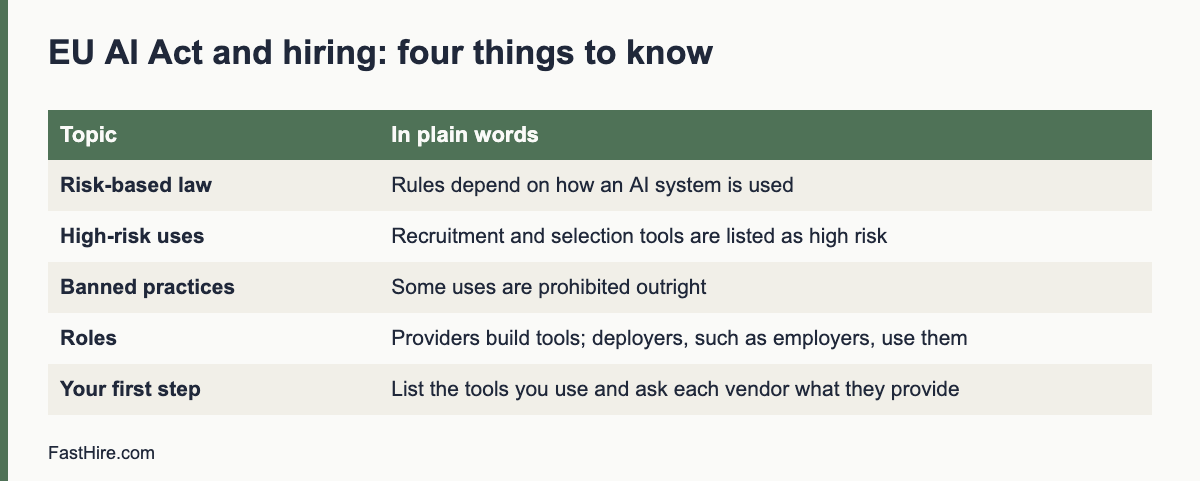
    Records that help you in a dispute

    Because the burden of proof can shift, records matter. Keep the role brief and criteria, the ad as published, the question list, the scorecards, the notes, the decision record and the messages sent to candidates. Store them securely, limit access and set a deletion date that follows national law and data protection rules. If a complaint arrives, do not delete or change records. Keep them, tell your legal adviser and respond within the time that applies.

    A short, written explanation for each hiring decision, linked to the criteria, is often the strongest evidence of fair treatment. It also improves your own decisions, because writing the reason forces you to check it. Make this habit part of your debrief. See how to run a debrief meeting for a template of a decision record.

    Frequently asked questions

    Which grounds does EU law protect in employment?

    Racial or ethnic origin, religion or belief, disability, age, sexual orientation and sex. National laws often add more.

    Do EU directives apply directly to employers?

    They are implemented through national law. Employers follow the national law of the country where they hire.

    Do I have to provide reasonable accommodation?

    Yes, for disabled applicants and employees, unless it would impose a disproportionate burden. National law sets the details.

    What does a shifting burden of proof mean?

    If a person shows facts that suggest discrimination, the employer must prove it did not breach equal treatment. Records help you do that.

    Where can I find the national rules?

    Start with the Your Europe pages, then the equality body, labour ministry and data protection authority of the country concerned.

    Related guides

    This is general information, not legal advice.
  • Accessible interviews: how to plan one for every candidate

    Accessible interviews: how to plan one for every candidate

    An accessible interview is one that works for every candidate by design, with room for individual changes on top. Build in a clear structure, advance information, breaks, a choice of format, an accessible venue or video setup, and an easy way to ask for more. Then fewer candidates need special arrangements, and those who do can get them quickly.

    Key takeaways

    • Design the standard interview so it already works for a wide range of people. Add individual adjustments when asked.
    • Send the format, questions or topics, people and timing in advance. This helps many candidates, not only those with a disability.
    • Check the venue or the video platform before the day: access, light, sound, captions and quiet.
    • Train interviewers: speak clearly, avoid idioms, allow pauses and never comment on the condition.
    • Score all candidates on the same job criteria. A change in how a person answers is not a change in the standard.
    x

    Universal design first, adjustments second

    Many employers handle accessibility one request at a time. That is necessary, and it is the law in many places. But a better start is to make the default interview easier for everyone. If every candidate gets the topics in advance, a written agenda and a break, a person with anxiety, a person with dyslexia, a person who is new to your language and a person who has a long travel day all benefit. Fewer people need to disclose anything to get a fair chance.

    This guide covers planning for the whole interview process. For the legal duties and request-handling steps, see our guides for hiring managers on reasonable adjustments in interviews, and for employers on the ADA and hiring and UK reasonable adjustments in recruitment.

    Step 1: Plan the structure

    • Same questions for everyone, tied to the job. See structured interviews.
    • Questions that are clear and direct. Avoid double questions, idioms and trick questions. “Tell me about a time you handled a complaint” is easier to follow than “How would you describe your approach to the customer journey?”
    • Time to think. Tell candidates they may take a moment before they answer.
    • Breaks in long sessions, built into the schedule for everyone.
    • A set plan for the time. For example, 5 minutes to open, 35 minutes of questions, 10 minutes for the candidate’s questions.
    • A scoring guide. Interviewers mark the content of the answer, not the speed, polish or style, unless these are real job needs.

    Step 2: Prepare the candidate

    Send an invitation that covers the date, time zone, length, format, people, topics, any task, venue or video link, and how to ask for changes. Our guide on how to prepare candidates for an interview has a template. Add a line about accessibility: “Our offices have step-free access and an accessible toilet. If you need anything else, such as an interpreter, a quiet room or a different format, please write to us.”

    Step 3: Check the venue

    AreaWhat to check
    Getting therePublic transport links; accessible parking spaces; clear directions that name the entrance; a person to meet the candidate at reception
    Entrance and routeStep-free route, automatic or easy doors, lifts that work, wide corridors, signs in large print
    RoomQuiet; good lighting; no glare behind the interviewer; chairs with and without arms; enough space for a wheelchair or a mobility aid; seating for the candidate’s support person
    SoundNo background noise; a hearing loop if you have one; interviewers face the candidate
    Toilets and waterAccessible toilet close to the room; water available
    SafetyA plan for evacuation that includes people with limited mobility

    Visit the route yourself before the first interview and walk from the entrance to the room. Fix what you can. For what you cannot fix, offer another room or another format, and say so in the invitation.

    Step 4: Set up video interviews well

    1. Choose a platform with captions and test it with the keyboard and a screen reader.
    2. Send the link early, with a phone number for problems and a simple test guide.
    3. Offer audio-only and phone options. Some candidates have no camera, a low bandwidth or find video tiring.
    4. Keep the background plain and the light on your face. This helps lip readers and people who rely on facial expression.
    5. Mute when not speaking, and speak one at a time. This helps captions and interpreters.
    6. Do not require a camera unless it is essential. If you do, explain why.
    7. Record only if needed, and only with notice. See GDPR for job applicants for the data protection side.

    Step 5: Train the interviewers

    Interviewers do not need medical knowledge. They need a handful of habits. Give them a one-page guide and a 30-minute briefing.

    DoDo not
    Speak clearly, at a natural pace, facing the candidateRaise your voice or speak in an overly slow way
    Speak to the candidate, even when an interpreter or support person is presentTalk to the interpreter or support person about the candidate
    Allow silence while the candidate thinksFill the silence or move on quickly
    Offer breaks and waterTreat a request for a break as a sign of weakness
    Ask about the job and the evidenceAsk about health, the condition or personal life
    Take the same kind of notes for everyoneWrite comments on manner, appearance or speech unless job-related

    Add a short practice session. Two interviewers run a mock interview with a colleague who plays a candidate who needs a captioned video call. The practice reveals problems in the platform, in the script and in habits.

    Step 6: Score fairly

    A fair scoring guide describes what a good answer contains. It should not reward fluency or a particular style unless the job needs it. For example, in a customer support role that involves written replies, a candidate who answers in short, careful sentences or types answers in the chat can still show the skill. Score the content: the situation, the action, the result. Keep adjustment details out of the scorecard. If a candidate used a different format, score the evidence the same way.

    Step 7: Ask for feedback

    At the end, ask every candidate: “Was there anything that would have made this interview easier for you?” Record the answers without names. Look for patterns, such as unclear directions or noisy rooms, and fix them. Once a year, review the complete process with a short checklist, and invite people with lived experience to test your process and share their view, with fair pay for their time.

    A one-page checklist

    CheckDone?
    Invitation sent with format, people, topics and timing
    Offer of adjustments with a named contact and reply time
    Venue checked: route, room, sound, toilet
    Video platform tested with captions and keyboard
    Audio-only option offered
    Breaks planned for all
    Interviewers briefed and given the one-page guide
    Same questions and scoring guide for all
    Adjustment details kept out of the scorecard
    Feedback question asked at the end

    FastHire is being built for the step before interviews. It shows each job requirement next to the exact CV passage that supports it, so interview questions can focus on real evidence. FastHire is coming soon. It does not rank, score or reject candidates. People make every decision.

    A fictional example: one interview, three candidates

    This example is invented. A company interviews three candidates for a customer support role with the same plan. The plan has the topics in advance, a written agenda, a five-minute break after 25 minutes and a choice of in-person, video or phone.

    CandidateWhat they asked forWhat the company didWhat stayed the same
    ANothingUsed the standard planQuestions, scoring guide, time
    BCaptioned video and the questions as text in the chatHeld the interview on a platform with live captions and pasted each question into the chat as it was askedQuestions, scoring guide, time
    CA quiet room, a slower pace and a support personBooked a small quiet room, allowed extra pauses, welcomed the support person, extended the breakQuestions, scoring guide, time

    All three candidates were scored with the same guide on the content of their answers. The support person for candidate C sat in as a listener and did not answer. The interviewers did not know the reasons for the changes and did not need to. The panel found that the plan helped candidate A as well: A said that having the topics in advance made it easier to prepare. This is the pattern to expect when you design for the wide range of people first.

    Common planning mistakes

    MistakeBetter practice
    Booking an interview room on an upper floor with no liftCheck access when you book the room, not after the invitation
    Sending the video link five minutes beforeSend it with the invitation and again the day before
    Surprise exercisesShare the brief and the time limit in advance
    Asking “How would you cope with…?” about a conditionAsk how the person would do the task, using the job description
    Treating silence as a weak answerAllow time. Score the content
    Relying on a single interviewer’s impressionUse a scorecard and a second interviewer
    Discussing the candidate’s condition in the debriefKeep the debrief to evidence about the job criteria

    Where mistakes happen, correct them quickly. If an interviewer asks an inappropriate question, the lead interviewer can step in: “Let us come back to the job requirements.” Afterwards, speak with the interviewer, note what happened and consider whether to tell the candidate. Take advice from HR if the question was about health or another protected trait.

    Measuring whether it works

    Track a few simple numbers from your own records, and do not compare them to outside benchmarks. How many candidates asked for a change, and how fast did you reply? How many candidates withdrew between invitation and interview? How many answered the feedback question and what did they say? How many interview rooms or platforms had a reported access problem? Review the numbers once a quarter in the same meeting where you review hiring metrics, as described in our guide to recruitment numbers worth tracking.

    When a number worsens, ask what changed. A new office, a new video platform or a new interviewer can alter the experience. Fix the cause, tell the team what you changed, and check again next quarter. Accessibility is a habit more than a project. A short check at each stage keeps the process working for the next candidate and for the one after that.

    If you run interviews in several offices, share what works. One office may have a good quiet room, a reliable captioning setup or a clear route from the station. Collect these notes in one place and let every interviewer find them. A simple shared page with photos, directions and contacts for each location saves time, reduces mistakes and makes the experience more consistent for candidates, wherever they interview.

    Official sources for this topic: EEOC: reasonable accommodation guidance, GOV.UK: reasonable adjustments, Acas: recruitment. These pages are maintained by the authorities and may change, so check them for the current text.

    Frequently asked questions

    Do I need to ask every candidate about accessibility?

    Offer to every candidate, in the invitation. Do not ask about health or disability. Invite requests.

    What if a candidate needs something I cannot provide at short notice?

    Be open about what you can do and talk about alternatives, such as a new date or a different format. Record your efforts. Take advice if the request is hard.

    Can I record the interview for people who could not attend the panel?

    Only with notice and a lawful basis, and with a clear retention period. Offer an alternative for candidates who do not want to be recorded.

    Is a structured interview more accessible?

    It can be, because the format and questions are known and scoring is consistent. Add flexibility on how answers are given.

    How do I know if my process works?

    Ask candidates, review the issue log and compare drop-out and completion by stage. Ask people with lived experience to test it.

    Related guides

    This is general information, not legal advice.