Author: fhai

  • GDPR for job applicants: what employers must do

    GDPR for job applicants: what employers must do

    Under the UK and EU GDPR, you may collect and use applicant data only for clear, fair purposes, you must tell applicants what you do with it, you may keep it only as long as needed, and applicants have rights to see, correct and in some cases delete it. This guide explains the main duties in plain language and gives a working checklist.

    Key takeaways

    • GDPR applies to applicant data, including CVs, interview notes and test results.
    • You need a lawful basis, a privacy notice and a retention period before you collect anything.
    • Applicants can ask for a copy of their data, and for correction or deletion in some cases.
    • Special category data, such as health or ethnicity, has extra rules.
    • Using software to support decisions adds duties. A person must stay in control of each decision.
    x

    What counts as applicant data

    Personal data is any information about an identifiable person. In hiring it includes the CV, cover letter, contact details, answers to screening questions, test and assignment results, interview notes, scorecards, emails, references, and any score or flag attached to a record. Notes written by your hiring managers about a candidate are personal data about that candidate.

    GDPR applies when you are established in the EU or UK, and in some cases when you recruit people located there. The UK has its own version, the UK GDPR, with the Data Protection Act 2018. The two are similar in structure but are separate laws, so UK and EU rules can differ over time. Read the official texts: the EU General Data Protection Regulation, the guidance of the European Data Protection Board, and the UK Information Commissioner’s Office pages on recruitment and selection.

    The seven principles, applied to hiring

    PrincipleWhat it meansHiring example
    Lawfulness, fairness and transparencyHave a lawful basis, treat people fairly, and be open about what you doPublish an applicant privacy notice on the application page
    Purpose limitationUse data only for the purpose you statedDo not add applicants to a marketing list without a lawful basis
    Data minimisationCollect only what you needDo not ask for date of birth or a photograph by default
    AccuracyKeep data correct and up to dateLet candidates correct their details and fix errors quickly
    Storage limitationKeep data no longer than necessaryDelete declined applications on a set date
    Integrity and confidentialityKeep data secureUse access by role, strong sign-in and secure sharing
    AccountabilityBe able to show how you complyKeep a record of your decisions, notices and retention schedule

    Step 1: Choose a lawful basis

    GDPR gives six lawful bases. Three are common in hiring.

    • Steps before entering a contract. Processing is needed to consider the application, for example to read the CV and invite the person to interview.
    • Legitimate interests. You have a real business interest, such as running a fair recruitment process, and the use of data is balanced against the rights of the applicant. Write a short assessment to show the balance.
    • Consent. The person freely agrees to a specific use, for example to be kept on a talent list. Consent must be easy to withdraw. Because applicants may feel pressure to agree, avoid relying on consent for the main process.

    Legal obligation can also apply, for example when you must check the right to work. Choose the basis for each purpose and write it down. Different purposes can have different bases. This is general information, and a data protection adviser can confirm the best fit for your case.

    Step 2: Tell applicants what you do

    Give applicants a privacy notice at or before the time you collect data. It should be short and clear. It should list who you are and how to contact you (and your data protection officer, if you have one), what data you collect and from where, why you use it and the lawful basis, who receives it (for example your applicant system provider), whether data goes outside the UK or EU, how long you keep it, the rights people have, and how to complain to the regulator. If you use automated tools, say so. Our applicant privacy notice template gives wording you can adapt.

    Step 3: Collect less

    Review your application form field by field. Ask of each field: do we need this to decide who to interview? If the answer is no, remove it, or move it to a later stage and ask only the finalists. For example, you do not need a home address to read a CV, and you do not need bank details until you make an offer. Collecting less lowers risk and reduces the work of protecting and deleting data later.

    Special category data

    Some data has extra protection: health, ethnicity, religion, sexual orientation, trade union membership, political opinions, and genetic and biometric data. You need both a lawful basis and a special condition to process it. In hiring, the most common case is equal opportunities monitoring, where you ask applicants to share data on a voluntary basis. Keep it separate from the people who make hiring decisions, explain the purpose, and make it clear that answers are optional. Criminal offence data has its own rules too, and checks are limited by national law.

    Step 4: Set retention periods

    Decide how long you keep each type of record, and why. For declined applicants, many employers choose a short period linked to the time in which a claim could be made, but the right figure depends on the country and your risk. Write the figure in your notice and apply it. If you want to keep CVs for future roles, ask for consent and renew it after a fixed time. Our guide to applicant data retention goes deeper.

    Step 5: Respect applicant rights

    RightWhat applicants can askPractical step
    AccessA copy of the personal data you hold and information about its useKnow where data lives. Reply within the legal time limit, which is generally one month, with possible extension. Check the official text.
    RectificationCorrect inaccurate dataAllow edits, and fix mistakes in notes and records
    ErasureDelete data in certain casesBe able to delete a candidate from the system and from other places
    Restriction and objectionLimit or object to some usesHave a route to review the request
    Not to be subject to solely automated decisionsA person should be involved where decisions have legal or similarly significant effectsKeep a person in charge of each hiring decision. See our guide to GDPR Article 22 in hiring.

    Create a one-page procedure: who receives the request, who checks identity, who gathers the data, who reviews it for other people’s information, and who replies. Practice with a dummy request. Interview notes are included in an access request in many cases, so write them as if the candidate may read them.

    Step 6: Be careful with automation

    If you use software that sorts, scores or filters applications, GDPR adds duties: transparency, a lawful basis, fairness, and in some cases a data protection impact assessment. See our guide on data protection impact assessments for hiring tools. The EU AI Act also treats some hiring systems as high risk. We do not give dates here. Check the official text, and read our overview of the EU AI Act and hiring tools.

    FastHire is being built around a simple idea: show each job requirement next to the exact CV passage that supports it, so a person can check the evidence. FastHire is coming soon. It does not rank, score or reject candidates. People make every decision.

    A GDPR applicant checklist

    CheckDone?
    Lawful basis chosen and recorded for each purpose
    Applicant privacy notice shown on the application page
    Application form reviewed, extra fields removed
    Special category data collected only where needed, separated and optional
    Retention period set for each record type
    Process for access, correction and deletion requests tested
    Data processing agreement signed with each software vendor
    Access limited by role, strong sign-in turned on
    Automated tools identified, with a person deciding in each case
    Impact assessment considered for high-risk tools

    Mistakes to avoid

    • Treating the CV as public because the candidate sent it. You are still responsible for how you use it.
    • Using one global notice for every country. Review rules for the UK and each EU country where you hire.
    • Keeping CVs “for future roles” without asking. Ask, and set a time limit.
    • Searching social media profiles without a clear reason. Public information is still personal data, and it can reveal protected details.
    • Emailing CVs to managers. Share through the system, and remove attachments from inboxes on a schedule.

    Which lawful basis for which task: a worked example

    This fictional example shows how one hiring process can use different bases for different tasks. A small company in Ireland hires a project coordinator. It is invented for illustration. It is not advice for any real case.

    TaskPossible basisReason to write down
    Read the CV and invite people to interviewSteps before entering a contract, or legitimate interestsNeeded to consider the application
    Run a short skills exerciseLegitimate interestsFair way to compare applicants on the same task
    Ask all applicants to complete an optional equal opportunities formConsent for voluntary special category data, with a lawful basis for monitoringOptional, separate from decision makers
    Keep the CV of a declined applicant for six more months for future rolesConsentThe applicant said yes and can withdraw
    Check the right to work of the person who gets the offerLegal obligationNational law requires the check
    Contact refereesLegitimate interests, after telling the candidateTell the candidate and ask before you call

    Notice what the table does not say. It does not say that the company can use any data for any purpose because the applicant sent a CV. Each purpose has its own reason, and each reason is recorded where the team can find it. When a regulator, a candidate or a manager asks why you hold a piece of data, the answer comes from the table, not from memory.

    A short note on international teams

    If your recruiters sit in one country and the candidates in another, ask three questions. Where is the data stored? Who can access it from other countries? Which law applies to the candidate? The answers decide which notice you show and which transfer tools you need. Keep a simple map: one line per tool, with country of storage and the vendor agreement. Update it whenever you add a new tool or move a team. A current map is often the first thing an auditor asks to see.

    Frequently asked questions

    Does GDPR apply if I only hire a few people a year?

    Yes. The size of your hiring does not exempt you. Smaller organisations can use simple tools, but the principles still apply.

    Can I keep a CV from a rejected candidate?

    Only for as long as you can justify. If you want to keep it for future roles, ask the person and set a review date.

    Do I need a data protection officer?

    Only in specific cases, such as large-scale monitoring or processing special category data on a large scale. Your national regulator and the official text explain when. Even if you do not need one, name a person responsible.

    Can I use LinkedIn to find candidates?

    Yes, but you must still tell people how you got their data and what you do with it, usually within a month, and use it only for the stated purpose. Read the official guidance for your country.

    What if the candidate lives in the EU but my company is in the US?

    GDPR may still apply in some cases when you target people in the EU. Ask a data protection adviser about your situation.

    Related guides

    This is general information, not legal advice.
  • How to choose recruiting software: 25 questions to ask every vendor

    How to choose recruiting software: 25 questions to ask every vendor

    Choose recruiting software by starting with your own process, not with the vendor demo. Write down the 10 tasks your team does every week, set a budget range and a data protection requirement, then ask every vendor the same 25 questions and score the answers on one sheet. This guide gives the questions, the scorecard and a short pilot plan.

    Key takeaways

    • Define your process and must-have needs before you see a demo.
    • Ask every vendor the same 25 questions and record the answers in writing.
    • Check data protection, security and automated-decision features early. They can rule a product out.
    • Ask for a pilot with your own roles, and set success measures before it starts.
    • Be careful with any tool that ranks, scores or rejects people. Ask how a person can see and challenge each result.
    x

    Step 1: Write down what you need

    Vendors sell features. You need outcomes. Before you speak to anyone, spend an hour with your team and write a short brief. It should include the following.

    1. The 10 weekly tasks. For example: post a job to several boards, receive applications, review CVs, message candidates, schedule interviews, collect interview feedback, make an offer, and report numbers.
    2. The three biggest pains. For example: applications arrive by email, interview feedback is lost, or candidates are not told the outcome.
    3. Volume. How many roles and how many applications per year, as ranges. Use your own records. If you do not have them, see our guide to a hiring dashboard in a spreadsheet.
    4. Countries. Where do you hire and where will candidate data be stored? Rules differ for the US, UK and EU.
    5. Budget range and contract length you can accept. Do not invent a figure to impress anyone. Use your own finance team’s number.
    6. Who will use it. Recruiters, hiring managers who rarely log in, and an administrator. Hiring managers should need no training.

    Step 2: Separate must-haves from nice-to-haves

    Use the same discipline you use for a job. A must-have is a need where “no” means you cannot use the product. A nice-to-have is a feature that helps but has a workaround. Keep the must-have list to about eight lines.

    AreaExample must-haveExample nice-to-have
    ApplicationsReceives applications from our career page and by emailMobile app for candidates
    CollaborationHiring managers can leave structured feedback without trainingIn-app chat
    CommunicationTemplates for acknowledgement and decline messagesText message sending
    DataExport all our data in a standard format at any timeCustom report builder
    ComplianceRetention rules and deletion per candidateBuilt-in consent pages in several languages
    ControlNo automated rejection without a person’s decisionDuplicate detection

    Step 3: Ask the 25 questions

    Send the questions in writing before the demo, and ask for written answers. Spoken answers are easy to forget and hard to compare. Keep a copy of the vendor’s reply for your records.

    Process and daily use (questions 1 to 6)

    1. Which of our 10 weekly tasks can your product do without workarounds? Show each one in the demo, using our example role.
    2. How does a hiring manager give feedback? How many clicks, and can they do it from email?
    3. Can we create our own stages, scorecards and message templates, or do you set them?
    4. How do candidates apply? Is there a mobile-friendly form, and how long does it take a candidate to finish?
    5. How do we reach applicants who are not a good match? Can we send a decline in bulk, and can we personalise it?
    6. What reports can we run without paying extra? Can we export raw data to a spreadsheet?

    Data protection and security (questions 7 to 14)

    1. Where is candidate data stored, in which country, and which companies process it as sub-processors?
    2. Do you act as a data processor for us? Will you sign a data processing agreement before we start?
    3. How do you support lawful transfers of data between regions, if we hire in the EU or UK and you store data elsewhere?
    4. How can we delete a single candidate’s data on request, and how fast does it disappear from backups?
    5. Can we set automatic retention periods per country or per role?
    6. What security certifications or independent audits do you hold, and can you share the reports under an agreement?
    7. Who at your company can see our candidate data, and how is access logged?
    8. What happens to our data if we end the contract? How long do you keep it, and in what format can we take it?

    Fairness, automation and AI (questions 15 to 20)

    1. Does the product rank, score, filter out or recommend candidates in any way? Describe each feature in plain language.
    2. Can every automated feature be switched off? Is any enabled by default?
    3. For every score, ranking or recommendation, can a person see the reasons, and can they override it?
    4. What data was used to build or tune the feature? Do you test for different results between groups, and can we see the test summary?
    5. How do you help customers meet the rules that apply to automated decisions and AI in hiring, such as local laws in some US cities, the UK and EU data protection rules, and the EU AI Act?
    6. Do candidates see any notice that automated tools are used on their application, and can we edit it?

    Cost, support and contract (questions 21 to 25)

    1. What is the total cost over three years for our volume, including set-up, training, extra users, extra roles and support? Please give it in writing.
    2. What is the contract length, the notice period and the price increase rule at renewal?
    3. What support is included, in which languages and time zones, and what is the response time for urgent problems?
    4. What does the first 90 days look like? Who helps us import data and set up templates?
    5. Can you give us two customers of our size and type to speak to, who were not selected by your sales team alone?

    Questions 15 to 20 need special attention. In the United States, some cities and states regulate automated tools in hiring. For example, the New York City Department of Consumer and Worker Protection explains the city’s rules on automated employment decision tools. In the EU, the AI Act sets rules for AI systems, and hiring uses are a regulated area. We do not state application dates here. Read the official text for current dates, and see our guide on the EU AI Act and hiring tools. In the UK, the Information Commissioner’s Office explains data protection duties in its recruitment and selection guidance.

    Step 4: Score the answers

    Create one table. List vendors across the top and your criteria down the side. Give each criterion a weight from 1 to 3 based on how important it is to you. Score each answer from 0 to 3 as follows: 0 means it cannot be done, 1 means it needs a workaround, 2 means it works, and 3 means it works well and is shown in the demo.

    CriterionWeightVendor A (0 to 3)Vendor B (0 to 3)Vendor C (0 to 3)
    Fits our 10 weekly tasks3
    Hiring manager ease of use3
    Data protection and deletion3
    Automation is optional and explainable3
    Reports and export2
    Total cost over three years2
    Support and onboarding2
    Contract terms and exit2
    Weighted total

    Use the table to reduce the choice to two vendors, not to make the final choice. A score cannot capture how a product feels in daily use. Use the pilot for that. And note the irony: you are scoring software, not people. When you screen candidates, the same discipline applies, but a person should make each decision.

    Step 5: Run a short pilot

    Ask for a trial or a paid pilot of two to four weeks with one or two real roles. Do not test only with demo data. Agree the success measures in writing before you start.

    MeasureHow to check
    Setup timeHours from start to the first role live
    Hiring manager feedbackShare of requests answered without a reminder
    Candidate completionShare who start the application and finish it, compared with your current form
    Data accuracySpot-check 20 records against the source
    Support qualityNumber of questions asked and time to a useful answer
    Data exportExport everything and open it. Check that no fields are missing

    At the end of the pilot, ask your hiring managers and two or three candidates for comments. Then decide. If the vendor will not allow a pilot, that is information about the contract you will get.

    Red flags

    • No written answers. If a vendor will not put data protection answers in writing, do not buy.
    • “Our AI picks the best candidates.” Ask how, with what data, and what a person can see and change. Be careful with any promise of removing bias with software.
    • No data export. You must be able to leave.
    • Pressure to sign this week. A good tool will still be there next month.
    • Pricing that depends on a call. This may be normal, but ask for a three-year total in writing.
    • Reference customers chosen only by the vendor. Ask for one more you choose from the vendor’s public customer list.

    FastHire is coming soon and is being built for the screening step. It shows each job requirement next to the exact CV passage that supports it. It does not rank, score or reject candidates. People make every decision. If you compare tools, ask FastHire and every other vendor the same 25 questions.

    Contract points to check before you sign

    PointWhat to ask for
    Data ownershipA clause that says candidate data belongs to you, and the vendor may use it only to provide the service
    Data processing agreementA signed agreement that lists sub-processors and gives you notice of changes
    ExitExport of all data in a standard format within a fixed number of days, then deletion confirmed in writing
    Price changesA cap on increases at renewal, or a fixed price for the term
    Service problemsA written commitment on availability and a remedy if it is not met
    Changes to featuresNotice before the vendor adds or changes any automated feature that affects candidates

    Ask your legal or data protection adviser to read the contract. If you hire in the EU or UK, also ask whether a data protection impact assessment is needed before you start. Our guide on impact assessments for hiring tools will cover this in more detail.

    A 60-day rollout plan

    1. Days 1 to 10: set up. Import open roles, build stages and message templates, and connect the career page. Name one owner.
    2. Days 11 to 20: train a small group. Train recruiters first, then two friendly hiring managers. Collect questions and fix templates.
    3. Days 21 to 40: run live roles. Use the tool for new roles only. Do not move every old role at once.
    4. Days 41 to 50: review. Compare your pilot measures with the targets. Fix problems with the vendor in writing.
    5. Days 51 to 60: expand. Move the remaining roles, switch off old inboxes and tell candidates where to apply.

    Plan one more step: set a review date six months after launch. Ask whether the tool still solves the three pains you wrote at the start. If not, say so while you still have contract options.

    Frequently asked questions

    How long should the selection process take?

    For a small team, three to six weeks is often enough: one week for the brief, one to two weeks for questions and demos, and two to four weeks for a pilot. Adjust to your own approval process.

    Do I need an applicant tracking system at all?

    Not always. A small team that hires a few people a year can use a spreadsheet and email. Consider software when volume, collaboration or compliance records become hard to manage.

    Who should be in the decision?

    At least one recruiter, one hiring manager who will use it, someone responsible for data protection or IT security, and whoever owns the budget.

    What if the vendor says its AI is compliant?

    Ask for the supporting documents and read them. Compliance is a shared responsibility, and you as the employer remain responsible for your decisions.

    Should I choose an all-in-one suite or a specialist tool?

    It depends on the pains you wrote down. A suite reduces the number of systems. A specialist tool may fit one task better. Score both with the same questions.

    Related guides

    This is general information, not legal advice.

  • A small business onboarding plan for the first 30 days

    A small business onboarding plan for the first 30 days

    A good onboarding plan for a small business has four parts: preparation before day one, a clear first week, goals and check-ins for weeks two to four, and a 30-day review. Give the new person a named guide, access to the tools they need, a short list of outcomes and regular time to ask questions. Plan it in writing, so that it does not depend on how busy you are.

    Key takeaways

    • Prepare before day one: equipment, accounts, schedule and a welcome message.
    • Week one is for orientation, safety, tools and meeting people. Do not overload it with tasks.
    • Set three to five outcomes for the first 30 days, and discuss them on day one.
    • Hold a short check-in every day in week one, then weekly.
    • End with a 30-day review that covers what worked, what is unclear and what comes next.
    x

    Why onboarding matters more in a small team

    In a large company there are systems, buddies and training teams. In a small business, the new person depends on you. If you are busy, they wait. A plan prevents the early weeks from turning into confusion, and it shows the person that you value them. It also protects you: the same checklist works for the second hire and the tenth.

    Onboarding is also where legal and safety duties start. Employers must give the right information and a safe workplace. For overviews, see GOV.UK on employing people, the US Department of Labor wage and hour fact sheets, and the Your Europe pages on hiring and managing staff. For workplace safety, check the national authority in your country, for example OSHA in the US, the Health and Safety Executive in the UK or the national labour inspectorate in your EU member state.

    Before day one: the 10-point checklist

    TaskWhoDone?
    Send a welcome message with the start time, address or link, dress code and who to ask forManager
    Prepare the workspace or the remote kit (laptop, phone, headset, accounts)Manager
    Create email, chat, software and file access, with the right levelManager or IT helper
    Complete contract, tax and payroll formsManager
    Complete right-to-work checks as the law requiresManager
    Prepare a one-page overview of the business, team and customersManager
    Choose a guide who is not the manager if possibleManager
    Block time in the calendar for the first weekManager and guide
    Write three to five outcomes for 30 daysManager
    Tell the team the start date and the roleManager

    Week one: a day-by-day plan

    DayFocusActivities
    Day 1Welcome and basicsTour or video call, meet the team, set up equipment, safety information, read the one-page overview, 30-minute talk about the outcomes
    Day 2Tools and processWalk through the main tools with the guide; watch one task done end to end; do a small supervised task
    Day 3Customers and productsLearn the products, the customers and the common questions; shadow a call or message session
    Day 4First real taskDo a real task with a guide present; get feedback the same day
    Day 5Review week one30-minute talk: what is clear, what is unclear, what to learn next; agree goals for week two

    Keep each day light enough to leave time for questions. A new person who feels lost for a week may decide to leave. Short daily check-ins of 10 minutes help you spot problems early.

    Weeks two to four

    WeekGoalCheck-in
    Week 2Do routine tasks with less help; learn the main systemsWeekly 30-minute meeting with the manager; daily quick message with the guide
    Week 3Take responsibility for one defined area; give a short update to the teamWeekly meeting; review one piece of work together
    Week 4Work independently on routine tasks; suggest one improvementWeekly meeting; prepare for the 30-day review

    Link the goals to the outcomes in the job description. If the role is new, see our guide to writing a job description for a role that does not exist yet, which explains how to write outcomes.

    The 30-day outcomes: how to write them

    An outcome describes what the person can do or deliver by day 30. Keep it measurable and fair.

    Weak outcomeBetter outcome
    Learn the systemCan enter and update orders in the system without help
    Get to know the customersHas answered 20 customer messages with a quality check by the guide
    Be proactiveHas suggested one change to the process and explained why
    Fit in with the teamHas met every team member and knows who to ask for each type of question

    Share the outcomes on day one so that there are no surprises. If the plan changes, update it together and write the change down.

    The role of the guide

    A guide is a colleague who answers questions and shows how things work. The guide is not the person’s manager or evaluator. The guide should:

    • Meet the person on day one and have lunch or a break with them
    • Explain unwritten rules, such as how to ask for time off and who answers which questions
    • Answer small questions without judgement
    • Introduce the person to others
    • Report to the manager if the person seems lost or unwell, in a helpful way

    Give the guide time in their own schedule. If you do not, the load falls on you or on a person who is already stretched. If you are the only manager and have no one else, schedule short daily slots with the new person and keep a shared document of questions and answers. Over time this becomes your handbook.

    Documents and training to cover

    TopicWhat to coverWhere to look
    SafetyEmergency exits, first aid, safe use of equipment, who to tell about an accidentNational health and safety authority
    PoliciesTime off, sick leave, expenses, data protection, equal opportunity, conductYour handbook or a one-page summary
    Data protectionWhat data the person will handle and how to keep it safeICO guidance in the UK; GDPR in the EU; your state laws in the US
    PayPay date, payslip, how to report errorsPayroll provider
    ToolsEmail, chat, project tools, filesGuide and manager
    Customers and productsWho they are and what they needManager and team

    Check-in questions

    Use the same five questions each week. Write the answers and act on them.

    1. What went well this week?
    2. What was confusing or took longer than expected?
    3. What do you need to learn or have to do your work?
    4. Is there anything about the team, the workload or the environment I should know?
    5. What would you like to focus on next week?

    Do not ask about health, family or personal matters. If the person shares something personal, listen and ask whether they need an adjustment. Follow the law on adjustments and leave, and take advice if needed.

    The 30-day review

    PartQuestions
    OutcomesWhich outcomes were met? Which were not? Why?
    LearningWhat does the person need to learn next? What training helps?
    RoleIs the role what both sides expected? What should change?
    Feedback to youWhat did the onboarding miss? What would you change?
    Next 60 daysSet three outcomes for the next period

    If there is a probation period, tell the person how the review links to it. Be clear and fair. If there are concerns, say so early, with specific examples, and agree a plan to improve. See the first hire plan for the full journey from the idea to the first day, and our guide on the cost of hiring to plan the budget for training time.

    Common mistakes

    MistakeEffectFix
    Starting without a workspace or accountsPerson waits; feels unwelcomeUse the 10-point list
    Giving real work with no help on day oneStress and errorsShow first, then supervise, then release
    No outcomesPerson does not know what good looks likeWrite three to five and share them
    Skipping check-ins when busyProblems growKeep 10 minutes daily in week one
    Only talking about tasksThe person feels isolatedAdd team time and a guide
    No feedback from the new personYou never improve the processAsk five questions each week

    A welcome message you can copy

    Hello [Name],

    We are glad you are joining us on [date]. Here is what to expect on your first day.

    Time and place: [time], [address or video link].
    Who you will meet: [manager name] and [guide name]. [Guide name] will be your first contact for questions.
    What to bring: [documents required by law, such as proof of the right to work; anything else].
    What we will do: a tour, meet the team, set up your equipment and talk about your first 30 days.
    Lunch: [arrangement].

    If anything changes or you have questions before then, please contact me at [phone or email].

    Best wishes,
    [Name]

    A worked example (fictional)

    This example is invented. A small bakery hires its first sales assistant. The owner prepares a one-page plan.

    WeekPlanOutcome by the end of the week
    1Safety and hygiene briefing, tour, meet the team, learn the till, shadow the guide, serve with supportCan use the till and explain the products with help
    2Serve customers with the guide nearby; learn opening and closing stepsCan open and close the shop with the guide present
    3Serve alone during quiet hours; take orders for cakesCan take a special order correctly
    4Serve during a busy period; suggest one improvement to the displayWorks independently on routine tasks; has made one suggestion

    At the 30-day review the owner asked the five weekly questions again. The new assistant said that the allergen information was the hardest part to learn. The owner added a laminated allergen chart behind the counter and a short quiz for future hires. The review improved the process for the next person.

    Make it inclusive

    • Ask all new starters whether they need any adjustment to get started, such as step-free access, written instructions, a quiet space or flexible breaks. Offer it in a neutral way.
    • Share the schedule early so that people with caring duties or religious observance can plan.
    • Use plain language and avoid idioms in written material, especially if staff speak English as a second language.
    • Give the same training and the same feedback to everyone in the same role.
    • Do not assume that a person needs less or more help because of age, sex or origin. Ask what would help.

    An inclusive start improves retention and makes the team stronger. It also reduces the risk of unfair treatment.

    Frequently asked questions

    How long should onboarding last?

    A structured plan for the first 30 days is a good start. Many roles need 60 to 90 days to reach full speed. Keep check-ins going during that time.

    What if I have no time?

    Block short slots in your calendar and use a written plan. A guide or a recorded walkthrough of key tasks also saves time.

    Should onboarding be different for remote workers?

    Add a stronger first week: send equipment early, schedule video calls, explain tools and make sure the person knows who to ask. Remote workers can feel isolated.

    When should I give the contract?

    Before or on the first day. In many countries the law requires written terms by a set time. Check your official guidance.

    What do I do if the new hire is struggling?

    Talk early and specifically. Ask what is hard, offer help and agree on a short plan with dates. See our upcoming guide on what to do when a new hire is not working out.

    Related guides

    This is general information, not legal advice.
  • How to define a role before you hire: a one-page role brief

    How to define a role before you hire: a one-page role brief

    A role brief is a one-page document that says why the role exists, what the person must achieve, what they must be able to do and what the job offers. Write it before you open the vacancy, agree it with the people who will work with the new hire, and use it for the ad, the screen, the interviews and the first 90 days. It takes one to two hours and saves weeks.

    Key takeaways

    • Start with outcomes, not duties or a copied job description.
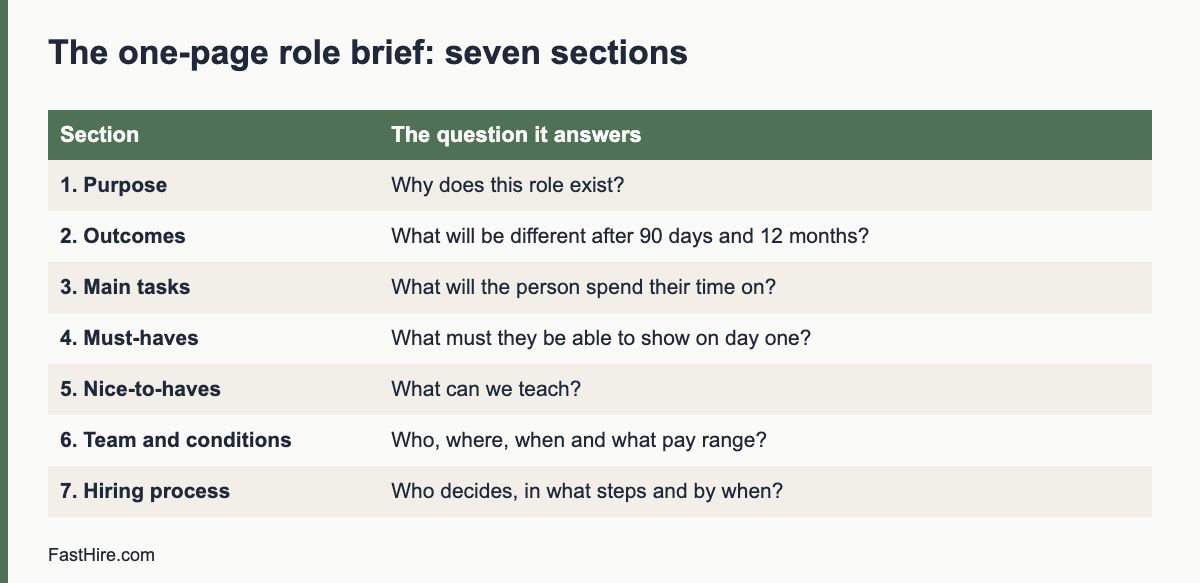
    • Use seven sections: purpose, outcomes, tasks, must-haves, nice-to-haves, team and conditions, and the hiring process.
    • Keep must-haves to three to five items that a person can check from a resume or CV.
    • Agree the brief with your recruiter, your manager and the main colleagues before you advertise.
    • Review the brief against five tests before you publish it, and change it only with a written reason.
    x

    Why define the role first

    Most hiring managers start with an old job description or a list of tasks they want to hand over. The result is a long list that describes the last person, not the next one. Candidates see a vague ad. Recruiters guess. Interviewers ask different questions because nobody agreed what good looks like. The hire may be a fine person who does not do what you needed.

    A brief fixes this by forcing three choices early: what changes if this person succeeds, what they need to be able to do on day one and what you can teach. These choices shape every later step. If you skip them, you will make them anyway, but under time pressure and without the people who should have a say.

    The seven sections of a one-page role brief

    SectionThe question it answersExample
    1. PurposeWhy does this role exist?Keep our five customer teams supplied with accurate weekly reports
    2. Outcomes (90 days and 12 months)What will be different if this person succeeds?In 90 days: weekly reports sent on time with fewer than two corrections a month
    3. Main tasksWhat will they spend their time on?Pull data, check it, write the summary, answer questions from team leads
    4. Must-havesWhat must they be able to show on day one?2 years of reporting work in any setting; advanced spreadsheet skills; clear writing
    5. Nice-to-haves and teachable skillsWhat can they learn here?Our reporting tool; our sector terms
    6. Team and conditionsWho do they work with, where and when? What is the pay range?Reports to Head of Operations; hybrid; salary range [range]
    7. Hiring processWho decides and by when?Two interviews, one work sample, decision within 3 working days of the last interview

    Section 1: Purpose

    Write one sentence. Use the form “This role exists so that [who] can [do what].” If you need two sentences, the role may be two roles. A clear purpose helps when you have to trade off: which skill matters more, and which duty can stay with someone else?

    Section 2: Outcomes

    List three to five results you expect in the first 90 days and in the first 12 months. Write them as things you could see or measure: “closes the monthly accounts by the fifth working day”, not “improves finance processes”. Outcomes tell you what to ask in the interview and how to judge the first months.

    Section 3: Main tasks

    List the regular work, in order of time spent. Five to eight lines is enough. Mark the one or two tasks that are hardest or most important. Tasks are useful for the ad and the onboarding plan, but they should not drive the must-haves. Many tasks can be learned.

    Section 4: Must-haves

    This is the most important section. A must-have is something a person must already be able to do, because you cannot or will not train it in the first weeks, and because you will reject a candidate who lacks it. Write each one so that a stranger can check it in a resume or CV. For more detail, see Must-haves vs nice-to-haves: cutting your applicant pile without unfair filters and How to write job requirements candidates can actually check themselves against.

    A quick test: for each must-have, ask “Would I really turn down an otherwise excellent candidate who lacks this?” If the answer is “probably not”, move it to nice-to-have.

    Section 5: Nice-to-haves and teachable skills

    List what is helpful but not essential. Add a short note on what you will teach. This makes it clear to candidates and recruiters that missing items are fine, and it reminds you to plan the training.

    Section 6: Team and conditions

    Name the manager, the main colleagues, the location, the hours and the pay range. If the pay is not agreed, agree it now. Without a range you cannot write an honest ad, and you risk a late-stage surprise. Some places require pay information in job ads or on request, so check the rules where the person will work.

    Section 7: Hiring process

    Say who will screen, who will interview and who decides. List the steps and the time each takes. Agree how quickly interviewers must give feedback. A process that is clear to you and the recruiter keeps candidates moving. We cover feedback speed in how to give fast interview feedback.

    A worked example

    This example is fictional and is only meant to show the level of detail.

    Role brief: Operations Reporting Analyst

    Purpose: This role exists so that our five customer teams can plan each week with accurate numbers.

    Outcomes. In 90 days: weekly reports go out every Monday by 10:00 with no more than two corrections a month; the team leads confirm they use them in their planning meetings. In 12 months: the person has replaced two manual reports with a shared dashboard and trained team leads to read it.

    Main tasks (most time first): pull and check data from three systems; write the weekly summary; answer team questions; maintain the dashboard; document report definitions.

    Must-haves: at least two years of reporting or analysis work, paid or unpaid; advanced spreadsheet skills, shown by an example; clear written English; can work with a team lead to define a report.

    Nice-to-haves (we will teach): our reporting tool; our sector terms; basic SQL.

    Team and conditions: reports to the Head of Operations; works with five team leads; three days in the office, two from home; salary range [range].

    Process: screen by the recruiter and the manager; 45-minute interview with two interviewers; one 45-minute work sample; decision within three working days of the last interview.

    Notice what the brief leaves out: a degree requirement, “strong communication skills” and “team player”. If the role truly needs a qualification, say which and why. If it only needs the skill, test for the skill.

    How to build the brief with your team in 90 minutes

    1. Before the meeting (20 minutes). Write a draft of sections 1 and 2. Send it to the recruiter and to two people who work closely with the role.
    2. Meeting, part one (30 minutes). Review purpose and outcomes. Ask: “If we hired the perfect person, what would you see after three months?” Rewrite until everyone agrees.
    3. Meeting, part two (30 minutes). List tasks, then pick must-haves. Challenge each one with the “would I turn down an excellent candidate?” test.
    4. After the meeting (10 minutes). Fill in sections 6 and 7. Send the final one-page brief to everyone. Ask for objections within one working day.

    If you work with a recruiter, use the brief as the agenda for your first meeting. Our guide on how to run a kickoff meeting with your recruiter shows how.

    Five tests before you publish

    TestPass if
    ClarityA person outside the team can say what the new hire will do after reading the brief
    CheckabilityEvery must-have can be confirmed from a resume or CV or a short, job-related test
    FairnessNo must-have excludes people for reasons unrelated to the job, such as age, a specific school or a native language
    RealismThe pay range, the outcomes and the must-haves fit the market, and the person can reach the outcomes in the time given
    AgreementThe manager, the recruiter and the main colleagues all agree and have said so in writing

    On fairness: use job-related criteria and apply them to everyone. The US Equal Employment Opportunity Commission lists protected traits and practices to avoid on its page about prohibited employment policies and practices. In Great Britain, the Acas page on recruitment explains how the Equality Act applies to hiring decisions. In the EU, equal treatment rules are set in EU and national law, so check the country where you hire.

    Common traps

    • Copying the last job description. It lists tasks the previous person did, including tasks that no longer matter.
    • Title inflation. A senior title with a junior brief attracts the wrong people and creates pay problems later.
    • Solution first. “We need a data scientist” may hide the real need, which could be better reports. Define the outcome and then choose the role.
    • Everything is a must-have. A list of twelve must-haves describes a person who does not exist.
    • Moving the target. If you add a new must-have after interviews begin, you risk treating candidates unequally.

    How to use the brief in the rest of the process

    Treat the brief as the source for everything else. The ad takes its purpose, tasks, must-haves and pay from sections 1, 3, 4 and 6. The screen uses section 4. The interview questions come from section 2 and section 4. The scorecard uses the must-haves as its rows. The 30-60-90 day plan is section 2 with dates. If a new fact appears, update the brief first and tell everyone.

    FastHire is being built around this chain. It shows each job requirement next to the exact CV passage that supports it, and candidates check their fit before applying. FastHire is coming soon. It does not rank, score or reject candidates. People make every decision. A clear brief makes that evidence much easier to read.

    Questions that sharpen a weak brief

    If your draft feels vague, ask the people closest to the role these ten questions. Write the answers in the brief.

    1. What is the one thing that goes wrong today because this role is empty?
    2. Who will rely on the new hire, and what do they need first?
    3. What would a very good first month look like? What would a poor one look like?
    4. Which task is the hardest, and what makes it hard?
    5. Which skills can we teach in four weeks, and which can we not?
    6. What did the last person do well that we must keep?
    7. What did we wish they had done differently?
    8. Who will the person work with most, and how do those people prefer to work?
    9. What is the lowest and highest pay we can offer, and what is the reason for the gap?
    10. What will make us say “yes” or “no” at the end of the process, and who will decide?

    Collect the answers in a shared document and ask people to comment before the meeting. Disagreement is useful here. It shows what you must settle before candidates arrive. If two senior colleagues give different answers to question one, the role is not ready to advertise.

    Turning the brief into an ad in 15 minutes

    Copy the purpose into the opening lines. Turn the main tasks into five to seven bullet points. Copy the must-haves as they stand. Add the nice-to-haves with the words “you can still apply without these”. Paste the conditions and the pay range, then list the process steps and dates. Remove internal terms that candidates will not know. Our guide to writing a job ad has a full template and a before-and-after example.

    Frequently asked questions

    How long should a role brief be?

    One page. If it runs longer, the role is probably too broad or the brief contains detail that belongs in the ad or the onboarding plan.

    Is a role brief the same as a job description?

    No. A job description often lists duties and formal requirements for HR files. A role brief focuses on outcomes, must-haves and the hiring process, and is meant to guide decisions.

    Who should approve the brief?

    The hiring manager, the recruiter or HR partner, and the person who owns the budget. Ask the main colleagues for comments before you finalise it.

    Can I change the brief after interviews start?

    Only for a good reason, and write the reason down. Changing requirements midway makes it hard to compare candidates fairly. If you must change it, tell everyone and apply the change to all candidates.

    Do I share the brief with candidates?

    Share the parts that help candidates decide: purpose, outcomes, tasks, must-haves, conditions and process. Keep internal notes, such as budget limits beyond the range, private.

    Related guides

    This is general information, not legal advice.
  • How to run a kickoff meeting with your recruiter

    How to run a kickoff meeting with your recruiter

    A recruiter kickoff meeting is a 45 to 60 minute conversation where you and your recruiter agree what the role is, what good looks like, who does what and how fast each step must be. Bring a one-page role brief, agree the must-haves, review three sample profiles together, set response times for both sides and end with a written summary. This meeting is the best chance to save weeks later.

    Key takeaways

    • Bring a written role brief. Do not start from a blank page in the meeting.
    • Agree must-haves, nice-to-haves and pay range, and write them down.
    • Review three sample profiles to calibrate: one clear yes, one clear no, one maybe.
    • Set response times for both of you, such as feedback on shortlists within one working day.
    • Send a written summary within 24 hours and ask the recruiter to confirm it.
    x

    Why the kickoff matters

    Recruiters work with what you tell them. If the brief is thin, they fill the gaps with guesses, and you spend the next weeks correcting profiles that miss the mark. A good kickoff turns a few vague wishes into a shared definition of success. It also builds a working relationship: the recruiter learns how you decide, and you learn how they work.

    The meeting matters whether your recruiter is internal, an agency partner or an HR generalist who also runs hiring. The structure is the same. If you have never written a brief, start with our guide to the one-page role brief.

    Before the meeting: what to prepare

    • A one-page role brief. Purpose, 90-day outcomes, tasks, must-haves, nice-to-haves, conditions and process.
    • Pay range and approval. Confirm the range is approved. A recruiter cannot sell a role with a pay range that may change.
    • Three sample profiles. Choose real or anonymised resumes or CVs: one you would hire, one you would reject and one you are unsure about. If you have none, write three short imaginary profiles.
    • Your calendar. Block interview slots for the next two weeks, so that you can promise speed.
    • The interview panel. Know who will interview and who will decide.

    Send the brief and the samples one working day before the meeting, so that the recruiter can come with questions.

    A 60-minute agenda

    TimeTopicOutput
    0 to 5 minGoal and context: why this role, why nowShared purpose
    5 to 20 minWalk through outcomes, tasks and must-havesAgreed must-haves and nice-to-haves
    20 to 30 minReview three sample profilesCalibrated view of yes, no and maybe
    30 to 40 minMarket and pay checkRealistic range and time estimate
    40 to 50 minProcess, roles and response timesNamed owners and deadlines
    50 to 60 minCandidate experience and fairnessAgreed message to candidates and how you will avoid bias

    The 15 questions to answer in the meeting

    1. Why does this role exist now, and what happens if it stays empty for two months?
    2. What are the three to five outcomes for the first 90 days?
    3. What are the must-haves? How will we check each one from a resume or CV or a short test?
    4. What is on the nice-to-have list, and what will you teach?
    5. What are the pay range, the benefits and the location rules? Which of these can move?
    6. Who is on the interview panel, and what will each person assess?
    7. How many interview rounds will there be, and how long will each last?
    8. Is there a work sample? How long is it, and will candidates be paid for long tasks?
    9. How fast will you give feedback on each shortlist? What is the recruiter’s promise to candidates?
    10. Which channels will the recruiter use? Is there a referral or an internal candidate?
    11. What is the realistic number of candidates you want to interview?
    12. What is the target date for the offer and for the start?
    13. What message do we send to candidates who are not selected?
    14. How will we monitor fairness, for example by using the same questions and the same criteria?
    15. What will we do if the first two weeks produce no good candidates?

    Calibrating with three sample profiles

    Calibration is the most underused part of a kickoff. Show the recruiter three profiles and say what you would do with each, and why. The reasons matter more than the verdicts. Use the must-haves as your language.

    ProfileYour decisionReason to give the recruiter
    A: Two years of reporting work in a shop, strong spreadsheet exampleYesMeets all four must-haves with evidence
    B: Recent degree, no work experience, no examples of reportingNoDoes not show the work-experience must-have. Please do not send profiles like this
    C: One year of reporting plus volunteer finance work, strong writing sampleMaybe, sendExperience is short, but volunteer work counts. Include if other must-haves are met

    Be careful to base each reason on the job. Do not say “he feels senior” or “she looks like a good fit”. If you notice yourself giving vague reasons, return to the brief and turn the reason into a must-have or drop it. This habit also helps avoid unfair filters. The US Equal Employment Opportunity Commission lists practices to avoid on its page about prohibited employment policies and practices.

    Agree who does what

    TaskYou (hiring manager)RecruiterOther
    Role brief and must-havesOwnChallenge and adviseHR approves
    Job adReview and approveWrite and publishBrand or comms review
    Sourcing and screeningReview shortlistsOwnUse agreed must-haves
    InterviewsOwnSchedule and prepare candidatesPanel members
    Feedback to candidatesGive feedback to the recruiter within one working dayDeliver to candidatesHR checks wording
    OfferDecidePrepare and make the offerHR and finance approve

    Write the response times next to each step. A small number of agreements, such as “shortlist feedback within one working day” and “candidate updates every five working days”, often matter more than any tool.

    Fairness and data points to agree

    Say out loud how you will keep the process fair. Agree that every candidate gets the same questions and the same scoring scale, that notes are factual, and that nobody asks about protected characteristics. The Acas page on recruitment explains how discrimination law applies to hiring in Great Britain.

    Also agree how candidate data will be handled. If your recruiter is an agency or consultant, ask who is responsible for the data, where it is stored, who can see it and when it will be deleted. In the UK, the Information Commissioner’s Office explains the responsibilities of employers and recruiters in its guidance on recruitment and selection.

    The written summary: a template

    Subject: Kickoff summary for [role]

    Hello [recruiter name],

    Thank you for the meeting today. Here is what we agreed.

    Purpose and outcomes: [two lines].
    Must-haves: [list]. Nice-to-haves: [list].
    Pay range and conditions: [range, location, hours].
    Process: [steps, panel, timings]. Offer target date: [date].
    Sample profiles: A yes, B no, C maybe, for the reasons we discussed.
    Response times: shortlist feedback within [one working day]; candidate updates every [five working days].
    Open items: [list with owner and date].

    Please confirm or correct by [date].

    [Your name]

    After the kickoff: the first two weeks

    1. Day 1: receive the written confirmation and the job ad draft. Reply within a working day.
    2. Day 3 to 5: review the first shortlist. Give feedback in writing, linked to the must-haves, so that the recruiter can adjust.
    3. Day 7: check progress. If you have fewer candidates than expected, review the brief together. Adjust the sourcing, the pay range or the must-haves, and record why.
    4. Day 10 to 14: hold the first interviews. Share notes with the recruiter in the format you agreed.

    Common kickoff mistakes

    • Treating the recruiter as an order taker. Ask them to challenge your brief and to bring market data.
    • Leaving the pay range open. It slows the process and harms trust with candidates.
    • Listing ten must-haves. The recruiter will read this as “send nothing” or “send everyone”.
    • Not blocking interview times. Candidates lose interest in a long gap.
    • Giving verbal feedback only. Written feedback is easier to act on and to audit later.

    FastHire is being built to help with the evidence that sits behind a shortlist. It shows each job requirement next to the exact CV passage that supports it, so a hiring manager and a recruiter can look at the same evidence. FastHire is coming soon. It does not rank, score or reject candidates. People make every decision.

    Adapting the kickoff to your situation

    SituationWhat to add to the standard agenda
    Internal recruiterAgree how this role ranks against other open roles, and how many hours per week the recruiter can give it. Capacity is the usual hidden constraint.
    External agencyAgree fees, the guarantee period, exclusivity, how candidates are presented and who owns candidate data. Put the terms in writing before work starts.
    Urgent hireCut the must-haves to the minimum, agree a one-week interview window and decide in advance who can approve an offer. Do not skip the written brief.
    Hard-to-fill roleAdd a market check: how many people have these skills, where they work and what they earn. Agree what you can change if the first two weeks fail, such as pay, location, or the balance of must-haves.
    Many similar rolesAgree one shared scorecard and one screening method, so that every hiring manager judges candidates the same way. Meet weekly to compare notes.
    Internal move possibleAgree how internal candidates will be considered, and make sure they go through the same assessment as external ones.

    Weak and strong kickoffs: a short comparison

    This comparison is illustrative. It shows how two different kickoffs for the same role can lead to different results.

    In the weak kickoff, the manager joins the call for 15 minutes, says “we need someone strong in reporting, ideally with a finance background, quick to start”, and sends last year’s job description. The recruiter sends twelve profiles in a week. The manager rejects eleven with comments such as “not senior enough” and “not quite right”. Nobody can say what the comments mean. The recruiter guesses again. Three weeks pass with no interviews.

    In the strong kickoff, the manager sends a one-page brief a day early. The meeting reviews three sample profiles with written reasons: yes because the CV shows two years of reporting work, no because there is no work experience, maybe because the experience is short but the volunteer work counts. The recruiter sends five profiles in three days. The manager replies with a yes or no and one reason per profile, linked to a must-have, the same day. Interviews start in week two. The recruiter can adjust because the feedback is specific.

    The difference is not effort, but information. A kickoff turns your preferences into criteria that another person can apply without you.

    Frequently asked questions

    How long should a recruiter kickoff meeting be?

    Aim for 45 to 60 minutes. If you have a written brief and sample profiles, 45 minutes is usually enough.

    Who should attend?

    The hiring manager and the recruiter at least. For senior roles or unclear roles, add the HR partner and one senior colleague who works closely with the role.

    What if I do not have a role brief?

    Use the meeting to write one, but plan for 90 minutes and a follow-up. A shorter option is to write sections one to four before the meeting.

    How many sample profiles do I need?

    Three is enough: one yes, one no and one maybe. Each should come with a reason linked to the must-haves.

    What response times are realistic?

    Many teams agree on feedback within one working day for shortlists and candidate updates every five working days. Pick times you can meet and put them in writing.

    Related guides

    This is general information, not legal advice.

  • Automated decisions about applicants under GDPR Article 22

    Automated decisions about applicants under GDPR Article 22

    Article 22 of the GDPR gives people a right not to be subject to a decision based solely on automated processing, including profiling, where the decision has legal or similarly significant effects. In hiring, a decision to reject someone with no human involvement can fall under it. The safest approach is to make sure a real person weighs the evidence and makes each decision.

    Key takeaways

    • Article 22 covers decisions made solely by automated means that significantly affect a person. Refusing a job application is a typical example.
    • Exceptions exist, such as explicit consent or necessity for a contract, but they come with safeguards.
    • A human step must be real. Rubber-stamping a tool’s output may not count as human involvement.
    • Tell applicants about automated tools and give them a way to ask for a person to review.
    • The UK and the EU have different and changing rules here. Read the current official guidance.
    x

    What Article 22 says

    Paragraph 1 of Article 22 in the GDPR gives the data subject the right not to be subject to a decision based solely on automated processing, including profiling, which produces legal effects concerning them or similarly significantly affects them. The recitals of the regulation mention, as an example, the automatic refusal of an online credit application and e-recruiting practices without any human intervention.

    Paragraph 2 lists three exceptions: the decision is necessary for entering into or performing a contract; it is authorised by law that sets safeguards; or it is based on the explicit consent of the person. Where the first or third exception applies, paragraph 3 requires safeguards, at least the right to obtain human intervention, to express a point of view and to contest the decision. Paragraph 4 sets stricter limits where the decision uses special category data, such as health or ethnicity.

    The articles on transparency also matter. People must be told about the existence of automated decision-making, including profiling, and given meaningful information about the logic involved and the significance and expected consequences. The European Data Protection Board publishes guidelines on automated individual decision-making. UK rules have been changed by recent legislation, so read the Information Commissioner’s Office pages on automated decision-making for the current position.

    Does it apply to my hiring process?

    Ask two questions. First, is the decision based solely on automated processing? Second, does the decision have legal or similarly significant effects on the person? A decision to refuse a job application usually has a significant effect. So the key question is the first one: is there meaningful human involvement?

    SituationLikely positionWhy
    A tool automatically rejects applicants below a threshold, and nobody looks at the rejected onesLikely solely automatedNo human decides
    A tool ranks applicants and a recruiter reads the top 20 only, never opening the restNeeds careful assessmentThe ranking may effectively decide who is considered, so the human step may not be meaningful
    A tool highlights evidence in each CV and a reviewer reads every CV and decidesHuman decisionThe person weighs the evidence and decides
    A tool schedules interviewsNot a hiring decisionNo evaluation of the person
    A chatbot asks knock-out questions and ends the application if an answer is “no”Likely solely automated if no person reviewsThe answer to a rule decides the outcome

    The EU Court of Justice has held, in a case about credit scoring, that producing a score can itself be an automated decision where a third party relies strongly on it to decide. The reasoning may be relevant if a hiring manager follows a tool’s score without further thought. Read the court’s judgment and the regulator’s guidance for the exact reasoning, and ask a specialist how it applies to your tools.

    What makes human involvement meaningful

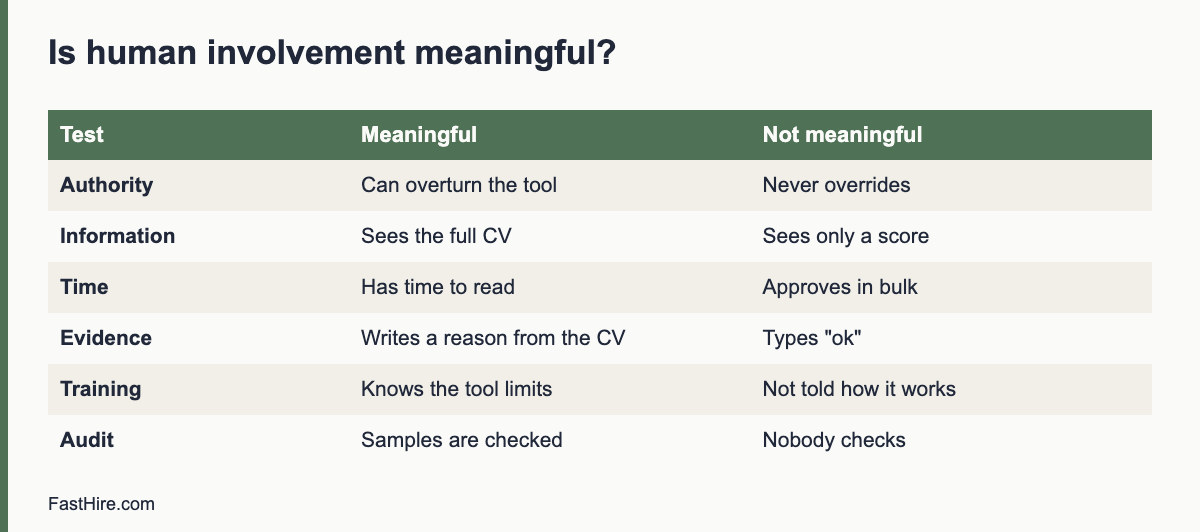
    Regulators expect more than a click on “approve”. A human step is more likely to count when the reviewer has authority and competence to change the outcome, has access to all the relevant information including the original CV, actually considers the evidence, and the tool’s output is only one input. Use the checklist below to test your process.

    TestMeaningfulNot meaningful
    Reviewer authorityCan overturn the tool and often doesNever overrides, or is discouraged from doing so
    InformationSees the full CV and the job requirementsSees only a score or label
    TimeHas time to readApproves hundreds a minute
    EvidenceWrites a reason tied to the CVTypes “ok” or leaves no note
    TrainingUnderstands what the tool does and its limitsHas not been told how it works
    AuditThe team checks a sample of decisionsNobody checks

    Practical steps

    1. List every tool that touches applications. Include chatbots, parsers, screening tools and scheduling tools.
    2. Classify each tool. Does it only help a person, or does it decide? Describe in one sentence.
    3. Remove automatic rejections. Replace them with a review step, where a person reads the evidence.
    4. Show the evidence to the reviewer. A tool that shows the exact CV passage behind each mark makes human review practical.
    5. Tell applicants. In your applicant privacy notice, say which tools you use, and how a person reviews outcomes.
    6. Offer a route to human review. Give a contact point for applicants who want a person to check the decision.
    7. Train reviewers. Explain what the tool can and cannot do, and tell them they are expected to disagree with it when the CV says so.
    8. Check samples. Review a sample of tool-assisted decisions each quarter to see if reviewers follow the tool without thought.
    9. Do an impact assessment. See data protection impact assessments for hiring tools.

    If you rely on an exception

    Some employers rely on explicit consent or on contract necessity for limited automated steps, such as an eligibility check against a legal requirement. If you do, document the exception and the reason. Consent for an application process is hard to rely on because applicants may feel they have no real choice. Contract necessity is read narrowly; a regulator may ask whether a person could do the step. For decisions that use special category data, the exceptions are tighter still. Ask a specialist before you use an automated rejection step in the UK or EU.

    Beyond GDPR: other rules to know

    • EU AI Act. Some AI systems used in hiring are treated as high risk, with duties on providers and on employers who use them. We do not state dates here. Read the official text and our overview.
    • United States. There is no general automated decision right. Some state and city laws apply, such as New York City rules on automated employment decision tools. Federal equal employment law still applies to results from any tool.
    • United Kingdom. Equality Act duties apply to outcomes from tools just as they do to human decisions, and data protection rules on automated decisions are in change. Check current ICO guidance.

    FastHire is designed so that a person makes each decision. It shows each job requirement next to the exact CV passage that supports it, which gives the reviewer the evidence in one view. FastHire does not rank, score or reject candidates. It is coming soon.

    A worked example (fictional)

    A retailer in the Netherlands receives 1,800 applications for seasonal warehouse roles. This case is invented to show the reasoning. The company considers two designs.

    DesignWhat happensArticle 22 view
    A. Automatic cut-offA tool compares answers with the requirements and removes everyone below a threshold. Recruiters read only the rest.High risk. Rejections are made without a person. Needs an exception, safeguards and a DPIA, or a redesign.
    B. Evidence viewA tool highlights where each requirement appears in the CV. Two recruiters read every application with the highlights, using a shared sheet, and decide. They can overrule the highlights.A person decides on all applications. The tool is a support, not the decision-maker.

    The company chooses design B. It writes the review steps in the process document, tells applicants in the notice that software highlights CV text and that people decide, and adds a contact for questions. It takes a sample of 50 decisions each quarter and checks that recruiters sometimes overrule the highlights, which shows that the review is active. If recruiters never disagree with the tool, the company asks why.

    Template: wording for applicants

    How we use software when we read applications
    We use software to help our recruiters find the parts of your CV that relate to the job requirements. The software does not decide who we interview or hire. A recruiter reads every application and makes the decision.
    If you would like a person to review the outcome of your application, write to [email]. We will reply within [period].

    Only write this wording if it is true. If you use a tool that does more, describe it honestly and ask a specialist to review.

    Questions to ask your software vendor

    • Does any feature reject, rank, score or remove applicants without a person acting? Can we turn it off?
    • Can the reviewer see the underlying CV and the reasons for any mark?
    • Do you record when a reviewer agrees or disagrees with the tool? Can we export that record?
    • Do you provide documents to support our impact assessment?
    • Which of your features does the EU AI Act regulate as high risk, and what do you provide to help us?

    Keep the answers in writing. If a vendor cannot explain a feature in plain language, you cannot explain it to an applicant or a regulator.

    Documenting your position

    Keep a short record for each tool that supports hiring. It should say what the tool does, whether it makes any decision on its own, who reviews the output, what the reviewer can see, how often reviewers disagree, and who checked this and when. This record is useful for three readers. A regulator can use it to see how you reached your view. An applicant who asks a question can get a clear answer. And a new recruiter can learn how the process is meant to work.

    Review the record when the tool changes, which can happen without notice when a vendor updates a feature. Ask vendors to tell you in writing before they add or change any automated step. A feature that was only a highlight last quarter may become a recommendation next quarter, and your notice and assessment would then be out of date.

    A final practical tip: run a short drill each half year. Pick five recent applications at random and trace each from the CV to the decision. Ask the reviewer to show where in the CV the evidence sits and why they chose the outcome. If the reviewer cannot do this, or if the tool’s output seems to have decided the case, the human step needs strengthening. The drill takes under an hour and gives you real examples to use in training and in answers to any questions from applicants or regulators.

    Frequently asked questions

    Is a ranking of applicants an automated decision?

    A ranking alone may not be a decision, but it can become one if people treat it as the outcome and do not look at lower-ranked applicants. Design the process so that people review the evidence for everyone who meets the stated requirements.

    Can I use an automatic knock-out question?

    Be careful. A knock-out question based on a legal requirement, for example a licence the law requires, is easier to defend than one based on a preference. Even then, offer a way for a person to review.

    What should I say to an applicant who asks about automated decisions?

    Explain which tools you use, what they do, and that a person makes each decision and can review their case. Give a contact point.

    Do these rules apply to internal candidates?

    Yes. Data protection rights apply to employees as well as external applicants.

    Does Article 22 apply to employers outside the EU?

    It can apply if GDPR applies to your processing, for example when you offer jobs to people in the EU. Ask a specialist about your case.

    Related guides

    This is general information, not legal advice.
  • How to push back on unrealistic hiring manager requests

    How to push back on unrealistic hiring manager requests

    To push back on an unrealistic hiring request, do not say no. Show the evidence, ask what outcome the manager needs, offer two or three options with trade-offs, and agree one change with a date. Use your own numbers, real adverts and candidate feedback, and keep the tone calm and practical.

    Key takeaways

    • Most unrealistic requests come from habit, pressure or a missing picture of the market, not from bad intent.
    • Bring evidence: your own pipeline numbers, current adverts, pay data from official sources and candidate comments.
    • Ask about the outcome behind the request before you discuss the request itself.
    • Offer options with trade-offs, such as a wider requirement, a higher pay range or a longer timeline.
    • Write down the agreement and review it on a set date.
    x

    What “unrealistic” usually means

    RequestWhat lies behind itTypical effect
    A very long list of must-havesFear of a bad hire; a list built from several people’s wishesA tiny pool; good people screened out for reasons that do not affect the work
    A pay range below the marketBudget limits; the pay of the previous employeeFew applicants; declined offers
    A start date in two weeksUrgent gap in the teamCandidates with notice periods cannot start; you lose strong people
    “Only people from top companies”A belief that prestige signals qualityNarrow pool and possible unfair filtering
    “Do not interview anyone before you have 50 CVs”A wish to compare many peopleDelay; strong candidates accept other offers
    “We need a unicorn who does three jobs”Budget for one role, work for threeA role no one can do, and burnout for the person hired
    “Reject anyone with a gap in their CV”A shortcut to reduce riskUnfair filtering of carers, people with health issues and others

    Notice that each request has a reason you can discuss. The aim is not to win an argument. It is to help the manager reach the outcome they want.

    Step 1: Get the facts ready

    A pushback with facts is a conversation. A pushback with opinion is a dispute. Collect four types of evidence before the meeting.

    1. Your own pipeline data. Applicants per role, stage conversion, time to hire and offer acceptance from similar searches. See eight recruitment numbers worth tracking. If the numbers are thin, say so.
    2. Live market examples. Five to ten current adverts for similar roles. Note the requirements, the pay shown and the location rules. Do not name competitors in anything you publish, but for an internal discussion the examples help.
    3. Official labour and pay data. In the US, the Bureau of Labor Statistics publishes the Occupational Outlook Handbook with pay and demand notes by occupation. In the UK, GOV.UK publishes National Minimum Wage rates as a pay floor, not a market rate. In the EU, EURES gives labour market information by country. Use these as context, not as proof of any single salary.
    4. Candidate voice. Comments from declined offers, withdrawn candidates and interview feedback. A line such as “the pay was below other offers” is more convincing than your opinion.

    Our guide to reading market data before you open a role, when it is published, will go deeper on this step.

    Step 2: Start with the outcome

    Open the conversation with a question about the goal. People defend a request when you attack it, but they will explain a goal.

    “I want to help you fill this role well. Can I check what you need this person to achieve in the first six months? Then I will show you what I see in the market, and we can decide together how to get there.”

    After the manager answers, repeat the goal in your own words, and ask if you have it right. Now the discussion is about how to reach the goal, and the original request becomes one option among several.

    Step 3: Show the evidence, calmly

    Share one or two facts at a time, in a simple form. A small table is better than a long deck. Here is a fictional example of how to present a requirements problem.

    RequirementCandidates meeting it (from 120 applicants)Notes
    Degree in the exact field14Many strong candidates trained on the job
    Five years in the exact title9Several have equal experience under other titles
    Both of the above and agency experience2Only two are available this month

    The numbers above are invented to show the format. In a real discussion, use your own records. The aim is to let the manager see that each added requirement removes most of the pool. Then ask: “Which of these three is essential on day one?”

    Step 4: Offer options, not objections

    Give two or three clear choices with trade-offs. The manager keeps control of the decision, and you show that you have a plan.

    OptionWhat changesTrade-off
    A. Keep the requirements, raise the pay rangeBetter chance of attracting the few matching peopleHigher cost; budget approval needed
    B. Keep the pay range, relax two requirements and trainLarger pool; some training neededSlower start to full performance
    C. Keep both, extend the timelineSame pool, more time to find peopleThe gap stays open longer; interim cover needed
    D. Split the roleTwo roles with clearer scopesTwo hires; more cost in total

    If the manager chooses A or C, ask for a sign-off from the person who controls the budget or the deadline, so the decision does not fall back on you later.

    Step 5: Write the agreement

    After the meeting, send a short note: “We agreed to change X to Y, review progress on [date], and use [metric] to decide whether to adjust again.” Keep it neutral. This protects both of you from misremembering. If the situation changes, you can point to what was agreed.

    Scripts for common situations

    SituationTry saying
    The list is too long“If we could only keep three of these, which three would you keep? Which others could the person learn in three months?”
    The pay is below the market“The five adverts I found for similar roles offer more. Candidates compare offers. What flexibility do we have, on pay or on other parts of the package?”
    The timeline is too short“Candidates who are working need time to give notice. If we start on [date], the earliest realistic start is after the notice period. Do you want to plan interim cover?”
    Only top companies“What does experience at those companies show that we need? Can we write the skill itself, so we can also see it in people from other places?”
    Reject people with a gap in their CV“A gap alone does not show whether someone can do the job. We risk unfair filtering. Can we check the same skills for everyone?”
    The manager wants to bypass the process“I want to keep it fair for all candidates and fast for you. What is the part you find slow? Can we change that part?”

    When the manager still says no

    Sometimes the answer stays the same. You have three honest choices. You can run the search as asked and track the results, sharing them at an agreed date. You can escalate calmly to your own manager or HR partner, with a short summary of the facts and the options offered. Or you can decline a request that is unlawful, such as a requirement based on a protected trait. In that last case you do not negotiate. Explain the rule, point to official guidance, and offer a lawful alternative. For example, the Equal Employment Opportunity Commission lists prohibited practices on its page on prohibited employment policies and practices, and Acas explains the position in Great Britain on its recruitment page.

    Keep a record of your advice and the decision. This is not to blame anyone. It helps the team learn when it reviews results.

    Build trust so that pushback gets easier

    • Deliver on small promises. Send the first shortlist on the date you promised.
    • Share wins. When a changed requirement leads to a good hire, say so, with the manager as the author of the decision.
    • Share the numbers regularly. A short monthly update makes your data part of the normal conversation.
    • Invite their view. Ask what you could do better. A manager who feels heard hears you more easily.
    • Use calibration. Compare sample CVs together, as in our guide on intake meetings.

    FastHire is being built to make this kind of discussion factual. It shows each job requirement next to the exact CV passage that supports it, so you can see how a requirement affects the pool. FastHire is coming soon. It does not rank, score or reject candidates. People make every decision.

    A one-page pushback brief

    Before a hard conversation, fill in this page. It takes 15 minutes and keeps you calm and specific.

    LineYour entry
    The request, in the manager’s wordsWrite it exactly
    The goal behind it (best guess, to confirm)What outcome do they need?
    Two facts that bear on itFrom your data, adverts or official sources
    The effect on the pool, fairness or timeNumbers if you have them, otherwise a clear description
    Two or three options with trade-offsUse the table above
    The change you will ask forOne change, with a date
    What you will do if the answer is noRun as asked, track, review, escalate

    Tone: three habits that help

    1. Use “we”. “How can we reach the goal?” is better than “You are wrong”.
    2. Slow down. Pause before you reply to a strong statement. Repeat back what you heard.
    3. Keep it short. Give one fact, one question and one option at a time. Long lists feel like a lecture.

    Remember that the manager is under pressure too. They may have a team that is stretched, a deadline from their own boss or a budget that was cut. If you start with that picture, your tone will be kinder, and the manager will be more likely to listen.

    Following up after a change

    Once the manager agrees to a change, follow up on the date you set. Bring the same type of evidence you used before: how many applicants, how many passed each stage, how long it took. If the change helped, say so and thank the manager. If it did not, ask what the data suggests and agree the next step. Keep a short log of each agreement and its result. After a few searches, you will have a record that shows which changes worked in your company. That record is the most persuasive argument you can bring to the next manager.

    Share what you learn with other recruiters. A shared document of past pushbacks, with the facts and the result, lets new team members start from experience instead of from zero. Remove names before you share it so that managers are not singled out.

    Frequently asked questions

    Is it my job to challenge a hiring manager?

    Yes, in a constructive way. A recruiter’s value includes honest advice on the market, the process and the law. The manager makes the hiring decision, and you help them see the options.

    What if I have no data because the role is new?

    Use market examples, official data and your experience from similar roles. State that the evidence is limited and propose a short review after a fixed number of weeks.

    How do I respond to “just do what I asked”?

    Confirm that you will run the search as agreed, state your concern in one sentence, and agree a date and a metric to review. Then do the work well.

    Should I put pushback in writing?

    Yes, in a short, neutral summary after a conversation. Avoid blaming language.

    Can I refuse a requirement that looks discriminatory?

    Yes, and you should. Explain the risk, share the official guidance and offer a lawful way to meet the goal. Tell your HR partner if the manager insists.

    Related guides

    This is general information, not legal advice.
  • How long to keep rejected applicant data

    How long to keep rejected applicant data

    There is no single legal answer to how long you may keep a rejected applicant’s data. In the UK and EU you must keep it no longer than necessary and be able to justify the period. In the United States you must keep hiring records for at least a minimum period set by law. The practical method is to set a period for each record type, tied to a stated reason, and to delete on a schedule.

    Key takeaways

    • UK and EU: keep data only as long as you need it, and be ready to explain why. No official figure fits every case.
    • US: federal rules set minimum retention for hiring records. Some state laws and federal contractor rules add more. Confirm the current figures on official pages.
    • Set a period for each record type: CV, interview notes, test results, talent pool data and monitoring data.
    • Keep talent pool data only with consent, and ask again after a fixed time.
    • Automate deletion and test it. A policy that is not enforced is only a document.
    x

    The two pressures: delete and keep

    Employers often feel pulled in two directions. Data protection rules in the UK and EU say you should not keep personal data longer than necessary. Equal employment rules in the US, and the wish to defend a possible claim, say you should keep enough to show how you decided. The way through is to keep what you need for a defined reason, for a defined time, and no more.

    RegionMain ruleSource to read
    EUStorage limitation: personal data must be kept in a form that permits identification for no longer than necessary for the purposesArticle 5(1)(e) of the GDPR
    UKSame principle under the UK GDPR. The regulator expects a justified, documented periodICO recruitment and selection guidance
    US (federal)Employers covered by federal equal employment laws must keep certain hiring records for a minimum period, and longer if a charge or claim is filedEEOC recordkeeping requirements

    The EEOC page states the minimum period and the circumstances that extend it. Read the current text and keep records at least that long. Federal contractors, public employers and some state laws can add longer periods or other duties. Confirm the position for your organisation with a specialist.

    What to keep, by record type

    Different records serve different purposes, so they can have different periods. The suggestions below describe the logic. They do not give a number, because the number depends on your country, sector and risk.

    RecordWhy you keep itHow to set the period
    Application form and CVTo show who applied and what you sawTie it to the period in which a claim could realistically be brought in your country, and the US minimum where it applies
    Screening notes or evidence sheetTo show the job-related reasons for the decisionSame period as the application
    Interview notes and scorecardsTo show a fair, comparable processSame period as the application
    Test or exercise resultsTo show what you assessedSame period, or shorter if the test result has no further use
    Reference responsesPart of the decision recordSame period as the application, if used
    Equal opportunities monitoring dataTo check the fairness of the processKeep in a separate, protected file, with its own period. Anonymise when you can
    Talent pool data (with consent)To contact people about future rolesA fixed period, such as a year or less, then ask again. Choose your own
    Offer and onboarding records for the person hiredTo start employmentMove to the employee file and follow employee record rules

    A seven-step method

    1. List the record types. Use the table above. Add any you create, such as video interview files.
    2. Find where each lives. Applicant system, email, shared drives, spreadsheets, calendar notes, paper.
    3. Write the reason for keeping each type. If you cannot write a reason, you probably should not keep it.
    4. Check the legal minimum. For US hiring, read the EEOC page. For other countries, look for local rules and ask an adviser.
    5. Choose the period. Take the longer of the legal minimum and the shortest period you can justify. Record the date you decided and who approved it.
    6. Put it in the notice. Tell applicants the period in your applicant privacy notice.
    7. Automate and test. Use retention rules in your system, run a monthly report for exceptions, and test that deleted data is gone from lists, exports and backups.

    Talent pools and “keep your CV for future roles”

    Keeping a CV for a later role is a different purpose from assessing the current application. In the UK and EU, ask the applicant. Make the request separate from the application, with a clear “yes” or “no”. Say how long you will keep the CV and how to withdraw. Ask again before the period ends. Do not treat silence as consent.

    A talent pool is only useful if it is current. Old CVs show past skills and may no longer match a person’s situation. Reviewing the pool once a year, and deleting what you do not use, supports both privacy and quality.

    Handling deletion in practice

    Delete from every place

    • The applicant system. Use the delete or anonymise function, not only an archive status. Ask the vendor what archive means.
    • Email. Search for the candidate’s name and delete attachments and messages when the period ends.
    • Shared drives and chats. Remove copies of CVs and notes that managers saved.
    • Spreadsheets. Keep trackers free of names or delete rows on schedule.
    • Backups. Ask IT how long backups last. Document that deleted data will leave the backups on a known date, and make sure restored data is cleaned again.

    Anonymise when you want to keep statistics

    You can keep counts and rates without keeping identities. For example, keep “120 applications, 40 screened in, 10 interviewed” and delete the underlying records. True anonymisation means that nobody can identify a person from the data, including by combining it with other information. If a person can still be identified, the data is still personal data. Remove names, contact details and free text, and group small categories together.

    Pause deletion when a claim or complaint exists

    If a candidate has made a complaint or you have been told of a claim or an investigation, do not delete related records until you have advice. Mark the records with a hold. Document who placed the hold and when it ends.

    A fictional example

    This example is invented. A mid-sized company with offices in Germany and the United States uses one applicant system. The HR lead builds the schedule below with the legal adviser. The periods in brackets are placeholders that the adviser sets from local law.

    RecordGermanyUnited StatesReview owner
    Declined application, CV and notes[period set by adviser under German and EU law][at least the federal minimum, or longer if state or contractor rules apply]HR lead
    Talent pool with consent[one fixed period, then ask again][one fixed period, then ask again]Recruiter
    Monitoring data[period set by adviser][period set by adviser]HR lead

    The point of the example is the structure. Each row has an owner, each period has a source and each country is treated separately. If a manager asks “Why do we delete in one country and keep in another?”, the table and the adviser’s note answer the question.

    Mistakes to avoid

    • One period for every country. Rules differ. Use the strictest where you cannot separate data, and document the choice.
    • Archive instead of delete. An archived record is still a stored record.
    • Forgetting documents outside the system. Email is where many old CVs live.
    • Deleting before the legal minimum in the US. Check first.
    • No owner. Assign one person to run and report on the schedule every quarter.

    FastHire is being built so that decisions rest on the exact CV passage that supports each requirement, with people making every decision. FastHire does not rank, score or reject candidates. It is coming soon. Whatever tool you use, the retention schedule above stays your responsibility.

    Replying to a deletion request: a short template

    Candidates sometimes write and ask you to delete their data. Reply within the time your law requires, and make the reply clear and kind. Adapt the text below to your case. If you must keep some records, say which ones and why, in plain words.

    Hello [Name],
    Thank you for your message. We have received your request to delete your application data for [role].
    We have deleted [list: your CV, your contact details and our notes] from our recruiting system on [date].
    [If something is kept: We must keep [short description] until [date] because [short reason, such as a legal duty to keep hiring records]. After that date we will delete it.]
    If you have any questions, please write to [email].
    Kind regards,
    [Name]

    A quarterly retention review

    Once a quarter, one person runs the review. It should take under an hour once the system is set up.

    StepQuestionEvidence
    1How many records passed their deletion date in the last quarter?Report from the system
    2How many were deleted, and how many remain?Report from the system, plus a spot check of 10 records
    3Are there records on hold? Is each hold still needed?List of holds with owner and date
    4Have any new tools, countries or record types appeared?Notes from recruiters and IT
    5Were there any requests from candidates? Were they answered in time?Request log
    6Does the privacy notice still match what we do?Read the notice side by side with the schedule

    Write the result in two lines and file it with the schedule. If something is late, add an owner and a date. A short regular review is far more useful than a long audit once every few years.

    How to explain the schedule to hiring managers

    Managers keep their own notes and files, so they need to know the rules. Give them a one-page summary. It should say where to save notes, what not to write, how long records stay in the system, and who to ask when a candidate wants to see or delete data. Add one rule that is easy to remember: if it is about a candidate, it lives in the recruiting system and nowhere else.

    Also tell managers what to do when they receive a CV by email from a friend or a referrer. They should forward it to recruiting, and recruiting adds it to the system with the source field set to referral. That way the record falls under the same schedule as every other application and the manager’s inbox does not become a hidden archive of personal data.

    Frequently asked questions

    Is six months a safe period to keep rejected applications?

    There is no universally safe period. It depends on the country, the sector and the claims risk. In the US, check the federal minimum. In the UK and EU, choose and record a period you can justify.

    Can I keep rejected applicants’ CVs in an email folder?

    You can only keep them for the period you set, and email counts. Include mailboxes in your deletion routine, or store CVs only in the system.

    What if a rejected candidate asks me to delete their data?

    In the UK and EU, the request must be considered. You may refuse in some cases, for example if you need the data for a legal claim, and you should explain your reason. In the US, state laws may give some rights. Follow your procedure and ask an adviser if unsure.

    Do the same periods apply to interns and contractors?

    Often similar rules apply, but they depend on the status of the person and the country. Check with an adviser.

    Should I keep the data of candidates who withdrew?

    Treat withdrawn applications the same as declined ones unless the person agrees to be in a talent pool.

    Related guides

    This is general information, not legal advice.
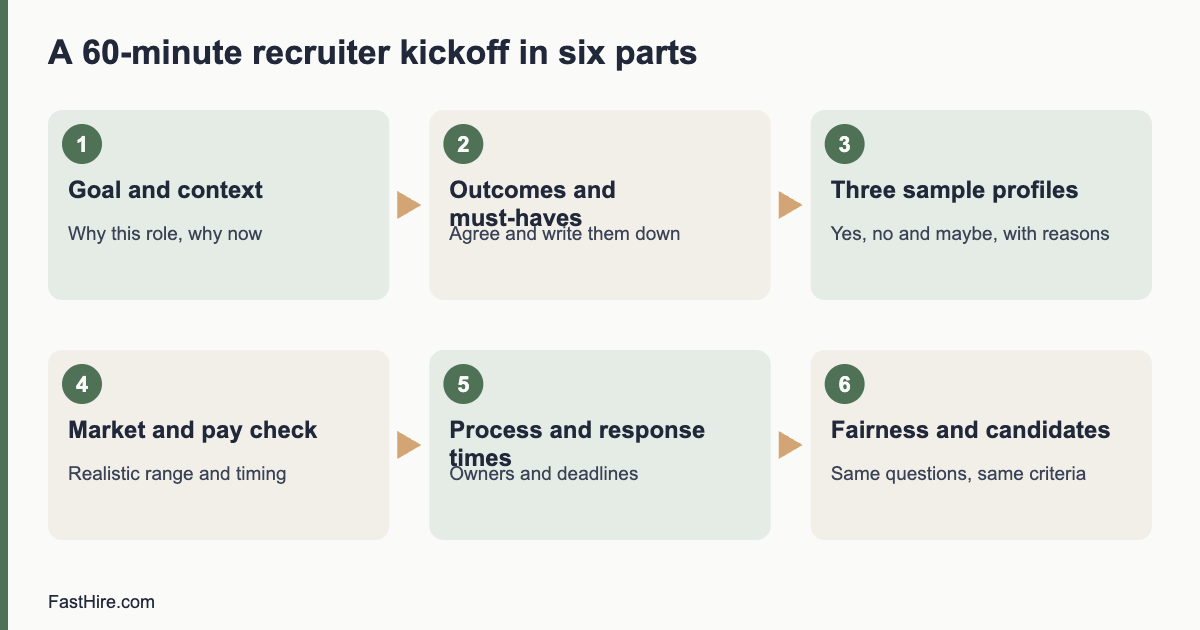
  • Applicant tracking system compliance checklist: GDPR and US records

    Applicant tracking system compliance checklist: GDPR and US records

    An applicant tracking system (ATS) holds personal data about people who have not yet joined you, so it needs clear rules on what you collect, who sees it, how long you keep it and how you delete it. Use the checklist below to review your system against GDPR duties in the UK and EU and against record-keeping duties in the United States.

    Key takeaways

    • Collect only the data you need to assess the application, and tell candidates what you do with it.
    • Set a retention period for each type of record, and delete or anonymise when it ends.
    • Keep US hiring records for the minimum period set by official rules, and keep them consistent for every applicant.
    • Limit who can see what. Hiring managers rarely need everything.
    • Test deletion and data export before you need them. Candidates can ask.
    x

    Two different rule sets, one system

    If you hire in the UK or EU, data protection law (the UK GDPR and the EU GDPR) limits what you may keep and for how long. If you hire in the United States, federal equal employment rules require employers to keep certain hiring records for a minimum time, and some states add their own rules. These can look like opposite pressures: one says delete, the other says keep. They fit together when you set separate retention periods per country and per record type, and write them down.

    Read the official texts for your situation. For the EU, see the General Data Protection Regulation and the guidance of the European Data Protection Board. For the UK, see the Information Commissioner’s Office guidance on recruitment and selection. For the United States, see the Equal Employment Opportunity Commission page on recordkeeping requirements. Rules change and differ by country, state and employer type, so ask a specialist for your case.

    The checklist

    A. Before you collect: purpose and notice

    1. Write the purpose. For example: “to assess applications for the role and to run the recruitment process fairly”. Do not use applicant data for an unrelated purpose, such as marketing, without a lawful basis.
    2. Choose a lawful basis (UK and EU). Many employers rely on legitimate interests or on steps needed before a contract. If you rely on consent, make it specific and easy to withdraw.
    3. Publish a privacy notice for applicants. It should say who you are, what data you collect, why, who receives it, how long you keep it, and how to exercise rights. Show it on the application page, before the form is submitted.
    4. Mention automated tools. If any feature makes or supports decisions with software, say so in plain language and explain how a person reviews the result.
    5. Review the application form. Remove fields you do not use. Do not ask for date of birth, photograph or marital status unless the law or the job requires it and you can explain why.

    B. While the process runs: access and accuracy

    1. Set roles and permissions. Recruiters see all applicants for their roles. Hiring managers see only the candidates shared with them, and only the fields they need.
    2. Hide what is not needed for the first review. Where the system allows it, hide names, photos and personal details until the screening decision. See our guide on reducing bias in resume screening.
    3. Keep notes factual. Interview notes can be disclosed if a candidate asks for their data or if there is a dispute. Write only what you would be comfortable showing to the candidate. Use job-related evidence, not comments about appearance, age, accent or family plans.
    4. Log changes. The system should record who viewed, edited or exported a record, and when.
    5. Keep records of the same type for every applicant. If you keep scorecards for interviewed candidates, keep them for all interviewed candidates, not only for the ones who were hired or declined.

    C. After the decision: retention and deletion

    1. Set a retention period per record type. Examples of types: applications and CVs of declined applicants, interview notes and scorecards, offer documents, candidate talent pool data, and monitoring data.
    2. Take the shortest period you can justify. Under GDPR, personal data must not be kept longer than necessary. Write the reason next to each period.
    3. Check US minimums. Federal rules set a minimum time to keep hiring records for most private employers, and longer periods can apply to federal contractors and under state laws. Confirm the current rule on the official page and keep records at least that long in the US.
    4. Automate deletion. Use the retention rules of the system. If it has none, put a monthly task in your calendar to run a deletion report.
    5. Delete from every place. Include email attachments, shared drives, spreadsheets, exports and backups. If backups cannot be changed at once, document the schedule on which they expire.
    6. Handle talent pools separately. Keep people in a talent pool only if they agreed, and ask them again after a fixed period. A guide on building a talent pool with consent is planned for this blog.

    D. Candidate rights and requests

    1. Name who handles requests. Candidates in the UK and EU can ask for a copy of their data, correction or deletion, and can object in some cases. Decide who receives the request and how fast you reply. GDPR sets a general time limit of one month for most requests, with possible extension. Read the official text for the details.
    2. Test a data export. Pick a dummy candidate, export everything and check what you see. Does it include interview notes and emails?
    3. Test a deletion. Delete the dummy candidate and check that the record disappears from search, reports and exports.
    4. Keep a log of requests. Record the date, the request, the action and the date of reply.
    5. Plan for the automated-decision rules. In the EU and UK, people have specific rights if a decision is based solely on automated processing and has significant effects. A guide on GDPR Article 22 and hiring is planned for this blog.

    E. Vendor and security

    1. Have a data processing agreement with the ATS vendor, listing sub-processors and locations.
    2. Check international transfers. If data moves outside the UK or EU, make sure there is a valid transfer mechanism. Ask the vendor to show it.
    3. Use strong sign-in. Require multi-factor authentication for all users and remove accounts when people leave.
    4. Review exports. Limit who can download all candidate data. Exports to personal laptops and email are a common leak.
    5. Plan for a breach. Know who to call, and the time limits for reporting a breach to the regulator in your country.

    A retention schedule you can adapt

    The table below is a template. The periods are placeholders in brackets. Replace them with the figures that your own legal adviser confirms for each country. We do not give fixed periods here because they depend on your country, your state, your industry and whether you are a government contractor.

    Record typePurposeUK / EU periodUS periodOwner
    Application and CV (declined)Handle the application and defend a claim[set by you, as short as justified][at least the official minimum]Recruiter
    Interview notes and scorecardsShow a fair, job-related decision[set by you][at least the official minimum]Recruiter
    Offer and acceptance documentsStart employmentMove to employee fileMove to employee fileHR
    Talent pool data (with consent)Contact for future roles[set by you, then ask again][set by you, then ask again]Recruiter
    Monitoring data (equal opportunities)Check the fairness of the process[set by you][set by you]HR
    Request logShow that you answered rights requests[set by you]n/aData protection lead

    Common mistakes

    • Keeping everything forever “just in case”. This is a risk under GDPR and a cost in any country.
    • Deleting US records too early. Deleting inside the minimum period can create its own problems. Check the official rule first.
    • Leaving data in email. CVs forwarded to hiring managers often live outside the ATS. Ask managers to use the system link instead of attachments.
    • Using free-text notes about protected traits. Do not record that a candidate is pregnant, older, disabled or of a certain religion. If a candidate volunteers it, do not use it in the decision.
    • Treating the vendor as responsible for everything. You remain responsible for how you use the system.

    FastHire is being built so that hiring teams can check each job requirement against the exact CV passage that supports it, with people making every decision. It does not rank, score or reject candidates. FastHire is coming soon.

    A one-hour self-audit

    You can test your system in one hour with one person from recruiting and one from IT. Work through the steps below and write down each answer. Anything you cannot answer in two minutes is a gap to fix.

    MinuteTaskWhat a good result looks like
    0 to 10Open the live application form as a candidateThe privacy notice is visible before submission, and every field has a clear purpose
    10 to 20Open the user listEvery user is current, and each has the lowest access they need
    20 to 30Open three old declined recordsEach is within its retention period, or it is flagged for deletion
    30 to 40Export a dummy candidateAll data appears in one file, including notes and messages
    40 to 50Delete the dummy candidateThe record is gone from search, lists and reports
    50 to 60Read the vendor agreement summaryA processing agreement, a sub-processor list and an exit clause exist

    Repeat the audit once a year and whenever you change vendor, add a new country or switch on an automated feature. Keep the notes. They show that you reviewed your own process, which is useful if a regulator, a candidate or an auditor asks.

    Talking to hiring managers about records

    Hiring managers rarely read policies, so give them three rules in a short message. First, use the system link and not email attachments to share CVs. Second, write notes about the job requirements and the evidence, and nothing else. Third, send questions about a candidate’s data to the named contact in recruiting. Repeat the message when a new manager joins, and again when the process changes. A rule that people can remember in ten seconds is a rule they will follow.

    What to do if you find a problem

    If the audit shows old records, missing notices or too much access, fix the simplest items first. Remove unused user accounts the same day. Update the privacy notice within a week. Set retention rules within a month. For larger gaps, such as data held by a vendor with no processing agreement, write a short plan with an owner and a date, and ask your data protection adviser whether anyone must be told. Record what you found, what you changed and when. Do not delete evidence that you may need to keep under a legal duty; ask for advice before you remove records connected to an open complaint or claim.

    Frequently asked questions

    Do I need candidate consent to store their CV?

    Not always. In the UK and EU, you need a lawful basis, and consent is only one of them. Many employers use legitimate interests or steps before a contract for ordinary recruitment. Consent is usual for talent pools. Check with your data protection adviser.

    How long should I keep declined applications?

    There is no single answer. Choose the shortest period you can justify, and in the US keep them at least as long as the official minimum. Write the period down and apply it to everyone.

    Can candidates see my interview notes?

    In the UK and EU, a candidate can ask for a copy of their personal data, and notes about them can be included, with some exceptions. In the US, rules vary by state. Write notes as if they could be read.

    Do these rules apply to a small business?

    Yes. Data protection law applies to most organisations that process personal data. Some US record-keeping rules depend on employer size, so check the official guidance.

    Who should own the ATS compliance checklist?

    One named person, usually in HR or operations, with support from IT and a legal adviser. Review it at least once a year and whenever you change the system.

    Related guides

    This is general information, not legal advice.
  • Structured screening: how to compare every applicant on the same evidence

    Structured screening: how to compare every applicant on the same evidence

    Structured screening means judging every applicant against the same written, job-related criteria, and recording the evidence for each decision. You write the must-haves first, read every application for the same things, note the passage in the CV that supports each criterion and decide by a rule you set in advance. It is fairer because personal preference has less room, and it is easier to explain because the evidence is on paper.

    Key takeaways

    • Write the criteria before you read the first application, and apply them to everyone.
    • Record evidence: the exact CV passage for each yes. No passage, no yes.
    • Mark “unclear” separately from “no”, and ask a neutral question before you decide.
    • Set the rule for choosing among qualified people in advance, and record it.
    • People make the decision. Keep notes that you can explain to a candidate or a regulator.
    x

    What structured screening is

    Screening is the step where you decide whom to take forward. It is often the least structured step in hiring, even in organisations that run structured interviews. A reviewer opens a CV, forms an impression in seconds and moves on. The impression may be influenced by a name, a photograph, a school, a gap in dates or the style of the layout. None of these show whether the person can do the job.

    Structured screening replaces impression with a method. The method has four parts: criteria written in advance, a standard way of marking each criterion, a record of the evidence and a decision rule. The same idea sits behind structured interviews, which the US Office of Personnel Management describes as asking every candidate the same questions in the same order and scoring them on the same scale. See our guide to structured interviews. The principle is equal treatment on job-related grounds.

    Why it supports fair hiring

    • Equal treatment. Every applicant is read against the same list, so two similar CVs get the same outcome.
    • Job relevance. If a criterion is not in the written list, it cannot decide the outcome. This keeps out proxies such as school names, employment gaps and age signals.
    • Explainability. You can tell a candidate, a manager or a regulator which criterion was not met and where you looked.
    • Consistency over time. Reviewers who are tired or rushed still follow the sheet.
    • Better calibration. When two reviewers disagree, the sheet shows which criterion caused it, and you can fix the wording.

    Structured screening does not guarantee fairness. Criteria can themselves be unfair, for example a requirement for a specific degree when the work does not need it. It is a tool that makes bias easier to see and correct.

    The six steps

    Step 1: Write the criteria from the role

    Use the role brief. Choose three to five must-haves that someone can verify on a resume or CV. Test each one with two questions: does the job really need this on day one, and could a person show it in more than one way? If the answer to the second is yes, write the alternatives, for example “two years of customer support work, paid or unpaid” instead of “two years in a call centre”.

    Step 2: Build a screening sheet

    ColumnContent
    Application IDA number for the first pass, if you can hide names
    Criterion 1 to 5Yes, no or unclear
    Evidence for each yesThe exact CV passage, copied or paraphrased
    Question to ask (unclear)One neutral question that would settle it
    Reviewer and dateFor traceability
    DecisionMove forward, hold or decline
    ReasonThe criterion not met, if declined

    Step 3: Mark every application the same way

    MarkUse it whenDo not use it when
    YesThe CV clearly shows the criterion, with a passage you can point toYou assume it from a job title or a company name
    NoThe CV clearly shows the criterion is missing, or the applicant says soThe CV is silent. Use unclear.
    UnclearThe CV could support the criterion but does not say, or is ambiguousYou simply dislike the style of the CV

    Step 4: Ask before you decline on unclear

    Send one short, neutral question to anyone with an unclear mark and no clear no. For example: “Your CV lists project work from 2022. Did it include managing a budget? A short reply is fine.” Give a date. Ask all unclear applicants the same question. This step often rescues strong candidates with short CVs.

    Step 5: Decide by a rule

    Write the decision rule before you screen. A common rule: invite everyone who has yes for every criterion. If you have more qualified people than you can interview, use a written, neutral tie-break, such as random selection among all who meet every criterion. Do not use hidden scores, impressions or the order in which you read applications.

    Step 6: Check and record

    Ask a second reviewer to check a sample, for example every tenth “no” decision. Keep the sheet. It is your record of job-related decisions. In the UK and the EU, the sheet is personal data about applicants, so protect it and delete it on schedule. The Information Commissioner’s Office explains the duties in its guidance on recruitment and selection.

    An example: two similar CVs

    This example is fictional. It shows how evidence changes the discussion. The role is Customer Support Assistant. The criteria are: one year of customer support work (paid, unpaid or volunteer), clear written English, comfort with new software.

    CriterionApplicant AApplicant B
    One year of customer support workYes. “Support agent, Brightside Pets, 2022 to 2024”Yes. “Volunteer helpline adviser, 18 months, evenings”
    Clear written EnglishYes. Cover note is clear and organisedYes. Short, clear CV and cover note
    Comfort with new softwareYes. “Introduced a ticket tool for a team of four”Unclear. Lists “quick learner” with no example
    ActionInviteAsk one question: “Can you give an example of learning a new tool?”

    A reviewer who skimmed might have preferred A because of the paid job title. The sheet shows that B meets two criteria with evidence and has one open question. B gets the question, replies with a clear example and is invited. The structured sheet made the volunteer experience count as the criterion allowed. Note that the example is for illustration only.

    What structured screening does not mean

    • It does not mean rejecting people for one missing nice-to-have. Nice-to-haves are not criteria.
    • It does not mean software decides. If you use software to find passages, a person still checks the evidence and decides.
    • It does not mean ignoring context. If a CV shows the criterion in an unusual way, count it and write why.
    • It does not mean you can skip legal rules. You must still avoid discrimination on protected grounds, make reasonable adjustments and protect data.

    Legal anchors by region

    Rules differ by country, so check the official sources for the places where you hire. In the US, the Equal Employment Opportunity Commission explains prohibited practices in selection on its page about prohibited employment policies and practices. In Great Britain, the Acas page on recruitment explains how the Equality Act applies, including to shortlisting. In the EU, equal treatment is set out in EU directives and national laws, and data protection rules apply to applicant data.

    Common mistakes

    • Writing criteria after seeing the applications.
    • Using a vague criterion such as “strong communicator” that cannot be checked on a CV.
    • Giving half marks. If you need a scale, use it in interviews. For screening, yes, no and unclear are enough.
    • Not recording evidence. A tick with no passage cannot be reviewed.
    • Changing the rule midway without telling everyone and re-applying it to all.

    FastHire is being built around this method. It shows employers each job requirement next to the exact CV passage that supports it, and candidates check their fit before applying. FastHire is coming soon. It does not rank, score or reject candidates. People make every decision.

    Turning vague requirements into checkable criteria

    Vague requirementWhy it failsCheckable version
    Excellent communication skillsCannot be seen on a CV and invites bias towards accent and styleWrites clear emails or reports. Evidence: cover note, work samples or a short written task for all candidates
    Degree in businessExcludes people who learned the skill another wayCan prepare budgets and forecasts. Evidence: work, study or volunteering that shows it
    Native English speakerPoints to national origin and is not a skill levelEnglish at the level needed to write customer replies. State the level
    5 years of experienceAn arbitrary number that favours ageHas handled at least [number] customer cases a week in a past role, paid or unpaid
    Team playerVague and not verifiable on a CVHas worked in a team on a shared outcome. Evidence: one example in the CV or answered question
    Culture fitInvites sameness and biasRemove from screening. If values matter, define behaviours and test them in a structured interview
    Recent graduatePoints to ageEarly-career role, with up to [number] years of experience. Say what you will teach

    Notice what changed. Each checkable version names a task, a result or a way to show evidence. It also allows several ways to meet the criterion. This helps both fairness and quality, because the person who can do the work has more ways to show it.

    A five-question fairness test for each criterion

    1. Is it job-related? Can you link it to a task or outcome in the role brief?
    2. Is it necessary on day one? If you could teach it in a few weeks, it is a nice-to-have.
    3. Is there more than one way to show it? If not, check whether the single way excludes people for reasons unrelated to the work.
    4. Could it work as a proxy for a protected trait? Age, sex, race, religion, disability, family status or nationality may be signalled by schools, years, names, languages or gaps. If yes, rewrite it as a task.
    5. Can you check it from the application? If not, test it later in a structured interview or work sample, for everyone.

    If a criterion fails a question, rewrite it before you screen. If you must keep a requirement that affects some groups more than others, such as a licence required by law, note the reason in the role brief. We cover the legal ideas of disparate treatment and disparate impact in other guides in this section.

    Handling special cases

    SituationWhat to do
    Career breakDo not treat the gap as a negative. Ask only about the criterion, for example the relevant skills used in the last role.
    Qualifications from another countryCompare the skills, not the name of the qualification. If you need a formal equivalence, use the official recognition service in your country.
    Non-linear career pathCount relevant work wherever it happened, including freelance, volunteer or family business work.
    CV in a different format or languageRead for the criteria. Offer a translation or an alternative way to apply where the role needs it.
    Applicant states a disability or a need for adjustmentDo not use it in the decision. Provide the adjustment and apply the same criteria.
    Internal applicantsUse the same criteria and the same sheet. Avoid assuming that you already know them.

    Frequently asked questions

    What is structured screening?

    Judging every applicant against the same written, job-related criteria and recording the evidence for each decision, with a decision rule set in advance.

    How is it different from reading CVs normally?

    Normal reading relies on impressions. Structured screening uses written criteria, standard marks and recorded evidence, so that two reviewers can reach the same result.

    What should I do about unclear applications?

    Mark them unclear and send one short, neutral question to each, with a date for a reply. Decide after you receive the answers.

    Can I use AI in structured screening?

    Tools can help find passages, but a person should check the evidence and make the decision. Rules on automated decision making and on AI in hiring may apply in your country.

    How long should I keep screening records?

    Only as long as needed and according to the rules of your country. State the period in your applicant privacy notice.

    Related guides

    This is general information, not legal advice.