Author: fhai

  • How to check the right to work: US, UK and EU basics

    How to check the right to work: US, UK and EU basics

    A right to work check is a simple step: before someone starts, you confirm that the law lets them work for you. The rules differ by country, so the right method in the US is not the right method in the UK or the EU. This guide gives the basics for each, a routine you can copy, and the errors small employers make most often.

    Key takeaways

    • Do the check for every new hire, in the same way, so no one is treated differently.
    • In the US, the employer completes Form I-9 for each new employee. In the UK, the employer checks and keeps a record. In the EU, national rules apply.
    • Check original documents, with the person in front of you or through the official route for your country.
    • Never ask for more documents than the rules require, and never choose documents for the person.
    • Diarise expiry dates and keep records for the period your national rules require.

    Why the check matters

    Employing someone who is not allowed to work can lead to fines and other penalties. Checking only some people, or asking some people for extra papers, can also be unlawful discrimination. The safest approach is one fixed routine that every new hire goes through.

    The check is not a hiring test. It happens after you decide to make an offer, not before. A person who looks or sounds foreign is not more likely to need a check, and every person you hire needs the same one.

    The general routine, in any country

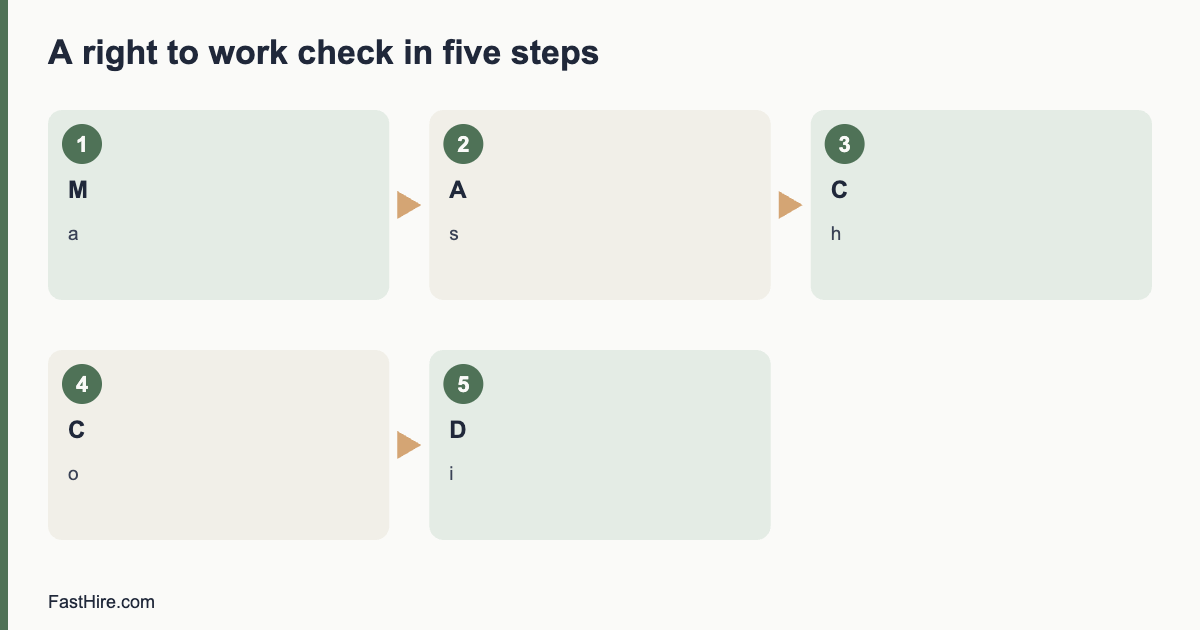
    1. Make the offer conditional on the right to work check.
    2. Tell the person which documents are accepted, and let them choose which to show.
    3. Look at the original documents with the person present, or use the official online route where one exists.
    4. Check that the documents look genuine, that the photo and details match the person, and that the dates are valid.
    5. Record the result in the way your national rules require.
    6. Add any expiry or review date to your calendar.
    7. Store the record safely, and delete it when the retention period ends.
    x

    United States: Form I-9

    In the US, every employer must complete Form I-9 for each new employee. The employee fills in their section no later than their first day of work. The employer then examines documents that show identity and work authorisation, and completes the employer section within the time the form instructions give. The official source is the USCIS I-9 page, which links to the current form, the instructions and the list of acceptable documents.

    Key points for small US employers

    • The employee chooses which acceptable documents to show. You must not say which ones you want.
    • You examine the documents and record what you saw. You do not need to keep copies unless you do so for every employee.
    • Use the current version of the form. Older versions may not be accepted.
    • Some employers can use an electronic system, and some can use E-Verify. Check the USCIS page before choosing either route.
    • Keep each form for the period the instructions state, and store I-9 forms apart from personnel files so they are easy to produce.

    US errors to avoid

    • Asking for a particular document, such as a passport or a green card.
    • Filling in the form before the person has accepted the job.
    • Asking for documents from some people but not others.
    • Letting the employee complete the employer section.
    • Failing to follow up when work authorisation has an end date.

    United Kingdom: right to work checks

    In the UK, employers must check that a person has the right to work before they start. Doing the check correctly gives the employer a statutory excuse against a civil penalty if the person later turns out not to be allowed to work. The route depends on the person. Some people can be checked using original documents, and some can be checked online using a share code. The official guidance is on the GOV.UK right to work check page, and the wider employer overview is at GOV.UK employing people.

    Key points for small UK employers

    • Check before the person starts work. A check done after the start date does not give the same protection.
    • Use the route that fits the person. British and Irish citizens can show certain documents, and others may prove their status online.
    • Make and keep a copy of the evidence, with a note of the date you did the check.
    • Diarise any time limit, and repeat the check before it ends.
    • Keep the record for the whole time the person works for you, plus the period the guidance states afterwards.

    UK errors to avoid

    • Doing the check by video call or by looking at a photo sent by message, when the guidance requires a different method.
    • Keeping no record of the date of the check.
    • Missing a follow-up check when a visa or permission has an end date.
    • Asking only people with a foreign accent or name.
    • Using out-of-date guidance. Check the GOV.UK page each time you hire.

    European Union: national rules apply

    The EU does not have one single right to work check. Each member state sets its own rules for how an employer confirms a worker can work, what documents are accepted, what notifications are needed and what records are kept. EU citizens have a right to work in other member states, but the employer may still need to register or notify the worker in the way national law requires. Start with the Your Europe business pages on human resources, then check the page of the national authority in the country where the person will work.

    A simple approach for EU employers

    1. Identify the country where the work will be done.
    2. Find the national rule for checking identity and work authorisation, and for registering a new employee.
    3. Ask the person for the documents the national rule names, and record what you saw.
    4. For non-EU workers, check whether a work permit or residence permit is needed, and when it ends.
    5. Ask a local adviser if you are unsure. Rules for posted workers and remote workers can differ.

    If you are hiring someone who lives in another country, read how to hire in another country before you make an offer.

    Compare the three approaches

    QuestionUSUKEU
    Who does the check?EmployerEmployerEmployer, under national rules
    When?After acceptance, within the form timelineBefore the start dateBefore or at the start, per national rule
    Who chooses documents?The employeeThe employee, within the allowed listDepends on the country
    What do you keep?Form I-9Copy of evidence and date of checkDepends on the country
    Repeat checks?When authorisation endsWhen permission endsWhen a permit ends

    A copyable checklist

    • Offer letter says the job is conditional on a right to work check.
    • The same routine is used for every new hire.
    • The person is told which documents are accepted and is not told which to choose.
    • Documents are checked in person or through the official route.
    • The person has been compared with the photo and details on the document.
    • The date of the check and the name of the checker are recorded.
    • Expiry dates are added to the calendar with a reminder at least a month before.
    • Records are stored securely and deleted when the retention period ends.

    Candidates, privacy and fairness

    Right to work documents contain personal data, and in some cases special category data. Collect them only from the person you are hiring, not from every applicant. Tell them why you need them and how long you will keep them. The article on GDPR for job applicants explains how to write a clear notice.

    Do not ask about someone immigration status in the first interview or on the application form. Ask whether they are legally able to work in the country where the job is, in the way your national guidance allows, and leave detailed checks until after the offer.

    What to do when a document looks wrong

    If a document does not look genuine or does not match the person, do not accuse them. Stay calm, say that you cannot accept the document, and ask whether they have another acceptable one. Write down what you saw and what you said. In the UK and the US there are official routes for checking a case, and in the EU you can contact the national authority. Do not start work until the check is complete.

    Where this fits in your hiring process

    The right to work check is the last step before the first day, after the offer and the references. Put it in your timeline from the start. The first hire plan shows where it sits, and the offer letter template has a line for a conditional offer. Then plan the first 30 days so the person has a good start.

    A simple log you can copy

    NameStart dateCheck methodDate checkedChecked byExpiry or review date
    Example Person (fictional)1st of the monthOriginal documentsBefore startOwnerNone
    Example Person B (fictional)1st of the monthOnline share codeBefore startManagerDate on permission

    Special cases small employers meet

    Remote and hybrid workers

    If someone works from home in a different country from your office, the law of the country where they work usually decides which check applies. Do not assume the rules of your own country cover them. Before you make the offer, find the official guidance for the place where the work will be done, and ask a local adviser whether you must register as an employer there.

    Part-time, seasonal and short contracts

    The check is needed for every employee, however short the job. A student who works two weeks in the summer needs the same check as a full-time manager. Build the check into your seasonal hiring routine, and set aside time for it in the week before the start date so the first day is not delayed.

    Agency workers and contractors

    If you use an agency, the agency usually does the check for the workers it supplies, but your contract should say so in writing. If you engage a self-employed contractor, the rules can differ, and the label on the contract does not decide the matter. Read employee or contractor before you rely on a label.

    Students and people with limited permission

    Some visas allow only limited hours or only some types of work. Ask for the details of the permission, record any limit, and make sure the rota respects it. Write the limit in the log so the next manager sees it.

    Training the person who does the check

    Whoever does the check should be named, trained and consistent. Give them a one-page guide that lists the steps, the accepted documents and the official page for your country. Ask them to practise with a colleague before the first real check. If the checker is on leave when a new hire starts, name a backup so the check is never skipped.

    Review the process twice a year. Pick a few records at random and ask three questions: was the check done before the start date, is the record complete, and is any expiry date missing from the calendar. Fix gaps at once and note the change in your log.

    Five-minute self audit

    • Open your last five hire records. Is each check dated and signed?
    • Is there a diary entry for every document that expires?
    • Do you store the records in one place, with limited access?
    • Does your offer letter mention the check?
    • Does your job ad avoid asking for particular documents?

    Frequently asked questions

    Can I check right to work before making an offer?

    It is usually better to check after you decide to make an offer, and to apply the same step to every person you hire. Checking earlier can lead to unfair treatment of applicants.

    Do I need copies of documents?

    In the UK you need to keep a copy and record the date. In the US you complete Form I-9 and need not copy documents unless you do so for everyone. Other countries differ, so check the official page.

    What if the person has a time limit on their right to work?

    Add the end date to your calendar, remind the person in good time, and repeat the check before it ends according to your national rules.

    Can I use a service to do the checks for me?

    Yes, in some countries. You remain responsible for the result, so choose a provider who follows the official method.

    Related guides

    This is general information, not legal advice.

  • Boolean search for recruiters: examples you can copy

    Boolean search for recruiters: examples you can copy

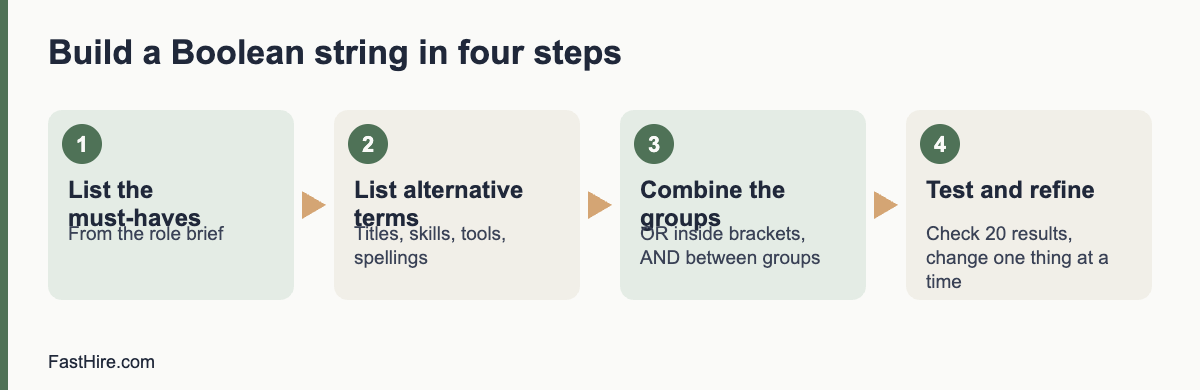
    Boolean search uses the words AND, OR and NOT, quotation marks and brackets to tell a search tool exactly what to find. For recruiting, it means you can search for several job titles and skills at once, leave out noise and test results quickly. Start with a plain list of must-haves, write the alternative terms for each, join the alternatives with OR inside brackets and join the groups with AND.

    Key takeaways

    • Build one group of terms for each must-have. Join alternatives with OR and groups with AND.
    • Use quotation marks for exact phrases and NOT to remove common false matches.
    • Test the string on a small result set. Adjust before you contact anyone.
    • Search by skills and work, never by traits that point to protected characteristics.
    • Check each platform’s help page, because operators and limits differ between tools.
    x

    The five building blocks

    OperatorWhat it doesExample
    ANDBoth terms must appear“warehouse” AND “planning”
    OREither term may appear“stock controller” OR “inventory planner”
    NOTRemoves results with a termNOT “intern”
    ” ” (quotation marks)Searches for an exact phrase“supply chain”
    ( ) (brackets)Groups terms so the logic is clear(“stock controller” OR “inventory planner”) AND “WMS”

    Most tools also support a wildcard, such as an asterisk, for word endings, and some support proximity or field-specific search. These features differ widely and change over time, so confirm them in the tool’s help page before you rely on them. Brackets and quotation marks work in most places.

    A four-step method to build a string

    Step 1: List the must-haves

    Take the three to five must-haves from the role brief. Boolean search works best on things that appear as words in a profile: job titles, skills, tools, certifications, sectors. It does not work for qualities such as “good attitude”.

    Step 2: List alternative terms for each

    People describe the same work in different ways. For each must-have, list titles, skills, tools and spelling variations. Ask the hiring manager and two current team members for their words. This is the step that makes the biggest difference.

    Must-haveAlternative terms
    Warehouse planning“warehouse planner”, “inventory planner”, “stock controller”, “stock planner”, “replenishment”
    Uses a warehouse management system“WMS”, “warehouse management system”, “barcode scanning”, names of tools you know
    Leads a small team“team leader”, “shift lead”, “supervisor”, “trainer”

    Step 3: Build and combine the groups

    Put each list inside brackets joined by OR. Then join the groups with AND.

    (“warehouse planner” OR “inventory planner” OR “stock controller” OR “stock planner” OR replenishment) AND (WMS OR “warehouse management system” OR “barcode scanning”) AND (“team leader” OR “shift lead” OR supervisor OR trainer)

    Step 4: Test and refine

    Run the string and look at the first 20 results. If most are wrong, you have too much OR in a broad group, or a term with two meanings. If you have very few results, remove one AND group or add alternative terms. Change one thing at a time and write down what you changed. After each change, read a few more results.

    Sample strings for five roles

    These examples are starting points. Replace the terms with the words your hiring manager and your market use.

    RoleSample string
    Customer support agent(“customer support” OR “customer service” OR “helpdesk” OR “service desk”) AND (“email” OR “chat” OR “tickets”) NOT (“sales” OR “intern”)
    Bookkeeper(bookkeeper OR “accounts assistant” OR “accounts payable” OR “accounts receivable”) AND (“month end” OR reconciliation OR “VAT” OR “sales tax”)
    Electrician(electrician OR “electrical technician”) AND (installation OR maintenance) AND (licence OR license OR certified OR qualified)
    Software developer(developer OR engineer) AND (“Python” OR “TypeScript” OR “Java”) AND (“API” OR “backend” OR “web”) NOT (manager OR recruiter)
    Operations coordinator(“operations coordinator” OR “operations assistant” OR “logistics coordinator”) AND (scheduling OR suppliers OR planning)

    Notice the spelling variants “licence” and “license”, and “VAT” and “sales tax”. If you recruit across the US, the UK and the EU, add local terms to the same string or keep one string per country.

    Searching on websites and public pages

    Some recruiters search the open web, for example public professional pages, portfolios and community profiles, using a search engine. Most search engines support quotation marks and a site operator that limits results to one website. Only use publicly available pages, follow the site’s terms and respect any “do not contact” notes. If a page is not open to the public, do not try to get around the restriction.

    Using Boolean search fairly

    A search string is a screen. It decides who you see and who you do not. Build it around skills and work, not around traits. Do not include words that point to age, sex, race, religion, nationality, disability or family status unless the role truly requires something job-related and lawful, and then get advice. Avoid search terms such as graduation years, “recent graduate” or “digital native” unless the role really is an early-career role. The US Equal Employment Opportunity Commission explains protected traits and practices to avoid on its page about prohibited employment policies and practices. In Great Britain, the Acas page on recruitment explains how discrimination law applies to choosing candidates.

    Remember that strings can exclude people by accident. If you list only one job title, you may miss capable people with other titles. If you require a specific tool name, you may miss people with similar skills in a different tool. Add alternatives and review a sample of “near misses” to see what you missed.

    Data protection and platform rules

    Profiles are personal data. In the UK and the EU, data protection law applies. If you save or copy details, you should tell people where you found them, why you are contacting them and how long you will keep their data. The Information Commissioner’s Office explains the duties of employers and recruiters in its guidance on recruitment and selection. Many platforms also restrict automated copying and mass messaging. Read the terms before you use any tool that collects data in bulk.

    A simple workflow for a search session

    1. Open the role brief and the sourcing tracker. Write the target number of profiles for the session, for example 30.
    2. Build the string in a text file, so you can save and reuse it.
    3. Run it and check the first 20 results. Adjust until at least half meet the must-haves at a glance.
    4. Review profiles against the must-haves. Write one line of evidence for each yes in the tracker.
    5. Contact the best matches with a short message. See How to source candidates for the whole process.
    6. Save the final string with a note of what worked, and review it with the hiring manager.

    Common mistakes

    • Too many terms in one group. A group with 30 OR terms will pull in noise. Keep groups under about ten terms and test.
    • Missing brackets. Without brackets, the search tool may read AND and OR in an order you did not intend. Always use brackets.
    • Searching only titles. Titles vary. Add skills and tools.
    • Not saving strings. Keep a library of tested strings and notes by role.
    • Skipping the hiring manager. The people who do the work often know the words that matter.
    • Ignoring false matches. Use NOT sparingly, because it can remove good profiles too.

    FastHire is being built for the stage after search, when you have applications or profiles and need to check them against the requirements. It shows each job requirement next to the exact CV passage that supports it, so people can check the evidence. FastHire is coming soon. It does not rank, score or reject candidates. People make every decision.

    Troubleshooting: too many or too few results

    What you seeLikely causeWhat to try
    Thousands of results, most irrelevantGroups are too broad, or common words such as “manager” match everythingAdd an AND group for a specific tool or task. Use exact phrases. Remove generic terms.
    Very few resultsToo many AND groups, a rare spelling or a term that few people useRemove one AND group. Add alternative terms and spelling variants. Check for typos.
    Many people with the right words but the wrong workWords appear in a different context, such as “planning” in event planningAdd a context term such as “warehouse” or “logistics”. Use NOT with care.
    Results all look alikeTerms favour one sector or one kind of employerAdd terms from other sectors that use the same skill. Search by tasks as well as titles.
    Good people missing from resultsProfiles use different words, or are shortTest the string against three people you know are a good match. Add the words they use.

    Practice exercise with answers

    Try this on a role you know. The role is “Payroll specialist”. Must-haves: two years of payroll processing, knowledge of tax and social contributions in the country, and use of a payroll system. Write your own string first, then compare.

    Sample answer:
    (“payroll specialist” OR “payroll administrator” OR “payroll officer” OR “payroll clerk” OR “payroll assistant”) AND (PAYE OR “payroll tax” OR “withholding” OR “social contributions” OR “social security”) AND (“payroll system” OR “payroll software” OR ADP OR Sage OR Workday OR “month end”)

    Check the logic: the first group covers titles, the second covers tax terms for the UK, the US and the EU, and the third covers systems. Names of tools are examples, so replace them with the tools your hiring manager uses. If you recruit only in one country, drop the terms for the others. Then read 20 results and adjust.

    Keep a string library

    A shared document of tested strings saves hours. Use one row per search and keep these fields.

    FieldWhat to record
    Role and dateRole name, date of the search and who ran it
    PlatformWhere you ran it, because operators differ
    StringThe exact text, copied and pasted
    Result qualityHow many of the first 20 results met the must-haves
    Changes and notesWhat you changed and what worked, for example “added spelling variant, results doubled”
    Review dateWhen to check the string again, since job titles and tools change

    Review the library every few months. Remove strings that no longer work, merge duplicates and share the best ones with new team members. A library also helps fairness: it shows what you searched, so you can check whether the terms were job-related and whether you used enough alternatives.

    When Boolean search is not the right tool

    Boolean search finds words. It cannot judge quality, motivation or potential. It also struggles when the key evidence is not written in a profile, for example in portfolios, code repositories or references. For roles like these, pair search with other methods: referrals, communities, short work samples and conversations. Also remember that a longer, cleverer string does not replace a clear role brief. If the hiring manager cannot say what good looks like, no string will find it. Fix the brief first, then search.

    Frequently asked questions

    What is Boolean search in recruiting?

    It is a way of searching with the words AND, OR and NOT, exact phrases and brackets, so that you can combine many terms in one precise search.

    Do all tools support the same operators?

    No. Support for wildcards, proximity and field search varies by tool. Always check the help page of the tool you use.

    How long should a Boolean string be?

    As short as works. Start with one group per must-have and add alternatives only where they bring good results. Very long strings are hard to maintain and to explain.

    Is Boolean search biased?

    It can be, if you choose terms that point to protected traits or only one narrow set of titles. Use skill-based terms, add alternatives and review the results you do not see.

    Can I save and share strings with my team?

    Yes. Keep them in a shared document with the role, the date, the platform and notes on how well they worked.

    Related guides

    This is general information, not legal advice.
  • How to check references without breaking rules or trust

    How to check references without breaking rules or trust

    To check references fairly, ask the candidate for permission, contact only the referees they name, ask the same job-related questions of every referee, write down the answers, and use them to confirm what you learned in the interview. Do not use references to look for private information, and do not let one comment decide the outcome without a check.

    Key takeaways

    • Check references after you have chosen a preferred candidate, and before you make an unconditional offer.
    • Always ask for the candidate’s consent and tell them who you will contact.
    • Ask all referees the same questions, based on the must-haves of the role.
    • Treat the answers as one piece of evidence. Look for patterns, not a single remark.
    • Keep notes secure and share them only with people who decide. Delete them on schedule.
    x

    Why references are worth a short call

    References do three jobs. They confirm facts, such as the job title and dates. They give you a second view of how the person works. And they help you plan the first months, because a good referee can say what support the person needs. They are not a test of character, and they are not a reason to ask about private life. A short, structured call of 15 minutes is enough.

    References have limits. Many referees only confirm dates and title because of company policy or fear of legal risk. Others are friendly and say only good things. Treat the reference as a supporting signal, together with the interview scorecard and any work sample. Our article on the interview scorecard shows how to keep the main evidence in one place.

    The rules before you call

    RuleWhat it means in practice
    Get consentTell the candidate you will contact referees and ask for names and contact details. Do not contact the current employer without permission, because it can put the candidate’s job at risk
    Use named referees firstAsk for two or three people who worked with the candidate. A manager is best. Add a colleague or client if the candidate cannot name a manager
    Time the checkDo it after you have a preferred candidate, so that you ask for fewer people to spend time, and make any offer conditional on satisfactory references if needed
    Keep it job-relatedAsk about the work: tasks, results, reliability and teamwork. Do not ask about health, family, age or other protected traits
    Apply the same process to all finalistsSame questions, same steps, same notes
    Handle data lawfullyYou are collecting personal data. In the UK and EU, data protection law applies and the candidate may have the right to see what you hold. In the US, rules differ by state and by type of check

    For data protection basics, see the UK Information Commissioner’s Office pages on employment information. For the EU, the GDPR text sets the principles, and your national data protection authority gives local guidance. In the US, if you use an outside company to prepare a background report, the Federal Trade Commission explains your duties under the Fair Credit Reporting Act in its page Background Checks: What Employers Need to Know.

    Step-by-step process

    Step 1: Ask the candidate

    Send a short message after the final interview. Example: “We would like to take up two references before we make an offer. Could you send the name, role and contact details of two people who have managed you or worked closely with you, and tell us the best time to call? We will not contact your current employer without your permission.”

    Step 2: Send the referee a short note

    Contact the referee by email and offer a call or a short written form. Example: “[Candidate] has applied for a [role] at [business] and gave your name as a referee. May I ask you a few questions about their work with you? It will take about 15 minutes. Please tell me a time that suits you, or reply by email.”

    Step 3: Ask the same questions

    Open with the facts: dates, title, and the nature of the relationship. Then ask the job-related questions below. Write the answers as the person speaks.

    Step 4: Check and record

    After the call, write a three-line summary: what was confirmed, what was new and what was unclear. Mark each must-have as supported, not supported or no information. Store the notes with the candidate’s file.

    Step 5: Follow up on anything unclear

    If a comment worries you, give the candidate a chance to explain, using neutral words: “A referee mentioned that deadlines were sometimes difficult. Can you tell me more about that?” Then decide using all of the evidence.

    Question bank

    TopicQuestionWhy it helps
    FactsCan you confirm the dates of employment and the job title?Checks the CV
    RelationshipHow do you know the candidate, and for how long?Shows how well the referee knows the work
    TasksWhat were the main tasks and responsibilities?Checks fit with your tasks
    ResultsWhat did the candidate achieve that you remember best?Checks evidence of results
    ReliabilityHow did the candidate manage deadlines and attendance?Checks dependability. Ask in a neutral way. Do not ask about health or family
    TeamworkHow did the candidate work with others?Checks cooperation
    LearningHow did the candidate respond to feedback?Checks growth
    SupportWhat support helped the candidate do their best work?Helps you plan onboarding
    RehireWould you work with this person again, and in what kind of role?Gives an overall signal
    OpenIs there anything else I should know about the work?Allows extra context

    Keep a scale for your own use, for example 1 to 4, and define it in words. Do not read hints into short or cautious answers. Many referees give brief replies because of policy. If a referee will only confirm dates and title, accept this and rely on other evidence.

    Written or by phone?

    MethodStrengthsWeaknesses
    Phone callRicher detail, can ask follow-ups, hear toneNeeds scheduling; harder to record exactly
    Email or online formEasy for referees; written recordLess detail; referees may write general praise
    Short video callSimilar to phoneNeeds a time slot

    For a small business, a 15-minute call with a short form for the notes is usually best. Offer the referee a written option if they prefer. Always follow their wishes regarding how their words are recorded and shared.

    Red flags and green flags

    SignalHow to treat it
    Facts differ from the CV (dates, title)Ask the candidate to explain. Mistakes happen. Look for patterns
    The referee is a friend or relative posing as a managerAsk for another referee from a work setting
    The referee refuses to talkAccept. Rely on other evidence. This is common
    Several referees mention the same concernTake it seriously. Discuss it with the candidate
    All referees describe the same strengths as you saw in the interviewA good sign; confirm the evidence on the scorecard
    One referee is negative and others are positiveLook for context: different roles, different managers. Do not decide on one voice

    What not to do

    • Do not contact a current employer without permission.
    • Do not ask referees about protected traits or private life.
    • Do not use social media comments in place of a reference.
    • Do not share one referee’s words with the candidate in a way that reveals who said them, unless the referee agreed.
    • Do not delay the process for weeks. Candidates may accept other offers.
    • Do not make a final offer to someone you have not checked, when the role needs trust, for example handling money or working with vulnerable people. Follow the legal checks for such roles.

    Some roles need formal checks, such as right-to-work, criminal record or professional licence checks. These are different from references. Use the official guidance: in the UK, GOV.UK: checks employers can make on job applicants; in the US, the FTC page above; in the EU, your national rules. Do them only when the law allows and the role requires. See our first hire plan for the order of steps.

    A sample note sheet

    FieldEntry
    Candidate / role
    Referee name, role, relationship
    Date and method
    Facts confirmed (dates, title)
    Must-have 1: evidence
    Must-have 2: evidence
    Must-have 3: evidence
    Concerns raised
    Rehire answer
    Summary in three lines

    A worked example (fictional)

    This example is invented. A small design studio plans to hire a project coordinator. The preferred candidate gives two referees: a former manager and a client. The must-haves are “keeps projects on schedule”, “communicates clearly with clients” and “works well in a small team”.

    Must-haveWhat the manager said (summary)What the client said (summary)Result
    Keeps projects on scheduleDelivered eight projects in two years; one slipped by a week because a client changed the briefAlways sent early warning when dates movedSupported
    Communicates clearly with clientsWrote the weekly update that clients likedReplies were fast and clearSupported
    Works well in a small teamHelped train a new colleagueNo informationPartly supported
    ConcernNeeded support when handling several urgent tasks at onceNo concernDiscuss with candidate

    The studio then asked the candidate a neutral question: “Your former manager mentioned that urgent tasks were hard to handle at once. Can you tell me how you organise your work when everything arrives together?” The candidate described a daily list and a rule for escalating. The studio recorded the answer, noted the need for a clear priority system in onboarding, and made the offer. The reference check helped plan support, rather than only rule the person in or out.

    Message templates

    Reply to a referee who wants to give a written answer

    “Thank you. Please reply to these four questions: What were the main tasks? What results do you remember best? How did the person handle deadlines? Would you work with them again, and in what role? Your answers will be kept only for the hiring decision and shared with the people who decide.”

    Message to a candidate when a referee raises a concern

    “Thank you for the references. One of them mentioned [neutral description of the point, without naming the person]. I would like to hear your view. Can you tell me more about it?”

    Message to a candidate after a satisfactory check

    “The references we received support what we heard in your interview. We would like to make you an offer. I will send the details by [date].”

    Timeline for a quick check

    DayAction
    Day 1Final interview ends; send reference request to the candidate
    Day 2Candidate sends names; you contact referees
    Days 3 to 4Calls or written replies; write summaries
    Day 5Decide, call the candidate, send the offer or the outcome

    A five-day timeline respects the candidate’s time. If a referee is slow, tell the candidate and ask for a back-up referee. Do not leave a good candidate without news for a week.

    Frequently asked questions

    When should I check references?

    After you have a preferred candidate and before you make an unconditional offer. Tell the candidate in advance.

    Can I call the current employer?

    Only with the candidate’s permission. Contacting it without consent can put the person’s job at risk.

    How many references do I need?

    Two is enough for most small business roles. Add one more only if the first two leave key questions open.

    What if a former employer will only confirm dates?

    Accept this. Many employers have this policy. Use the interview, work sample and other referees for evidence.

    Do I need the candidate’s consent in every country?

    Consent or another lawful basis is needed under data protection law in the UK and EU. Even where it is not strictly required, asking is fair and respectful. Check local rules.

    Related guides

    This is general information, not legal advice.
  • How to write a job ad that attracts the right applicants

    How to write a job ad that attracts the right applicants

    A good job ad tells a candidate what they will do, what you need, what you pay, where the work happens and how to apply. Write it in plain words, keep to a few checkable must-haves, show a pay range and describe your process. The ad is also your first screening tool: a clear ad brings fewer unsuitable applications and more people who can actually do the work.

    Key takeaways

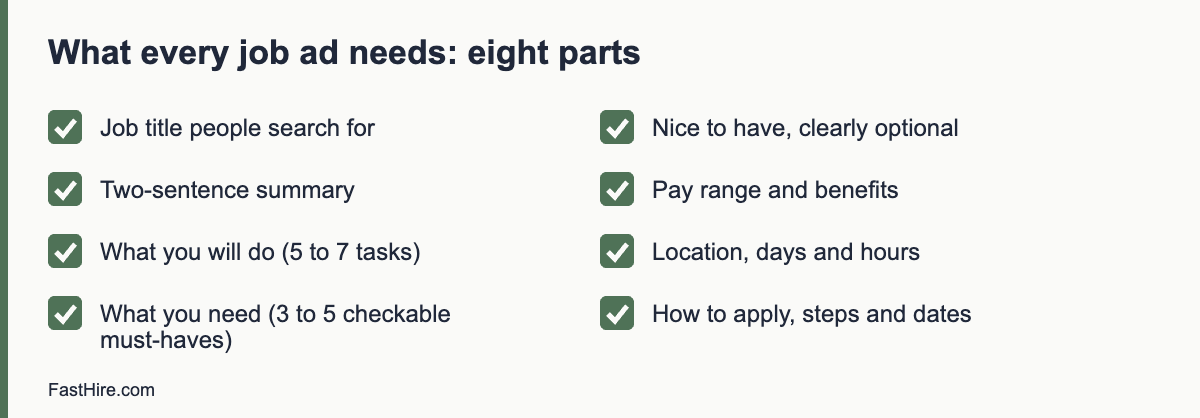
    • Use eight parts: title, summary, what you will do, what you need, nice to have, pay and benefits, location and hours, how to apply.
    • Limit must-haves to three to five things a person can check in their own CV.
    • Show a pay range. It saves time on both sides and, in some places, the law requires it.
    • Describe your process and dates so that candidates know what to expect.
    • Avoid wording that points to age, sex, race or other protected traits.
    x

    Why the job ad matters more than it seems

    Most hiring problems that look like “too many bad applicants” start in the ad. A vague ad attracts everyone and puts the whole filtering job on you. A precise ad lets candidates screen themselves. The best ads also respect the reader: they are short enough to read in two minutes, honest about the hard parts of the job and specific about what happens next.

    FastHire is being built on the same principle. Candidates check their fit against the requirements before they apply, and employers see each requirement next to the exact CV passage that supports it. FastHire is coming soon. It does not rank, score or reject candidates, and people make every decision. Whatever tools you use, the work starts with requirements that can be checked.

    The eight parts of a good job ad

    1. A job title people actually search for

    Use the common name of the role, such as “Bookkeeper”, “Customer Support Assistant” or “Electrician”. Avoid invented titles such as “Ninja” or “Guru”. Put the level in plain words when it matters, for example “Junior” or “Senior”. Add the location only if the role is tied to one place.

    2. A two-sentence summary

    Say who you are and why the role exists. Example: “We are a six-person online shop selling home goods. We need someone to keep our customers happy and our orders on time.” Candidates should know within ten seconds whether the ad is for them.

    3. What you will do

    List five to seven tasks, in order of time spent. Use verbs and objects: “answer customer emails within one working day”, “prepare weekly invoices”, “keep the stock list up to date”. Add one sentence about the hardest part of the job. It builds trust.

    4. What you need

    This is the must-have list. Keep it to three to five items, and write each so that a person can answer yes or no from their CV. Use “at least one year of customer support work, paid or unpaid” instead of “excellent communication skills”. If a requirement cannot be checked, leave it for the interview. See How to write job requirements candidates can actually check themselves against and Must-haves vs nice-to-haves for more.

    5. Nice to have

    Keep this short, and say clearly that people without these items are welcome to apply. Never screen out on a nice-to-have.

    6. Pay and benefits

    Show a pay range and the pay period, for example “per year” or “per hour”. List the benefits that matter to most applicants: holiday, pension or retirement plan, flexible hours and training. Do not list benefits you do not offer.

    Pay information is moving from good practice to legal duty in many places. Some US states have pay-range laws for job ads, and the EU has adopted Directive (EU) 2023/970 on pay transparency. Each EU member state must apply it in national law, so check the rules in the country where the person will work. Rules differ and change, so check your local law.

    7. Location, hours and flexibility

    Say where the work happens, how many days are on site, and what hours are expected. If a role is remote, say which countries or time zones you can hire in. If the schedule can be flexible, say so.

    8. How to apply and what happens next

    Give the closing date, the steps (for example: application, 15-minute call, one-hour interview, short work task), the time each step takes and when people will hear from you. Offer a contact for adjustments, such as a different format for the interview or the application. Ask for a resume or CV and, at most, one short written question.

    Before and after: the same role, two ads

    Here is a weak ad. It is typical of what small businesses post when they are in a hurry.

    Rockstar Customer Ninja Wanted!!

    We are a fast-growing, dynamic company looking for a young and energetic go-getter to join our family. Must be a native English speaker with excellent communication skills and a can-do attitude. Must be able to work under pressure and wear many hats. Competitive salary. Apply now!

    Now the same role, rewritten.

    Customer Support Assistant, Greenfield Home Goods

    We are a six-person online shop selling home goods in the UK and Ireland. We need someone to keep our customers happy and our orders on time.

    What you will do: answer customer emails and chats within one working day; process returns and refunds; keep our help pages up to date; tell us each month what customers ask about most. The hardest part of the job is the first week of December, when volume triples.

    What you need: at least one year of customer support work (paid, unpaid or volunteer); clear written English; comfort learning new software.

    Nice to have: experience with an online shop platform. If you do not have it, please still apply.

    Pay and benefits: [range] per year, 25 days of holiday plus public holidays, pension contribution, training budget.

    Where and when: Bristol office four days a week, one day from home. Monday to Friday, 9:00 to 17:30.

    How to apply: send your resume or CV and three lines on a time you solved a customer problem, by [date]. We will reply to every application by [date]. Steps: a 20-minute call, a one-hour interview and a short paid exercise. Tell us if you need any adjustment for any step.

    The second ad is longer, but it takes less time to read, because every line is useful. It removes the age and language references, lists checkable requirements and shows the pay range and the process.

    Words and phrases to avoid

    Instead ofWhy it causes troubleWrite
    Young and energeticPoints to ageAble to work at a steady pace in a busy shop
    Native English speakerPoints to national originFluent written and spoken English (state the level you need)
    Digital nativePoints to ageConfident with the tools we use, such as [tool names]
    Strong man or girl FridayPoints to sexOffice assistant
    Must be a team playerCannot be checkedHas worked in a team and can give one example
    Rockstar, ninja, guruUnclear and off-putting to manyUse the real job title
    Must work under pressureVague and can deter people with health conditionsHandles up to [number] customer queries a day

    The US Equal Employment Opportunity Commission states that job ads must not favour or discourage applicants because of protected traits. See its page on prohibited employment policies and practices. In Great Britain, the same principle comes from the Equality Act 2010. The Acas page on recruitment explains how employers should advertise and select fairly. In the EU, equal treatment rules are set in EU directives and national law, so check the law of the country where you hire.

    A job ad template you can copy

    [Job title]

    [Company name] is [one sentence about what you do and your size]. We need someone to [one sentence on why the role exists].

    What you will do
    – [Task 1]
    – [Task 2]
    – [Task 3]
    – [Task 4]
    – [Hardest part of the job]

    What you need
    – [Must-have 1, checkable]
    – [Must-have 2, checkable]
    – [Must-have 3, checkable]

    Nice to have
    – [Item]. You can still apply without it.

    Pay and benefits
    – [Pay range and period]
    – [Holiday, pension or retirement plan, other benefits]

    Where and when
    – [Location, days on site, hours]

    How to apply
    – Send [what you need] by [date].
    – Steps: [list steps and time for each].
    – You will hear from us by [date].
    – Tell us if you need any adjustment at [contact].

    Five checks before you publish

    1. Read it aloud. If you stumble, shorten the sentence.
    2. Check each requirement. Can a person confirm it from their resume or CV? If not, move it to the interview.
    3. Check the pay. Is a range shown? Does it match what you would offer an internal candidate?
    4. Ask a colleague who does not know the role. Can they say what the person will do after reading it?
    5. Look for protected traits. Search for words about age, sex, race, religion, disability, family status and nationality.

    Accessibility and data protection

    Make the ad easy to read: short paragraphs, simple headings and no text inside images. Offer an alternative way to apply, for example by email. Tell people how you will use their data. In the UK and the EU, you should give applicants a privacy notice. The UK Information Commissioner’s Office has detailed guidance on recruitment and selection.

    Where to post the ad

    Post the ad where your candidates already look: your own website, one or two job boards in your sector and country, and professional groups. Public employment services can help as well. Tell friends and customers to share the ad, and set a closing date so that you can screen in one batch. See our first hire plan for a step-by-step process and how to hire without an HR team for a record-keeping routine.

    Common mistakes in job ads

    • Copying a large company’s ad. It lists requirements for a different business.
    • Listing ten or more must-haves. Few people meet all of them, and good candidates talk themselves out of applying.
    • Hiding the pay. Candidates then guess, and many guess that it is low.
    • Using the ad as a sales brochure. Describe the work first and the perks second.
    • Leaving the process vague. People need to know how long to wait.

    A 20-minute exercise to improve any ad

    Take your current draft and do four things, in this order. First, delete every sentence that would be true of any company. Second, replace each vague trait with a task or an example. “Self-starter” becomes “plans your own week with a manager check-in on Mondays”. Third, add the pay range, the days on site and the dates of your process. Fourth, send it to one person who works in the role at another company and ask: “Would this make you apply, and is anything unclear?” Make the changes they suggest if they match the real job.

    This short loop usually shortens the ad, makes the requirements clearer and gives you a better first screen. It is also the best moment to check the must-haves against the role brief you wrote before advertising.

    Frequently asked questions

    How long should a job ad be?

    Aim for 300 to 500 words. That is long enough to cover the eight parts and short enough to read in two minutes.

    Should I include the salary in the ad?

    Yes, as a range with the pay period. It saves time, and some places already require it by law. Check the rules where the person will work.

    How many requirements should I list?

    Three to five must-haves. Put anything else in the nice-to-have list or leave it for the interview.

    Can I ask for a cover letter?

    You can, but it is a barrier for many people. Consider asking for three lines on a specific question instead.

    Is it legal to say “native speaker” in a job ad?

    It can point to national origin and lead to discrimination claims. State the language level you actually need instead.

    Related guides

    This is general information, not legal advice.

  • How to make a job offer: a letter template and what to include

    How to make a job offer: a letter template and what to include

    A good job offer is clear, complete and honest. Call the candidate first, then send a written offer that states the job title, start date, pay, hours, place, any conditions, the deadline for a reply and who to contact. The written offer is not the same as the full employment contract, but it must match it, and it should never promise things you cannot deliver.

    Key takeaways

    • Phone the candidate first, then send the letter the same day.
    • Put the key terms in writing: title, pay, hours, place, start date, conditions and reply date.
    • State conditions clearly, such as references or right-to-work checks.
    • Give a fair time to decide, usually three to five working days.
    • Rules on written terms differ by country. Check the official page for your country before you send a contract.
    x

    The offer in three steps

    StepWhat you doWhy
    1. CallPhone the candidate, share the good news, give the main terms and the reply dateShows respect, answers first questions and lets you hear the reaction
    2. WriteSend the offer letter by email within a few hoursGives the candidate the terms in writing and avoids misunderstandings
    3. ContractSend the full employment contract or written terms of employment as the law requiresCovers all legal terms; the offer letter alone may not be enough

    Many small businesses skip step 3 or merge it with step 2. If you merge them, make sure the document includes everything the law requires in your country. Read the official guidance: in the UK, GOV.UK: employment contracts; in the US, there is no federal requirement for a written contract for most jobs but state rules and the Fair Labor Standards Act affect pay (see US Department of Labor: wages and the FLSA); in the EU, Directive (EU) 2019/1152 on transparent and predictable working conditions sets information duties, and each country applies them in its own way.

    What to include in the letter

    ItemDetails to stateNotes
    Job titleThe exact titleMatch the ad
    Start dateDate, or “to be agreed by [date]”Allow time for notice periods
    PayAmount, currency, period (hourly, weekly, yearly) and pay dateMatch the range in the ad, or explain any difference
    HoursHours per week, days, breaks, overtime rulesState flexible hours if they apply
    Place of workAddress or remote arrangementSay who pays for equipment
    Reporting lineName and title of the managerHelps the candidate picture the team
    Contract typePermanent, fixed term, part-time; end date if fixedUse the legal term for your country
    Probation or trial periodLength and rules, if usedSee local limits; in some places a probation period has legal rules
    BenefitsHoliday, pension or retirement, health, other benefitsDescribe only what you will provide
    ConditionsReferences, right to work, qualifications, background checks if the role requires themSay what happens if a condition is not met
    Reply dateA date and timeGive three to five working days
    ContactName, email, phoneOffer to answer questions

    Do not copy terms from a large company if you will not offer them. Avoid phrases like “competitive package” with no detail. If the pay depends on bonuses, state the bonus rules in plain words and say that they are not guaranteed unless they are.

    A template you can copy

    Replace the text in square brackets. Have a lawyer or advisor check the template once for your country.

    [Date]

    Dear [Name],

    Job offer: [Job title] at [Business name]

    We are pleased to offer you the position of [job title]. This letter sets out the main terms. We will send the full written terms of employment separately [or: they are attached].

    Start date: [date].
    Place of work: [address or remote details].
    Reporting to: [name and title].
    Hours: [hours per week and days].
    Pay: [amount] per [hour/month/year], paid [monthly/weekly] on [date].
    Contract: [permanent/fixed term until date], [full-time/part-time].
    Probation: [length and rules, or “none”].
    Holiday and other benefits: [summary].

    This offer depends on: [satisfactory references; proof of the right to work in [country]; any other condition].

    Please reply by [date and time] to confirm that you accept. If you have questions, please contact [name] at [email or phone]. We would be glad to talk.

    We were impressed by [one specific, honest reason from the interview] and we look forward to working with you.

    Yours sincerely,
    [Name, title]

    The phone call script

    1. Open with the news. “We would like to offer you the role of [title]. Congratulations.”
    2. State the main terms. Title, pay, hours, start date and conditions.
    3. Ask for first reactions. “How does that sound to you?”
    4. Answer questions honestly. If you do not know, say you will check and reply by a time.
    5. Give the timeline. “I will send the letter today. Please reply by [date].”
    6. End warmly. Thank them. Do not pressure them to decide on the call.

    Do not use tactics such as an “exploding offer” with an unreasonable deadline or a false statement that there are other candidates waiting. They damage trust, and they may push the person to a worse decision. A fair time to decide is part of a respectful offer.

    A worked example (fictional)

    ItemExample
    RoleOperations coordinator at a small online shop (invented)
    Pay24,000 per year, paid monthly, within the range in the ad
    Hours30 hours per week over four days
    Start date1 March, or earlier by agreement
    ConditionsTwo satisfactory references and proof of right to work
    Reply dateFriday at 5 p.m., four working days after the offer

    The founder called the candidate on Monday, sent the letter at noon, and sent the full written terms on Tuesday. The candidate asked two questions: whether the hours could be moved to another day, and whether there was a training budget. The founder answered both in writing the next morning. The candidate accepted on Thursday. The founder then told the other finalists the outcome the same day.

    Handling questions and negotiation

    Candidates often ask for a change in pay, hours, start date or benefits. Decide in advance what you can offer. Have a floor and a ceiling for pay, and a list of items that can change at low cost, for example start date, flexible hours, a review date for pay or a training budget. When you negotiate:

    • Treat all candidates alike. Unequal pay for the same work can create fairness and legal issues, and some places require pay equity.
    • Give reasons for what you cannot change.
    • Put every agreed change into the written terms.
    • Do not reduce an offer because the candidate asked a question.
    • If you cannot meet the request, say so with respect and ask whether the original offer still works.

    After the person accepts

    1. Send a thank-you message and confirm the start date.
    2. Tell the other finalists the outcome, with respect. A short message is enough.
    3. Close the job ad.
    4. Complete the required checks as the law requires, such as right-to-work checks.
    5. Prepare payroll, equipment, accounts and the first-week plan.
    6. Stay in touch before day one with a short message from the manager.

    The gap between acceptance and the first day is a risk period. A friendly message, a clear schedule and a named contact reduce the risk that the person changes their mind or arrives unprepared. See the first hire plan for the full order of steps.

    Mistakes to avoid

    MistakeWhy it hurtsFix
    Verbal offer onlyTerms are unclear; disputes laterAlways follow with writing
    Terms that differ from the adLose trust; may breach rules on pay informationExplain differences honestly before sending
    Vague conditionsThe candidate quits a job for an offer that then falls throughState conditions clearly
    A very short deadlinePressure; poor decisionsGive three to five working days
    No contractLegal risk in many countriesProvide written terms as the law requires
    Telling other finalists nothingDamages your reputationReply to everyone within a day or two

    Reply templates

    Acceptance confirmed

    Hello [Name],

    Thank you for accepting. We are glad you are joining us. Your start date is [date]. Before then, we will send you the full terms, the first-week schedule and details of who to meet on your first day. If you have any questions, please contact me at [email].

    Best wishes,
    [Name]

    Message to the other finalists

    Hello [Name],

    Thank you for your time and effort during our process. We have offered the role to another candidate. We valued your skills in [one specific point], and we would be glad to keep your details for future roles if you agree. We wish you every success.

    Best wishes,
    [Name]

    Check list before sending the offer

    • The terms match the job ad, or any difference is explained.
    • The pay is the same as you would offer another candidate with the same experience.
    • The conditions are listed, with a way to meet each one.
    • The reply date is realistic.
    • Someone else has read the letter for errors.
    • You have a plan for the full contract.

    Offers for different situations

    SituationWhat to addWhat to watch
    Part-time roleState the hours, the days and how changes are agreedPart-time staff usually have the same rights in proportion to hours. Check local rules
    Fixed-term roleState the end date and the reason, and say what happens at the endRules limit repeated fixed-term contracts in many countries
    Seasonal roleState the season dates, the shifts and how pay is calculatedMake sure holiday pay is handled as the law requires
    Remote roleState the country of work, equipment and costs, and the time zoneWorking from another country can change tax and legal duties. Take advice
    Commission or bonus payState the rules, the targets and the pay datesDo not describe a bonus as guaranteed unless it is
    RelocationState what you pay for and when the person must repay it, if at allPut repayment terms in the contract and keep them reasonable

    If you are offering a role to a person who currently lives in another country, the legal position can be complex. Our guide on hiring abroad will cover the basics. Until then, speak to an accountant who knows both countries before you make the offer.

    Keep the tone human

    An offer letter is also a first impression of how you manage. Use plain words. Thank the person for their time. Give one honest reason why you chose them, based on the evidence from the interview, not on personality. Avoid heavy legal language where you can. If the legal document is formal, add a short cover note in plain words that says what happens next. Candidates remember how they were treated at this point, and they tell others.

    Frequently asked questions

    Is an offer letter a contract?

    It can form part of a contract once accepted, depending on the country. Treat it as binding on you and make sure it matches the full terms.

    Do I need a written contract?

    Many countries require written terms or a statement of particulars for employees. Check the official page for your country, for example GOV.UK in the UK.

    How long should I give a candidate to decide?

    Three to five working days is typical. Allow more time for senior roles or for people who must give notice.

    Can I withdraw an offer?

    Only for fair reasons, such as a failed condition, and with care. Withdrawing without a valid reason can create legal risk. Take advice before you do it.

    Should I tell the candidate the pay range earlier?

    Yes. State a range in the ad where you can, and make the offer within the range, unless you explain a change.

    Related guides

    This is general information, not legal advice.

  • How to source candidates: ten channels and when to use each

    How to source candidates: ten channels and when to use each

    Sourcing means finding people who could do the job and inviting them to apply, before or alongside advertising. The most reliable method is to define the profile from the role brief, choose three or four channels that fit that profile, contact people with a short honest message, track where every candidate comes from and drop channels that do not produce. This guide covers ten channels and when each one works.

    Key takeaways

    • Start with a clear profile based on the must-haves in the role brief, not on job titles alone.
    • Use three or four channels at a time. Ten channels in parallel create noise and double work.
    • Contact people with a short, honest message and a clear next step.
    • Treat personal data with care: tell people where you found them and why you are contacting them.
    • Record the source of every candidate and review the numbers every two weeks.
    x

    What sourcing is, and when you need it

    Advertising waits for candidates to find you. Sourcing goes to find them. You need it when a role is hard to fill, when the people you want are not looking, when a market is tight, or when your usual channels bring too few or too similar candidates. Sourcing also helps when you want a wider mix of candidates and your ad alone does not reach them.

    Sourcing is not a separate magic skill. It is a repeatable process: define, search, contact, track and review. You can do it with a spreadsheet and a few free channels. Before you start, make sure the role is defined. Our guides to the role brief and the recruiter kickoff meeting show how.

    Step 1: Define the profile

    Write the profile in terms of what a person can do and has done, not job titles alone. Titles differ widely between companies, and some capable people have never held the title you list. For each of the three to five must-haves, add two or three ways it might appear in a profile.

    Must-haveWays it might appear in a profile
    Two years of warehouse planning“Stock controller”, “inventory planner”, “stock room lead”, volunteer stock management
    Uses a warehouse systemNames of systems, “WMS”, “barcode scanning”, or training in a similar tool
    Leads a small team“Shift lead”, “supervisor”, “trainer”, or running a group of volunteers

    This list becomes your search terms and your checklist for judging profiles later. It also reminds you that skills can come from different paths, which helps fairness.

    Step 2: Choose the channels

    Here are ten channels. Pick the ones that match where your candidates are, the time you have and the budget.

    ChannelBest forMain limit
    1. Your own careers page and social accountsRoles where people already know youSmall reach if your brand is unknown
    2. General job boardsHigh-volume roles, entry-level rolesMany unsuitable applications
    3. Niche or sector boardsSpecialist rolesCost and smaller audience
    4. Public employment servicesLocal roles, wide mix of candidates. In the UK, the Find a job service; in the EU, EURESCoverage varies by country
    5. Professional networksExperienced and senior rolesNeeds personal outreach; response rates vary
    6. Employee referralsFast, trusted introductionsCan repeat the profile of your current team
    7. Communities and eventsSpecialist skills; meetups, forums, alumni groupsSlow to build, needs a real presence
    8. Universities and training providersEarly-career roles and apprenticesSeasonal timing
    9. Your own talent poolPast applicants who said yes to being contactedMust respect consent and retention rules
    10. AgenciesUrgent, senior or hard-to-fill rolesFees; you give up some control of the process

    You do not need all ten. For a customer service role, two job boards, your careers page and referrals may be enough. For a rare engineer, you may add a niche board, two communities and direct outreach.

    Step 3: Search and shortlist profiles

    When you search networks or databases, use the variations from your profile table, and record the search terms you used. This helps you repeat what works and explain later how you found people. For advanced search syntax, see our guide to Boolean search for recruiters.

    Compare each profile against the must-haves only. Write one line of evidence for each yes, as in a normal screen. Do not rank people by how polished their profile looks. People write profiles for different reasons, and many strong candidates keep them short.

    Step 4: Contact people with respect

    A good message is short. It says who you are, why you are writing to this person, what the role is and what you want them to do next. It tells them where you found their details and makes it easy to say no. For more, see our guide to writing outreach messages that candidates reply to.

    Subject: Warehouse planning role at [company]

    Hello [name],

    I found your profile on [source]. You have worked on stock planning at [company], which is close to what we need for a Warehouse Planner role in [city]. Pay range: [range]. Hybrid, four days on site.

    If you would like to hear more, reply with a good time for a 15-minute call. If not, no problem. I will not contact you again unless you ask.

    [Your name, company and a way to verify who you are]

    Keep personal data lawful

    When you find people yourself, you hold personal data about them. In the UK and the EU, data protection law applies, and you should tell people where you obtained their details, why you hold them and how long you will keep them. Use only the data you need, and delete it when you no longer need it. The UK Information Commissioner’s Office explains the duties of employers and recruiters in its guidance on recruitment and selection. In the US, there is no single national law on this, but state privacy laws and platform rules may apply, so check them for the places where you recruit.

    Platform terms matter too. Many networks restrict automated collection or mass messaging. Read the rules before you use any tool that copies data.

    Fair sourcing

    Sourcing can widen your pool or narrow it. If you search only in the same networks or ask only your own team for referrals, you may keep meeting the same kind of people. Add channels that reach different groups. Describe the role in neutral language. Contact people based on skills, not on names, photos or other traits that point to protected characteristics. The US Equal Employment Opportunity Commission lists protected traits and practices to avoid on its page about prohibited employment policies and practices. In Great Britain, the Acas page on recruitment explains how discrimination law applies to hiring.

    A two-week sourcing sprint

    DayWhat to do
    Day 1Confirm the profile and the search terms with the hiring manager. Agree the channels.
    Days 2 and 3Search and shortlist 30 to 50 profiles against the must-haves. Record the evidence.
    Day 4Send the first 20 messages. Use one template and personalise one line.
    Day 7Send one follow-up to people who did not reply. Do not send more than one.
    Days 8 to 10Hold short calls with interested people. Share two to four strong profiles with the hiring manager.
    Day 14Review: how many contacted, how many replied, how many passed the must-haves and which channel produced them. Change the plan.

    What to measure

    Track four numbers per channel: contacts or applications, replies or qualified applicants, interviews and offers. Divide each stage by the one before it. This shows where a channel is weak: low replies mean the message or targeting is off, low qualification means the profile or the ad is unclear. Review every two weeks and drop channels that give nothing.

    Common sourcing mistakes

    • Searching for job titles only and missing capable people with other titles.
    • Sending the same long message to hundreds of people. Short and personal gets more replies and builds a better name for your employer.
    • Contacting people repeatedly after they say no.
    • Keeping candidate data in private spreadsheets without a deletion date.
    • Letting the hiring manager skip the brief and say “send more profiles”. Calibrate first.

    FastHire is being built for the step after sourcing, when you have a pile of profiles or applications. It shows each job requirement next to the exact CV passage that supports it, so that people can check the evidence quickly. FastHire is coming soon. It does not rank, score or reject candidates. People make every decision.

    A sourcing tracker you can copy

    One simple sheet is enough. Add one row per person you contact or who applies.

    ColumnWhat to record
    Name and contactAs the person gave it or as it appears in the public profile
    Source and date foundChannel, link and the date you found the profile
    Basis for contactWhy you contacted this person, for example “stock planning at a retailer, matches must-have 1”
    Must-havesYes, no or unclear for each, with one line of evidence
    Message sent and replyDate of first message, follow-up, reply and the outcome
    Consent and retentionWhat you told the person, and the date you will delete the record
    StageContacted, replied, call, shortlisted, interview, offer, closed

    Sourcing in three common situations

    SituationWhat worksWhat to watch
    Senior or specialist role, few candidatesDirect outreach, referrals and communities. A personal note that shows you read the profile. Offer a short, low-pressure call.Do not overstate the role or the pay. Be clear about the process and the timeline.
    High-volume role, many candidates neededJob boards, public employment services and a short application. Screen in batches against must-haves.A long application loses people. Keep the first step to a few minutes.
    Early-career roleUniversities, training providers and community groups. Describe what you will teach.Do not require experience that only some people can get, such as unpaid internships.

    A worked example: warehouse planner

    This example is fictional. A regional distributor needs a warehouse planner. The hiring manager and the recruiter use the profile table above. They choose four channels: the company careers page, one logistics job board, the local public employment service and employee referrals. They ask the team for referrals with a short message that explains the must-haves and says that referred people go through the same process as everyone else.

    In week one, the recruiter finds 40 profiles and contacts 20 of them. Eight reply and six agree to a call. Applications arrive from the careers page and the public employment service. The recruiter reviews all of them against the same four must-haves, writes one line of evidence for each yes and sends the hiring manager five strong candidates. The numbers in this example are invented to show the flow. They are not benchmarks.

    At the two-week review, the recruiter sees that the job board produced many applications but few that met the must-haves, while referrals and the public service produced fewer but better matches. The recruiter keeps the two stronger channels, adds one community, and pauses the board. The process improved because every candidate had a recorded source and the same screen.

    Frequently asked questions

    What is the difference between sourcing and recruiting?

    Recruiting is the whole process from role definition to offer. Sourcing is the part that finds and contacts potential candidates, often people who are not actively applying.

    How many sourcing channels should I use?

    Use three or four at a time and review them every two weeks. Drop those that give nothing and test a new one.

    Is it legal to contact people I find online?

    It can be, but data protection rules apply, especially in the UK and the EU. Tell people where you found their details, why you are contacting them and how they can object. Check platform rules too.

    How do I find candidates who are not looking?

    Use professional networks, communities and referrals, and write a short message that explains why you contacted them and what is in it for them. Respect a no.

    How do I avoid sourcing only people like my current team?

    Add channels that reach different groups, use skill-based search terms and apply the same must-haves to every profile.

    Related guides

    This is general information, not legal advice.
  • Blind CV screening: does it work and how to do it

    Blind CV screening: does it work and how to do it

    Blind CV screening hides details such as name, photo, address and date of birth during the first review, so that reviewers judge applicants on skills and evidence. Public trials show mixed results: it can remove one route for bias, but it does not fix unclear criteria and it can remove useful context. Use it as one control among several, and measure the effect in your own process.

    Key takeaways

    • Blind screening hides identity details in the first pass. It does not make a process fair on its own.
    • Evidence from public trials is mixed. Treat it as a tool to test, not a cure.
    • Decide in advance what to hide, who hides it and when to reveal it.
    • Hidden details can still leak through proxies such as school names, club membership, and writing style.
    • Combine blind review with written criteria, an evidence sheet, two reviewers on a sample and outcome checks.
    x

    What blind recruitment is

    Blind recruitment, also called anonymised or name-blind screening, removes some or all personal details from an application before the first reviewer sees it. The idea is simple: if a reviewer cannot see a name, a photo or an age, those details cannot trigger a conscious or unconscious judgement. The reviewer scores the work history, skills and evidence against the job criteria. Later in the process, after a shortlist is chosen, the details are revealed.

    Blind screening is different from a structured process. A structured process asks the same questions and uses the same scoring for everyone. Blind screening hides some information. You can use both. See our guides on structured screening and how to reduce bias in resume screening.

    Does it work? What public trials found

    Evidence from public programmes is mixed. Two examples show why you should test the method before you rely on it.

    TrialWhat was testedWhat was reported
    Public Service Commission of Canada, name-blind pilot, 201727 recruitment processes, April to October 2017, comparing anonymised and non-anonymised screeningThe overall rate of applicants screened in fell from 48.3 percent to 43.3 percent with anonymisation. For visible-minority applicants, the rates were 47.3 percent and 46.0 percent, not significantly different. The report notes limits, including that reviewers knew they were in a pilot. See the PSC report
    Australian Public Service trialMore than 2,100 public servants shortlisted candidates for a hypothetical role, with some applications anonymisedThe summary advises caution before assuming that blind review improves diversity outcomes. See the Australian government report summary

    Do not read these results as proof that blind screening never helps. They show that effects depend on context, on who reviews and on what else changes. They also show that removing details does not remove all bias. A fair process needs several controls.

    What you can hide, and what it does

    DetailWhy consider hiding itLimit
    NameMay signal sex, ethnicity or originSometimes needed to match records later
    PhotoShows face, age, sex, ethnicity, disabilityRare in US and UK CVs; common in some countries. Better not requested at all
    Address or postcodeCan signal class, race or originLocation may matter for a commute or legal reasons
    Date of birth and graduation yearsSignals ageYears of experience may still show age
    Gender, marital status, nationalityProtected or sensitive traitsShould not be in an application at all
    School and university namesCan signal class or backgroundQualifications may be a real requirement
    Hobbies, clubs, volunteer groupsMay signal religion, politics or backgroundCan also show real skills
    Employment gapsMay relate to caring duties, health or studyHiding dates can hide useful chronology

    Decide the list for each role. Hide only what you do not need for the first pass. Keep qualifications that are a legal or practical requirement. If a requirement uses a degree, state exactly which one and why.

    How to run blind screening in six steps

    Step 1: Write the criteria first

    Blind review needs clear criteria. Without them, reviewers use their own guesses. Write three to five must-haves that can be checked on a CV. See must-haves vs nice-to-haves.

    Step 2: Choose who removes the details

    Use someone who is not on the review panel, or software that can hide fields. A person who redacts must work carefully and consistently. Give them a one-page rule list. If you use software, test it on five CVs to see what it misses.

    Step 3: Create a clean review copy

    Give each applicant a code instead of a name, for example A-014. Keep a private key that links the code to the applicant. Store the key separately and give access only to the person who needs it.

    Step 4: Review with an evidence sheet

    Reviewers mark each must-have as yes, no or unclear, and note the CV passage that supports it. They do not judge writing style beyond the clarity needed for the job.

    Step 5: Reveal at a fixed point

    Reveal identity only after the shortlist is chosen. Record the date. Do not go back and change scores after the reveal.

    Step 6: Check the result

    Compare pass rates by stage with and without blind review where the law allows monitoring. Ask reviewers whether the blind copy gave enough information. Adjust the list of hidden details after the first search.

    Redaction checklist

    ItemDone?
    Name replaced by a code
    Photo removed
    Address reduced to a general area, or removed
    Date of birth, age, graduation years removed (where not needed)
    Gender, marital status, nationality fields removed
    Names of clubs or groups that signal protected traits removed
    Contact details removed
    Links to social profiles removed
    File name and document properties cleaned (they can contain names)
    Key stored separately

    Where hidden details leak back in

    • Proxies. A school, a language, an interest or a postcode can still point to a person’s background.
    • Writing style. Spelling variants, phrases and format can hint at origin or age.
    • Work history dates. A long career shows age even without a birth date.
    • Narrative details. “Returned after parental leave” or “managed my disability” tell the reviewer something personal.
    • Reviewer familiarity. In a small field, the reviewer may recognise the person from the work.

    You cannot remove all of these without removing useful information. Aim for a reasonable first pass and combine it with the other controls. Do not ask applicants to remove factual information about their careers. Do not penalise people who include details.

    Legal and data protection notes

    Blind review does not replace anti-discrimination law. You must still not decide on protected characteristics at any stage. In the UK, the Acas page on recruitment explains fair process. In the US, the EEOC describes prohibited practices on its page about prohibited employment policies and practices. In the EU, equal treatment is set by directives and national laws; see Directive 2000/78/EC and Directive 2000/43/EC. The key list that links codes to names is personal data. In the UK and EU, apply data protection rules: limit access, keep it secure and delete it on schedule. See the ICO employment guidance.

    A worked example (fictional)

    This example is invented. A company receives 160 applications for an analyst role. The recruiter writes four must-haves and a one-page redaction rule list. An assistant who is not on the panel replaces names with codes, removes photos and addresses, and deletes graduation years. Two reviewers use an evidence sheet. After the first pass they compare 15 CVs they both reviewed. They disagree on three. The disagreements are all about “uses data tools”, where the CV wording was unclear. They rewrite the criterion to say which tools count, and re-score. They shortlist 18 applicants, reveal the identities, and invite 12 to a screen. The recruiter records the pass rate at each stage. After the search she sees no pattern she cannot explain, but she also notes that two reviewers said they missed the context of university projects. She decides to keep university names visible in future rounds, because the role accepts graduates. The test taught her which details matter for this role.

    When blind screening fits, and when it does not

    SituationFitComment
    High-volume roles with clear criteriaGoodEasier to redact and compare
    Roles where a licence or degree is mandatoryPartlyKeep the legal requirement visible
    Small teams where reviewers know the field wellLimitedReviewers may recognise people
    Roles that need a portfolio or public workLimitedWork samples show identity; use work sample review instead
    Internal movesLimitedPeople are known; use structured evidence instead

    Blind screening is easy to explain and cheap to try. Try it on one search and measure. If it removes a source of doubt for your team, keep it. If it adds work with no benefit, drop it and put the effort into criteria, evidence and checks.

    Alternatives and additions to hiding details

    If hiding details is hard in your setting, other controls address similar risks. They also work well alongside blind review.

    ControlWhat it doesEffort
    Evidence sheet with a CV passage for each yesDirects attention to what the CV shows about each must-haveLow
    Work sample, scored without namesGives direct evidence of a skill; can be scored anonymouslyMedium. See work sample tests
    Structured interview with the same questionsMakes later stages comparableMedium. See structured interviews
    Two reviewers on a sampleFinds inconsistent markingLow
    Outcome monitoring where the law allowsFinds patterns you cannot see in single decisionsMedium
    Clear, job-related criteriaRemoves guessworkLow. See checkable requirements

    Tools that show each job requirement next to the exact CV passage that supports it follow the same logic: they draw the reviewer’s attention to evidence. FastHire is being built on that approach. It is coming soon, it does not rank, score or reject candidates, and people make every decision.

    What to tell candidates

    Be open about your process. In the job ad or the privacy notice, say whether you review applications without names at the first stage. Explain why you ask for the information you collect and when you will see it. If you collect diversity or monitoring data, say it is separate from the hiring decision and optional where the law allows. Candidates trust a process that is explained, and they can ask for adjustments if they need them.

    Do not claim that your process removes bias. Say that you use several controls to reduce it. Overclaiming harms trust if a candidate later finds a gap.

    Questions to ask before you start

    1. What problem are we trying to solve: names, school, age, or something else?
    2. Which details are not needed for the first pass?
    3. Who will redact, and how will we check their work?
    4. How will we reveal the details, and when?
    5. How will we measure the effect, and what will we do if we see no change?
    6. Who owns the key that links codes to names, and how long will we keep it?

    Write the answers in one page. If you cannot answer them, delay the pilot until you can. A small, well-planned test teaches more than a large, loose one.

    Frequently asked questions

    What is blind CV screening?

    It is a method where identity details such as name, photo and address are hidden from the first reviewer, so that they judge skills and evidence.

    Does blind recruitment increase diversity?

    Public trials give mixed results. It may help in some settings and not in others. Test it in your own process and combine it with other controls.

    Is blind screening legal?

    Yes, as a process choice. You must still follow anti-discrimination and data protection laws. This is general information, not legal advice.
    What should I hide?

    Only what you do not need for the first pass: name, photo, address, date of birth, graduation years and similar details. Keep qualifications that are a real requirement.

    Can software do blind screening?

    Some tools can hide fields. Test what they miss, and keep people in charge of the decision.

    Related guides

    This is general information, not legal advice.
  • How to write a screening call script

    How to write a screening call script

    A screening call script is a short, fixed set of questions and prompts that a recruiter uses with every candidate in a first call. It has six parts: opening, role summary, must-have checks, motivation and availability, candidate questions and closing. A script makes calls shorter, fairer and easier to compare, and it leaves room for natural conversation.

    Key takeaways

    • Use the same script and the same must-have questions for every candidate for the same role.
    • Keep the call to 15 to 25 minutes, with time for the candidate’s questions.
    • Check must-haves with a request for an example. Do not accept a plain “yes” without detail.
    • Record notes on a sheet during the call and score within 15 minutes after.
    • Avoid questions about protected traits. Offer adjustments at the booking stage.
    x

    What a screening call is for

    A first call has three jobs. It confirms that the candidate meets the basic must-haves. It checks practical facts such as location, availability and pay expectations. And it gives the candidate a clear picture of the role and process so that they can decide whether to continue. It is not a full interview, and it should not try to test every skill.

    A script helps because recruiters handle many calls. Without one, each call drifts, questions vary and notes are hard to compare. With one, you can move through 8 to 10 calls in a day and still treat each person with attention. Pair the script with a screening sheet. See our guides to structured screening and screening at volume.

    Before the call: preparation checklist

    TaskDetail
    Read the role briefKnow the must-haves, nice-to-haves, pay range, hours, location and process
    Read the CVMark two items to ask about and any unclear points
    Prepare the sheetOne row per must-have, with fields for evidence and score
    Book the callOffer a choice of times, state the length and ask about adjustments
    Prepare answersPay range, process, timeline, benefits, remote or office policy
    Check the rulesKnow what you cannot ask. See questions you cannot ask

    The six-part script

    PartTimePurpose
    1. Opening1 to 2 minPut the candidate at ease and set the agenda
    2. Role summary2 minShare the facts
    3. Must-have checks8 to 10 minCollect evidence
    4. Motivation and practicalities3 to 5 minInterest, availability, pay, notice
    5. Candidate questions3 to 5 minAnswer honestly
    6. Closing1 to 2 minExplain next steps and the date

    Part 1: Opening

    Hello [Name], this is [your name] from [company]. Thank you for making time. This call will take about [20] minutes. I will tell you a little about the role, ask some questions, and leave time for yours. I will take notes so that I do not miss anything. Is this still a good time?

    Part 2: Role summary

    The role is [title], on a team of [number]. The person will [two or three main tasks]. The hours are [hours], based [place or remote]. The pay range is [range]. The process has [number] steps and we plan to decide by [date]. Does that match what you expected?

    Part 3: Must-have checks

    Ask each must-have as a request for an example. Use the same wording for all candidates. Write the answer and score it right after the call. Use “tell me about” prompts and follow-ups.

    Must-have (example)Main questionFollow-upWhat a good answer includes
    Customer support experienceTell me about the support work you have done most recently. What did you handle each day?How many customers or cases? What tools?Specific tasks, volume, tools, outcome
    Written communicationTell me about a message you wrote that solved a customer problem.What happened after?A real example, clear action, result
    Works to deadlinesDescribe a busy period and how you managed your time.What would you do differently?Method, priorities, honest reflection
    Uses the main toolsWhich systems have you used, and for what?How long did it take you to learn them?Named tools, tasks, learning speed

    If an answer is general, ask for an example: “Can you give me a recent example?” If there is none, mark “unclear” or “no evidence”. Do not guess. The aim is to find evidence, not to catch people out.

    Part 4: Motivation and practicalities

    • “What interested you in this role?”
    • “What are you looking for in your next role?”
    • “Are you able to work the hours and the place described?”
    • “What is your notice period or earliest start date?”
    • “What pay range are you looking for?” (Check local laws first. Some US states and cities restrict questions about pay history. Ask about expectations, not current pay, unless the law allows it.)
    • “Are you in other processes, and what is your timeline?” (This helps you plan. It is not a test.)

    Part 5: Candidate questions

    What questions do you have for me about the role, the team or the process?

    Answer honestly. If you do not know, say you will find out and by when. Note what the candidate asks, because it shows what matters to them.

    Part 6: Closing

    Thank you, that was helpful. Here is what happens next: I will review my notes and contact you by [date] with a decision on the next step. If you need any adjustment for the next steps, please tell me. Do you have any final questions?

    Notes sheet

    FieldWhat to write
    Candidate, role, date, time
    Must-have 1 evidenceFacts and phrases, not opinions
    Must-have 2 evidence
    Must-have 3 evidence
    Availability, notice, location
    Pay expectation (if asked)
    Questions asked by the candidate
    Score per must-have (1 to 4)
    Decision: move forward / hold / decline
    Reason in one line, job-related

    Do not note anything about age, health, family, religion, accent or looks. If the candidate shares such information, do not record it and do not use it. Keep the notes secure. In the UK and EU, a candidate may ask to see data held about them. See the ICO guidance on employment.

    Tone and listening

    • Smile when you speak. It changes your voice.
    • Do not read the script in a flat voice. Know it well enough to ask naturally.
    • Let silence work. Wait three seconds after a question before you prompt.
    • Summarise key points back to the candidate to check understanding.
    • Do not judge accent, speech style or background noise. They say nothing about the must-haves.
    • Be honest about pay, process and timeline. Do not oversell.

    A worked example (fictional)

    This example is invented. A recruiter screens a candidate for a customer support role. After the opening and role summary, she asks: “Tell me about the support work you have done most recently.” The candidate says he handled about 40 tickets a day at an online shop, used a help desk tool and a chat tool, and wrote refund replies. She scores “customer support experience” 3, with the note “40 tickets a day, two tools, refund replies”. For “written communication” she asks for an example. He describes a reply to an angry customer that led to a replacement and a positive review. She scores 3 with the same detail. For “works to deadlines” the candidate gives a general answer. She asks a follow-up: “Can you tell me about a particular week?” He cannot give an example, so she scores 1 and notes “no example given when asked”. She moves him forward with a note to test deadline handling in the interview. Her notes total 12 lines and were scored within 10 minutes.

    Adjustments and accessibility

    In the booking message, write: “If you need any adjustment for this call, such as more time, a different format or captions, please tell us and we will arrange it.” Offer phone or video, and a written alternative if needed. If the candidate asks for questions in advance, send them. This is fair, and it does not harm the quality of your screening. For legal context, see Acas on recruitment in the UK and the EEOC on prohibited practices in the US. This is general information, not legal advice.
    Common mistakes

    MistakeEffectFix
    Different questions for each candidateCannot compareUse a script
    Asking only yes/no questionsNo evidenceAsk for examples
    Talking more than the candidateLittle to scoreLimit your part to five minutes
    Judging voice or accentPossible biasScore only on the must-haves
    Skipping notesMemory errorsWrite during the call
    No next step statedCandidate waits and doubtsState the date

    Handling difficult moments

    SituationWhat to sayWhat to avoid
    The candidate asks about pay and you cannot share it“The range is [range]. I am not able to discuss exact figures at this stage, but I will confirm them before any offer.”Dodging the question or inventing a number
    The candidate does not meet a must-have“Based on what you have told me, the role needs [skill], and I did not hear enough about that. I do not want to waste your time, so I will not move forward with your application at this stage.”Vague promises of a later call
    The candidate is nervous“Take your time. We can come back to that question.”Interrupting or finishing sentences
    The candidate gives a very long answer“Thank you, that is helpful. Let me move to the next question so we cover everything.”Cutting them off sharply
    The candidate asks personal questions about the team“I can tell you about the work and the process. The hiring manager can say more in the interview.”Sharing personal details of colleagues
    The candidate shares health or family details“Thank you. Let us return to the role.”Following up on the topic or writing it in the notes
    The candidate asks if the role is still openAnswer honestly based on the planSaying it is open when you have filled it

    Scoring and deciding after the call

    1. Within 15 minutes, fill in the scores and the one-line reason.
    2. Mark the candidate: move forward, hold or decline.
    3. Check your notes for any protected-trait information. Remove it.
    4. Send the next-step message within two working days. See fast interview feedback for templates.
    5. Add the candidate to your tracking sheet with the date and outcome.

    Review the first ten calls together with the hiring manager. Check whether the questions separated strong from weak evidence and whether the time was right. Change the script if needed and apply the change to all later calls. Keep a version number and the date so that you can show which script you used for which candidates.

    Adapting the script for different channels

    ChannelChange
    Video callSend the link in advance and check the connection. Do not judge the background
    Phone onlyOffer a call-back if the line is poor
    Text or chat screeningUse the same questions in writing, with a time limit of two working days to reply
    Voice recording by an automated toolTell the candidate how the data is used and give a human alternative on request

    If a tool records or analyses candidate speech, check the data protection and AI rules in your country first. People must make the hiring decision. This is general information, not legal advice.
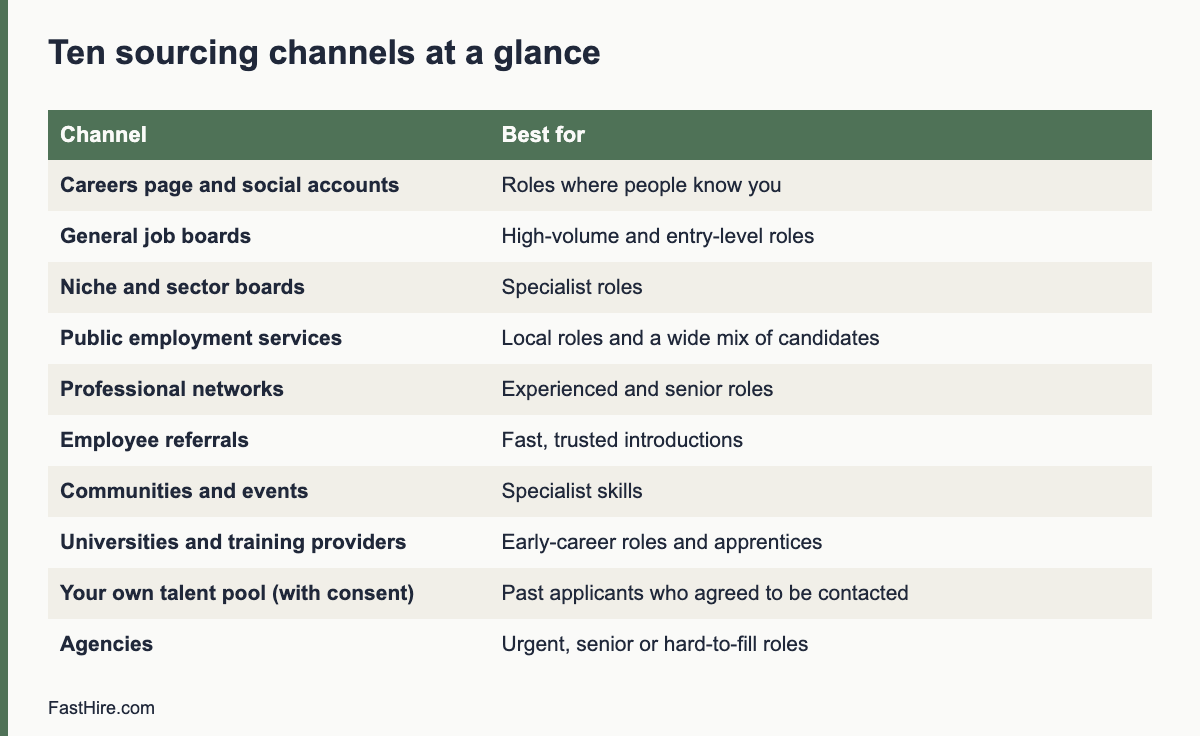
    Frequently asked questions

    How long should a screening call be?

    15 to 25 minutes is enough for most roles. Longer calls often repeat the interview.

    Should I record the call?

    Only if the law allows and the candidate agrees, and you have a reason and a retention rule. Notes are usually enough.

    Can I ask for the candidate’s current salary?

    Rules vary. Some places restrict it. Ask about expectations for the role, and check local law.

    What if the candidate does not meet a must-have?

    Say so clearly and kindly, and explain the next step. Do not prolong the call.

    How do I keep calls fair across many candidates?

    Use the same script, the same must-have questions, the same scale and the same notes sheet.

    Related guides

    This is general information, not legal advice.

  • How to hire an assistant or office manager: role, ad and interview

    How to hire an assistant or office manager: role, ad and interview

    To hire an assistant or office manager, list the tasks you want to hand over, group them by skill, decide the hours and the level of trust, write a clear job description, advertise it with the pay range, and test the real skills with a short task such as a calendar puzzle, an email draft or a small spreadsheet. Keep the process fair, and plan the first month so that the person can take over tasks step by step.

    Key takeaways

    • Start with a task audit: write down everything you want to hand over and how long each task takes.
    • Choose between an assistant (supports you) and an office manager (runs the office). They are different jobs.
    • Test judgement and organisation with a short, realistic exercise.
    • Be clear about confidentiality, access to systems and data protection from the start.
    • Plan a staged handover: show, do together, then hand over with review.
    x

    Assistant or office manager?

    Titles in this area are used loosely. Before you write an ad, decide what you need. The two main roles are different, and so are the skills and the pay.

    AspectAssistant (executive or personal)Office manager
    Main focusSupports one person: calendar, email, travel, follow-upRuns the workplace: suppliers, equipment, health and safety, visitors, admin, sometimes HR support
    Key skillsDiscretion, written communication, calendar management, anticipationOrganisation, supplier management, budgets, practical problem solving, people skills
    Who they work withMostly youThe whole team, suppliers, visitors
    Typical riskBecomes a bottleneck for one person’s tasksRole grows into many unrelated jobs
    TestEmail, calendar and prioritisingSupplier plan, budget, handling an urgent issue

    If you need both, consider whether one person can do both at the start, or whether you should begin with one and add the other later. A role that mixes both can work in a very small company if you define priorities. See how to write a job description for a role that does not exist yet.

    Step 1: Run a task audit

    For one week, write down every task you do that someone else could do. Note the time each takes and how often. Then group the tasks.

    GroupExamplesHours per week (your estimate)
    Calendar and emailScheduling, filtering, drafting replies, reminders
    Travel and eventsBooking, itineraries, expenses
    Finance supportInvoices, receipts, expense forms, supplier payments (with access controls)
    OfficeSupplies, equipment, post, cleaning contracts, safety checks
    People supportOnboarding setup, contracts filing, holiday calendar
    Customer supportFirst reply, forms, bookings
    ProjectsResearch, document formatting, meeting notes

    Add the hours. If the total is below ten hours a week, consider a part-time role or a freelancer, and read employee or contractor. If it is above 30 hours, the job is full-time. Compare the cost with your own time using the cost worksheet.

    Step 2: Decide trust, access and data

    Assistants and office managers see sensitive information: emails, contracts, bank details and personal data. Decide before you hire what access the person will have, and put rules in writing.

    • Which accounts they can view or manage
    • Whether they can make payments, and what limits apply
    • How passwords and shared accounts are handled; use a password manager, not shared notes
    • What counts as confidential, and a confidentiality clause in the contract
    • Data protection duties. In the UK and EU, the person will handle personal data and needs training. See the ICO employment guidance
    • Checks you plan to make, where the law allows and the role needs it. Apply the same checks to every finalist

    Step 3: Write the job description and ad

    Use the seven-part method from the new-role guide: problem, outcomes, tasks, must-haves, nice-to-haves, context, unknowns. For an assistant, outcomes might be “calendar is up to date with no double bookings” and “email replies within one working day”. For an office manager, outcomes might be “supplier contracts reviewed each year” and “safety checks completed on time”. Choose three to five must-haves that you can check, such as “wrote business emails daily in the last role” or “managed supplier orders”. Avoid proxies such as years of experience that are not needed. See how to write a job ad that attracts the right applicants.

    Step 4: Screen and interview

    Must-haveQuestionWhat a strong answer shows
    OrganisationTell me how you plan a week with many changes. Give a real example.A method, tools, priorities
    Written communicationDescribe a difficult email you wrote on someone’s behalf.Clarity, tone, result
    DiscretionTell me about a time you handled confidential information. What did you do?Care, rules, judgement
    InitiativeTell me about something you improved in a past role without being asked.Action and result
    Working with a busy personHow do you work with someone who changes priorities often?Calm, questions, flexibility
    Practical problem solvingThe printer breaks before a client visit. What do you do?Steps, priorities, communication

    Use the same questions for every candidate and a simple scorecard. Learn the method in our guides on the first interview and the interview scorecard. Do not ask about family plans, health, age or other protected topics. See what you can and cannot ask.

    Step 5: Test the skills with a short task

    A 30 to 45 minute exercise gives strong evidence. Use made-up data and tell candidates the time limit.

    TaskWhat it testsScoring points
    Calendar puzzle: five meetings, three time zones, two conflicts. Find a schedule and write a short email to confirm.Planning, attention to detail, written clarityNo conflicts, correct time zones, clear email
    Inbox triage: ten fictional emails; mark the urgent ones, draft two replies, list questions for the manager.Priorities, judgement, toneRight order, polite and short replies, good questions
    Small spreadsheet: fix three errors in a fictional expense sheet and add a total.Accuracy, basic toolsErrors found, formulas correct
    Supplier choice: compare three fictional quotes and recommend one.Judgement, simple analysisClear comparison, assumptions stated

    Keep the task short, paid if long, and fair. See how to assess skills with a work sample test.

    Step 6: Check references and make the offer

    Ask referees about reliability, discretion, accuracy and how the person handled pressure. See how to check references. Then make the offer with clear hours, duties and confidentiality terms. See how to make a job offer.

    The first month: staged handover

    StageWhat happensYour role
    1. ShowExplain the task, why it matters and how you do itDemonstrate; give a checklist
    2. Do togetherThe person does it while you watchGive feedback
    3. Do with reviewThe person does it; you check the resultReview quickly
    4. OwnThe person owns the task; you check weeklyTrust and spot-check

    Write a short handbook as you go: where files are kept, who the key suppliers are, how you like emails written. The new person can update it, and it helps the next hire. See the first 30 days onboarding plan.

    Common mistakes

    MistakeEffectFix
    Hiring before the task auditRole does not match the needRun the audit first
    Giving full access on day oneRisk to data and moneyGrant access in stages with limits
    Treating the role as a junior role with senior dutiesLow pay, high responsibility, quick exitMatch pay to duties. Check the market
    No prioritiesPerson is pulled in many directionsAgree top three priorities each week
    Expecting the person to read your mindFrustrationShare preferences in a written guide
    Handing over everything at onceErrors and overloadStaged handover

    A worked example (fictional)

    This example is invented. A founder of a six-person design studio spends about 12 hours a week on admin: scheduling, invoices, supplies and client emails. She runs a task audit and decides to hire a part-time studio coordinator for 20 hours a week. She writes outcomes: invoices sent within two days of project milestones, calendar free of conflicts and a monthly supplier review. She uses a 40-minute inbox triage task and the same six interview questions. The chosen candidate shows careful planning and clear email style. In the first month the founder uses the four-stage handover. By week four the coordinator owns the calendar and invoices. The founder reviews invoices weekly for two months. After 90 days the founder has about 10 more hours a week for client work.

    Pay, hours and growth

    Pay for assistants and office managers varies widely by country, city and level of responsibility. Do not guess. Check current local sources such as national statistics or labour market information, and compare advertised pay for similar roles in your area. In the US, the Bureau of Labor Statistics publishes occupation data in its Occupational Outlook Handbook. In the UK and EU, check your national statistics office and the legal minimum pay on GOV.UK or the equivalent source. Set a range, write it in the ad where allowed or required, and offer within it.

    Be honest about growth. If the role can grow into a coordinator or operations role, say so, with the conditions. If it cannot, do not promise it. People stay when the work is clear, the pay is fair and they see a path to learn. A training budget or a named course can mean more than a vague promise.

    Part-time and shared options

    OptionFits whenWatch out for
    Part-time employeeYou need steady cover, 10 to 25 hours a weekSet clear hours and a backup for holidays
    Shared assistant between two foundersYou each need a few hoursAgree priorities and who decides conflicts; put it in writing
    Freelancer or virtual assistantTasks are separable and the person works with their own toolsCheck status rules and data protection. See employee or contractor
    Temporary coverA busy period or leave coverPlan the handover and keep access limited

    Whatever option you choose, write down the tasks, hours, confidentiality rules, review dates and the way you will give feedback. A short written agreement reduces most misunderstandings.

    How to review the role after three months

    1. Compare the task list with what the person actually does.
    2. Ask the person which tasks take the most time and which they would change.
    3. Review the outcomes: calendar conflicts, invoice timing, supplier issues, errors.
    4. Decide which tasks to add, move or remove.
    5. Update the job description and agree changes in writing.

    Roles like this grow quickly. A short review prevents drift and keeps both sides clear about what is expected.

    Finally, think about cover. If the person is ill or on holiday, who answers the calendar and the post? A shared checklist and a named backup keep the office running. Write the checklist while the person is new and fresh, because they notice steps that others have forgotten. Update it every quarter.

    Frequently asked questions

    What is the difference between an assistant and an office manager?

    An assistant supports one person or a small group with calendar, email and tasks. An office manager runs the workplace, including suppliers, equipment and administration.

    Should the role be full-time or part-time?

    Add up the task hours from your audit. Under about ten hours a week, consider part-time or a freelancer. Above 30 hours, plan a full-time role.

    How do I protect confidential data?

    Limit access by task, use a password manager, add a confidentiality clause, train the person on data protection and review access regularly.

    What test should I use?

    A short, realistic task such as inbox triage or a calendar puzzle, with a time limit and a scoring guide.

    Can I hire a virtual assistant?

    Yes. Check the status rules in employee or contractor, and set data protection terms with the provider.

    Related guides

    This is general information, not legal advice.

  • Where to post a job when you have no budget

    Where to post a job when you have no budget

    You can post a job for free on public job services, your own website, social networks, local community boards, schools and colleges, and through your network. Free channels cost time, not money, so pick three to five that match the role and track which ones bring suitable applicants. Use a clear ad, apply the same fair process to everyone, and do not rely on word of mouth alone.

    Key takeaways

    • Free channels cost your time. Choose by role type and location, not by habit.
    • Use three to five channels, not fifteen. Track the source of each applicant.
    • Government job services, your own careers page, local boards and schools are strong free options in many places.
    • Word of mouth is useful but can narrow your pool. Always add at least one open channel.
    • Write one clear ad and adapt the first lines for each channel.
    x

    Free channels and when to use them

    ChannelBest forEffortWatch out for
    Public employment services (for example the job service run by the government in your country)Local, entry-level, trades, part-time and shift rolesLowListings may need an account; check the posting rules
    Your own website or careers pageEvery role; builds a lasting sourceMedium at first, low afterNeeds traffic; link to it from other channels
    Your business social media profilesRoles where customers or fans may applyLowReach depends on your followers; be careful with ad wording
    Professional networks for individualsOffice, skilled and remote rolesMediumFree posts may be limited in number or reach
    Local community boards, shops and librariesLocal and part-time rolesLowShort reach; use a clear contact method
    Schools, colleges and universitiesEntry-level, apprentice, intern and seasonal rolesMediumFollow each institution’s rules for employers
    Industry associations and groupsSpecialist rolesMediumRead the group rules; do not spam
    Alumni and volunteer networksMission-led or specialist rolesMediumKeep the process open to all
    Your network and customersAny role, especially hard-to-fillLowCan narrow the pool; combine with open channels
    Your own email listAny role if you have a listLowOnly message people who agreed to receive email from you

    Job board names and free-posting rules change often, so check each site’s current terms before you spend time. In the US, the Department of Labor sponsors CareerOneStop, which lists American Job Centers that help employers find workers. In the EU, the EURES portal supports cross-border job search. In the UK, GOV.UK: employing people points to the official routes for employers.

    A five-step plan for a free posting week

    Step 1: Write one strong ad

    A clear ad saves you hours of screening. Use our guide to writing a job ad that attracts the right applicants. Include the job title, the main tasks, three to five must-haves, the pay range, the hours, the place and how to apply. Keep it under 500 words.

    Step 2: Pick the channels

    Choose by role. For a shift worker in a town, pick the public job service, local boards and your shop window. For a remote designer, pick your website, a professional network and one industry group. For a trainee, pick local schools and colleges. Keep the list short enough that you can answer every applicant.

    Step 3: Make one tracking link per channel

    Use a simple way to learn where people came from. The easiest way is a question on the application: “How did you hear about this job?” with a short list of options. Do not put personal data in a link. Plain text answers are fine.

    Step 4: Post on a weekday morning and set a closing date

    Post early in the week so that you can respond within a day or two. Set a closing date two to three weeks ahead and say it in the ad. A date helps candidates plan and helps you plan your own time.

    Step 5: Review after one week

    Count applicants by source and ask: how many met the must-haves? Drop the channels that bring many unsuitable applicants. Repeat the post on the channels that bring suitable ones. Use a screening method for small teams so that the review takes minutes.

    Templates you can copy

    Short post for social media

    “We are hiring a [job title] in [place]. You will [two main tasks]. Pay: [range]. Hours: [hours]. Closing date: [date]. Read the full details and apply here: [link]. Please share with anyone who may be interested.”

    Message to your network

    “Hello [name], we are hiring a [job title] at [business]. The role is [one sentence]. The details are here: [link]. If you know someone who may be a good match, please pass it on. We welcome all applicants and everyone will receive a reply.”

    Note for a school or college careers team

    “We are a small business in [place] and we have a [job title] role for [type of applicant]. It includes [training or support]. Could you share the details with students or graduates? Our contact is [name and email].”

    Keep the process fair

    Free channels can narrow your pool without you noticing. If you only post to your own friends and followers, you will meet people who look like your network. Add at least one public channel that anyone can see. Use the same ad, the same questions and the same screening sheet for all applicants, whatever the source. Do not use words in the ad or the post that point to age, sex, race or other protected traits, for example “young and energetic” or “native speaker” when fluent English is enough. If you need a language level, state it as a skill, such as “written English at a level for customer emails”.

    Respect candidates. Say how long you will take to reply, and then reply. Do not ask for payment from applicants. Do not ask for sensitive information such as bank details or identity numbers at the application stage. Scam postings make candidates wary, so keep your contact details and your company name clear.

    Measure what works

    Number to trackHow to countWhat to do with it
    Applicants per channelCount by the “how did you hear” answerKeep top channels
    Suitable applicants per channelCount those who meet the must-havesChoose by suitable, not by total
    Time to replyDays from application to first replyAim for two working days
    Hires per channelCount at the endPlan the next hire with these channels
    Hours you spentEstimate your timeCompare with a paid option

    After two or three hires, you will know which free channel serves each type of role. Keep a short list in a spreadsheet and reuse it. If free channels do not bring enough suitable people after two weeks, check the ad and the pay before you pay for promotion. See what to do when no one applies in our first hire plan. A low-cost paid option can still make sense when your time is the scarcer resource; the cost worksheet helps you compare.

    Match the channel to the role: three examples

    These examples are invented to show the thinking. They are not data from real businesses.

    Role (fictional)Channels chosenWhyFirst-week target
    Weekend shop assistant in a small townPublic job service, shop window sign, local community board, business social pageApplicants are local and look for nearby work. People walk past the window.Ten applicants, three who can work the shifts
    Remote bookkeeper, part-timeOwn careers page, a professional network post, one accounting association groupSkill is specialist and place does not matterEight applicants, three with the right software experience
    Summer trainee in a workshopTwo local colleges, public job service, parents’ groups through a school newsletterApplicants are young and local; schools reach themSix applicants, two who can start in June

    In each example, the owner picked channels that the likely applicant already uses. Ask yourself: where would a person who could do this job look first? Then post there.

    How to write the first lines for each channel

    Most readers see only the first two lines. Rewrite them for each channel and keep the rest the same.

    ChannelFirst lines should say
    Public job serviceTitle, place, hours and pay range
    Social mediaWhat the person will do and where, in one sentence, plus the link
    Professional networkThe outcome of the role and the team size
    Careers pageWhy the role exists and what success looks like
    School or collegeThe training or support you give and the start date
    Community boardTitle, hours, contact name and phone or email

    Keep the facts identical across channels. If the pay is stated on one and missing on another, candidates notice, and it creates doubt.

    Handling replies without losing a week

    Free channels can bring many replies at once. Set a routine so that none are lost.

    1. Use one email address or one form for all applications. Do not collect them in private messages on five platforms.
    2. Send an automatic or manual reply within two working days that confirms receipt and gives the closing date and the next step.
    3. Put each applicant in a spreadsheet with a date, the source and a status.
    4. Screen on a fixed day, for example the day after the closing date.
    5. Send a clear outcome to every applicant. A short message takes a minute and protects your reputation.

    A simple spreadsheet is enough at this stage. Our guide to a 20-minute screening method shows how to go from a pile to a shortlist without reading every application twice.

    Common mistakes with free posting

    • Posting once and waiting. Post, then share again after one week with a new first line.
    • Using a different ad on each channel. It creates confusion and uneven screening.
    • Posting without a closing date. You will not know when to start screening.
    • Ignoring replies. A slow reply loses good people to faster employers.
    • Using only your personal network. It is fast, but it narrows the pool.
    • Asking for payment or sensitive data. Applicants should never pay to apply or share bank details.

    Do the numbers before you pay for promotion

    If free channels bring few suitable people, test a paid option on one role only. Set a fixed cap before you start. Write down the fee, the expected number of suitable applicants and the date you will judge the result. After the closing date, divide the fee by the number of suitable applicants. Compare that figure with the value of your own hours. If a paid option saves you ten hours and costs less than ten hours of your time, it is a fair trade. If it brings the same people you already reach, do not repeat it.

    Keep a short record after each search: the channels you used, the number of suitable applicants from each, the hours you spent and the result. After three searches, this record is more useful than any general advice, because it describes your own market, your own roles and your own time. Share it with the next person who hires for you.

    Frequently asked questions

    Is it really free to post a job?

    Many public services, your own site and social profiles are free to use. Some job boards limit free posts or charge to promote them. Check each site’s terms.

    How many channels should I use?

    Three to five is a good range for a small team. More channels mean more replies to manage.

    Is word of mouth a fair way to hire?

    It is a useful source, but if it is your only source, it can limit who hears about the job. Add at least one public channel.

    How long should I leave the ad open?

    Two to three weeks is typical for a small business role. State a closing date in the ad.

    Do I need to pay to reach good candidates?

    Not always. Check your ad and pay first. If free channels fail, try one paid channel for one role and track the result.

    Related guides

    This is general information, not legal advice.