Author: fhai

  • How to turn down a candidate kindly and clearly: templates

    How to turn down a candidate kindly and clearly: templates

    To turn down a candidate kindly, tell them quickly, say the decision in the first sentence, thank them for their time, give one honest and job-related reason if they reached an interview, and wish them well. Keep the message short and keep a copy. This guide gives templates for each stage and the rules to follow.

    Key takeaways

    • Send the message within a few working days of the decision. Silence is the worst reply.
    • Put the decision in the first line, then thank the person.
    • For people who interviewed, add one or two true, job-related points. Never mention personal traits.
    • Do not promise to keep their details unless they agreed, and tell them how long you will keep data.
    • Use a template, then change the name, the role and one personal detail.

    Why a small business should bother

    In a small business, your name is your brand. Candidates are customers, neighbours and future colleagues. A kind, clear message takes five minutes and costs nothing. A missing reply leaves people waiting and guessing, and they tell others. It also helps you: a clear close lets you move on, and a good message can keep a strong person open to applying again.

    For a deeper guide on feedback, see how to give useful feedback to rejected candidates. For longer templates, see rejection emails that respect candidates. This article is the short version for owners who do the hiring alone.

    Principles

    1. Be prompt. Aim to reply within a few working days of the decision.
    2. Be clear. Do not say “we will keep your CV” if you will not.
    3. Be kind but not vague. Avoid false hope.
    4. Be honest. Never invent a reason.
    5. Be brief. Four to seven sentences are enough.
    6. Be consistent. Treat every candidate at the same stage in the same way.
    7. Be careful. Do not mention age, health, family, religion, race or other protected traits.

    Timing by stage

    StageWhen to replyWhat to include
    Applied, not shortlistedWhen you close the shortlist, or within two weeks of applyingThanks, the decision, good wishes
    Phone or video screenWithin two or three working daysThanks for their time, the decision
    First interviewWithin three working days of the decisionThanks, the decision, one or two job-related points if possible
    Final interviewA phone call, then a short emailThanks, the decision, specific feedback, an invitation to ask questions
    Offer declined by you after trialSame day if possible, by phoneClear, calm, thanks
    x

    Templates you can copy

    After an application

    Subject: Your application for [role]

    “Hello [name], thank you for applying for the [role] at [company]. We have reviewed all applications against the requirements in the ad, and we will not take your application further this time. We know applying takes effort, and we appreciate your interest in [company]. We wish you well in your search.”

    After a phone or video screen

    “Hello [name], thank you for speaking with me about the [role]. We have decided to continue with other candidates whose experience is closer to what we need for this role. I enjoyed our conversation, and I wish you success in your search.”

    After a first interview

    “Hello [name], thank you for the time you gave us for the interview for the [role]. We have decided to offer the role to another candidate. The role needed strong experience in [requirement], and in the interview we heard more about [other area]. You explained [strength] very clearly. We wish you well, and you are welcome to apply for future roles.”

    After a final interview (call script)

    “Hello [name], thank you for coming through every stage. I wanted to tell you myself that we have chosen another candidate. It was a close decision. The deciding factor was [requirement]. What stood out about you was [strength]. If you would like to ask me anything about it, please do. I would be glad to hear from you again about future roles.”

    If you want to keep them in mind

    Only say this if you mean it, and ask first: “If you would like us to keep your details for future roles, please reply yes. We will keep them for [period] and then delete them. You can ask us to remove them at any time.”

    What to avoid

    • Vague lines such as “you were not the right fit”.
    • False hope: “we will be in touch” when you will not.
    • Reasons that mention personal traits or guesses, such as “we want someone younger” or “you seemed nervous”.
    • Comparing the person with others by name.
    • Long explanations that invite an argument.
    • Sending the message at night after a hard day. Wait and re-read.

    Privacy and records

    A rejection message is a good time to say how long you will keep a person data. Keep the application, the notes and the message for as long as your local rules say, then delete them. In the UK and EU, people can ask to see their data. The ICO guidance on recruitment and selection explains your duties, and our guides on GDPR for job applicants and how long to keep rejected applicant data give practical steps.

    Acas also offers advice on fair recruitment at acas.org.uk/recruitment.

    If the person replies upset or asks why

    Stay calm and kind. Thank them for replying. If they ask for feedback and you have clear notes, give two or three job-related points. If you have no notes, say what the role needed and what you saw in general, honestly. If they say the decision was unfair, do not argue. Say you will review the notes, and do so. If they raise discrimination, write down what they said and take advice. Do not delete anything.

    Template for a short reply to a request for feedback

    “Thank you for asking. The role needed [requirement 1] and [requirement 2]. In the interview, we heard strong examples about [area], and less about [requirement]. I hope that helps, and I wish you well.”

    Keeping a log

    CandidateStageDecision dateMessage sentData delete date
    Name or IDApplied
    Name or IDFirst interview

    A simple log helps you keep to your own promises, and shows you the delays. Add a delete date when you send the message, and clear old records every few months. The first hire plan and how to hire without HR include similar steps.

    Mistakes to avoid

    • Waiting until you have a signed offer from your first choice. Tell others once the choice is made, or say there is a delay.
    • Using a message that reads as if no person wrote it.
    • Sending the same message to someone who spent three hours with you and to someone who sent a CV.
    • Giving a reason you cannot support with notes.
    • Leaving people without news for weeks.

    Worked example (fictional)

    A bakery owner interviews four people for a counter role. After the decisions, she sends the three unsuccessful candidates a message the same day. She uses her template, adds the name, and for each adds one true point from her notes: one had strong experience with tills but less with customers; another explained opening hours clearly; the third was friendly but could not work the weekends needed. She does not mention age, family or anything personal. One candidate replies with thanks and applies again for a later role, and gets it.

    How the law shapes your message

    You are not usually required to give reasons for a rejection, but what you write can be used if a candidate later claims unfair treatment. That is why short, factual, job-related messages are best. Do not write anything that you would not want a stranger to read. In the US, the EEOC lists the practices that are prohibited. In the UK, see GOV.UK employing people. In the EU, national equal treatment rules apply.

    If you used any third party check, such as a background report, some places require extra steps before you reject a person because of it. Read the guidance for your country before you send the message. If you are unsure, take advice. See criminal record checks in hiring.

    Handling the hardest cases

    A friend or contact applied

    Be even more careful. Use the same template and the same timing as for others. Offer to talk by phone if you wish, and keep the reasons job-related. Our guide to hiring friends and family gives more advice.

    The person was your second choice

    If you might need them if the first choice declines, be honest: “You were a strong candidate. We have made an offer to someone else, and we will let you know quickly if the situation changes.” Do not use this line to keep a person waiting for weeks. Set a date and tell them.

    A current employee applied for the job

    Speak in person first, then send a short note. Give clear feedback and a path for growth. The internal candidate will remain in the team, so the way you handle this shapes morale. See internal vs external hiring.

    The candidate has a disability and asked for adjustments

    Do not mention the disability in your reason. Give only job-related points. Make sure the process was fair, with the adjustments made, and that your notes show the evidence on the requirements.

    Setting up a simple system

    1. Write four templates: after application, after screen, after interview, after final interview.
    2. Save them in your email as drafts or in a document.
    3. Add a column to your tracker for “message sent” and “delete date”.
    4. Set a weekly time to send messages, such as Friday morning.
    5. Once a quarter, review your templates and update them.

    A small system keeps you consistent, which is both fairer and faster. It also shows candidates that your business is organised and respectful, which helps with referrals and future applications.

    Tone: examples of warm and cold wording

    ColdWarm and clear
    Unfortunately you have been unsuccessful.Thank you for applying. We have decided not to take your application further this time.
    We received many strong applicants.We chose another candidate whose experience was closer to the requirements for this role.
    Your profile does not match.The role needed hands-on experience with [skill], which we did not see in your examples.
    Do not contact us for feedback.If you would like feedback, reply to this email and I will share the main points.

    Read your message aloud before you send it. If it sounds like something you would be glad to receive, send it. If it sounds like a form letter, add one personal line that is true. Candidates remember the tone of a rejection long after they forget the details of the interview. A warm, honest and brief message costs you five minutes, and it protects the reputation of your business in the community where you hire.

    Keep a short folder of replies from candidates. Over time, you will see which phrases people appreciate and which cause questions. Adjust the templates, and share them with anyone else in your business who helps with hiring, so that every candidate hears the same respectful voice.

    Finally, remember that candidates are people who hoped for a yes. A sentence that acknowledges the effort they made, such as the time spent preparing for the interview, shows respect. Keep it short and true, avoid clichés, and let the message stand on its own without long apologies.

    Frequently asked questions

    How soon should I reply to a rejected candidate?

    Within a few working days of the decision. Quick replies are kind, and they help you keep a good name.

    Do I have to give a reason?

    Usually not by law, but a short honest reason helps people who spent time on interviews. Keep it job-related.

    Should I keep the CV on file?

    Only if the person agrees or you have another lawful reason. Tell them how long you will keep it, and delete it when the time ends.

    What if I never got a reply from the candidate?

    Send your message anyway. Closure is part of good practice, even when the person has gone quiet.

    Related guides

    This is general information, not legal advice.
  • Religion and belief in recruitment: dress, holidays and interviews

    Religion and belief in recruitment: dress, holidays and interviews

    Religion and belief are protected in hiring in the US, UK and EU. In practice this means three things: do not ask about a candidate religion, do not make assumptions from dress or names, and be ready to adjust interview times, dress rules or schedules when a candidate asks, unless there is a strong, job-related reason you cannot. This guide gives rules, examples and wording by region.

    Key takeaways

    • Do not ask about religion or belief, and do not guess it from names, dress or appearance.
    • Be ready for requests: interview times that avoid prayer or holy days, religious dress, and time off for festivals.
    • In the US, employers must reasonably accommodate religious practices unless it causes undue hardship. In the UK and EU, indirect discrimination rules apply.
    • Look for a practical solution first. Record the request, the options and the decision.
    • Apply rules on dress and schedules to everyone, and justify any rule that has an unequal effect.

    Why this topic matters in recruitment

    Candidates often face a choice: hide a part of their identity or risk a lost chance. Questions about faith, comments about dress and rigid interview times can all deter capable people. A fair process welcomes questions about practical needs and gives clear, calm answers. Most requests are small and easy to meet.

    United States

    Title VII of the Civil Rights Act prohibits religious discrimination in hiring and requires employers to reasonably accommodate an applicant or employee religious beliefs and practices, unless this would cause undue hardship on the business. The EEOC explains religious discrimination, including dress and grooming and scheduling. Some states add protection. The US Supreme Court has said that undue hardship means a substantial burden in the overall context of the business, so do not assume a request is too costly without checking the facts.

    • Do not ask about religion in interviews.
    • If a candidate asks for an adjustment, treat it as a request for accommodation. Ask what would help.
    • Do not refuse to hire a person because their religious dress does not fit your image or customer preference.
    • Avoid asking “can you work Saturdays?” as a trick. If the job needs weekend work, say so, and then discuss any request.

    United Kingdom

    The Equality Act 2010 protects religion or belief, including lack of belief. There is no direct duty like the US accommodation rule, but a rule that puts people of a faith at a disadvantage, such as a ban on head coverings or a fixed schedule on a day of worship, may be indirect discrimination unless it is a proportionate way of reaching a legitimate aim. The Act is on legislation.gov.uk, and general guidance is on GOV.UK employing people. See also our UK Equality Act recruitment guide.

    European Union

    The Employment Equality Directive prohibits discrimination in employment based on religion or belief. See EUR-Lex. How far an employer may restrict visible religious signs, such as a headscarf, has been tested in the Court of Justice of the EU, and national laws and courts differ. Do not assume a neutrality rule is lawful. Take advice for your country before you adopt one, and apply any rule in a consistent and justified way. See our EU equal treatment guide.

    x

    Interview scheduling and holy days

    Offering a choice of interview slots solves most issues. If a candidate says that a slot clashes with prayer, a fast, a holy day or a Sabbath, move the interview or offer another time without asking for proof or explanation. A single polite sentence is enough: “Of course, here are other times.” Do not hold the request against the person, and do not mention it in notes.

    RequestGood responsePoor response
    Interview on a holy dayOffer other slots at onceSay that the day was fixed and cannot change
    Time for prayer during a long assessmentPlan a short break and a quiet spaceSay that breaks are not allowed
    Fasting during an assessmentOffer water, breaks or a different time, as the person prefersMake comments about the fast
    Request to avoid handshakesGreet in another way, such as a nod and a smileTreat the refusal as rude

    Our guide to scheduling interviews faster shows how to offer slots that make this simple.

    Religious dress and appearance

    Dress rules need a real reason. Safety, hygiene and security needs can be valid. A look, brand image or customer preference is rarely enough on its own. If your role requires protective gear, explain what is needed and why, and check whether a design that fits both exists, such as a hijab-compatible helmet liner or a turban-compatible safety solution where available. Ask the candidate how they would work safely, and listen.

    • Check your dress code against real job needs.
    • Apply the same code to everyone.
    • Allow religious dress and symbols unless there is a justified safety, hygiene or legal reason.
    • Write the reason into the policy.
    • Never comment on a candidate dress in notes or feedback.

    Time off for festivals and observance

    Candidates may ask in the process whether they can take time off for festivals. Answer honestly about the leave policy, and say how requests are handled. Do not treat a request as a sign of low commitment. If the job has fixed peak times, tell all candidates about them and discuss options for swaps. In the US, a request may fall under the accommodation duty. In the UK, a blanket refusal that disadvantages a faith group needs a good reason.

    Questions to avoid and better alternatives

    AvoidBetter alternative
    What is your religion?Not asked
    Do you go to church, mosque, temple or synagogue?Not asked
    Will your religion prevent you doing any part of the job?This job includes X, Y and Z. Are you able to do these, with or without adjustments?
    Why do you wear that?Not asked
    Which holidays do you celebrate?The role has these fixed peak periods. Can you meet them?
    Can you work weekends? (used to filter by faith)The role requires weekend work on a rota. Can you meet this requirement?

    See also interview questions you cannot ask.

    Faith-based organisations and exceptions

    Some laws allow religious organisations to prefer people of their own faith for certain roles, and some roles may have genuine occupational requirements. These exceptions are narrow and differ by country. If you think one applies, take legal advice, record the reason and apply it only to the roles it covers.

    Job ads and sourcing

    • Do not state a religion or belief unless a lawful exception applies.
    • State fixed working times and dress requirements clearly, with the reason.
    • Say that you welcome requests for adjustments.
    • Share the ad where different communities will see it.

    See how to write a job ad.

    Handling a request in practice

    1. Thank the candidate and say you will find a solution.
    2. Ask what would help, without asking about the faith itself.
    3. Check what the job needs: what is fixed, what can change.
    4. Offer the options you can, and discuss them.
    5. Confirm the outcome in writing.
    6. Record the request and the decision in a separate note, away from scores.

    Training your team

    Short training can prevent most issues. Teach interviewers three habits: do not ask or guess, offer flexibility on timing, and keep the focus on job-related evidence. Practise a reply: “Thank you for telling me. Let me see what we can arrange.” Give them a contact in HR for hard cases. Review your process once a year. See also how to reduce interview bias.

    Worked example (fictional)

    A retail chain invites a candidate to an interview at 17:30 on a Friday. The candidate writes that this is before sunset on the Sabbath and asks for another time. The recruiter replies the same hour with three other slots and thanks the candidate. At the interview, the candidate asks whether the store allows a head covering. The manager explains that the uniform policy allows religious headwear, subject to safety rules in the stockroom, and shows the safe options. The panel scores the interview on the fixed questions and the candidate receives an offer. The manager notes the shift pattern and agrees the Friday rota with the candidate before the start.

    Scenarios from real practice (fictional)

    A candidate declines a handshake

    The interviewer extends a hand and the candidate places a hand on the chest and nods. Respond in kind, smile and carry on. Do not comment or record it. The handshake has no link to the job, and the interview should focus on the evidence.

    A candidate asks for a prayer room

    Say that a quiet room is available if you have one, or find a simple option such as a meeting room for a few minutes. If there is none, say so honestly and ask what would help. Do not suggest that the request reflects poorly on the person.

    A manager worries about customer reaction to religious dress

    Customer preference is not a valid reason to refuse a candidate. Explain that the decision must rest on the requirements and evidence, and that the law does not allow the exclusion of people on the basis of what others might think. Offer to support the manager in handling any concerns that do arise.

    Two candidates ask for the same holiday

    Treat requests by the same rules, regardless of faith. Use a fair method, such as the order of request or a swap system, and apply it to all staff. If one request is a religious festival with a fixed date, give it proper weight under the law that applies to you.

    Records and privacy

    Information about religion or belief is special category data under GDPR and sensitive in other laws. Collect it only if you must, for example to arrange an adjustment, and then keep only what is needed. Store it apart from scoring notes, limit access, and delete it when no longer needed. See GDPR for job applicants and applicant privacy notice template.

    Checklist

    • The ad does not refer to religion or belief unless an exception applies.
    • Interviewers know not to ask or guess.
    • Interview slots are flexible and breaks are possible.
    • Dress rules are tied to safety or hygiene needs, and are explained.
    • Requests for adjustments have a clear route to HR.
    • Notes are job-related and free of comments on faith.
    • You review your policies once a year with an adviser.

    Keep one idea in mind through all of this: your aim is to learn whether the person can do the job, and to give them a fair chance to show it. Faith, dress and festivals are part of who people are, not part of how well they work. When a candidate raises a practical need, treat it as a normal planning question and solve it with the same care you give to any other part of the process. That response protects the candidate, treats your team fairly and keeps you on the right side of the law in each country where you hire.

    If you are in doubt about a request, ask a simple question: what is the real need of the job here, and is there another way to meet it? That question solves most cases before they grow, and it shows candidates that your process is fair, calm and practical.

    Frequently asked questions

    Can I ask a candidate about their religion?

    No. Do not ask, and do not guess from names or dress. If a candidate raises a practical need, discuss it.

    Must I change an interview time for a religious reason?

    In most cases you should if you can. It is usually easy, and in the US it can be part of the duty to accommodate.

    Can I ban religious dress at work?

    Only with a real and justified reason, such as safety, and with care. Laws differ by country, so take advice before adopting a rule.

    What if a request would cause real difficulty?

    Look at alternatives first. Document the reason and the options you considered. Take advice if you plan to refuse.

    Related guides

    This is general information, not legal advice.
  • Race, ethnicity and national origin in hiring: what the law says

    Race, ethnicity and national origin in hiring: what the law says

    Race discrimination in hiring means treating a candidate worse because of race, colour, ethnicity or national origin, or using a rule that disadvantages a group without a job-related reason. It is unlawful in the US, UK and EU. The practical defence is a process that uses job-related criteria, hides signals such as names, scores evidence on a fixed scale, and checks the results by group.

    Key takeaways

    • Race, colour, ethnicity and national origin are protected in the US, UK and EU, though the legal terms differ.
    • Discrimination can be direct (a worse decision because of race) or indirect (a neutral rule with an unjustified unequal effect).
    • Do not ask about race, origin or first language unless the job truly requires it. Right to work checks must be done the same way for everyone.
    • Reduce bias with fixed criteria, structured interviews, hidden names in screening and a review of outcomes by group.
    • Keep records, train your team, and respond to complaints with care.

    Direct and indirect discrimination

    Direct discrimination is the clearest form: refusing to hire someone because of race or origin, or using race to decide who gets an interview. Indirect discrimination is quieter. A neutral rule, such as a language test, a dress rule or a requirement for local experience, may affect one group more than another. If it does and it is not justified by the job, it may be unlawful.

    TypeExampleWhy it matters
    DirectRejecting a candidate because of a foreign-sounding namePlain unlawful treatment
    IndirectA requirement for a native speaker for a job that needs only clear written EnglishMay disadvantage people by national origin without a job-related need
    HarassmentJokes or slurs in an interviewCreates a hostile process and can be unlawful
    VictimisationRejecting someone who complained about past discriminationRetaliation is also unlawful

    Our guide on disparate treatment and disparate impact explains the US terms for these ideas.

    United States

    Title VII of the Civil Rights Act prohibits discrimination in hiring because of race, colour or national origin. The EEOC explains race and colour discrimination and enforces the law. Employers should avoid hiring practices that treat people differently by race or origin, and should be ready to show that tests and criteria are job-related. The position on enforcing disparate impact has changed in recent years, but the law on intentional discrimination is unchanged, and some state laws add protection. Check the current federal and state position.

    • Do not ask about race or ethnicity in interviews. Collect it only for lawful monitoring, on a separate form.
    • Do not ask where a person is “really from”. Ask only whether they are legally able to work, in the way the law allows.
    • Do not require English fluency beyond what the job needs. Do not reject for an accent unless it materially interferes with the duties.
    • Treat right to work checks equally. See how to check the right to work.

    United Kingdom

    The Equality Act 2010 protects against discrimination because of race, which includes colour, nationality and ethnic or national origins. It covers recruitment. You can read it on legislation.gov.uk, and general employer guidance is on GOV.UK. Positive action is allowed in limited cases, for example when candidates are equally qualified and a group is under-represented. Take advice before you use it. See our UK Equality Act recruitment guide.

    European Union

    The Racial Equality Directive prohibits discrimination based on racial or ethnic origin in employment, including recruitment. Read the text on EUR-Lex. Member states apply it through national law. Nationality discrimination is handled by separate rules for EU citizens, who have free movement rights, and by national law for others. Check the law of the country where you hire, and see our EU equal treatment guide.

    x

    Where bias enters the hiring process

    StageTypical riskControl
    Job adWords or images that suggest a group; language requirements beyond needPlain wording, inclusive images, real language needs only
    SourcingReliance on networks that are not diverseUse several channels, including open postings
    ScreeningNames, schools or places that signal originHide names and personal details, score evidence
    InterviewsSmall talk, accents, assumptions about “fit”Fixed questions, scorecard, trained panel
    SelectionGut feeling at the debriefWritten scores, discuss evidence
    ChecksExtra checks for some peopleSame checks for everyone

    See how to reduce bias in resume screening, blind CV screening and how to reduce interview bias.

    Language requirements

    Language needs are real in many jobs, but they are also a common source of indirect discrimination. Ask: what level of which language does the job require, in speaking, reading and writing? Define the level in terms of tasks: “can write a clear email to customers”, “can follow written safety instructions”. Test the skill with a task, not with a judgment about accent. Do not require “native speaker” unless a true need exists, which is rare.

    Names, accents and “culture fit”

    Names and accents are signals, not evidence of ability. A process that hides names during screening helps, and structured interviews help. “Culture fit” is risky because it can hide a preference for people who are similar. Replace it with specific behaviours that relate to the work, such as collaborating across teams, receiving feedback or following safety procedures. Score those behaviours with examples.

    Right to work checks done fairly

    Every new hire needs a right to work check, in the way the law requires, and the same for all. Do not ask only people who look or sound foreign. Do not demand particular documents. Let the person choose from the accepted list. Do the check after the offer. See how to check the right to work.

    Monitoring outcomes

    Collect data on race or ethnicity, where the law allows, through an optional form separate from the application. Compare shares of applicants, interviewees, offers and hires. If a group falls away at one stage, review the criteria, questions and scoring there. In the US, the four-fifths rule is a common first check, with limits. Treat the data with care: store it apart from hiring files, restrict access and delete it on schedule. See GDPR for job applicants for the privacy side.

    Using tools and AI

    If a tool helps you screen, check what data it uses, test it for unequal effects, and keep a person responsible for decisions. Some places require bias audits or notices, such as New York City Local Law 144. FastHire is coming soon and is designed to show evidence next to each requirement, with people making every decision, and without ranking or scoring candidates automatically.

    What to do if someone complains

    1. Listen without arguing, and thank the person for raising it.
    2. Tell HR or an adviser at once.
    3. Keep all records: ad, screening sheet, notes, scores and messages.
    4. Do not retaliate, and make sure others do not.
    5. Review the decision against the written criteria.
    6. Respond in writing, with facts.
    7. Fix any weak points in the process.

    Checklist

    • Job-related criteria are written before screening.
    • Ads use plain wording and show real language needs.
    • Names and personal details are hidden in screening where possible.
    • Interviews use fixed questions and a scorecard.
    • Right to work checks are done the same way for everyone.
    • Outcomes are monitored by group, where lawful.
    • Interviewers are trained and complaints have a clear route.

    Worked example (fictional)

    A logistics firm notices that few applicants with certain names reach interview. HR reviews the process. The ad asked for “excellent English”, the screeners read full resumes with names, and the interview had no fixed questions. HR changes the ad to say “can write clear delivery notes and follow written safety instructions”, hides names in screening, uses a scorecard, and adds a short writing task. Six months later, the shares of applicants reaching interview are closer across groups, and the managers say that their hires are as strong as before. HR keeps the data, shares it with leaders and plans a yearly review.

    Recognising subtle patterns in your own process

    Most race bias in hiring is not open. It shows up in patterns that nobody planned. Look for these in your own data and habits.

    • Referrals fill most roles, and your current team is not diverse. The network repeats itself.
    • Candidates from certain schools or areas get interviews more often than others with the same evidence.
    • Interview panels are not diverse, and comments after interviews refer to “polish” or “presence”.
    • Some candidates are asked more questions about their background than others.
    • Offers to candidates from some groups come with lower pay than to others for the same role.

    If you see a pattern, do not guess at the cause. Test it. Check each stage for the group effect, then look at the rule or habit behind it. Fix the cause and measure again after the next few hires.

    Inclusive sourcing

    Widen the places you advertise. Use open job boards, local organisations, community groups, colleges and professional bodies that serve different communities. Make the ad easy to read and to apply to. Use images that show the real range of people who work for you. Say that adjustments and support are available, and tell candidates what the process will be. Do not promise preference in selection. Everyone is assessed on the same criteria.

    Pay and offers

    Fair treatment continues at the offer stage. Set a range for each role and place candidates in it for job-related reasons. Review offers by group to check for unexplained gaps. In the UK and EU, pay transparency and equal pay rules are growing, and in the US several states require pay ranges. See pay transparency in hiring and how to set a fair salary.

    Training and accountability

    A one-hour session once a year is not enough on its own, but it is a start. Combine short training with fixed tools: scorecards, question lists and review of outcomes. Assign an owner for fair hiring in each team, report results to leaders each quarter, and agree on actions. Treat the results as information, not as blame.

    Candidates who face extra barriers

    Some candidates meet barriers that are not about race itself but that interact with it: a different education system, a gap caused by a move between countries, a qualification that your system does not recognise, or a lack of local references. Do not treat these as weaknesses. Ask what the person did and what they achieved, and map their experience to your requirements. Offer a way to submit documents in more than one form. Where a qualification needs checking, use an official comparison service in your country rather than guessing. This keeps your process open to capable people, and it widens your pool of talent in a way that is fair and lawful.

    Finally, make complaints easy to raise. A candidate who feels unfairly treated should know whom to contact, in plain words, and should receive a prompt, respectful reply. Publish the contact on your careers page, and train staff to pass concerns on. This protects the candidate, the team and the company, and it gives you early notice of problems that data alone may not show.

    Add one more habit: when you review hiring results each quarter, include the stories as well as the numbers. Read a sample of anonymised notes and rejection reasons, and ask whether a stranger would find them fair and clear. Where wording is vague or personal, rewrite the template. Small improvements in the record lead to better decisions, because writers think more carefully about what they can support with evidence.

    Frequently asked questions

    Can I ask where a candidate is from?

    Avoid it. Ask only whether the person is legally able to work, and do the right to work check after the offer in the same way for everyone.

    Can I require fluent English?

    Only to the level the job truly needs, defined by tasks. Do not require native speakers.

    Is it legal to hide names in screening?

    Yes. It is a common good practice to reduce bias, and it does not breach the law.

    What is indirect race discrimination?

    A neutral rule that puts people of a certain race or origin at a disadvantage and cannot be justified by the job.

    Related guides

    This is general information, not legal advice.
  • Sex, gender and pregnancy: rules for interview questions

    Sex, gender and pregnancy: rules for interview questions

    No, you should not ask about pregnancy, plans for children, marital status or similar topics in an interview. In the US, UK and EU, sex and pregnancy are protected, and questions on these topics can be used as evidence of discrimination. Ask about the real requirements of the job, such as hours, travel and dates, in the same way for every candidate.

    Key takeaways

    • Do not ask about pregnancy, fertility, plans for children, marital status or childcare.
    • Ask all candidates the same questions about the job: hours, travel, tasks, start date.
    • Treat gender, sex and gender identity as protected. Use the name and pronouns the person gives, and do not ask for details that the job does not need.
    • If a candidate mentions pregnancy or family, do not use it in the decision. Move back to the job requirements.
    • Keep records of questions, scores and reasons, and train interviewers.

    Why these questions cause trouble

    Questions about family plans often come from good intentions, such as wanting to be fair to the team or to plan cover. But they put the burden on one group, usually women, and they signal that the answer will affect the decision. Even if it does not, the candidate cannot know that. In a claim, the question itself can be used as evidence.

    There is a simple fix. Describe the real needs of the job and ask everyone whether they can meet them. That gives you the information you need and treats everyone alike.

    United States

    Title VII of the Civil Rights Act prohibits discrimination because of sex, including pregnancy, childbirth and related conditions. The EEOC explains pregnancy discrimination and the rules on accommodation for pregnancy-related limits. The Pregnant Workers Fairness Act requires reasonable accommodations for known limitations related to pregnancy, childbirth or related conditions for covered employers. Title VII also covers sex stereotyping, and the EEOC treats discrimination because of gender identity and sexual orientation as sex discrimination under its guidance; the legal position is changing, so check current EEOC pages and your state law. See the Title VII page.

    United Kingdom

    The Equality Act 2010 protects against discrimination because of sex, pregnancy and maternity, and gender reassignment. Pregnancy and maternity discrimination covers the time of pregnancy and maternity leave. Marriage and civil partnership are also protected. Read the Act at legislation.gov.uk and see GOV.UK employing people. Our UK Equality Act recruitment guide gives more.

    European Union

    EU law requires equal treatment of men and women in employment. The recast directive on equal opportunities and equal treatment covers access to employment, and there are separate EU rules protecting pregnant workers. Member states apply these rules through national law, and many give more protection. Check the law where you hire. See also the EU equal treatment guide.

    x

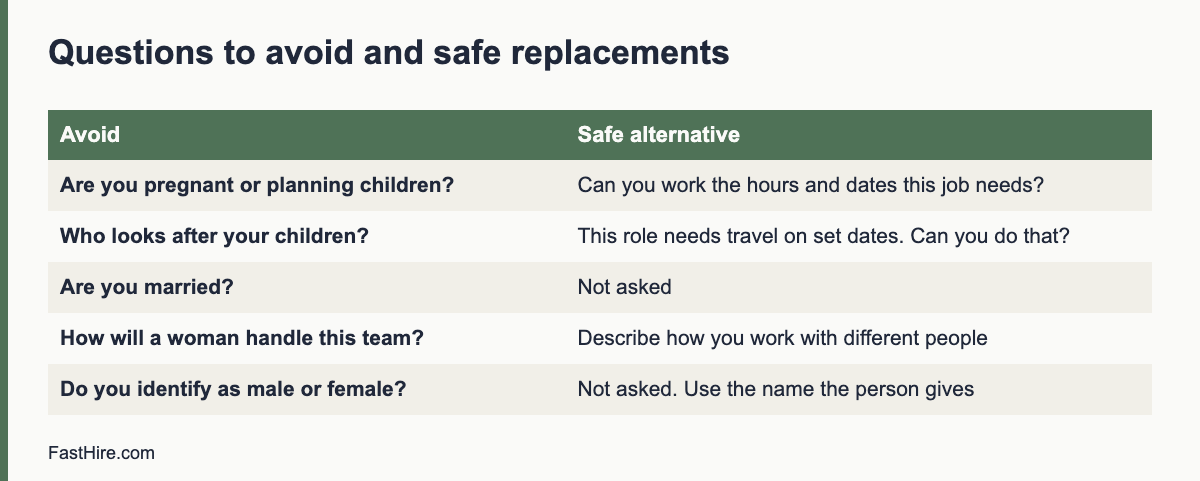
    Questions to avoid and what to ask instead

    AvoidWhyAsk instead
    Are you pregnant? Do you plan to have children?Protected topic; can be used as evidence of discriminationThis job needs X hours and Y dates. Can you work these?
    Who will look after your children?Assumes caring duties, usually of womenCan you meet the schedule and travel needs of this role?
    Are you married? Do you have a partner?Marital status can be protected and is not job-relatedNot asked
    Do you think a woman can lead this team?Sex stereotypeDescribe a time you led a team and what happened
    Are you a man or a woman? What are your pronouns?Not needed to judge ability; can expose a protected statusNot asked. Use the name and pronouns the person gives you after hire
    How long do you plan to stay with us?Can be used to screen out women of child-bearing ageWhat are you looking for from this role in the next year or two?
    Will you be able to cope with long hours?Phrased as a guess about the personThis role includes some evening work on set dates. Can you do that?

    More examples are in interview questions you cannot ask. A structured interview with fixed questions removes the temptation to improvise.

    If a candidate raises pregnancy, family or gender identity

    Sometimes the candidate brings up the topic. Do not ask follow-up questions, and do not let it affect the decision. Say something neutral such as “Thank you for telling me. We will assess every candidate on the requirements of the role.” Then return to the job. If the person asks about leave, benefits or adjustments, answer the question or refer them to HR. Do not record the information in interview notes unless the law requires it or it is needed to provide an adjustment.

    Pregnant candidates and adjustments

    A person does not need to tell you about pregnancy before they are hired. If they do, you cannot refuse them because of it. Once hired, they may need adjustments, such as changes to tasks, hours or breaks. Ask what would help and follow the legal rules in your country. For health and safety, take advice on the risk assessment for pregnant workers. Keep information confidential and share it only with people who need it to arrange support.

    Gender identity, names and respect

    Use the name a candidate gives you. If they ask to be addressed in a particular way, do so. Do not ask about medical history, surgery or sex at birth. If a background check or right to work document shows a different name or sex marker from the one the person uses, handle it in a private, respectful way with HR, and share it only if needed for legal compliance. Make sure forms allow a preferred name and do not force a choice that does not fit. Read the national guidance on gender reassignment and gender identity where you hire.

    Job ads and screening: gender-neutral practice

    • Use gender-neutral job titles, such as “salesperson” rather than “salesman”.
    • Avoid words that signal a gender, such as “he” for the successful candidate, or “ambitious young man”.
    • Review the must-haves for real need. A requirement to lift weights or work at night should be tied to the duties.
    • Remove names, photos and gender signals from resumes or CVs before screening, if your process allows.
    • Compare outcomes by sex or gender, where lawful, to look for patterns.

    See how to reduce bias in resume screening, blind CV screening and how to write a job ad.

    Pay, flexible work and fairness

    Mothers and fathers, carers and people with different needs all benefit from clear, fair rules on hours and flexible work. Say in the ad what flexibility the job offers, and apply the rules in the same way for everyone. Do not assume that a woman wants fewer hours or that a man does not need flexibility. Pay should follow the job and the skills. For equal pay rules, see the US Equal Pay Act, the UK gender pay gap guidance and pay transparency in hiring.

    Training interviewers

    1. Give each interviewer a list of questions to avoid and a list to use.
    2. Run a practice interview where someone raises a family topic, and rehearse a neutral reply.
    3. Ask interviewers to take notes on job-related evidence only.
    4. Review a sample of notes each quarter for protected topics.
    5. Tell interviewers how to refer a sensitive question to HR.

    Worked example (fictional)

    A hiring manager is interviewing for a field sales role that needs travel on some weekdays. In the past, a colleague asked candidates whether they had young children. HR replaces that with a statement in the ad and in every interview: “This role includes travel on up to two weekdays a week, with overnight stays on some. Can you meet this requirement?” Candidates answer yes or no and can ask about support. During one interview, a candidate mentions that she is pregnant. The interviewer replies, “Thank you. We assess everyone on the requirements, so let us go back to the travel needs,” and records only the job-related answers. She scores highest on the requirements and receives the offer. Once hired, HR meets her to discuss any adjustments she wants.

    Practical scenarios and what to do

    The candidate asks whether the job is family friendly

    Answer the question about the job: the hours, the flexibility, the leave policy and the benefits. Do not ask why they ask. Give the same information to every candidate who asks, and put the main facts in the ad so everyone sees them.

    A manager says a woman candidate may not stay long

    Challenge the assumption with the written criteria. Say that the decision must rest on the requirements and the evidence, and that guesses about future plans are not a lawful or reliable basis. Add the comment to your records, and offer the manager refresher training.

    A candidate with a visible pregnancy is late to an interview

    Treat the delay as you would for any candidate. Ask whether anything would help, such as a seat or a water break. Offer a short rest if the person looks tired. Score the interview on the answers. Do not add any note about the pregnancy.

    A transgender candidate has documents in a different name

    Use the name the person gives. For right to work or background checks, ask HR to handle the documents privately, follow the law, and share only what is needed. See how to check the right to work. Do not ask about medical history.

    Monitoring and data

    To see whether your process treats groups fairly, collect data on sex or gender at each stage, where the law allows it. Use an optional form that is separate from the application and not seen by the hiring team. Compare the shares of applicants, interviewees, offers and hires. A large gap at one stage deserves a review of the criteria, the questions and the scoring. The four-fifths rule is one simple check used in the US and explained with its limits in our guide. In the UK, larger employers must report gender pay gaps, as explained on GOV.UK. Use the findings to improve, not to blame individuals.

    Policy wording you can adapt

    SectionWording
    PurposeWe hire on skills and evidence. We do not use sex, gender, pregnancy or family status in decisions.
    InterviewsInterviewers use a fixed list of questions. They do not ask about pregnancy, family plans, marital status or childcare.
    If raisedIf a candidate raises such a topic, the interviewer does not use it and returns to the requirements.
    AdjustmentsWe provide adjustments as the law requires, once a person asks or we know of a need.
    RecordsNotes are job-related. We review a sample of notes each quarter.

    A final point on culture. Rules on paper do not change behaviour alone. Leaders set the tone by how they talk about parents, carers and people of every gender. When a manager praises a colleague for working late or jokes about who will “go on leave next”, the team learns what is rewarded. Treat caring duties as normal, support flexible work where the job allows, and speak up when you hear a stereotype. This builds a workplace where capable people of every gender want to apply and to stay, and it makes lawful, fair hiring much easier to sustain.

    Frequently asked questions

    Can I ask a candidate if she is pregnant?

    No. Do not ask, and do not base a decision on it. Ask about the dates and hours the job needs, the same way for all candidates.

    Can I ask about childcare to check availability?

    Ask about availability for the real schedule, not about childcare. Say what the job needs, and ask if the candidate can meet it.

    What if a candidate tells me they are pregnant?

    Do not use it in your decision. Return to the requirements. After hire, offer support and adjustments as the law requires.

    Can I ask for a candidate gender on a form?

    Only if there is a lawful reason, such as monitoring, and then in a separate optional form that does not go to the hiring team.

    Related guides

    This is general information, not legal advice.
  • Age discrimination in hiring: wording, screening and examples

    Age discrimination in hiring: wording, screening and examples

    It is not a good idea to ask a candidate age, and in many places it can lead to a claim. Age is protected in hiring in the US (for people aged 40 and over under federal law), in the UK (all ages) and across the EU (through national law that applies a directive). The safest approach is to describe the skills you need, avoid age-linked words, and screen on evidence of those skills.

    Key takeaways

    • Age rules differ: the US federal law protects people 40 and over, while UK and EU law cover all ages, with limited exceptions.
    • Do not ask for age, date of birth or graduation year unless the law requires it for a clear reason.
    • Avoid words in ads that suggest an age group, such as “digital native” or “young team”.
    • Screen on skills and evidence, not on years since school or the number of years of experience as a proxy.
    • Check for patterns: look at who applies, who gets interviewed and who is hired by age group.

    Why age bias is common and easy to miss

    Age bias often hides in habits. A manager thinks an older worker will not learn new tools. Another thinks a younger worker will leave soon. A job ad asks for “up to five years of experience”, which shuts out older applicants. A resume screen filters by graduation year. None of these needs a bad intention to cause harm, and none is supported by evidence about individuals. The aim is to judge each person on skills and results.

    United States

    The Age Discrimination in Employment Act protects applicants and employees who are 40 or older from discrimination because of age. The EEOC explains age discrimination, including job ads and hiring practices. Some states and cities protect people of all ages, including younger people, so check your local law.

    • Do not state or imply an age preference in ads.
    • Do not ask for date of birth or graduation year at the application stage. You may need age later, for example to confirm legal working age for young workers.
    • Do not base decisions on assumptions about energy, tech skills or how long someone will stay.
    • Be careful with phrases such as “overqualified”. Ask about the specific concern, such as pay expectation or interest in the role, instead.

    United Kingdom

    The Equality Act 2010 makes age a protected characteristic. It covers people of all ages. Direct age discrimination can only be justified if it is a proportionate way of achieving a legitimate aim, which is a high bar. You can read the Act on legislation.gov.uk, and see GOV.UK employing people for practical points. Our UK Equality Act recruitment guide covers the wider rules.

    European Union

    The EU Employment Equality Directive prohibits discrimination in employment on grounds including age. Member states apply it through national law, with some exceptions that are allowed if justified. Read the directive on EUR-Lex and check the law of the country where you hire. Our EU equal treatment guide explains more.

    x

    Wording in job ads

    Words carry signals. Some are obviously age-related, and some are subtle. Use plain, skill-based wording.

    AvoidWhyUse instead
    Digital nativeSuggests a young candidateComfortable using digital tools such as X and Y
    Recent graduateExcludes older applicantsEntry level role, no previous experience needed
    Young, energetic teamSignals ageActive, friendly team
    Up to X years of experienceCaps experience, which can shut out older workersExperience level needed: X years or equivalent skills
    Mature or seasonedSignals older ageSkills in X, with examples of results
    Fresh ideasCan signal youthWillingness to suggest improvements

    Even words that seem positive can limit who applies. Read your ad aloud and ask: would this wording make a 25 year old or a 60 year old feel less welcome? If yes, change it. See how to write a job ad.

    Screening without age signals

    • Hide or ignore dates of birth, graduation years and early work dates when you screen.
    • Score evidence of each must-have, not the number of years since a qualification.
    • Do not use “culture fit” as a reason without a clear, job-related behaviour.
    • Do not assume that an older candidate will not accept direction from a younger manager, or the reverse.
    • Do not assume a younger candidate lacks commitment.

    The structured screening guide and how to reduce bias in resume screening show how to use the same criteria for everyone. Our guide to what to look for on a resume covers evidence-based reading.

    Interview questions to avoid and better alternatives

    AvoidBetter alternative
    How old are you?Are you legally able to work in this country? (Ask in the way local rules allow.)
    When did you graduate?What training or qualifications relate to this role?
    Where do you see yourself in 10 years? (used to assess age)What are you looking for in this role over the next year or two?
    Will you fit in with a young team?Describe how you work with people from different backgrounds and ages.
    Are you comfortable reporting to someone younger?Describe how you work with a manager whose style differs from yours.
    How long until you retire?Not appropriate. Do not ask.

    See interview questions you cannot ask for a longer list.

    Young workers: age limits that are lawful

    There are legal rules that restrict hours and tasks for young workers. Employers need to know a worker age in those cases. Handle it separately and late in the process: after a conditional offer, check age as part of right to work and legal onboarding. Do not use the rules as a reason to reject young applicants. Offer suitable tasks and hours instead. See how to check the right to work.

    Monitor your process

    Collect data on the age profile of applicants, interviewees and hires, where law and privacy allow it. Ask for age bands in an optional, separate form that does not go to the hiring team. Compare stages. If a group falls away at one stage, review that stage. The four-fifths rule guide explains one simple check used in the US, and gives its limits.

    Training your team

    • Teach interviewers the age-related questions to avoid.
    • Review job ads before they go live.
    • Share a short list of neutral words.
    • Ask managers to name the evidence behind every decision.
    • Review the process each year.

    Worked example (fictional)

    A software firm posts a support role asking for a “digital native with up to three years of experience”. After a review, HR rewrites it: “Comfortable using ticket tools and chat; experience from one year or equivalent skills.” The screening sheet scores evidence of tool use, writing quality and problem solving, and hides graduation years. A candidate in her fifties, who changed career, scores strongly on all three and is invited to interview. The panel uses the same questions for every candidate. The firm records the reasons for its choice, and the new hire starts with a plan for the first 30 days.

    Common age myths and what to do instead

    MythWhat to do instead
    Older workers learn tools slowly.Ask for an example of learning a new tool, from any candidate. Score the answer.
    Younger workers leave quickly.Ask about what the person wants from the role. Do not guess from age.
    Older workers cost more.Set a pay range for the role and apply it. Pay should follow the job and the skills.
    Younger workers lack judgment.Use scenario questions and score the reasoning.
    Older workers will retire soon.Do not ask or assume. People change plans at any age.

    Each myth treats a group as one person. Evidence about individuals is easy to collect: examples, results, work samples. A structured process lets you compare candidates on the same evidence. See structured interviews and work sample tests.

    The idea of “overqualified”

    “Overqualified” is a common reason for rejecting older candidates. It can hide an assumption that the person will be bored, expensive or hard to manage. Before you use the word, ask what the real concern is. If it is pay, ask about the person pay expectation and share the range. If it is interest, ask why the role appeals. If it is fit with a manager, ask both sides what they need. Then decide on facts. If you cannot name a job-related concern, the person is not overqualified, they are qualified.

    Age and benefits, pay and training

    Age issues do not end at hiring. Offer training and growth to all ages. Do not assume who wants to learn. Apply the same pay range to the same job. Where benefits depend on age, such as some pension or insurance rules, take advice, as laws allow some age-based rules and not others.

    What to do if you get a complaint

    1. Take it seriously and tell HR or your adviser at once.
    2. Do not retaliate against the person or discourage them from complaining.
    3. Keep all records: the ad, the screening sheet, the notes, the scores and the messages.
    4. Review the decision against the written criteria.
    5. Respond in writing, with facts, using your adviser if needed.
    6. Fix any weak points in the process, and train your team.

    Good records are your best protection. Keep them for the period the law requires in your country. The article on how long to keep rejected applicant data explains the balance between records and privacy.

    Checklist for age-fair hiring

    • The ad uses skills-based wording and no age-linked words.
    • The form does not ask for date of birth or graduation year.
    • Screening hides age signals and scores evidence of the must-haves.
    • Interviewers use a set list of questions and avoid age-linked ones.
    • Decisions are recorded with reasons linked to the requirements.
    • You review outcomes by age group where the law and privacy allow.
    • Your team is trained and the process is reviewed each year.

    Remote work, flexibility and age

    Flexible hours and remote options help people at every age: parents, carers, students, older workers and people with health needs. Offer them on the basis of the job, and state them in the ad. Do not assume that older people want less demanding work or that younger people want more flexibility. Ask all candidates the same question about working arrangements, and answer questions honestly about what the role needs.

    When you hold interviews by video, check that every candidate can use the tool and offer an alternative. Some older and younger people alike may lack equipment or a quiet space. A phone option and a clear guide remove the barrier. This keeps the evidence you collect comparable, and it keeps the process open to the widest group of capable people.

    Finally, review your employer brand images and text. If every photo shows people of one age group, candidates will notice. Use images and stories that reflect the real range of people who work for you, and avoid stock images that suggest a narrow profile. Small changes here signal that all ages are welcome to apply.

    If you are unsure whether a practice is lawful in your country or state, ask an employment adviser before you use it. A short call before you post an ad costs far less than a claim after a hire, and the answer can improve your template for every future role.

    Frequently asked questions

    Is it illegal to ask a candidate their age?

    In many places it is not banned on its own, but it can be used as evidence of discrimination if the candidate is not hired. It is best to avoid it until you need to check legal age.

    Can I say “recent graduate” in a job ad?

    It is risky because it can exclude older applicants. Say “entry level” and describe the skills instead.

    What if a candidate looks too old or too young?

    Appearance is not a valid basis for a decision. Judge skills and evidence.

    Does age protection apply to young people?

    In the UK and EU, yes. In the US, federal law protects people 40 and over, while some states protect all ages.

    Related guides

    This is general information, not legal advice.
  • Criminal record checks in hiring: fair practice by country

    Criminal record checks in hiring: fair practice by country

    Whether you can ask about criminal records, and when, depends on the country, the state and the job. A fair approach is the same everywhere: check only when the role needs it, ask late in the process, look at how the record relates to the job, let the person explain, and keep a written reason. This guide explains the basics in the US, UK and EU.

    Key takeaways

    • Rules differ by country, state, city and job. Check the law where the person will work.
    • Many places limit when you can ask, which checks you can run and how you can use the result.
    • Judge the link between the record and the job, not the label. Consider the type of offence, the time passed and the duties.
    • Give the person a chance to explain, and tell them if a result may lead to a rejection.
    • Keep records secure and use them only for the purpose you gave.

    Why this topic needs care

    A criminal record can affect a person chance of work for years. Blanket bans can shut out many capable people, and they can raise discrimination concerns because records are not spread evenly across groups. At the same time, some jobs need checks by law, such as work with children or vulnerable adults, or roles of high financial trust. A fair process protects people, customers and your company.

    This article gives general information. Rules change, so confirm them with official sources or an adviser.

    Step 1: decide whether the role needs a check

    Ask: is a check required by law for this role? If not, is there a real, job-related reason? Write the reason. Examples of reasons might include handling cash, working alone in homes, or access to sensitive data. A job with none of these may not need a check at all.

    QuestionIf yesIf no
    Is a check required by law or by a regulator for this role?Run the required check in the way the law statesGo to the next question
    Does the role involve high trust, safety or sensitive data?Consider a limited, targeted check, tied to the dutiesDo not check
    Can you reduce the risk in other ways?Use controls such as supervision or limited accessConsider a check
    Will you treat everyone in the role the same way?Proceed with a written policyFix the process first

    Step 2: United States

    In the US, federal law does not ban all questions about records, but several rules limit how you use them. Title VII of the Civil Rights Act prohibits discrimination, and the EEOC enforces it. If you use a third party to run a background check, the Fair Credit Reporting Act sets steps on notice, consent and what to do before and after taking action. The FTC explains these steps for employers.

    Many states and cities have “fair chance” or “ban the box” laws. They may limit when you can ask about a record, require you to consider the link to the job, require written notice before a decision, or ban certain kinds of inquiry. The rules differ widely. Check your state and city labour department for the exact requirements.

    Practical points for US employers

    • Do not ask about records on the first application form unless the law requires it.
    • If you run a check through a provider, follow the notice and consent steps.
    • Make an individual assessment: nature of the offence, time passed, and the duties of the job.
    • Give the person a chance to respond before you decide, and say what you will do with the information.
    • Treat arrests that did not lead to a conviction with great care. Local law may ban their use.
    • Apply the same policy to everyone in the same role.
    x

    Step 3: United Kingdom

    In the UK, the Rehabilitation of Offenders Act lets many convictions become “spent” after a period of time. For many jobs, a person does not need to disclose a spent conviction and you cannot treat it as a reason to refuse. Some roles are exempt and allow questions about spent convictions. The Rehabilitation of Offenders Act is on legislation.gov.uk.

    The Disclosure and Barring Service provides criminal record checks at different levels for eligible roles. The GOV.UK guidance for employers on DBS checks explains which checks apply to which roles. You may only request a check if the role is eligible for that level. Data protection rules also apply to how you use and store the information.

    Practical points for UK employers

    • Find out whether the role is eligible for a basic, standard or enhanced check, or none.
    • Ask about unspent convictions only where the law allows it, and ask about spent ones only for exempt roles.
    • Ask late in the process, once you have decided to make a conditional offer.
    • Write a policy on how you assess a record, and share it with candidates.
    • Use the ICO guidance on recruitment and selection for data protection.

    Step 4: European Union

    In the EU, data about criminal convictions is subject to extra protection under GDPR. Article 10 allows processing only under the control of official authority or when authorised by EU or member state law, with safeguards. You can read the text on EUR-Lex. Each country has its own rules on what employers may ask, which certificate is allowed, and for which jobs. In some countries, employers can ask for an official certificate of good conduct for certain roles. In others, they cannot.

    Practical points for EU employers

    • Check national law and the guidance of the data protection authority where the person will work.
    • Do not collect or store records unless the law allows it for that job.
    • If a certificate is allowed, ask for the official one, not a detailed account of the past.
    • Collect only what is needed, keep it for as short a time as possible, and delete it.
    • Explain the purpose in your privacy notice. See applicant privacy notice template.

    See also GDPR for job applicants.

    Comparison table

    TopicUSUKEU
    Is there a general ban on asking?No single federal ban; state and city laws varyDepends on spent or unspent status and the roleStrict data rules; depends on national law
    Official check systemVaries; third party reports covered by FCRADBS checks for eligible rolesVaries by country
    When to askLate, if the law requiresAfter a conditional offer, where permittedOnly where the law allows
    Assessment required?Individual assessment recommendedRisk assessment recommendedProportionality is required by data rules

    Step 5: assess the record fairly

    If a record appears, do not decide at once. Use a short, written assessment.

    QuestionWhy it matters
    What was the offence and how does it relate to the duties?A fraud conviction matters for a finance role more than for a gardening role
    How long ago did it happen?Time passed shows risk may be lower
    What has the person done since?Work, study, training and references show change
    Can the risk be managed?Supervision, limited access or training may reduce the risk
    What does the law require?Some roles are barred by law

    Involve HR or an adviser in difficult cases. Make the decision with at least two people, and write the reason. Link it to the duties of the job, not to a general view of the person.

    Step 6: let the person respond

    Before a rejection, tell the person what you found and ask for their view. They may correct an error, give context or show that the record does not relate to the job. A short conversation is fair, and it reduces errors. If you use a third party report, the law in some places requires you to share the report and allow time to respond.

    Step 7: keep records and privacy

    • Store results securely and limit access to those who need them.
    • Keep them only as long as needed. Delete when the retention period ends.
    • Do not share the information with others unless the law requires it.
    • Keep your policy and reasons in writing.

    See how long to keep rejected applicant data.

    Wording for forms and messages

    SituationWording to adapt
    Job adThis role requires a [type of] check, as required by law. We consider each case individually.
    Application formWe do not ask about criminal records at this stage.
    Conditional offerThis offer is conditional on a [type of] check, where the law allows. We will tell you about any issue and give you a chance to respond.
    Policy statementWe assess records fairly, by the link to the job. A record does not automatically bar anyone, except where the law requires it.

    Common mistakes

    • Asking about records on the first form for every job.
    • Applying a blanket ban with no assessment.
    • Running a higher level of check than the role allows.
    • Using internet search results or rumour as if they were official records.
    • Not telling the person the reason for a rejection that relates to a check.
    • Keeping records too long.

    Fair processes also protect your company from claims. Our guides on reducing bias in resume screening and how to check references show other ways to base decisions on evidence.

    Worked example (fictional)

    A building firm hires a site administrator who will handle supplier payments. HR decides that a limited check for fraud-related convictions is relevant, and writes the reason. The ad says that the offer is conditional on a check where the law allows it. After a conditional offer, the check shows an old conviction unrelated to money. HR assesses the offence, the time passed and the duties, and invites the person to discuss it. The person explains the circumstances and provides a reference from a later employer. HR and the manager decide the record does not relate to the role, record the reasons, and confirm the offer.

    Roles that usually need checks by law

    Some jobs are covered by specific rules. Examples include work with children, work with vulnerable adults, some financial roles and security-regulated jobs. The rules differ by country, and they may require a particular check or certificate. Do not guess. Look up the rule for the role and place, and use only the check that applies. If you are unsure, ask the regulator or an adviser before you ask the candidate.

    Using third party providers

    Many employers use a provider to run checks. You remain responsible for the result. Choose a provider that explains its sources and methods, follows the law in the place of work and supports corrections. Ask how long it keeps data, how it secures it, and how a person can dispute an error. Never accept a report that is a blend of unverified web searches. Keep your contract with the provider on file.

    Fairness checks for your policy

    • Do you apply the same policy to every candidate in the same role?
    • Does the policy explain which offences matter for which duties?
    • Does the process allow a response from the candidate?
    • Do you review outcomes by group to see whether the policy has an unfair effect?
    • Is the policy short, written in plain words and available to candidates?

    Review the policy once a year, and when the law changes. Use official sources, and ask an adviser to check it. A short policy that you follow is better than a long one that you do not.

    Frequently asked questions

    Can I ask about criminal records on an application form?

    In many places the law limits this, or advises against it. Ask late in the process, and only if the role needs it and the law allows it.

    Do I have to run a criminal record check?

    Only if the law or a regulator requires it for the role. Otherwise it is your choice, and the check should be proportionate.

    Can I reject someone because of a conviction?

    Sometimes, if it relates to the job and the law allows it. Make an individual assessment and record the reason. Some laws protect people with spent convictions.

    What if the person did not tell me about a record?

    Check what the law and the form asked. Ask the person to explain. Treat it as a matter of honesty only if the question was proper and clear.

    Related guides

    This is general information, not legal advice.
  • How to hire in volume for seasonal peaks

    How to hire in volume for seasonal peaks

    To hire in volume for a seasonal peak, forecast how many people you need and when, work back from the start date to set deadlines, simplify screening into batches with the same short checks, prepare onboarding and checks in advance, and keep a talent pool of good people for next year. This guide gives a plan, a funnel calculator and a compliance checklist.

    Key takeaways

    • Forecast early. Work backwards from the first day that you need people on the floor.
    • Use the funnel: applications, screens, interviews, offers, starts. Plan for drop-out at each step.
    • Keep the process short and the same for everyone. Batch screening and group sessions save time.
    • Prepare checks and onboarding before offers go out.
    • Know the rules for pay, hours, young workers and right to work in each country.

    What makes volume hiring different

    Volume hiring is not just normal hiring done many times. It has different pressures. You have a fixed date, many roles that are alike, and a short time to fill them. A slow step affects dozens of people. A weak step, such as a vague ad or a long form, loses many candidates at once. You also need to be fair at scale: a small bias in a screening step can affect many applicants.

    If you already read how to screen at volume and how to run a hiring day, this guide ties them into a seasonal plan. For a small business hiring a few seasonal staff, see hire seasonal and part-time staff.

    Step 1: forecast the need

    Use your own history. For each role, note the number of people you used in the last peak, the dates they worked, the hours, and the shortfalls. Adjust for changes this year: new sites, new products, different demand. Ask managers for their view and write down the assumptions.

    RoleNeededStart dateWeeksHours per weekNotes
    Floor staff
    Warehouse picker
    Customer support
    Team leader

    Add a buffer for people who do not start or leave early. Seasonal staff often have a higher exit rate, so plan for it and keep a waiting list.

    Step 2: work back from the start date

    StageTypical time to allowOwner
    Final decision on numbers and budgetSeveral weeks before sourcingOperations and finance
    Ad, careers page and application form readyA weekRecruiter
    Sourcing and application window2 to 4 weeksRecruiter
    Screening and interviewsWithin days of applicationsRecruiter and managers
    Offers and checks1 to 2 weeksHR
    Onboarding and trainingBefore the first shiftManagers

    These times are guides. Set yours from your own history, and see how long hiring takes. Make the plan visible to everyone, with dates for each step. If a date slips, tell people early and adjust.

    x

    Step 3: the funnel calculation

    Use a simple funnel to estimate how many applications you need. Start with how many people you must have at the start, then work backwards using your own conversion rates from past events.

    StepYour rate from past dataNumber needed at this step
    Starts100% of targetTarget number
    Offers madeShare of offers that startTarget divided by start rate
    Interviews or sessionsShare of interviews that get an offerOffers divided by offer rate
    ScreensShare of screens that reach interviewInterviews divided by that rate
    ApplicationsShare of applications that pass screeningScreens divided by that rate

    If you do not have past rates, run a small pilot and measure them for a week. Do not use a figure from another employer, as they differ by role, pay and location. Review the numbers every few days, and adjust your sourcing if you are behind.

    Step 4: write one clear ad and one short form

    A clear ad improves the quality of applications and cuts screening time. Include the role, place, pay or range, hours, start date, main duties, must-haves, and how to apply. Follow local rules on pay information, as in salary in job ads. Use plain words. See how to write a job ad.

    Keep the application form short. Ask only for what you need at this stage: name, contact, location, availability, right to work yes or no, and a few job-related questions. Ask for a resume or CV only if it helps, and accept mobile applications. A long form loses candidates, and a form that cannot be completed on a phone loses more. Check that it works for people using assistive tools. See accessible job applications.

    Step 5: source in more than one place

    • Your careers page and job boards.
    • Local community groups, colleges, job centres and employment services.
    • Former seasonal staff. Ask them to return and to refer friends.
    • Employee referrals with clear rules.
    • Events and hiring days.
    • Your own talent pool, if candidates agreed to be contacted. See how to build a talent pool with consent.

    Track which channels give the best results, using the starts per channel and the cost, not only the number of applications. Move effort to the channels that work.

    Step 6: screen in batches with a short, fair routine

    1. Check each application against the written must-haves, such as availability, right to work answer and any needed licence.
    2. Use a short phone or video screen of 10 to 15 minutes with fixed questions.
    3. Invite to a group session or a short interview, using a scorecard.
    4. Decide within one or two days, and send offers right away.

    Use the same questions and scoring for everyone. Avoid assumptions about age, sex, nationality or background. Do not reject people on a gap in history unless it matters to the job. If you use any automated tool in screening, check local rules and keep a person responsible for the decisions. See NYC Local Law 144, GDPR Article 22 and US AI hiring law.

    Step 7: make decisions and offers quickly

    Speed matters in seasonal hiring, because candidates often apply to several employers. Aim to make offers the same day or the next day after a successful session. Use a standard offer letter with the key terms: role, place, start date, hours, pay, length of contract, and conditions such as right to work. The job offer letter template has a structure you can adapt.

    Step 8: compliance checks by region

    TopicUnited StatesUnited KingdomEuropean Union
    Right to workForm I-9 for each new employeeCheck before the start dateNational rules apply
    Pay and overtimeFederal and state minimum wage; overtime rules apply to many rolesNational minimum wage by age bandNational minimum wage or collective agreements
    Working timeRules vary by state and roleWorking time rules applyEU Working Time Directive applies through national law
    Young workersSpecial limits on hours and tasksRules on hours and tasksNational rules on young workers
    Contract termsOffer letter and state rulesWritten particulars of employmentWritten information on key terms

    Use the official pages: US Department of Labor, GOV.UK minimum wage rates and Your Europe. For right to work, see how to check the right to work. If you hire people in another country, see hire in another country.

    Step 9: onboard before the first shift

    • Send a welcome message with the start time, place, dress code and who to ask for.
    • Prepare accounts, uniforms, passes and equipment in advance.
    • Run a short group induction on the first day: safety, rules, pay and how to ask for help.
    • Pair each new person with a buddy for the first shift.
    • Check in at the end of the first day and week.

    The first 30 days onboarding guide can be scaled down to one week for a seasonal role. Good onboarding lowers early exits.

    Step 10: review and build a talent pool

    At the end of the season, collect data: applications, starts, channel results, time to fill, early leavers, and manager feedback. Ask staff what worked. With consent, keep details of good seasonal workers so you can invite them next year. Tell them how long you will keep their data, and how to withdraw. Update your plan with lessons learned.

    Mistakes to avoid

    • Starting too late and paying for rushed hiring.
    • Making the form so long that people give up.
    • Using different questions for different candidates.
    • Skipping right to work checks to save time.
    • Forgetting to plan for no-shows.
    • Not keeping a record of what worked.

    Worked example (fictional)

    A garden centre needs thirty seasonal staff for the spring. The recruiter looks at last year: they hired twenty-five, and six left in the first month. She adds a buffer, and plans for thirty-six offers. She opens applications six weeks before the first day, uses a short mobile form, and runs two hiring sessions, one on a weekday evening and one on Saturday. Each candidate gets a ten minute structured interview and a short task. Offers go out the same day. HR checks right to work before the start date, and managers run a half-day induction. At the end of the season, the recruiter records starts by channel and asks good workers for consent to be contacted next year.

    Keeping quality high at speed

    High volume can tempt teams to cut corners. Protect quality in three ways. First, keep the must-haves short and real. For most seasonal roles they are availability, right to work, reliability and the ability to follow safety rules. Second, test those must-haves in a simple, fair way, such as a scenario question or a short task. Third, check a sample of decisions each day. A second reviewer scores ten applications from the batch and compares. If the scores differ, fix the guide.

    Treat reliability with care. Do not guess it from a gap in history or a short job. Ask a direct question about availability and about how the person handled a time when they had to be on time under pressure. Score the answer against a simple scale.

    Communication that keeps candidates

    In volume hiring, silence causes drop-out. Use templates and automation for common messages, but make sure they are clear and kind: application received, invited to a session, offer, not selected. Give a contact for questions. Reply to messages within a working day. The candidate update email cadence guide gives a schedule, and avoiding ghosting explains why it matters.

    Daily control sheet

    ItemTarget for todayActualAction
    New applications
    Screens completed
    Interviews or sessions held
    Offers sent
    Offers accepted
    Checks completed
    Starts confirmed

    Review this sheet at a ten minute stand-up each day. If one step falls behind, add people to it or change the channel mix. Share a summary with managers so they know when to expect their teams.

    Retention starts in the hiring process

    Early exits cost money and time in a short season. Reduce them at the source. Be honest in the ad about hours, shift patterns, physical demands and pay. Show the workplace in the session, so candidates know what to expect. Offer flexible shifts when you can. Give each new starter a named contact and a clear first week. Ask for feedback after one week, and fix what you can quickly. Candidates who feel respected are more likely to stay, to return next year and to tell friends.

    Frequently asked questions

    When should I start seasonal hiring?

    Work back from the first day you need people, and allow time for sourcing, screening, offers, checks and onboarding. Use your own history to set the time.

    Do seasonal workers have the same rights as other employees?

    Many rights apply from the first day, such as minimum wage and protection from discrimination. Details differ by country and by contract type, so check official sources.

    How do I keep seasonal staff from leaving early?

    Be clear about hours, pay and tasks in the ad, onboard well, give a buddy, and check in often. Ask leavers why they left.

    Can I use agencies?

    Yes, but agree who does the right to work and other checks, and check the contract carefully. You remain responsible for fair treatment of workers on site.

    Related guides

    This is general information, not legal advice.
  • How to run a hiring day or open day

    How to run a hiring day or open day

    A hiring day, also called an open day or recruitment event, lets you meet and assess many candidates in one place and one time. It works best for roles with high volume, shift work or hard-to-fill jobs. To run one well, set clear goals, plan stations with the same scoring for everyone, make the day accessible, protect personal data, and follow up quickly.

    Key takeaways

    • Use a hiring day when you need many people in a short time, and the work can be shown in a short task or conversation.
    • Plan stations with set questions, a scorecard and trained assessors. Use the same stations for every candidate.
    • Offer an adjustment route and an alternative for people who cannot come on the day.
    • Tell candidates what happens, how long it takes and how their data is used.
    • Decide quickly. Offers or clear next steps within a few days keep momentum.

    When a hiring day makes sense

    A hiring day is not right for every role. It suits jobs where many candidates meet the same requirements, such as customer service, retail, hospitality, warehouse, care, seasonal work and entry level roles. It also helps when you want to show your workplace and let candidates see the work. It is less suited to senior or highly specialist roles, where one-to-one conversations are better.

    Compare with other options. If you need volume but not a single day, see how to screen at volume and how to hire in volume for seasonal peaks. If you need only a few people, a normal process may be faster and fairer.

    Step 1: set goals and roles

    • How many people do you need, for which roles and starts?
    • How many candidates do you expect to invite, and how many places do you have?
    • What decisions will you make on the day: offers, next-stage invitations, or only first screens?
    • Who makes the decisions? Name the decision maker and a backup.
    • What is the budget for space, food, staff time and materials?

    Write these down in a one-page plan. Share it with the hiring managers and HR. Agree the requirements for each role in advance, using checkable job requirements.

    Step 2: choose the date, place and format

    Choose a date that suits your target group. For shift workers, offer more than one session, such as a weekday afternoon and a weekend morning. Choose a place that is easy to reach by public transport, has step-free access, and has quiet space. A virtual or hybrid option can widen the pool.

    FormatGood forWatch out for
    In personRoles where seeing the workplace mattersAccess, travel, cost, crowding
    VirtualRemote roles, wide areaTechnology, time zones, access
    HybridMixed needsDouble the planning

    Visit the venue in advance. Check step-free routes, lifts, toilets, signs, lighting, noise and a quiet room. The UK government explains duties on adjustments at reasonable adjustments for disabled workers, and in the US the EEOC ADA guidance applies to employers covered by the law.

    x

    Step 3: design the stations

    Use stations so each candidate does the same activities in the same order or rotation. A station is a short, structured activity tied to a requirement.

    StationWhat happensRequirement it checksTime
    Welcome and check-inGreet, confirm name, explain the day, offer adjustmentsProcess and fairness5 minutes
    Short interviewTwo or three structured questions from a scriptCommunication, relevant experience10 to 15 minutes
    Role play or taskA realistic task with a simple guideSkills for the job10 to 15 minutes
    Group activity (optional)A task done with othersTeamwork, if it is a real requirement15 minutes
    Workplace tour and Q&AShow the workplace, answer questionsCandidate fit and expectations10 minutes
    Exit and next stepsExplain what happens next and whenExperience5 minutes

    Be careful with group activities. They can favour confident talkers and disadvantage shy or neurodivergent people. Use them only if teamwork in groups is a true part of the job, and score observable behaviours. Read how to reduce interview bias for more.

    Step 4: build the scorecards

    Create one scorecard per role. Each station has two or three criteria, a clear scale from zero to three, and a note space. Define each score with an example. Train every assessor for 30 minutes before the day, with a practice round. Our interview scorecard guide and structured interview guide have templates you can adapt.

    • Assessors score alone, and do not discuss scores until the end of the day.
    • Use the same questions for every candidate.
    • Keep notes factual: what the candidate said or did.
    • Do not note protected traits, appearance or personal circumstances.

    Step 5: invite and prepare candidates

    Send a clear invitation that includes the date, time, place and how to get there, what the day involves, how long it takes, what to bring, whether food is provided, and who to contact. Add a line about adjustments, and ask for needs in advance. Say how their data will be used. See how to prepare candidates for interviews.

    Offer an alternative for people who cannot attend, such as a video interview. This keeps the process open to people with caring duties, health needs or work commitments.

    Step 6: staff the day

    RoleTasksNumber
    LeadRuns the day and solves problems1
    GreeterCheck-in, signs, directions1 to 2
    AssessorsRun stations and scoreDepends on volume
    RunnerMoves candidates and materials1
    Data and recordsCollects scores, secures papers1
    First aider or welfare contactLooks after any health or safety issue1

    Hold a 30 minute briefing at the start. Go through the schedule, the fairness rules, the adjustment process and what to do if a candidate is upset or unwell.

    Step 7: run the day with fair rules

    • Greet everyone in the same way and explain the day.
    • Keep to times. Late candidates get a fair option, such as a later slot.
    • Follow the script. Do not add extra questions for some people.
    • Offer water, seating, quiet space and breaks.
    • Respect privacy: no photos of candidates without consent, and no posting of names.
    • Keep a log of any incidents and adjustments made.

    Step 8: decide and follow up

    Hold a short calibration meeting at the end. Compare scores, discuss big gaps, and agree decisions based on the requirements. Where you can, make decisions the same day and tell candidates what happens next. If you plan to make offers, check references and right to work, as in how to check the right to work. Send a message to every candidate within two working days, using the guidance in rejection emails that respect candidates and feedback to rejected candidates.

    Privacy and data protection

    • Tell candidates what data you collect, why, who sees it and how long you keep it.
    • Store paper scorecards in a locked place, and shred or delete them after the retention period.
    • Use a secure system for digital notes.
    • Limit access to people who need it.
    • Delete data on candidates who did not progress, following local rules.

    See GDPR for job applicants, the applicant privacy notice template and how long to keep rejected applicant data.

    Checklist for the week before

    • Venue visited and access checked.
    • Stations, scripts and scorecards printed and tested.
    • Assessors briefed and trained.
    • Candidates confirmed with details and adjustment contacts.
    • Signs, name badges, water and seating ready.
    • Data protection notice ready and visible.
    • Plan for no-shows and late arrivals agreed.
    • Follow-up messages drafted.

    Measuring success

    MeasureQuestion it answers
    Show-up rateDid the invitation and reminders work?
    Share who reached offerWere stations aligned with the real needs?
    Time from event to decisionDid you keep momentum?
    Candidate feedbackWas the day clear, fair and welcoming?
    Hire quality after 90 daysDid the day select people who do well?

    Review the results with managers, update the stations and keep the notes for the next event.

    Worked example (fictional)

    A care provider needs twenty care assistants before the summer. The recruiter plans two sessions: a weekday afternoon and a Saturday morning. Each session has a welcome desk, a five minute introduction to the work, a ten minute structured interview, a short scenario task about a safe response to a resident request, and a tour. Five assessors are trained in advance. A quiet room is ready, and the invitation asks about adjustments. Candidates who cannot attend are offered video interviews. At the end of each session, the team scores, agrees decisions, and sends a message to every candidate within two days. Fourteen offers go out in the first week, and the recruiter notes what to change next time.

    Making the day welcoming

    A hiring day can feel like a test. Small choices make it welcoming. Greet people by name, offer a drink, explain the plan on a board, and give a clear end time. Provide a quiet space for those who need a break. Use plain language on signs. Ask assessors to smile, introduce themselves, and explain each step before it starts.

    Tell candidates what you are looking for. Share the requirements and how the day links to them. When people know what is expected, they can show their best, and your scores reflect the job, not the stress.

    Adjustments and accessibility in practice

    • Ask in the invitation: “Tell us if you need any adjustments, such as extra time, a quiet room, a different format or a way to attend by video.”
    • Prepare common options in advance: seating, larger print, instructions in writing, extra time, a support person welcome, a break room.
    • Have one named person who handles requests, with a phone number and email.
    • Do not ask for medical proof for ordinary adjustments. Ask what would help.
    • Record the adjustment made, not the diagnosis.

    The pages on accessible interviews and accessible job applications give more detail. If a candidate cannot attend in person, offer an equal alternative, with the same questions and scoring.

    Safety and welfare

    Think through simple safety points. Know the fire exits and the assembly point. Have a first aider on site. Check that the space is not over capacity. Have a plan for a candidate who feels unwell or upset. If the event is outdoors or off site, check weather and transport. Keep a list of attendees, so you know who is present in an emergency, and delete it after the retention period.

    Using social media and promotion

    Promote the event through the channels your target group uses: your own site, job boards, local community groups, colleges, job centres and employee referrals. Use plain language, include the date, time, place, roles and how to book. Say that you welcome candidates of all backgrounds and that adjustments are available. Avoid wording that suggests an age, sex or other preference. If you advertise pay, follow the rules in salary in job ads.

    What to do if too many or too few people come

    SituationResponse
    Too manyOpen an extra session, move some to video, or schedule short slots in a waiting list. Never turn people away without a clear alternative.
    Too fewFollow up with those who booked, offer video slots, and widen promotion. Review timing and channels for next time.
    A large group arrives at onceStagger starts, use a queue system and keep people informed.

    Frequently asked questions

    How many candidates can I invite to a hiring day?

    It depends on your space, staff and stations. Plan for no-shows, and avoid crowding that makes the day stressful.

    Are group exercises fair?

    They can be, if teamwork in a group is a true requirement and assessors score observable behaviour. Otherwise use individual tasks.

    Can I make offers on the day?

    Often yes, if your scoring and approval process allows it. Keep checks such as references and right to work as conditions.

    What if a candidate needs an adjustment?

    Ask in the invitation, plan for it, and keep the process fair. Offer an alternative format when needed.

    Related guides

    This is general information, not legal advice.

  • How to schedule interviews faster

    How to schedule interviews faster

    To schedule interviews faster, block the panel time before you post the job, offer candidates a choice of slots through a booking link or a short list, send one clear invitation with all the details, and keep backup slots for changes. Most delay comes from waiting for people to reply, not from the work itself. This guide shows where time is lost and how to win it back.

    Key takeaways

    • Book panel time in diaries before the job goes live. This is the single biggest saver.
    • Offer three to five slots, or a self-booking link, instead of asking “when are you free?”.
    • Use one template with place, time, length, panel, format, what to bring and how to ask for an adjustment.
    • Plan for time zones, notice periods and shift patterns.
    • Confirm, remind and keep a backup plan for no-shows and changes.

    Where scheduling time is lost

    Look at your last five hires and track the time between “agreed to interview” and “interview held”. Most teams find days of waiting, caused by a few patterns.

    PatternWhat happensFix
    Email ping-pongSeveral messages to find one slotOffer a list of slots or a booking link
    Busy interviewersPanel members are unavailable for daysBlock time in advance
    Late invitationsCandidate gets details the day beforeSend invitations within one working day
    Slow decisionsNo one is sure who should interviewAgree the panel at intake
    No backupOne no-show wastes a weekHold spare slots and a waiting list
    Time zone confusionMissed or mistimed callsState the time zone in every message

    Delay costs you good candidates. People with other offers move on if they wait. Our guide on how to reduce time to hire places scheduling in the context of the full process, and how long hiring takes shows typical stages.

    Step 1: block time before you post the job

    At the intake meeting, ask the hiring manager and the panel to hold time in their diaries for the whole search. A simple approach: two or three blocks of two hours per week for three weeks, labelled “Interviews: [role]”. Release the blocks you do not use. This costs little and removes the largest source of delay.

    Name the panel at the start, with a backup for each person. If a panel member is on leave during the window, plan around it now. The intake meeting guide shows how to settle these points.

    x

    Step 2: choose the interview format and length

    Shorter formats are easier to schedule. Decide what each stage needs.

    StageTypical lengthFormatWho
    Screening call15 to 30 minutesPhone or videoRecruiter
    First interview45 to 60 minutesVideo or in personHiring manager plus one
    Work sample or caseSet by taskTake-home or liveReviewer
    Final interview60 to 90 minutesIn person or videoPanel

    Cut stages that add little. Our guide to how many interview rounds you need helps you decide, and a structured interview plan keeps each round purposeful.

    Step 3: offer slots, not questions

    Replace “when are you free?” with a clear offer. You have two good options.

    Option A: a short list of slots

    Send three to five specific slots over two or three days. Ask the candidate to reply with a number. This works well without extra software. “Which of these suits you: 1) Tuesday 10:00, 2) Tuesday 15:00, 3) Wednesday 09:30, 4) Thursday 14:00? Times are in UK time (GMT).”

    Option B: a self-booking link

    A calendar tool that shows live availability lets the candidate pick a slot in seconds. Check that the tool is accessible, works on a phone, and handles time zones. Check data protection rules for any tool you use, since it stores personal data. Offer a human alternative for anyone who cannot use the link.

    Step 4: write one clear invitation

    A good invitation avoids follow-up questions. Use a template.

    ItemWhat to include
    Role and stageJob title and which round this is
    Date, time and time zoneState the time zone clearly
    LengthHow long it will take
    Place or linkAddress with entrance and parking notes, or the video link and backup phone number
    PanelNames and roles of interviewers
    FormatQuestions, presentation, task, or tour
    What to bringID if needed, work samples if asked
    AdjustmentsA line inviting them to ask for any adjustments, and who to contact
    ContactA named person and number for same-day problems

    The adjustments line matters. Candidates with a disability or health need should know they can ask. See reasonable adjustments in interviews and how to prepare candidates for interviews.

    Step 5: confirm, remind and plan for changes

    • Ask the candidate to confirm receipt of the invitation.
    • Send a reminder 24 hours before, with the link or address.
    • Keep two or three spare slots per week for reschedules.
    • If an interviewer is ill, swap in the backup panel member rather than cancelling.
    • If a candidate no-shows, call once, then email with a new offer. Do not penalise a first miss without checking what happened.

    Special cases

    Candidates who are working

    Offer early morning, lunch and evening slots, and allow video. Many people cannot take a day off for a first interview. A flexible slot shows respect and widens the pool.

    Shift workers and volume hiring

    For roles with shifts, offer group interview days or rolling sessions. See how to run a hiring day and screening at volume.

    Time zones and remote interviews

    Write times with the zone name, and add a link that converts times. Avoid slots that are unfair to the candidate. If you hire across regions, rotate the inconvenient hours rather than always placing them on the same side.

    Candidates who need adjustments

    Give extra time, a different format or a quiet room when asked. Ask what helps, and do not ask for medical detail unless it is needed. Plan these slots first, since they may need more preparation.

    Tools and automation

    Calendar tools, scheduling features in an applicant tracking system, and auto-reminders can save hours. Choose tools that fit your volume, not the most advanced option. Check the accessibility, security and data protection features. Under GDPR and similar laws, tell candidates how their data is used. If a tool decides who is invited, check the rules on automated decisions and keep a person in charge. The ICO guidance on recruitment and selection is a useful reference.

    Measure and improve

    MeasureHow to trackTarget to set for yourself
    Time from request to interviewTimestamps in your trackerChoose a target and review monthly
    Candidates who rescheduleCount per roleLook for patterns
    No-show rateCount per stageCheck reminders and invitations
    Drop-out between stagesCount per stageCompare with scheduling delay

    Do not copy a target from elsewhere. Use your own baseline from the last few hires, then improve it. Add the numbers to the hiring dashboard.

    A scheduling message you can copy

    “Hello [name], thank you for speaking with me. We would like to invite you to a 45 minute video interview for the [job title] role with [names and roles]. Please choose one of these times (all in [time zone]): 1) [slot], 2) [slot], 3) [slot], 4) [slot]. Reply with a number and I will send the link. The interview will include questions about [areas]. If you need any adjustments, such as extra time or a different format, please tell me and we will arrange them. If none of these times work, send me two that do. [Name, phone].”

    Worked example (fictional)

    A recruiter at a regional retailer finds that candidates wait six days from the screening call to the first interview. She reviews the last five hires and sees that most of the wait is for panel availability and email replies. For the next role, she asks the manager to block two afternoons a week, offers four slots by email within a day of each screening call, and sends a single invitation template. She also keeps one spare slot per week. The wait drops to two days for most candidates, and two people who had other offers accept the interview. She records the numbers and shares them with the team.

    Why speed must not cost fairness

    Faster scheduling is good, but a rushed process can become unfair. Three rules protect fairness. First, offer every candidate the same type of slot choice, so no one gets a narrower menu because of assumptions about their availability. Second, hold the same format and length for the same stage. Third, give the same notice of the interview, unless a candidate asks for more time to prepare, in which case grant it.

    Do not assume that a person cannot attend because of their family, health or religion. Offer the slots and let the candidate decide. If a candidate asks to move an interview for a religious holiday or a medical need, treat the request with care and offer a fair alternative. These are the kinds of situations where discrimination law may apply. See the EEOC page for the US and GOV.UK employing people for the UK.

    A one-week fast track plan

    If you must hold interviews within a week of the screening calls, use this plan.

    1. Day 0: confirm the shortlist and panel. Send invitations the same day with four slots over three days.
    2. Day 1: confirm bookings. Send the interview guide and scorecard to the panel. Check rooms or links.
    3. Day 2: send candidates the preparation note and the adjustments line again.
    4. Days 3 to 5: hold interviews, with a 15 minute debrief after each one.
    5. Day 5: hold the decision meeting. Send updates to all candidates within one working day.

    Use a shared interview scorecard and hold a short debrief meeting right after the last interview. Speed here comes from preparation, not from cutting the questions.

    Common mistakes

    • Posting the job before panel time is booked.
    • Sending invitations with missing details, then answering the same questions many times.
    • Failing to say the time zone.
    • Booking panel members for two hours when one is enough.
    • Using a tool that candidates cannot use on a phone.
    • Forgetting to offer an adjustment option.
    • Not telling rejected candidates, which wastes their time and your reputation.

    Candidate experience check

    After each interview, ask the candidate two questions: how easy was it to book, and was the information clear? Keep it short. Use the answers to improve your template. The candidate experience checklist lists other points to review, and candidate update email cadence shows how often to write between stages.

    Handling last-minute changes calmly

    Changes will happen. A panel member falls ill, a candidate has a family emergency, a train is cancelled. Plan for them. Keep a list of backup interviewers who know the scorecard. Keep spare slots in the diary each week. Offer video as a fallback when travel fails. When you reschedule, apologise briefly, give the new options at once, and confirm in writing. Candidates remember how you handled a problem far more than the problem itself, and a calm, prompt reply keeps a good candidate in the process.

    Record each change in your tracker with the reason. If the same cause appears again and again, such as panel availability, fix it at the source in the next intake meeting.

    Frequently asked questions

    How fast should I schedule an interview after a screening call?

    Aim to offer slots within one working day, and to hold the interview within a few days if you can. Pick your own target from your past data.

    Is a booking link better than email?

    Often, yes, because it saves time. Offer a person-to-person option for candidates who cannot use it, and check data protection.

    How many slots should I offer?

    Three to five, spread over a few days and times of day.

    What if the hiring manager is never free?

    Raise it at intake, name a backup interviewer, and tell the manager the cost of delay in lost candidates.

    Related guides

    This is general information, not legal advice.
  • How to run a calibrated shortlist review with hiring managers

    How to run a calibrated shortlist review with hiring managers

    A shortlist review is a short meeting where the recruiter and the hiring manager look at the best candidates side by side and agree who moves forward. Make it work by agreeing the criteria first, sharing the evidence in the same format for each candidate, letting each reviewer score before the meeting, and recording the reasons. This guide shows the format, the agenda and a template.

    Key takeaways

    • Agree the must-haves and the scoring scale before you send any candidate.
    • Present evidence per requirement, not a general summary or a personal opinion.
    • Ask reviewers to score on their own first, then compare. This reduces anchoring on the first voice.
    • Calibrate: discuss big score differences and what each person saw.
    • Record who moves on, who does not, and why, in terms of the requirements.

    Why shortlist reviews go wrong

    The usual problems are easy to spot. The recruiter sends a long list of CVs with a few lines of text. The manager skims and picks on first impressions. Feedback arrives late, or in a vague message: “not quite right”. The recruiter has to guess what the manager wants, and the next round repeats the problem. A good review turns this into a clear, short, fair discussion.

    Step 1: agree the criteria first

    Before you source or screen, hold the intake meeting and write the must-haves and nice-to-haves. Add a scoring scale. A simple one works: zero for no evidence, one for weak, two for clear, three for strong. Make sure everyone who will review knows the scale. If requirements are loose, the review turns into an argument about taste. Our guide on checkable job requirements helps.

    Step 2: choose a format for the shortlist

    Use the same one-page format for each candidate. Keep it short so reviewers read it.

    SectionWhat to include
    HeaderCandidate ID or name, source, stage, key dates
    Requirement evidenceFor each must-have: the evidence found, its source (CV line, screening call note), and a score
    Questions to askGaps or claims to check at interview
    Practical pointsNotice period, location, pay expectation, right to work status where known
    Recruiter noteOne or two lines on what stood out, factual only

    Do not include photos, age, family or other personal details that do not relate to the job. If you use a tool to help prepare the evidence, check each line yourself before sharing. FastHire is coming soon and is designed to show each requirement next to the exact CV passage that supports it. People make the decision.

    x

    Step 3: score separately before the meeting

    Send the shortlist 24 hours ahead. Ask each reviewer to score each candidate on each requirement, and to write one line for any score of zero or three. Ask them to send scores to you before the meeting, not in a group chat. This avoids anchoring, where the first opinion sets the tone.

    Keep the group small. Two to four reviewers is enough: the hiring manager, the recruiter, and perhaps a team member who will work with the person.

    Step 4: run the calibration meeting

    Calibration means checking that everyone uses the scale in the same way. A “two” for one reviewer should not be a “three” for another. Use the meeting to discuss differences, not to repeat the CVs.

    1. Start with the criteria. Read the must-haves aloud (one minute).
    2. Show the scores in a grid, with differences highlighted.
    3. For each candidate, start with the largest score gap. Ask each reviewer what evidence they used.
    4. Agree the score or note that the evidence is unclear and a question is needed.
    5. Rank the shortlist in groups: move forward, hold, do not move forward.
    6. Agree the interview questions and who will ask them.
    7. Confirm next steps and dates.
    CandidateReviewer AReviewer BGapDiscussion note
    Candidate 1231B saw a result figure that A missed
    Candidate 2312Different views on recent experience
    Candidate 3220Agreed

    Step 5: set decision rules

    Agree how decisions are made before the meeting. For example: a candidate moves forward only if they score at least two on every must-have, or have a clear plan to learn a missing one. A candidate with a zero on a must-have goes to a “hold” list until the team agrees whether the requirement is truly needed. The manager makes the final call, and the recruiter records the reasons.

    Be careful with the phrase “not a culture fit”. It hides bias. Ask what behaviour or requirement it refers to, and score against that instead.

    Step 6: record decisions and reasons

    After the meeting, send a short summary within one working day.

    • Who moves to interview, who is on hold, who is not moving forward.
    • The reason for each decision, in terms of the requirements.
    • Open questions for each interviewed candidate.
    • Interview dates and panel.
    • Any changes to the criteria, with who agreed.

    These records protect fairness and speed up feedback to candidates. See how to give feedback to rejected candidates and rejection emails that respect candidates.

    Fairness and legal points

    Agenda template for a 30 minute review

    TimeItemOwner
    0-3 minCriteria and scale recapRecruiter
    3-10 minScore grid and differencesRecruiter
    10-22 minDiscuss the largest gaps, candidate by candidateAll
    22-27 minGroup decisions and interview planHiring manager
    27-30 minNext steps and datesRecruiter

    Handling difficult situations

    The manager wants someone who does not meet the must-haves

    Ask which requirement the manager wants to change, and why. If the requirement is not needed, update the brief for all candidates, and re-score. If it is needed, explain the gap. Do not make an exception for one person without changing the rule for everyone.

    The manager has a favourite from the start

    Use the scores and notes. Ask a second reviewer to read the same evidence. Remind the group that the aim is a fair comparison. If the favourite is the best fit, the scores will show it.

    The shortlist is too short

    If fewer than three candidates meet the must-haves, check the requirements, the pay range and the sourcing. See how to source candidates and push back on unrealistic requests.

    The manager is slow to respond

    Agree a response time in the intake meeting. Send a short reminder with the deadline, and offer a fifteen minute call to talk through the shortlist.

    Worked example (fictional)

    A recruiter sends a shortlist of five candidates for a finance analyst role. Each has a one-page summary with evidence for the four must-haves. Two reviewers score on their own. In the 30 minute meeting, they find that Candidate 2 has a gap of two points on “recent budget experience”. The manager says the candidate ran a budget three years ago, while the other reviewer thought it was current. They agree the evidence is dated and add an interview question. They move three candidates to interview, hold one, and decline one, and the recruiter sends a summary the same day.

    What a strong evidence summary looks like

    The one-page summary is the heart of the review. It should let a busy manager see in one minute how a candidate meets each requirement. Below is a fictional example for a finance analyst role. Notice that each line points to evidence and the source, and none relies on adjectives.

    RequirementEvidence foundSourceScore
    Builds monthly forecastsBuilt a rolling twelve month forecast for three business unitsCV, current role3
    Uses advanced spreadsheet functionsDescribes lookup and pivot use for monthly closeCV, screening call2
    Explains numbers to non-finance staffPresented results to sales leads each monthScreening call2
    Experience with budgets in a team of 50+Not shownCV0

    The last line shows why the format works. It invites a question for the interview instead of a rejection. If the candidate has the experience, they can show it. If not, the manager sees the gap clearly.

    Keeping the review short and useful

    • Send the shortlist early, with the deadline for scores.
    • Keep each summary to one page.
    • Limit the meeting to 30 minutes, and use the time on disagreements.
    • Use a shared document, not email threads, so the record is in one place.
    • End with decisions, owners and dates.

    A good rhythm is one review per batch of candidates, ideally within two days of the last screening call. Long gaps between screening and review cause candidate drop-out. Our guide on how to reduce time to hire shows where delay usually hides.

    Training managers to be good reviewers

    Not all managers know how to review a shortlist. Spend ten minutes teaching three habits.

    1. Read the evidence against each requirement before forming an overall view.
    2. Score alone first, and write one line for extreme scores.
    3. Name the evidence when you disagree. “I do not feel it” is not evidence. “The role needs X, and the CV shows Y” is.

    Share a short guide at the intake meeting, and repeat the points at the start of the first review. After two or three reviews, most managers pick up the routine.

    Records, privacy and data protection

    The shortlist contains personal data. Share it only with people who need it. Remove contact details when the manager does not need them yet. Delete or archive files when the process ends, following the rules for your country. See our guides on GDPR for job applicants and how long to keep rejected applicant data.

    Checklist: before you send a shortlist

    • The must-haves and the scoring scale are written and agreed.
    • Each candidate has a one-page evidence summary in the same format.
    • Personal details that are not job-related are removed.
    • Questions to ask are noted for every gap or claim.
    • The deadline for scores and the meeting time are set.
    • The reviewers know how to score and to record their reasons.
    • A shared place exists for scores, notes and decisions.

    Checklist: after the meeting

    • A decision summary has gone to all reviewers within one working day.
    • Candidates who moved forward have a date for the interview.
    • Candidates who did not move forward receive a kind message, and feedback if they reached interview.
    • Scores and notes are saved with the candidate file.
    • Any change in the criteria is recorded and applied to all candidates.
    • Lessons for the next review are noted: what was unclear, what took too long, what worked.

    If you repeat this routine for every role, reviews become quicker and fairer. Managers learn what is expected, candidates move through the process with less waiting, and you build a record that shows how decisions were made. That record is useful if you need to explain a decision, defend a process or train a new recruiter.

    One last tip: keep a short log of your own review habits. After each meeting, note how long it ran, how many scores differed by two points or more, and whether any candidate was moved after discussion. Over a few roles, the log shows whether your criteria are clear and whether your managers are learning the routine, and it gives you facts to use when you ask for more time or support.

    Frequently asked questions

    How many candidates should be on a shortlist?

    Three to six is common. The number depends on the role and the volume. Quality of evidence matters more than the number.

    Should the hiring manager see all applications?

    For small volumes, yes. For large volumes, the recruiter screens against the agreed criteria and shows the manager the shortlist plus a summary of how many were screened and why.

    How do I keep managers from choosing on gut feeling?

    Agree the criteria first, collect scores separately, and ask for evidence behind every strong view.

    Do I need a meeting for every shortlist?

    Not always. For simple roles, a written review with scores may be enough. Use a meeting for senior, hard-to-fill or high-volume roles.

    Related guides

    This is general information, not legal advice.