Author: fhai

  • Screening at volume: a process for 500 applications

    Screening at volume: a process for 500 applications

    To screen 500 applications without losing fairness, split the work into stages: a short set of must-have questions at application, a 30 to 45 second review of each CV against the same written must-haves, a second pass on the people who pass to record evidence, and quality checks on a sample of both the yes and the no decisions. Use several reviewers who have calibrated together, keep records and tell every applicant the outcome.

    Key takeaways

    • Write three to five must-haves before the ad goes live, and test them on 20 real CVs.
    • Use short application questions only for facts that really decide eligibility, such as right to work or required licences.
    • Review every application against the same must-haves. Mark yes, no or unclear. Do not rank.
    • Calibrate reviewers on 10 CVs, then sample 10 percent of the “no” decisions for a second look.
    • Keep records of criteria, decisions and dates, and send every applicant an outcome.
    x

    Why volume changes the problem

    With 20 applications, one person can read each CV closely. With 500, closer reading is impossible, and the risk grows that fatigue, unclear criteria or a quick glance at the wrong features decide who gets seen. People also become less consistent through the day: the 400th CV is read differently from the first. A volume process needs structure that does not depend on one reviewer’s energy.

    Structure has another benefit. In many places, employers are expected to show that they used job-related criteria and applied them equally. Written criteria and records make that possible. The guidance of the US Equal Employment Opportunity Commission on prohibited employment policies and practices and the Acas page on recruitment both point to fair, job-related selection.

    Stage 0: Prepare before the ad goes live

    1. Write the must-haves. Use the role brief. Keep to three to five must-haves that can be checked on a resume or CV.
    2. Test them on 20 CVs. Ask two people to read the same 20 CVs against the must-haves. Where they differ, fix the wording and add an example of what counts.
    3. Choose the application format. Fewer fields means more applications, and also more noise. Ask only for what you need to decide whether someone is eligible.
    4. Plan the reviewers and the time. Estimate: 500 applications at 45 seconds each is about six and a quarter hours of reading for the first pass. Split across three reviewers, that is about two hours each, in short sessions.
    5. Prepare the messages. Write the acknowledgement, decline and invitation emails now, so that nobody improvises under pressure.

    Stage 1: Application questions (only for real eligibility)

    Short questions at application can save time, but they are a screen, and they can exclude people unfairly. Use them only for facts that decide legal or practical eligibility, such as the right to work in the country, a licence required by law, or availability for shift work if the role needs it. Phrase them neutrally, and allow a way to explain or ask for an adjustment.

    Good useRisky use
    “Do you hold a valid forklift licence?” for a role that legally requires one“How many years have you been working?” which may indirectly screen out older or younger candidates
    “Are you able to work Saturday shifts?” if every shift pattern includes them“Do you have reliable transport?” which may exclude people for reasons unrelated to the job
    “Do you have the right to work in [country]?” with a note on how to show it“Are you a native speaker?” which points to national origin; state the language level needed instead

    Stage 2: The 45-second review

    Reviewers read each CV for the must-haves only. They mark yes, no or unclear for each. They do not rank or compare. Use a sheet with one row per application and one column per must-have. This stage removes clearly ineligible applications and sorts the rest.

    Outcome of stage 2RuleNext step
    All must-haves yesMoves to stage 3Record the CV line for each yes
    At least one unclear, no noSend one short question or check the application form againIf the answer shows the must-have, move to stage 3
    At least one clear noDecline with a standard messageRecord the must-have that was not met

    Treat unclear marks with care. CVs are short summaries. A candidate with strong skills may write badly about them. If many applications are marked unclear for the same must-have, the ad or the application form probably does not make the requirement clear. Fix it and tell reviewers.

    Stage 3: Evidence and the short list

    For applications that pass, spend two to three minutes finding the exact evidence for each yes. Copy the CV line into the sheet. This is a person-led step. Tools can help you find passages, but a person decides what counts as evidence. FastHire is being built to show each job requirement next to the exact CV passage that supports it, so a person can check the evidence quickly. FastHire is coming soon. It does not rank, score or reject candidates. People make every decision.

    When you have more qualified people than you can interview, do not rank by a hidden formula. Use a neutral, written rule: random selection among all who meet every must-have, or one extra published criterion. Record the rule and apply it to everyone.

    Calibrate your reviewers

    1. Before the screen starts, all reviewers read the same 10 CVs and mark them alone.
    2. Compare marks. For each difference, discuss the must-have, agree what counts and write an example.
    3. Repeat with 10 new CVs. Aim for the reviewers to agree on nearly all marks. If they still differ often, the must-have is too vague. Rewrite it.
    4. Midway, repeat with five CVs to check for drift.

    Quality checks that catch errors

    CheckHowWhy
    Sample of no decisionsA second reviewer re-reads 10 percent of the “no” decisions, chosen at randomFinds errors and shows whether the criteria are applied consistently
    Sample of yes decisionsRe-read five to ten yes decisions per reviewerFinds reviewers who are too lenient
    Near-miss reviewLook at applicants who failed only one must-haveShows whether that must-have is really essential
    Time checkCompare how long each reviewer spends per CVVery quick reviews may mean low accuracy
    Pattern checkLook at who passes and fails by source channel and by must-haveHelps spot channels or criteria that need review

    If you track outcomes by group, such as for equal opportunity monitoring, store that data separately from decision records and follow the rules of your country. We cover this in more detail in our upcoming guides to diversity reporting and fairness monitoring.

    Candidate communication at volume

    • Send an automatic acknowledgement with the closing date and the date by which people will hear the outcome.
    • Send a clear decline to everyone who is not moving forward. Silence damages your employer reputation and wastes candidates’ time. See our guide to recruiter outreach messages for tone.
    • Offer a way to request an adjustment at any stage.
    • Tell people how long you will keep their data. The UK Information Commissioner’s Office explains the duties of employers and recruiters in its guidance on recruitment and selection.

    A worked example with 500 applications

    This example is fictional. It shows the flow, not the results of any real company. A retailer opens 12 customer service roles and receives 500 applications in two weeks. Three reviewers calibrate on 10 CVs in 45 minutes and rewrite one must-have that was unclear. Each reviewer reads about 167 applications in stage 2 over two sessions. 310 applications have all yes marks, 60 are unclear and 130 have a clear no.

    The 60 unclear applications receive a short question about availability. Forty reply, and 25 of them show they meet the must-have. That gives 335 applications for stage 3. The team can interview 60 people. Since 335 people meet every must-have, they use a published rule: random selection among all who meet the must-haves, repeated if people decline. A second reviewer checks 50 “no” decisions and 20 “yes” decisions at random, finds three errors and corrects them. Every applicant receives an outcome within the promised date. The whole screen takes about 20 reviewer hours, spread over two weeks.

    Common mistakes at volume

    • Changing the criteria after you see the pile. If you must change them, change them for all applications and record why.
    • Screening on proxies. Gaps in employment, school names, postal codes and graduation years are poor proxies for skill and can create unfair patterns.
    • Relying on a tool to decide. If you use software, a person must decide and understand the basis. Ask the vendor how the tool works. See our Boolean search guide for a search method that you can explain and check.
    • Skipping the sample checks. Errors at volume are common, and a short check finds many of them.
    • Forgetting the bin. Delete application data when you no longer need it, according to the rules of your country.

    A screening sheet for volume

    ColumnContentNotes
    Application IDA number, not a name, for the first pass if your system allows itSupports anonymous review. Link IDs to names in a separate, protected sheet.
    Date receivedDateHelps you meet the time you promised candidates
    Must-have 1 to 5Yes, no or unclearOne column per must-have
    Evidence (stage 3)The CV line, copied or paraphrasedOnly for people who pass stage 2
    Reviewer and timeInitials and dateShows who decided and when
    Second checkYes or no, with a noteOnly for sampled records
    Outcome and message sentInvited, declined, held, with the dateCloses the loop with the candidate
    Delete byRetention dateSupports data protection rules

    A reviewer time budget

    Use arithmetic to plan before you start. This table shows how to calculate the time for 500 applications. The numbers are planning assumptions, not benchmarks. Replace them with your own.

    StageTime per applicationApplicationsTotal hours
    Stage 2: first review45 seconds5006.25
    Unclear questions and replies2 minutes602.0
    Stage 3: evidence notes3 minutes33516.75
    Second checks on a sample1 minute701.2
    Messages to everyoneTemplates; mostly automated5002.0 (checks and edits)

    The total is about 28 hours, which three people can share over two weeks. If the total looks too high, you can cut stage 3 for the group that you will not interview, but only after you apply the written selection rule. Do not skip evidence notes for people you invite.

    If your must-haves knock out too many people

    Sometimes the pass rate is very low, and you wonder if the criteria are too strict. Check the near misses: look at 20 applicants who failed one must-have. If many of them clearly could do the job, the must-have may be a preference. Move it to nice-to-have with the hiring manager’s agreement and write the reason down. Then re-apply the changed rule to every application, not only to the ones you saw. If a must-have is unavoidable, such as a legal licence, explain this in the ad so that fewer unsuitable people apply.

    Frequently asked questions

    How long should I spend on each CV in a first pass?

    About 30 to 45 seconds, against written must-haves only. The aim is to sort, not to judge the whole person.

    Is it fair to reject applications that miss one must-have?

    Yes, if the must-have is job-related, written down before screening and applied to everyone. Review near misses to check that the must-have is really essential.

    Can I use software to screen at volume?

    Yes, but the decision should stay with a person, and rules on automated decision making may apply. Ask the vendor how the tool works and keep your own records.

    How many reviewers do I need?

    Enough to finish in a few short sessions. Three reviewers who calibrate together are better than one tired reviewer.

    What do I do if I have too many qualified candidates?

    Use a neutral, written rule such as random selection among all who meet every must-have, or one extra published criterion. Do not use a hidden score.

    Related guides

    This is general information, not legal advice.
  • How to write a rejection email that respects candidates

    How to write a rejection email that respects candidates

    A good rejection email is prompt, short, kind and clear. Say that the application did not move forward, thank the person for their time, give a brief and honest reason where you can, and leave the door open if it is true. Send it to everyone, and never leave an applicant waiting in silence.

    Key takeaways

    • Send an outcome to every applicant. Silence is the message candidates remember most.
    • Match the message to the stage: after screening, after a call, after interviews, after a final round.
    • Be honest and neutral. Do not invent reasons, and do not give details that open arguments or risk legal claims.
    • Offer useful feedback to people who gave you more of their time, within your capacity.
    • Only invite people to a talent pool if they agree, and only say “keep in touch” if you mean it.
    x

    Why the message matters

    For the candidate, a rejection is personal, even when the process is fair. For your company, it is one of the few moments when you speak to a large group of people who may become customers, colleagues or referrers. A clear and respectful message shows how you treat people. Silence does the opposite, and it is one of the most common complaints from job seekers. See our guide on how to avoid ghosting candidates and the candidate experience checklist.

    Principles

    1. Be prompt. Send the message as soon as the decision is made. Do not hold rejections until the role is filled, unless you tell candidates that is your plan.
    2. Be personal where it counts. Use the name and the role title. A mail merge is fine if it reads naturally.
    3. Be brief. Four to eight sentences is enough for most stages.
    4. Be honest. Do not say “we will keep your CV on file” unless you will, and the person agreed. Do not say “you were very close” if it is not true.
    5. Be consistent. Use a standard structure for each stage, so that people in the same situation get the same quality of message.
    6. Be careful with reasons. A short, job-related reason is kind. A long list of faults is not. Avoid any reference to personal characteristics.
    7. Make a human available. Give a contact for questions, and answer them.

    Which message for which stage

    StageWhat the person has givenWhat they need to hear
    After the applicationA few minutesA clear outcome soon after you decide; thanks; a brief reason such as “we chose applicants whose experience was closer to the requirements”
    After a screening call30 minutesThanks for the conversation; the outcome; a brief reason
    After interviewsSeveral hoursA personal message from the hiring manager or recruiter; a specific reason; an offer to share feedback
    After a task or testTime and effortThanks for the work; the outcome; useful feedback on the task
    After a final roundThe mostA phone call, then an email; real feedback; sincere thanks

    Templates

    1. After the application

    Subject: Your application for [role]
    Hello [Name],
    Thank you for applying for [role] at [Company]. We read every application with care.
    We have decided not to take your application forward. For this role, we chose to continue with applicants whose experience was closer to the requirements in the advert.
    We appreciate your interest, and we encourage you to look at our other roles at [link] if they fit your skills.
    We wish you well in your search.
    Kind regards,
    [Name, role]

    2. After a screening call

    Subject: Your application for [role]
    Hello [Name],
    Thank you for taking the time to talk with me on [day]. I enjoyed learning about your work on [specific topic].
    After the call, we have decided not to move your application to the next stage. We are continuing with candidates whose recent experience matches [one named requirement] more closely.
    If you would like a short note on how we reached this decision, reply to this email and I will send one.
    Thank you again, and good luck with your search.
    [Name, role]

    3. After interviews

    Subject: Your interview for [role]
    Hello [Name],
    Thank you for the time and effort you put into the interviews for [role]. It was a pleasure to meet you, and we appreciated your examples about [specific topic].
    We have decided to offer the role to another candidate. The decision was close, and the main difference was [one job-related reason, such as experience leading projects of the size we need].
    I would be glad to share more feedback if you would like it. Reply to this message or call me on [number].
    We will keep your details only for the period in our privacy notice, and we would like to stay in touch only if you want that. Reply “yes” if you would like us to tell you about future roles.
    Thank you again,
    [Name, role]

    4. After a task or test

    Subject: Your task for [role]
    Hello [Name],
    Thank you for completing the task for [role]. We know it took time.
    We have decided not to continue with your application. In the task, we looked for [two criteria]. Your submission showed [one strength], and we saw less evidence of [one gap].
    If you have any questions about the feedback, please write to me.
    We wish you the best,
    [Name, role]

    5. The call before the final email

    For final-stage candidates, call first. Say the decision in the first sentence. Do not start with small talk, because the person will be waiting for the answer. Then give two specific points of feedback and thank them. Follow with a short written message so they have it in writing. This takes ten minutes and builds goodwill that lasts.

    What to leave out

    AvoidWhySay instead
    “We found someone better.”It hurts and it is rarely helpful“We chose to continue with another candidate whose experience was closer to the requirements.”
    “Your CV was weak.”Vague and unkindName the requirement that was not shown
    “We will keep your CV on file.”Often untrue, and a data protection risk“We will delete your data by [date]. If you would like us to keep it for future roles, reply yes.”
    “You were overqualified.”Can read as age-relatedDescribe the match with the role needs
    “We want someone who is a better fit.”Unclear, and may hide biasUse specific, job-related reasons
    Any reference to age, health, family plans, nationality or other personal traitsRisky and unfairNever mention these

    Legal and data points

    Rejection messages are not a place for legal commentary, but a few points matter. Keep the reason consistent with the real reason in your records. If a candidate later challenges a decision, your notes and your email should match. In the UK and EU, candidates can ask for the personal data you hold about them, including notes, so write with that in mind. See our guides on GDPR for job applicants and retention of rejected applicant data. The Equal Employment Opportunity Commission describes unlawful practices on its page on prohibited employment policies and practices, and Acas covers the position in Great Britain on its recruitment page.

    Do not offer feedback that you cannot give consistently. If you share detailed feedback with some candidates, offer the same service to others at the same stage. Give feedback from the evidence you recorded, not from memory.

    Set up a system that scales

    • Build templates in your applicant system for each stage, with the merge fields for name, role and company.
    • Set a service level. For example, “every applicant gets an outcome within an agreed number of days after the decision”. Choose your own number and track it in your dashboard.
    • Review the wording twice a year. Ask a few declined candidates, with their permission, how the message felt.
    • Train managers. Many managers avoid writing rejections. Give them templates and a short call script.
    • Keep a feedback bank. A short list of approved, honest reasons by requirement makes personal feedback quicker.

    FastHire is being built so that decisions rest on the exact CV passage behind each requirement. That makes it easier to give a short, honest reason when someone asks. FastHire is coming soon. It does not rank, score or reject candidates. People make every decision, and people write the message.

    A feedback bank you can reuse

    Personal feedback takes time. A short bank of approved reasons, linked to your requirements, makes it faster and more consistent. Write each line so that it describes the evidence and not the person.

    RequirementIf the evidence was strongIf the evidence was limited
    Handles customer emails“Your examples showed clear, calm writing to customers.”“We saw fewer examples of written work with customers than we needed for this role.”
    Produces regular reports“You described a weekly report with a clear audience and purpose.”“We did not see a regular reporting task described in your examples.”
    Works with other teams“You gave a good example of coordinating with two other teams.”“We would have liked more examples of working across teams.”
    Leads or coaches“You described coaching two colleagues and the result.”“The role needs more experience leading others than your examples showed.”

    Do not say “you lacked confidence”, “you seemed nervous” or anything about manner unless the job clearly requires that and you can describe the observed behaviour. Never refer to age, health, accent, family or any protected trait. If a reviewer wrote such a comment in their notes, raise it with HR before you use the notes.

    Timing: a simple rule set

    SituationSuggested timing (set your own)
    Screened out on the written applicationWithin an agreed number of working days after the decision
    Declined after a callWithin one to two working days
    Declined after interviewsWithin one working day of the decision, with a call for final-round candidates
    Role closed or put on holdTell everyone still in the process as soon as you know
    Offer accepted by another candidateTell the other finalists after the acceptance is confirmed, and quickly

    The timings in this table are suggestions. Pick numbers that your team can meet, publish them to candidates, and track whether you meet them. A commitment you keep is better than a fast promise you break.

    If you have hundreds of applicants

    High volume does not remove the duty to reply. It changes how you do it. Use a merge template, send it in batches, and make the wording honest: “We received many applications for this role, and we are not able to give individual feedback at this stage.” Link to a page with tips on how applications are assessed, so applicants can improve for the next time. For the volume process itself, see screening at volume.

    Frequently asked questions

    Should I tell a candidate why they were rejected?

    Give a brief, job-related reason when you can. For people who invested time in interviews or tasks, offer more detailed feedback. Keep it tied to the evidence you recorded.

    Is it risky to give feedback?

    Feedback based on job-related evidence and your written criteria is usually safer than vague or inconsistent answers. Avoid any comment on personal traits. Ask HR or a lawyer if you have concerns.

    What if a candidate replies with anger?

    Respond once, calmly, with thanks and a restatement of the decision. If the person becomes abusive, you do not need to continue. Pass concerns about unfair treatment to HR.

    Should I send rejections in bulk?

    Yes for early stages, using a merge template. For later stages, write personally.

    Can I say we will keep their details?

    Only if you will, and if you have a lawful basis. In the UK and EU, ask for consent first. See our guide on talent pools with consent.

    Related guides

    This is general information, not legal advice.
  • How to screen resumes against must-haves with evidence

    How to screen resumes against must-haves with evidence

    To screen resumes against must-haves with evidence, write each must-have as something you can see in a CV, then record for every applicant one of three marks (yes, no, unclear) and the exact CV passage behind each yes. A person decides from the evidence. This is slower than a quick scan for the first ten CVs and faster after that, and it is much easier to explain.

    Key takeaways

    • A must-have is a skill or fact the person needs on day one. Write it so a reviewer can find proof in the CV.
    • Use three marks: yes with a quote, no, or unclear. Never guess.
    • Ask every unclear applicant the same short question before you decide.
    • Review one criterion at a time across a batch to avoid the halo effect.
    • People decide. A tool or a sheet only organises the evidence.
    x

    Why evidence beats impression

    A quick scan of a CV leaves you with an impression. Impressions are shaped by the layout, the employer names, the school and your mood. They are hard to explain to a hiring manager and harder to defend to a candidate who asks why. An evidence sheet changes the question from “Do I like this CV?” to “Does this CV show this skill, and where?”

    This is the same idea as in our guides on structured screening and screening at volume. Here we focus on the practical steps for reading each CV against your must-haves, including a sample sheet and a fictional example with CV passages.

    Step 1: Turn must-haves into checkable statements

    Take the three to five must-haves from the role brief. For each one, write: the requirement, what counts as evidence, what does not count, and one example. Vague words need to become observable.

    Vague must-haveCheckable must-haveCounts as evidenceDoes not count alone
    Strong communicationWrites clear customer repliesRole that included customer emails or reports; a described exampleThe phrase “excellent communicator”
    Senior experienceHas led a project or a teamA CV line that names a team size, a project or a result, paid or unpaidA job title alone
    Good with dataBuilds and checks spreadsheets or reportsA task such as monthly reporting, with a tool namedListing a tool in a skills list with no use shown
    Team playerWorks with other departmentsA described project with people from two or more teamsThe phrase “team player”
    Local experienceCan work in the countryA right-to-work statement, collected at the right stage by the right methodThe location of the last employer

    Notice that no must-have refers to age, sex, race, religion, disability, nationality or family status. Test each line for proxies, as explained in our guide on reducing bias in resume screening. The Equal Employment Opportunity Commission lists prohibited practices on its page on prohibited employment policies and practices, and Acas explains the position in Great Britain on its recruitment page.

    Step 2: Build the sheet

    A spreadsheet is enough. One row per applicant, one column per must-have for the mark, one for the evidence quote, and one for notes. Add a column for the decision and the reviewer’s initials.

    Applicant IDMust-have 1 markMust-have 1 evidenceMust-have 2 markMust-have 2 evidenceMust-have 3 markMust-have 3 evidenceOverallNext step
    A-014Yes“Answered about 40 customer emails a day…” (CV, job 2)Yes“Prepared the weekly sales report in Excel” (CV, job 1)UnclearNo mention of working with other teamsAsk one questionSend question
    A-015NoNo customer-facing role shownYes“Built monthly budget tracker”NoNone shownDoes not meet must-havesDecline with message

    The sample rows are fictional. They show the format: a mark and a short quote. The quote is the key part. If you cannot find words in the CV that support a yes, write unclear or no. A column of “yes” without quotes is an opinion.

    Step 3: Read in a fixed way

    1. Hide what is not needed. Where your system allows, hide name, photo, address and date of birth for the first read.
    2. Read one criterion at a time. Take a batch of 20 CVs and mark only must-have 1. Then mark must-have 2. This reduces the halo effect, where one strong item makes everything look strong.
    3. Look for evidence in the whole CV. Skills can appear in volunteer work, projects, education and earlier jobs. Do not limit the search to the last job.
    4. Accept different routes. A skill learned through paid work, unpaid work, training or study can show the same ability.
    5. Quote exactly. Copy a short phrase and note where it is in the CV.
    6. Mark unclear honestly. Unclear means the CV neither shows nor rules out the skill.
    7. Take breaks. Fatigue changes marks. Work in blocks of about 20 to 30 minutes.

    Step 4: Handle unclear marks

    Unclear marks are common, because CVs are short. Send the same neutral question to each applicant with an unclear mark on the same criterion: “Your CV does not show whether you have worked with other teams. Could you give us a short example in two or three sentences?” Set a response time, such as three working days. Treat answers as new evidence and record them in the sheet. Do not decline someone because the CV is brief without giving them a chance to add context, if you have the time and the numbers allow.

    For high-volume roles, you may not be able to ask every unclear applicant. Set a rule in advance, for example “we ask only applicants who meet the other must-haves”, and apply it the same way to all.

    Step 5: Decide and record

    A person looks at the marks and makes the decision. Use a simple rule that you wrote before reading: “A yes for all must-haves moves to the next step. An unclear for one gets a question. A no for any must-have is declined.” Add a second reviewer on a sample, about one in ten, to check consistency. Keep the sheet for the period in your retention schedule. See how long to keep rejected applicant data.

    A fictional example, end to end

    This example is invented. A small company hires an operations assistant. The brief gives three must-haves: handles customer emails, produces regular reports, and works with other teams. Here are three short CV passages and how a reviewer marks them.

    CV passage (fictional)Must-haveMarkReason
    “Responded to customer and supplier emails daily; resolved complaints within the team’s agreed times.”Handles customer emailsYesThe passage describes the task and a standard
    “Excellent communicator with strong attention to detail.”Handles customer emailsUnclearClaim only; no task or example. Ask a question
    “Created weekly stock reports and shared them with sales and finance.”Produces regular reports; works with other teamsYes for bothNames the report, the frequency and two teams
    “Studied business administration; completed a three-month internship in an office.”Produces regular reportsUnclearStudy and an internship do not show reports. Ask a question

    The marks come from the words on the page. The reviewer never needs to guess about a person’s background, and another reviewer would reach almost the same marks from the same words. That consistency is the point of the method.

    Where software can help, and where it cannot

    Software can make this faster by locating the passages in a CV that relate to each requirement. But it cannot decide what counts as evidence, and it should not decide who moves on. If you use a tool, check that you can see the passage behind every mark, that you can disagree with it, and that no applicant is rejected without a person reading the evidence. Rules on automated decisions and AI in hiring apply in several places; see our guides on GDPR Article 22 and New York City Local Law 144.

    FastHire is being built for exactly this method. It shows each job requirement next to the exact CV passage that supports it, so a reviewer can check the evidence in seconds. FastHire is coming soon. It does not rank, score or reject candidates. People make every decision.

    Common mistakes

    • Adding new criteria after reading some CVs. Changes should be logged and applied to everyone, including those already declined.
    • Marking yes from a job title. Titles vary across companies.
    • Treating gaps as evidence of anything. A gap shows only a gap.
    • Using school or employer names as shortcuts. They are not the same as skills.
    • Not telling candidates the outcome. Every applicant deserves a reply.

    Question bank for unclear marks

    Use short, neutral questions that ask for an example. Send the same question to every applicant with the same unclear mark.

    Unclear onQuestion
    Customer-facing writingPlease describe, in two or three sentences, a time you wrote to a customer to solve a problem. What did you write and what happened?
    ReportsWhich regular report or tracker have you prepared? What tool did you use and how often?
    Working with other teamsPlease give one example of a task where you worked with people from another team. What was your part?
    Leading or coachingHave you trained, led or guided other people, paid or unpaid? Please tell us what you did and for how long.
    Tool or systemWhich tasks have you done in [tool]? Please describe the most complex one.

    Keep the answers short. Do not ask for more than three questions at this stage. Candidates are giving you their time. Tell them why you ask: “Your CV is brief on this point. We want to make sure we have understood your experience.”

    Calibration: a 30-minute exercise

    Before a large screening round, calibrate the reviewers. Pick 10 CVs. Each reviewer marks the same CVs alone using the sheet. Then compare. Where marks differ, read the passage aloud and decide together what counts. Update the sheet with the new rule. Repeat with five more CVs until reviewers agree on almost all marks. This half hour saves a lot of rework later, and it produces better wording for the evidence column.

    Keep a log of the rules you agreed: “A volunteer role counts if the CV names the tasks.” “A skills list alone does not count.” Share the log with every reviewer and update it when you meet a new case.

    What to do with the sheet afterwards

    After the round, use the sheet to learn. Count how many applicants met each must-have. If one must-have was met by almost nobody, check whether it is too strict or whether the advert reached the wrong people. If one was met by almost everybody, it may not separate candidates and could be moved to the interview. Share these counts with the hiring manager as part of your update. They give a factual base for any change to the requirements, as discussed in our guide on pushing back on unrealistic requests.

    Finally, tell applicants what happened. Use short, respectful messages. Our guide on rejection emails that respect candidates gives templates.

    Frequently asked questions

    How many must-haves should I use?

    Three to five. More than that makes the pool small and the process slow. Move the rest to nice-to-have or to the interview.

    What if a CV is badly formatted?

    Read it anyway. Format is not a skill unless the job requires it. If a parser cannot read it, open the original.

    Can I use keywords to speed things up?

    Keywords can help you find passages, but they can also miss people who use different words. Read the passages, and do not decline because a word is missing.

    How long does evidence screening take?

    The first batch takes longer while you learn the sheet. After that, many reviewers find it as quick as a scan, and the output is more useful. Time it with your own team.

    Should two people screen every CV?

    For high-stakes or high-volume roles, a second reviewer on a sample is a good balance. Calibrate on ten CVs at the start.

    Related guides

    This is general information, not legal advice.
  • New York City Local Law 144: bias audits for hiring tools

    New York City Local Law 144: bias audits for hiring tools

    New York City Local Law 144 of 2021 applies to employers and employment agencies that use an automated employment decision tool (AEDT) for hiring or promotion decisions in the city. In outline, the tool must have had a bias audit within the year before use, a summary of the results must be public, and candidates and employees must receive notice. The city’s Department of Consumer and Worker Protection (DCWP) enforces the law.

    Key takeaways

    • The law covers tools that support or replace human judgment in hiring and promotion for jobs in New York City.
    • A bias audit must be done within one year before the tool is used, and a summary of the results must be made public.
    • Candidates and employees must receive notice. DCWP guidance says notice must be given 10 business days before use.
    • DCWP enforces the law, and anyone can file a complaint.
    • If you do not use any scoring or ranking tool, the law may not apply. Check the definitions in the official text.
    x

    What the law is

    Local Law 144 is a city law. It does not ban automated tools. It sets conditions for using them: independent testing for bias, public information, and notice to the people affected. The city describes the requirements on its DCWP page on automated employment decision tools, which links to the law, the rule and a set of frequently asked questions. Read those documents; this guide is a plain-language orientation and not a substitute.

    According to the city page, DCWP began enforcing the law and the rule on July 5, 2023. The page also records that DCWP held roundtables in May 2023 and clarified in June 2023 that the notice must be provided 10 business days before the tool is used. Rules and guidance can change, so check the page before you rely on this summary.

    Who is covered

    The law covers employers and employment agencies. Based on the city’s description, it applies where such a tool is used to make employment decisions about candidates or employees for jobs in New York City. Where the job is located matters. A company outside the city may be covered if the job is in the city. Remote roles raise questions that you should put to a lawyer.

    What is an automated employment decision tool?

    The law defines an AEDT using a few elements. In general, it is a computational process derived from machine learning, statistical modelling, data analytics or artificial intelligence that produces a simplified output, such as a score, classification or recommendation, and that is used to substantially assist or replace discretionary decision-making. The text of the law and the DCWP rule explain these words in detail, including what “substantially assist” means. Read them for your tool.

    Tool example (generic)Likely question to ask
    A resume screening tool that ranks applicants by a scoreDoes the score substantially assist or replace discretionary decisions? Likely to be considered
    A tool that highlights CV text next to job requirements for a person to readDoes it produce a score, classification or recommendation? If it only shows evidence and a person decides, ask a lawyer how the definition applies
    A scheduling toolDoes it evaluate candidates? Probably not
    A video interview tool that scores speech or facial featuresLikely to be covered if it produces a score or recommendation that informs the decision
    A job board that recommends jobs to candidatesThe law concerns decisions about candidates, not job recommendations. Check the definition

    This table gives questions, not legal conclusions. A tool’s design and your use both matter. Ask your vendor and your adviser.

    The three main duties

    1. A bias audit

    The city page states that a tool may be used only if it has undergone a bias audit within one year before its use. The audit must be done by an independent auditor. The rule describes the calculations the audit must include; in general, these compare how the tool’s results differ between groups defined by sex and by race and ethnicity categories. Read the rule for the exact method and for how to treat small groups and intersectional categories. An audit report is not a guarantee that a tool is fair, but it is a legal condition of use.

    2. A public summary

    Information about the audit must be publicly available, and a summary of results must be posted. Check the rule for where it must appear and what it must show. Many employers link it from their careers page.

    3. Notice to candidates and employees

    Candidates and employees who live in the city must receive notice that a tool will be used, and DCWP guidance says to give it at least 10 business days before use. The rule lists what the notice contains, which includes information about the job qualifications and characteristics the tool will assess and, on request, about the data it uses. It also addresses how a person can request an alternative selection process or a reasonable accommodation where available. Read the rule text for the current wording.

    What to do in practice

    1. List every tool used in hiring and promotion for New York City jobs. Include screening, chatbots, video tools and assessments.
    2. Classify each one. Does it produce a score, classification or recommendation? Does it substantially assist or replace human judgment? Write the reason.
    3. Ask each vendor for an audit. Request the audit date, the auditor, the summary and the data it used. If the audit is more than a year old, it does not meet the condition for continued use.
    4. Check the data in the audit. An audit that uses data from other employers may be allowed by the rule in some cases. Ask your adviser how it applies to you.
    5. Publish the summary. Put it on a page that candidates can find, and keep a record of when it was posted.
    6. Send the notice. Build it into the application flow or the invitation. Keep a record of when each notice was sent.
    7. Set up an alternative route. Decide how a person can ask for another process or an adjustment, and who answers.
    8. Train recruiters. They should be able to answer a candidate’s question about the tool and the notice.
    9. Review each year. Put the audit date in a calendar with a reminder.

    Enforcement and complaints

    DCWP enforces the law. According to the city page, workers and others can file a complaint online, including about a missing audit, a missing audit summary or missing notices. The law and rule set the penalties; read them rather than relying on summaries. Treat a complaint as a chance to fix a process. Keep your records ready: tool list, audit reports, publication dates and notice logs.

    Other laws that still apply

    Passing a bias audit does not remove other duties. Federal anti-discrimination law covers decisions made with or without tools. The Equal Employment Opportunity Commission explains the statutes on its page on Title VII and the principles for selection procedures in 29 CFR Part 1607, the Uniform Guidelines. Enforcement priorities on disparate impact at the federal level have changed since 2025, but the statutes and state and city laws remain. Our guide to the four-fifths rule explains one common screening statistic and its limits.

    Other places have their own rules, and new ones are being proposed. In Illinois and some other states, laws address AI in employment or video interviews. In the EU, the AI Act covers some hiring systems, and in the UK and EU, data protection rules on automated decisions apply. See our guides on GDPR Article 22 and the EU AI Act and hiring tools. Check the current position in each place you hire.

    Questions for your vendor

    • Do you consider your product an AEDT under Local Law 144? Why or why not?
    • When was the latest bias audit, who did it, and where is the public summary?
    • Which data did the auditor use? Can you share the full report under an agreement?
    • Can we turn off any scoring or ranking function?
    • Can you supply text for the candidate notice and support the alternative process?
    • How will you tell us if the product changes in a way that affects the audit?

    Our guide to choosing recruiting software includes 25 questions for vendors, several of them on automated features.

    FastHire is being built to keep people in charge. It shows each job requirement next to the exact CV passage that supports it. FastHire does not rank, score or reject candidates. People make every decision. FastHire is coming soon, and we will publish our approach to fairness testing when it is ready.

    A compliance log you can keep

    A simple log helps you show that you followed the rules. Keep one row for each tool.

    ToolUsed forCounts as AEDT? (reason)Audit dateAuditorSummary linkNotice added toAlternative routeNext review
    Example screening tool (fictional)Screening for NYC rolesYes, produces a score used in decisionsDateAuditor nameLinkApplication page and invitation emailEmail to a named contactDate
    Example scheduling tool (fictional)Booking interviewsNo, does not evaluate candidatesn/an/an/an/an/aDate

    Fill the log from your own facts. Have a lawyer check the classification column. Keep copies of notices as they appeared on the day. If a tool changes, update the log and ask the vendor whether the audit still applies.

    Wording for a candidate notice (outline only)

    The rule sets the required content, so check it. In plain terms, a notice should say that an automated tool will be used in the assessment, which job qualifications and characteristics the tool will assess, and how to ask for another process or an adjustment. It should also say how to ask about the data the tool collects. Keep it short and put it where candidates see it before they apply or are assessed. Have a lawyer approve the final text.

    Notice about automated tools
    We use [tool name], an automated tool, to help review applications for [role] in New York City. The tool looks at [qualifications and characteristics it assesses]. A person makes the final decision.
    A summary of the latest bias audit is at [link].
    If you would like us to use a different process, or if you need an adjustment, write to [email] at least [number] business days before [date].

    Only use wording that matches the tool and your process. If the tool does more than the notice says, the notice is wrong.

    Plan the timing too. If notice must be given before a tool is used, build it into your process early: in the job advert, in the application form or in the first email. Do not add the notice after the tool has already run. Also plan for what happens if a candidate asks for an alternative process. Decide who handles the request, what the alternative looks like, such as a manual review of the CV by two people, and how long it takes, so the candidate is not disadvantaged by asking.

    Frequently asked questions

    Does Local Law 144 apply to my company if we are outside New York City?

    It can apply if the job is located in the city. Remote roles and mixed roles raise questions that a lawyer should answer.

    Is a bias audit a legal guarantee of fairness?

    No. It is a legal condition of use under the city law, and it measures differences in outcomes between groups. Other laws still apply to your decisions.

    Do I need to give notice if a person makes the final decision?

    The law applies to tools that substantially assist or replace discretionary decisions, so a human final step does not by itself remove the duty. Ask a lawyer how the definition applies to your tool.

    Where can I find the official text?

    On the DCWP page linked in this guide, which links to the law, the rule and the FAQ.

    Do other US cities have similar laws?

    Some states and cities have passed or proposed laws on AI in hiring. Check the official sources for each place where you hire.

    Related guides

    This is general information, not legal advice.
  • US law on AI and hiring: what employers should know

    US law on AI and hiring: what employers should know

    In the United States, federal anti-discrimination laws apply to hiring decisions made with software in the same way as to decisions made without it. Employers remain responsible for the results of tools they use, including tools bought from vendors. Federal enforcement priorities have shifted since 2025, but the laws have not changed, and states, cities and private plaintiffs can still act.

    Key takeaways

    • Title VII, the ADA and the ADEA apply to hiring tools. A tool is not a legal shield.
    • Employers can be responsible for a vendor’s tool if they use it to make or inform hiring decisions.
    • Two risks stand out: unequal results for protected groups (disparate impact) and tools that screen out disabled people who could do the job with an accommodation.
    • The EEOC’s earlier AI technical assistance pages were taken down from its site, and federal disparate-impact enforcement was deprioritised by a 2025 executive order. Check current guidance before you rely on any summary.
    • State and local rules, such as New York City Local Law 144, may add duties.
    x

    What the law covers

    The main federal laws on employment discrimination apply regardless of the technology used. Title VII of the Civil Rights Act of 1964 prohibits discrimination based on race, color, religion, sex and national origin. The Americans with Disabilities Act (ADA) protects qualified people with disabilities, and requires reasonable accommodation in the application process. The Age Discrimination in Employment Act (ADEA) protects workers aged 40 and over. The Equal Employment Opportunity Commission (EEOC) enforces these laws, and its page on prohibited employment policies and practices summarises the basics.

    None of these laws has an exception for software. If a tool produces results that treat applicants differently because of a protected trait, the employer who uses it can be liable. The same logic applies when the tool is simple, such as a keyword filter, and when it is complex, such as a model trained on past hires.

    Two kinds of risk

    RiskWhat it meansExample (generic)
    Disparate treatmentTreating people differently because of a protected trait, on purposeA tool is set to filter out applicants over a certain age
    Disparate impactA neutral rule or tool that falls more heavily on a protected group and is not job-related and consistent with business necessity, or where a less discriminatory alternative existsA screening score trained on past hires reproduces a past imbalance in the workforce
    Disability screen-outA tool or test that screens out a person because of a disability, when the person could do the job with a reasonable accommodationA timed online test that a person with a motor or processing difference cannot complete in the usual way
    Failure to accommodateNot offering an alternative way to take a test or interviewNo route to ask for another format

    Our guides on disparate treatment vs disparate impact and the four-fifths rule explain the first two in more detail. The EEOC explains how selection procedures are judged in its page on employment tests and selection procedures, and the Uniform Guidelines on Employee Selection Procedures are published as 29 CFR Part 1607.

    What changed in 2025

    Employers should know three developments, and should verify each on official sources. First, the EEOC published technical assistance documents on AI and hiring in 2022 and 2023. Those pages were later removed from the agency’s site, so they should not be treated as current EEOC guidance. Second, an executive order in April 2025 told federal agencies to deprioritise enforcement of disparate impact liability. Third, the statutes, including Title VII’s disparate impact provisions, were not repealed. Private individuals can still bring claims, and state attorneys general and state or local agencies can apply their own laws.

    What this means in practice: federal agencies may act less on disparate impact. Lawsuits and state action remain possible, and tools that may cause unequal results are still a business and reputational risk. Intentional discrimination, including by an automated tool, remains unlawful. Rules and priorities keep changing, so check the EEOC site and ask a lawyer for current advice.

    Employer responsibilities with vendor tools

    Buying a tool does not move legal responsibility to the vendor. In general, if you use a tool to make or inform decisions, you answer for the effects on your applicants. Contract terms can share costs, but they do not remove your duties. So you need to understand the tool and test its effects on your own process.

    1. List all tools used in hiring. Include resume parsers, chatbots, video tools, assessments and scoring or ranking features.
    2. Ask each vendor what the tool does. What inputs does it use? What is the output? How was it built and tested?
    3. Ask for evidence of testing. Has the vendor tested for differences in outcomes between groups? Can you see the summary?
    4. Review job-relatedness. Does the tool measure something the job needs? Can you explain how?
    5. Test with your own data. Compare outcomes for applicants by group where the law allows, and use a sample review by people to check for errors.
    6. Provide accommodations. Offer another way to take an assessment, and a clear contact for requests.
    7. Keep a person in charge. Make sure a trained person reviews the evidence and makes each decision.
    8. Keep records. Store what you tested, what you found and what you changed, for the period required by law. See how long to keep rejected applicant data.

    Disability and AI tools

    Many hiring tools time responses, measure speech or facial expression, track mouse movements or use games. These can disadvantage people with disabilities who could do the job. Practical steps include telling candidates what the tool measures, giving a simple way to ask for an alternative or more time, and training staff to respond to requests. Our guides on reasonable adjustments in interviews and the ADA and hiring cover the process. The EEOC’s enforcement guidance on reasonable accommodation is still available.

    State and local rules

    PlaceExampleWhere to read
    New York CityLocal Law 144 requires a bias audit within a year before using covered tools, a public summary and candidate noticeCity page and our Local Law 144 guide
    IllinoisA law on artificial intelligence in video interviews requires notice and consent in covered casesCheck the Illinois General Assembly site for current text
    Other statesSeveral have passed or proposed rules on automated decisions or AI in employmentCheck state legislature and attorney general sites for each state where you hire

    Because the picture changes, make “check current rules” a standing item in your procurement checklist, as in our guide to choosing recruiting software. The US National Institute of Standards and Technology also publishes a voluntary AI Risk Management Framework that employers can use to structure their own review.

    A short policy for AI in hiring

    Write a one-page policy and share it with recruiters and hiring managers. It can follow this outline.

    SectionContents
    PurposeHire fairly and lawfully; keep people responsible for decisions
    ScopeAll tools that sort, score, rank, recommend or screen candidates
    RulesNo automatic rejection; every decision reviewed by a trained person; no use of protected traits or close proxies
    ApprovalNew tools need approval from HR and legal after a review
    TestingOutcomes checked by group where lawful; sample review of decisions each quarter
    AccommodationsA clear route to request alternatives; staff know how to respond
    TransparencyCandidates are told which tools are used and how to ask questions
    RecordsKeep the review, tests and changes for the required period
    ReviewReviewed each year and when rules or tools change

    FastHire is being built to help you keep people in charge. It shows each job requirement next to the exact CV passage that supports it. FastHire does not rank, score or reject candidates. People make every decision. FastHire is coming soon.

    A vendor review sheet (fictional example)

    QuestionVendor answer (fictional)Follow-up
    What does the tool output?A match percentage for each applicantIs it used to rank? Can we switch it off?
    What data does it use?CV text and answers to screening questionsDoes it use anything that is a close proxy for a protected trait?
    How was it tested?Internal testing, summary available on requestRequest the summary; ask who ran the test and when
    How do applicants ask for an accommodation?Not built inWe add a contact in the invitation and a manual route
    Can reviewers see why a result appeared?A list of matched wordsCan they see the CV passage and overrule the result?

    The answers are invented. The structure is the point: each answer leads to a follow-up that either reduces the risk or ends the use of the feature. Keep the completed sheet in your file for the tool.

    What to do when a test shows a gap

    1. Do not ignore it. Document the finding, the date and who reviewed it.
    2. Check the data. Small groups can show large swings. Look at more data before you conclude anything.
    3. Look for the cause. Which step or requirement produces the gap? Is it a feature of the tool, a job requirement or the source of applicants?
    4. Test job-relatedness. Is the requirement or feature necessary for the job? Could a less exclusive method work?
    5. Change the process. Adjust the requirement, remove or limit the feature, add a human review, or change how the tool is used.
    6. Re-test. Check again after the change, and note the result.
    7. Take legal advice. Do this early if the gap is large or affects a legally protected group.

    Remember that testing your own tool is a good-faith step toward fair hiring, and it is much better than not looking. Handle the data with care, limit who can see protected-trait data and delete it on schedule.

    Talking to candidates about tools

    Candidates increasingly ask whether AI is used on their application. Give a plain answer in your careers page and your application confirmation. Say what the tool does, that a person makes the decision, and how to ask for another process or an adjustment. Do not claim that a tool removes bias. Say what you do to test and review. Honest, specific language builds more trust than large claims, and it keeps you consistent with what your vendors really provide.

    One more practical point: assign a single owner for hiring tool risk. Without an owner, the vendor relationship sits with whoever signed the contract, the data sits with IT and the fairness question sits with nobody. A named owner, usually in HR with support from legal, keeps the tool list current, collects vendor documents, schedules tests and reports to leadership once a year. Even in a small company, one person with an hour a month for this task makes a difference.

    Frequently asked questions

    Does the EEOC still have AI guidance?

    The EEOC’s earlier technical assistance pages on AI and hiring were removed from its site. The laws they described are still in force. Check the EEOC website for what is current, and ask a lawyer.

    Am I liable for a vendor’s tool?

    You can be liable for the effects of tools you use in your hiring decisions. Contract terms do not remove your legal duties.

    Do small employers need to worry?

    Coverage of the federal laws depends on the number of employees, and state laws may reach smaller employers. Tool risk exists at any size.

    Is a keyword filter an AI tool?

    The law does not care about the label. A simple filter that causes unlawful discrimination is still a problem.

    Can I test my own tool for bias?

    Often yes, using lawful methods and data. Work with a specialist, and be careful with how you collect and store protected-trait data.

    Related guides

    This is general information, not legal advice.
  • Adverse impact and the four-fifths rule explained

    Adverse impact and the four-fifths rule explained

    The four-fifths rule is a rule of thumb from US federal guidelines. It compares selection rates between groups: if the rate for one group is less than four-fifths (80 percent) of the rate for the group with the highest rate, enforcement agencies will generally regard it as evidence of adverse impact. It is a screening signal, not proof of discrimination and not a legal safe harbour.

    Key takeaways

    • Adverse impact means a neutral selection step that selects one group at a markedly lower rate than another.
    • The four-fifths rule: divide each group’s selection rate by the highest group’s rate. A result below 0.80 is a warning sign.
    • Small numbers can make the ratio unstable. Statistical and practical significance also matter.
    • Passing the rule does not prove a process is fair. Failing it does not prove unlawful discrimination.
    • The rule comes from US guidelines. UK and EU law use different tests. Check current US enforcement priorities, because they have changed.
    x

    What adverse impact is

    Adverse impact, also called disparate impact, happens when a rule or test that looks neutral selects members of one group at a much lower rate than members of another group. A requirement can look fair on its face, and still exclude more people from a protected group. The question is then whether the requirement is job-related and necessary, and whether a less exclusionary alternative exists.

    The US Equal Employment Opportunity Commission describes this in its page on employment tests and selection procedures: neutral tests that disproportionately exclude a protected group can violate federal law unless they are job-related and consistent with business necessity. For the difference between disparate treatment and disparate impact, see our guide on disparate treatment vs disparate impact.

    Where the four-fifths rule comes from

    The rule appears in the Uniform Guidelines on Employee Selection Procedures, which US federal agencies adopted. The text of 29 CFR 1607.4 says that a selection rate for any race, sex or ethnic group that is less than four-fifths (or 80 percent) of the rate for the group with the highest rate will generally be regarded as evidence of adverse impact. It adds that smaller differences may still constitute adverse impact if they are significant in both statistical and practical terms, and that greater differences may not count where they are based on small numbers and are not statistically significant.

    So the rule is a first screen. It tells you where to look. It does not give a verdict.

    How to calculate it, step by step

    1. Choose the step. For example, resume screening, a test, or an interview stage.
    2. Count applicants and selections by group. Use only data you may lawfully collect and use for monitoring.
    3. Calculate each group’s selection rate. Rate = number selected divided by number of applicants in the group.
    4. Find the highest rate.
    5. Divide each group’s rate by the highest rate. The result is the impact ratio.
    6. Compare to 0.80. Below 0.80 is a flag for review.
    7. Check the numbers. If groups are small, results may be unstable. Collect more data or look at several searches together.

    A worked example (fictional)

    This example is invented. A company screens 200 applicants for a role. The table shows applicants and those who passed the resume screen, by a fictional group split.

    GroupApplicantsSelectedSelection rateImpact ratio (rate divided by highest rate)
    Group A1204848 / 120 = 0.400.40 / 0.40 = 1.00
    Group B802020 / 80 = 0.250.25 / 0.40 = 0.625

    Group A has the highest rate, 0.40. Group B has a rate of 0.25. The impact ratio is 0.25 divided by 0.40, which is 0.625. This is below 0.80, so the result flags a possible adverse impact at the resume screening step. The next step is not to conclude that discrimination happened. It is to look at the criteria used at that step and ask: Which rule produced the gap? Is it job-related? Is there a less exclusive alternative? Are the numbers large enough to trust? A statistician or an employment lawyer can advise on tests of significance.

    Same example, different numbersGroup AGroup BImpact ratio
    Selection rate0.400.340.34 / 0.40 = 0.85
    ResultAbove 0.80No four-fifths flag, but still check the criteria

    If the selection rates are 0.40 and 0.34, the ratio is 0.85. That is above 0.80 and the rule does not flag it. Yet the guidelines say smaller differences can still matter if they are significant in statistical and practical terms. Treat the rule as one tool.

    The limits of the rule

    LimitWhat it meansWhat to do
    Small samplesA change of one person can move the ratio a lot. With 10 applicants in a group, one extra hire changes the rate by 10 pointsPool several searches. Use statistical tests. Take advice
    Only one measureIt compares rates; it ignores whyExamine the criteria and the evidence
    Not a safe harbourPassing does not make a process lawfulKeep criteria job-related and documented
    US-specificUK and EU law use different testsUse local guidance in each country
    Data availabilityMany employers cannot collect group data in all countriesCheck what the law allows. Some countries restrict collecting such data
    Group definitionsResults depend on how groups are definedUse official categories where required; avoid guessing a person’s group

    What to do if a step is flagged

    1. Check the data. Look for counting errors and double counts.
    2. Check the sample. If groups are small, collect more data before you act.
    3. Find the cause. Which criterion or test separated the groups? A required qualification, a test score, a keyword filter, a location rule?
    4. Test job-relatedness. Is the criterion needed to do the job? Write why. Show the link to the tasks.
    5. Look for alternatives. Could another way of checking the same skill select people more evenly without losing quality?
    6. Change the step if needed. Test the new version on past data where possible.
    7. Record what you did. Keep notes on the analysis, the reasons and the decision.
    8. Take advice. Employment lawyers and industrial psychologists can advise on validation and risk.

    Common causes of adverse impact include rigid keyword filters, degree requirements that are not needed, strict years-of-experience rules, tests with no validation and location rules. See must-haves vs nice-to-haves for how to separate real requirements from habit.

    The current US landscape: check the position

    US federal approaches to disparate impact enforcement have shifted. In April 2025 an executive order directed federal agencies to deprioritise enforcement of disparate-impact liability. That order does not change the statute. Title VII still contains the provisions on disparate impact, and private plaintiffs and many state laws can still raise such claims. Because the position is changing, check the current EEOC and Department of Labor guidance, and the law of each state where you hire, before you rely on any summary, including this one. This is general information, not legal advice.
    Other countries use different tests

    RegionConceptWhere to read
    United StatesAdverse (disparate) impact; the four-fifths rule is a rule of thumb in federal guidelines29 CFR 1607; EEOC
    United KingdomIndirect discrimination under the Equality Act 2010: a provision, criterion or practice that puts a group at a particular disadvantage and cannot be justified as a proportionate means of achieving a legitimate aimAcas: recruitment
    European UnionIndirect discrimination in the equal treatment directives, applied by national courtsDirective 2000/78/EC; Directive 2000/43/EC

    The UK and the EU do not use the four-fifths rule as a formal test. Employers there can still use selection-rate comparisons as a monitoring tool, provided that data protection rules allow the data to be collected and used.

    Using the rule well: a monitoring routine

    • Choose the steps to monitor: screening, tests, interviews, offers.
    • Decide what group data you may collect and how you will keep it separate from decision records.
    • Calculate selection rates every quarter or after each large search.
    • Review ratios below 0.80, and also any trend that worries you.
    • Pool data across similar roles for stability.
    • Record what you did and what you changed.
    • Share a summary with leaders: numbers, causes and actions.

    Monitoring pairs well with the steps in how to reduce bias in resume screening. If you use software to screen applicants, ask the vendor how the tool was tested for adverse impact, and test it on your own data. People must make the decisions.

    Common questions about the calculation

    Which group is the comparison group?

    Use the group with the highest selection rate at that step as the reference. Do not use a fixed group such as “men” or “majority” unless that group happens to have the highest rate. Compare each other group with the reference group.

    Which applicants count in the denominator?

    Count the people who actually applied and entered the step. If a step is screening, count all who were screened. If a step is the interview, count all who were invited to an interview. Be consistent. Do not mix counts from different steps.

    Can I combine groups?

    You can check each protected category on its own, such as sex, or each ethnic group. Very small groups may need to be combined or tracked across several searches. Take statistical advice before you draw a conclusion from small numbers.

    What about intersections?

    The rule is usually applied to single categories. Real people belong to several. If you have enough data, look at combinations such as sex and age band together. If you do not, note that single-category results may hide issues.

    A reporting template

    FieldEntry
    Step analysed
    Period and roles included
    Data source and how groups were recorded
    Selection rate by group
    Impact ratio by group
    Sample size note
    Possible causes
    Job-relatedness of the criterion
    Alternatives considered
    Action taken and date
    Review date

    A one-page report like this helps you show that you looked at the issue and acted. Keep the report and the data secure, and limit access. In the UK and EU, data about protected characteristics is special category data, which needs a lawful basis and extra care. See the ICO employment guidance and the GDPR text.

    What the rule does not tell you

    The rule does not say why a gap exists. A gap may come from the criteria, from where you advertise, from who applies in the first place, or from a mix. Look at the whole funnel: who sees the ad, who applies, who is screened in, who is interviewed, who is offered and who accepts. A gap at one step may begin at an earlier step. If your ad reaches mainly one group, your selection rates at later steps will look different even if each step is fair. Compare the applicant pool to the working population where you have reliable data, and test the reach of your ad channels.

    Finally, a ratio above 0.80 is not a goal. Aim for a process in which every criterion is job-related and every applicant has a fair chance to show their evidence. The rule helps you find places where that is not happening.

    Frequently asked questions

    What is the four-fifths rule in hiring?

    It is a rule of thumb from US federal guidelines. If a group’s selection rate is less than 80 percent of the highest group’s rate, it is generally regarded as evidence of adverse impact.

    Does passing the four-fifths rule mean my process is fair?

    No. It is only one signal. Smaller differences can still matter, and a process can be unfair in ways the rule does not measure.

    Does the rule apply in the UK or the EU?

    It is a US federal guideline. UK and EU law use the concept of indirect discrimination, with different tests.

    What if my group sizes are small?

    Ratios can swing a lot. Pool data across searches and seek statistical advice.

    Can I collect group data from applicants?

    Often yes, with rules. Keep it separate from decision records and explain the purpose. Rules differ by country, so check the official guidance.

    Related guides

    This is general information, not legal advice.
  • Accessible job applications: a checklist for forms and websites

    Accessible job applications: a checklist for forms and websites

    An accessible job application can be completed by people who use a keyboard only, a screen reader, magnification, voice control or extra time, and by people who find long or unclear forms hard. Test your careers page and form against 25 checks in four groups: content, structure, forms, and alternatives. Start with the free checks from the W3C.

    Key takeaways

    • Accessibility is part of fair hiring. A form that people cannot complete excludes them before any assessment starts.
    • Use the W3C Web Content Accessibility Guidelines (WCAG) as your technical reference. WCAG 2.2 is the latest version listed by the W3C.
    • Test with a keyboard, a zoomed screen and a screen reader. Automated tools find only part of the problems.
    • Always offer another way to apply, such as email or phone, and say how to ask for help.
    • Ask your applicant system vendor for its accessibility statement or test report.
    x

    Why accessibility belongs in hiring

    Your application page is the first step in the process. If a candidate who uses a screen reader cannot submit the form, you will never read their CV, and you may never know that you lost them. Barriers also affect many people who are not disabled: someone on a phone with a small screen, someone with a slow connection, someone who reads in a second language or someone in a hurry.

    Legal duties differ by place, and they are changing. In the US, the ADA applies to the application process, and the Equal Employment Opportunity Commission covers it in its guidance on reasonable accommodation. In Great Britain, the Equality Act 2010 requires reasonable adjustments in recruitment. In the EU, the Employment Equality Directive applies, and some EU and national accessibility laws cover websites and digital services. See our guides on the ADA and hiring and UK reasonable adjustments in recruitment. This guide is a practical checklist, not a legal audit.

    The standard to use

    The W3C publishes the Web Content Accessibility Guidelines, known as WCAG. The W3C says that WCAG 2.0, 2.1 and 2.2 exist and encourages the use of the latest version, 2.2. Many laws and public buyers refer to WCAG at a stated level, often AA. Ask your lawyer or procurement team which level applies to you. The W3C also offers a page of easy checks for a first review. It notes that passing these quick checks does not mean a page is fully accessible.

    The 25-point checklist

    A. Content and language (checks 1 to 6)

    1. Plain language. Write the advert and the form at a level most adults can read quickly. Short sentences, common words.
    2. Clear page title. Each page has a title that says where the person is, such as “Apply for Operations Assistant – Step 2 of 4”.
    3. Headings in order. Use real headings, not bold text, so screen reader users can move around.
    4. Describe images. Informative images have alt text. Decorative images have empty alt text. Do not put job requirements only in an image.
    5. Link text makes sense alone. Use “Read the privacy notice”, not “Click here”.
    6. State the language of the page, and mark changes of language.

    B. Structure and design (checks 7 to 13)

    1. Keyboard access. Everything works without a mouse: links, buttons, menus, form fields and upload buttons.
    2. Visible focus. A clear outline shows where the keyboard cursor is.
    3. Logical order. The tab order follows the visual order.
    4. Colour contrast. Text and controls stand out from the background. Check with a contrast tool, and do not use colour as the only signal, for example for errors.
    5. Zoom and reflow. The page remains usable when text is enlarged to 200 percent, and on a small screen, without sideways scrolling.
    6. No time traps. If the session times out, warn the user and allow an extension. Save progress where possible.
    7. No flashing or auto-moving content that cannot be paused.

    C. Forms (checks 14 to 20)

    1. Labels for every field. A visible label is linked to its field, not just a hint inside the box.
    2. Mark required fields in text, not only in colour.
    3. Helpful errors. Say which field has a problem and how to fix it. Place the message next to the field and at the top.
    4. Group related fields (such as an address or a set of options) with clear group labels.
    5. Do not demand too much. Ask only for what you need to assess the application. Offer to accept a CV without re-typing it into 15 fields.
    6. Accessible upload. The file upload works with a keyboard and a screen reader, and accepts common file types.
    7. Accessible CAPTCHAs. Avoid image puzzles. Use an alternative that does not block people. Ask your vendor about options.

    D. Alternatives and support (checks 21 to 25)

    1. Another way to apply. Offer email, phone or a paper option, and put it next to the form.
    2. A named contact for help, with a reply time.
    3. Accessible documents. Job descriptions and notices are available as accessible web pages or tagged PDFs.
    4. Accessible video and audio. Captions for speech and a transcript. Audio description where visuals carry information.
    5. An accessibility statement. Say what you tested, known problems and how to report a barrier.

    How to test, in an hour

    TestHowWhat you learn
    Keyboard-onlyPut the mouse away. Use Tab, Shift+Tab, Enter and Space to complete the whole applicationMissing focus, traps, unreachable controls
    ZoomZoom the browser to 200 percent and then 400 percentOverlaps, hidden buttons, sideways scrolling
    Screen readerUse a free screen reader (NVDA on Windows, VoiceOver on Mac and iPhone, TalkBack on Android) for the first two pagesUnlabelled fields, bad reading order, missing alt text
    Colour and contrastUse a contrast checker on text, buttons and error messagesLow contrast and colour-only signals
    PhoneComplete the form on a mid-range phone on a mobile connectionSlow pages, tiny controls, awkward uploads
    Real peopleAsk two or three people who use assistive technology to try it, and pay them for their timeProblems that automated tools miss

    Automated tools help, but they find only a share of problems. Use them for a first pass, and then test with people. Record what you find, give each issue an owner and a date, and retest after the fix.

    Working with your software vendor

    Most employers use a vendor for the application form. You are still responsible for the experience. Ask for the vendor’s accessibility statement, the standard it follows and a recent test report. Ask how they handle bug reports and how fast they fix them. Test your own configuration, because custom fields, embedded questions and added scripts can create new barriers. Our guide on choosing recruiting software includes accessibility among the points to cover.

    Make the process better for everyone

    • Shorter forms. Fewer fields means fewer chances to fail.
    • Save and return. Let people leave and finish later.
    • A progress indicator. “Step 2 of 4” reduces stress.
    • Confirmation that is clear. Tell people their application was received, and what happens next.
    • A way to give feedback. Add a short link: “Tell us if anything on this page was hard to use.”

    These changes help people with disabilities most, but they also help almost everyone. A form that is easy to complete increases the number of qualified people who finish it.

    FastHire is coming soon, and we are building it with accessibility in mind. It shows each job requirement next to the exact CV passage that supports it. It does not rank, score or reject candidates. People make every decision. Whatever tools you use, test the application experience yourself.

    Plain language: before and after

    BeforeAfter
    Candidates must possess demonstrable proficiency in the utilisation of enterprise resource planning systems.You have used a system for orders and stock, such as an ERP system.
    Please be advised that incomplete submissions will not be considered.We can only read applications that are complete. Please fill in every field marked “required”.
    Applicants should endeavour to submit their documentation prior to the closing date.Please send your CV by 17:00 on [date].
    Successful candidates will be contacted forthwith.We will write to everyone by [date].

    Plain language does not mean simple ideas. It means clear sentences that more people can read the first time. Test your text with a colleague outside the team. If they must read a sentence twice, rewrite it.

    An issue log for your application page

    IssuePage or stepWho it affectsSeverityOwnerFix byRetested
    Upload button cannot be reached by keyboard (fictional)Step 3Keyboard and screen reader usersHighWeb leadDateYes / No
    Error message in red only (fictional)Step 2People with colour vision differencesMediumVendorDateYes / No
    Session ends after 10 minutes with no warning (fictional)All stepsPeople who need more timeHighVendorDateYes / No

    The rows are invented to show the format. Rank issues by how much they block a person from finishing. A blocked upload ranks above a spelling error. Review the log at a monthly meeting until the high-severity items are closed.

    What to say in your accessibility statement

    A short statement builds trust and tells people what to do if they hit a barrier. Include the following points in plain words.

    1. What you tested, which standard you aimed for and the date of the last review.
    2. Known problems and when you plan to fix them.
    3. How to apply another way: an email address and a phone number.
    4. How to report a barrier, and how fast you will reply.
    5. The name or role of the person responsible.

    Be honest. A statement that lists real gaps and clear plans is better received than a claim that everything is perfect. Update it after each review.

    A quarterly routine

    Put a recurring task in the calendar. Each quarter, one person completes the application on a phone and on a desktop, using the keyboard only. They also run an automated scan, check the issue log and read any feedback received. They record the result in two lines. Every year, add a test with people who use assistive technology. This is a small amount of work that prevents large problems, and it keeps the form accessible when vendors, templates or questions change.

    Costs and priorities

    Teams often worry that accessibility is expensive. Many fixes are small: adding labels, changing a colour, adding a visible focus outline, writing clearer error messages and offering an email option. The larger costs usually come from systems that were not chosen with accessibility in mind. That is why the questions belong in procurement, before you sign a contract. If you already have a system with problems, rank the issues by impact, ask the vendor for a dated plan and put the commitment in writing.

    Start with the first three steps of the application, since that is where most people leave. Fix the barriers that block completion. Then work on the issues that make completion hard. Last, polish. Measure the share of people who start and finish the form before and after your changes. A rise in completion is a sign that the changes help.

    Frequently asked questions

    Is an accessible application the same as an accessible interview?

    No. The application is the first step. Interviews and tests have their own needs. See our guide on accessible interviews.

    Do I need to meet WCAG AA?

    It depends on the law that applies to you and on your contracts. WCAG AA is a common target, and it is good practice. Ask a lawyer about your duties.

    Can I use an accessibility overlay or plugin to fix my form?

    Be careful. Many experts warn that overlays do not fix underlying problems. Fix the page itself, and test with real users.

    What if my vendor says its form is accessible?

    Ask for evidence: a test report and the standard used. Then test it yourself with your own configuration.

    How often should I test?

    After every change to the form or the careers page, and at least once a year.

    Related guides

    This is general information, not legal advice.
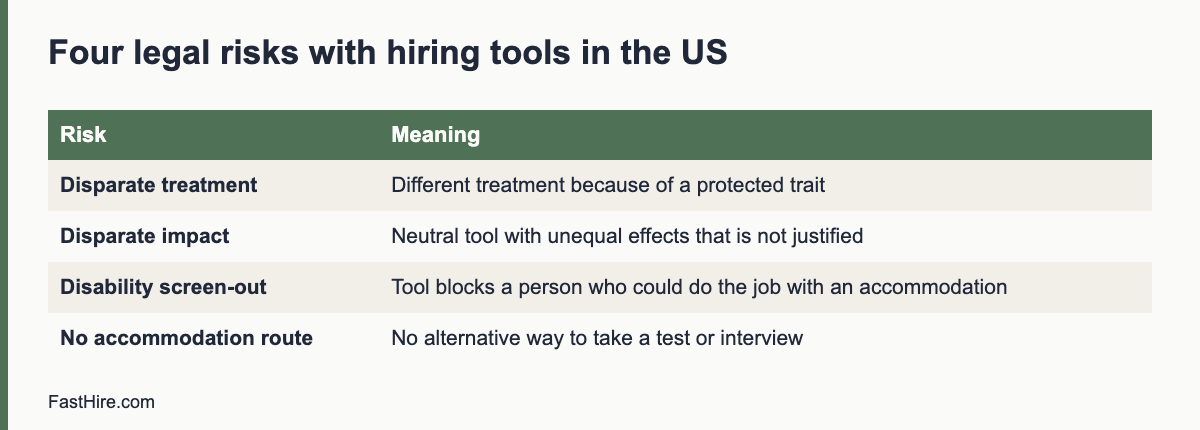
  • Candidate experience: a practical checklist for recruiters

    Candidate experience: a practical checklist for recruiters

    Candidate experience is how people feel and what they learn at each step of your hiring process, from seeing the job ad to the first day of work or a polite decline. To improve it, make the process clear, respectful, fast and fair: tell people what happens next, reply on time, treat everyone the same, and ask for feedback. The checklist below covers seven stages with 35 checks.

    Key takeaways

    • Candidate experience is a set of small, concrete actions, not a slogan.
    • Clarity and speed matter most: say what happens next and keep your word on dates.
    • Treat declined candidates well. They may apply again, refer others and talk about you.
    • Fairness is part of experience: same questions, same time, adjustments on request.
    • Ask two short questions after the process and act on the answers.
    x

    What candidate experience is, and why it matters

    Every candidate leaves the process with a picture of your organisation. That picture is formed by the ad, the application form, the messages, the interviews and the outcome. People who feel respected may accept an offer more readily, apply again later and speak well of you. People who feel ignored tell others. For a small team or a growing company, reputation is a hiring asset that costs very little to protect.

    Experience is also a matter of fairness. A process that is clear, accessible and consistent is easier for everyone, including people with caring duties, disabilities, or little experience of formal hiring. See our guide on how to reduce bias in resume screening for the screening side.

    The seven-stage checklist

    Stage 1: The job ad and the first look

    CheckDone?
    The title is clear and uses common words
    The ad states the main tasks, must-haves, hours, location and pay range (where allowed or required)
    The ad says what the process looks like and how long it takes
    The language is plain, with no phrases that point to age, sex or other protected traits
    The ad is readable on a phone
    There is a contact for questions and for adjustments

    See our guide to writing a job ad that attracts the right applicants for wording tips.

    Stage 2: Applying

    CheckDone?
    The application takes under 10 minutes
    Candidates can apply with a CV or resume, without retyping it into many fields
    The form works with a screen reader and a keyboard
    Candidates can save and return, or apply by email if the form fails
    The privacy notice is linked and written in plain words
    The confirmation message arrives within minutes

    Stage 3: Screening and first contact

    CheckDone?
    Candidates receive an outcome or a status message within the time you promised
    Screening uses written criteria and the same sheet for everyone
    The first call is booked at a time that suits the candidate, with a choice of slots
    The recruiter explains the role honestly, including limits
    The call is no longer than needed

    Stage 4: Interviews

    CheckDone?
    The invitation states the format, length, people, location or link, and how to prepare
    Adjustments are offered in the invitation
    The candidate is greeted on time and the interview starts on time
    Interviewers use prepared questions and take notes openly
    The candidate has time for questions
    Travel costs or time are respected, for example by video options

    Stage 5: Decision and feedback

    CheckDone?
    Every candidate receives an outcome
    Finalists receive a call or detailed message with job-related reasons
    Messages go out within the promised time
    Messages contain no protected-trait comments or comparisons
    Candidates can ask a question after the outcome

    Stage 6: Offer and onboarding

    CheckDone?
    The offer is made by phone first, then in writing
    Terms match the ad, or differences are explained
    The candidate has a fair time to decide
    The first-day plan and contact are sent before the start
    Other finalists are told the outcome promptly

    See how to make a job offer and the first 30 days onboarding plan.

    Stage 7: After the process

    CheckDone?
    A short survey is sent to hired and declined candidates
    Results are reviewed every quarter
    One improvement is chosen and shared with the team
    Candidate data is kept only as long as needed and then deleted
    Candidates who agreed are added to a talent pool with consent

    A two-question survey

    Keep the survey short so that people reply. Send it within two days of the outcome. Use these two questions, plus an optional comment box.

    1. How clear was the process? (1 = very unclear, 5 = very clear)
    2. How respected did you feel? (1 = not at all, 5 = fully)

    Add: “What is one thing we could do better?” Store the answers without names if you can. Report the average and the comments to the hiring team each quarter. Do not use answers to judge individual candidates. If a candidate was declined, a reply is voluntary and should never affect any later application.

    Service standards you can publish

    StandardExample wording
    AcknowledgementYou will hear from us within one working day of applying
    ScreeningWe review applications within five working days of the closing date
    InterviewsYou will receive an invitation or an outcome within two working days of the screening date
    FeedbackYou will get an outcome within two working days of each interview
    OffersWe call the same day we decide

    Publish only what you can deliver. A missed promise hurts more than a longer promise. Track your performance against the standard and report it to your team. See how to reduce time-to-hire for ways to make the standard realistic.

    Common problems and fixes

    ProblemLikely causeFix
    Candidates ask “what is the status?”No updatesAdd automatic status messages at set points
    Candidates drop out after the first callUnclear role or payState key facts in the ad and the call script
    Complaints about long formsToo many fieldsCut to the minimum; accept a CV
    Candidates arrive unpreparedNo briefingSend an invitation with details and a tip sheet
    Silence after interviewsOverloaded teamUse templates and a service standard
    Poor reviews from declined candidatesImpersonal or late messagesUse kind, specific, on-time messages

    A worked example (fictional)

    This example is invented. A recruiter at a mid-sized company reviews her process using the checklist. She finds five gaps: the application form needs 18 fields, there is no status message after screening, interview invitations do not mention adjustments, declined candidates after interview receive no message, and no one asks for feedback. She fixes them in two weeks. She cuts the form to a CV upload and five questions, writes three status templates, adds an adjustment line to the invitation, sends a decline template to all interviewed candidates, and starts the two-question survey. After the next search, 14 of 40 candidates reply to the survey. The average clarity score is 4.3 and the respect score is 4.5. The main comment is “I wish I had known the salary range earlier”. She adds the range to the ad.

    Data and privacy

    Candidate experience also covers how you treat personal data. Tell candidates what you collect, why, how long you keep it and who sees it. In the UK and EU, the GDPR requires this. See the ICO employment guidance and the GDPR text. Ask for consent before you add candidates to a talent pool. Delete data on schedule. In the US, rules vary by state. This is general information, not legal advice.
    Messages that show respect

    Messages are the part of the experience that you control most. Write them in plain words, keep them short and say what happens next. These templates cover the moments that matter most.

    Status update during a delay

    Hello [Name],

    A short update on your application for [job title]. We are still reviewing applications and need until [date] to finish. You do not need to do anything. We will contact you by [date] with a decision on the next step. If your situation changes, please reply and tell us.

    Best wishes,
    [Name]

    Interview invitation with preparation notes

    Hello [Name],

    We would like to invite you to an interview for [job title] on [date and time options]. It will last about [45] minutes with [names and roles]. We will ask about your experience with [two or three topics] and leave time for your questions. You do not need to prepare a presentation. If you would like any adjustment, such as questions in advance, more time or a different format, please reply and we will arrange it.

    Best wishes,
    [Name]

    Decline that respects the candidate

    Hello [Name],

    Thank you for the time and care you put into your application and interview. We have decided not to move forward. This decision was based on how closely the experience matched the requirements for this role. We valued [one specific, honest point]. If you would like to be considered for future roles, tell us and we will keep your details for [period] with your consent.

    Best wishes,
    [Name]

    Who owns candidate experience?

    If everyone owns it, no one owns it. Name one person, usually the recruiter or the HR lead, who is responsible for the standard, the templates and the survey. Give hiring managers a short list of three duties: be on time, give feedback on time and follow the question list. Review the results together every quarter. Small teams can do this in a 30-minute meeting. Keep a shared document with the standard, the templates and the latest survey results, so that new team members can find them.

    Fairness inside the experience

    A good experience for one candidate and a poor one for another is not fair. Check that the same steps, the same time and the same support apply to all. Review whether certain steps create barriers: a form that does not work with assistive technology, interview times that exclude people with caring duties, or locations that are hard to reach. Offer alternatives. Ask all candidates the same question about adjustments. For legal duties, see Acas for the UK, the EEOC for the US and your national equality body in the EU. This is general information, not legal advice.
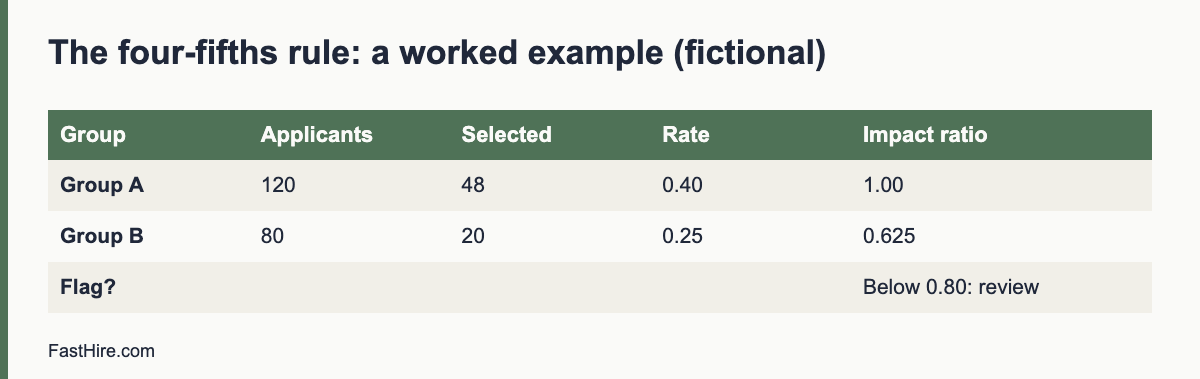
    What to do with the survey results

    Read every comment, then group them by stage. If three or more candidates mention the same issue, treat it as a pattern. Pick one fix per quarter. Tell the team what you changed and why. Tell candidates, too: a line on your careers page such as “You told us the process was unclear, so we now share the full steps in the job ad” shows that you listen.

    Do not chase high scores by asking leading questions. A low score on a clear question is more useful than a high score on a vague one. Compare declined and hired candidates separately, because the groups often feel differently. If declined candidates score much lower on respect, review your decline messages and your timing first.

    Finally, share the results with leadership once a year in a one-page summary: the scores, the main comments, the changes you made and the next change you plan. Leaders then see candidate experience as a measured part of hiring, and they are more likely to support the time it needs.

    Frequently asked questions

    What is the most important part of candidate experience?

    Clear communication and respect for time. Say what happens next and keep to the dates.

    Do I need to reply to every applicant?

    Yes, as a standard of good practice. An automatic acknowledgement and a clear outcome message take little time.

    How do I measure candidate experience?

    Use a short survey with two scored questions and a comment box. Report the results every quarter.

    Does candidate experience matter for entry-level roles?

    Yes. Entry-level candidates may be new to hiring and benefit most from clear instructions.

    Can small teams offer a good candidate experience?

    Yes. A clear ad, quick replies and kind decline messages cost little and make a large difference.

    Related guides

    This is general information, not legal advice.

  • The ADA and hiring: reasonable accommodation for applicants

    The ADA and hiring: reasonable accommodation for applicants

    The Americans with Disabilities Act (ADA) bans discrimination against qualified applicants with disabilities and requires covered employers to provide reasonable accommodation in the application process. Before a conditional job offer, you generally cannot ask disability-related questions or require medical exams. After an offer, you can, if you do it for everyone entering the same job and keep the results confidential.

    Key takeaways

    • The ADA covers qualified applicants. Judge people on whether they can perform the essential functions of the job, with or without accommodation.
    • Before an offer, do not ask disability-related questions or require medical exams. You can ask whether the person can perform the job functions.
    • After a conditional offer, you may ask and test, if you do it for all entering employees in that job category and keep the information separate and confidential.
    • Provide reasonable accommodation in the application process unless it causes undue hardship.
    • Coverage and state laws vary. Check the EEOC guidance and ask a specialist about hard cases.
    x

    Who and what the ADA covers

    Title I of the ADA prohibits discrimination in employment, including hiring, against a qualified individual on the basis of disability. The text is hosted by the EEOC on its page for Titles I and V of the ADA. Coverage depends on the size of the employer, and the EEOC’s small business pages explain how the rules apply; see EEOC guidance for small business. Many state and local laws reach smaller employers or add protections, so do not assume that you are outside the rules.

    “Qualified” means that the person can perform the essential functions of the job with or without reasonable accommodation. “Disability” is defined broadly in the ADA as amended, and includes physical or mental impairments that substantially limit one or more major life activities, a record of such an impairment, or being regarded as having one. Employers should not try to decide who “counts”. Focus on the job and on what the person needs to do it.

    Before the job offer: what you cannot ask

    The EEOC’s guidance on preemployment disability-related questions and medical examinations explains the rules. In outline, before a conditional offer you generally may not ask disability-related questions or require medical examinations. That is true even if you plan to look at the results only after the offer.

    Allowed before an offerNot allowed before an offer
    “Can you perform the essential functions of this job, with or without accommodation?”“Do you have a disability?” “What medications do you take?”
    Asking about attendance requirements, such as “Can you work the hours listed?”“How many sick days did you take last year?”
    Asking about non-medical qualifications and skills“Have you ever had a workers’ compensation claim?”
    Asking about current illegal drug useAsking about past treatment for addiction or mental health conditions
    Asking a candidate who has an obvious disability, or who has told you about one, whether they need an accommodation and what it would beMedical exams, including tests that measure physiological responses such as blood pressure
    Physical agility tests that are not medical, for all applicants in the jobTests that measure heart rate or other medical responses

    These examples follow the EEOC guidance. Read the guidance for details and edge cases, such as how to describe job functions and how drug and alcohol tests are treated. A drug test for illegal drugs is not a medical exam, but an alcohol test is treated as one.

    After a conditional offer

    Once you make a conditional offer, you may ask disability-related questions and require medical examinations, and make the offer depend on the results. Three conditions apply. You must do it for all entering employees in the same job category, whether or not they have a disability. You must keep medical information confidential, in files separate from the personnel file. And if you withdraw the offer because of a medical result, you must show that the reason is job-related and consistent with business necessity, and that no reasonable accommodation would let the person do the job.

    Reasonable accommodation in the application process

    Reasonable accommodation includes changes to the application process, the way a test or interview is given, and the way a job is done. The EEOC’s enforcement guidance on reasonable accommodation and undue hardship covers job applicants and the application process.

    StageExamples of accommodation
    Application formAccept applications by phone or email; provide an accessible form; give extra time; allow help from another person
    Online testsExtra time; a different format; a screen-reader-friendly version; an oral or written alternative
    InterviewsSign language interpreter; step-free location; written questions; a quiet room; breaks; a video or phone option
    Work sample or trialAdapted equipment; a different way to show the skill; a longer time limit
    Offer and onboardingAccessible documents; flexible start arrangements; workplace changes

    The employer and the applicant should talk about the need and the options. A request does not need special words. If a person says that a change would help because of a condition, treat it as a request. You may ask what would help. You may ask for limited documentation only where the disability and the need are not obvious, and take care not to ask for more than you need. Where an accommodation causes undue hardship, you can decline it, but you should look for an alternative that works. Our guide on reasonable adjustments in interviews gives step-by-step handling and scripts, and many of the practices apply in the US.

    Essential functions and job descriptions

    The ADA looks to the essential functions of the job. Write them down before you advertise. A good description lists the real tasks, the time spent on each, and whether the task could be done in another way. It avoids “must be able to lift 25 kilos” unless lifting is truly a core function. If a task is not essential, it should not be a barrier. Use the same list to build your screening criteria and interview questions. Our guide to writing a job description for a new role and the role brief method help here.

    Tests, tools and standards

    • Ask whether a test measures a skill the job needs. A timed typing test is relevant to a data entry role, but not necessarily to a role that uses speech software.
    • Check that online tools are accessible. They should work with keyboards and screen readers.
    • Offer an alternative. Give a clear way to ask for another format.
    • Validate selection criteria. The EEOC explains how tests and selection procedures are assessed in its guidance on employment tests and selection procedures.
    • Review automated tools. See our guide on US law on AI and hiring.

    Confidentiality and records

    Information about an applicant’s disability or accommodation request is confidential. Share it only with people who need to know it to carry out the accommodation, and describe the change, not the condition. Keep it out of scorecards and out of general applicant files. Medical information should sit in a separate confidential file. Do not use the information to decide who moves forward. Follow your retention schedule; see our guide on retention of rejected applicant data.

    Common mistakes

    MistakeFix
    Asking “Do you have any health problems?” in an interviewAsk whether the person can do the essential functions, with or without accommodation
    Rejecting a person because an accommodation “might be costly”Look at the actual accommodation, and at the undue hardship standard in the EEOC guidance. Many accommodations cost little or nothing
    Telling the hiring team about a candidate’s conditionTell them only what they need to carry out the change
    Using a medical form with the applicationRemove it. Medical exams come after a conditional offer, for all entering employees in the job
    Assuming that a person cannot do a task because of a conditionAsk the person how they would do it, and offer a trial where relevant
    No contact for requestsName a person and put the contact in every invitation

    FastHire is being built for fair, evidence-based screening. It shows each job requirement next to the exact CV passage that supports it, so decisions rest on skills and not on guesses. FastHire is coming soon. It does not rank, score or reject candidates. People make every decision.

    A fictional case: a request during an application

    This case is invented to show the reasoning. It is not legal advice. A candidate for an inventory clerk role writes to the contact in the invitation: “I have a visual impairment and use screen magnification. Could I receive the skills test as a file I can enlarge, with extra time?”

    StepWhat the employer does
    1. Reply fastThanks the candidate, confirms the request and asks if the format and time suggested would work
    2. Check the testAsks: does the test measure a skill the job needs? Is speed essential? The job involves counting stock, not speed reading, so extra time is reasonable
    3. Provide the changeSends an accessible file, sets a longer time limit, and confirms in writing
    4. Keep it separateTells the assessor only that the format and time limit differ, not why
    5. Score on the job criteriaMarks the test against the same criteria as all other candidates
    6. Keep recordsStores the request and the change in a confidential file for the retention period

    The employer did not ask about the cause, did not ask for medical proof and did not change the standard. It changed how the candidate showed the skill. If the employer had been unsure whether extra time was reasonable, it could have talked with the candidate about alternatives and taken advice.

    Training for people who handle requests

    The person who first receives an accommodation request is often a recruiter, a coordinator or a hiring manager who has never been trained. A one-hour session helps. Cover these points: what an accommodation is, how to reply in a warm and practical way, who to involve, how to keep information confidential, what not to ask, and what to do if the request seems difficult. Give them a script and a contact in HR or legal for hard cases. Repeat the session once a year and when new people join the hiring team.

    Reply template:
    Hello [Name], thank you for letting us know. We can [change]. Does that work for you? If you would like something different, please tell us. We will confirm the arrangement in writing and will tell only the people who need to know what is different, not the reason.

    Keep the tone matter-of-fact and positive. Candidates who are treated well when they ask for help often become strong employees and good advocates for your company.

    Ask for a review each year

    Once a year, review how requests were handled. Count the number of requests, the time to reply, the types of change and the results. Remove personal details before you share the review. Ask whether any request was declined and why. Ask a few candidates who used accommodations, if they agree, what worked and what did not. Use the findings to update your templates, your venues and your online tools.

    Frequently asked questions

    Can I ask a candidate if they have a disability?

    Generally not before a conditional job offer. You may ask whether they can perform the essential functions of the job with or without accommodation, and you may invite requests for accommodation.

    Can I ask a candidate with a visible disability how they would do the job?

    If the disability is obvious, or the person has told you about it, you may ask whether they need an accommodation and what it would be. Keep the questions about the job.

    Is a drug test a medical exam?

    A test for illegal drugs is not a medical exam under the ADA. A test for alcohol is. Check the EEOC guidance and your state law.

    Can I ask for a doctor’s note for an accommodation request?

    Only in limited cases, where the need is not obvious, and only what is needed. Ask a specialist first, and do not request medical records at the application stage by default.

    Does the ADA apply to remote or online hiring?

    Yes. The application process is covered whatever the format.

    Related guides

    This is general information, not legal advice.
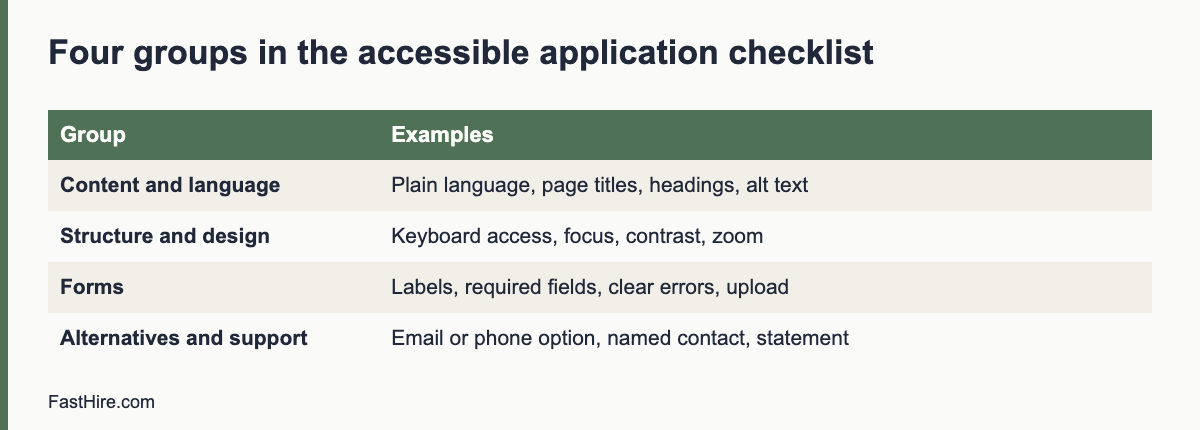
  • UK reasonable adjustments in recruitment

    UK reasonable adjustments in recruitment

    Under the Equality Act 2010, employers in Great Britain must make reasonable adjustments so that disabled applicants are not at a substantial disadvantage in recruitment. You also may not ask applicants about their health before offering work, except for limited purposes. In practice: invite requests, agree changes, keep details confidential, and judge everyone on the same job criteria.

    Key takeaways

    • The duty applies to recruitment as well as to employment. It is triggered when a disabled applicant would be at a substantial disadvantage.
    • Before offering work, do not ask about health or disability, except for permitted purposes such as checking if a person can take part in an assessment.
    • Adjustments can change a process, a physical feature or provide an auxiliary aid.
    • The Access to Work scheme can help with support such as interpreters at interviews. Tell candidates about it where relevant.
    • Northern Ireland has separate legislation. This guide covers Great Britain.
    x

    The legal duty, in plain language

    The duty to make adjustments is in section 20 of the Equality Act 2010. It has three requirements. First, where a provision, criterion or practice puts a disabled person at a substantial disadvantage compared with non-disabled people, you must take reasonable steps to avoid the disadvantage. Second, where a physical feature has that effect, you must take reasonable steps to avoid it. Third, where a disabled person would be at a disadvantage without an auxiliary aid, you must take reasonable steps to provide the aid. The full Act is on legislation.gov.uk.

    The duty applies to job applicants. A recruitment practice is a “provision, criterion or practice”. Examples: a requirement to complete an online test in 30 minutes, a rule that all interviews take place in person upstairs, or a form that can only be completed on one website. If a practice puts a disabled person at a substantial disadvantage, you consider what reasonable steps can remove it. “Substantial” means more than minor or trivial.

    “Reasonable” depends on the facts: how effective the step would be, whether it is practicable, its cost, your resources and the support available. Many changes in recruitment are low cost. GOV.UK gives employers a short guide on reasonable adjustments for disabled workers, and Acas explains recruitment duties on its recruitment page.

    Who is a disabled person?

    Under the Act, a person has a disability if they have a physical or mental impairment that has a substantial and long-term adverse effect on their ability to carry out normal day-to-day activities. Long-term generally means that the effect has lasted or is likely to last at least 12 months. Conditions such as cancer, HIV and multiple sclerosis are covered from diagnosis. Read the definition on GOV.UK to see how it applies. Do not decide whether a person “counts” before you help. Focus on what they need in the process.

    No health questions before an offer

    Section 60 of the Equality Act says that an employer must not ask a job applicant about their health before offering work, or before placing them in a pool to be selected from later. The Act lists exceptions. They include asking whether the person will be able to take part in an assessment, such as an interview or a test, and whether reasonable adjustments are needed for it. They also include checking that the person can carry out a function that is intrinsic to the work, with adjustments, and monitoring diversity. Read the section for the full list, and ask a specialist if you are unsure.

    Allowed in the recruitment processNot allowed before an offer
    “Is there any adjustment we should make so you can take part in the interview or test?”“Do you have any health conditions?”
    “This job involves driving. Do you hold a valid licence?”“How many days were you off sick in your last job?”
    “Can you perform the main tasks in the job description, with adjustments if needed?”A health questionnaire sent with the application form
    An equal opportunities form that is voluntary, anonymous in the decision, and kept separateAsking referees about the person’s sickness record
    Asking about health after a conditional offer, as the Act allowsRejecting a person because of an imagined future absence

    An employer can ask for health information after making an offer, but the usual rules on discrimination still apply. If you withdraw an offer for a reason linked to disability, take advice first.

    What adjustments look like in recruitment

    StagePossible adjustments
    Advert and applicationPlain language; accessible format; alternative ways to apply, such as phone or email; extra time for the form
    Selection testsExtra time; a different format; reader or scribe; screen-reader-compatible test; a quiet space
    InterviewsInterview questions sent in advance; step-free venue; breaks; a video or phone interview; British Sign Language interpreter; a support person
    Assessment centres and tasksAdjusted schedule; a different task that tests the same skill; assistive technology
    Offer and startAccessible documents; changes to the workplace or equipment; a phased start

    Make it easy to ask. Add a line to every invitation. For example: “If you need any adjustment to take part, such as extra time, a different format or step-free access, please tell us at [email]. You do not need to explain why. We will reply within one working day.” Our guide for hiring managers on reasonable adjustments in interviews has wording and a six-step process.

    Access to Work

    Access to Work is a UK government scheme that can help disabled people with the extra costs of support at work, and it can cover support at job interviews. GOV.UK describes it on its page, Access to Work: get support if you have a disability or health condition. It mentions that deaf or hard-of-hearing applicants who need a BSL interpreter or lipspeaker, and people who need communication support, can get help for interviews. Rules and eligibility change, so read the page. Tell candidates that this scheme exists, but do not make them apply for it before you provide reasonable adjustments you can provide yourself.

    Keeping the process fair

    • Judge the same job criteria for everyone. An adjustment changes how a person shows a skill. It does not lower the standard.
    • Keep details confidential. Tell interviewers what is different, not why.
    • Record what you agreed. Keep a short note, and keep it away from the scorecard.
    • Do not treat a request as a risk. Declining a candidate because they asked for an adjustment is likely to be unlawful.
    • Use structured interviews. Same questions, same scoring. See structured interviews.
    • Mind data protection. Health and disability information is special category data under UK GDPR. See GDPR for job applicants.

    Common mistakes

    MistakeFix
    Waiting for the candidate to discloseOffer adjustments in every invitation
    Asking for a medical certificateAsk what would help. Do not ask for proof at this stage
    Saying “we cannot do that” without looking for alternativesDiscuss other options and explain what you can do
    Using an online test with no accessible versionOffer an alternative format, or choose an accessible tool
    Sharing the condition with all interviewersShare only the change, not the reason
    Assuming the cost is too highCheck the real cost; consider support such as Access to Work

    FastHire is being built for fair, evidence-based screening. It shows each job requirement next to the exact CV passage that supports it, so decisions rest on skills. FastHire is coming soon. It does not rank, score or reject candidates. People make every decision.

    A fictional case: an online test

    This case is invented. A UK retailer uses a 20-minute online numeracy test for a stock controller role. A candidate with dyscalculia emails the contact in the invitation and asks whether the time can be extended.

    QuestionReasoning
    Is there a provision, criterion or practice?Yes. The practice is a timed online test for all candidates.
    Is there a substantial disadvantage?Likely. Timed numeracy tasks can disadvantage the candidate more than non-disabled candidates.
    What would a reasonable step be?Extra time, a calculator if the job allows it, or a different format. The employer checks what the job needs: stock controllers use calculators and systems every day.
    Is the step practicable and low cost?Yes. Most test platforms allow time changes.
    What does the employer do?Agrees extra time and allows a calculator, confirms in writing, tells the assessor only about the changed conditions, and marks against the same criteria.

    The key move is to ask what the test is for. If the job uses a calculator, a test that bans it measures something the job does not need. Adjusting the test makes it fairer for everyone, and it gives the employer a better picture of the skill it cares about.

    Plan for common requests

    Most requests fall into a few groups. Plan these in advance so that you can reply fast.

    Request typePlan
    More time in a testKnow which tools allow it and how long you can extend. Decide a standard extension and a route for longer ones
    Questions in advanceDecide which questions you can send, and send the same kind to anyone who asks
    Different formatKeep documents in plain text or accessible PDF; allow phone or video
    Step-free accessKnow the accessible rooms in each office and the route from the entrance
    Interpreter or communication supportKeep contact details for booking services; tell candidates about Access to Work where it may apply
    A support person or assistance animalSet a simple rule to welcome them, and tell reception

    Write the plan in a short procedure and give it to everyone who schedules interviews. Review it each year with feedback from candidates who asked for adjustments, if they are willing to share it.

    Public sector and large employers

    Public bodies in Great Britain also have the public sector equality duty, which is separate from the duty to make adjustments. Large employers may also use voluntary schemes to show their commitment to disabled candidates. These schemes can help, but they do not replace the legal duties. Treat each request on its own facts.

    What to do if a request is hard

    Some requests take effort: a sign language interpreter booked at short notice, an interview in a building with no lift, or a test platform that cannot change its timing. Do not refuse by reflex. Try these steps in order: tell the candidate you are working on it, look for a different date or venue, look for another route such as a video interview, ask the candidate what would work for them, and check whether outside support is available. Record what you tried. If you conclude that a request is not reasonable, take advice before you reply, and offer the closest alternative you can.

    Tell the candidate early. Waiting until the day before makes every option harder and leaves the candidate anxious. A frank message that says what you can do and when you will have an answer is always better than silence.

    Frequently asked questions

    Do small employers have to make reasonable adjustments?

    The duty applies to employers of any size in Great Britain. What is reasonable depends on the employer’s resources.

    Can I ask about health at the interview?

    Not before offering work, except for the permitted purposes in section 60 of the Equality Act, such as asking about adjustments for the assessment.

    What if a candidate does not tell me about their disability?

    The duty to make adjustments generally applies where the employer knows, or could reasonably be expected to know, that a person is disabled and likely to be disadvantaged. Invite requests so that people can tell you.

    Who pays for adjustments?

    The employer pays for reasonable adjustments, and cannot pass the cost to the applicant. Schemes such as Access to Work may help with some support.

    Does this apply in Northern Ireland?

    Northern Ireland has its own disability discrimination law. Check the official guidance there.

    Related guides

    This is general information, not legal advice.