Author: fhai

  • How to build a talent pool with consent

    How to build a talent pool with consent

    A talent pool is a list of people you may contact about future roles. To build one fairly, ask each person clearly, explain what you will do with their data and how long you will keep it, make saying no easy, contact them only about jobs, and review the list on a schedule. In the UK and EU, consent must be freely given, specific and easy to withdraw.

    Key takeaways

    • Ask for consent separately from the job application, with a clear yes or no choice that is not pre-ticked.
    • Say what you will send, how often, how long you will keep the data and how to leave.
    • Do not add people to the pool without asking. That includes declined applicants and people you found online.
    • Review the pool at set times, delete expired entries and honour withdrawals fast.
    • Only contact people about jobs that match what they told you they want.
    x

    What a talent pool is, and is not

    A talent pool is a group of people who have agreed to hear from you about future openings. It can include past applicants who were close, former employees, people who met you at events and people who joined your careers page mailing list. It is not a database of everyone whose CV you have ever received. Keeping CVs “just in case” without asking is a common mistake and a data protection risk.

    A pool can save time. When a role opens, you can start with people who already know you and have shown interest. But a pool is worth only as much as its freshness and its trust. An out-of-date list of people who never agreed to be there harms both.

    The legal picture, in outline

    RegionMain pointsOfficial source
    EUGDPR: consent must be freely given, specific, informed and unambiguous, shown by a clear affirmative act, and as easy to withdraw as to give. You must also have a lawful basis for any other use and give a privacy notice. Marketing-style messages are also subject to e-privacy rules in member statesGDPR; European Data Protection Board
    UKUK GDPR and the Data Protection Act 2018 apply. Rules on electronic messages (PECR) can apply to emails and texts. The regulator publishes guidance on consent and on recruitmentICO recruitment and selection
    USNo single federal rule on talent pools. Federal and state laws on email, telephone and text messaging, and some state privacy laws, may apply. Check each state where you hireCheck state attorney general pages and the Federal Trade Commission for email rules

    Some employers rely on legitimate interests to contact people they have found through public sources. In the UK and EU, this requires a balance test and a prompt notice to the person, usually within one month. Many privacy regulators expect special care with unsolicited approaches. Consent is the simpler path for a pool. Ask a data protection adviser which basis fits your case. Our guide on GDPR for job applicants explains the lawful bases.

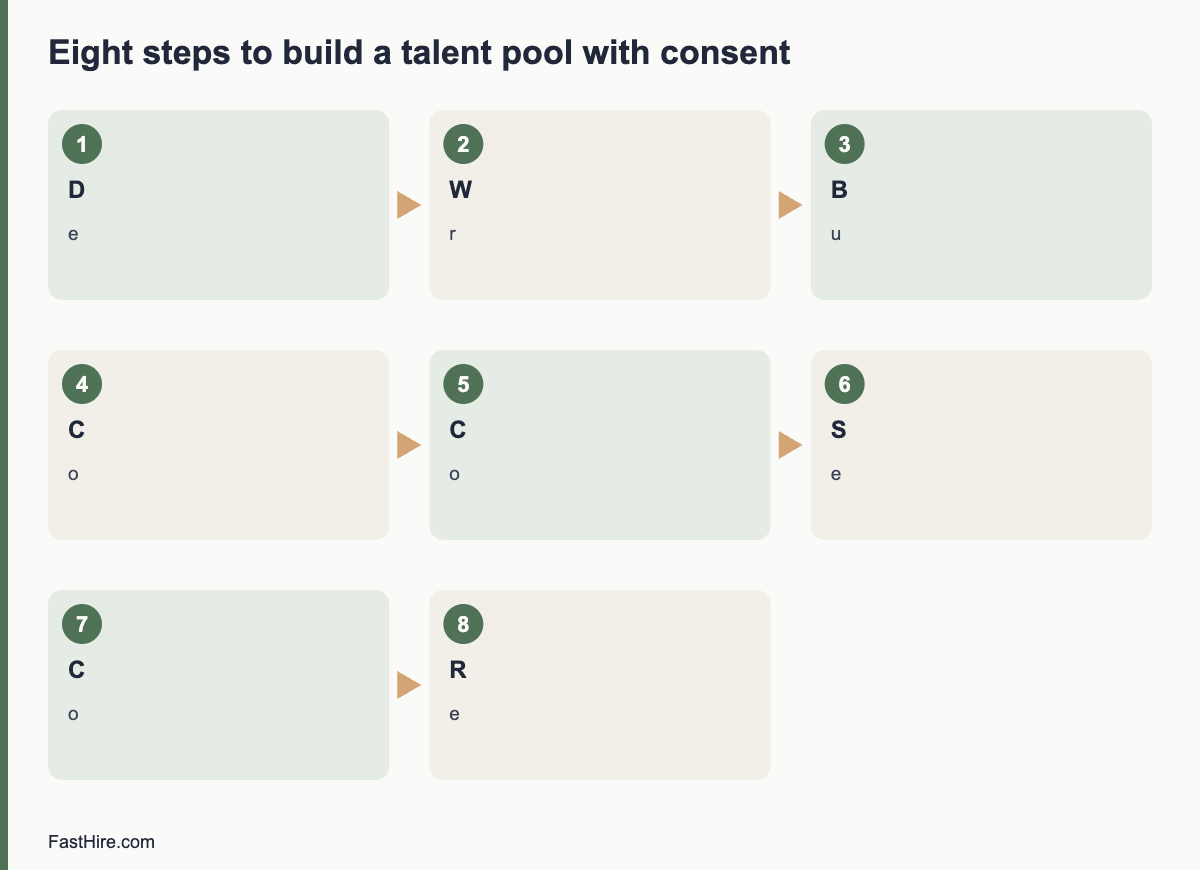
    Eight steps to build a pool with consent

    1. Decide the purpose. For example: “to tell you about roles in customer support and operations in Berlin and remote”. The narrower the purpose, the clearer the consent.
    2. Write the promise. What will you send, how often, and for how long will you keep the data? Examples: “no more than one message a month, only about roles that match”, “deleted after 12 months unless you renew”. The figures here are examples. Choose your own.
    3. Build an opt-in. A separate checkbox that is not pre-ticked, on the application form or a sign-up page. Keep the wording simple. Keep it independent from the application, so that saying no does not affect the application.
    4. Collect the minimum. Name, contact details, interests, location and work authorisation if needed. Skip anything not needed to match roles.
    5. Confirm. Send an email that confirms what the person agreed to, with a link to change or withdraw.
    6. Record consent. Store the date, the wording they saw, the source and what they agreed to. You may need to show this later.
    7. Segment. Tag people by role family and location so you can match them to the right roles.
    8. Review and refresh. Remove people after the period you promised, or ask them to renew. Delete anyone who withdraws within the legal time limit, and aim for the same day.

    Wording for the opt-in

    Stay in touch
    Would you like us to keep your details and tell you about future roles at [Company] that match your interests? You can say no and still apply for this job.
    [ ] Yes, keep my details for [period] and email me about roles in [areas]. We will email no more than [frequency] and you can leave at any time with one click.
    We use your details only for this purpose. Read our privacy notice at [link].

    Do not use a pre-ticked box, bundle this with the application consent or hide it in long terms. In the EU and UK these methods are not valid consent.

    Where people come from, and what to do

    SourceWhat you can doWhat to avoid
    Candidates who applied and were declinedAsk in the decline message if they would like to stay in touch. Link to the opt-inAdding them to the pool automatically
    People who sign up on your careers pageUse the sign-up as the opt-in, with a clear confirmationUsing the email for general marketing
    Event contactsAsk in person or by follow-up email whether they agree to hear about rolesTyping every business card into the system without asking
    Former employeesAsk in the exit process whether they want alumni updatesAssuming they agreed in their employment contract
    People found on public profilesSend a short individual message that explains who you are and how you found them, and ask if they want to hear from you. Respect any request not to contact themBulk-loading them into the pool or scraping profiles

    Be careful about scraping profile sites. Platforms have terms that restrict automated collection, and data protection law still applies to public information. Contact people one by one, with a clear and honest message.

    How to use the pool fairly

    • Match on skills and interests, not on traits that could be protected. Do not filter on age, sex, nationality or family status.
    • Record the evidence for each match. Use the same job-related criteria as for any other applicant. See screening resumes against must-haves with evidence.
    • Give pool members the same process. They do not skip the structured interview because you know them.
    • Tell them the outcome. A person who agreed to hear from you deserves a reply if they apply for a role through the pool.
    • Check who your pool leaves out. If the pool is mostly people from the same schools or networks, widen your sources.

    Measure and clean

    Track four numbers: the size of the pool, the share who open or reply, the number of hires from the pool and the number of withdrawals. These are your own numbers. Do not compare them to industry benchmarks unless you have an official source. A pool with many silent entries needs cleaning. Remove people who have not engaged after the period you promised. A shorter, current pool is more useful and lower risk than a long one that nobody trusts.

    Set a calendar date for a full clean every six months. Export the list, remove expired entries, delete from every place (system, email tools, spreadsheets) and keep a short log of what you removed. See how long to keep rejected applicant data for the retention method.

    What to send, and what not to send

    Good messagePoor message
    “A role opened in operations in Lisbon that matches your interests. Here is the advert. Reply if you want to apply, or tell us if you no longer want to hear from us.”“We have many exciting roles! Click here!” sent to everyone
    Short, specific, easy to leaveLong, vague, with a hidden unsubscribe link
    Sent only when a match existsSent weekly because the system allows it

    FastHire is being built for the step where you read applications. It shows each job requirement next to the exact CV passage that supports it, so a person can check the evidence quickly, whether the CV came from a talent pool or a new application. FastHire is coming soon. It does not rank, score or reject candidates. People make every decision.

    A consent record template

    Keep one record for every pool member. You need it to show what the person agreed to, and to find them when they ask to leave.

    FieldExample (fictional)
    Person IDTP-0042
    Date and time of consentDate and time
    SourceCareers page sign-up form
    Exact wording and version shownVersion 2 of the opt-in text, link to a saved copy
    What they agreed toEmails about operations roles in Lisbon, up to once a month
    Review or expiry dateDate set from the period you promised
    Withdrawal dateBlank until withdrawn
    Last contact and outcomeDate; applied / no reply / opted out

    Store the record where only the recruiting team can see it. Keep a copy of each version of the opt-in wording with the date it was in use. If the wording changes in a way that widens the purpose, ask existing members again.

    Monthly routine for the pool owner

    1. Process every withdrawal request received. Aim to complete it within one working day.
    2. Check for entries that reach their expiry date in the next 30 days, and send the renewal message.
    3. Remove expired entries from all systems.
    4. Review bounced emails and remove invalid addresses.
    5. Match new roles against the pool using the written criteria, and record the evidence for each match.
    6. Update the four numbers: pool size, response share, hires from the pool and withdrawals.

    The routine takes under an hour a month for a small pool. It keeps the list honest, and it gives you a short record to show a regulator or a candidate if they ask how the pool works.

    When a pool is not the right tool

    A talent pool takes effort to run well. If you hire a handful of people a year, the cost may be higher than the benefit. In that case, a simple option works: keep a short list of people who asked to be told about specific roles, and write to them when one opens. Or invite declined candidates to re-apply when a new role appears. These options need less data and less upkeep, and they are easier to explain.

    Frequently asked questions

    Is a talent pool the same as keeping CVs on file?

    No. Keeping CVs on file for the current process is one purpose. A pool for future roles is a different purpose and needs its own basis, often consent, and its own retention period.

    Can I add declined applicants to the pool?

    Only if they agree. Ask in the decline message and give a link to opt in. Do not add them automatically.

    How long can I keep pool entries?

    Choose a period you can justify, state it in the opt-in, and ask people to renew before it ends. Many employers choose a year or less; your adviser can confirm what fits.

    Do I need to remove people when they ask?

    Yes. In the UK and EU, withdrawal of consent must be easy and acted on promptly. In the US, state laws and email rules may also give opt-out rights.

    Can I contact people from a public professional profile?

    You can send a first, individual message that explains who you are, where you found their details and what you want. Respect a request to end contact. Check the rules in each country.

    Related guides

    This is general information, not legal advice.
  • Data protection impact assessments for hiring tools

    Data protection impact assessments for hiring tools

    A data protection impact assessment (DPIA) is a written risk check you do before you start processing that is likely to be high risk for people. Under the UK and EU GDPR, hiring tools that evaluate people at scale, use new technology or make automated decisions often call for one. This guide explains when you need one, what it contains and gives a template you can fill in.

    Key takeaways

    • A DPIA is a document that asks: what do we do with data, is it necessary and fair, what could go wrong, and what do we do about it?
    • Do it before you start using a tool, not after. Update it when the tool or the use changes.
    • Hiring tools that score, rank or filter applicants, analyse video or voice, or combine data from many sources are strong candidates for a DPIA.
    • Involve recruiting, IT or security, a data protection lead and, where possible, the views of applicants.
    • A DPIA can end with the answer “do not use this tool” or “use it with these limits”.
    x

    What the law says

    Article 35 of the GDPR requires a DPIA where processing is likely to result in a high risk to the rights and freedoms of people. The article gives examples that include systematic and extensive evaluation of personal aspects based on automated processing, including profiling, on which decisions are based that produce legal or similarly significant effects. National regulators publish lists of processing that always needs one. The UK Information Commissioner’s Office explains the duty in its guidance on data protection impact assessments. The European Data Protection Board publishes European guidance and endorses criteria for deciding when a DPIA is likely.

    Employment decisions have a significant effect on people. Applicants are also in an unequal position, because they depend on your decision. Both points weigh toward doing a DPIA for tools that go beyond basic storage. The EU AI Act separately treats some hiring AI systems as high risk, and has its own duties. We do not state dates. Read the official text and our overview of the EU AI Act and hiring tools.

    In the United States there is no general DPIA duty. Some state privacy laws require risk assessments for certain processing, and some local laws require bias audits for automated employment decision tools. Check the rules where you hire. Many US employers do a similar assessment as good practice.

    Do you need one? A quick screen

    QuestionIf yes
    Does the tool score, rank, filter or recommend applicants?A DPIA is very likely needed
    Does it analyse video, voice, facial expression or other biometric data?A DPIA is very likely needed, and extra legal limits may apply
    Does it combine data from several sources, such as social media or public profiles?A DPIA is likely needed
    Do you process data about many applicants, or about vulnerable groups?Consider a DPIA
    Does the tool make decisions without a person reviewing them?A DPIA is needed, and the automated decision rules also apply
    Is it a basic storage or scheduling tool with no evaluation?A DPIA may not be needed. Record why

    Write down the result of this screen even when the answer is “no DPIA”. The record shows you thought about it.

    What a DPIA contains

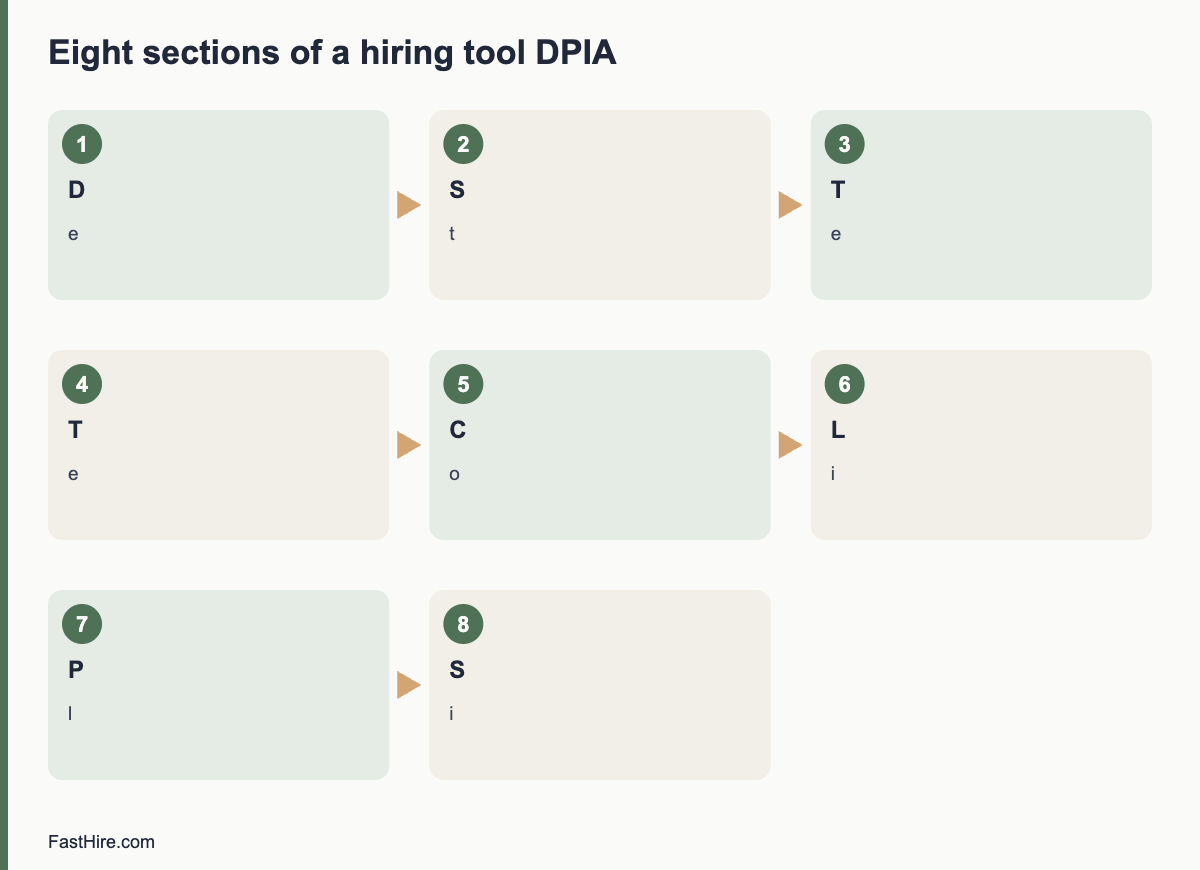
    The GDPR requires at least four things: a description of the processing and its purposes, an assessment of necessity and proportionality, an assessment of risks to people, and the measures you will take to address the risks. In practice you can organise the work in eight sections.

    1. Describe the processing. What tool, what data, from whom, for what decision, where stored, who sees it, how long kept.
    2. State the purpose and the lawful basis. Why you need it, and the lawful basis for each purpose.
    3. Test necessity. Could you reach the same goal with less data or a simpler method? For example, can a reviewer check the job requirements against the CV directly?
    4. Test proportionality and fairness. Is the effect on applicants proportionate to the benefit? Could the tool treat groups differently?
    5. Consult. Ask recruiters, hiring managers, IT or security, the data protection officer if you have one, and where possible applicants or their representatives.
    6. List the risks. For each, score likelihood and severity as low, medium or high.
    7. Plan measures. Reduce each risk with a specific action, an owner and a date.
    8. Sign off and review. Record the decision, who made it, and when you will review it.

    A template

    SectionWhat to writeExample (fictional)
    1. ProcessingTool name, data types, volumes, storage, recipientsA screening tool reads CVs and highlights text that matches job requirements. About 3,000 CVs per year. Data stored in the EU.
    2. Purpose and basisWhy, and the lawful basisTo assess applications fairly. Legitimate interests; assessment recorded.
    3. NecessityAlternatives consideredManual review is slower. A highlight tool does not need names or photos, so we hide them.
    4. FairnessRisks of unequal effects, how you testWe compare the tool output with manual review on a sample each quarter.
    5. ConsultationWho you asked, what they saidRecruiters asked for an override. IT asked for single sign-on.
    6. RisksLikelihood and severityWrong highlights could mislead a reviewer: medium likelihood, medium severity.
    7. MeasuresAction, owner, dateReviewers see the full CV next to every highlight. Owner: head of recruiting. Done by launch.
    8. Sign-offDecision, date, review dateApproved with conditions. Review in six months.

    The example is invented to show the format. It is not a legal assessment. Your DPIA must reflect your actual tool and facts.

    Risks specific to hiring tools

    RiskWhy it mattersPossible measure
    Unfair or biased resultsA tool trained on past decisions may repeat past patternsTest results across groups where lawful; keep a person deciding; remove proxies
    Opaque decisionsApplicants and reviewers cannot see why a result appearedChoose tools that show the evidence, such as the CV passage behind each mark
    Over-collectionTools may pull in extra data from public sourcesTurn off enrichment; collect only what the role needs
    Inaccurate dataParsing errors can misread a CVLet reviewers see the original; let candidates correct their data
    Excessive retentionData kept in a vendor system after the processSet retention rules; test deletion
    Transfers abroadData may move to other countriesCheck vendor locations and transfer tools
    SecurityA breach exposes CVs and contact detailsAccess by role, strong sign-in, encryption and breach plan
    Candidate rightsRequests to access or delete may be hard to answerTest the request process before launch

    What to ask the vendor

    • What data does the tool use, and from which sources?
    • How does it produce its output? Can we see the reasons for each result?
    • Has it been tested for different results between groups? Can we see a summary?
    • Where is the data stored and who are your sub-processors?
    • Can we switch off any automated feature?
    • Will you help us with the DPIA by sharing documents and answering questions?

    Our guide to choosing recruiting software lists 25 questions that feed directly into a DPIA.

    After the DPIA

    1. Do not skip the follow-up. Measures on paper do not protect anyone until they are in place.
    2. Review on a schedule. Every six to twelve months, and whenever the tool, the data or the use changes.
    3. Consult the regulator if risks remain high. The GDPR provides for prior consultation where you cannot reduce a high risk. Read the official guidance.
    4. Update your privacy notice. The notice should match the DPIA.
    5. Keep the document. It is evidence of your accountability.

    FastHire is being built to keep people in charge. It shows each job requirement next to the exact CV passage that supports it, so a reviewer can check the evidence. It does not rank, score or reject candidates. People make every decision. FastHire is coming soon. If you assess FastHire or any other tool, use the template above.

    How to score risks without false precision

    Use a simple three-level scale for likelihood and for severity. Likelihood asks how probable it is that the harm happens. Severity asks how bad the harm is for the person. A harm that is unlikely but very serious, such as a wrongly rejected applicant who never learns why, still needs a measure. Do not pretend that the scores are exact. They help you decide where to act first.

    Risk (fictional example)LikelihoodSeverityOverallMeasure
    Reviewer trusts a wrong highlightMediumMediumMediumShow the full CV next to every highlight; train reviewers to check
    Applicant data stored longer than statedLowMediumLow to mediumAutomatic deletion; quarterly check
    Data moved to a country without a transfer toolLowHighMediumConfirm vendor storage; sign transfer terms
    Applicant cannot get a copy of their dataMediumLowLow to mediumWritten request procedure; test it
    Tool treats groups unequallyUnknownHighHigh until testedTest on a sample; keep a person deciding; turn off a feature if a problem appears

    The last row shows an honest approach. When you do not know a likelihood, say so, and treat the risk as high until you have evidence. Do not enter “low” because the vendor says so.

    A five-day plan for a first DPIA

    1. Day 1: gather facts. Collect the vendor documents, the data map and the application form. List the people to consult.
    2. Day 2: fill in sections 1 to 3. Describe the processing, the purpose and the necessity test.
    3. Day 3: run a short workshop. Ask recruiters, a hiring manager and IT to name risks. Write them without judging them.
    4. Day 4: score and plan. Score each risk, assign measures, owners and dates.
    5. Day 5: review and sign. Ask your data protection lead to comment. Record the decision and the review date.

    The first DPIA takes the longest. After that you can reuse the structure, and later reviews are shorter. Keep a folder with the final document, the vendor papers and the consultation notes.

    Common DPIA mistakes

    • Writing it after launch. A DPIA is meant to shape the decision. If the tool is already in use, treat the DPIA as urgent and do it now.
    • Copying the vendor’s template without edits. The assessment is about your use, your data and your applicants.
    • Listing risks to the company only. The focus is risk to people, such as unfair treatment, loss of privacy or loss of opportunity.
    • Leaving out consultation. Include the people who use the tool and, where possible, the people affected by it.
    • No review date. Tools change, so the assessment must change with them.

    Finally, write a one-paragraph summary at the top of the DPIA for busy readers. It should say what the tool does, the main risks, the measures and the decision. Executives, managers and regulators will read the summary first. If it is unclear, the rest of the document will not be read carefully.

    Frequently asked questions

    Is a DPIA the same as a legitimate interests assessment?

    No. A legitimate interests assessment checks whether that lawful basis fits. A DPIA is a broader risk assessment. You may do both for the same tool.

    Who signs off on a DPIA?

    Usually a senior person responsible for the process, with advice from the data protection officer or lead. The adviser records advice, and the decision-maker records the decision.

    Do small companies need DPIAs?

    The rule depends on risk, not on company size. A small company using a tool that scores applicants may still need one.

    Can the vendor do the DPIA for me?

    The vendor can give information, but you are responsible for the assessment of your own use.

    Does a DPIA replace a bias audit?

    No. A DPIA looks at risks to people from the use of data. A bias audit tests outcomes for different groups. Some tools need both.

    Related guides

    This is general information, not legal advice.
  • How to reduce bias in resume screening: 15 practical steps

    How to reduce bias in resume screening: 15 practical steps

    You can reduce bias in resume screening, but you cannot remove it with one trick. The most reliable approach combines written job-related criteria, evidence recorded for each decision, more than one reviewer, limits on information that is not needed for the first pass, and checks on your own results. This guide gives 15 practical steps, with the limits of each.

    Key takeaways

    • Bias in screening comes from habits of the mind and from the process. Fix both.
    • Write job-related criteria first, record evidence and use the same sheet for everyone.
    • Hide details that are not needed for the first pass, but know the limits: public pilots show mixed results.
    • Use two reviewers on a sample, and check your outcomes for patterns.
    • Never use protected characteristics, or close proxies for them, to decide.
    x

    Where bias enters screening

    TypeWhat it looks like in screeningControl
    Similarity biasPreferring applicants who share your school, hobby or backgroundEvidence sheet and written criteria
    Halo effectOne strong item, such as a famous employer, lifts every judgmentMark one criterion at a time
    StereotypingAssumptions linked to a name, age, gender or nationalityHide details in the first pass; test criteria for proxies
    AnchoringThe first CV you read sets the standard for the restCalibrate on sample CVs; review in random order
    FatigueLater CVs get less attentionTime boxes and short sessions
    ConfirmationYou look for facts that support a first impressionRecord evidence for each criterion before you decide

    These are normal human tendencies, not signs of bad intent. A good process assumes they exist and builds in checks. Discrimination law looks at what you did and the effects, not only at what you meant. The US Equal Employment Opportunity Commission lists protected traits and practices to avoid on its page about prohibited employment policies and practices, and the Acas page on recruitment explains the Equality Act position for Great Britain.

    Fifteen practical steps

    Steps 1 to 5 happen before you screen, steps 6 to 10 while you screen, and steps 11 to 15 after you screen.

    1. Write the criteria first. Take three to five job-related must-haves from the role brief. Do not add new ones after you see the pile.
    2. Test each criterion for proxies. Ask: could this exclude people because of age, sex, race, religion, disability, family status or nationality, without being needed for the work? Rewrite it as a task if so.
    3. Allow several ways to show a skill. “Customer support work, paid or unpaid” is wider and fairer than “two years in a call centre”.
    4. Define the evidence. For each criterion, write what counts and what does not, with one example.
    5. Calibrate reviewers. Have everyone mark the same 10 CVs alone, compare, and fix the wording where they differ.
    6. Hide what you do not need in the first pass. Names, photographs, addresses and dates of birth are not criteria. Where your system allows, hide them for the first review. See the limits below.
    7. Use a sheet, not a feeling. Mark yes, no or unclear for each criterion and write the CV passage for each yes.
    8. Review one criterion at a time. Mark criterion 1 for a batch of CVs, then criterion 2. This reduces the halo effect.
    9. Use random order and time boxes. Mix the batch so that no group is always read at the end of the day. Take breaks.
    10. Ask about unclear marks. Send the same neutral question to every applicant with an unclear mark before you decline.
    11. Add a second reviewer on a sample. Have a colleague re-read 10 percent of the declined applications and a few of the accepted ones.
    12. Look at near misses. Review applicants who failed only one criterion. If many could do the job, the criterion may be too strict.
    13. Check patterns, lawfully. Where the law allows you to collect monitoring data, compare pass rates by stage and source. If a pattern appears that you cannot explain by job-related reasons, take advice.
    14. Give every applicant an outcome. Silence is not neutral. People from groups who face barriers are more likely to give up when they hear nothing.
    15. Keep records, and delete on schedule. Records show that you used job-related criteria. Data protection law also requires you to keep applicant data only as long as needed.

    A simple screening sheet you can copy

    One sheet per applicant keeps every decision on the same footing. Use one row per criterion. The evidence column is the most important one: if you cannot paste a passage from the CV, the mark is “unclear”, not “yes”.

    CriterionWhat countsMark (yes / no / unclear)CV passage or note
    1. Handles customer queries in writingAny paid or unpaid role with written replies to customers, members or users
    2. Uses a ticket or case systemAny named system, or a clear description of logging and tracking cases
    3. Works to deadlinesA stated target, rota or service level they met
    4. Can work the shifts listedStated availability, or no conflict visible in the CV

    Notice what the sheet leaves out: school name, employer prestige, age, and anything about family. If a criterion does not appear on the sheet, it should not influence the decision. If a reviewer wants to add a reason during the review, pause and agree whether the new reason is job-related. If it is, add it for everyone and re-check the earlier applicants.

    A worked example (fictional)

    This example is invented to show the method. It is not real data. A small company is hiring a customer support agent and gets 120 applications. The hiring manager writes four criteria and defines the evidence. Two reviewers each mark the same 10 CVs alone. They disagree on three of them, all on criterion 3, “works to deadlines”. The wording was too vague, so they rewrite it as “a stated target, rota or service level they met”, and mark the 10 again. Now they agree on nine.

    The reviewers then split the remaining CVs and mark criterion 1 for the whole batch, then criterion 2, and so on. Fourteen applicants fail exactly one criterion. A reviewer looks at those 14 and finds that nine of them fail criterion 2, “uses a ticket or case system”, only because they used a different system with a different name. The team changes the “what counts” column to accept any system, and moves the nine forward. The process found a flaw in the criterion, not in the applicants.

    What to avoid

    Common mistakeWhy it causes harmBetter practice
    Rejecting for a gap in work historyGaps can relate to health, caring duties or study, and say little about skillAsk about skills and recent evidence, not about the gap
    Preferring “culture fit”It often means “like us”Define the behaviours the job needs and look for evidence
    Using a prestige school or employer as a shortcutIt favours people with access, not people with skillMark the skill evidence itself
    Changing criteria after seeing the pileIt lets first impressions steer the rulesFreeze criteria; record any change for all
    Scanning quickly and trusting the gutFast reading amplifies stereotypesUse the sheet and a time box

    The limits of hiding information

    Many employers hide names and other details in the first pass. This can help, but evidence from public programmes is mixed, so treat it as one tool, not a cure.

    The Public Service Commission of Canada ran a name-blind pilot with 27 recruitment processes between April and October 2017. Its final report found that anonymisation reduced the overall rate at which applicants were screened in, from 48.3 percent to 43.3 percent. For visible-minority applicants, the rates did not change significantly (47.3 percent and 46.0 percent). The report notes limits, such as that reviewers knew they were part of a pilot and that removing details also removed information related to skills. See the Public Service Commission of Canada report. A trial in the Australian Public Service, with more than 2,100 public servants shortlisting for a hypothetical role, also advises caution before assuming that blind review improves diversity outcomes. See the Australian government report summary.

    The lesson is practical. Hiding information can remove one route for bias, but it can also remove context, and it does not fix unclear criteria. Combine it with the other steps, and measure what happens in your own process. We discuss this in more detail in our guide to blind CV screening.

    Do not use protected traits, or close proxies

    In screening, do not use a protected characteristic, directly or by a proxy, as a reason to include or exclude. Examples of risky proxies include graduation year (age), postcode (race or class), name (ethnicity or gender), gaps in work history (sex, disability or caring duties) and club memberships (religion or sexual orientation). If you think a requirement is truly needed and has an uneven effect on a group, record why it is necessary for the job and look for a less exclusive alternative. Get advice in such cases.

    What differs in the US, UK and EU

    RegionWhat to knowWhere to read
    United StatesFederal law prohibits job discrimination on protected grounds, and state and city laws can add more. Rules on automated tools and on monitoring differ by state or city, so check where you hire.EEOC: prohibited practices
    United KingdomThe Equality Act 2010 protects nine characteristics. Data protection rules apply to applicant data, including data you collect for monitoring.Acas: recruitment
    European UnionEqual treatment is set by EU directives and national laws, and GDPR governs applicant data. National rules differ, so check each country where you hire.Check the official national equality body and data protection authority

    Using software without losing control

    Some tools hide details, extract CV passages or score applicants. If you use one, remember three rules. A person must make and understand the decision. You must be able to explain what the tool did with each application. And you must check the tool’s effect, because a tool can copy bias from the data it learned from. In the UK and the EU, rules on automated decisions and on the use of AI in hiring may apply. The UK Information Commissioner’s Office explains data protection duties in its guidance on recruitment and selection.

    FastHire is being built for this kind of person-led screening. It shows each job requirement next to the exact CV passage that supports it, so a reviewer can check the evidence in seconds. FastHire is coming soon. It does not rank, score or reject candidates. People make every decision.

    A one-page checklist

    CheckDone?
    Criteria written before screening and tested for proxies
    Evidence defined, with one example per criterion
    Reviewers calibrated on 10 CVs
    First-pass details hidden where possible
    Sheet used: yes, no, unclear and a CV passage
    One criterion reviewed at a time
    Unclear applicants asked one neutral question
    Second reviewer checked a sample
    Near misses reviewed
    Every applicant told the outcome
    Records kept and deletion date set

    Frequently asked questions

    Can unconscious bias training fix biased screening?

    Training can raise awareness, but it rarely changes results alone. Changing the process, with written criteria, evidence and checks, has more direct effects.

    Should I always hide names on CVs?

    It can help in the first pass, but results from public pilots are mixed and it does not fix unclear criteria. Use it with other steps and check your own results.

    Is it legal to collect diversity data from applicants?

    Often yes, if you follow your country’s rules, keep the data separate from decision records and explain its purpose. Rules differ by country, so check the official guidance.

    How many reviewers do I need?

    At least two on a sample of decisions. For high-volume roles, calibrate all reviewers first.

    What if my results show a pattern I cannot explain?

    Do not ignore it. Review the criteria and the process, and get advice from an HR or employment law specialist.

    Related guides

    This is general information, not legal advice.
  • How to build a hiring dashboard in a spreadsheet

    How to build a hiring dashboard in a spreadsheet

    You can build a useful hiring dashboard in a spreadsheet in about two hours. Use one tab for raw candidate data, one tab for definitions, and one tab for summary tables that update with formulas. Keep one row per candidate per role, record the date of each stage, and read the results monthly.

    Key takeaways

    • A spreadsheet is enough for a team that hires fewer than about 30 people a year. After that, manual entry becomes the problem.
    • Use three tabs: Data, Definitions and Dashboard. Never type into the Dashboard tab.
    • Record dates, not statuses. Dates let you calculate every time metric.
    • Use drop-down lists for source, stage and decline reason to keep the data clean.
    • Protect personal data: limit access, avoid sensitive fields and delete on schedule.
    x

    When a spreadsheet is the right tool

    A spreadsheet suits a small team, a new hiring process, or a pilot before you pay for software. It is easy to change, everyone knows how to read it, and it forces you to decide what you want to measure. It works less well when several recruiters edit the same file, when volume reaches hundreds of applicants per role, or when you need an audit trail. At that point, see our guide on choosing recruiting software if it is available, or use the questions in the section on moving on below.

    Treat this dashboard as a way to learn what you need. The metrics themselves are explained in eight recruitment numbers worth tracking. This guide shows how to build them.

    Step 1: Design the Data tab

    One row equals one candidate applying to one role. If the same person applies to two roles, make two rows. Use these columns.

    ColumnTypeNotes
    Candidate IDNumberUse a code such as C-0001. Do not use names in reports.
    Role IDTextA short code, such as CS-2026-01
    SourceDrop-downCareer page, job board, referral, agency, outreach, event, other
    Date appliedDateThe day the application arrived
    Date screenedDateThe day the screening decision was recorded
    Date first callDateLeave blank if no call
    Date interviewDateThe date of the first interview
    Date decisionDateThe day the final decision was made
    Date offerDateLeave blank if no offer
    Date acceptedDateLeave blank if declined or no offer
    OutcomeDrop-downDeclined at screening, declined after call, declined after interview, offer declined, hired, withdrew
    Decline reason codeDrop-downMissing a must-have, withdrew, accepted other offer, pay, other
    Hiring manager response daysNumberDays between request and reply for this candidate
    Outcome sent dateDateThe day the candidate was told

    Keep names, emails and CVs in your applicant system or a separate protected folder. The dashboard needs dates and codes, not personal details. This also lowers your data protection risk. The UK Information Commissioner’s Office gives guidance on recruitment and selection, and the US Equal Employment Opportunity Commission explains record-keeping duties on its page on recordkeeping requirements.

    Step 2: Add data validation

    Most spreadsheet errors are typing errors. Use data validation to restrict what can be entered.

    1. Drop-down lists for Source, Outcome and Decline reason. In Google Sheets, use Data, then Data validation, then Drop-down. In Excel, use Data, then Data Validation, then List.
    2. Date rules for every date column, so text such as “next Tuesday” is refused.
    3. A check column that flags rows where a later date is earlier than a previous date. Example formula: =IF(AND(H2<>””,H2<D2),”Check”,””).
    4. Frozen header row and a filter, so people can sort without breaking the table.
    5. A named range or table for the full data area, so formulas extend as you add rows.

    Step 3: Write the Definitions tab

    This tab has three columns: Metric, Start event and end event, and Rule for missing data. Write them in plain language. Examples are below.

    MetricDefinitionMissing data rule
    Time to hireDate accepted minus Date applied, in calendar daysExclude rows with no acceptance
    Time to first responseOutcome sent date or first call date (whichever is earlier) minus Date appliedExclude rows with neither
    Stage conversionCount in the next stage divided by count in the current stage, for one roleShow “n/a” if the current stage has fewer than 5 people
    Offer acceptance rateCount with Date accepted divided by count with Date offerShow “n/a” if fewer than 5 offers
    Manager responseAverage of Hiring manager response days, by managerExclude blanks

    Step 4: Build the Dashboard tab

    The Dashboard tab contains only formulas. Never type numbers into it. Below are formulas that work in both Google Sheets and Excel. Replace the ranges with your own. Row 2 onward holds data, and columns follow the table above.

    NumberExample formulaPlain meaning
    Applicants for a role=COUNTIFS(Data!B:B,A2)Count rows with this Role ID
    Hired for a role=COUNTIFS(Data!B:B,A2,Data!K:K,”Hired”)Count rows with the outcome “Hired”
    Offers made=COUNTIFS(Data!B:B,A2,Data!I:I,”<>”)Count rows with an offer date
    Offer acceptance=IFERROR(COUNTIFS(Data!B:B,A2,Data!J:J,”<>”)/COUNTIFS(Data!B:B,A2,Data!I:I,”<>”),”n/a”)Accepted divided by offers
    Median time to hireUse a helper column on Data: =IF(J2<>””,J2-D2,””) then =MEDIAN(helper range)Middle value, not distorted by one slow hire
    Applicants by source=COUNTIFS(Data!C:C,”Referral”)Count rows with that source
    Stage conversion, screening to call=IFERROR(COUNTIFS(Data!B:B,A2,Data!F:F,”<>”)/COUNTIFS(Data!B:B,A2,Data!E:E,”<>”),”n/a”)Candidates with a call date divided by candidates with a screening date

    Add one pivot table for each of these views: applicants and hires by source, outcomes by role, and average manager response days by manager. Pivot tables take two minutes to build and refresh with one click.

    Charts that help

    • A funnel table, not a fancy chart. List the stages in order with counts and percentages. It is easier to read than most funnel charts.
    • A simple bar chart of median days between stages. The tallest bar shows where candidates wait.
    • A line of applicants per week for each open role. This shows when an advert slows down.
    • A table of open roles with days open and next action. Add a column with the owner.

    Step 5: Set a routine

    A dashboard that nobody updates is worse than none, because it looks accurate. Agree on three habits.

    1. Update within one working day. Whoever changes a candidate’s stage also enters the date. It takes ten seconds at the moment and an hour a week later.
    2. Check the Check column every Friday. Fix errors before they reach the Dashboard.
    3. Review once a month. Use the agenda in the metrics guide. Write actions in a text box under the numbers.

    A fictional example

    This example is invented to show how to read the dashboard. A small team has three open roles in one quarter: a customer support agent, an office coordinator and a bookkeeper. After two months the Dashboard shows the following.

    RoleApplicantsReached interviewOffersAcceptedMedian days, application to decision
    Customer support agent9682219
    Office coordinator4161024
    Bookkeeper1431112

    What can the team learn? The office coordinator role has one offer that was declined. The decline reason column says “pay”. That is one case, not a pattern, but it is enough to check the pay range against the advert. The customer support role has a high number of applicants and 8 interviews, so the team could ask whether the screening criteria are clear enough. The bookkeeper role has few applicants, so the team could check the advert and the channels. The numbers do not give the answer. They tell you where to look.

    Privacy and fairness rules for the spreadsheet

    • Limit access. Share the file only with people who need it, and remove access when people leave the team.
    • Avoid sensitive fields. Do not add columns for age, ethnicity, health or similar details to the same sheet. If you need monitoring data for fairness checks, collect it where the law allows, keep it separate, and follow the guidance of your country.
    • Use codes. Candidate IDs let you discuss patterns without exposing names in meetings.
    • Delete on schedule. Decide how long you keep rows, and delete or anonymise them when the period ends. See your country’s rules. In the EU and UK, data protection law requires you to keep personal data only as long as needed. The European Data Protection Board publishes guidance on the GDPR.
    • Do not use the sheet to decide about people. It shows process patterns. A person must make each hiring decision, using evidence from the CV and interview.

    When to move beyond the spreadsheet

    Signs that you have outgrown it: more than two people need to edit at once and overwrite each other; you hire more than about 30 people a year; you need to send messages from the same place; you must show who changed what and when; or you spend more than an hour a week fixing data. At that point, write down your needs first. A list of the questions to ask vendors is in our recruiting software guide when it is published. Your Data tab columns become your list of required fields.

    FastHire is being built for the screening step in that process. It shows each job requirement next to the exact CV passage that supports it, so reviewers can check the evidence quickly. FastHire is coming soon. It does not rank, score or reject candidates. People make every decision.

    Common spreadsheet problems and fixes

    ProblemCauseFix
    Numbers change when someone sorts the dataFormulas use fixed row numbersUse whole-column references or a named table
    The same source appears under three namesFree-text entryReplace with a drop-down list and clean the old rows once
    Median time looks too lowRows without an acceptance date are counted as zeroUse helper columns that return blank text when the date is missing
    Two people overwrite each other’s changesOne shared file, no rulesAgree one owner per role, or use version history and review it weekly
    Nobody trusts the dashboardErrors were found once and never explainedKeep a short change log on the Definitions tab with date and reason for each fix

    A 30-minute handover note

    If the person who built the dashboard leaves, the file must still work. Write a one-page note and store it on the Definitions tab. The note should say who owns the file, where the master copy is, which columns people may edit, how to add a new role, how often the data is checked and who to ask for help. Add three screenshots: the Data tab, the Dashboard tab and the drop-down list settings. Test the note by asking a colleague to add a new role and a new candidate using only the note. Every place where they hesitate is a place to improve it.

    Finally, run a yearly clean-up. Archive the previous year into a separate protected file, remove personal data you no longer need, and start a new Data tab with the same columns. This keeps the sheet fast and respects your retention rules.

    Frequently asked questions

    Should I use Excel or Google Sheets?

    Either works. Google Sheets is easier for several people editing at once. Excel is better for large files and offline work. Choose the one your organisation already supports and secures.

    How many rows can a spreadsheet handle?

    Both tools can handle tens of thousands of rows, but they become slow and hard to check well before that. If you pass a few thousand rows, consider a database or an applicant system.

    Should I include candidate names in the sheet?

    Not in the dashboard. Use IDs and keep the link between IDs and names in a protected place. This limits the harm if the sheet is shared by mistake.

    How do I count time when a role is paused?

    Write a rule in the Definitions tab, for example “the clock pauses while the role is paused” and add pause start and end columns. Whatever you choose, apply it to all roles.

    Can I build this without formulas?

    Yes. Pivot tables can produce most of the counts. Formulas are needed only for medians and some conversion rates.

    Related guides

    This is general information, not legal advice.

  • How to run a debrief meeting after interviews

    How to run a debrief meeting after interviews

    An interview debrief is a short meeting where interviewers share their scores and evidence, discuss differences and reach a hiring decision. To run one well, ask everyone to submit written scores before the meeting, speak in a fixed order with the most junior person first, discuss evidence rather than feelings, and record the decision and the reasons. Keep it to 30 minutes per finalist or less.

    Key takeaways

    • Collect written scores and notes before the meeting, so that no one is swayed by a senior voice.
    • Speak in a set order. Start with the least senior interviewer and end with the hiring manager.
    • Discuss evidence against the must-haves. Do not discuss “gut feel” without examples.
    • Resolve differences by returning to the notes or by adding one targeted check.
    • Write a short decision record: choice, reasons, risks and next steps.
    x

    Why debriefs go wrong

    In many hiring teams, the debrief is a free conversation. The loudest or most senior person speaks first, others agree, and a vague feeling like “I just liked her” becomes the decision. This is fast, but it hides the evidence, repeats the same biases and makes it hard to defend the decision. It also wastes the work that interviewers did in their interviews.

    A structured debrief fixes this. It takes the same time or less, and it gives you a record. If your interviews used a scorecard, the debrief is a short step from the scores. If they did not, start with our guides to structured interviews and the interview scorecard.

    Common problemWhat happensStructured fix
    Anchoring on the first speakerOthers adjust to the first viewCollect scores in writing before the meeting
    Senior voice dominatesJunior interviewers stay silentSpeak in order from the most junior
    Feelings in place of evidence“Good vibe” decidesAsk for an example for each score
    Recency effectThe last candidate is remembered bestUse notes and scores, not memory
    Hidden disagreementQuiet doubts do not surfaceAsk for the biggest concern from everyone
    No recordCannot explain the decision laterWrite a decision record

    Before the meeting: what each interviewer submits

    Ask each interviewer to submit three items within a set time after their interview, for example two hours, and before they speak to anyone else about the candidate.

    1. Scores for each must-have, on the agreed scale, such as 1 to 4.
    2. Evidence for each score: one or two facts or quotes from the interview.
    3. Overall recommendation: strong yes, yes, no or strong no, and the main reason.

    Use a shared form or a spreadsheet. A simple layout is one row per must-have and one column per interviewer. A facilitator hides the names until the meeting, or reveals them only after everyone has submitted. This protects independent judgement.

    The 30-minute agenda

    MinutesStepWhat happens
    0 to 3Set the frameThe facilitator restates the role, the must-haves and the rules of the meeting
    3 to 8Review the scoresEveryone looks at the grid. Mark the rows where scores differ by two points or more
    8 to 20Discuss differencesGo row by row through the differences. Each interviewer states the evidence for their score. Ask: “What did the candidate say or do that led to this score?”
    20 to 25Concerns and risksEach person names the biggest risk. Decide whether it can be reduced by onboarding or support
    25 to 28DecideCompare finalists on the grid. Name the first choice and a back-up. Check the decision against the must-haves
    28 to 30Next stepsAssign who calls the candidate, who checks references and who tells the others

    If you compare several finalists, run the same steps for each candidate before you compare them. Score first, compare later. Comparing too early can turn the debrief into a ranking contest where the best performer on a single day wins, instead of the person who best meets the criteria.

    Roles in the meeting

    RoleTask
    FacilitatorKeeps time, enforces the order, asks for evidence, keeps the group on the must-haves. This may be the recruiter or a neutral colleague, not the hiring manager if possible
    Hiring managerMakes the final decision after hearing the group; speaks last
    InterviewersShare scores and evidence; do not interrupt each other
    Note takerRecords the scores, the reasons and the decision

    In a small business you may be the only decision maker. Ask one trusted outsider to read your scorecards and ask you questions. Even 15 minutes with another person improves the quality of the decision.

    Rules for the discussion

    • Refer to the must-haves. If a point is not related to the role, it does not count.
    • Use examples, not labels. “She reduced late orders from ten to two a week” is evidence. “She seems senior” is not.
    • Do not mention protected traits such as age, sex, race, religion, disability, family plans or accent. If someone does, the facilitator interrupts the comment and returns to the criteria.
    • Do not use “culture fit” as a reason. Use specific behaviours the role needs.
    • Separate risks from deal breakers. A risk can be managed in onboarding. A deal breaker is a missing must-have.
    • Do not change the criteria during the meeting to favour a candidate.

    For more on reducing bias, see how to reduce bias in resume screening, which also applies to interview decisions. In the UK, Acas explains fair recruitment. In the US, the EEOC lists prohibited practices on its page about prohibited employment policies and practices.

    What to do when interviewers disagree

    SituationNext step
    Scores differ by one pointAccept the average, unless the evidence is weak
    Scores differ by two or more points on a must-haveEach side reads their evidence aloud. If the evidence conflicts, ask whether the questions were the same
    One interviewer has a strong concern others did not seeAsk what they saw. Decide if it needs a check, such as a reference or a short follow-up question
    Two finalists are very closeAdd one targeted check: a work sample, a reference call or a second conversation on one must-have
    The group is split on the final choiceReturn to the must-haves. If still split, the hiring manager decides and records the reasons

    Do not settle disagreements by voting alone. A vote hides the reasons. A short written reason for the final choice is more useful. For a deeper guide to deadlocks, see our upcoming article on how to decide when the team disagrees.

    A decision record template

    FieldEntry
    Role and date
    Finalists considered
    Decision
    Evidence for each must-have
    Risks and how to manage them
    Differences discussed and how they were resolved
    Reference checks needed
    Next steps and owner
    Date records will be deleted

    Keep the record secure. Share it only with people who need it. Delete it when your policy or the law requires. In the UK and EU, data protection rules apply to these notes. A candidate may ask to see data held about them. Write notes that you would be comfortable showing to the candidate.

    A worked example (fictional)

    This example is invented. A team hires a marketing coordinator. Three interviewers each score three finalists on four must-haves with a scale of 1 to 4.

    Must-haveInterviewer AInterviewer BInterviewer CNotes
    Writes clearly434All saw the sample email
    Plans campaigns243A asked about planning; B asked about a campaign. Questions differed
    Uses data333Agreed
    Works with others334Agreed

    The facilitator noticed the two-point gap on “plans campaigns”. She asked A and B what each had asked. A had asked a general question and had received a short answer. B had asked for an example, and had received a detailed one. The group agreed that B’s evidence was stronger. They asked A to re-score from the notes and the score became 3. The group chose the candidate and recorded the reason: strong writing and evidence of planning, with a risk on data tools that onboarding would cover.

    Remote debriefs

    • Collect scores in a shared form before the call.
    • Use video, so that the facilitator sees who wants to speak.
    • Use the chat to flag when someone wants to add a point.
    • Share the grid on screen.
    • Save the recording only if your policy allows. Written notes are enough.

    After the debrief

    1. Call the chosen candidate within one working day.
    2. Send reference requests or checks as agreed.
    3. Tell the other finalists the outcome and give brief feedback if you can. See our upcoming guide on giving fast feedback.
    4. Store the record.
    5. Review: what would make the next debrief faster?

    For a deeper view of the process before the debrief, see the recruiter kickoff meeting and behavioural interview questions. CIPD offers a recruitment factsheet on good practice.

    Questions the facilitator can use

    MomentQuestion
    A score has no evidenceWhat did the candidate say or do that led to this score?
    A strong opinion without a reasonWhich must-have does this relate to?
    Everyone agrees very fastWhat is the strongest argument against this choice?
    A vague concernWhat would we need to see to feel sure about this point?
    A comment about personalityCan you describe the behaviour you saw, and why it matters for this job?
    Pressure to decide quicklyWhich facts are still missing, and can we get them in one day?

    These questions work because they are neutral. They do not accuse anyone, and they bring the group back to the evidence. Print them for the facilitator and read them aloud when needed.

    Keep the debrief fair for candidates

    The debrief is the point where hidden bias often enters. Remind the group of three habits. First, compare candidates to the criteria, not to each other. Second, treat equal evidence equally, whatever the person’s background. Third, check whether you applied the same questions and the same time to each candidate. If one candidate got a longer interview or a friendlier setting, note it, and adjust the weight you give to the extra information.

    If you hold monitoring data about applicants and the law allows you to use it, review it after the decision, not during it. Do not use it to choose individuals. Use it to check whether your process has patterns that need review. Take advice if you are unsure.

    Metrics to review after three debriefs

    QuestionWhat it tells you
    How often did scores differ by two points or more?Whether the questions or scales need clearer wording
    How long did the meeting take?Whether the preparation works
    How often did the group change a score after discussion?Whether discussion adds value or only pressure
    Did the chosen candidate perform well at six months?Whether your criteria predict success
    Did any candidate complain about the process?Whether the experience needs a change

    Keep these notes together. After several hires you will see which must-haves and which questions help most. That evidence is more useful than any rule of thumb.

    Frequently asked questions

    Who should attend the debrief?

    Everyone who interviewed the candidate, the hiring manager and a facilitator. Keep the group small, five people or fewer if possible.

    Should we debrief right after each interview?

    Collect scores right after each interview. Hold the group debrief when all interviews for the role are done, or after each finalist if you must move fast.

    What if the hiring manager disagrees with the group?

    The hiring manager usually decides. They should write the reason in the decision record and explain it to the group.

    Is it fine to talk about “fit”?

    Only if you define it as specific behaviours the job needs and give examples. Avoid vague fit statements.

    How long should a debrief take?

    About 30 minutes per role if scores were submitted in advance. Add 10 minutes per extra finalist.

    Related guides

    This is general information, not legal advice.
  • How to hire without an HR team: a simple process that works

    How to hire without an HR team: a simple process that works

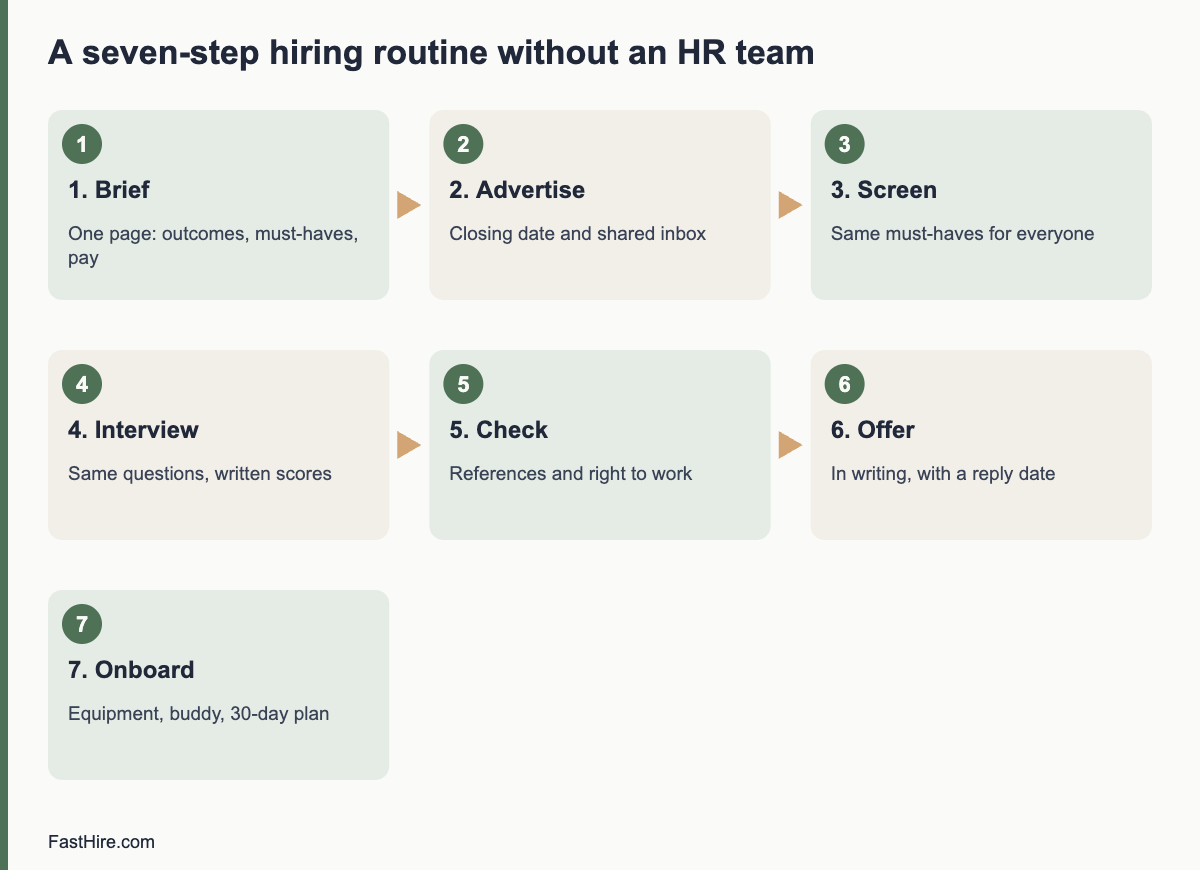
    You can hire well without an HR team if you write the role down, use one simple process for every candidate, keep short records and give each task a named owner. HR teams add structure and memory. A small business can add the same two things with a spreadsheet, a shared inbox and a few templates.

    Key takeaways

    • Give hiring one owner and one backup. Unowned tasks are the main reason small teams lose good candidates.
    • Use a seven-step process every time: brief, advertise, screen, interview, check, offer, onboard.
    • Keep three records: the role brief, a candidate sheet and interview notes.
    • Treat law as a checklist by country: right to work, written terms, payroll registration and non-discrimination.
    • Ask an accountant, payroll provider or employment adviser for what you cannot check yourself.

    What an HR team normally does for you

    Before you build a process, it helps to know what you are replacing. In a company with an HR team, HR usually covers these jobs.

    • Structure: a standard way to open a role, approve it and close it.
    • Writing: job descriptions, ads, offer letters and contracts.
    • Fairness and law: consistent questions, non-discrimination, right-to-work checks and written terms.
    • Records: who applied, who was interviewed, why decisions were made and when data was deleted.
    • Onboarding: accounts, equipment, payroll set-up and a first-week plan.
    • Memory: what worked last time and what to change.

    You do not need a department for any of these. You need a repeatable routine and a place to write things down.

    x

    Step 1: Name an owner and set the ground rules

    Choose one person to run each hire from start to finish. In a very small business, that is the founder or the office manager. Choose a backup who can answer candidates if the owner is away. Then write three rules on one page.

    1. Speed: every applicant gets a first reply within a set time, for example five working days.
    2. Fairness: every candidate for the same role is judged on the same written must-haves and gets the same core questions.
    3. Records: the owner keeps one folder per role with the brief, the candidate sheet and the interview notes.

    Step 2: Write a one-page role brief

    The brief is the most useful document in hiring. It keeps you honest when a charming candidate turns up. Keep it to one page with five parts: the purpose of the role, three to five outcomes for the first 90 days, the main tasks, the must-haves and the working conditions including the pay range.

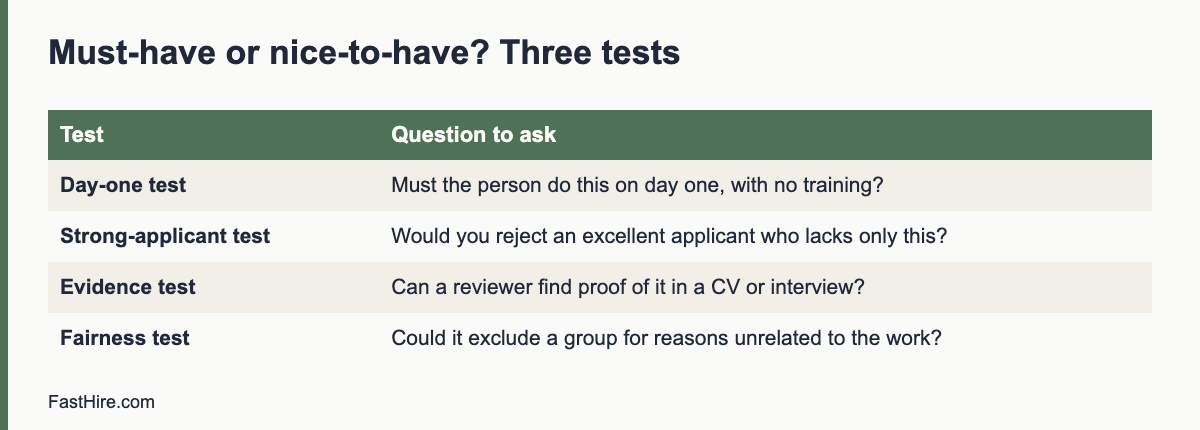
    Keep the must-haves short and checkable. “Two years of bookkeeping work in any setting” can be checked in a CV. “Great attitude” cannot. Our guides on must-haves and nice-to-haves and checkable job requirements show how.

    Step 3: Advertise in a way you can manage

    Post the job where your future colleagues look, and set a closing date. A closing date lets you read all applications together. Use a shared email address, such as jobs@yourcompany, so that applications do not sit in one person’s inbox. Add one question to the application, for example “Tell us about a time you solved a problem like the one in this role”, so that you can see how people write and think.

    Write the ad from the brief. For a worked example, see our first hire plan. Avoid wording that points to a protected group. The US Equal Employment Opportunity Commission explains the rule on job ads on its page about prohibited employment policies and practices.

    Step 4: Track every candidate in one sheet

    A spreadsheet is enough for a small business. Use one row per candidate and these columns.

    ColumnWhat to writeWhy it matters
    Name and contactAs given by the candidateSo that you can reply
    SourceWhere they found the adShows which channels work
    Must-have 1 to 5Yes, no or unclear, with a note from the CVShows the evidence behind each decision
    StageApplied, screened, interviewed, offered, declined, rejectedShows what to do next
    Last contact dateThe date you last wrote to themPrevents candidates from waiting without news
    Delete byThe date you will delete their dataSupports data protection rules

    Share the sheet only with the people who need it. It holds personal data, so protect it with a password or access control and delete it on schedule. In the UK and the EU, data protection law applies to applicants. The UK Information Commissioner’s Office explains the rules in its guidance on recruitment and selection.

    Step 5: Screen and interview the same way each time

    Screen against the must-haves only. Then plan six to eight interview questions that match the outcomes in the brief. Ask each candidate the same questions in the same order. Write notes during or straight after the interview. Score each answer on a simple scale, such as 1 to 4, and write one sentence about what the person said or did.

    A small business can run this with two people in the room: one asks, one writes. Afterwards, each person scores alone before you compare. This reduces the pull of the first strong impression.

    Step 6: Make the checks you need

    Checks protect you and the candidate. Keep them short, and make the same checks for everyone in the same role.

    • References: ask permission first, and ask each referee the same questions.
    • Right to work: this is a legal duty in the US, the UK and EU member states, and the method differs. In the UK, follow the GOV.UK guide to checking a job applicant’s right to work. In the US, you complete Form I-9 after hiring.
    • Qualifications or licences: check only those that the role really needs.

    Step 7: Make the offer, then onboard

    Confirm the offer in writing with the job title, start date, pay, hours, location, notice period and any probation period. Then complete the legal set-up. The US Small Business Administration lists the main steps for US employers. The GOV.UK recruiting and hiring page lists them for the UK. In the EU, the rules are national, so ask your payroll provider or labour authority.

    Prepare day one before the person arrives: equipment, accounts, a buddy and a first-week plan. Our first hire plan has a simple 30-day structure.

    Who does what: a simple split for a small team

    TaskOwnerBackup or helper
    Role briefHiring owner with the future managerFounder
    Ad and applicant inboxHiring ownerOffice manager
    ScreeningHiring owner and the future manager separatelySecond reviewer for a sample
    InterviewsFuture manager and one other personHiring owner
    Right-to-work and payroll set-upOffice manager or founderAccountant or payroll provider
    Contract and legal questionsFounderEmployment adviser or lawyer

    When to bring in outside help

    You do not have to do everything yourself. Pay for help with the parts where an error is costly or hard to see: employment contracts, dismissals, immigration or visa questions, pay and benefits law, and anything that looks like a discrimination claim. In the UK, the free helpline and guides at Acas are a good first place to look for recruitment questions.

    Common mistakes when you have no HR team

    • Hiring by conversation only. Without notes, you remember the best talker, not the best candidate.
    • Changing the requirements after you have met someone you like. Write the must-haves first and keep them.
    • Letting applicants wait. Silence loses good people and harms your reputation.
    • Keeping every resume forever. Set a deletion date and follow it.
    • Skipping the written offer. A verbal promise causes disputes later.

    A weekly rhythm that keeps hiring moving

    Set a fixed 30-minute slot each week while a role is open. Use it to read new applications, update the sheet, send replies and book interviews. In most small teams, speed comes from this rhythm, not from more tools.

    FastHire is being built to help with the reading step, by showing each job requirement next to the exact CV passage that supports it. FastHire is coming soon. It does not rank, score or reject candidates. You and your team make every decision.

    Templates you can copy today

    Short, plain messages save time and treat candidates with respect. Adapt the wording to your own voice.

    1. Acknowledging an application

    Subject: Your application for [role]

    Hello [name],

    Thank you for applying for [role] at [company]. We close applications on [date]. You will hear from us by [date], whether or not we invite you to interview.

    If you need any adjustment to take part in the process, such as a different interview format or extra time, please tell us and we will arrange it.

    [Your name]

    2. Inviting a candidate to interview

    Subject: Interview for [role] on [date]

    Hello [name],

    We would like to invite you to an interview for [role]. It will take about 45 minutes, on [date] at [time], at [place or video link]. You will meet [names and job titles].

    We will ask about your recent work and how you would handle examples from this role. You do not need to prepare slides or tasks. If another time or format would suit you better, tell us and we will find one.

    [Your name]

    3. Declining a candidate after interview

    Subject: Your interview for [role]

    Hello [name],

    Thank you for the time you gave us. We have decided to continue with another candidate, whose experience matched the role more closely on [one specific, job-related reason].

    We liked [one real strength]. If you would like short feedback, reply to this message and we will send it.

    [Your name]

    4. A one-page interview note template

    FieldWhat to write
    Candidate and dateName, role, interviewer
    Question 1 to 6What the candidate said they did, in one or two lines
    Evidence for each must-haveQuote or note from the interview or CV
    Score for each answer1 to 4, using the same scale for every candidate
    Open questionsWhat you still need to check, for example a reference
    RecommendationMove on, hold or decline, with the reason in one sentence

    A worked example: a six-person design studio hires an office manager

    A studio with six people has no HR team. The founder, Lena, owns hiring and her colleague Tom is the backup. Lena writes a one-page brief: purpose (keep the office running so designers can focus), three outcomes (invoices sent weekly, supplier orders on time, a tidy calendar), five must-haves (one year of administration work, clear writing, accuracy with numbers, comfort with spreadsheets, availability five days a week) and a pay range.

    She posts the ad for two weeks. Forty-one people apply. She reads them in one sitting against the five must-haves and marks yes, no or unclear. Twelve have all yes marks and four have unclear marks. She sends the four a single question by email. Three answer, so fifteen candidates move on. Tom and Lena each phone-screen for 15 minutes using three questions. Six candidates reach a one-hour interview with the same eight questions. They score alone, then meet for 20 minutes to compare notes. Two candidates tie, so they use a short paid task that mirrors real work: tidy a messy supplier list in 30 minutes. Lena checks two references for the top candidate and sends a written offer. This sample is an illustration only. The numbers are invented to show the flow, not results from any study or customer.

    The whole process takes about five weeks, including the notice period. No special software is used. What makes it work is the written brief, the shared sheet and the same questions for everyone.

    Frequently asked questions

    Do I need HR software to hire without an HR team?

    No. A spreadsheet, a shared inbox and a calendar are enough for most small teams. Consider software when you run several roles at once or when the sheet becomes hard to protect and keep tidy.

    What is the minimum paperwork for a hire?

    You should keep the role brief, the candidate sheet and your interview notes, plus a written offer and the legal documents your country requires, such as right-to-work checks and written terms.

    How do I keep hiring fair without an HR person?

    Use the same written must-haves and the same questions for every candidate, score each answer on a fixed scale and record your reasons. Do not ask about protected characteristics.

    Who should interview candidates?

    The future manager and one other person who understands the role. Two interviewers make notes more reliable and reduce the effect of personal preference.

    How long should I keep applicant data?

    Keep it only as long as you need it, and set a deletion date. Rules differ by country, so check your regulator’s guidance. In the UK, see the ICO page linked above.

    Related guides

    This is general information, not legal advice.

  • What a bad hire really costs, and how to lower the risk

    What a bad hire really costs, and how to lower the risk

    A bad hire costs more than the salary you paid. You also pay for recruitment time, training, errors, lost customers, extra work for colleagues and the cost of hiring again. There is no single trusted figure that fits every business, so the useful step is to estimate your own cost with a simple worksheet and then reduce the risk with a fair, evidence-based process.

    Key takeaways

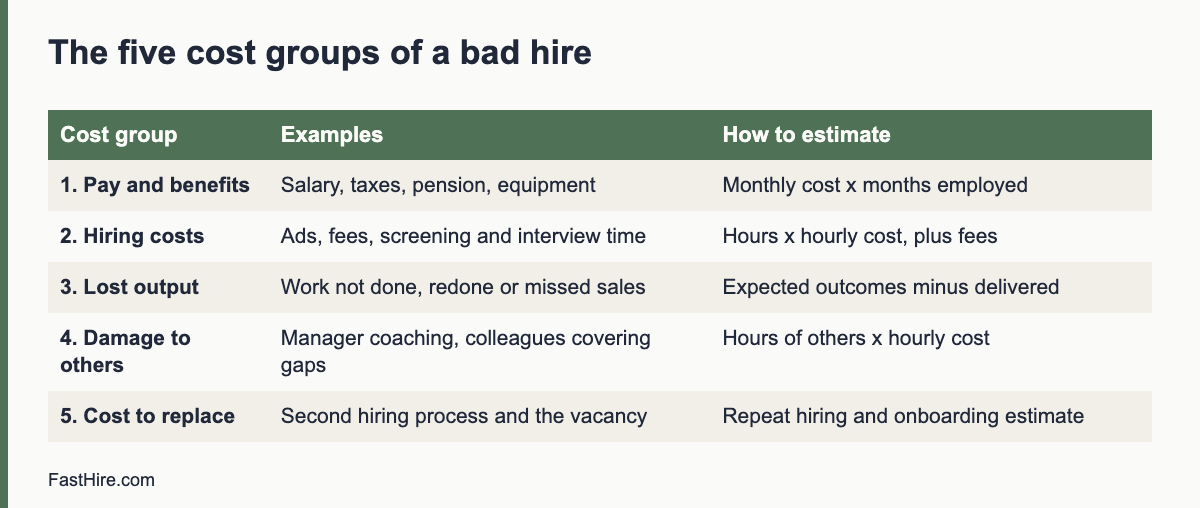
    • Count five cost groups: pay and benefits, hiring costs, lost output, damage to others and the cost to replace.
    • Use your own numbers. Averages from other firms rarely fit a small business, and many published figures have no clear source.
    • Most mis-hires start before the interview: a vague role, an unclear must-have list or a rushed process.
    • Ten controls lower the risk: a written brief, checkable must-haves, structured interviews, work samples, references, a clear offer, onboarding, early check-ins, fair probation use and prompt action.
    • Fairness is part of risk control. A decision based on evidence is easier to defend and more often right.
    x

    What “bad hire” means

    A bad hire is a person who does not meet the main outcomes of the role after a fair chance. Sometimes the person lacks a skill. Sometimes the role was never clear, the manager gave little support or the person and the business did not suit each other. All three produce the same cost, so it helps to ask early: was this a person problem, a role problem or a management problem? The answer decides what to fix.

    Be careful with the label. A person who struggles in the first weeks is not a bad hire yet. Most people need time and support. Treat “bad hire” as a conclusion you reach after clear goals, honest feedback and enough time, not as a first reaction.

    The five groups of cost

    Cost groupExamplesHow to estimate it
    1. Pay and benefitsSalary, employer taxes and social contributions, pension or retirement contributions, insurance, equipment and software for the months the person workedMonthly cost of the person multiplied by months employed
    2. Hiring costsJob ads, agency fees, your time and your colleagues’ time to screen and interview, background checksHours spent multiplied by an hourly cost, plus fees
    3. Lost outputWork that was not done, done wrongly or redone; missed sales; delayed projectsValue of the outcomes expected minus what was delivered
    4. Damage to othersManager time spent coaching, colleagues covering gaps, customer complaints, a drop in team moraleHours of other people’s time multiplied by their hourly cost, plus any lost revenue
    5. Cost to replaceA second hiring process, a gap with no one in the role, onboarding and training the next personRepeat the hiring and onboarding estimate, plus the vacancy period

    Group 3 and group 4 are the hardest to measure and often the largest. You can still estimate them with honest ranges, for example “two hours a week of manager time for twelve weeks”.

    A worksheet you can copy

    Open a spreadsheet and fill in these lines. Use your own figures. The example below is arithmetic to show how the sheet works, not a benchmark or a statistic.

    LineYour figureExample (hypothetical)
    A. Monthly cost of the employee (pay, taxes, benefits, equipment)[you fill in]3,500 per month
    B. Months employed[you fill in]4 months
    C. Hiring cost the first time (hours x hourly cost + fees)[you fill in]1,200
    D. Manager and colleague time lost (hours x hourly cost)[you fill in]60 hours x 30 = 1,800
    E. Value of lost or redone work and lost sales[you fill in]1,500
    F. Cost of the second hiring process and the vacancy[you fill in]1,400
    Total = A x B + C + D + E + F[you fill in]14,000 + 1,200 + 1,800 + 1,500 + 1,400 = 19,900

    When you do this for a real case, you usually find that the salary is less than half of the total. Use the total to decide how much time and money it is worth spending on a better hiring process. If one mis-hire costs more than a small business earns in a month, a few extra hours on a role brief and structured interviews are a bargain.

    Where mis-hires really start

    Look back at your last difficult hire. In most cases, the problem began in one of these places.

    • An unclear role. If you cannot say what the person must achieve in 90 days, you cannot judge a candidate or a new hire.
    • A wish list instead of must-haves. Long lists make you hire for charm or for the one flashy item.
    • An unstructured interview. A friendly conversation tests rapport, not skill.
    • No evidence. Decisions by feeling cannot be checked, repeated or defended.
    • Rushing. Urgency pushes teams to settle for the first acceptable candidate.
    • Weak onboarding. A good hire can fail because nobody explained what good looks like.

    Ten controls that lower the risk

    1. Write a one-page role brief with outcomes for the first 90 days. See our first hire plan for the format.
    2. Set three to five checkable must-haves and keep them fixed. See must-haves vs nice-to-haves.
    3. Advertise clearly, with pay, location and process, so that people can screen themselves. See how to write a job ad.
    4. Screen on evidence. Note the CV line that supports each must-have. See how to screen applications quickly.
    5. Use a structured interview. The same questions, the same order and a scoring scale for every candidate.
    6. Add a work sample for roles where you can test the real task in 30 to 60 minutes. Pay candidates for tasks longer than an hour.
    7. Check references with the same questions for each referee, after you ask permission.
    8. Make a clear written offer with the terms, so that nobody starts with different expectations.
    9. Onboard on purpose. Give a 30-day plan, a buddy and a check-in each week.
    10. Act early. If the first 30 days show a gap, say so, offer help and write down the plan. Do not wait for month six.

    Early warning signs, and what to do

    Most mismatches show up in the first month, but they only matter if you notice them. Watch for these signals and respond in a fair, documented way.

    SignalFirst response
    The person misses the first small deliverablesCheck that the goals were clear and the tools worked. Agree a short, specific target for the next week.
    The person asks few questions or hides problemsAsk for a short daily update for two weeks. Explain that questions are expected.
    Colleagues report frictionListen to both sides. Look for facts, such as missed handovers, not for personality labels.
    The person says the job is not what they expectedCompare the job as advertised with the job as done. If the ad was inaccurate, fix the ad and the role.

    Write notes after each conversation. If you later need to end the employment, the notes show what you said and when. Rules for notice, probation and dismissal differ by country and change over time. In the US, the Department of Labor describes federal rules on termination, and state law adds more. In the UK, GOV.UK explains dismissal rights, and Acas offers guidance for employers. In the EU, rules are mainly national. Ask an employment adviser before you dismiss anyone.

    Probation and trial periods: use them well

    A probation or trial period is a useful check, but it is not a safety net for a weak process. Rules differ widely. Some countries set a legal maximum, some do not use the concept at all, and employment protections may still apply during probation. Write the terms in the contract, set review dates (for example at 30, 60 and 90 days) and give honest feedback at each one. Our guide to the probation period in each country will cover this in more detail.

    The fairness side of risk

    A hiring process that follows written criteria is also a fairer process. Decisions based on evidence are easier to explain, and you reduce the risk of a discrimination claim. In the US, the Equal Employment Opportunity Commission lists the main rules on its page about prohibited employment policies and practices. In Great Britain, the Acas page on recruitment explains the duty not to discriminate when choosing who to hire.

    FastHire is being built around the same idea: show each job requirement next to the exact CV passage that supports it, so that people decide on evidence. FastHire is coming soon. It does not rank, score or reject candidates. People make every decision.

    A short post-mortem after a mis-hire

    If a hire does not work out, write a one-page review within a week. Answer five questions: What did we need? What did the ad and the interviews say we were getting? What did we see in the first 30 days? Which step in the process could have shown the gap earlier? What will we change in the next hire? Share it with the people who took part. The aim is to improve the process, not to blame a person. One honest review is worth more than any benchmark.

    A 30-day check-in script that catches problems early

    A short, structured conversation at 30 days is the cheapest control on this list. Block 45 minutes and use the same outline for every new hire. Share the questions a day earlier so that the person can think.

    1. What has gone well so far? Let the person speak first. Note specific examples.
    2. Which outcomes from the role brief are on track, and which are not? Go through the three to five outcomes one by one. Use facts, such as deliverables and dates.
    3. What has been harder than expected? Listen for gaps in tools, training or information that you can fix.
    4. What do you need from me? Offer support before you give criticism.
    5. What will we both do in the next 30 days? Write down two or three clear actions with dates.

    Then give your own feedback in the same order. A useful sentence has three parts: what you saw, why it matters and what you want to see next. For example: “The weekly report was two days late both times. The team plans its Monday around it. Please send it by Friday noon from now on, and tell me on Thursday if you are at risk.”

    Write a five-line summary after the meeting and send it to the person. If the 60-day check shows no progress on the same point, you have a record that you were clear and fair, and the person has had a real chance. If the person grows, you have also learned something about how to onboard the next hire.

    Decision table: stay, support or exit

    What you see at 30 to 90 daysLikely causeNext step
    Good outcomes, slow startNormal learning curveKeep the plan and review again in 30 days
    Mixed outcomes, willing and open to feedbackGaps in training or unclear goalsAdd training, clarify goals, check again in two weeks
    Missed outcomes and no change after clear feedbackSkill or fit mismatchTake advice on the legal steps in your country, then decide
    Conduct problems such as dishonesty or harassmentConduct, not performanceFollow your policy and the law at once, and take advice

    Use the table as a thinking aid, not a rule. Each case has its own facts, and local employment law may limit what you can do and how fast.

    Frequently asked questions

    How much does a bad hire cost?

    It depends on the role, the pay and how long the problem lasts. Use the worksheet above to estimate your own figure. Be careful with published averages that do not name their source.

    Is a bad hire always the candidate’s fault?

    No. Unclear roles, poor onboarding and weak management cause many failures. Ask what you could have done differently before you decide.

    How can I reduce the risk of a bad hire without spending much?

    Write the role brief, set checkable must-haves, ask the same questions of every candidate and check references. These steps cost hours, not money.

    Should I fire quickly if I realise it is a mistake?

    Act early, but fairly. Give clear feedback and a short chance to improve, write down what you say and follow the legal rules for your country.

    Do work samples help?

    They can, because they test the real task. Keep them short, relevant and accessible, and pay for longer tasks.

    Related guides

    This is general information, not legal advice.

  • Must-haves vs nice-to-haves: cutting your applicant pile without unfair filters

    Must-haves vs nice-to-haves: cutting your applicant pile without unfair filters

    When a role attracts a large number of applications, the temptation is to cut the pile fast. Add a filter, reject anyone missing a keyword, and get down to a number you can read. It works, in the sense that the pile gets smaller. Whether it gets smaller in the right way is another question.

    The tool most hiring teams already have for this is the split between must-haves and nice-to-haves. Used well, it lets you narrow a pile quickly and defensibly. Used badly, it quietly turns preferences into hard rules and excludes people who could have done the job. This post is about using it well.

    Key takeaways

    • A must-have is a requirement where missing it means you would not hire the person, even if everything else is excellent.
    • Keep the must-have list to three to five items, each written so that a reviewer can find proof in a CV or an interview.
    • Nice-to-haves help you choose between people who already meet the must-haves. Do not use them to reject.
    • Test every requirement for fairness: could it exclude a group for reasons unrelated to the work?
    • Write the list before you read applications, and keep it the same for everyone.
    x

    What makes something a must-have

    A must-have is a requirement where, if a candidate does not meet it, you would not hire them even if everything else about them was excellent. That is a high bar, and it should be.

    A good way to test each requirement is to imagine the strongest possible applicant who lacks just that one thing. Would you really turn them down?

    • A pharmacist without a professional registration: yes, you would have to. Must-have.
    • A data analyst who has used every major BI tool except the one you happen to use: probably not. They could learn it. Nice-to-have.
    • A delivery driver without a driving licence: yes. Must-have.
    • A marketing manager without a marketing degree but with years of running campaigns: almost certainly not. Not even a nice-to-have, perhaps.

    Most roles have three to five genuine must-haves. If your list is longer, some of them are preferences wearing a must-have badge.

    Common traps

    Copying last year’s advert

    Requirements accumulate. Each time a role is reopened, someone adds a line about the thing the last hire struggled with, and nothing is ever removed. Before you reuse an advert, go through each requirement and ask whether the current team still needs it.

    Must-haves that describe the last person

    It is natural to picture whoever did the job before and write down their background. But their exact path is one route into the role, not the only one. “Has worked at a Big Four firm” describes a person. “Has prepared statutory accounts for limited companies” describes the work.

    Proxies instead of the real thing

    Degrees, years of experience and job titles are often used as stand-ins for skills. They are quick to filter on, which is why they are popular. They are also where unfairness tends to hide. A requirement for a degree can exclude capable people from backgrounds less likely to have gone to university. A requirement for a number of years can disadvantage younger candidates, and sometimes older ones too.

    In the UK, the Equality Act 2010 treats a rule that applies to everyone but puts people with a protected characteristic at a particular disadvantage as indirect discrimination, unless the employer can show it is a proportionate means of achieving a legitimate aim. In the Netherlands, the Algemene wet gelijke behandeling and related acts work in a similar way, and the College voor de Rechten van de Mens gives opinions on complaints about recruitment. A must-have that you cannot justify in terms of the work is a risk, not just a missed opportunity.

    Language requirements set higher than the job needs

    “Native English speaker” or “moedertaal Nederlands” excludes people based on where they grew up rather than how well they speak. If the job needs strong language skills, describe the level and the use instead: “Can write formal letters to customers in Dutch” or “Can present to clients in English”. That is checkable, and it is about the work.

    Writing nice-to-haves that help

    Nice-to-haves are useful. They tell candidates what would make them stand out and give reviewers a way to tell apart applicants who all meet the must-haves. The trouble is that many candidates, and many reviewers, read them as hidden must-haves.

    A few habits make them work better:

    • Label them clearly. Put them under a separate heading such as “Useful but not required”. Do not mix them into the main list.
    • Say they are optional. A short line like “If you meet the requirements above but not these, we would still like to hear from you” makes a real difference to who applies.
    • Keep them short. Three or four is plenty. A long list of extras signals that you expect all of them.
    • Never filter on them. Nice-to-haves are for reading and comparing, not for rejecting.

    Filtering on must-haves without silent exclusion

    Once you have a short list of real must-haves, it is reasonable to use them to narrow the pile. How you do it matters.

    Make the filter visible

    If a filter removes applications, someone on the hiring team should be able to see how many it removed and why. A filter that silently drops people gives you no way of noticing when it goes wrong. Seeing “this filter hid 40 applications” is a prompt to look at a few of them.

    Look at what was filtered out

    Read a sample of the applications a filter excluded, especially early on. Keyword filters miss people who describe the same experience in different words. “Managed the books” and “ran bookkeeping” mean the same thing; a filter looking for “accounts” may catch neither. A quick look tells you whether your must-have is doing what you meant.

    Let candidates answer factual questions themselves

    For must-haves that are facts rather than skills (right to work, a licence, availability to start), ask the candidate directly with a yes/no question. It is more accurate than inferring the answer from a CV, and it respects the candidate’s own account of their situation.

    Keep a person responsible for every rejection

    Filters can sort and narrow, but someone should own the decision to reject. If a candidate asks why they were not taken forward, a person on your team should be able to answer with reference to a requirement the candidate did not meet. If your process relies on automated decisions with significant effects, UK GDPR and the GDPR in the Netherlands add specific rules on solely automated decision-making. The ICO’s guidance on automated decision-making is a sensible starting point.

    A quick checklist

    Before you publish an advert or set up a filter, run through these:

    1. Do I have three to five must-haves, and could I justify each one in terms of the work?
    2. Have I removed requirements that are proxies (years, degrees, job titles) where the real skill can be stated directly?
    3. Are language requirements described as a level and use, not as nationality or mother tongue?
    4. Are nice-to-haves clearly labelled as optional, and am I sure no filter uses them?
    5. Will I be able to see how many applications a filter excluded, and will I look at some of them?
    6. Are factual must-haves asked as yes/no questions the candidate answers themselves?
    7. Is there a person who owns each rejection and could explain it?

    The point of the split

    Separating must-haves from nice-to-haves is not paperwork. It is how you make your applicant pile smaller for good reasons, while being able to explain those reasons to a candidate, a colleague or a regulator. A short, honest must-have list, applied visibly and checked by a person, is quicker to review and fairer to the people applying. Both of those are worth having.

    If you have not yet written your requirements in a way candidates can check, start with how to write job requirements candidates can actually check themselves against.

    A 20-minute sorting exercise

    Most lists of requirements grow over time. Different people add items, and nobody removes them. A short exercise with the hiring manager can fix this. You need the draft list, a timer and a shared document.

    1. Write every requirement on its own line. Include skills, experience, qualifications, tools and traits. Aim to get all items on the page in five minutes.
    2. Apply the day-one test. For each line ask: must the person do this on their first day, without training? If the answer is “they could learn it in three months”, move it to nice-to-have or to the onboarding plan.
    3. Apply the strong-applicant test. Imagine an excellent applicant who lacks only this item. Would you still decline them? If not, it is not a must-have.
    4. Apply the evidence test. Write what a reviewer would see in a CV or hear in an interview as proof. If you cannot write it, rewrite the item or drop it.
    5. Apply the fairness test. Ask whether the item could exclude people because of age, sex, race, religion, disability, family status or nationality, without being needed for the work. Examples of risky items: “recent graduate”, “native speaker”, “no career gaps”. Replace each with a precise skill or task.
    6. Count. If more than five must-haves remain, vote on the three that matter most and move the rest down.

    Save the final list in the role brief and share it with everyone who will review applications.

    A fictional example: operations coordinator

    This example is invented to show the method. A manager lists eight requirements for an operations coordinator. After the exercise, the list changes as shown.

    Original requirementResultReason
    Degree in businessDroppedStrong applicants without a degree could do the job; the work needs skills, not the qualification
    Five years in operationsRewritten as must-have: “has coordinated schedules or orders for a team, paid or unpaid”Checks the task, allows different routes
    Excel expertRewritten as must-have: “builds and checks spreadsheets for tracking work”Describes the task and leaves out vague “expert”
    Knows our order systemNice-to-haveCan be learned in the first month
    Excellent communicatorRewritten as must-have: “writes clear emails to customers or suppliers”Observable in a task or CV example
    Young, energetic team playerDropped“Young” signals age; “energetic” is not measurable; teamwork is tested in interviews
    Own transportDroppedNot needed for the work; may exclude people unfairly
    Fluent in a second languageNice-to-haveHelpful but not essential

    The final list has three must-haves, each with a way to check it, and two nice-to-haves. The pool grows, and each reviewer knows what to look for.

    How must-haves connect to evidence in a CV

    A must-have is only useful if you can see it. After you write the list, add an “evidence” column that says what counts. For “writes clear emails to customers or suppliers”, evidence could be a job task that includes customer email, a link to a writing sample, or a description of a project that required written replies. What does not count alone: the phrase “excellent communicator”. Our guide on screening resumes against must-haves with evidence shows how to record a yes, no or unclear mark for each applicant with the CV passage behind it. If a CV does not show a must-have clearly, mark it unclear and ask the same short question of every applicant in that position, instead of rejecting them.

    Using nice-to-haves well

    • Use them to choose between candidates who all meet the must-haves, never to remove people from the pile.
    • Limit them to three to five. More than that creates noise.
    • Weigh them in the final decision, not in the first screening.
    • Say which ones can be learned. A candidate without a nice-to-have but with strong must-haves may become a strong hire with training.
    • Avoid hidden must-haves. If a nice-to-have decides every outcome, it is a must-have and belongs on the list, with a test.

    Keep the list stable

    Changing requirements after you have read some CVs is a common source of unfairness. People tend to change the list to fit the candidates they like. If a change is needed, write down what changed and why, apply it to everyone, including applicants you already declined, and tell the recruiter. See our guide on how to write checkable job requirements for more on wording.

    The official sources on equal treatment give the baseline for fairness. In the US, see the Equal Employment Opportunity Commission page on prohibited employment policies and practices. In Great Britain, see Acas on recruitment. In the EU, see the Employment Equality Directive and your national law.

    FastHire is being built around this split. It shows each job requirement next to the exact CV passage that supports it, so you can see which must-haves a CV shows and which are unclear. FastHire is coming soon. It does not rank, score or reject candidates. People make every decision.

    Frequently asked questions

    How many must-haves should a role have?

    Three to five is a good range. A longer list shrinks the pool and often contains items that could be learned.

    Is a degree ever a must-have?

    Yes, when the law or a regulator requires a qualification, such as for a licensed profession. In other cases, ask whether the skills can be shown in other ways.

    What if I get too few applicants who meet all must-haves?

    Check whether each must-have passes the day-one test. Move items that can be learned to nice-to-have, and review the advert and pay range.

    Can I use keyword filters for must-haves?

    Be careful. Keyword filters can miss people who use different words. Use them to find passages, and have a person read before anyone is declined.

    Should candidates see the must-haves?

    Yes. Put them in the advert in plain words. Candidates can then judge their own fit before they apply.

    Related guides

    This is general information, not legal advice.
  • What the EU AI Act means for hiring tools in 2026 (plain English, not legal advice)

    What the EU AI Act means for hiring tools in 2026 (plain English, not legal advice)

    This post is a plain-English overview, not legal advice. The rules are detailed, their timing has been the subject of proposals to change it, and how they apply to you depends on your situation. Check the official text and take advice before relying on any of this.

    If you hire in the Netherlands, or you hire people in the EU from the UK, you have probably heard that the EU AI Act affects recruitment software. That is true. This post sets out what the law says about hiring, in plain language, with links to the sources.

    Key takeaways

    • The EU AI Act sorts AI systems by risk. AI used for recruitment and selection is listed among the high-risk uses.
    • A few practices are banned outright. Most hiring tools are not banned, but high-risk tools carry duties.
    • Providers (who build tools) and deployers (employers who use them) have different duties.
    • Application dates have been the subject of proposals to change them. Read the official text for current dates. We do not state dates here.
    • A person should make each hiring decision, with the evidence in front of them.
    x

    What the AI Act is

    The AI Act is Regulation (EU) 2024/1689. It entered into force in August 2024. As a regulation, it applies directly in every EU member state, including the Netherlands, without needing a separate Dutch law to copy it.

    It does not regulate “AI” in general. It sorts AI systems by what they are used for and sets rules according to the risk of that use. Most uses carry few or no new obligations. A short list of practices is banned outright. And a set of uses listed in the Act are treated as high-risk, with significant obligations attached.

    Why hiring is in the high-risk group

    Annex III of the Act lists the high-risk areas. Point 4 covers employment. It includes AI systems intended to be used:

    • for the recruitment or selection of people, in particular to place targeted job adverts, to analyse and filter job applications, and to evaluate candidates; and
    • to make decisions affecting terms of work relationships, promotion or termination, to allocate tasks based on behaviour or personal traits, or to monitor and evaluate performance and behaviour.

    In plain terms: if an AI system reads applications and sorts, filters or assesses candidates, it is very likely to be high-risk. Hiring decisions have a large effect on people’s lives, and automated systems can repeat unfair patterns at scale.

    There are narrow exceptions in Article 6(3) for systems that only perform a narrow procedural task or a preparatory task and do not materially influence the outcome. Whether a given tool falls under them is a question for careful analysis, not something to assume because a vendor says so.

    Something that is already banned

    Article 5 lists prohibited practices, and these have applied since 2 February 2025. One of them is directly relevant to hiring: using AI systems to infer the emotions of a person in the workplace, except for medical or safety reasons. A video interview tool that claims to read a candidate’s enthusiasm or honesty from their face or voice is the kind of thing this was aimed at. If you use or are offered anything like that, pause and get advice.

    Providers and deployers

    The Act puts different duties on different parties.

    • The provider is whoever develops the AI system and places it on the market under its name. For most employers, that is the software vendor.
    • The deployer is whoever uses the system under its authority in a professional setting. If you use an AI hiring tool to process applications, you are a deployer.

    Providers carry most of the technical obligations. Deployers have a shorter but real list.

    What deployers of high-risk hiring tools have to do

    Article 26 sets out the main deployer obligations. In plain English, an employer using a high-risk AI hiring system should expect to:

    1. Use it as instructed. Follow the provider’s instructions for use, and do not use it for purposes it was not designed for.
    2. Put people in charge. Assign human oversight to people who have the competence, training and authority to do it, and the support they need. Article 14 explains what that oversight is meant to achieve, including being able to disregard or override the system’s output.
    3. Check your input data. Where you control the data going in (for example, the job requirements you configure), make sure it is relevant and sufficiently representative for the purpose.
    4. Monitor and report. Keep an eye on how it is working, and tell the provider, and in some cases the authorities, if you see a serious risk or incident.
    5. Keep the logs. Keep the automatically generated logs under your control for at least six months, unless other law says otherwise.
    6. Tell your workforce. Before putting a high-risk system into use at the workplace, inform workers’ representatives and affected workers. In the Netherlands that is likely to involve your works council (ondernemingsraad), which may have its own rights under Dutch law.
    7. Tell candidates. Inform people who are subject to decisions made or assisted by the system that it is being used.

    On top of that, Article 86 gives people affected by certain decisions based on a high-risk system the right to a clear and meaningful explanation of the role the system played. And Article 4, which has applied since February 2025, expects both providers and deployers to take measures to ensure a sufficient level of AI literacy among the staff who deal with AI systems.

    When this applies

    The general timetable in Article 113 makes most high-risk obligations, including those for Annex III systems such as hiring tools, apply from 2 August 2026. However, in November 2025 the European Commission proposed changes, known as the Digital Omnibus, that would delay the high-risk obligations, linking them to the availability of supporting standards and guidance. At the time of writing you should check the current position on the European Commission’s AI Act pages and with your advisers rather than assume either date.

    Whatever the final date, most of what the Act asks of deployers is good practice anyway.

    What about the UK?

    The UK is not in the EU, so the AI Act does not apply there as UK law. But it can still reach UK employers. The Act applies to providers and deployers outside the EU where the output of the AI system is used in the EU. A UK company using an AI tool to assess candidates for a role in Amsterdam should assume it may be in scope.

    For purely UK hiring, the relevant rules are mainly UK GDPR, including its rules on solely automated decision-making, and the Equality Act 2010. The ICO has published recommendations for AI tools in recruitment following audits of providers, and these are a useful reference for any employer.

    Questions to ask your vendors

    If you use, or are considering, software that uses AI anywhere in your hiring process, these questions are a reasonable start:

    • Do you consider this system high-risk under Annex III of the AI Act? If not, why not?
    • What exactly does the system do with applications: does it sort, filter, assess or exclude anyone?
    • What are your instructions for use, and what human oversight do you expect from us?
    • What logs does the system keep, and how do we access them?
    • How have you tested it for unfair outcomes across groups of candidates?
    • How can a candidate find out how the system was involved in a decision about them?
    • Does any feature infer emotions, personality or honesty from video, audio or text?

    Unclear answers are themselves useful information.

    The short version

    The AI Act does not ban AI in hiring. It treats it as a high-stakes use, and asks the people building and using these tools to show they are being careful: clear instructions, real human oversight, records, openness with candidates, and no emotion reading at work. If your hiring process already keeps people in charge and can explain itself, you are most of the way there.

    Again: not legal advice. Read the official text and talk to an adviser about your own situation.

    A deployer checklist

    If you use an AI tool in hiring, the Act calls you a deployer. Article 26 of the AI Act sets out duties for deployers of high-risk systems. In outline, they include using the system according to the provider’s instructions, assigning human oversight to people with the competence and authority to do it, checking that the input data is relevant for the intended purpose where you control it, monitoring the system and reporting problems, keeping the logs the system generates for an appropriate period, and informing workers’ representatives and the affected workers before using a high-risk system at work. Read the article for the exact wording and conditions, and ask a lawyer how it applies to you.

    StepWhat to doEvidence to keep
    1. InventoryList every tool that sorts, filters, scores, ranks or evaluates applicantsThe tool list, with owner and purpose
    2. ClassifyFor each tool, decide with your vendor whether it falls under a high-risk use. Annex III lists recruitment and selection uses, such as analysing and filtering applications and evaluating candidatesA short note on the reasoning
    3. Ask the vendorRequest the instructions for use, the logging features and the vendor’s own documents on conformityVendor replies in writing
    4. Assign oversightName the people who review the tool’s output, give them time and authority, and train themNames, training dates
    5. Inform peopleTell candidates which tools are used. Tell employees and their representatives where the Act or national law requires itNotices and dates
    6. Keep logsKeep the logs the system produces, for at least the period set by the Act or longer if national law requiresLog settings and retention schedule
    7. ReviewCheck outcomes by sample, report problems to the vendor and to the authorities where requiredReview notes

    This table is a planning aid. It is not a full list of duties, and some of them depend on your role and your country. For data protection duties that run alongside, see our guides on GDPR for job applicants, GDPR Article 22 and impact assessments for hiring tools.

    What to do this month

    1. Write the tool list. One page, one line per tool.
    2. Switch off what you do not need. Features that rank or score people are the first to review. If a feature is not essential, turn it off.
    3. Email each vendor with five questions. What does the tool do? Is it intended for recruitment or selection? What documents do you provide? How do we use human oversight? How do we get logs?
    4. Name an owner. One person in HR or legal should track the vendor answers and official updates.
    5. Add a line to your candidate notice. If you use AI-assisted tools, say so in plain language and say that people decide.

    FastHire is being built to keep people in charge. It shows each job requirement next to the exact CV passage that supports it. It does not rank, score or reject candidates. People make every decision. FastHire is coming soon. If you assess FastHire or any other tool, use the checklist above.

    Frequently asked questions

    Does the EU AI Act ban CV screening software?

    No. The Act does not ban CV screening in general. It lists AI used for recruitment and selection among high-risk uses, which carry duties. A few specific practices are banned, and the official text lists them.

    Is a tool that only highlights text in a CV high risk?

    It depends on what the tool is intended to do and how it is used. Annex III lists uses such as analysing and filtering applications and evaluating candidates. Ask the vendor and a lawyer to classify the tool in your setting.

    I am a UK employer. Does this apply to me?

    It can, if you place a tool on the EU market, or if the output of a tool is used in the EU, or if you hire people in the EU. The UK has its own rules, including UK GDPR. Check both.

    What are the dates for these rules?

    Dates and any changes to them are set by the official text and by later amendments. Check the Official Journal and the European Commission pages for the current position. We do not state dates in this guide.

    Who is responsible, the vendor or the employer?

    Both have duties. Providers must meet requirements for the system they place on the market. Deployers, such as employers, must use it properly and provide human oversight. Contracts do not remove your own duties.

    Related guides

    This is general information, not legal advice.
  • How to hire your replacement when a team member leaves

    How to hire your replacement when a team member leaves

    When a team member leaves, do not copy their job description into a new advert. First check whether the role should stay the same. Then capture what the person knows before they go, write a fresh brief, plan cover for the gap, and start recruiting while the leaver is still there if the rules and the relationship allow it.

    Key takeaways

    • A resignation is a chance to ask what the role needs now, not only to refill it.
    • Capture knowledge in the notice period: processes, contacts, files, open work and risks.
    • Write a new role brief with must-haves and tasks, using what the leaver actually did.
    • Plan interim cover so the team is not overloaded while you hire.
    • Treat the leaver with respect. Their goodwill helps the handover and your employer brand.
    x

    Step 1: Pause and check the role

    The first reaction to a departure is often to hire the same person again. Pause for a day and ask four questions with your manager and, if relevant, finance.

    QuestionIf yesIf no
    Is the work still needed at the same level?Continue with the same roleConsider a smaller or different role
    Has the work changed since the role was written?Update the brief with the new tasksKeep the current brief, but check each task
    Could part of the work be moved to others or to a tool?Reduce the scope and say soKeep the full scope
    Is there someone inside the company who wants this role?Talk to them before you advertiseGo to an open search

    Check budget and approval rules in your company. In the UK, the US and EU alike, the way you describe and pay the role matters for fairness, so look at what the departing person was paid only as a reference. Do not set pay by what the previous person earned alone. Our guide to the cost of a bad hire explains why careful role design pays back.

    Step 2: Run a structured handover

    Knowledge leaves with the person unless you collect it. A good handover is a plan with dates, not a hope. Start on the first day of the notice period, or as soon as you know the date of leaving.

    1. Meet the leaver in the first week. Ask what they would want a successor to know. Keep it friendly and practical.
    2. List the work. Recurring tasks, deadlines, tools, contacts, access rights and open projects. Ask them to estimate the time each takes.
    3. Record the how. For each key task, write a short guide or record a screen video of the process. Use checklists with steps.
    4. Record the who. List the main internal and external contacts, with notes on what each one needs.
    5. Record the where. Files, folders, logins to be transferred under your security rules, and passwords never shared by email or chat.
    6. Identify risks. Which tasks only this person can do? Which have deadlines in the next 90 days?
    7. Assign owners. For each task, name who will cover it in the gap and who will own it after the new hire starts.
    8. Schedule a final review. In the last week, check the handover list and fill gaps.

    Be careful with personal data and access. When the person leaves, remove access to systems on their last day, in line with your policies. Do not ask the leaver to hand over personal account details. See the official pages on employing people for the UK and for the US if you need to review your obligations around leaving.

    Step 3: Write a fresh brief

    Use what you learned in the handover to write a role brief. It should list the top three outcomes in the first year, the main tasks, the must-have skills (as evidence you can check), and the nice-to-have skills. Do not copy the old job description. Descriptions drift, and old text may contain requirements that excluded good people. Read must-haves vs nice-to-haves for a method to separate them.

    Ask the people who work with the role what they need from it. A short survey of three questions is enough: what does this role do well for you, what is missing, and what should the next person do first? Use plain language and share the results with the recruiter at your kickoff meeting.

    Step 4: Plan the timeline

    Hiring takes time. Plan from three dates: the leaver’s last day, the date you want the new person to start, and the notice period that a likely candidate might have to serve. Notice periods vary by country, contract and level of seniority, so ask candidates early. Our guide on how long hiring takes helps you build a realistic plan from your own records. The table below shows the order of steps. It gives no durations, because these depend on your process.

    StageOwnerOutput
    Approval and role checkHiring manager and financeDecision on the role
    Handover planHiring manager and leaverList of tasks, owners and dates
    Role brief and advertHiring manager and recruiterBrief, advert, scorecard
    Sourcing and screeningRecruiterShortlist with evidence
    InterviewsHiring manager and panelScorecards and decision
    Offer and noticeRecruiter and hiring managerAccepted offer and start date
    OnboardingHiring managerFirst-week plan

    Where the law and the relationship permit, start the search while the leaver is still working. The overlap helps the handover and shortens the gap. But do not ask the leaver to interview their own replacement unless they agree and the conflict is managed. Be open and kind in how you handle it.

    Step 5: Cover the gap

    A gap puts pressure on the team. Decide how to cover the work before people burn out.

    • Triage the tasks. Sort into must-do now, can wait, and can be dropped. Tell the team and stakeholders what will wait.
    • Share the load fairly. Spread must-do tasks across several people, and agree how long this lasts.
    • Consider temporary help. An agency worker, a contractor or a fixed-term contract may fit. Check employment status and local rules. See the official pages on employment status in the UK and the IRS guidance on independent contractors or employees if you are unsure.
    • Review overtime rules. In the US, the Fair Labor Standards Act sets overtime rules for many workers. See the Department of Labor. In the UK and EU, working time rules apply. Do not ask people to work beyond legal limits.
    • Say thank you. Recognise the extra work. A short note and flexibility later often matter more than a gesture.

    Step 6: Prepare the next person to succeed

    Use the handover guides to build a first-month plan. Our onboarding guide gives a day-by-day outline. Tell the new hire what their predecessor did well, what was hard, and what you want them to change. Introduce them to the contacts you listed. If the leaver is open to it, ask whether they can answer a few questions by email in the first month. Many leavers are happy to help, but do not rely on it.

    Learn from the exit

    Departures are data. If the person leaves after a year, ask why. Hold an exit conversation that the leaver chooses to join, and ask neutral questions: what worked, what did not, and what would have kept you? Write themes without names, and share them with leadership. If several people leave a team for the same reason, the answer lies in the work, not in the hiring. A better advert cannot fix a role that people leave for the same reason every year.

    FastHire is being built for the screening stage that follows. It shows each job requirement next to the exact CV passage that supports it, so the new brief you write turns directly into evidence checks. FastHire is coming soon. It does not rank, score or reject candidates. People make every decision.

    A handover table you can copy

    Task or areaHow oftenWhere the guide isKey contactsRisk if missedOwner during gapOwner after hire
    Monthly report to financeMonthlyShared folder, guide v1Finance leadLate report; budget questionsNameName
    Customer onboarding callsWeeklyChecklist in team wikiCustomer successPoor first impressionNameName
    Supplier ordersTwice a monthOrder templateTwo suppliersStock shortageNameName

    The rows above are fictional examples. Replace them with the real tasks. Add one row for every task that could cause a problem in the first 90 days. Review the table in the final week with the leaver and the people who will cover the work.

    Tell people what is happening

    Departures cause uncertainty. A short, clear message prevents rumours. Agree the wording with HR and the leaver before you send it.

    Team message:
    [Name] will leave us on [date] to [take a new role / for personal reasons / retire]. We thank [Name] for their work on [two examples]. Until a replacement joins, [Name] and [Name] will cover [tasks], and we will move [tasks] to later. We expect to start recruiting on [date]. If you work with [Name] and have questions, please speak to me.
    Stakeholder message:
    From [date], please contact [Name] for [topic]. A permanent contact will be named when we hire. Thank you for your patience.

    Do not share the reason for leaving unless the leaver wants it shared. Do not say anything negative about the person. Others on the team will watch how you treat a leaver and will draw conclusions about how they would be treated.

    Common mistakes

    • Copying the old advert. It carries old requirements and may no longer match the work.
    • Waiting until the last day to start the handover. Knowledge capture needs time.
    • Setting pay by the old salary. Set pay by the role, the market and your rules.
    • Letting the team absorb the work for months. Set an end date for the cover plan and review it every two weeks.
    • Skipping the exit conversation. You lose the chance to learn why people leave.

    A note on internal candidates

    When a role opens, someone on your team may want it. Treat internal candidates with the same care as external ones. Use the same brief, the same questions and the same scorecard. Tell internal candidates the outcome in person, give specific feedback and explain what they could do to be ready for a later role. A team that sees fair treatment of internal applicants is more likely to stay and to apply again. Also check that an internal move does not leave a hidden gap: if you promote one person, a second role opens, and the same planning steps apply to that role.

    Keep the learning from this search. After the new hire has been in the role for three months, spend 20 minutes with them and with the team. Ask what the handover missed, which parts of the brief matched the real work and which did not, and what you would change next time. Update the handover template and the brief for the next departure. Over a few cycles, the process gets faster and calmer, and less depends on any one person.

    Frequently asked questions

    Should I tell candidates why the role is open?

    Be honest and neutral. “The role is open because the previous post holder is moving on” is enough. Do not share private details about the leaver.

    Can I hire before the leaver goes?

    Yes. A parallel search shortens the gap, if the leaver is open to the handover. Check any rules in your company about advertising a role that is still filled.

    Should the leaver interview candidates?

    Only if they agree and understand the conflict. They can often help with a technical review of tasks, but the decision stays with the hiring manager and panel.

    How do I prevent one person carrying all the knowledge in future?

    Document recurring tasks as you go, and share key contacts and files with a second person. Review it twice a year.

    What if I cannot match the leaver’s pay?

    Set pay from the role, the market and your budget. Do not match pay to the leaver’s pay by default. Check the pay rules for your country.

    Related guides

    This is general information, not legal advice.